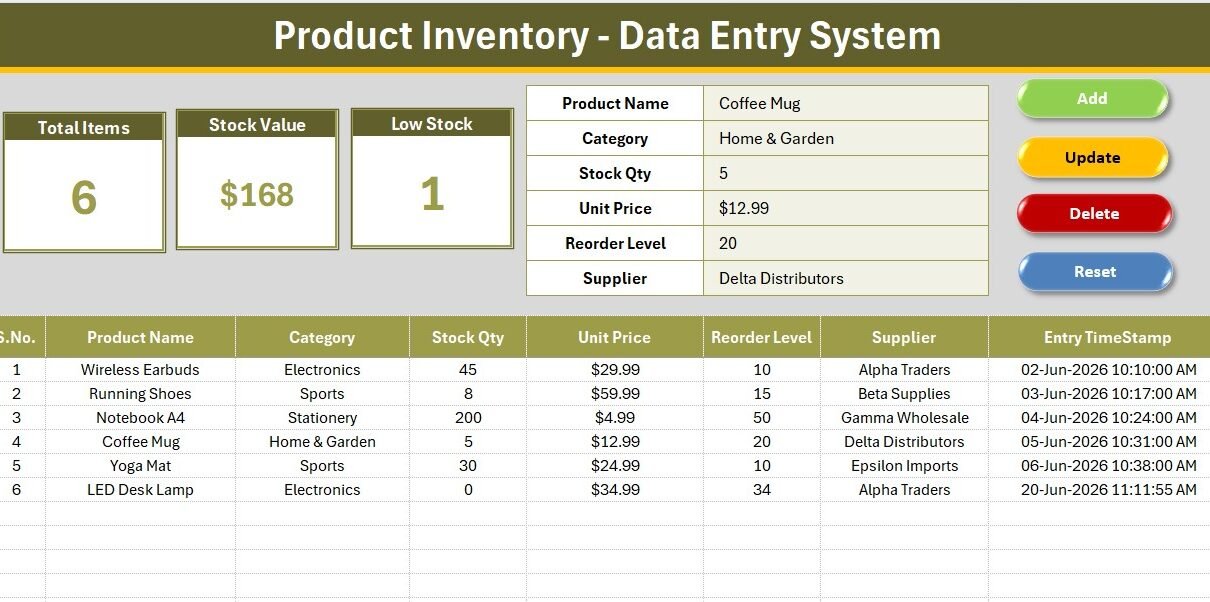
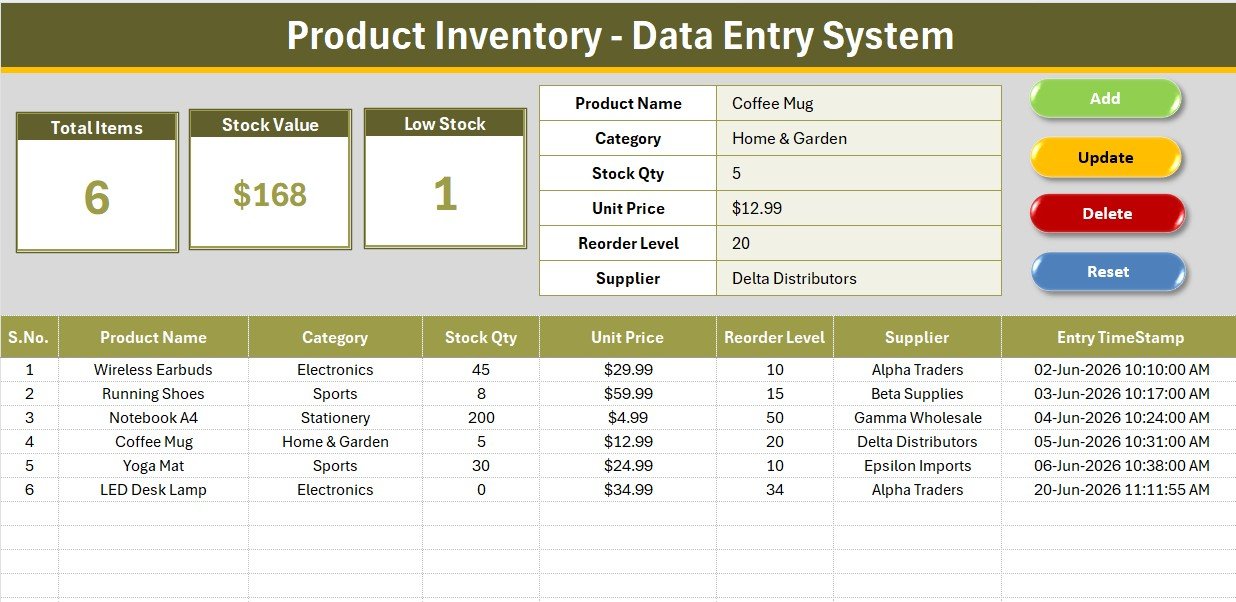
The Product Inventory Data Entry System in Excel tracks 6 inventory fields — Product Name, Category, Stock Qty, Unit Price, Reorder Level, and Supplier — with 3 live KPI cards that refresh automatically on every new entry. A separate VBA module (supplied as a .bas file) powers Add, Update, Delete, and Reset buttons, so stock records can be managed without any formula knowledge. According to Microsoft, Excel is used by over 750 million people worldwide, making it the most accessible tool for small-business inventory tracking.
Small business owners and warehouse staff routinely waste hours building and re-building inventory spreadsheets from scratch. The Product Inventory Data Entry System in Excel eliminates that effort: import the VBA module, assign 4 buttons, and the system is live in under 10 minutes. Whether you manage electronics, clothing, stationery, or furniture stock, this template gives you a structured entry form, auto-validated dropdowns, and live KPI visibility without a monthly SaaS subscription.
Key Features of the Product Inventory Data Entry System in Excel
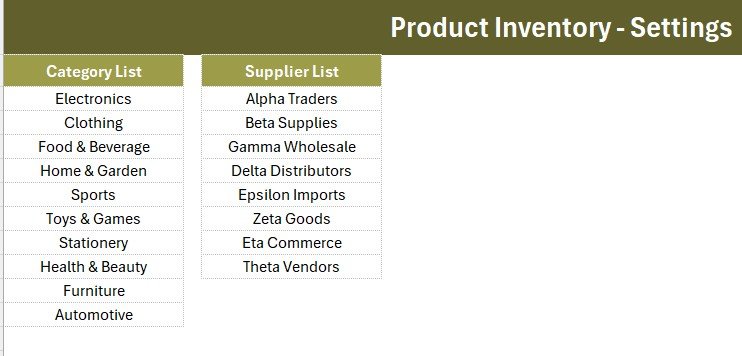
The system captures 6 core fields per product through a single structured form. Category and Supplier are dropdown-validated, pulling from editable lists on the Setting sheet — 10 built-in categories and 8 default suppliers cover most retail and wholesale scenarios. Changing or adding your own values takes seconds. An Entry TimeStamp column logs the exact date and time of every Add or Update operation automatically.
- 3 live KPI cards: Total Items (COUNTA), Stock Value (SUM of Unit Price), and Low Stock alert (COUNTIF where Stock Qty = 0) — all updating the moment a new row is added.
- VBA-powered buttons: Add Record, Update Record, Delete Record, and Reset Form macros supplied as a pre-written .bas file — no coding needed.
- Auto-numbered S.No column: Rows number themselves sequentially using a live formula; no manual renumbering when records are deleted.
- Professional design: Dark olive heading bar, gold divider line, gray dashboard panel, and Aptos Narrow font throughout — ready for client-facing or management reports.
- Duplicate KPI cards on the Setting sheet: Copy as linked pictures for weekly stock reports without breaking the live formulas on the main sheet.
- One-time purchase: Download once, use forever. No cloud account, no per-user fees, no subscription renewal Product Inventory Data Entry System in Excel.
Template Structure Explanation
Data Entry Sheet
The main sheet opens with a gray dashboard panel at the top. The input form sits inside this panel with bold labels and dropdown arrows on Category and Supplier fields. Below the form, four flat-coloured button cells (green Add, red Delete, gold Update, dark-blue Reset) mark where Form-Control buttons are assigned after VBA import. The records table starts at row 15, with auto-S.No in column A, all 6 data fields in columns B–G, and Entry TimeStamp in the final column. Product Inventory Data Entry System in Excel.
KPI Dashboard Cards
Three white cards with olive-toned borders display the live KPI values. Total Items shows how many product records exist, Stock Value aggregates the Unit Price column, and Low Stock flags items at zero quantity. All three update instantly when the records table changes. The Setting sheet carries a duplicate set of the same cards so you can copy them as linked images into external reports. Product Inventory Data Entry System in Excel
Setting Sheet and Records Table
The Setting sheet stores the Category and Supplier source lists. Editing the lists here instantly updates the dropdown validation on the Data Entry form — no formula edits required. The records table itself uses hair grid lines, a theme-coloured header row, and USD currency formatting on the Unit Price column. Data starts at row 15, leaving room for clean print layouts above.
Product Inventory Data Entry System in Excel vs. Google Sheets Inventory vs. Zoho Inventory — Feature Comparison
| Feature | Product Inventory Data Entry System in Excel | Google Sheets Inventory (DIY) | Zoho Inventory |
|---|---|---|---|
| Cost | $5.99 one-time | Free (hours of setup) | $39–$99 / month |
| Platform | Microsoft Excel (offline) | Browser only | Cloud SaaS |
| Setup time | Under 10 minutes | 2–4 hours DIY | 1–2 days |
| VBA-powered form buttons | ✅ Pre-built | ❌ Requires scripting | ❌ Not applicable |
| Live KPI cards | ✅ 3 cards | Manual formula work | ✅ Dashboard (paid tier) |
| Works offline | ✅ Fully offline | ❌ Needs internet | ❌ Cloud only |
| Customisable dropdowns | ✅ Editable Setting sheet | ✅ Manual | ✅ Limited fields |
| Year-1 cost (1 user) | $5.99 total | $0 (build time cost) | $468–$1,188 |
| No subscription | ✅ One-time purchase | ✅ | ❌ Monthly billing |
For retail owners and warehouse staff who live in Excel and want a structured inventory form without a monthly SaaS bill, the Product Inventory Data Entry System in Excel sits in the sweet spot.
Who Should Use This Template
Perfect for:
- Retail shop owners managing 50–2,000 SKUs in Microsoft Excel
- Warehouse assistants who add, update, and delete stock records daily
- Small business procurement teams tracking reorder levels across multiple categories
- Excel users who want a ready-to-use form instead of building one from scratch
- Freelancers or consultants creating inventory tools for small-business clients
Not a fit if:
- You need real-time multi-user cloud sync or barcode scanning integration
- You require purchase orders, invoicing, or multi-location warehouse management in a single tool
- Your primary platform is Mac (VBA macros require Windows Excel for full functionality)
Real-World Use Cases
Maria manages a small electronics shop with 200+ SKUs. She opens the Product Inventory Data Entry System in Excel every morning, adds newly received stock via the Add button, and checks the Low Stock KPI card before placing supplier orders. Her weekly Stock Value figure goes straight to her accountant — all without paying $39/month for Zoho Inventory.
Rohit is a warehouse assistant at a clothing distributor. At the start of each shift, he updates quantities for items received or shipped using the Update button. The auto-timestamp logs every change, giving his manager a full audit trail without any extra effort. The Reset button clears the form between entries in one click.
Priya handles procurement for a stationery wholesaler. She monitors the Low Stock KPI card daily. When it ticks above zero, she sorts the records table by Stock Qty to identify which items need reordering. No formula knowledge required — the system does the counting for her.
Advantages of the Product Inventory Data Entry System in Excel
- Zero monthly cost: A single $5.99 payment replaces recurring SaaS subscriptions that cost $39–$99/month.
- Offline-first: Works entirely within Microsoft Excel with no internet dependency.
- No coding required: VBA macros are pre-written; users only import the .bas file and assign buttons.
- Fast activation: From download to first entry in under 10 minutes.
- Scalable records table: Handles hundreds or thousands of SKUs within Excel row limits (over 1 million rows).
- Report-ready design: KPI cards can be pasted as linked pictures into PowerPoint or Word reports.
Opportunities for Improvement
- No real-time multi-user access: Excel files are not designed for simultaneous editing. For teams of 3+ users entering data concurrently, a cloud-based solution or a Google Sheets version would serve better.
- No barcode scanning: Stock updates require manual field entry. A hardware or app integration for barcode scanning would speed up high-volume receiving operations.
- Low Stock KPI counts zero-quantity items only: It does not automatically compare Stock Qty against the Reorder Level field. Users who need that comparison can add a simple helper formula in the records table.
- Mac VBA limitation: Macro buttons do not fire on Mac Excel; the records table and KPI cards still work but require manual data entry.
Best Practices
- Update the Category and Supplier lists on the Setting sheet before entering your first record — it prevents data inconsistency from free-text entries.
- Use the Reset button after every entry to clear the form. This avoids accidentally re-submitting the same product twice.
- Copy the KPI cards from the Setting sheet as linked pictures into a monthly stock report template so totals always stay current.
- Back up the .xlsm file weekly to a shared drive or cloud folder. Excel files are not version-controlled by default.
- Sort the records table by Supplier or Category periodically to spot patterns in stock levels across product groups.
Explore Relevant Templates
If you found this template useful, explore the full data entry system series on NextGenTemplates:
- Daily Sales Entry Data Entry System in Excel — capture daily sales transactions with VBA buttons and revenue KPIs
- Patient Appointment Data Entry System in Excel — log patient visits and appointment status with dropdown validation
- Driving School Enrollment Data Entry System in Excel — track student enrolments, fees, and instructor assignments
- Tuition Payment Log Data Entry System in Excel — manage student fee records with payment status tracking
Browse all Inventory Management Templates and VBA Tools in Excel on NextGenTemplates. For official guidance on Excel features, see Microsoft Excel Support.
Frequently Asked Questions
What does the Product Inventory Data Entry System in Excel track?
The Product Inventory Data Entry System in Excel tracks 6 fields per product: Product Name, Category, Stock Qty, Unit Price, Reorder Level, and Supplier. Three live KPI cards summarise Total Items, Stock Value, and Low Stock count. Every record is stored in a structured table with an auto-generated S.No and Entry TimeStamp.
Do I need VBA or coding skills to use this template?
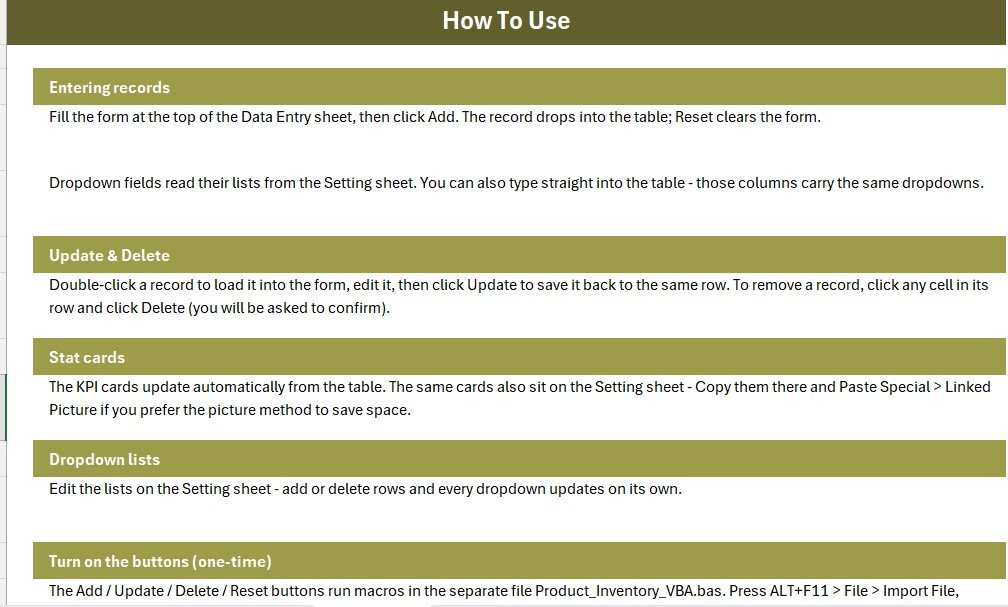
No coding skills are required. The VBA module is pre-written and supplied as a .bas file. Press ALT+F11 in Excel, go to File → Import File, select the .bas file, draw 4 buttons, and save as .xlsm. The full process is documented on the Instructions sheet and takes under 10 minutes.
Can I customise the product categories and supplier names?
Yes. The Category and Supplier lists live on the Setting sheet. Type your own values into those lists and the dropdown validation on the Data Entry form updates immediately. No formula edits are needed.
Product Inventory Data Entry System in Excel
How does this compare to Zoho Inventory?
The Product Inventory Data Entry System in Excel costs $5.99 once with no monthly fees, no cloud account, and no per-user charges. Zoho Inventory starts at $39 per month. For small businesses managing under a few hundred SKUs who are already comfortable in Excel, this template is a cost-effective, offline-first alternative.
How long does setup take?
From download to first record entry takes under 10 minutes: unzip, open in Excel, import the .bas module via ALT+F11, draw and assign 4 buttons, then save as .xlsm. The Instructions sheet walks through every step.
Does this work without an internet connection?
Yes. The Product Inventory Data Entry System in Excel runs entirely within Microsoft Excel on your local computer. No internet connection, no cloud sync, and no login are required. Data stays on your machine.
How many products can the records table hold?
The records table supports over one million rows (Excel’s native row limit). For typical small-business use with up to 5,000 SKUs, performance remains fast even on older hardware.
About the Author
Built by PK — Microsoft Certified Professional with 15+ years of Excel, Google Sheets, and Power BI experience. Founder of NextGenTemplates, reaching 300K+ subscribers across YouTube channels. Every template is hand-built and tested before release.
Conclusion
The Product Inventory Data Entry System in Excel gives small business owners and warehouse staff a structured, VBA-powered inventory form without the complexity or cost of cloud-based inventory software. Three live KPI cards, dropdown-validated fields, and a professionally designed layout make stock management faster and more reliable from day one. Product Inventory Data Entry System in Excel.
🛒 Click here to Purchase the Product Inventory Data Entry System in Excel
✅ Instant download · One-time payment · No subscription
🎥 Watch step-by-step tutorials on Youtube.com/@PK-AnExcelExpert
📅 Last updated: June 2026