The Fill tools save more typing than any formula. Six short chapters cover the Fill menu with Ctrl+D and Ctrl+R, the fill handle with Auto Fill Options and custom lists, Flash Fill with Ctrl+E, the Fill Series dialog for numbers and dates, how relative and absolute references behave when you fill a formula, and the Go To Special trick that fills blank cells with the value above.
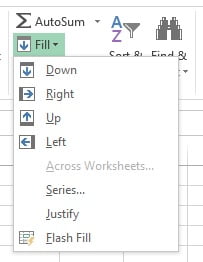
The Fill option lives in Home → Editing → Fill. It can copy a value down, up, left or right, generate a series of numbers or dates with any step, and with Flash Fill (Ctrl + E) it can split first and last names, extract domains from e-mail addresses or combine columns, all without a formula. The later chapters show what happens to formulas when you fill them and how to repair reports that arrive with blank category cells.
Course curriculum
-
Fill Down, Up, Right, Left and JustifyThe Fill menu, Ctrl + D and Ctrl + R, Fill Across Worksheets, an introduction to Fill Series, and Fill Justify for re-flowing text.
-
AutoFill: Fill Handle, Auto Fill Options and Custom ListsHow the fill handle decides what to fill, Ctrl+drag, double-click to fill to the bottom, and your own lists such as departments or regions.
-
Flash Fill (Ctrl+E): Split, Combine and Format DataPattern-based filling for splitting, joining, extracting and reformatting text, with the formula alternative for each task.
-
Fill Series: Linear, Growth, Date Series, Step and Stop ValuesEvery option in the Series dialog: linear and growth steps, day, weekday, month and year series, Trend, and filling to a stop value.
-
AutoFill Formulas: Relative vs Absolute References and F4What moves and what stays fixed when a formula is filled, mixed references for grids, F4, named ranges and Table columns.
-
Fill Blank Cells with the Value Above and Fill Down FastGo To Special > Blanks with Ctrl+Enter, every way to fill down without dragging, and Power Query Fill Down for repeat imports.
What you will learn
Frequently asked questions
Flash Fill did nothing. Why?
Flash Fill needs a clear pattern in the adjacent column and at least one typed example. Type the first result, press Ctrl + E, and make sure the source column has no blank rows in between. Chapter 3 lists every cause.
How do I fill weekdays only?
Type the first date, drag the fill handle, then choose Fill Weekdays from the Auto Fill Options button, or use Fill → Series → Date → Weekday. Chapter 4 covers the Series dialog in full.
What is the difference between AutoFill and Flash Fill?
AutoFill extends a pattern you drag: numbers, dates, days, months and custom lists. Flash Fill reads an example you type and rebuilds the rest of the column from the data beside it, so it splits, combines and reformats text. Chapters 2 and 3 cover them.
How do I fill a formula down without dragging?
Select the formula cell, press Ctrl + Shift + Down to reach the last row, then press Ctrl + D. Double-clicking the fill handle does the same with the mouse. Chapter 6 compares every method.