Most small shops still tally the day’s takings on paper or in a messy spreadsheet. The Daily Sales Entry Data Entry System in Excel replaces that with a structured form that captures every sale across six fields and rolls them into three live KPIs — Total Sales, Items Sold, and Average Sale value — that recalculate the instant you click Add. Setup takes under five minutes. Daily Sales Entry Data Entry System in Excel.
This Excel sales entry form is built for counter staff, kiosk owners, freelancers, and anyone who wants one-click logging without paying a monthly POS subscription. In this post we walk through every sheet, compare it to the alternatives, and share best practices for getting clean daily sales numbers.
Key Features of the Daily Sales Entry Data Entry System in Excel
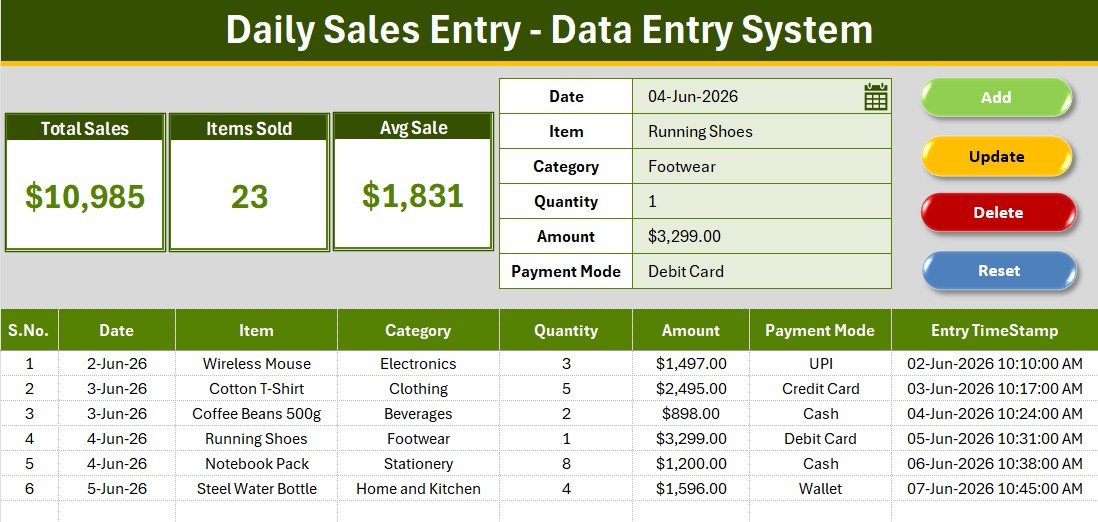
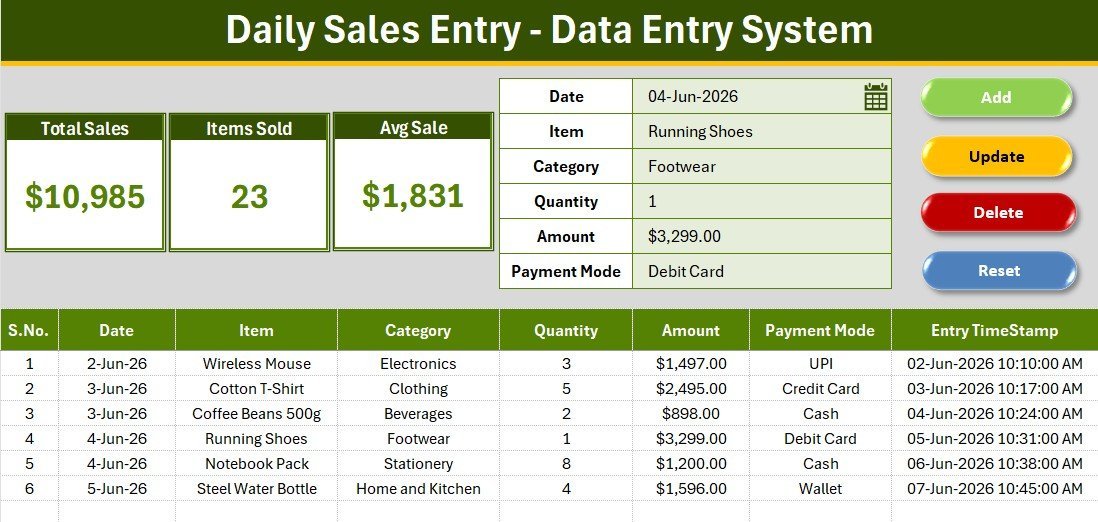
The system records each transaction with six fields: Date, Item, Category, Quantity, Amount, and Payment Mode. Every saved record gets an automatic serial number and an entry timestamp, so your log stays ordered and auditable without manual numbering.
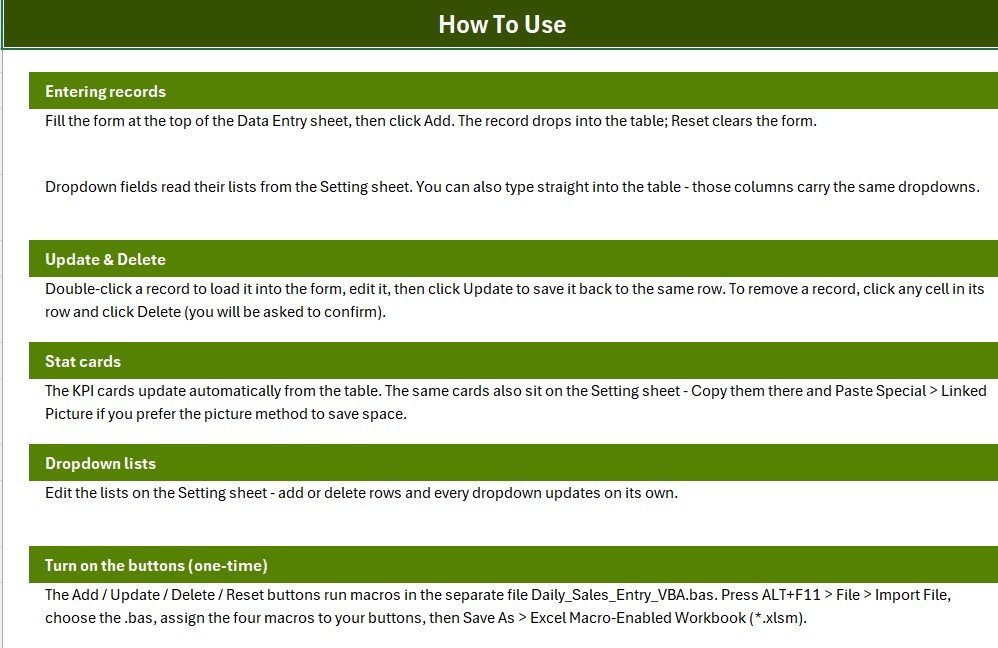
Four VBA-powered buttons run the whole workflow. Add writes a new record, Update edits the selected row, Delete removes a record after a confirmation prompt, and Reset clears the form. Double-clicking any record loads it straight back into the form for fast edits.
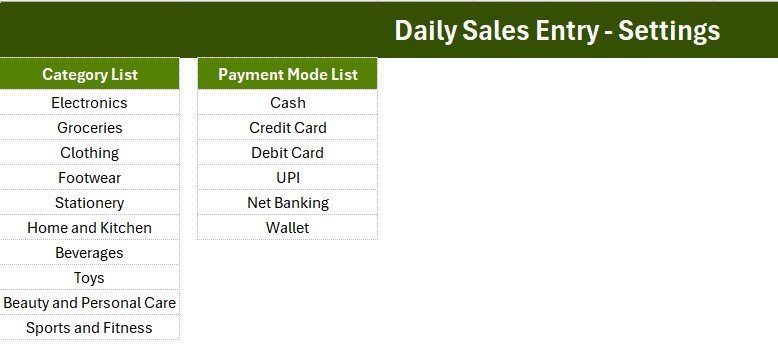
Three KPI cards sit above the form and read directly from the records table: Total Sales sums the Amount column, Items Sold totals the Quantity column, and Avg Sale returns the average transaction value. The Category and Payment Mode dropdowns pull from editable lists on the Setting sheet, so the same options appear in both the form and the table.
Sheets Explanation
Data Entry Dashboard
The main sheet combines the three KPI cards, the six-field entry form, the colour-coded Add / Delete / Update / Reset buttons, and the records table below — complete with auto serial numbers, currency formatting on Amount, and an Entry TimeStamp column.
Setting Sheet
The Setting sheet stores the Category and Payment Mode source lists. Add or remove an item here and every dropdown in the system updates automatically — there are no formulas to edit and no named ranges to manage by hand.
Instructions and Get More Templates
A built-in Instructions sheet explains how to enable the buttons the first time, and a Get More Templates sheet links back to the wider NextGenTemplates catalogue for related tools. Daily Sales Entry Data Entry System in Excel.
Daily Sales Entry System vs. Google Sheets vs. Paid POS/SaaS — Feature Comparison
| Feature | Daily Sales Entry System | Manual Google Sheet | Square POS / Zoho Books |
|---|---|---|---|
| Cost | $5.99 one-time | Free but build-it-yourself | $0–$60 / month + fees |
| Platform | Microsoft Excel (offline) | Browser + Google account | Cloud + app |
| Setup time | Under 5 minutes | Hours to design | Account + hardware setup |
| One-click Add/Update/Delete | Yes — VBA buttons | Manual rows | Yes |
| Live KPI cards | Yes — 3 built-in | Build manually | Yes |
| Works fully offline | Yes | No | No |
| Per-user fees | None | None | Per seat / per device |
| Year-1 cost at 3 users | $5.99 | $0 | $700–$2,000+ |
For shop owners and sales staff who want one-click logging and instant totals without a monthly POS bill, the Daily Sales Entry System sits in the sweet spot.
Who Should Use This Template
Perfect for:
- Small retail shops, kiosks, and market stalls logging daily counter sales
- Freelancers and home-business owners tracking orders and payment modes
- Sales staff who want a simple offline log without learning a POS system
- Owners who want Total Sales, Items Sold, and Avg Sale at a glance each evening
Not a fit if:
- You run a multi-store chain needing real-time cloud sync across locations
- You require barcode scanning or integrated card terminals
- You need several people editing the same file at the same time
Real-World Use Cases
Ravi runs a mobile-accessory kiosk. He logs each sale by item and payment mode through the day, then reads Total Sales and Items Sold off the KPI cards at closing instead of tallying a paper book.
Meera sells handmade candles at weekend markets. She records Quantity and Amount per sale, sorts her records table by Category, and uses the Avg Sale figure to decide which bundles to push the following weekend.
A small grocery store records daily takings across Cash, UPI, and Card right at the counter, giving the owner a clean Total Sales figure every evening without a paid POS subscription.
Advantages of the Daily Sales Entry System
The biggest advantage is cost: a $5.99 one-time purchase against $700–$2,000+ a year for a comparable POS at three users. Because it runs in Excel, it works offline and your data never leaves your machine. The one-click buttons cut entry time and reduce the typos that creep into manual spreadsheets, while the live KPI cards remove the end-of-day calculator step entirely.
Opportunities for Improvement
Being an Excel file, the system is single-user at a time — it is not designed for several people editing simultaneously. It also has no barcode or card-terminal integration, so high-volume retailers with scanning needs will outgrow it. Teams that need multi-location cloud sync should consider the web-app version linked below. For most single-shop owners, though, these limits rarely bite.
Best Practices
- Tailor the Category and Payment Mode lists on the Setting sheet to your real business before you start logging.
- Log sales as they happen rather than at day’s end — the timestamp keeps an honest record.
- Keep a dated backup copy of the .xlsm file weekly.
- Use the Avg Sale KPI to spot slow days and plan promotions.
Enabling macros safely is covered well in Microsoft’s official Excel support.
Explore Relevant Templates
If you handle larger volumes, the multi-user Daily Sales Purchase System Web App is the natural next step, and the Sales Funnel KPI Dashboard in Power BI adds deeper analytics. For promotion planning, see the Retail Sales and Promotion Calendar in Excel. You may also like our other data entry systems: the Patient Appointment, Student Attendance, and Tuition Payment Log systems.
Frequently Asked Questions
What KPIs does the Daily Sales Entry System track?
The Daily Sales Entry Data Entry System in Excel tracks three KPIs — Total Sales (sum of Amount), Items Sold (sum of Quantity), and Avg Sale (average transaction value). All three update automatically each time you add or edit a record.
Do I need macros enabled?
Yes. The Add, Update, Delete, and Reset buttons in the Daily Sales Entry System run on VBA, so enable macros when Excel prompts you, then save the file as a macro-enabled workbook (.xlsm).
Can I change the Category and Payment Mode options?
Absolutely. Both dropdowns read from editable lists on the Setting sheet. Add or remove an item and every dropdown in the Daily Sales Entry System updates on its own — no formulas to touch.
How long does setup take?
Under five minutes. Open the workbook, enable macros, adjust the two dropdown lists on the Setting sheet, and start logging sales. The Instructions sheet covers activating the buttons once.
How does this compare to a paid POS like Square?
A POS subscription can run $0–$60 per month with hardware and per-device fees. The Daily Sales Entry System is a $5.99 one-time purchase that runs offline in Excel — ideal when you want one-click logging and instant totals without a recurring bill.
Does it work on Mac and older Excel versions?
Yes, it works in Excel for Windows and Mac that support VBA macros (Excel 2010 and later). The system ships as .xlsx; you import the macro module once and save as .xlsm.
About the Author
Built by PK — Microsoft Certified Professional with 15+ years of Excel, Google Sheets, and Power BI experience. Founder of NextGenTemplates, reaching 300K+ subscribers across YouTube. Every template is hand-built and tested before release.
Conclusion
The Daily Sales Entry Data Entry System in Excel turns daily sales logging into a one-click task and hands you Total Sales, Items Sold, and Avg Sale without a single formula. Click here to purchase the Daily Sales Entry Data Entry System in Excel.
Instant download · One-time payment · No subscription.
For step-by-step video tutorials, visit YouTube.com/@PK-AnExcelExpert.
Last updated: June 2026