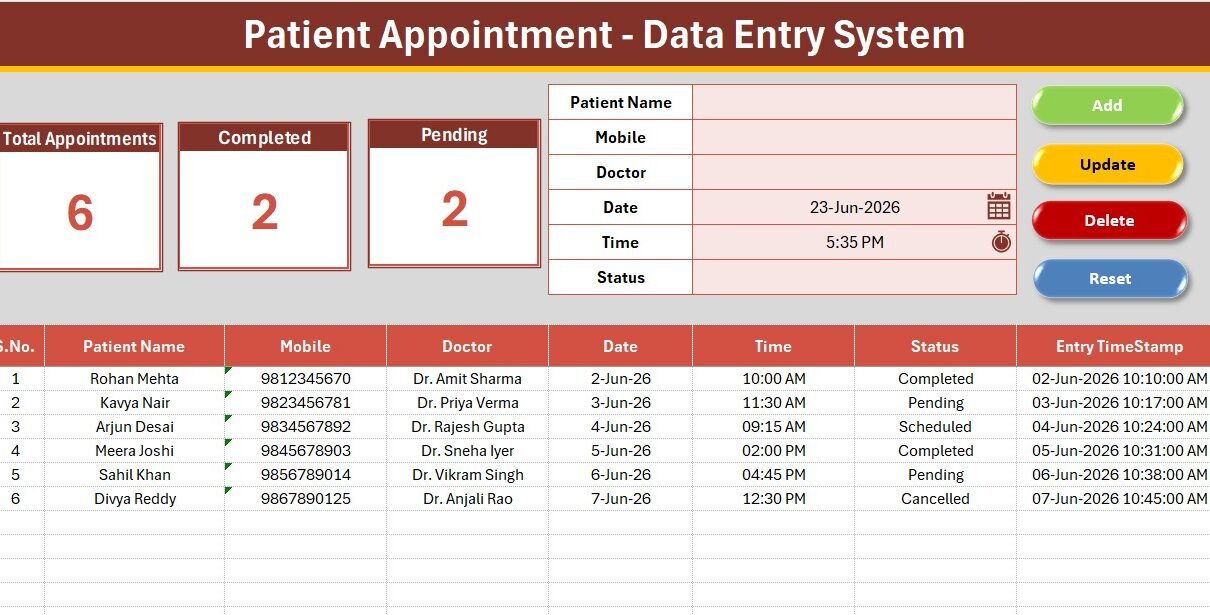
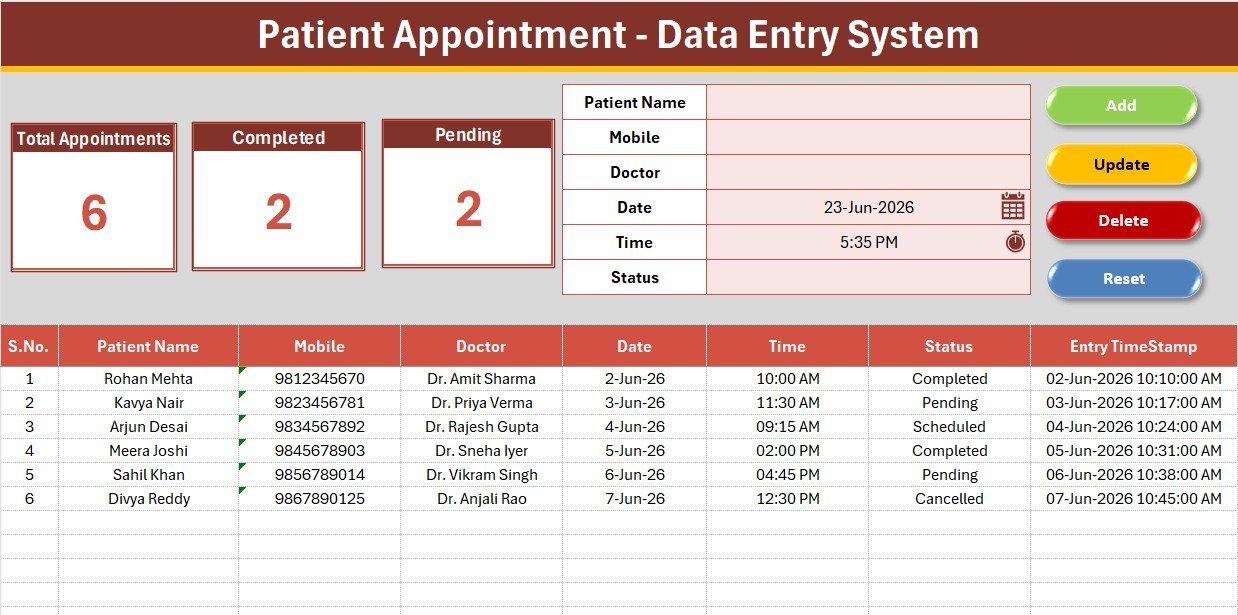
The Patient Appointment Data Entry System in Excel records six fields per visit — Patient Name, Mobile, Doctor, Date, Time, and Status — and keeps three live KPI cards (Total Appointments, Completed, Pending) updated automatically. Four VBA buttons handle Add, Update, Delete, and Reset, and the whole workbook sets up in under 10 minutes.
Most small clinics either scribble appointments in a notebook or pay $12–150 per user every month for scheduling software they barely use. This Patient Appointment Data Entry System in Excel gives front-desk staff a clean, one-click form and an offline records table for a single one-time payment — no logins, no per-seat fees, no internet required.
Key Features of the Patient Appointment Data Entry System
Every feature below is pre-wired — enable macros, assign the buttons once, and the system is ready.
- VBA-powered entry buttons. Add, Update, Delete, and Reset run on a single VBA module, so staff log an appointment in seconds without editing the table directly.
- Three live KPI cards. Total Appointments, Completed, and Pending recalculate from the records table using COUNTA and COUNTIF, giving a daily snapshot at a glance.
- Doctor and Status dropdowns. Both fields are bound to editable lists on the Setting sheet through Excel data validation, which removes typos and keeps reporting consistent.
- Auto S.No and Entry TimeStamp. Each saved row is auto-numbered and stamped with the entry date and time for a clean audit trail.
- Printable, clinic-ready layout. A dark heading bar, gold divider, and gridded records table print cleanly as a daily appointment sheet.
Sheets Explanation
The workbook ships with four sheets: Data Entry, Setting, Instructions, and Get More Templates.
Data Entry Dashboard
The main sheet holds the three KPI cards, the entry form, the Add/Update/Delete/Reset button block, and the records table. Replace the sample rows with your own and the cards update instantly.
Setting Sheet
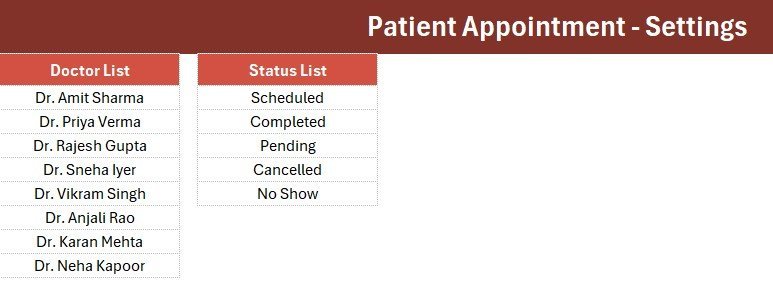
The Setting sheet stores the Doctor list and the Status list (Scheduled, Completed, Pending, Cancelled, No Show). Edit these to match your practice and the dropdowns and KPI counts follow automatically.
Instructions and Get More Templates
Patient Appointment Data Entry System in Excel
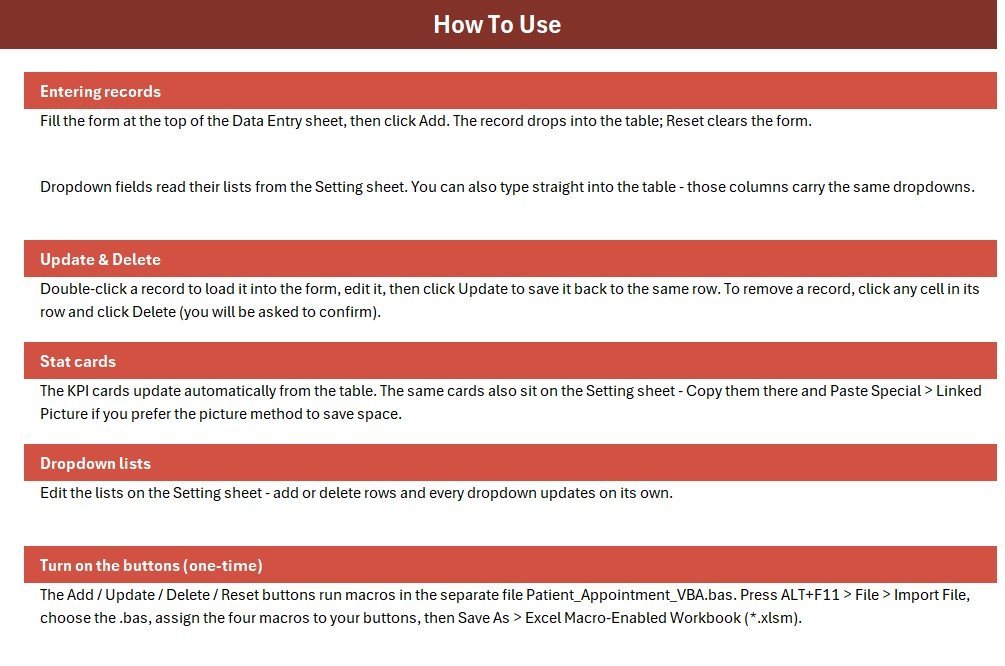
The Instructions sheet lists the one-time activation steps, and the Get More Templates sheet links back to related tools so you can extend your toolkit later.
Patient Appointment Data Entry System vs. Google Sheets vs. Paid Scheduling SaaS — Feature Comparison
| Feature | Patient Appointment System (Excel) | Google Sheets equivalent | Practo / Calendly / Athenahealth |
|---|---|---|---|
| Cost | $5.99 one-time | Free, but build it yourself | $12–150 / user / month |
| Platform | Microsoft Excel (offline) | Browser / Google account | Cloud only |
| Setup time | Under 10 minutes | 1–2 hours to build | Hours of onboarding |
| One-click Add/Update/Delete | Yes, VBA buttons | Manual / Apps Script needed | Yes |
| Works offline | Yes | No | No |
| Customizable fields | Yes | Yes | Limited by plan |
| Per-user fees | None | None | Charged per seat |
| Year-1 cost at 5 users | $5.99 total | $0 + your time | $720–9,000 |
For clinics that want a fast, offline appointment log without paying per-seat SaaS fees, the Patient Appointment Data Entry System sits in the sweet spot.
Who Should Use This Template
Perfect for:
- Solo doctors, dentists, and physiotherapists logging daily appointments
- Front-desk staff who want one-click entry instead of typing into a raw table
- Small practices that prefer a one-time Excel purchase over recurring software
Not a fit if:
- You need patient-facing online booking, SMS reminders, or payment processing
- You require HIPAA-certified cloud storage and role-based logins out of the box
- Your device blocks macros — the buttons depend on VBA
Real-World Use Cases
Dr. Anjali runs a two-doctor dental clinic. Her receptionist logs every walk-in and call-in with the Add button, picks the doctor and status from the dropdowns, and reads the Pending count at the end of the day to plan follow-up calls — without paying a monthly scheduling fee.
Ravi manages a physiotherapy center. He uses the Completed KPI card to count finished sessions each week and the Entry TimeStamp column to audit when each appointment was booked, which keeps his billing reconciliation clean.
A small eye-care practice prints the Data Entry sheet each morning so doctors see the day’s schedule at a glance, then updates statuses live as patients arrive.
Advantages of the Patient Appointment Data Entry System
The biggest advantage is cost: a one-time $5.99 file replaces a recurring per-user subscription that can reach thousands of dollars a year for a five-person front desk. Because it runs offline in Excel, there is no dependency on internet uptime or a vendor’s servers. The one-click VBA buttons cut data-entry errors, and the live KPI cards turn a flat table into a daily management view without any extra setup. Patient Appointment Data Entry System in Excel
Opportunities for Improvement
Being honest about limits: this is a single-user desktop tool, so it does not offer simultaneous multi-user editing the way a cloud app does. It has no automatic SMS or email reminders, and it is not a substitute for HIPAA-certified storage. Clinics that outgrow it can move up to a Google Apps Script web app version with logins and a shared backend — but for a small practice’s daily log, the Excel system is usually all that is needed.Patient Appointment Data Entry System in Excel
Best Practices
Patient Appointment Data Entry System in Excel
- Edit the Doctor and Status lists on the Setting sheet first, before logging real appointments.
- Keep the file saved as .xlsm so the macros stay attached.
- Back up the workbook weekly — it is a single file, so a copy protects your records.
- Use the Status dropdown consistently so the Completed and Pending KPIs stay accurate.
Explore Relevant Templates
If this system is useful, these related data-entry tools share the same one-click design:
- Admission Enquiry Data Entry System in Excel
- Student Attendance Data Entry System in Excel
- Tuition Payment Log Data Entry System in Excel
- Driving School Enrollment Data Entry System in Excel
- Appliance Service Data Entry System in Excel
Want several systems at once? The VBA Management Systems Mega Pack bundles multiple tools at a discount.
Frequently Asked Questions
What fields does the Patient Appointment Data Entry System capture?
The Patient Appointment Data Entry System captures six fields per record: Patient Name, Mobile, Doctor, Date, Time, and Status. Doctor and Status use editable dropdown lists so entries stay consistent across your whole appointment log.
Which KPIs does it track?
It tracks three KPIs — Total Appointments, Completed, and Pending. All three are live formulas that recalculate automatically as you add, update, or delete rows.
Do I need to enable macros?
Yes. The Add, Update, Delete, and Reset buttons run on a VBA module, so you must enable macros and save the file as a macro-enabled workbook (.xlsm) for them to work.
How does this compare to paid scheduling software like Practo or Calendly?
Paid scheduling SaaS charges $12–150 per user each month. The Patient Appointment Data Entry System is a one-time $5.99 Excel file that works offline with no per-user fees — ideal for small clinics that just need a clean appointment log.
How long does setup take?
Under 10 minutes. Import the VBA module, assign the four buttons, edit the Doctor and Status lists, and save as .xlsm.
Can I add my own doctors and statuses?
Yes. Edit the Doctor and Status lists on the Setting sheet and the form dropdowns and KPI counts update automatically.
About the Author
Built by PK — Microsoft Certified Professional with 15+ years of Excel, Google Sheets, and Power BI experience. Founder of NextGenTemplates, reaching 300K+ subscribers across YouTube channels. Every template is hand-built and tested before release. Visit YouTube.com/@PK-AnExcelExpert for step-by-step tutorials.
Conclusion
The Patient Appointment Data Entry System in Excel is a fast, offline, one-time-purchase way for small clinics to log appointments, validate entries, and watch their Completed and Pending counts in real time. Click here to purchase the Patient Appointment Data Entry System in Excel.
Instant download · One-time payment · No subscription.
Last updated: June 2026