Most workshops know they have a scrap problem and cannot tell you what it costs, because the evidence lives on the back of a job card. The Scrap Record Data Entry System in Excel fixes the smaller, solvable half of that: it gives scrap one place to be written down, in the same shape, every time. It is a macro-enabled Excel workbook (.xlsm) built around a seven-field form, four VBA buttons, a ten-column records table and four summary cards that recalculate as you type. The sample file ships with 6 demonstration records, 12 material types, 10 scrap reasons, 9 departments and 5 statuses, all editable on a Setting sheet.
One thing to be clear about first. This is a record-keeping workbook and nothing more. It does not make a scrap yard, metal dealer or recycling operation licensed, registered, compliant or audit-ready. It does not satisfy any seller-identification, know-your-customer, cash-payment, police-reporting, waste-carrier or waste-transfer-note obligation, it classifies no hazardous waste or e-waste, and it is not legal, tax, environmental or accounting advice. Scrap metal dealing and waste handling are regulated in many jurisdictions; check what applies where you trade and keep whatever records your regulator requires. What follows is about the spreadsheet.
Key Features of the Scrap Record Data Entry System in Excel
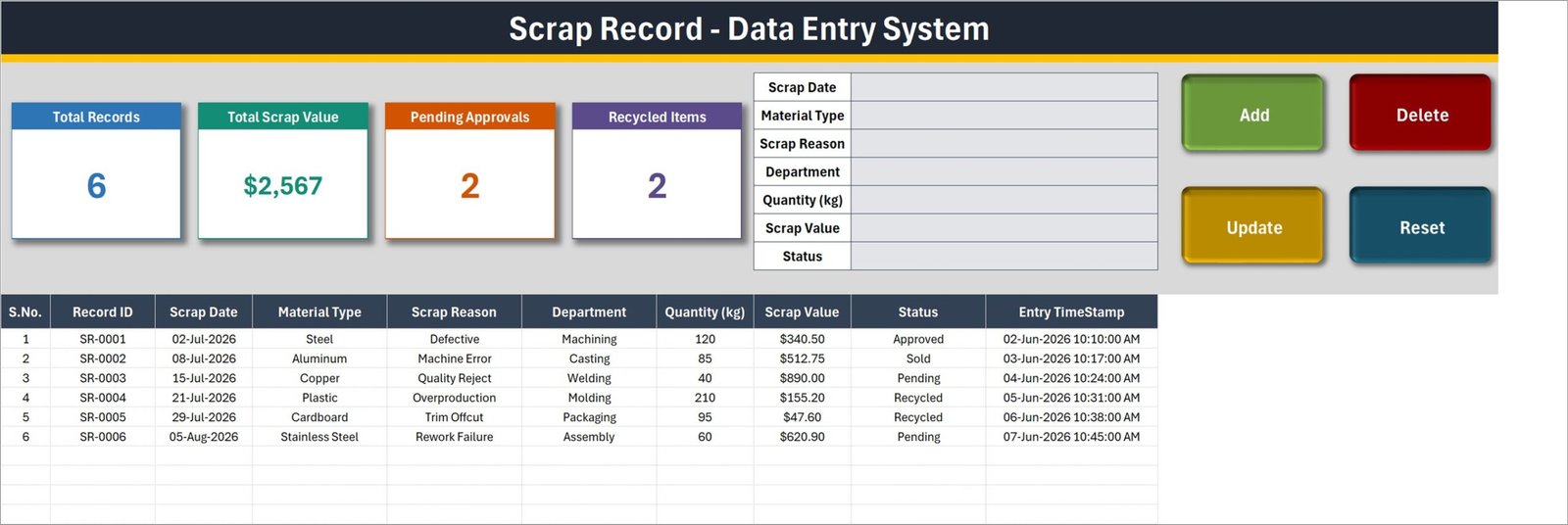
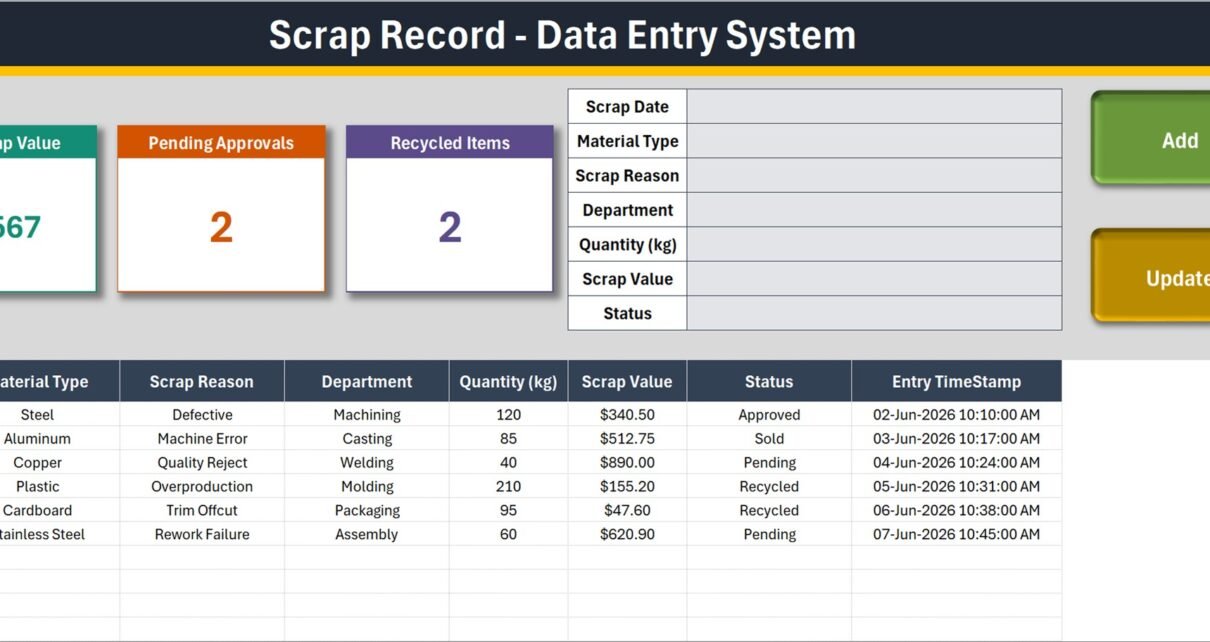
- A seven-field form. Scrap Date, Material Type, Scrap Reason, Department, Quantity (kg), Scrap Value and Status – one block, beside the buttons, no scrolling sideways through a table to find the right column.
- Four VBA buttons. Add writes the row. Update saves an edit. Delete removes a row after a confirmation that shows the Record ID so you cannot wipe the wrong one. Reset clears the form.
- Automatic Record IDs. The sample rows run SR-0001 through SR-0006 and the next entry continues the sequence, so two people never invent the same reference.
- An Entry TimeStamp column. The last column of the table records when the row was saved, kept separate from the Scrap Date you type in. That distinction matters when someone backdates an entry.
- Four summary cards. Total Records, Total Scrap Value, Pending Approvals and Recycled Items. In the sample data they read 6, $2,567, 2 and 2.
- Four editable dropdown lists. Material Type (12 entries), Scrap Reason (10), Department (9) and Status (5) live on the Setting sheet. Add or delete a row there and every dropdown follows.
- Double-click to edit. Double-click any record and it loads into the form with its ID remembered behind the scenes, so Update finds the right row even after you have sorted the table.
- The table carries the same dropdowns. Small corrections can be typed straight into the records table without touching the buttons.
Workbook Pages Explained
The workbook is deliberately small. Three pages, each doing one job.
1. The Data Entry sheet
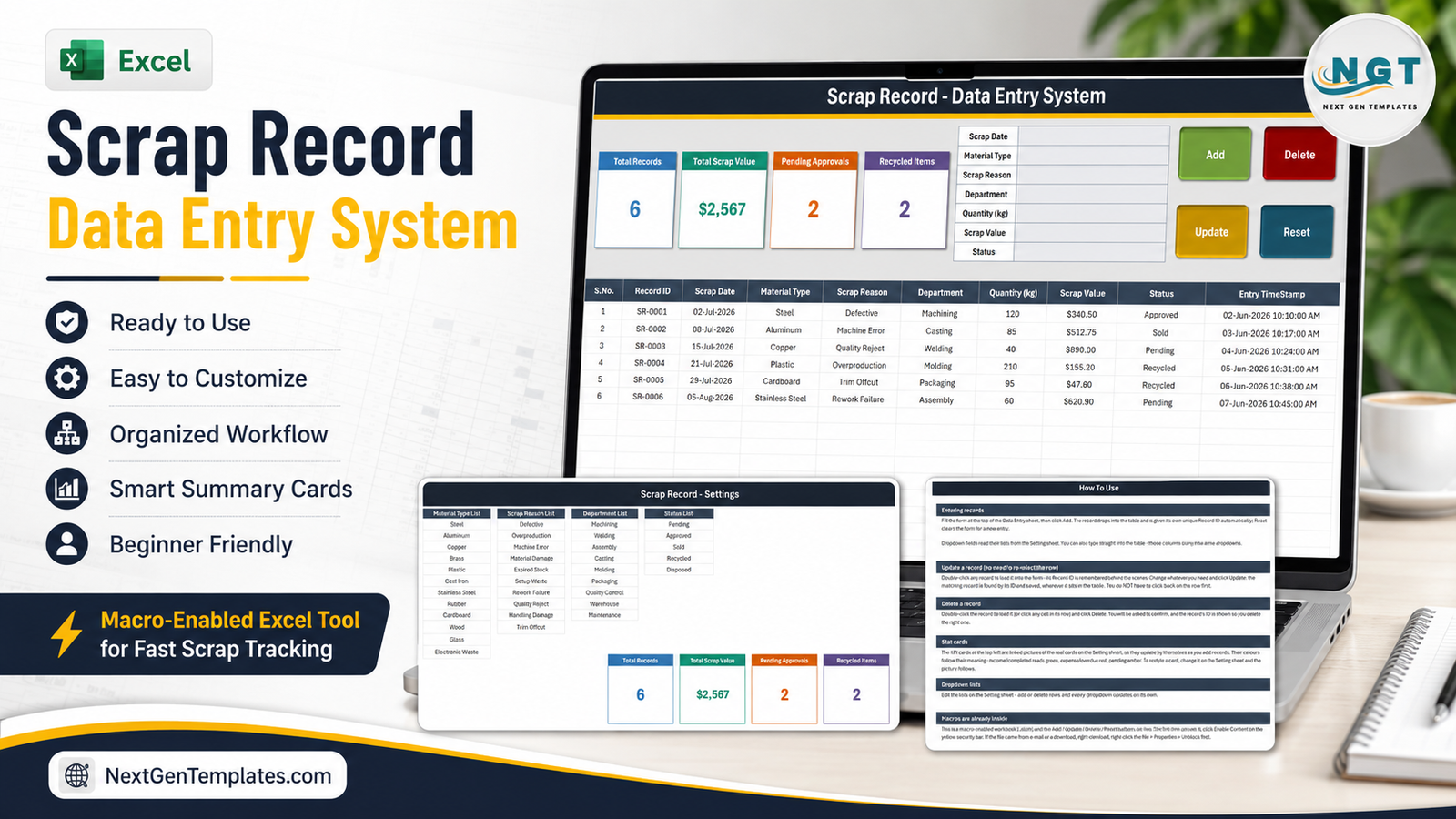
This is where the work happens. A dark title bar reading “Scrap Record – Data Entry System”, then the four summary cards along the left, the seven-field form in the middle, and the Add / Delete / Update / Reset buttons on the right. Below all of it sits the records table with ten columns: S.No., Record ID, Scrap Date, Material Type, Scrap Reason, Department, Quantity (kg), Scrap Value, Status and Entry TimeStamp. In the shipped sample the six rows cover Steel scrapped as Defective from Machining, Aluminium from a Machine Error in Casting, Copper rejected on quality in Welding, Plastic from Overproduction in Moulding, Cardboard trim offcut from Packaging and Stainless Steel from a Rework Failure in Assembly.
2. The Setting sheet
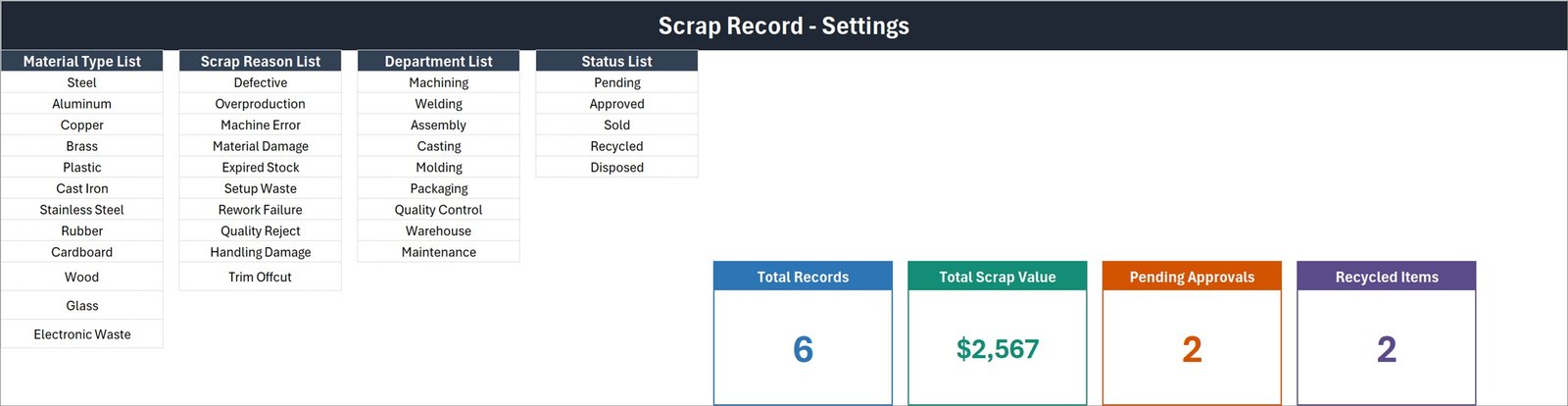
Four list columns and the master copies of the four cards. The Material Type list runs Steel, Aluminium, Copper, Brass, Plastic, Cast Iron, Stainless Steel, Rubber, Cardboard, Wood, Glass and Electronic Waste. Scrap Reason covers Defective, Overproduction, Machine Error, Material Damage, Expired Stock, Setup Waste, Rework Failure, Quality Reject, Handling Damage and Trim Offcut. Department lists Machining, Welding, Assembly, Casting, Moulding, Packaging, Quality Control, Warehouse and Maintenance. Status offers Pending, Approved, Sold, Recycled and Disposed.
The cards you see on the Data Entry sheet are linked pictures of the cards on this sheet. That is why restyling a card here changes it there, and why the numbers update on their own without a refresh button.
3. The How To Use sheet
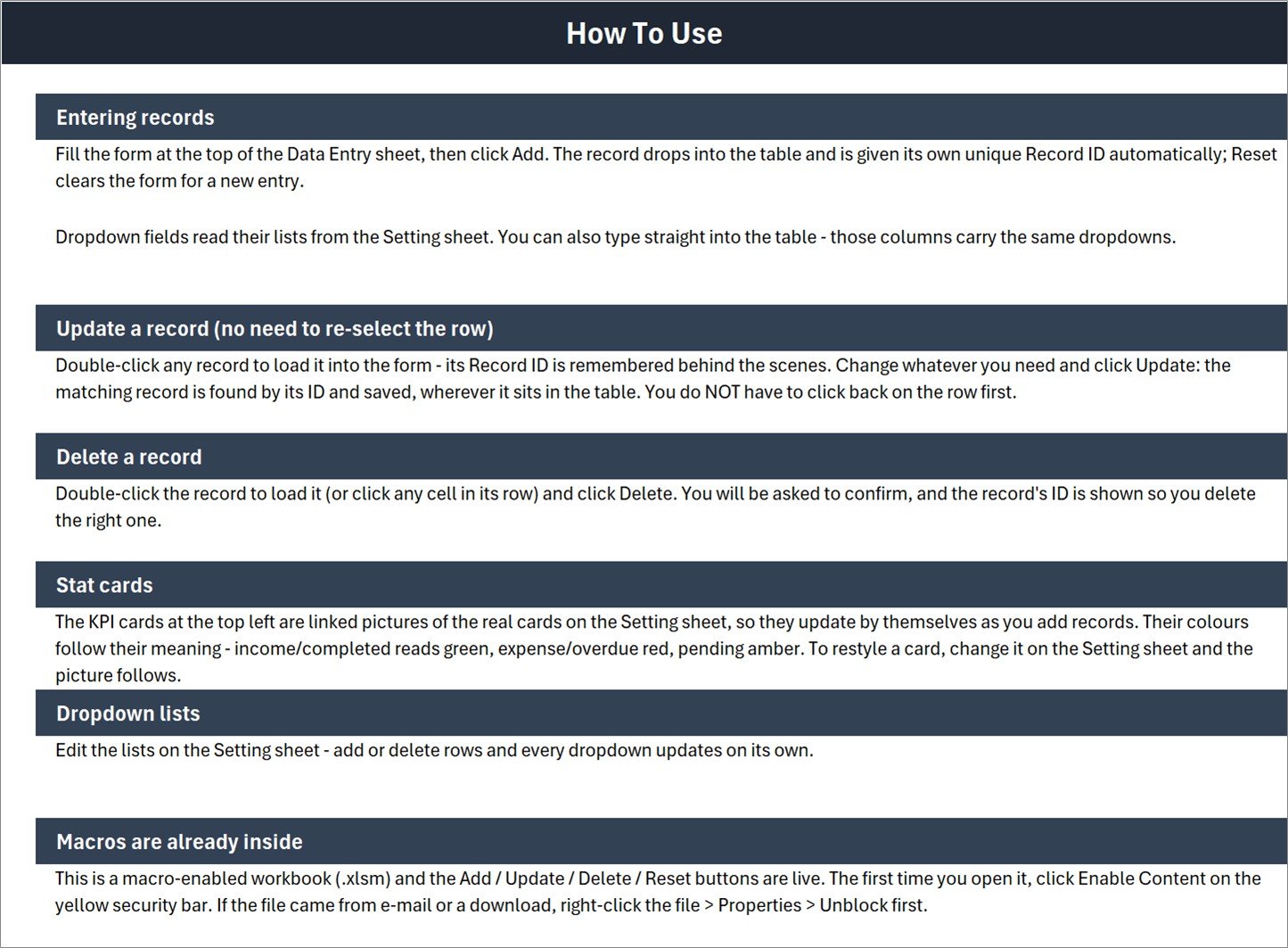
Six short sections written into the file itself: entering records, updating a record without re-selecting the row, deleting a record safely, how the stat cards work, editing the dropdown lists, and a plain note that the macros are already inside and need Enable Content on first open.
Scrap Record Data Entry System in Excel vs. Google Sheets vs. Paid Inventory SaaS – Feature Comparison
| What matters | Scrap Record Data Entry System in Excel | A Google Sheets scrap log | Zoho Inventory / NetSuite ERP |
|---|---|---|---|
| Cost | One payment, one file | Free, but you build it | Monthly subscription per user |
| Platform | Desktop Excel for Windows (.xlsm) | Any browser | Browser and mobile apps |
| Setup time | Minutes – open, enable macros, edit the lists | Hours of formula and validation work | Days to weeks of configuration |
| Real-time team collaboration | No – one file, one person at a time | Yes | Yes |
| Mobile access | No – VBA does not run on mobile or the web | Yes | Yes |
| Customizable fields | Lists yes; the seven form fields need VBA edits | Yes | Yes, within the vendor’s model |
| Share with link | No – it is a file you send | Yes | Yes |
| Year-1 cost at 5 users | The one-off template price | Free plus your build time | Hundreds to thousands per year |
| One-click Add / Update / Delete | Yes – VBA buttons | Only if you write Apps Script | Yes |
| Automatic record IDs and timestamps | Yes – SR-0001 onward, stamped on save | Only if you script it | Yes |
Who Should Use This Template
It suits a production supervisor, quality engineer, storekeeper or small-workshop owner who wants scrap recorded consistently by whoever is on shift, and who already works in desktop Excel on Windows. It suits a plant that is currently logging scrap on paper, or in a spreadsheet where every person has invented their own spelling of “machine error”. It suits a business that does not want another subscription for a module it will open twice a month.
It does not suit teams who need several people entering scrap simultaneously, anyone who needs it on a phone or tablet, or anyone on Excel for the web – VBA simply does not run there, so the buttons are inert. It does not suit a shop that wants scrap costed automatically from a bill of materials, or scanned from a weighbridge or barcode reader. And it does not replace a compliance system: identity checks on sellers, cash-payment limits, stolen-metal reporting, waste-carrier registration and hazardous or e-waste classification are legal duties that no workbook discharges. “Electronic Waste” appears in the Material Type dropdown as a text label for your own sorting, not as a waste classification.
Real-World Use Cases
A press shop of about 40 people. The supervisor logs each shift’s rejects against Machining, Welding or Casting, choosing Setup Waste or Machine Error as the reason. At month end he sorts the table by Department, and for the first time the conversation about scrap has numbers in it.
A quality engineer running an approval queue. New entries sit at Pending. She reviews the physical part, then switches the row to Approved, Sold, Recycled or Disposed. The Pending Approvals card is her to-do count and it falls as she works.
A packaging plant storekeeper. Cardboard and Plastic offcuts leave weekly with a recycler. He marks those rows Recycled and checks the Recycled Items card against the collection note before signing it.
Advantages of the Scrap Record Data Entry System in Excel
- Consistency by construction. Dropdowns instead of free text means “Machine Error” is one category, not four spellings, and the table can actually be filtered.
- No training overhead. Anyone who can fill a form can use it, and the How To Use sheet travels inside the file.
- It is yours. One file, no login, no seat count, no vendor deciding your fields.
- Editing is safe. Update matches on the Record ID rather than on which row happens to be selected, and Delete names the ID before it removes anything.
- The cards need no maintenance. They are formula-driven pictures, so there is no pivot table to refresh and no chart cache to rebuild.
Opportunities for Improvement
An honest listing says what a template does not do.
- Total Scrap Value includes everything. It sums the Scrap Value column across all rows regardless of status, so scrap you have already sold or disposed of is inside the same figure as scrap awaiting approval.
- The cards do not reconcile to the total. Only two of the five statuses have a card, so Pending Approvals plus Recycled Items will not equal Total Records. Approved, Sold and Disposed are uncounted.
- Quantity (kg) is never totalled. It is captured per record but no card or footer adds it up. If weight matters more to you than value, add a SUM under the column.
- Sample dates are inconsistent. In the shipped file the Scrap Dates fall in July and August 2026 while the Entry TimeStamps read June 2026. It is demo data you will delete, but do not treat it as a worked example of the timestamp logic.
- Single-user, single-file. No concurrent editing, no audit trail of who changed what, and no built-in backup. Keep copies.
- The seven fields are fixed. Adding a supplier, a job number or a photo reference means editing the VBA behind the buttons, not just typing a new heading.
Best Practices
- Unblock before you open. If the file arrived by e-mail or download, right-click it, choose Properties and tick Unblock, then click Enable Content on the yellow bar. Microsoft explains the security prompt and its reasoning in its own guidance on enabling and disabling macros in Microsoft 365 files.
- Edit the four lists before anyone types a record. Your departments, your materials, your reason codes. Changing them later leaves old records tagged with categories that no longer exist.
- Delete the six sample rows. Do it on day one so nobody reports $2,567 of scrap that never happened.
- Agree what Status means. Pending, Approved, Sold, Recycled and Disposed only work as a queue if everyone reads them the same way. Write the definitions on the Setting sheet.
- Log at the point of scrap, not at month end. The Entry TimeStamp is only useful if it is close to the Scrap Date.
- Back it up somewhere versioned. A single .xlsm on one laptop is one accident away from a year of lost history.
- Keep personal or supplier data out of it unless you have to. If you do add names, apply the access controls and retention rules your own policies require.
Explore Relevant Templates
- Scrap Record Data Entry System in Excel – the template described in this post.
- Ceramic Tiles Production Dashboard in Excel – for when the log has enough history to deserve charts.
- Plant Production Manager Toolkit – nine Excel and Power BI templates covering the wider plant.
- Watch Repair Data Entry System in Excel – the same form-and-buttons build for a repair bench.
- Salon Product Stock Data Entry System in Excel – the stock-side sibling of this workbook.
- More of the same family is being prepared, including a Hotel Booking Agent Data Entry System in Excel and a Book Reading Log Data Entry System in Excel.
Frequently Asked Questions
Does this workbook make my scrap or recycling business compliant?
No. It records scrap; that is the whole of it. It does not make an operation licensed, registered, compliant or audit-ready, does not satisfy seller-identification, know-your-customer, cash-payment, police-reporting, waste-carrier or waste-transfer-note obligations, does not classify hazardous waste or e-waste, and is not legal, tax, environmental or accounting advice.
Do I have to enable macros?
Yes. Add, Update, Delete and Reset are VBA procedures, so the file must be opened as a macro-enabled .xlsm with content enabled. Without macros you have a table and four cards, and the buttons do nothing.
Will it work in Google Sheets, Excel for the web or on a Mac?
It is built and tested for desktop Microsoft Excel on Windows. Google Sheets and Excel for the web do not run VBA at all. Excel for Mac is not guaranteed.
Can I add my own fields?
You can freely edit the four dropdown lists on the Setting sheet – add or delete rows and the dropdowns follow. The seven form fields are wired into the VBA, so adding an eighth means editing the macro code.
How many scrap records can it hold?
There is no limit written into the workbook. An Excel worksheet holds just over a million rows, and a scrap log of a few thousand entries stays quick. The screenshots show six sample records.
Does it calculate a scrap rate or cost the scrap for me?
No. You type the Scrap Value yourself and the workbook sums that column on the Total Scrap Value card. There is no cost lookup, no bill of materials, no scrap-rate percentage, and Quantity (kg) is not totalled anywhere.
Can two people use it at once?
Not usefully. It is a single file with VBA behind it, so one person edits at a time. If simultaneous entry matters more than the buttons do, a browser-based sheet is the better shape.
About the Author
Built by PK – Microsoft Certified Professional with 15+ years of Excel, Google Sheets, and Power BI experience. Founder of NextGenTemplates, reaching 300K+ subscribers across YouTube channels. Every template is hand-built and tested before release.
Conclusion
The Scrap Record Data Entry System in Excel is not trying to be an ERP module. It is trying to make sure that when a part is scrapped, somebody writes it down in a form that can be filtered, counted and argued with later – with a Record ID, a timestamp, a department and a reason attached. Three sheets, seven fields, four buttons, four cards. Edit the lists, delete the sample rows, and you are logging real scrap the same afternoon. Just remember what it is not: a compliance system, a costing engine, or advice. Get the template here: Scrap Record Data Entry System in Excel.
For step-by-step Excel and VBA walkthroughs, subscribe at youtube.com/@PKAnExcelExpert.