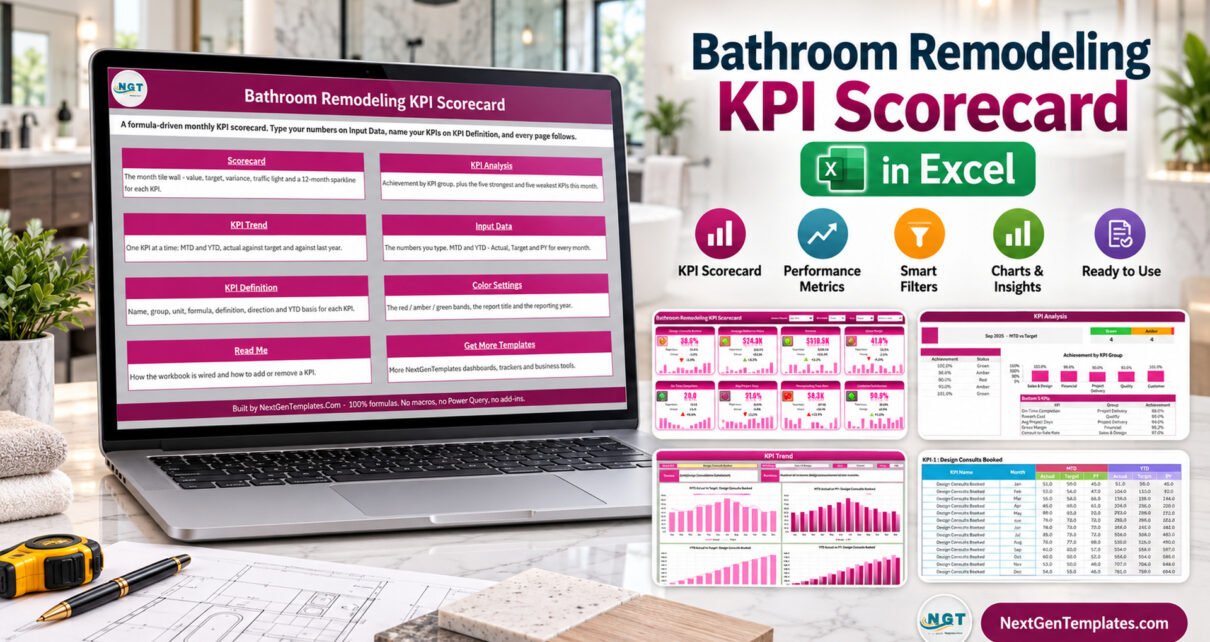
Bathroom Remodeling KPI Scorecard in Excel is built for remodeling teams that need a clear monthly view of sales, project delivery, quality, margin, and customer outcomes without committing to a full construction software rollout. Bathroom projects often move through consults, design, waterproofing, installation, punch lists, and customer sign-off, so performance can slip in several places at once. A focused Excel scorecard helps the owner or manager see which numbers are green, amber, or red before the next month starts.
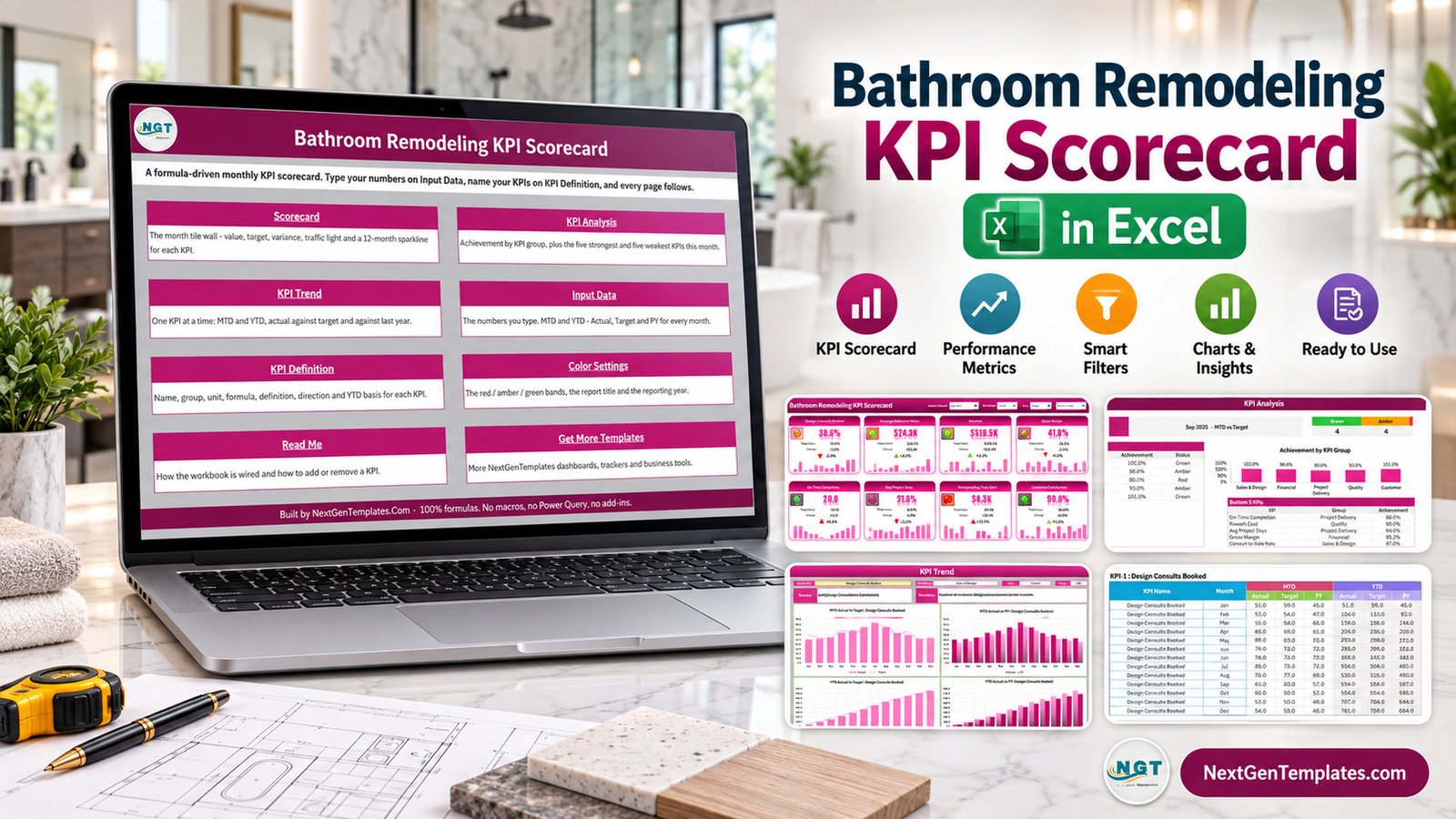
Key Features of This Remodeling Scorecard
The workbook tracks 10 sample KPIs for a bathroom remodeling business: design consults booked, consult-to-sale rate, average bathroom value, revenue, gross margin, on-time completion, average project days, waterproofing pass rate, rework cost, and customer satisfaction. Each KPI tile shows actual value, target value, change, percentage variance, a small trend chart, and a traffic-light status.
Managers can select the reporting month, switch between MTD and YTD, and compare actual performance against either target or previous-year values. That makes the file useful for both quick weekly check-ins and formal month-end review.
Dashboard Pages Explanation
Home Sheet
The Home sheet works as the navigation page. It explains the purpose of each section and helps users jump to Scorecard, KPI Analysis, KPI Trend, Input Data, KPI Definition, Color Settings, Read Me, and related templates.
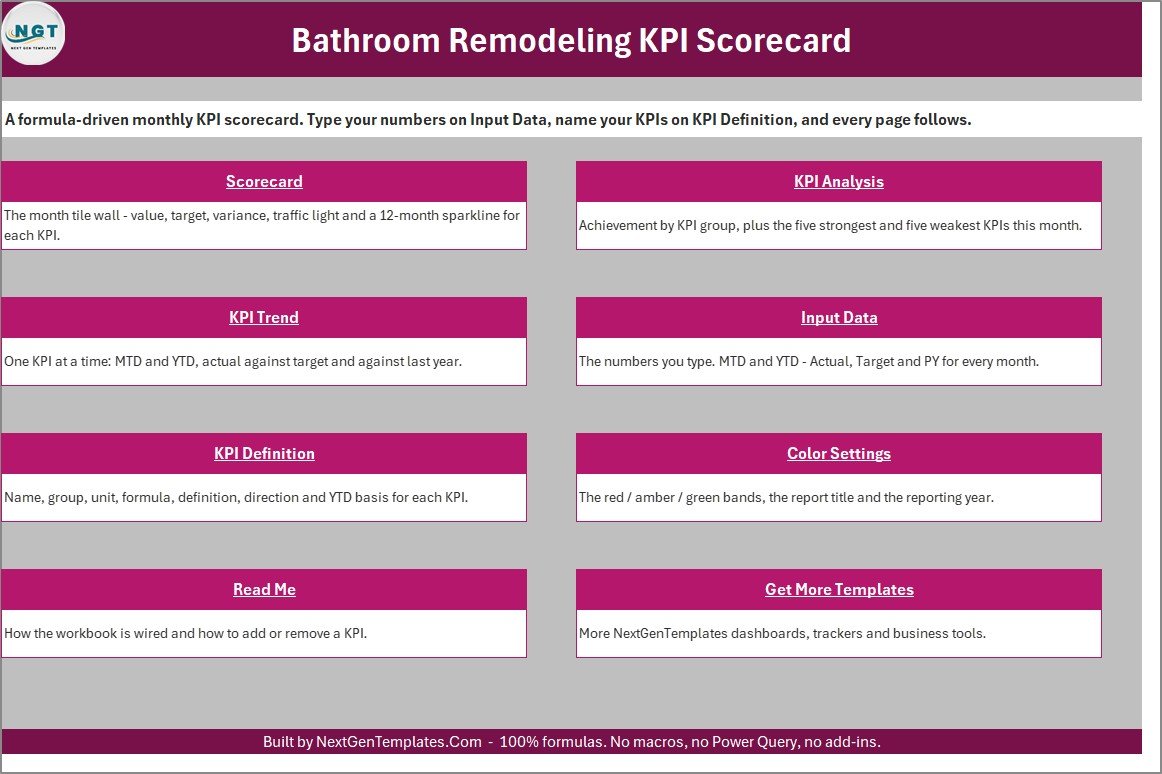
Home navigation page for the Bathroom Remodeling KPI Scorecard in Excel
Scorecard Sheet
The Scorecard sheet is the main review page. It displays 10 KPI tiles in a compact layout and lets you select the month, MTD or YTD mode, and the comparison basis. It is designed for the meeting where the owner asks what changed and where action is needed.
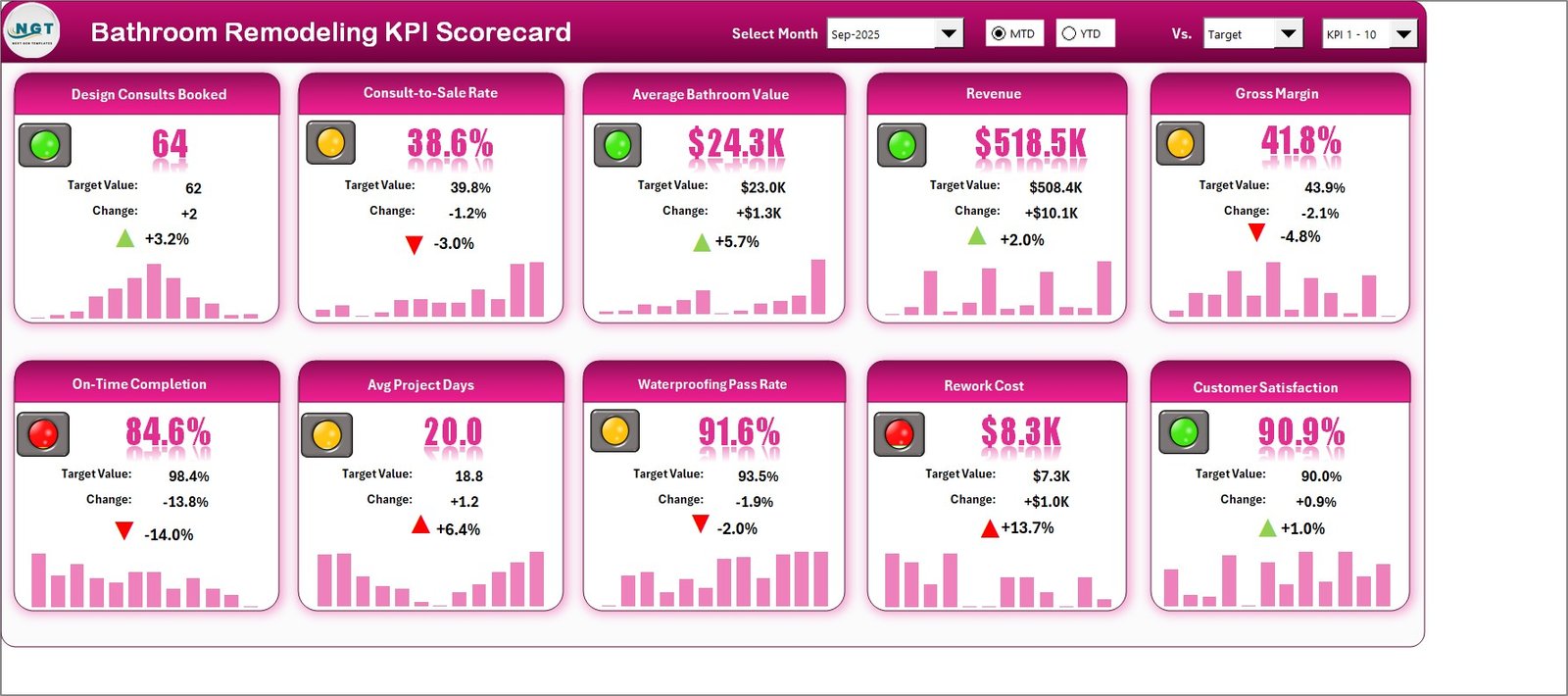
Monthly scorecard page with bathroom remodeling KPIs
KPI Analysis Sheet
The KPI Analysis page groups performance by Sales and Design, Financial, Project Delivery, Quality, and Customer. It also highlights the top 5 and bottom 5 KPIs, which is helpful when the scorecard has several mixed signals.
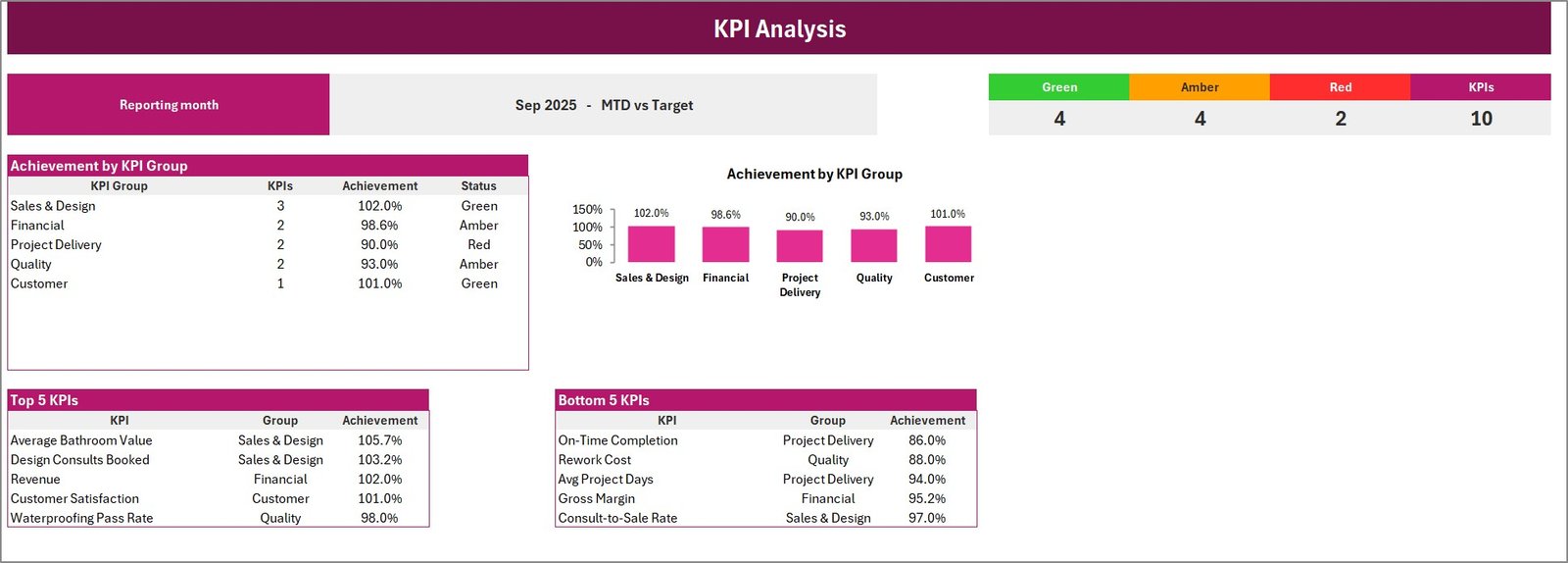
KPI analysis page showing achievement by group and top bottom KPIs
KPI Trend Sheet
The KPI Trend page focuses on one metric at a time. It compares actual values against target and prior-year numbers across months, so a manager can see whether a problem is seasonal, recent, or persistent.
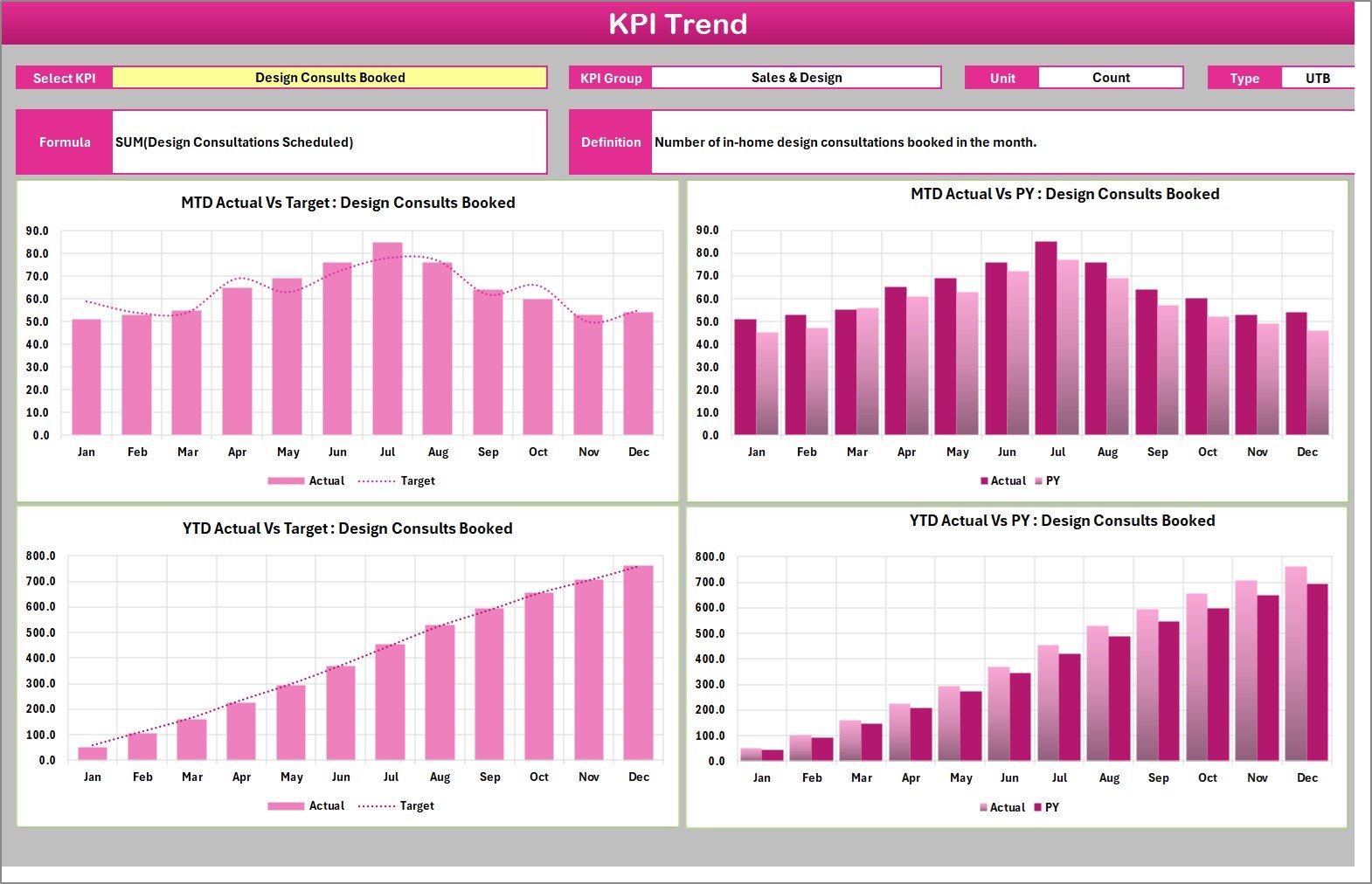
KPI trend page for bathroom remodeling performance
Input Data and KPI Definition Sheets
The Input Data sheet is where users type monthly actual, target, and previous-year values. The KPI Definition sheet holds KPI name, group, unit, formula, definition, direction, and YTD basis. Together they make the scorecard reusable for different bathroom remodeling teams.
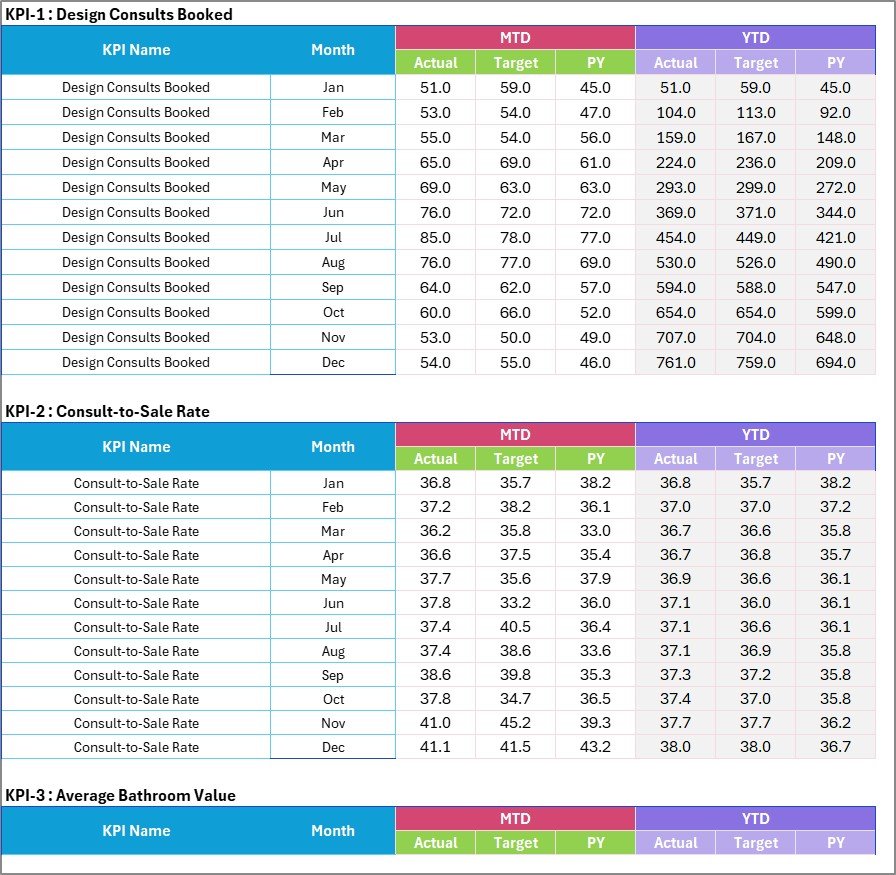
Input data sheet for actual target and previous year values

KPI definition sheet with formula unit and direction
Bathroom Remodeling KPI Scorecard in Excel vs. Google Sheets vs. Paid CRM/SaaS – Feature Comparison
| Feature | This Excel scorecard | Google Sheets scorecard | Paid construction CRM/SaaS |
|---|---|---|---|
| Best fit | Owner-led KPI review | Shared online tracking | End-to-end business operations |
| Setup effort | Low | Medium if rebuilt manually | High configuration effort |
| Monthly KPI status | Built in | Possible with formulas | Depends on reporting module |
| Offline access | Yes in Excel desktop | Limited | Usually no |
| Year-1 cost at 5 users | $9.99 sale price | Mostly setup time | Often much higher |
| Project scheduling | No | No | Usually yes |
Who Should Use This Template
This template is useful for bathroom remodeling owners, interior fit-out teams, project managers, sales managers, renovation consultants, and franchise operators who want a simple Excel-based KPI view. It is especially helpful when the business already has sales, project, and quality data but does not have a clean review format.
Real-World Use Cases
Monthly owner review
The owner reviews revenue, gross margin, consult-to-sale rate, and customer satisfaction in one place instead of opening separate spreadsheets.
Project delivery meeting
The project manager checks on-time completion, average project days, rework cost, and waterproofing pass rate to identify the operations issues behind delayed bathrooms.
Sales and design coaching
The sales lead compares booked design consults and conversion rate against target before coaching designers or changing follow-up routines.
Advantages of This Excel Remodeling Scorecard
The main advantage is focus. Instead of building a full reporting system, a remodeling team can start from a finished scorecard, replace the sample values, and hold a more disciplined review. The workbook is editable, so the KPI list can be changed when the business wants to track different measures.
It also avoids dependency on subscriptions. Microsoft has detailed guidance for working with formulas and structured workbooks in Microsoft Excel support, and this template stays inside that familiar Excel environment.
Opportunities for Improvement
This is not a live field app. It does not collect photos from job sites, sync invoices, schedule crews, or update from a CRM automatically. A team that needs those capabilities should connect its operational system separately and use this workbook as a management summary.
Best Practices
- Keep one owner for monthly KPI updates.
- Use the same KPI definitions every month unless the business formally changes them.
- Review red and amber KPIs first.
- Separate lower-the-better KPIs such as rework cost from upper-the-better KPIs such as revenue or customer satisfaction.
- Archive a copy after each month-end review.
For best results, keep the review cadence simple. Many remodeling businesses get more value from one accurate month-end scorecard than from several partially updated reports. Start with the sample KPIs, replace only the names that do not match your operation, and wait until the team trusts the monthly routine before adding extra measures.
Explore Relevant Templates
You can review the product page for the Bathroom Remodeling KPI Scorecard, compare it with the Google Sheets version, browse more Excel KPI templates on NextGenTemplates, or read more Excel dashboard tutorials on PK-AnExcelExpert.
Frequently Asked Questions
Is this a macro-enabled workbook?
No. The workbook is built with Excel formulas and worksheet structure only. It does not require macros, Power Query, Power Pivot, or add-ins.
Can I change the bathroom remodeling KPIs?
Yes. Update the KPI Definition sheet to rename KPIs, assign groups, set units, write definitions, and mark each KPI as upper-the-better or lower-the-better.
How many KPIs are shown on the scorecard?
The sample file displays 10 bathroom remodeling KPIs across sales and design, financial, project delivery, quality, and customer groups.
Can I track MTD and YTD performance?
Yes. The scorecard includes MTD and YTD options and compares actual values against target or previous-year values depending on the selected view.
Is this suitable for live field scheduling?
No. This is a KPI scorecard for monthly performance review, not a dispatch board, estimating system, accounting platform, or field crew scheduler.
What version of Excel do I need?
Use Microsoft Excel desktop for the best experience. The workbook is designed for normal Excel editing after you replace the sample values with your own.
About the Author
Built by PK – Microsoft Certified Professional with 15+ years of Excel, Google Sheets, and Power BI experience. Founder of NextGenTemplates, reaching 300K+ subscribers across YouTube channels. Every template is hand-built and tested before release.
Conclusion
This Excel remodeling scorecard is a practical way to move from scattered monthly numbers to a structured performance review. It gives remodelers a reusable place to track sales, delivery, financial, quality, and customer KPIs while staying inside Excel. For more Excel dashboard and template tutorials, visit PK: An Excel Expert on YouTube.