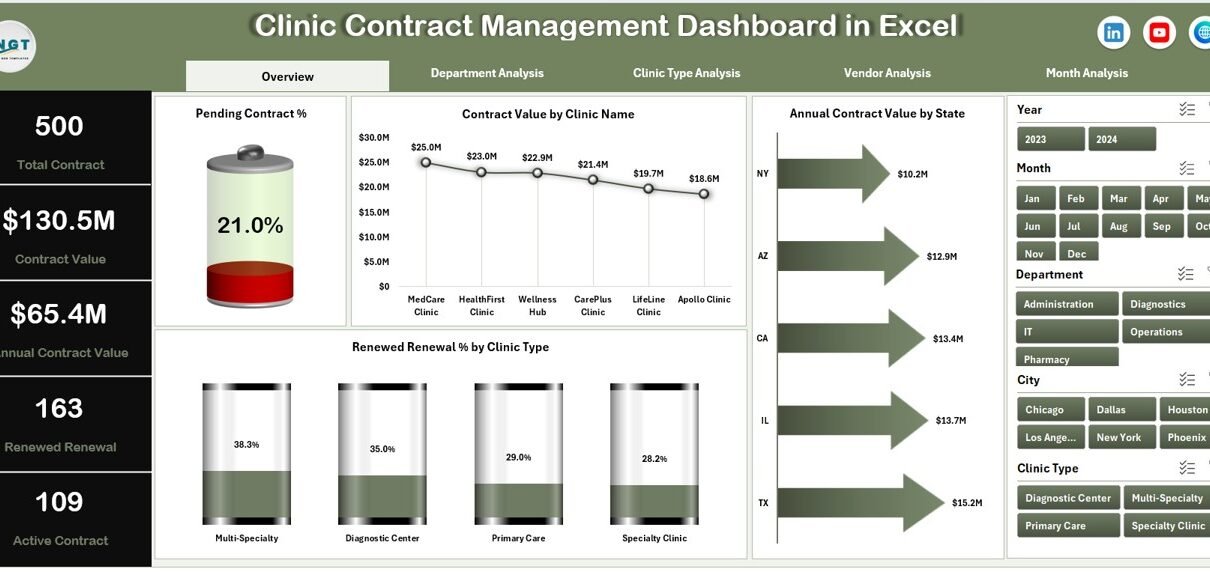
Managing clinic contracts demands accuracy, visibility, and timely action. However, many clinics still depend on scattered Excel files, manual trackers, and email-based follow-ups. As a result, renewals get delayed, contract values remain unclear, and compliance risks increase.
This is exactly where a Clinic Contract Management Dashboard in Excel becomes a powerful and practical solution.
In this detailed guide, you will learn what a Clinic Contract Management Dashboard in Excel is, why clinics need it, how it works, its structure, key features, advantages, best practices, and frequently asked questions. Moreover, the language stays simple, clear, and easy to follow so that clinic managers, administrators, and finance teams can use it confidently.
What Is a Clinic Contract Management Dashboard in Excel?
Click to Purchases Clinic Contract Management Dashboard in Excel
A Clinic Contract Management Dashboard in Excel is a ready-to-use analytical template designed to track, monitor, and analyze clinic contracts from one centralized dashboard.
Instead of reviewing long spreadsheets or searching through folders, this dashboard converts raw contract data into:
-
Clear KPI cards
-
Interactive charts
-
Department-wise and vendor-wise insights
-
Monthly and annual contract performance trends
As a result, clinics gain better control, faster reviews, and improved contract decisions without investing in expensive contract management software.
Moreover, because the dashboard runs entirely in Excel, users do not need technical skills or complex integrations.
Why Do Clinics Need a Contract Management Dashboard?
Clinic contracts involve vendors, service providers, equipment suppliers, maintenance partners, and outsourced services. Therefore, clinics must monitor contract value, renewal status, duration, and termination carefully.
However, manual contract tracking creates multiple challenges.
Common Challenges Without a Dashboard
-
Contracts stored in multiple Excel files
-
Missed renewal dates and penalties
-
No clear visibility of contract value by clinic or department
-
Difficulty tracking vendor performance
-
Time-consuming manual reporting
As a result, clinics face financial leakage and compliance risks.
How Does a Contract Management Dashboard Help?
A Clinic Contract Management Dashboard in Excel solves these issues by:
-
Centralizing all contract data
-
Showing real-time contract status
-
Highlighting pending and expiring contracts
-
Improving accountability across departments
Therefore, clinics operate with confidence and clarity.
How Does a Clinic Contract Management Dashboard in Excel Work?
The dashboard works by connecting structured contract data with pre-built formulas, pivot tables, and charts.
Here is how the process flows:
-
You enter or update contract data in the Data Sheet
-
Excel automatically refreshes calculations
-
The dashboard updates all charts and KPIs
-
You analyze performance across multiple dimensions
Because Excel handles all calculations, users focus on insights instead of manual work.
Structure of the Clinic Contract Management Dashboard in Excel
This ready-to-use dashboard includes five analytical pages, a data sheet, and a support sheet. Each page focuses on a specific contract analysis angle.
Let us explore each section in detail.
What Is the Overview Page in the Clinic Contract Management Dashboard?
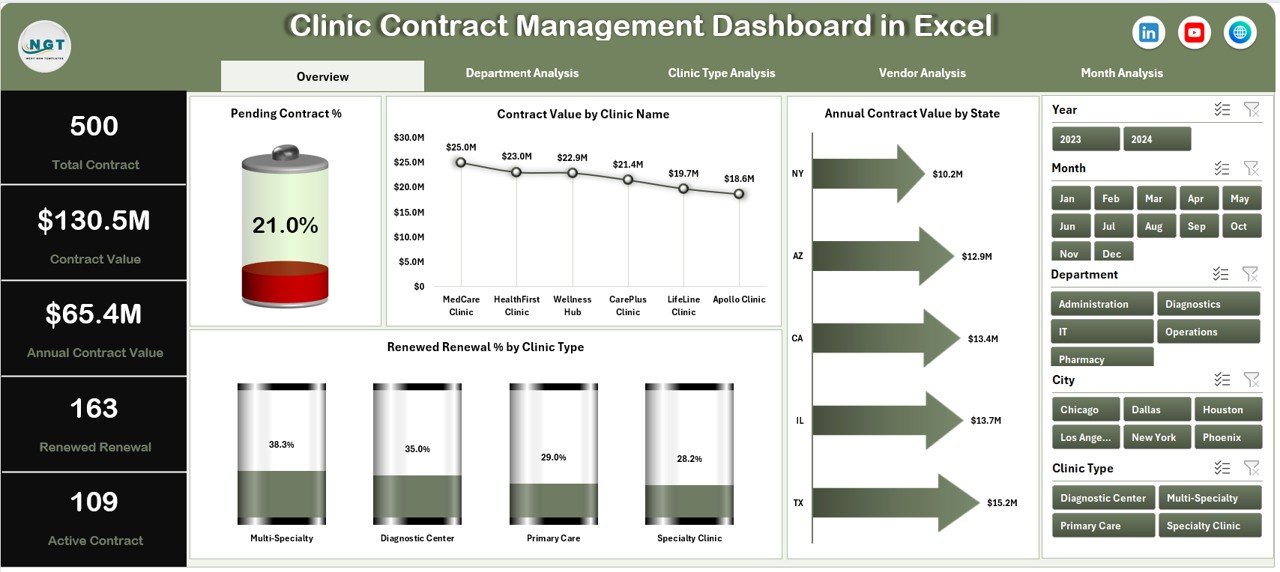
The Overview Page acts as the main landing page of the dashboard. It provides a quick summary of overall contract performance.
Key Elements of the Overview Page
-
Right-Side Slicer (Silencer) for dynamic filtering
-
4 KPI Cards for high-level insights
-
4 Interactive Charts
Charts on the Overview Page
-
Pending Contract %
-
Contract Value by Clinic Name
-
Annual Contract Value by State
-
Revenue Renewal % by Clinic Type
As a result, decision-makers instantly understand where contracts stand and where attention is required.
Click to Purchases Clinic Contract Management Dashboard in Excel
How Does Department Analysis Improve Contract Visibility?

The Department Analysis Page breaks contract data department-wise. Therefore, clinics can evaluate how each department manages contracts.
Key Features of Department Analysis
-
Right-side slicer for filtering
-
Focused insights by department
Charts Included
-
Contract Value by Department
-
Annual Contract Value by Department
-
Renewed Renewal % by Department
-
Active Contract by Department
Because of this view, clinics identify departments with high contract value, renewal gaps, or inactive contracts quickly.
Why Is Clinic Type Analysis Important?

Different clinic types handle contracts differently. Therefore, analyzing contracts by clinic type provides valuable operational insights.
What Does the Clinic Type Analysis Page Show?
This page highlights performance across clinic categories such as specialty clinics, diagnostic centers, or multi-specialty clinics.
Charts on the Clinic Type Analysis Page
-
Contract Value by Clinic Type
-
Annual Contract Value by Clinic Type
-
Pending Contract % by Clinic Type
-
Active Contract by Clinic Type
As a result, management identifies clinic types with renewal risks or underperforming contracts.
Click to Purchases Clinic Contract Management Dashboard in Excel
How Does Vendor Analysis Strengthen Contract Decisions?
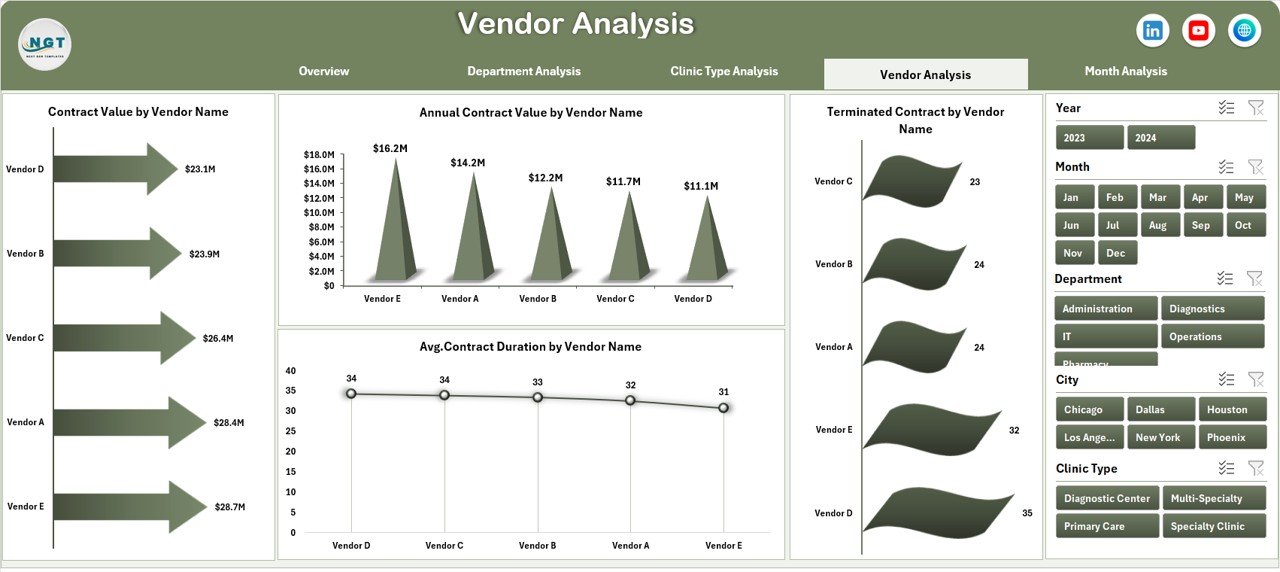
Vendor relationships play a major role in clinic operations. Therefore, vendor-wise contract tracking becomes essential.
Vendor Analysis Page Highlights
-
Right-side slicer for vendor selection
-
Clear vendor performance metrics
Charts Included
-
Contract Value by Vendor Name
-
Annual Contract Value by Vendor Name
-
Terminated Contract by Vendor Name
-
Average Contract Duration by Vendor Name
With these insights, clinics can negotiate better contracts, identify risky vendors, and strengthen partnerships.
What Insights Does Month Analysis Provide?
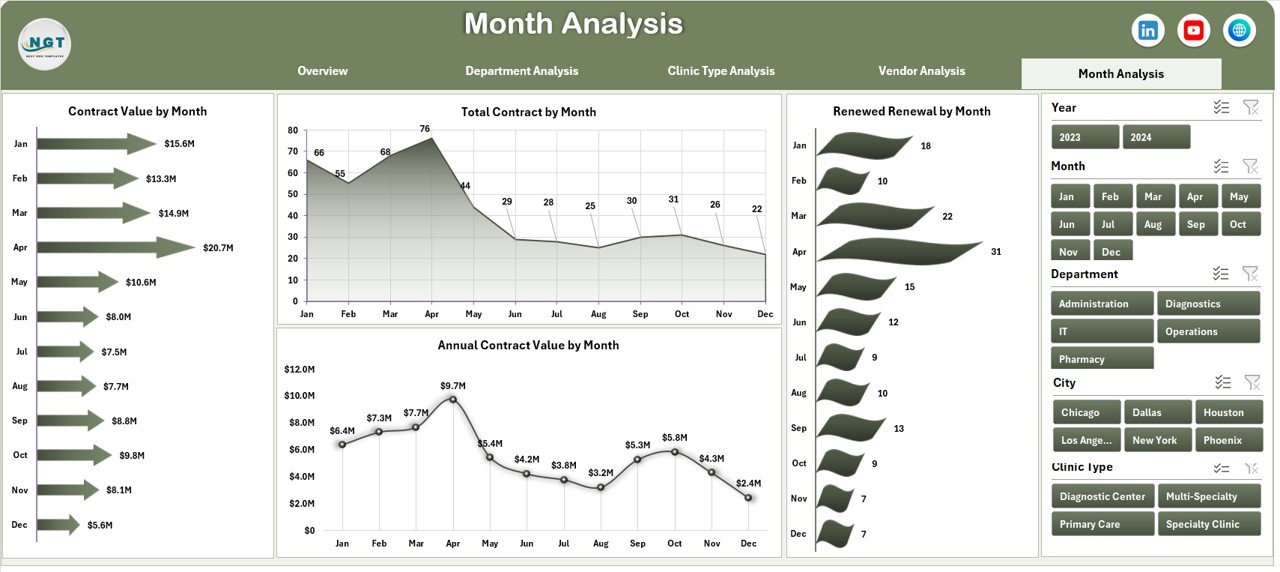
The Month Analysis Page helps clinics track contract trends over time.
Why Monthly Analysis Matters
Contracts follow renewal cycles. Therefore, month-wise tracking improves planning and forecasting.
Charts on the Month Analysis Page
-
Contract Value by Month
-
Annual Contract Value by Month
-
Renewed Renewal by Month
-
Total Contract by Month
As a result, clinics spot seasonal trends and renewal peaks easily.
What Is the Role of the Data Sheet and Support Sheet?
Data Sheet
The Data Sheet stores all raw contract information such as:
-
Contract ID
-
Clinic Name
-
Department
-
Vendor Name
-
Contract Value
-
Start Date and End Date
-
Contract Status
This sheet acts as the backbone of the dashboard.
Support Sheet
The Support Sheet manages dropdown lists, validations, and background calculations. Therefore, it ensures data accuracy and smooth dashboard performance.
Click to Purchases Clinic Contract Management Dashboard in Excel
Key Features of Clinic Contract Management Dashboard in Excel
This dashboard delivers powerful features that make contract management efficient and reliable.
🔹 Interactive Page Navigator
Easily move across dashboard pages using the left-side navigator.
🔹 Dynamic Slicers
Filter data instantly by clinic, department, vendor, or time period.
🔹 Ready-to-Use Structure
Start using the dashboard immediately without setup.
🔹 Automated Calculations
Excel formulas update KPIs and charts automatically.
🔹 Visual Charts and KPIs
Understand complex data quickly through visuals.
Advantages of Clinic Contract Management Dashboard in Excel
Using this dashboard brings measurable benefits to clinics.
✔ Centralized Contract Control
Manage all contracts from a single file.
✔ Faster Decision-Making
View insights instantly instead of manual analysis.
✔ Reduced Renewal Risks
Track pending and expiring contracts easily.
✔ Improved Vendor Management
Analyze vendor performance objectively.
✔ Cost-Effective Solution
Avoid expensive contract management software.
Opportunities for Improvement in Contract Management
Although this dashboard delivers strong results, clinics can enhance contract management further.
-
Integrate reminder alerts for renewals
-
Link dashboards with Power BI for advanced visuals
-
Add compliance tracking fields
-
Introduce contract performance scoring
By doing so, clinics build a future-ready contract system.
Best Practices for the Clinic Contract Management Dashboard in Excel
Following best practices ensures long-term success.
📌 Maintain Clean Data
Update the data sheet regularly and avoid blank fields.
📌 Standardize Contract Status
Use consistent terms like Active, Pending, Renewed, or Terminated.
📌 Review Dashboards Monthly
Schedule monthly reviews to avoid surprises.
📌 Control File Access
Limit editing rights to prevent data errors.
📌 Backup the Dashboard
Store backup copies to protect critical data.
Who Can Use a Clinic Contract Management Dashboard in Excel?
This dashboard suits a wide range of healthcare professionals:
-
Clinic Administrators
-
Operations Managers
-
Finance Teams
-
Procurement Officers
-
Hospital Management
Because Excel remains familiar, adoption stays smooth and fast.
How Does This Dashboard Support Strategic Planning?
This dashboard does not only track contracts. It also supports long-term planning.
-
Forecast contract renewals
-
Identify cost-saving opportunities
-
Strengthen vendor negotiations
-
Improve compliance monitoring
As a result, clinics move from reactive to proactive contract management.
Conclusion
A Clinic Contract Management Dashboard in Excel transforms how clinics manage contracts. Instead of scattered files and manual follow-ups, clinics gain a structured, visual, and automated system.
With features like overview insights, department analysis, vendor tracking, and monthly trends, this dashboard delivers clarity and control. Moreover, Excel makes it affordable, flexible, and easy to use.
Therefore, clinics that want accuracy, transparency, and efficiency should adopt this dashboard without delay.
Frequently Asked Questions (FAQs)
❓ What is a Clinic Contract Management Dashboard in Excel?
It is an Excel-based tool that tracks and analyzes clinic contracts using KPIs and visual charts.
❓ Do I need advanced Excel skills to use this dashboard?
No. Basic Excel knowledge is enough to operate and update the dashboard.
❓ Can I customize the dashboard for my clinic?
Yes. You can modify charts, fields, and layouts based on your requirements.
❓ How often should I update the data?
You should update the data whenever contracts change or at least monthly.
❓ Is this dashboard suitable for small clinics?
Yes. Both small clinics and large healthcare organizations can use it effectively.
Visit our YouTube channel to learn step-by-step video tutorials