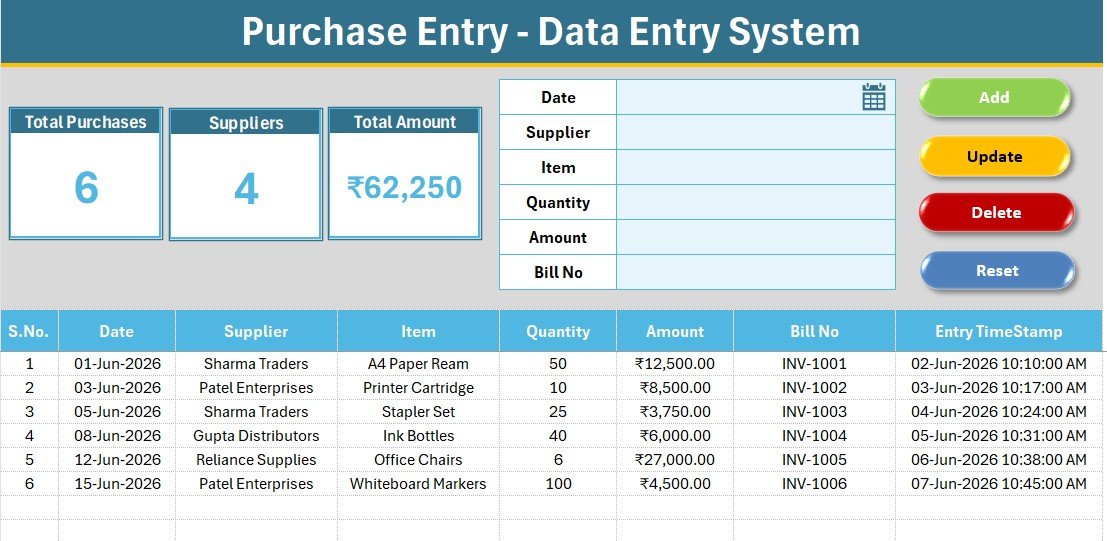
The Purchase Entry Data Entry System in Excel records six fields per purchase — Date, Supplier, Item, Quantity, Amount, and Bill No — and rolls them into three live KPI cards: Total Purchases, distinct Suppliers, and Total Amount. Each record is added through a single VBA-powered form, numbered automatically, and time-stamped on entry. Setup takes under five minutes from download to first record.
Most small businesses still track supplier bills in a messy, formula-heavy sheet that breaks the moment a row is inserted. This Excel purchase entry system fixes that with a structured form, an editable supplier dropdown, and one-click Add, Update, Delete, and Reset buttons — no monthly software fee and no internet required.
Key Features of the Purchase Entry Data Entry System in Excel
- 6-field purchase form capturing Date, Supplier, Item, Quantity, Amount, and Bill No from one tinted input line.
- Three live KPI cards — Total Purchases counts records, Suppliers shows the distinct vendor count, and Total Amount sums the money column, all recalculating automatically.
- Four VBA buttons — Add, Update, Delete, and Reset — plus double-click on any record to load it back into the form for editing.
- Editable supplier dropdown driven by the Setting sheet, so lists update on their own.
- Auto S.No and Entry TimeStamp on every row, with a currency-formatted Amount column.
Sheets Explanation
Data Entry Sheet
The hub of the system: a sky-blue heading bar, the three KPI cards, the 6-field form with the Add/Delete/Update/Reset block, and the records table with auto numbering, currency formatting, and a timestamp column.
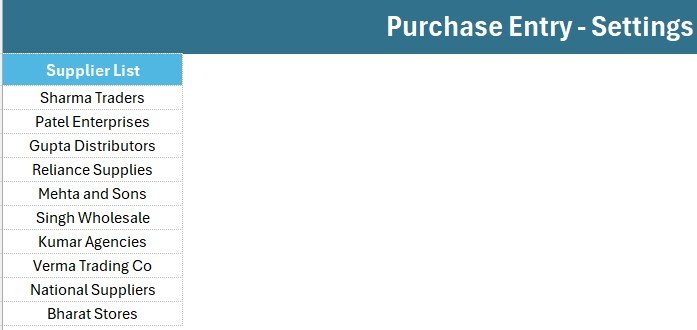
Setting Sheet
Stores the Supplier dropdown source list and a duplicate set of KPI cards. Add or remove suppliers here and every dropdown across the workbook updates instantly.
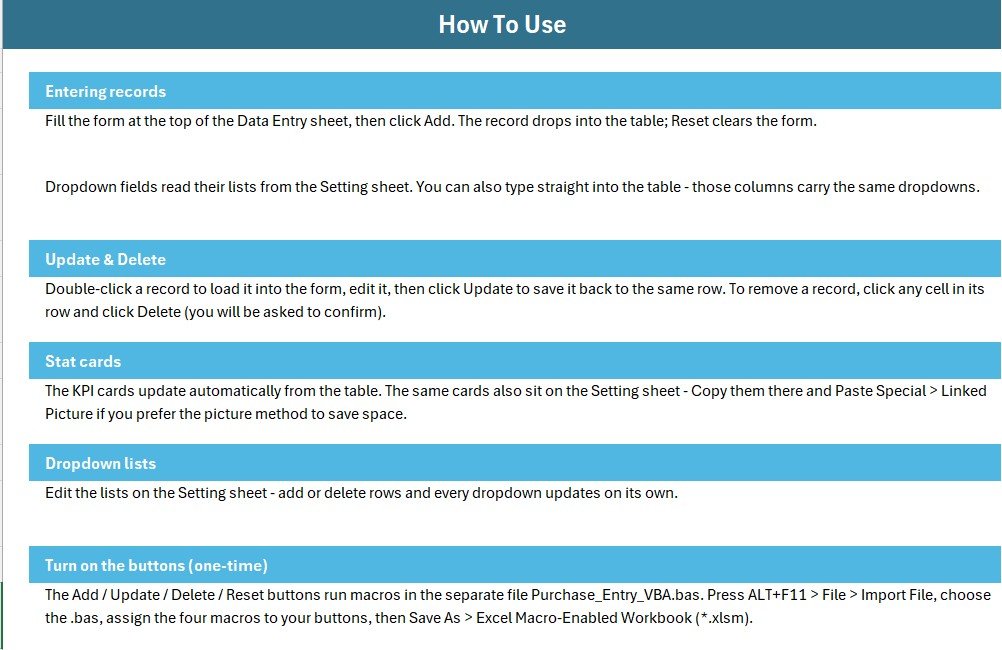
Instructions & Get More Templates
A plain-language Instructions sheet covers entering records, the Update and Delete flow, and the one-time button setup, while the Get More Templates sheet links to the wider catalog.
Purchase Entry System in Excel vs. Google Sheets vs. Paid Accounting SaaS — Feature Comparison
| Feature | Purchase Entry System (Excel) | Google Sheets equivalent | QuickBooks / Zoho Inventory |
|---|---|---|---|
| Cost | $5.99 one-time | $5-7 one-time | $15-50 / user / month |
| Platform | Excel (offline) | Google Sheets (online) | Cloud SaaS |
| One-click Add/Update/Delete | Yes (VBA) ✅ | Apps Script needed | Yes ✅ |
| Works offline | Yes ✅ | No | No |
| Editable supplier dropdown | Yes ✅ | Yes ✅ | Yes ✅ |
| Per-user fees | None ✅ | None ✅ | Per seat |
| Data ownership | Your local file ✅ | Google cloud | Vendor cloud |
| Year-1 cost at 5 users | $5.99 ✅ | ~$6 | $900-3,000 |
For small teams that want one-click purchase logging without paying $900+ a year for accounting software, the Purchase Entry Data Entry System sits in the sweet spot.
Who Should Use This Template
Perfect for:
- Small business owners and shopkeepers logging daily supplier bills
- Accountants and bookkeepers who want an offline purchase register
- Procurement and store staff at 1-50 person companies
Not a fit if:
- You need multi-user cloud access, approval workflows, or audit trails
- You require automated supplier payments or GST e-invoicing inside the tool
- You use Excel for Mac and cannot enable VBA macros
Real-World Use Cases
Ramesh runs a hardware store. He logs every supplier delivery with the Bill No and amount, then checks the Total Amount card at month-end to reconcile against his bank statements — without paying for accounting software.
Anita manages procurement at a 20-person print shop. She watches the Suppliers KPI to see how many vendors she buys from and filters the records table to pull every bill from one supplier before renegotiating rates.
Sofia is a freelance bookkeeper. She keeps a separate, offline copy of the system in each client folder, then exports the table at year-end. For the inventory side she pairs it with the Product Inventory Data Entry System.
Advantages of the Purchase Entry Data Entry System
The biggest advantage is speed with structure. Because entries go through a form wired to Excel VBA, you avoid the broken-formula problem of manual sheets while still owning a simple, portable .xlsx file. The distinct Suppliers KPI gives an instant read on vendor spread, and the one-time $5.99 price replaces recurring SaaS costs that run into hundreds of dollars a year. It also pairs naturally with sibling tools like the Medicine Stock Data Entry System and the Patient Visit Log Data Entry System when you run several registers side by side.
Opportunities for Improvement
Honest limitations: the VBA buttons require a Windows version of Excel with macros enabled, so Mac-only users lose the one-click workflow (though the form and KPI cards still work). There is no multi-user concurrency — it is a single-file tool, not a shared database — and it does not generate supplier payment files or tax invoices. Teams needing approvals or cloud sync should look at the Google Sheets or web-app options instead.
Best Practices
- Keep the supplier list on the Setting sheet tidy and consistently spelled so the distinct Suppliers count stays accurate.
- Use the Bill No field as your unique reference when reconciling against bank or vendor statements.
- Make a fresh copy per financial year to keep each register light and easy to archive.
- Save as .xlsm after importing the VBA so your buttons survive every reopen.
Explore Relevant Templates
- Daily Sales Entry Data Entry System in Excel — the sales-side companion register.
- Product Inventory Data Entry System in Excel — track the stock your purchases feed.
- Purchase Order Tracker in Google Sheets — a cloud-based PO alternative.
- Daily Sales Purchase System Web App — a multi-user upgrade path.
Frequently Asked Questions
What does the Purchase Entry Data Entry System in Excel track?
The Purchase Entry Data Entry System tracks Date, Supplier, Item, Quantity, Amount, and Bill No per record, then summarises them into Total Purchases, distinct Suppliers, and Total Amount KPI cards that update automatically.
Do I need to know VBA to use it?
No. The Purchase Entry Data Entry System ships with a ready-made VBA module. You import it once, assign four buttons, and the whole add/update/delete flow runs on clicks with no coding.
How long does setup take?
Under five minutes. Import the .bas module, place the four buttons over the coloured cells, save the file as .xlsm, and the Purchase Entry Data Entry System is ready to record purchases.
How does this compare to QuickBooks or Zoho?
QuickBooks and Zoho charge $15-50 per user monthly. The Purchase Entry Data Entry System in Excel is a one-time $5.99 purchase that works offline and keeps supplier data in your own file.
Can I change the currency and suppliers?
Yes. The supplier list lives on the editable Setting sheet, and the Amount column uses a standard currency format you can switch to any local symbol in a few seconds.
About the Author
Built by PK — Microsoft Certified Professional with 15+ years of Excel, Google Sheets, and Power BI experience. Founder of NextGenTemplates, reaching 300K+ subscribers across YouTube channels. Every template is hand-built and tested before release.
Conclusion
If you want a fast, offline, structured way to record supplier purchases, the Purchase Entry Data Entry System in Excel delivers a clean form, live KPIs, and one-click buttons at a one-time price. Click here to purchase the Purchase Entry Data Entry System in Excel.
Instant download · One-time payment · No subscription. For video tutorials, visit YouTube.com/@PK-AnExcelExpert.
Last updated: June 2026