How to Build a Patient Visit Log Data Entry System in Excel (VBA)
Every clinic, hospital OPD, and private practice logs patient visits daily. But most do it in a plain spreadsheet with no form, no validation, and no live statistics. The result is messy data, time wasted on manual lookups, and KPI cards that break the moment someone types in the wrong column.
In this tutorial, PK walks you through exactly how to build a Patient Visit Log Data Entry System in Excel using VBA macros, structured around a UserForm-style interface with Add, Update, Delete, and Reset functionality, three live KPI stat cards, and a doctor dropdown wired to a central Setting sheet.
If you prefer to skip straight to the finished file, you can download the ready-made Patient Visit Log Data Entry System from NextGenTemplates.com.
What the System Tracks
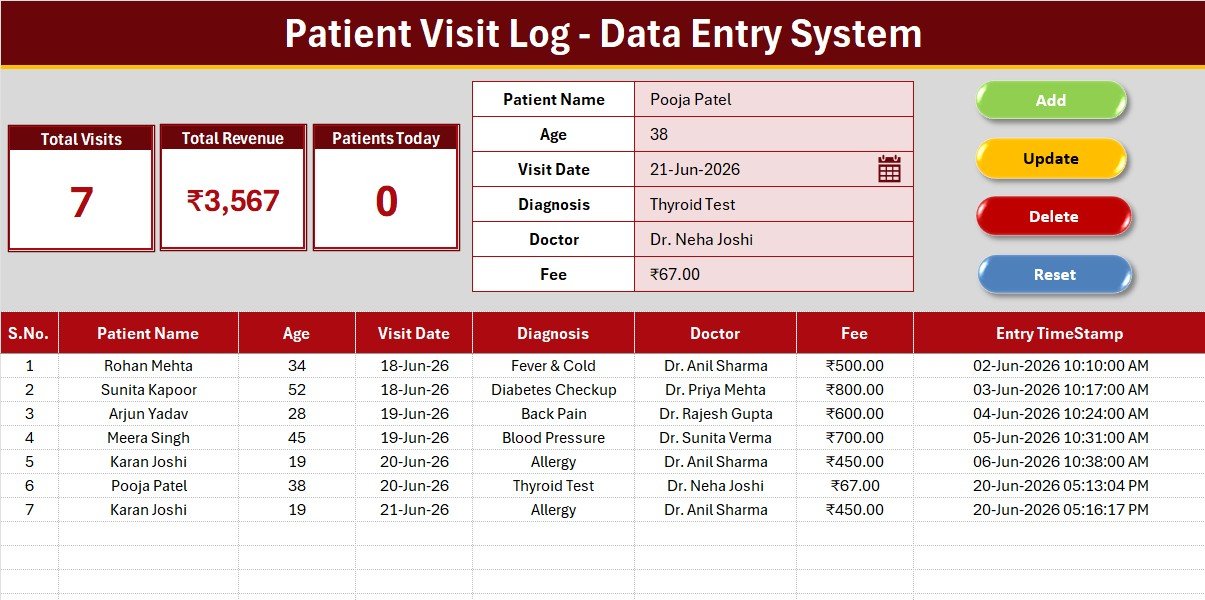
The system captures 6 fields per visit: Patient Name, Age, Visit Date, Diagnosis, Doctor (dropdown), and Consultation Fee. A seventh column, Entry TimeStamp, is auto-filled by the VBA when any record is added, giving you a full audit trail of when data was entered. Patient Visit Log Data Entry System in Excel.
Sheet Structure
Data Entry Sheet
The main sheet. A gray dashboard panel at the top holds three KPI stat cards: Total Visits (COUNTA), Total Revenue (SUM of fee), and Patients Today (COUNTIF on Visit Date = TODAY). Below is the data entry form with labeled input cells and four flat-coloured macro buttons: Add in green, Delete in red, Update in gold, and Reset in dark blue. Records start at row 15, auto-numbered with =IF($B15=””,””,ROW()-14).
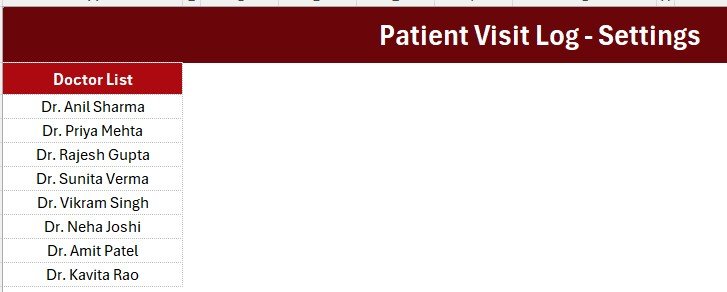
Setting Sheet
Contains the Doctor dropdown source list via the named range DoctorList. Update doctor names here and the form dropdown reflects them instantly. KPI cards are also duplicated here for Copy to Paste Special to Linked Picture use in reports.
Instructions Sheet
A plain-English three-step guide covering VBA import, button assignment, and Save As xlsm, designed so any clinic admin can activate the system without IT support.
KPI Card Formulas
- Total Visits: =COUNTA(B15:B10000)
- Total Revenue: =SUM(F15:F10000) where F is Consultation Fee
- Patients Today: =COUNTIF(D15:D10000,TODAY()) where D is Visit Date
The range ceiling of 10000 accommodates years of records before any formula adjustment is needed. Microsoft covers COUNTA and COUNTIF in detail in their official documentation.
Design Details
Theme colour is deep crimson #AC0911 with a gold divider line #FFC000, a gray dashboard panel #D9D9D9, white KPI cards with theme-coloured borders and large bold numbers, and Aptos Narrow font throughout all 4 sheets.
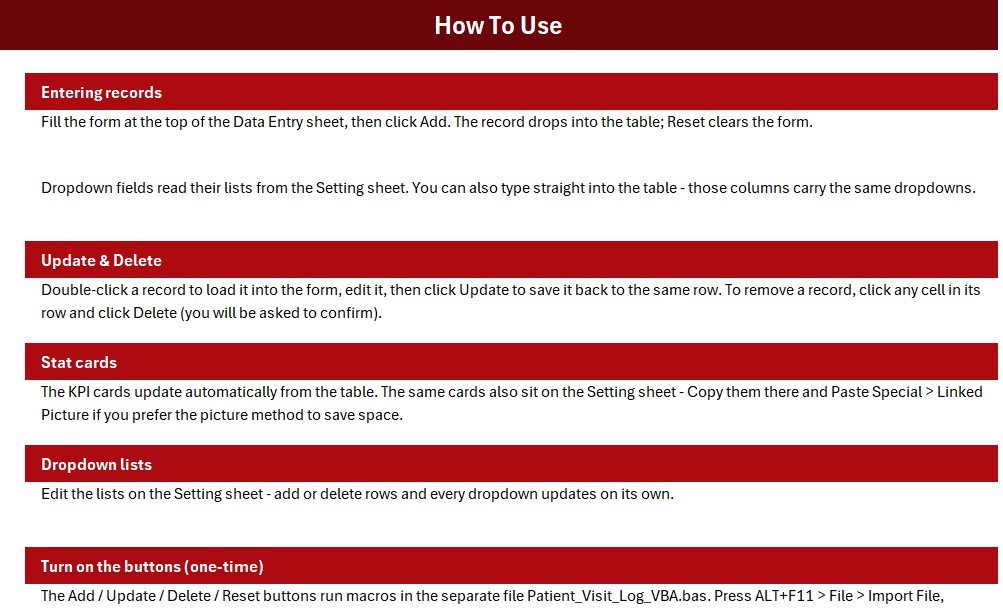
Activating the VBA Macro: Step by Step
- Download and extract the ZIP file
- Open Patient_Visit_Log_System.xlsx in Excel 2016 or later
- Press ALT+F11 to open the VBA editor
- Go to File then Import File and select Patient_Visit_Log_VBA.bas
- Close the editor and draw four Form Control buttons over the Add, Delete, Update, and Reset coloured cells
- Assign Add_Record, Delete_Record, Update_Record, and Reset_Form to each button respectively
- Save As Excel Macro-Enabled Workbook (.xlsm)
- Go to the Setting sheet and update the Doctor list with your clinic doctor names
Customisation Tips
- Change the currency symbol by selecting the Fee column, pressing CTRL+1, and editing the custom number format
- Add a Department field by inserting a column before Consultation Fee and updating the VBA column references
- Password-protect the Setting sheet via Review to Protect Sheet to prevent staff from editing dropdown lists
- Filter records by doctor using Data to AutoFilter without affecting KPI totals
Download the Finished System
The finished Patient Visit Log Data Entry System in Excel is available at NextGenTemplates.com, including the xlsx workbook, the bas VBA module, and a plain-text txt backup of the macro code.
Download the Patient Visit Log Data Entry System
You may also like the Patient Appointment Data Entry System, the VBA Tool library, and the Health and Safety template collection at NextGenTemplates.com.
Frequently Asked Questions
Does the Patients Today KPI work correctly?
Yes. The formula uses COUNTIF on Visit Date equal to TODAY(). The VBA validates dates with IsDate() before writing to the table, so only genuine Excel date serials are stored and matched correctly.
What Excel version is required?
Excel 2016 or later on Windows for full VBA support. The xlsx file and formulas work on Mac, but VBA macros have limited Mac compatibility.
Can I add more KPI cards?
Yes, up to 4 cards fit the standard panel. A fifth card requires widening the gray dashboard panel slightly.
Is patient data secure?
All data stays in the local xlsm file. Use Excel sheet and workbook password protection plus OS-level encryption for sensitive patient records.
Published by PK, Microsoft Certified Professional with 15+ years of Excel and VBA experience. Subscribe to Youtube.com/@PK-AnExcelExpert for free Excel tutorials.