Tracking performance in physiotherapy and rehabilitation centers is essential because it helps measure treatment effectiveness, patient progress, clinic operational efficiency, and staff performance. However, many centers still struggle with manual record-keeping, scattered data, and inconsistent reporting. A Physiotherapy & Rehabilitation KPI Dashboard in Excel solves this challenge by providing a simple, structured, and automated way to monitor all key performance indicators (KPIs) in one place.
This detailed guide explains how the dashboard works, its key features, the advantages of using it, and the best practices you must follow. You will also find answers to common questions at the end.
Click to buy Physiotherapy & Rehabilitation KPI Dashboard in Excel
What Is a Physiotherapy & Rehabilitation KPI Dashboard in Excel?
A Physiotherapy & Rehabilitation KPI Dashboard in Excel is a ready-to-use performance tracking system for physiotherapists, rehabilitation centers, clinics, therapy departments, and wellness centers. It allows you to monitor MTD (Month-to-Date) and YTD (Year-to-Date) performance of all the important KPIs such as:
- Patient intake
- Treatment success rate
- Average recovery time
- Patient satisfaction
- Therapy session adherence
- Equipment utilization
- Appointment no-show rate
- Revenue and cost metrics
All these KPIs appear visually on a single dashboard with charts, scorecards, and trends. This helps management understand performance instantly and make informed decisions.
Since the dashboard is created in Excel, you can customize it, add more KPIs, change formulas, and update data easily without needing any advanced software.
Why Do Physiotherapy & Rehabilitation Centers Need KPI Dashboards?
Physiotherapy centers operate in a data-rich environment. They manage patients, sessions, staff schedules, treatments, follow-ups, and financial details. Without proper monitoring, it becomes difficult to maintain quality care.
A KPI dashboard helps because it:
- Brings all data into one view
- Shows trends clearly
- Reduces errors
- Saves time
- Improves decision-making
- Enhances patient experience
- Supports growth planning
When therapists track performance regularly, they can solve operational issues quickly and improve treatment outcomes.
Key Features of the Physiotherapy & Rehabilitation KPI Dashboard in Excel
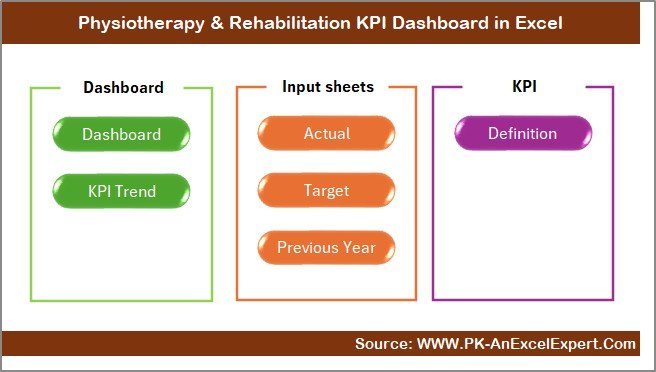
This dashboard includes seven powerful worksheets, each designed to track a specific part of performance monitoring. Below is the complete breakdown.
Summary Page – The Main Navigation Hub
The Summary Page works like the home screen of the dashboard. It contains six navigation buttons that let you jump to other sheets instantly. This makes the dashboard user-friendly because you do not scroll or search.
This page ensures smooth navigation across all sections, including:
- Dashboard
- Trend Analysis
- Actual Numbers Input
- Target Sheet
- Previous Year Data
- KPI Definitions
With one click, you can move to any section and update or analyze numbers quickly.
Click to buy Physiotherapy & Rehabilitation KPI Dashboard in Excel
Dashboard Sheet – Complete Performance View
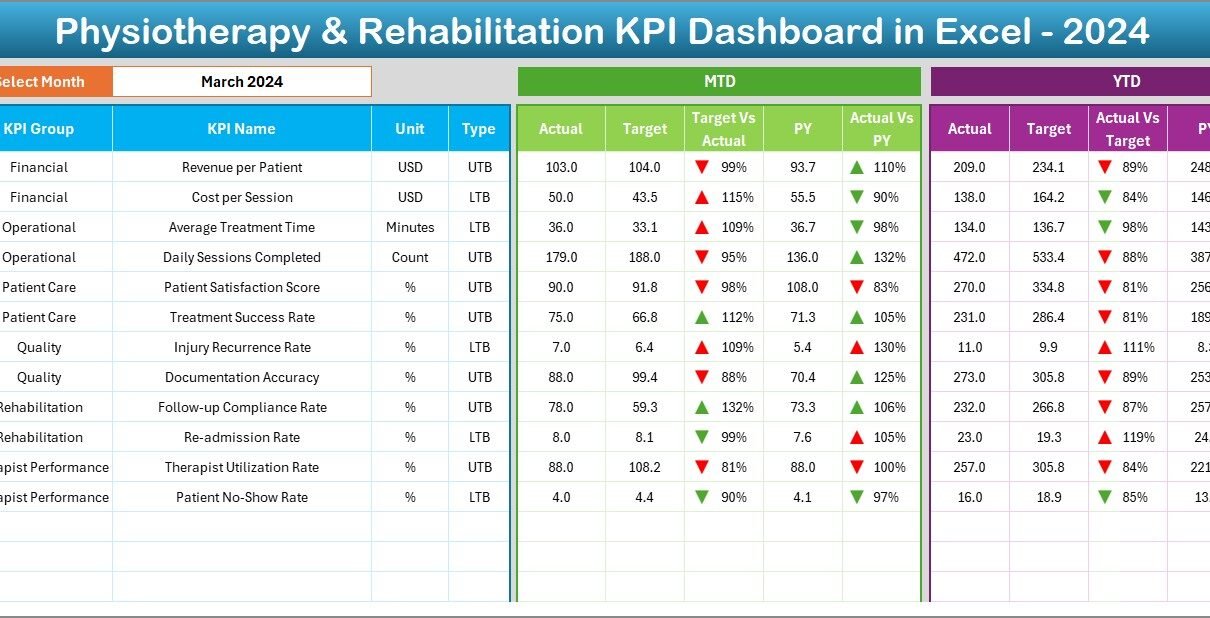
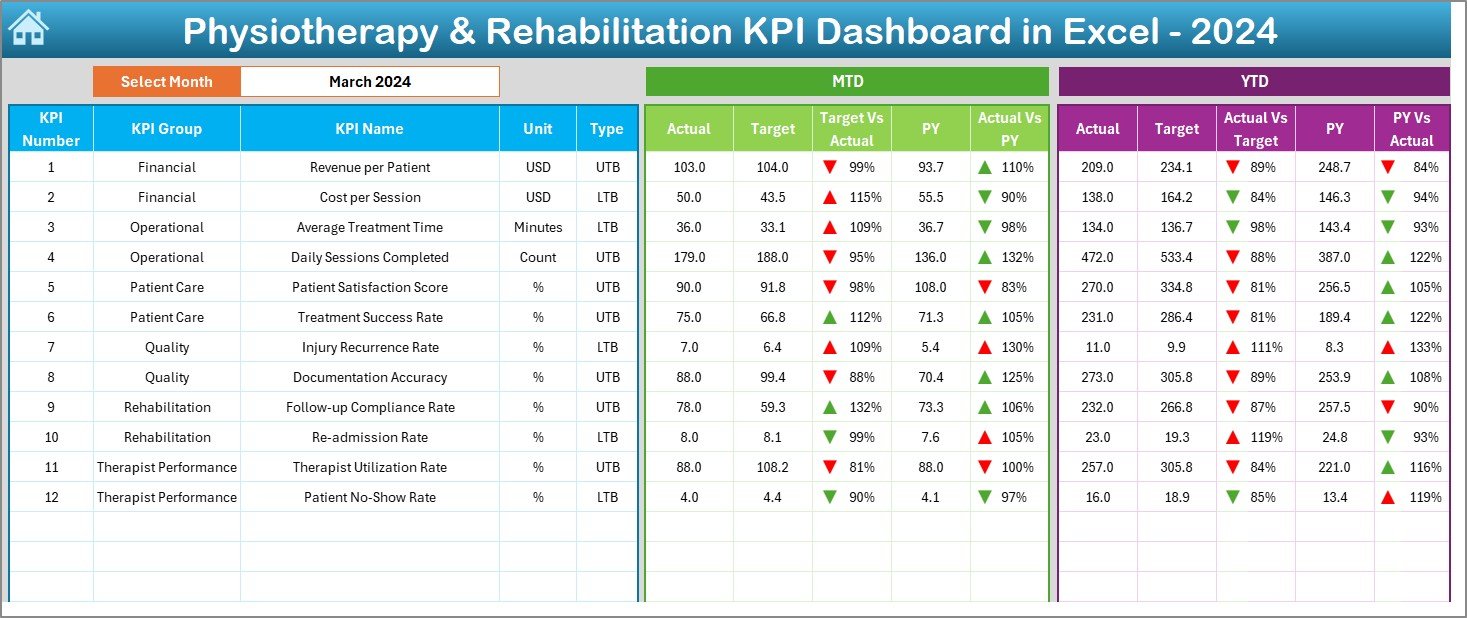
This is the main dashboard where all KPI performance data appears. Everything updates automatically when you select a month from the drop-down list in cell D3.
What You Can See on This Dashboard
The dashboard shows:
- MTD Actual vs Target
- MTD Actual vs Previous Year (PY)
- YTD Actual vs Target
- YTD Actual vs Previous Year (PY)
To make the results easy to understand, the dashboard includes:
- Up/Down arrows
- Conditional formatting
- Color indicators
These visual elements help you quickly identify:
- Which KPIs are performing well
- Which KPIs need attention
- Which KPIs improved from last year
- Which KPIs dropped compared to last year
This sheet acts as the control center for performance tracking.
Click to buy Physiotherapy & Rehabilitation KPI Dashboard in Excel
Trend Sheet – KPI Performance Over Time
Trend analysis is important because physiotherapy and rehabilitation progress depends on time-based improvement.
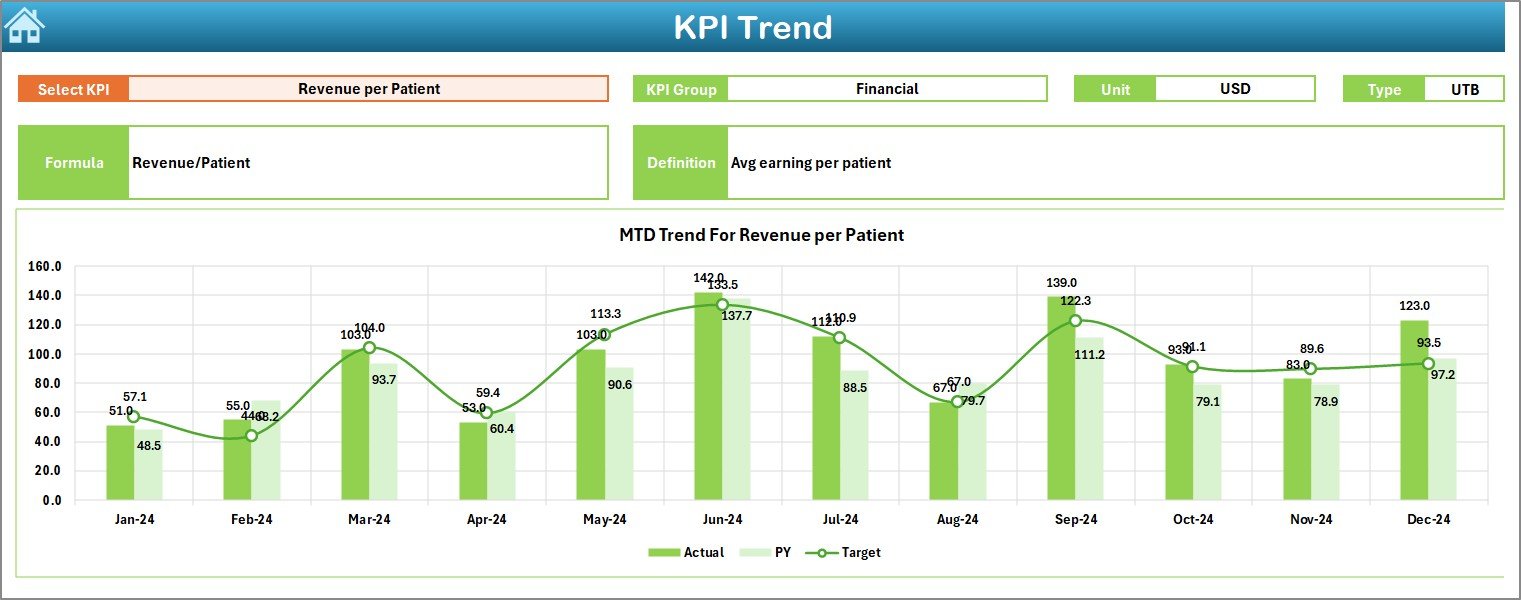
In this sheet, you can select a KPI from a drop-down menu in cell C3. After selecting a KPI, the dashboard automatically displays:
- KPI Group
- KPI Unit
- KPI Type (Lower the Better or Upper the Better)
- KPI Formula
- KPI Definition
Trend Charts Display
The sheet shows two visual trend charts:
- MTD Trend (Actual, Target & Previous Year)
- YTD Trend (Actual, Target & Previous Year)
These charts allow you to:
- Compare this year with last year
- Identify seasonal patterns
- Track improvement or decline
- Understand treatment or operational bottlenecks
The trend sheet is extremely useful for monthly reporting and performance reviews.
Click to buy Physiotherapy & Rehabilitation KPI Dashboard in Excel
Actual Numbers Input Sheet – Enter Performance Data
This sheet is used to enter the actual numbers for MTD and YTD.
How It Works
- You enter the starting month in cell E1.
- The dashboard automatically updates all month columns.
- You fill the table with actual numbers for each KPI every month.
This design lets you easily maintain data for the entire year.

Click to buy Physiotherapy & Rehabilitation KPI Dashboard in Excel
Target Sheet – Enter Monthly KPI Targets
Targets are important because they define performance expectations.
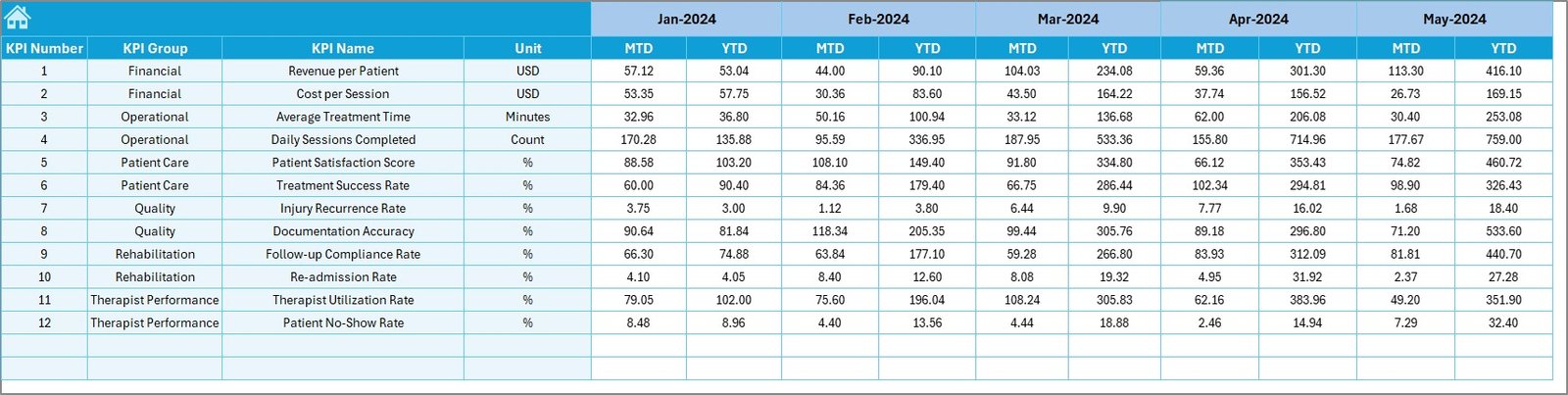
In this sheet, you enter:
- MTD Targets
- YTD Targets
for every KPI across all months.
Setting accurate targets helps physiotherapy centers stay aligned with organizational goals such as:
- Improving patient recovery rate
- Reducing waiting times
- Increasing patient engagement
- Lowering no-show percentage
This sheet ensures that the dashboard always compares actual performance with expected performance.
Previous Year Number Sheet – Historical Comparison
To understand whether performance improved or declined, previous year data is essential.
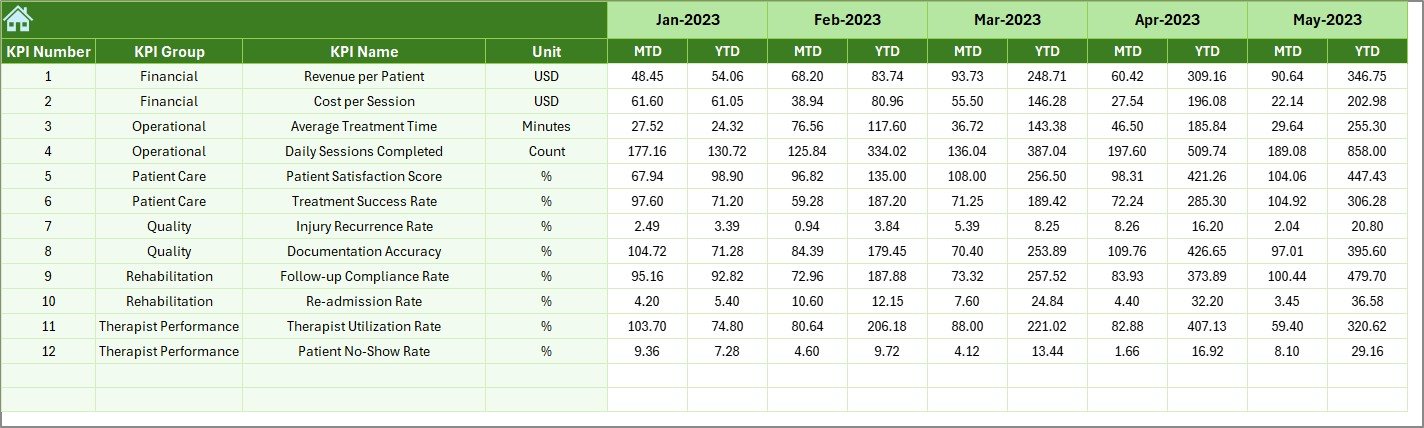
In this sheet, you enter:
- Monthly MTD numbers
- Yearly YTD numbers
from the previous year.
When you compare current performance with last year, you understand:
- Improvement areas
- Decline patterns
- Operational challenges
- Year-over-year performance
This helps clinics create better strategies for growth and patient care.
KPI Definition Sheet – KPI Library
This sheet contains a detailed list of:
- KPI Name
- KPI Group
- Unit
- Formula
- Definition
Each KPI includes a clear explanation so users can understand exactly what the metric means. This avoids confusion and maintains consistency in reporting.
This sheet helps new staff, new managers, and interns understand KPI meaning without asking repeatedly.

Advantages of Using a Physiotherapy & Rehabilitation KPI Dashboard in Excel
Using this dashboard provides many clear benefits. Below are the most important ones.
- Improves Treatment Quality
The dashboard tracks all important KPIs such as patient recovery, therapy adherence, and treatment success rate. This helps therapists take corrective actions quickly.
- Enhances Patient Experience
By monitoring waiting time, satisfaction scores, and no-show rates, clinics can improve patient handling, reduce delays, and personalize care.
- Saves Time for Staff
Instead of manually checking records, the dashboard shows all performance numbers automatically in one place. This reduces workload and increases productivity.
- Makes Decision-Making Easier
Charts, scorecards, and trend lines give a clear picture of what is working and what needs improvement.
- Brings Consistency in Reporting
Because all KPIs are defined in one format, different departments follow the same approach. This improves accuracy in reporting.
- Helps in Monthly & Yearly Reviews
Managers can use the dashboard for performance reviews because it displays MTD, YTD, Target, and Previous Year performance all at once.
- Fully Customizable
Since the dashboard is Excel-based, it is easy to add:
- New KPIs
- New years
- New charts
- New departments
This flexibility makes the dashboard suitable for all rehabilitation centers.
Best Practices for Using the Physiotherapy & Rehabilitation KPI Dashboard
Follow these best practices for accurate reporting and better results:
- Update Data Every Month
Always update MTD and YTD numbers on time so that the dashboard reflects the correct status.
- Review KPI Targets Regularly
Targets must be realistic and achievable. Adjust them based on clinic workload and treatment trends.
- Use Trend Charts for Decision-Making
Trend charts show long-term improvement or decline. Use these insights during planning meetings.
- Train Staff to Use the Dashboard
Every team member should understand how KPIs work. Training improves accuracy in data entry.
- Keep KPI Definitions Clear
Use the KPI Definition sheet to maintain clarity across departments.
- Review Previous Year Data Before Setting New Targets
Always check historical performance before setting goals for the new year.
Conclusion
A Physiotherapy & Rehabilitation KPI Dashboard in Excel helps clinics track performance, improve patient results, and streamline operations. It brings all key metrics into one place and shows real-time progress through charts and scorecards. With its structured worksheets and automation, it saves time, enhances decision-making, and ensures better planning.
By following the best practices shared in this guide, physiotherapy centers can use this dashboard effectively and improve patient care, staff performance, and overall operational efficiency.
Frequently Asked Questions (FAQs)
- What KPIs should a physiotherapy center track?
You should track KPIs like patient recovery rate, therapy adherence, satisfaction score, treatment cycle time, appointment no-show rate, revenue per patient, and equipment utilization.
- Can I customize the KPI Dashboard?
Yes, the dashboard is fully customizable. You can add new KPIs, modify formulas, include new charts, or update layouts based on your center’s needs.
- Do I need advanced Excel skills to use this dashboard?
No. Basic Excel knowledge is enough. Most fields work through drop-downs, formulas, and automated charts.
- How often should I update the Actual Numbers Input sheet?
You should update MTD numbers every month and YTD numbers whenever required for accurate reporting.
- Can small clinics use this dashboard?
Yes. The dashboard works for small, medium, and large physiotherapy and rehabilitation centers.
- What makes this dashboard better than manual reporting?
Visit our YouTube channel to learn step-by-step video tutorials
Watch the step-by-step video tutorial:
Click to buy Physiotherapy & Rehabilitation KPI Dashboard in Excel