Managing attendance for meetings, workshops, training sessions, and corporate events often becomes difficult when organizations rely on manual registers or scattered spreadsheets. Teams spend hours calculating participation rates, verifying records, and preparing reports. As a result, productivity decreases and decision-making slows down.
Therefore, businesses now prefer automated yet simple solutions that organize attendance data efficiently. The Attendance Tracking System for Events and Meetings in Excel provides a ready-to-use template that helps organizations record attendance, monitor participation, and analyze performance using interactive dashboards.
In this detailed guide, you will learn how this Excel-based system works, its features, advantages, best practices, and how it improves event management efficiency.
What Is an Attendance Tracking System for Events and Meetings in Excel?
An Attendance Tracking System in Excel is a structured workbook designed to record daily attendance for meetings and events while automatically calculating participation metrics.
Instead of maintaining manual records, users enter attendance data once, and the system automatically generates:
- Attendance dashboards
- Monthly summaries
- Participation percentages
- Event-wise analysis
- Performance insights
Because Excel supports formulas, charts, and automation, organizations can manage attendance without expensive software.
Why Do Organizations Need an Attendance Tracking System?
Click to Buy Attendance Tracking System for Events and Meetings in Excel
Many companies conduct daily stand-ups, reviews, training programs, and departmental meetings. However, tracking attendance manually creates several challenges.
Common Problems Without a System
- Attendance records stored in multiple files
- Manual calculation errors
- No participation visibility
- Time-consuming reporting
- Difficulty tracking department engagement
However, a centralized Excel system solves these issues by automating calculations and providing visual insights.
Workbook Structure of the Attendance Tracking System
This ready-to-use template contains multiple sheets designed for specific purposes. Each sheet plays an important role in attendance tracking and reporting.
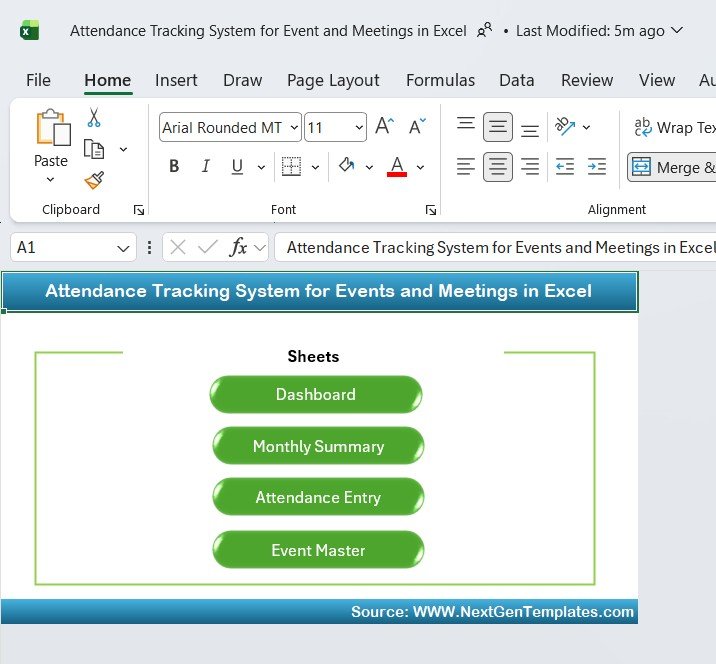
Home Navigation Sheet – Easy Sheet Access
The Home sheet acts as the starting interface of the workbook.
Features
Clean dashboard-style layout
Quick navigation buttons
Direct access to all sheets:
- Dashboard
- Monthly Summary
- Attendance Entry
- Event Master
Because navigation remains simple, users move between sheets easily without confusion.
Click to Buy Attendance Tracking System for Events and Meetings in Excel
Dashboard Sheet – Real-Time Attendance Overview
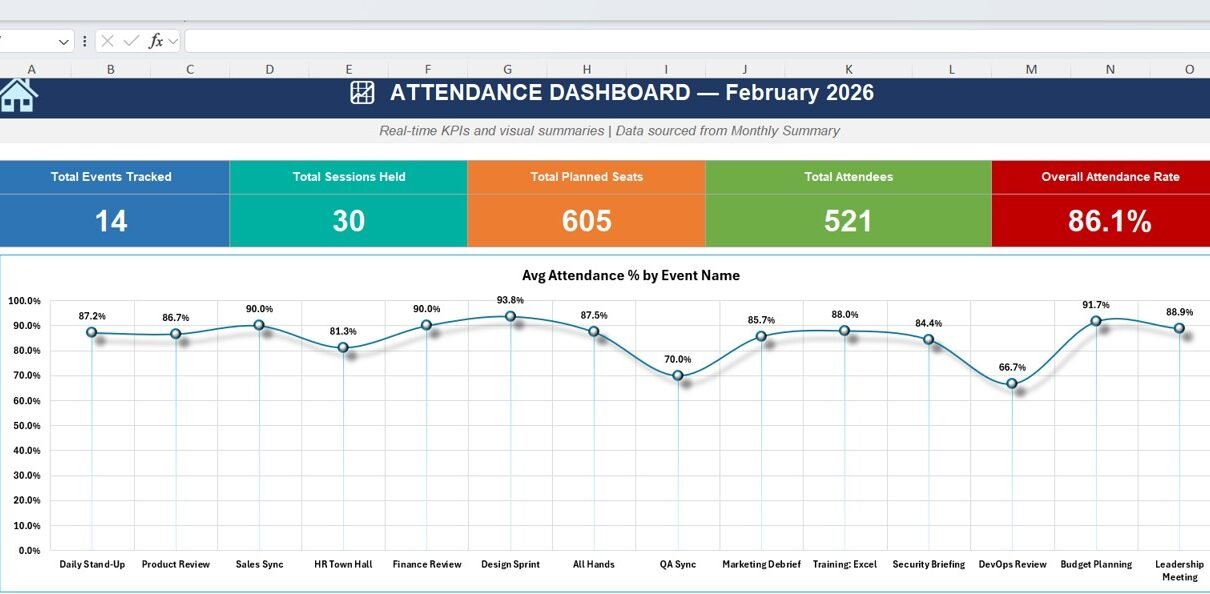
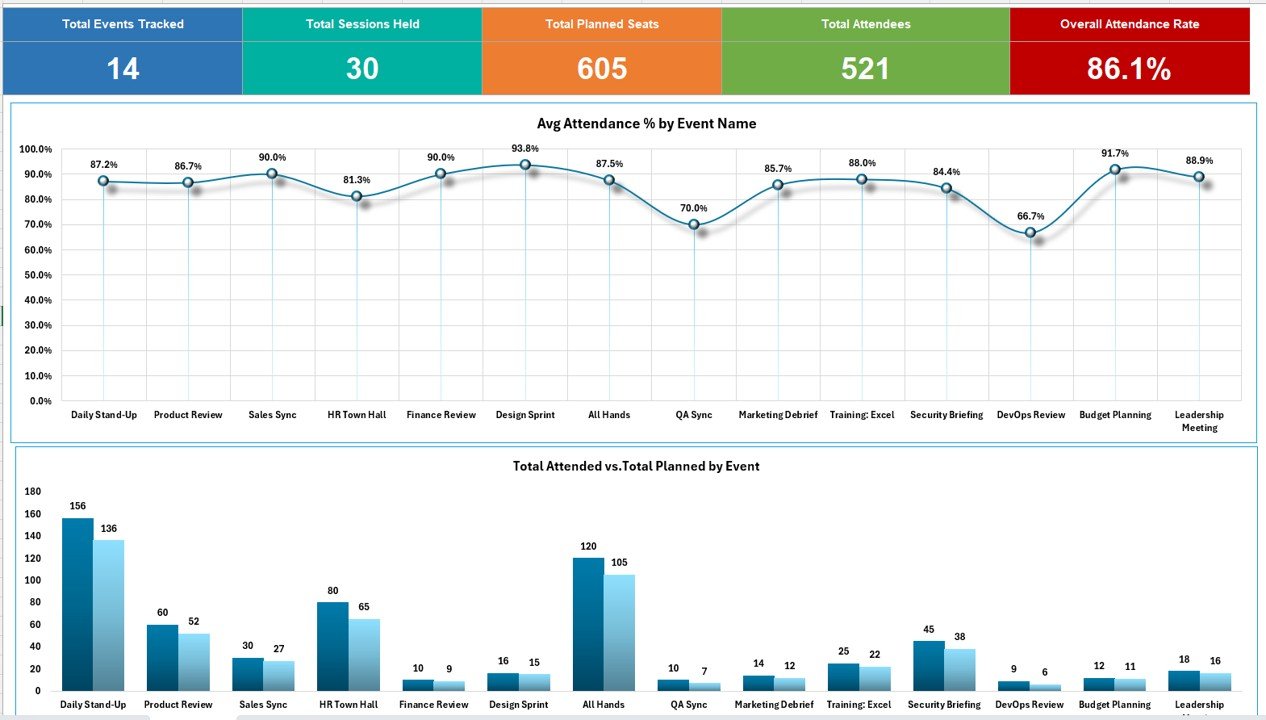
The Dashboard Sheet provides a visual summary of attendance performance.
KPI Cards Displayed
- Total Events Tracked
- Total Sessions Held
- Total Planned Seats
- Total Attendees
- Overall Attendance Rate
These KPIs instantly show participation performance.
Visual Analysis Included
- Average Attendance % by Event Name (Line Chart)
- Total Attended vs Planned by Event (Column Chart)
Because visuals update automatically, managers quickly identify high and low participation events.
Click to Buy Attendance Tracking System for Events and Meetings in Excel
Monthly Summary Sheet – Event-Level Performance Analysis
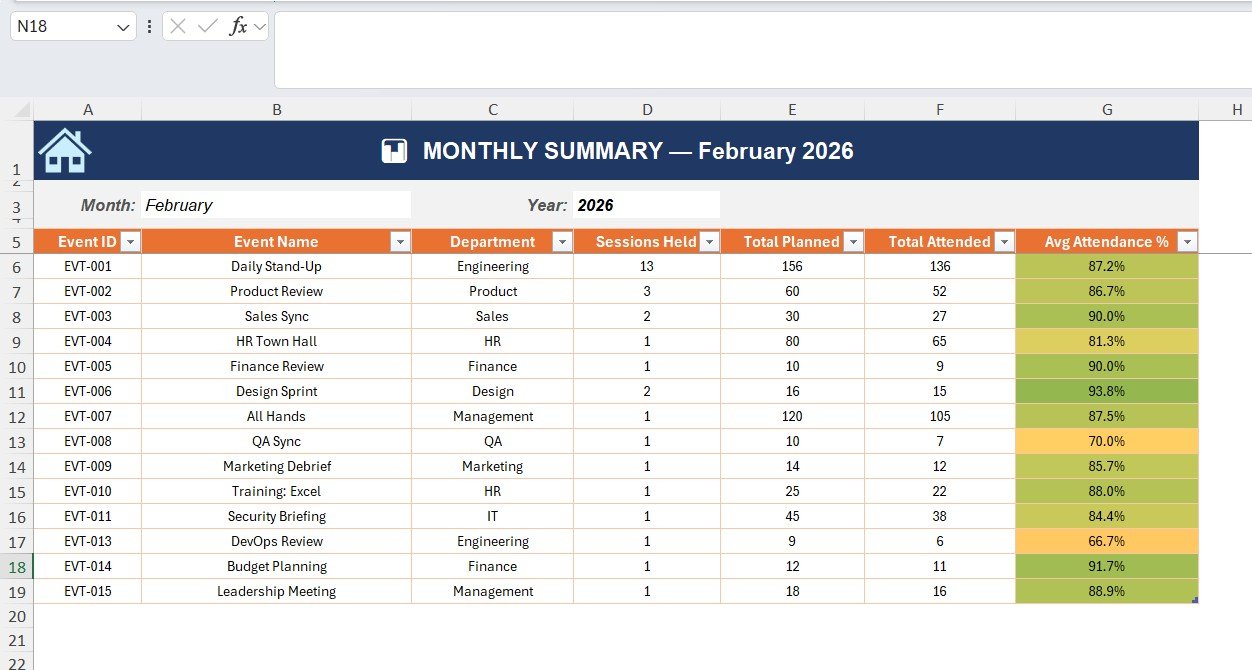
The Monthly Summary sheet aggregates attendance data for a selected month and year.
Information Displayed
- Event ID
- Event Name
- Department
- Sessions Held
- Total Planned Participants
- Total Attended
- Average Attendance %
Conditional formatting highlights performance automatically, helping users identify attendance issues immediately.
Click to Buy Attendance Tracking System for Events and Meetings in Excel
Attendance Entry Sheet – Daily Attendance Recording
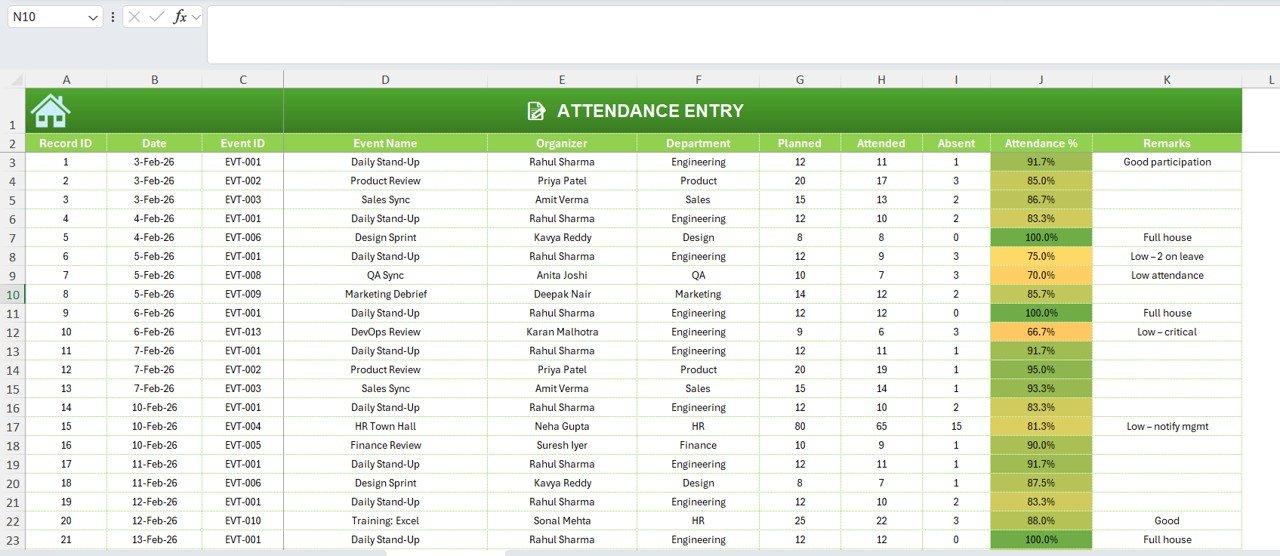
The Attendance Entry Sheet is where users record daily attendance.
Data Fields Included
- Record ID
- Date
- Event ID
- Event Name
- Organizer
- Department
- Planned Participants
- Attended
- Absent
- Attendance %
- Remarks
The system automatically calculates attendance percentage, reducing manual effort.
For example:
- Full attendance → highlighted green
- Low attendance → highlighted orange/red
Therefore, managers immediately notice participation problems.
Click to Buy Attendance Tracking System for Events and Meetings in Excel
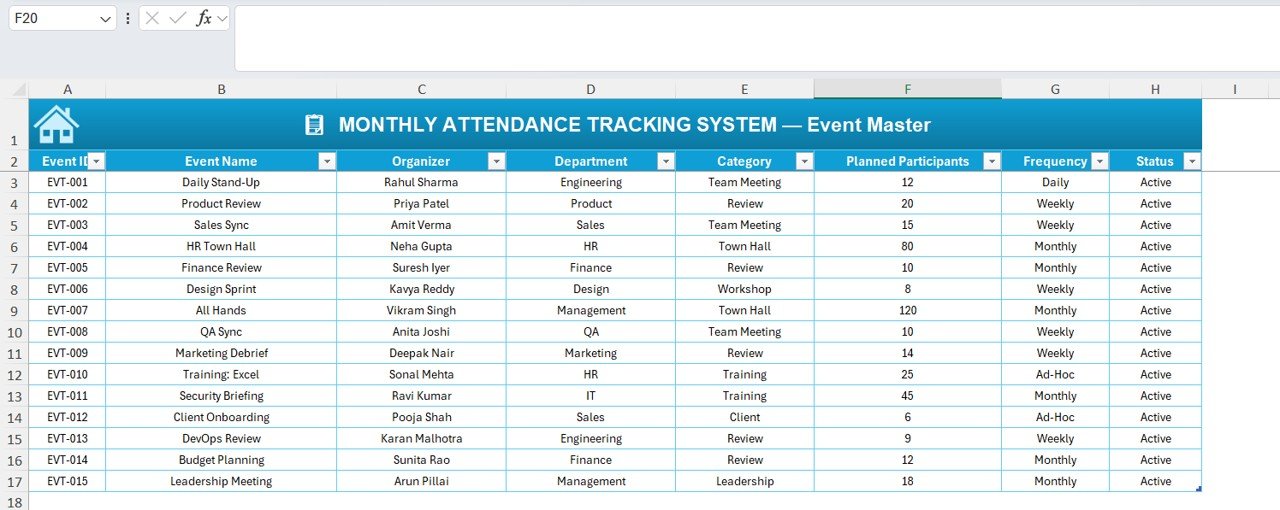
Event Master Sheet – Central Event Database
The Event Master Sheet stores all event details.
Data Maintained
- Event ID
- Event Name
- Organizer
- Department
- Category
- Planned Participants
- Frequency (Daily/Weekly/Monthly)
- Status
Because dropdowns pull data from this sheet, users avoid duplicate entries and maintain consistency.
Click to Buy Attendance Tracking System for Events and Meetings in Excel
Advantages of Attendance Tracking System for Events and Meetings in Excel
Centralized Attendance Management
All records stay organized in one workbook.
Automated Calculations
Excel formulas compute attendance instantly.
Real-Time Dashboard Insights
Managers monitor participation visually.
Improved Event Planning
Historical data improves future scheduling.
Reduced Manual Errors
Automation eliminates calculation mistakes.
Performance Transparency
Departments clearly see engagement levels.
Who Can Use This Attendance Tracking System?
This template works across industries.
Ideal Users
- Corporate Offices
- HR Departments
- Training Teams
- Educational Institutions
- Event Managers
- Project Teams
- Workshop Coordinators
Therefore, any organization conducting regular meetings benefits from this system.
Best Practices for the Attendance Tracking System
Click to Buy Attendance Tracking System for Events and Meetings in Excel
1. Maintain Accurate Event Master Data
Always update organizer and department information.
2. Record Attendance Daily
Avoid delayed entries to maintain accuracy.
3. Use Standard Naming Conventions
Consistent event names prevent duplication.
4. Review Dashboard Weekly
Regular monitoring improves participation.
5. Analyze Low Attendance Events
Identify root causes and improve engagement.
6. Backup Excel File Regularly
Protect organizational data.
7. Train Users on Data Entry
Proper usage ensures reliable analytics.
Why Excel Is Ideal for Attendance Tracking?
Excel remains a powerful business tool.
Key Benefits
- Easy customization
- No additional software cost
- Automated formulas
- Interactive dashboards
- Flexible reporting
Therefore, organizations implement attendance analytics quickly.
Conclusion
Click to Buy Attendance Tracking System for Events and Meetings in Excel
The Attendance Tracking System for Events and Meetings in Excel offers a practical and efficient solution for managing attendance records and analyzing participation performance. Instead of relying on manual tracking, organizations gain automated dashboards, structured summaries, and actionable insights.
Moreover, the system improves transparency, enhances planning, and saves reporting time. Because Excel remains accessible and customizable, businesses of all sizes can implement this solution immediately.
Ultimately, organizations that track attendance effectively improve engagement, productivity, and operational efficiency.
Frequently Asked Questions (FAQs)
What is an Attendance Tracking System in Excel?
It is a structured Excel template used to record attendance and automatically analyze participation performance.
Can beginners use this system?
Yes. The template uses simple Excel features and guided sheets.
Does the dashboard update automatically?
Yes. Once attendance data is entered, dashboards update automatically.
Can I customize events and departments?
Yes. You can modify the Event Master sheet anytime.
Is this suitable for corporate meetings?
Absolutely. It works perfectly for meetings, training sessions, and workshops.
How often should attendance data be updated?
You should update data daily for accurate reporting.
Can this system track multiple events?
Yes. The system supports unlimited events and sessions.
Visit our YouTube channel to learn step-by-step video tutorials
Watch the step-by-step video tutorial:
Click to Buy Attendance Tracking System for Events and Meetings in Excel