Introduction
The CrossFit Gym KPI Scorecard is an essential tool designed to help gym owners and managers monitor, analyze, and improve the performance of their fitness facilities. This ready-to-use scorecard template simplifies tracking key performance indicators (KPIs) that directly impact member satisfaction, operational efficiency, and overall gym success.
In this article, we explore the structure, features, and benefits of this comprehensive scorecard, which includes four interactive worksheets designed to deliver insightful performance data at a glance.
Key Features of CrossFit Gym KPI Scorecard
- Multi-Sheet Structure: Four dedicated worksheets for Scorecard, KPI Trends, Input Data, and KPI Definitions.
- Dynamic Dropdown Menus: Easily select the month and performance periods such as MTD (Month-to-Date) or YTD (Year-to-Date) for detailed analysis.
- Actual vs Target Comparison: Instantly compare actual KPI results against predefined targets to gauge performance.
- Visual Indicators: Color-coded status visuals and conditional formatting highlight areas of concern or success.
- KPI Trend Analysis: Track performance trends through interactive charts showing actual, target, and previous year (PY) data.
- Comprehensive KPI Information: Access KPI definitions, units, formulas, and groupings for clarity and consistency.
- Easy Data Entry: An input sheet designed for effortless updating of KPI data, keeping information current and reliable.
Dashboard Pages Explanation
1. Scorecard Sheet
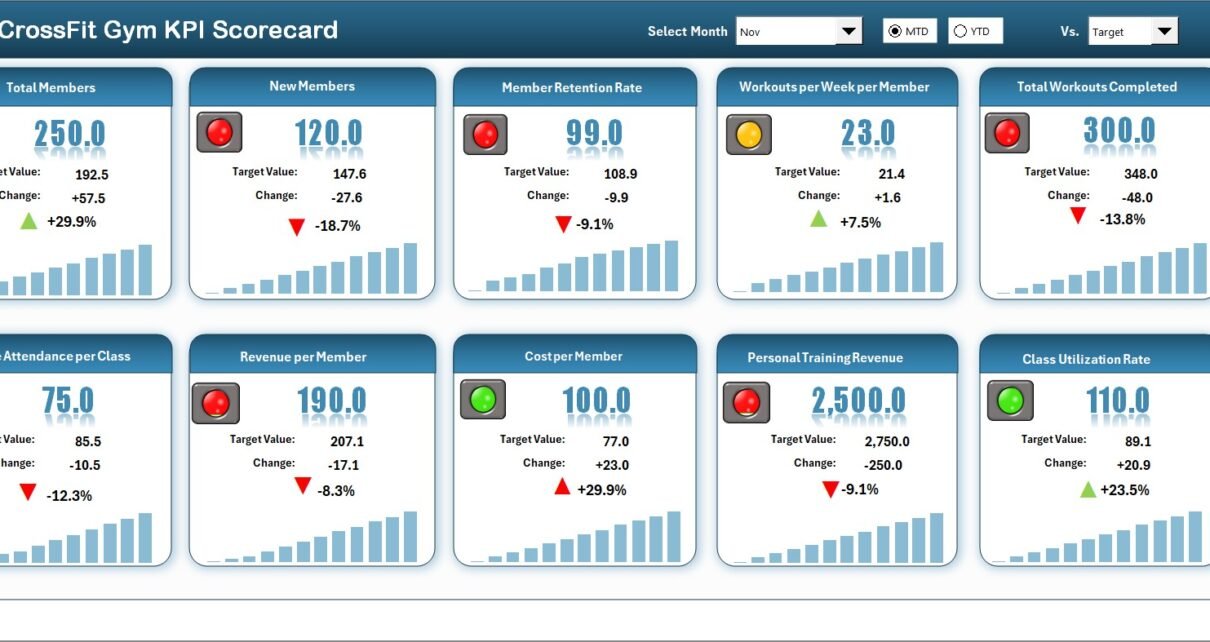
The Scorecard sheet serves as the primary interface for viewing KPI performance and insights.
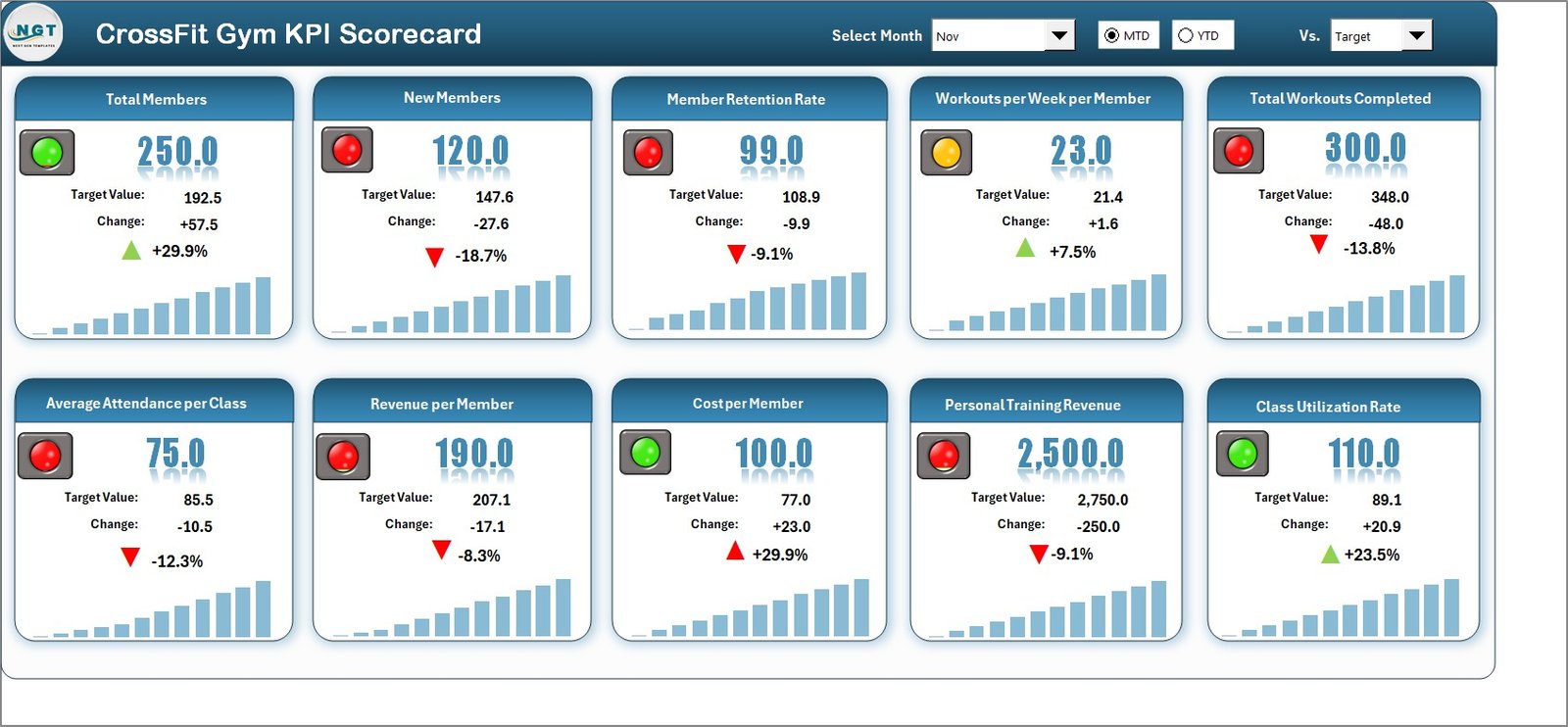 CrossFit Gym KPI Scorecard
Click to Buy CrossFit Gym KPI Scorecard in Excel
- Dropdown Menus: Select the desired month and choose between MTD or YTD analysis.
- Actual vs Target Values: View side-by-side comparisons for each KPI.
- Visual Indicators: Utilize color codes to quickly assess performance status.
- Comprehensive KPIs Overview: Analyze all relevant KPIs with detailed MTD and YTD comparisons.
2. KPI Trend Sheet
This sheet provides detailed trend analysis for individual KPIs.
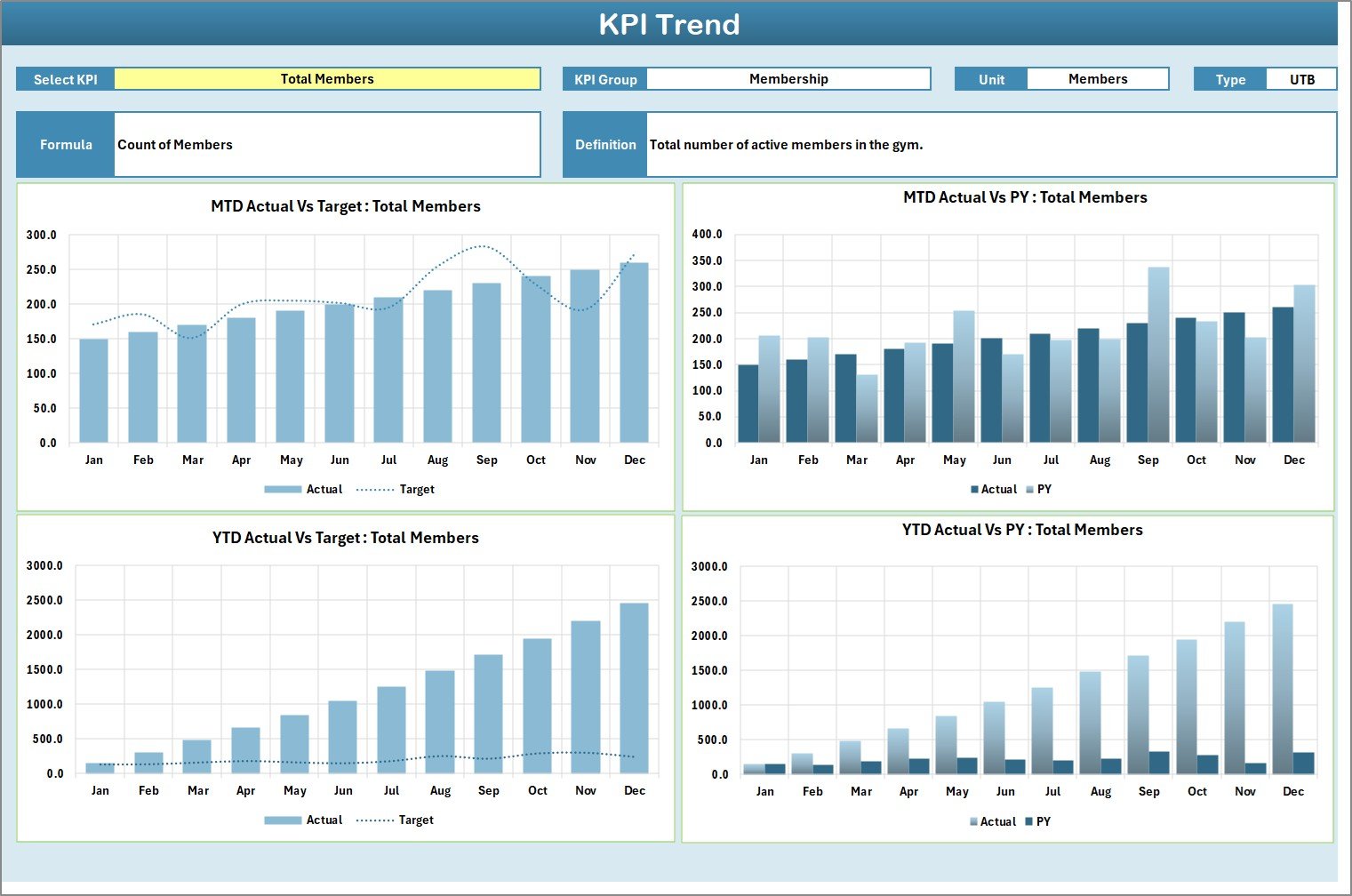 KPI Trend Sheet
Click to Buy CrossFit Gym KPI Scorecard in Excel
- KPI Selection: Choose a KPI from the dropdown in cell C3.
- KPI Details: View KPI group, unit, type (lower the better or upper the better), formula, and definition.
- Trend Charts: Visualize MTD and YTD trends of actual, target, and previous year’s performance.
3. Input Data Sheet
The Input Data sheet is the data entry hub for all KPI-related metrics.
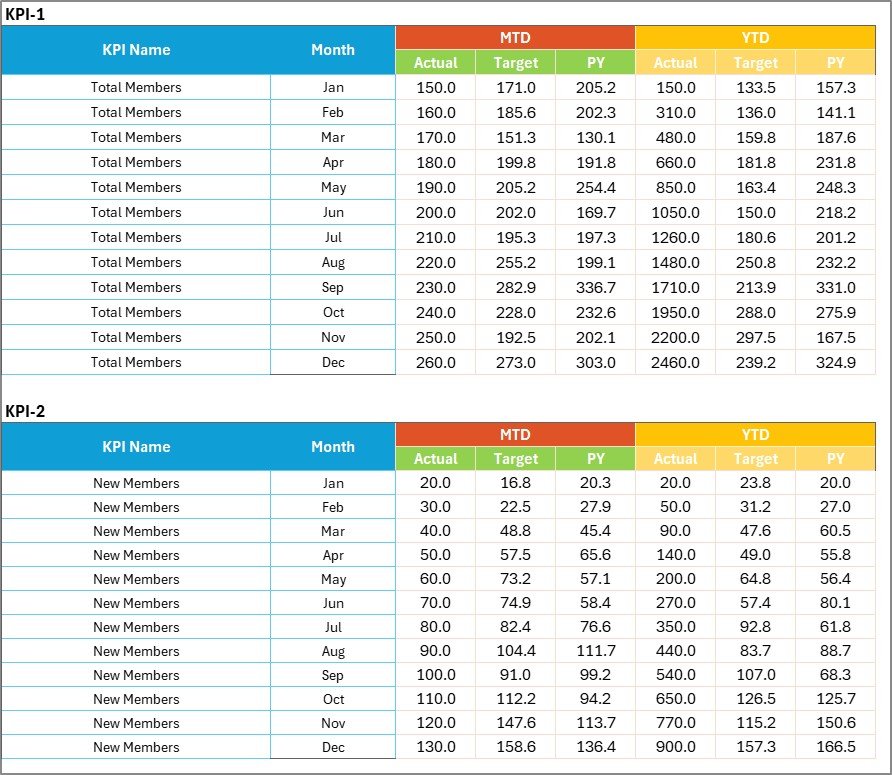 Input Data Sheet
- Data Entry: Enter actual values, targets, and other KPI metrics as they become available.
- Flexibility: Easily update data to ensure the scorecard remains accurate and timely.
4. KPI Definition Sheet
This sheet contains the master list of all KPIs with detailed descriptions.
 KPI Definition sheet tab
Click to Buy CrossFit Gym KPI Scorecard in Excel
- KPI Setup: Enter KPI names, their groupings, measurement units, formulas, and clear definitions.
- Consistency: Maintains clarity and standardization across all KPI tracking.
Advantages of CrossFit Gym KPI Scorecard
- Improved Decision Making: Offers precise data insights that support strategic gym improvements.
- Time Efficiency: Streamlines KPI monitoring, eliminating the need for multiple scattered reports.
- Customizable & Scalable: Adaptable template for gyms of various sizes and changing business needs.
- Enhanced Accountability: Clear tracking of targets versus actuals promotes responsibility among staff.
- Visual Clarity: Easy-to-understand charts and color-coded signals reduce data overwhelm.
Opportunities for Improvement
Click to Buy CrossFit Gym KPI Scorecard in Excel
- Integration with Other Software: Link KPI data with membership and billing systems for automatic updates.
- Mobile Access: Develop a mobile-friendly version to review KPIs on-the-go.
- Advanced Analytics: Incorporate predictive analytics and forecasting to proactively manage gym performance.
- Member Feedback KPI: Add KPIs related to member satisfaction surveys and retention rates.
Best Practices
- Regular Data Updates: Ensure timely input of all KPI data to keep reports accurate and actionable.
- Set Realistic Targets: Define achievable KPI targets based on historical data and growth goals.
- Review Scorecard Consistently: Make scorecard analysis a regular part of management meetings.
- Engage Your Team: Share KPI insights with trainers and staff to foster a culture of continuous improvement.
- Leverage Visual Insights: Use the color-coded visuals to focus on underperforming areas immediately.
FAQs
Click to Buy CrossFit Gym KPI Scorecard in Excel
What is the main purpose of the CrossFit Gym KPI Scorecard?
Its primary function is to help gym managers track, compare, and analyze key performance indicators to improve gym operations and member satisfaction.
Can I customize the KPI Scorecard for my specific gym needs?
Yes, the template is designed to be flexible so you can add or modify KPIs relevant to your business goals.
How often should I update the KPI data?
We recommend updating the KPI data at least monthly to maintain accurate and actionable insights.
Does the scorecard support trend analysis?
Yes, the KPI Trend sheet provides visual charts to track MTD and YTD performance trends.
Conclusion
Click to Buy CrossFit Gym KPI Scorecard in Excel
Implementing the CrossFit Gym KPI Scorecard empowers gym owners and managers with a powerful tool to track performance, identify growth opportunities, and drive success. Its comprehensive yet user-friendly design ensures that both operational and strategic insights are just a click away, helping your CrossFit gym stay competitive and member-focused.
Optimize your gym’s performance by adopting this ready-to-use KPI Scorecard template today and watch your operational efficiency and member engagement soar.
For further resources on Excel analytics and professional templates, visit the Microsoft Excel Support official site.
Visit our YouTube channel to watch the demo.
Click to Buy CrossFit Gym KPI Scorecard in Excel