Introduction
The Luxury Spa KPI Scorecard is an essential tool designed to help luxury spa managers and stakeholders track, analyze, and improve their key performance indicators (KPIs) efficiently. This ready-to-use scorecard template offers a comprehensive approach to performance monitoring, ensuring every aspect of spa operations is measured, evaluated, and enhanced to meet and exceed business goals.
Key Features of Luxury Spa KPI Scorecard
Click to Buy Luxury Spa KPI Scorecard in Excel
- Four Dynamic Worksheets: Organized to provide clear data entry, visualization, and KPI definitions.
- Interactive Scorecard Sheet: Use dropdown menus to select specific months, Month-to-Date (MTD), or Year-to-Date (YTD) for real-time performance analysis.
- Actual vs Target Comparison: Quickly assess how your spa is performing against established targets for each KPI.
- Visual Performance Indicators: Color-coded indicators and conditional formatting help identify areas excelling or needing attention.
- Comprehensive KPI Details: Displays detailed metrics, including MTD and YTD comparisons, for a holistic KPI overview.
Dashboard Pages Explanation
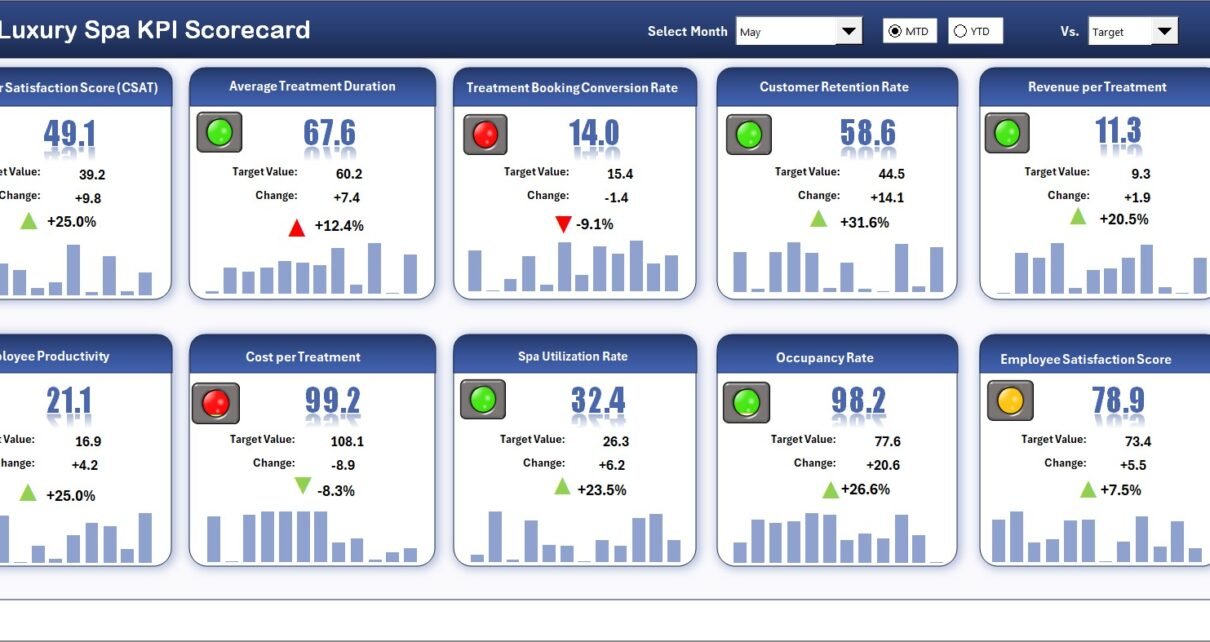
1. Scorecard Sheet
The main interface for a snapshot of your spa’s KPI performance, this sheet features:
- Dropdown Menus: Select the month and view MTD or YTD results to analyze trends over time.
- Actual vs Target Values: Immediate visibility of performance gaps or achievements for each KPI.
- Visual Indicators: Conditional formatting highlights good, average, or poor performances with colors.
- Comprehensive KPI Overview: Access all relevant information about individual KPIs along with performance trends.
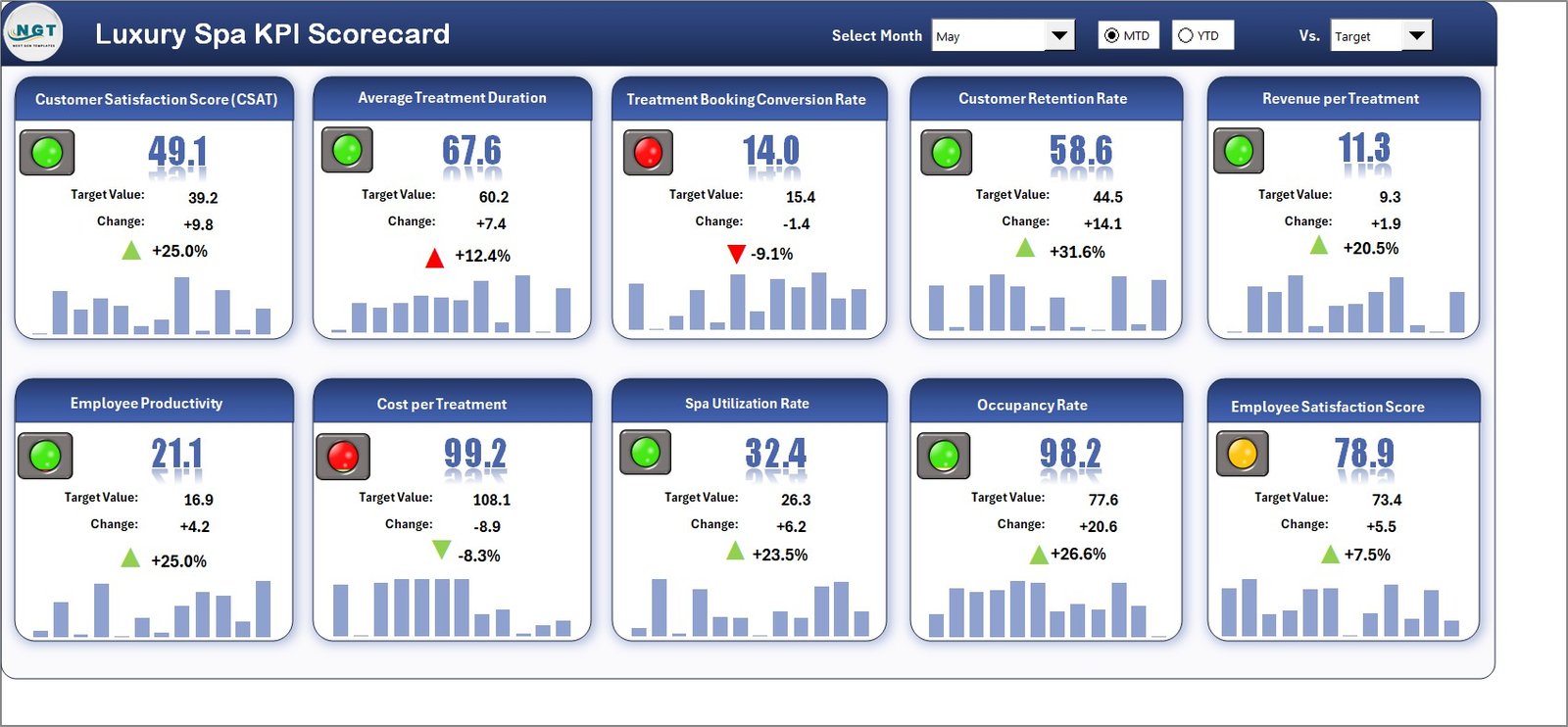 Luxury Spa KPI Scorecard
2. KPI Trend Sheet
This sheet enables a detailed trend analysis of individual KPIs by selecting the KPI name from the dropdown in cell C3. Featured elements include:
- KPI Group: Classification of each KPI for better organization.
- Unit of KPI: Measurement units, ensuring clarity in reporting.
- Type of KPI: Indicator if a lower or upper value is better for the spa (e.g., Lower the Better or Upper the Better).
- Formula & Definition: Clear calculation methods and KPI meaning to maintain consistency.
- Trend Charts: Visual MTD and YTD comparison charts for Actual, Target, and Previous Year (PY) data.
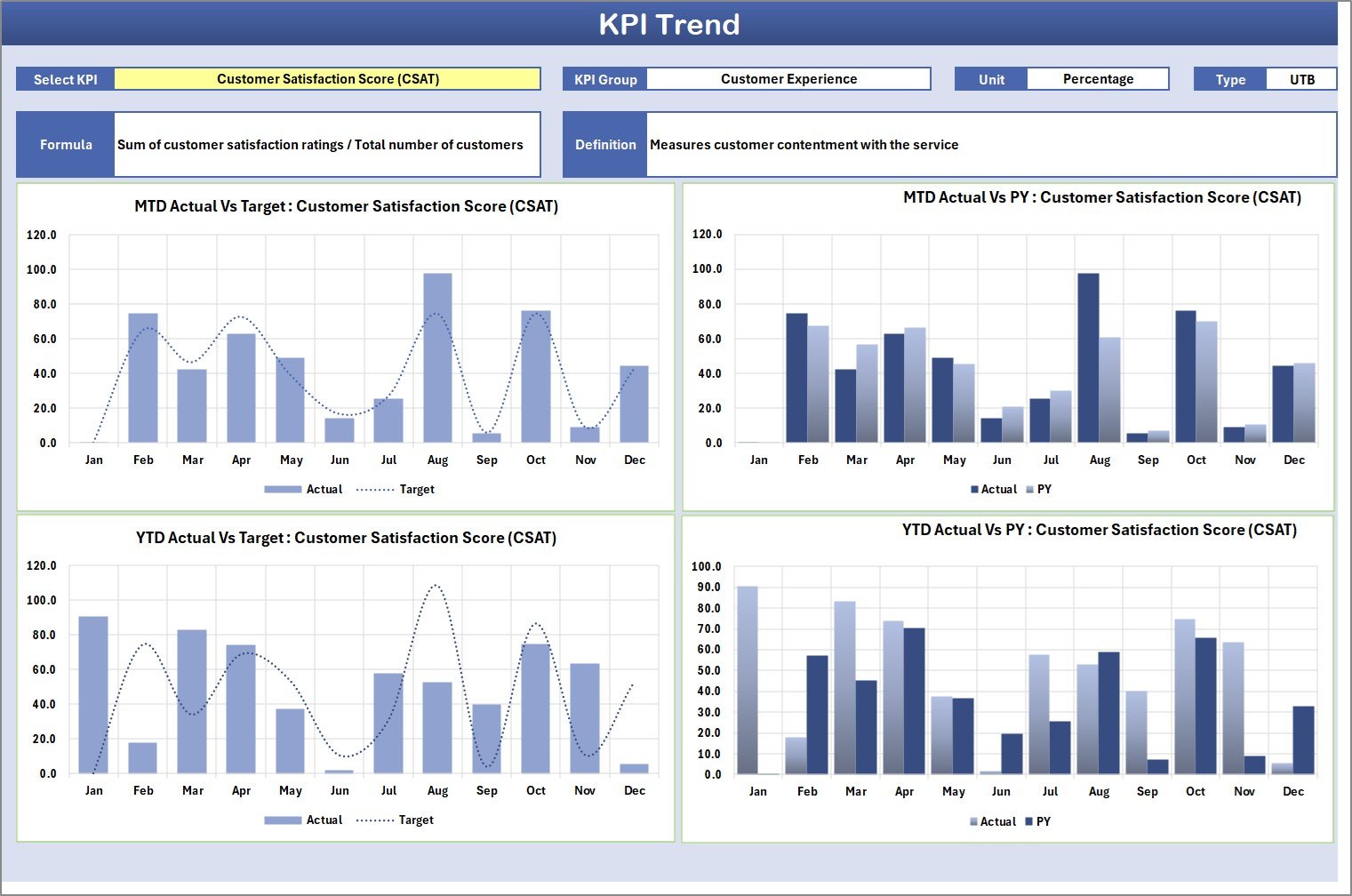 KPI Trend Sheet
3. Input Data Sheet
This is the backbone where you input all data related to KPIs, helping keep your scorecard updated and accurate. Features include:
- Data Entry: Easily input actual activity values, target benchmarks, and other critical metrics.
- Flexibility: Quickly update data as new monthly or yearly numbers become available.
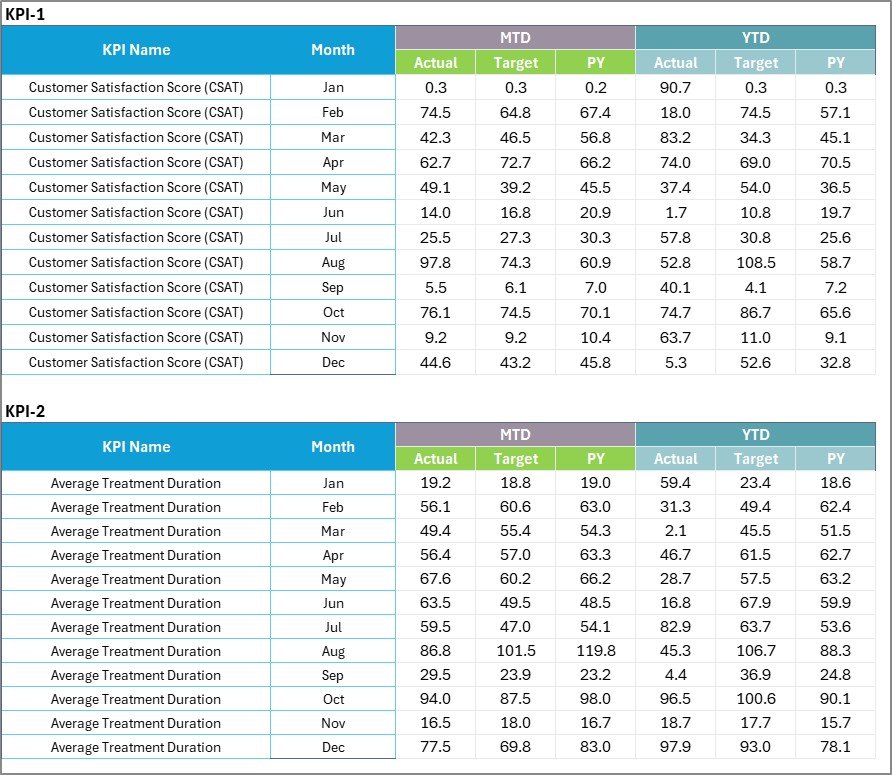 Input Data Sheet
4. KPI Definition Sheet Tab
This sheet provides detailed background on each KPI, aiding understanding and consistency. Key entries include:
- KPI Name: The title of the indicator being tracked.
- KPI Group: Categorization to group similar KPIs together.
- Unit: The measurement unit for each KPI.
- Formula: Exact computation method for the KPI.
- KPI Definition: Descriptive explanation ensuring all users interpret KPIs uniformly.
 KPI Definition sheet tab
Advantages of Luxury Spa KPI Scorecard
- Real-Time Monitoring: Quickly identify strengths and weaknesses immediately.
- Comprehensive Analysis: Combines data input, visualization, and KPI definitions in one solution.
- Improved Decision Making: Insights from actual versus target comparisons help prioritize initiatives.
- Customizable & User-Friendly: Easy dropdowns and editable sheets fit specific spa operational needs.
- Enhanced Communication: Clear visuals and definitions improve team understanding and engagement.
Opportunities for Improvement
- Incorporate automated data imports to reduce manual entry efforts.
- Add predictive analytics features to forecast future KPI trends.
- Integrate customer feedback metrics for a more holistic spa performance view.
- Expand dashboard mobile compatibility for on-the-go monitoring.
Best Practices
Click to Buy Luxury Spa KPI Scorecard in Excel
- Regularly update the Input Data Sheet to ensure accuracy.
- Use the KPI Definition sheet as a training tool for new team members.
- Leverage trend analysis to pinpoint long-term improvements.
- Review actual versus target performance monthly for timely adjustments.
- Encourage collaboration by sharing the scorecard insights with relevant teams.
FAQs
What is the purpose of the Luxury Spa KPI Scorecard?
It helps track, analyze, and improve luxury spa performance by monitoring critical KPIs through a structured and visual approach.
Can the template be customized?
Yes, it is designed for flexibility so you can update KPIs, targets, and formulas according to your spa’s requirements.
How often should the data be updated?
Ideally, data should be updated monthly or more frequently to reflect the latest performance and trends.
Is prior Excel knowledge required?
Basic Excel knowledge is helpful, but the template’s user-friendly design allows even beginners to navigate and use it effectively.
Conclusion
Click to Buy Luxury Spa KPI Scorecard in Excel
The Luxury Spa KPI Scorecard is an invaluable asset for spa managers aiming to maintain high standards and optimize operations. By combining clear data inputs, comprehensive KPI definitions, and visual trend analyses, it supports smarter decision-making and continuous improvement. Implementing this tool can help luxury spas deliver exceptional service efficiently and maintain a competitive edge.
For additional resources and tutorials on how to use KPI scorecards effectively, consider exploring Microsoft Excel support.
Visit our YouTube channel to watch the demo: Youtube.com/@NextGenTemplates
Click to Buy Luxury Spa KPI Scorecard in Excel