Staying organized throughout the day is often the difference between productivity and stress. A daily routine keeps you focused, ensures you don’t miss important tasks, and helps balance both work and personal life. However, without a structured system, daily routines can quickly fall apart.
That’s where a Daily Routine Schedule Checklist Template in Excel comes in. This simple yet powerful tool allows you to plan, track, and complete your tasks with ease. In this guide, we’ll explore what this template is, why it matters, and how to use it effectively. We’ll also look at its advantages, best practices, and opportunities for improvement.
What Is a Daily Routine Schedule Checklist?
A daily routine checklist is a structured list of tasks and activities you plan to complete within a day. Unlike a simple to-do list, a checklist adds more details, such as deadlines, responsibilities, and progress tracking. It’s a roadmap that keeps you on track and helps you prioritize.
Daily routine checklists are widely used for:
- Personal productivity.
- Work-related planning.
- Family routines.
- Fitness and health goals.
- Study schedules.
Why Do You Need a Daily Routine Schedule Checklist?
Click to Buy Daily Routine Schedule Checklist Template in Excel
Many people try to rely on memory to manage their day, but that often leads to missed tasks and stress. A daily routine checklist ensures structure and accountability.
Here are some benefits of maintaining one:
- Better organization – You see the entire day’s plan at a glance.
- Reduced stress – Writing things down clears mental clutter.
- Higher productivity – You can track completed vs. pending tasks.
- Improved focus – Clear priorities help you avoid distractions.
- Personal growth – Over time, you build healthy daily habits.
Daily Routine Schedule Checklist Template in Excel
Excel is one of the most flexible tools for creating a daily routine checklist. Our ready-to-use Daily Routine Schedule Checklist Template in Excel is designed to make your life easier.
Key Features of the Template
The template contains two worksheets:
- Main Checklist Sheet – The central sheet where you capture and track daily activities.
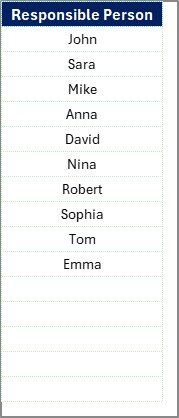
- List Sheet – A support sheet that stores unique responsible persons, used for dropdown menus.
The Top Section of the Template
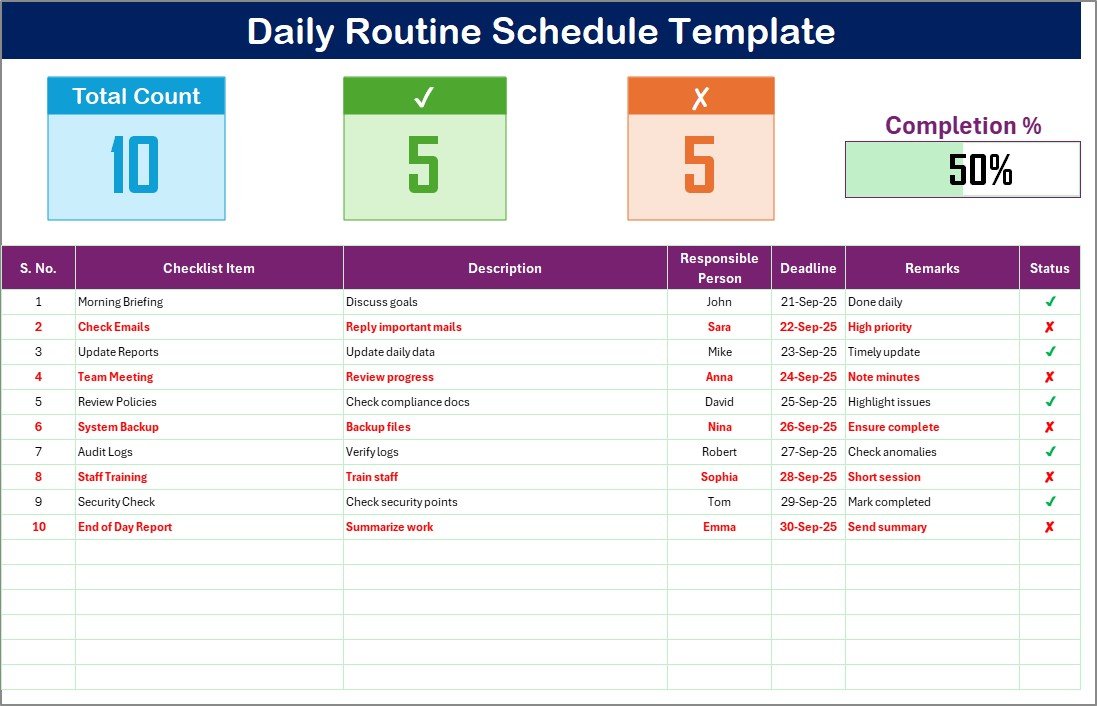
At the top of the main sheet, you will see three important summary cards:
- Total Count – The total number of tasks listed.
- Completed Count – The number of tasks marked as finished.
- Pending Count – The number of tasks still open.
- Progress Bar – A visual tracker that shows the percentage of tasks completed.
This section gives a quick overview of your daily performance.
The Checklist Table
The main section of the template is the checklist table. This is where you record your tasks. The table includes the following columns:
- Serial No. – Task number for easy reference.
- Checklist Item – The task or activity name.
- Description – A short note explaining the task.
- Responsible Person – The person accountable for the task (useful for teams).
- Deadline – The time or date the task must be finished.
- Remarks – Updates or comments.
- Status – Mark ✔ if complete, ✘ if pending.
This format keeps everything structured and easy to update.
Click to Buy Daily Routine Schedule Checklist Template in Excel
List Sheet
The list sheet tab captures a unique list of responsible persons. It powers the dropdown feature in the “Responsible Person” column. This ensures consistent data entry and saves time.
Examples of Daily Routine Checklist Items
Here are a few sample tasks you might include:
- Morning exercise.
- Eat a healthy breakfast.
- Review emails.
- Attend team meeting.
- Work on project tasks.
- Client follow-up calls.
- Take lunch break.
- Update progress reports.
- Evening walk.
- Family time.
- Read a book.
Click to Buy Daily Routine Schedule Checklist Template in Excel
Advantages of Using a Daily Routine Schedule Checklist Template
Using this Excel-based checklist offers several benefits:
- Keeps You Organized :You have a clear view of your daily tasks, deadlines, and progress.
- Enhances Productivity:You can focus on completing tasks instead of figuring out what to do next.
- Improves Accountability:If used in a team, it shows who is responsible for each task.
- Saves Time: You don’t need to create a new plan from scratch every day.
- Encaurages Good Habits: Tracking your routine helps you build consistency.
Opportunity for Improvement in Daily Routine Checklists
Even with a structured template, there are ways to improve:
- Add automation – Use formulas or macros to update progress automatically.
- Set reminders – Integrate with calendar tools for alerts.
- Prioritize tasks – Include priority levels (high, medium, low).
- Mobile access – Create versions that work on mobile for on-the-go use.
- Review performance – Analyze weekly or monthly trends.
Best Practices for Daily Routine Management
Click to Buy Daily Routine Schedule Checklist Template in Excel
To maximize results, follow these best practices:
- Plan Ahead: Fill out the checklist the night before or early in the morning.
- Be Realistic: Don’t overload the list. Keep it achievable.
- Update Regularly: Mark completed tasks immediately to stay motivated.
- Prioritize Tasks: Tackle high-priority or time-sensitive tasks first.
- Reflect and Adjust: At the end of the day, review what worked and what didn’t.
How to Use the Daily Routine Schedule Checklist Template in Excel
Here’s a simple guide to getting started:
- Download the template and open it in Excel
- Enter your tasks in the checklist table.
- Assign responsibilities if working in a team.
- Set deadlines for each task.
- Update the status as you complete tasks.
- Review the progress bar to see your daily performance.
Conclusion
Click to Buy Daily Routine Schedule Checklist Template in Excel
A Daily Routine Schedule Checklist Template in Excel is a practical tool for anyone who wants to stay organized and productive. With features like a progress bar, summary cards, and dropdown lists, it simplifies daily planning.
By following best practices, identifying areas of improvement, and using the template consistently, you can achieve more in less time while building healthier daily habits.
Frequently Asked Questions (FAQs)
- What is a Daily Routine Schedule Checklist Template in Excel?
It is an Excel-based planner that helps you organize and track your daily tasks.
- Can I customize the template?
Yes, you can add new tasks, change columns, and adjust formatting.
- Is this template useful for teams?
Absolutely. Teams can assign responsibilities and track progress collectively.
- How does the progress bar work?
The progress bar calculates the percentage of tasks marked as completed.
- Should I use the checklist daily?
Yes. Using it daily builds consistency and improves productivity over time.
- Can this checklist improve work-life balance?
Yes. By scheduling both work and personal activities, you ensure a healthier routine.
Visit our YouTube channel to learn step-by-step video tutorials
Click to Buy Daily Routine Schedule Checklist Template in Excel