New: NextGenTemplates Academy - video courses on Excel formulas with AI and Pivot Tables & dashboards. Early-bird: 20% off with code EARLYBIRD20 - first 20 orders only. See the courses →
  • Learn Excel (Free Course)
    • 1. Shortcut Keys
    • 2. Fill & Flash Fill
    • 3. Find & Replace
    • 4. Sort & Filter
    • 5. Formulas & Functions
    • 6. Data Validation
    • 7. Conditional Formatting
    • 8. Basic Charts
    • 9. Advanced Charts
    • 10. Pivot Tables
    • 11. Excel Dashboards
    • 12. VBA Course
    • 13. Excel Formulas with AI
  • Templates
  • Tutorials
    • Charts and Visualization
    • VBA
    • Excel Tips and Tricks
    • Excel Dashboards
    • Power Pivot & DAX
  • Power BI
  • Template Store
    • Ready to Use Templates
  • Courses
  • Academy
    • Excel + AI Mastery: 100 Formulas
    • Excel Pivot Tables & Dashboards
  • About Us
  • Contact Us

PK: An Excel Expert

Transforming Data into Decisions

Tag: Excel security

Templates

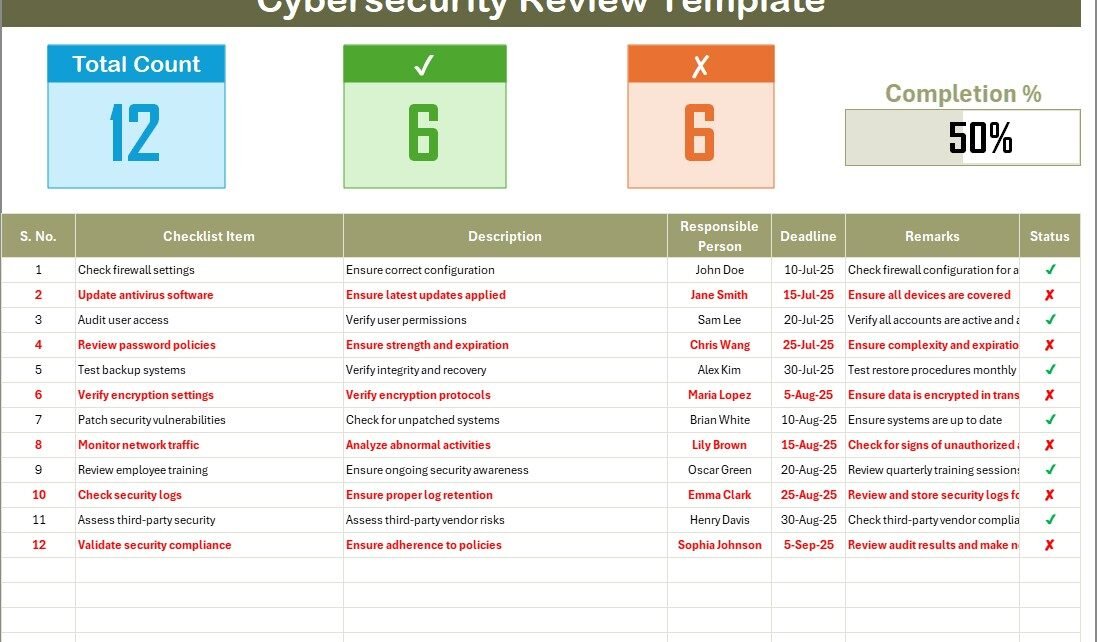
Cybersecurity Review Checklist in Excel

July 5, 2025July 5, 2025 PKComments Off on Cybersecurity Review Checklist in Excel
Cybersecurity has become a critical part of any organization’s strategy. With increasing threats from hackers and data breaches, it is essential for businesses to ensure their security measures are effective.
Read More
Enable Macros in Excel VBA
VBA

4 Easy ways to Enable Macros in Excel VBA

February 17, 2025October 10, 2026 PKComments Off on 4 Easy ways to Enable Macros in Excel VBA
Are you tired of manually repeating the same tasks in Excel? Macros can automate your workflow and save you time! But since macros can pose security risks, Excel disables them
Read More
Hide Your Formula in Excel-1
Excel Tips and Tricks

Hide your Excel Formula with this trick

December 28, 2023October 10, 2026 PKComments Off on Hide your Excel Formula with this trick
Introduction Are you looking to keep your Excel formulas confidential? Our latest video, "Hide your Excel Formula with this Trick," has got you covered. In this blog post, we'll expand
Read More
  • Learn Excel (Free Course)
    • 1. Shortcut Keys
    • 2. Fill & Flash Fill
    • 3. Find & Replace
    • 4. Sort & Filter
    • 5. Formulas & Functions
    • 6. Data Validation
    • 7. Conditional Formatting
    • 8. Basic Charts
    • 9. Advanced Charts
    • 10. Pivot Tables
    • 11. Excel Dashboards
    • 12. VBA Course
    • 13. Excel Formulas with AI
  • Templates
  • Tutorials
    • Charts and Visualization
    • VBA
    • Excel Tips and Tricks
    • Excel Dashboards
    • Power Pivot & DAX
  • Power BI
  • Template Store
    • Ready to Use Templates
  • Courses
  • Academy
    • Excel + AI Mastery: 100 Formulas
    • Excel Pivot Tables & Dashboards
  • About Us
  • Contact Us
Copyright © 2023 PK-AnExcelExpert.com - Privacy Policy