Healthcare research moves fast. New experiments begin every week. Teams run multiple clinical studies at the same time. Stakeholders expect constant updates and seamless coordination. Because of this, Healthcare R&D departments need a smart way to plan work, track activity, and manage research timelines. A Healthcare R&D Digital Transformation Calendar in Excel helps you do all this in one structured, easy-to-use solution.
This detailed guide explains how the calendar works, why it helps Research & Development teams, what features it includes, and how you can use it every day. You will explore each worksheet, learn the workflow, and see the advantages of digital transformation in research planning.
Click to buy Healthcare R&D Digital Transformation Calendar in Excel
What Is a Healthcare R&D Digital Transformation Calendar in Excel?
A Healthcare R&D Digital Transformation Calendar in Excel is a ready-to-use planning tool that helps research teams schedule projects, track milestones, record events, and manage daily activities. It brings structure to complex research workflows. You select a year, choose a month, add events, and track every experiment on a clear visual calendar.
Healthcare R&D departments use this calendar for:
- Experiment planning
- Clinical trial timelines
- Regulatory submission milestones
- Lab equipment schedules
- Team availability
- Research reviews
- Training events
- Compliance reminders
- Facility maintenance dates
The template works like a full digital planner inside Excel. Because everything updates automatically, you can manage your entire research year without confusion.
Why Do Healthcare R&D Teams Need This Digital Calendar?
Healthcare R&D runs hundreds of tasks each month. Researchers coordinate across labs, departments, and external partners. Work often overlaps, and delays in one phase may affect the entire project.
This digital calendar helps teams stay coordinated because:
- It organizes schedules in a single place.
- It updates everything automatically.
- It shows research activities in annual, monthly, and daily formats.
- It reduces confusion between teams.
- It highlights important research milestones.
- It offers quick event entry features.
- It supports flexible planning and theme customization.
Because of these benefits, R&D professionals use this calendar to stay aligned and avoid delays.
Inside the Healthcare R&D Digital Transformation Calendar: Sheet-by-Sheet Guide
This Excel template includes five worksheets, and each page supports a different planning need. You can use the buttons on the Home Sheet to move to any page instantly.
Let’s explore each sheet in detail.
Home Sheet – Your Navigation Center
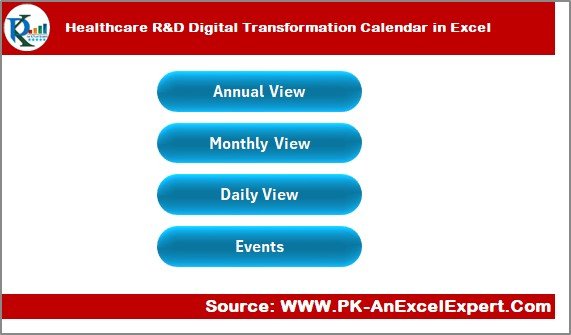
The Home Sheet works as the main menu of the workbook. You can quickly move to any section by clicking the buttons. The clean layout saves time and improves navigation.
The Home Sheet includes these four buttons:
- Annual View
- Monthly View
- Daily View
- Events
Because every button links to a dedicated sheet, you avoid scrolling through multiple pages. The design also helps new users understand the template within seconds.
Click to buy Healthcare R&D Digital Transformation Calendar in Excel
Annual View Sheet – Full-Year Research Planning
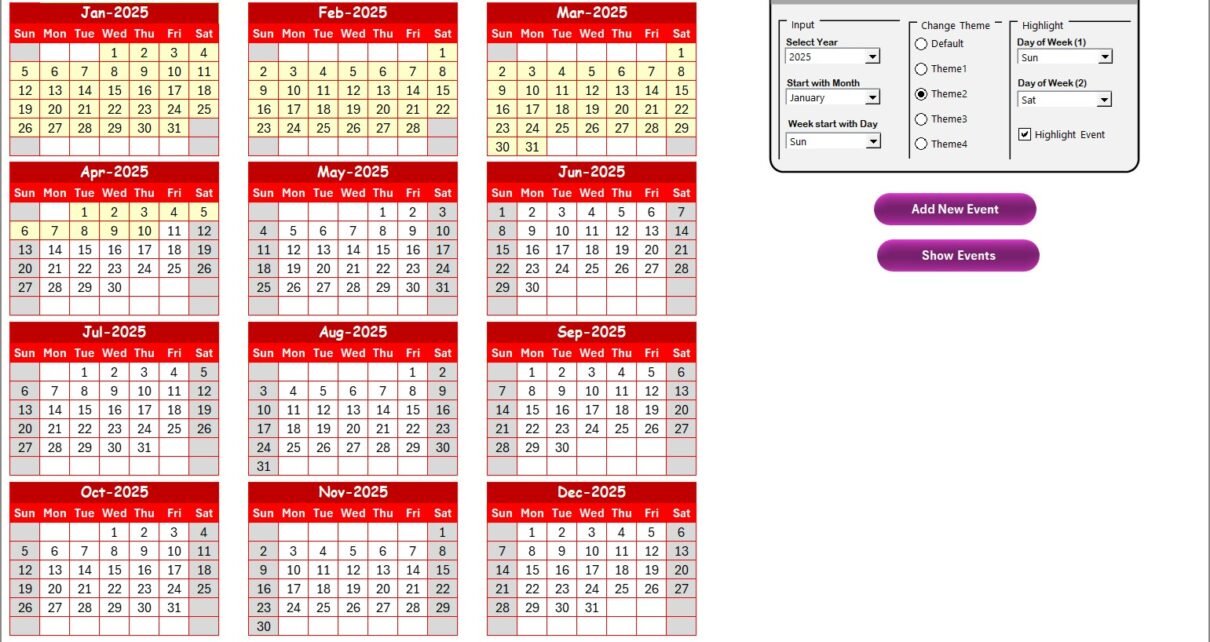
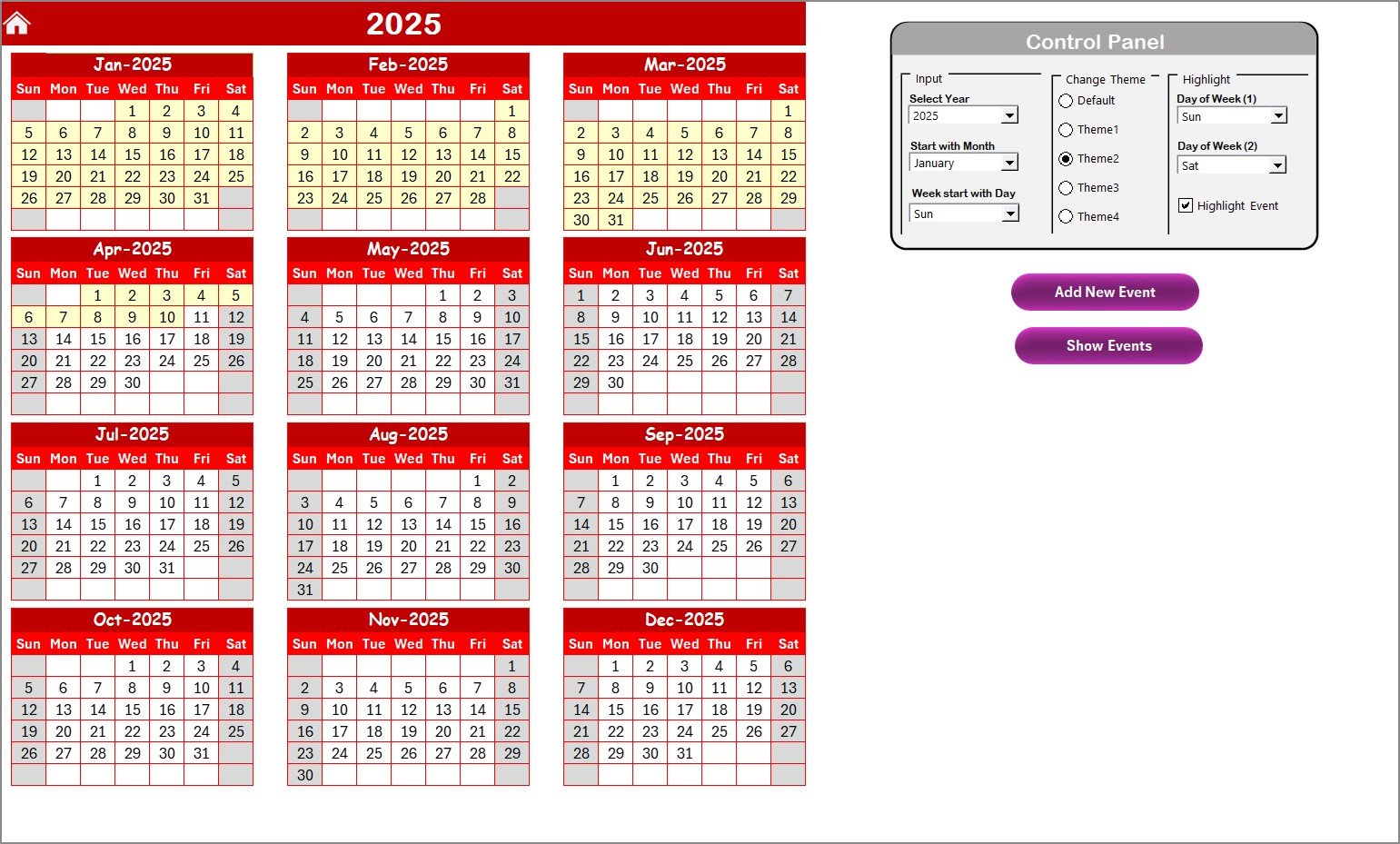
The Annual View Sheet shows all 12 months on a single page. It is perfect for long-term planning, major milestones, and yearly research cycles.
What You See on This Sheet
- Full 12-month calendar
- Clean layout
- Color-coded highlights
- Auto-updated dates
- Event markers
- Theme options
This sheet helps you monitor the entire R&D year at a glance. You can plan major events like:
- Research phases
- Clinical trials
- Annual reviews
- Scientific conferences
- Product development cycles
- Regulatory compliance deadlines
Because the sheet updates based on your selected year, you can reuse the template every year.
Click to buy Healthcare R&D Digital Transformation Calendar in Excel
Annual View Control Panel Explained
The Control Panel on this sheet gives you several customization options. It includes three main groups:
- Input Group
You control the behavior of the calendar from this section:
- Select the Year
- Change the Starting Month
- Change the Starting Day of the Week
These settings help you follow your regional or internal calendar structure. Healthcare teams in different countries can adjust the starting day to match their standard practices.
- Change Theme Group
You can choose from five different color themes. The theme applies instantly across the entire workbook. This feature helps you match your department’s branding or personal visual style.
- Highlight Group
Highlighting helps you emphasize special weekdays or non-working days.
You can highlight:
- Day of Week (1)
- Day of Week (2)
- Event Days
For example, you may want to highlight weekends for clinical trial monitoring or lab shutdown days. When you check Highlight Events, the calendar marks event dates in yellow.
Event Buttons in Annual View
You get two event-related buttons:
- Add New Event
- Show Event
Add New Event
Select any date → Click the button → Fill the form → Submit
The event is added instantly.
Show Event
Select a date → Click the button → View all events for that date.
Because everything works through simple forms, anyone can add or check events without confusion.
Monthly View Sheet – Detailed Monthly Planning
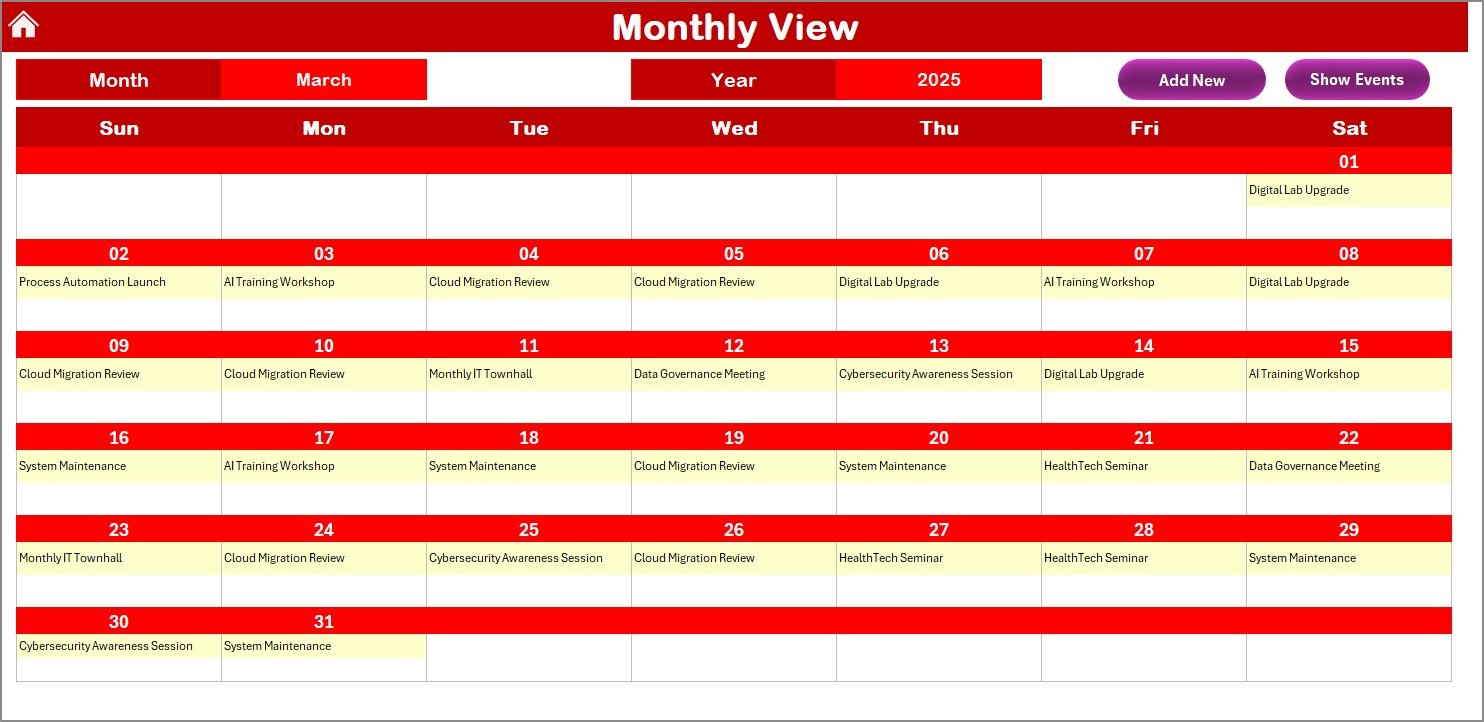
The Monthly View Sheet shows a single month with detailed layout. You can choose the month and year, and Excel updates the calendar automatically.
This sheet is ideal for:
- Daily lab schedules
- Weekly plans
- Multi-day studies
- Short-term research programs
- Doctor review cycles
You can see one event on each date. If more than one event exists, the cell shows “more than 1…” as an indicator.
Buttons on the Monthly View Sheet
- Add New Event
- Show Event
Both buttons work exactly like the ones in the Annual View Sheet. This keeps the user experience consistent.
Because you can select dates directly from the monthly calendar, adding events becomes very simple.
Click to buy Healthcare R&D Digital Transformation Calendar in Excel
Daily View Sheet – Event List for a Date Range
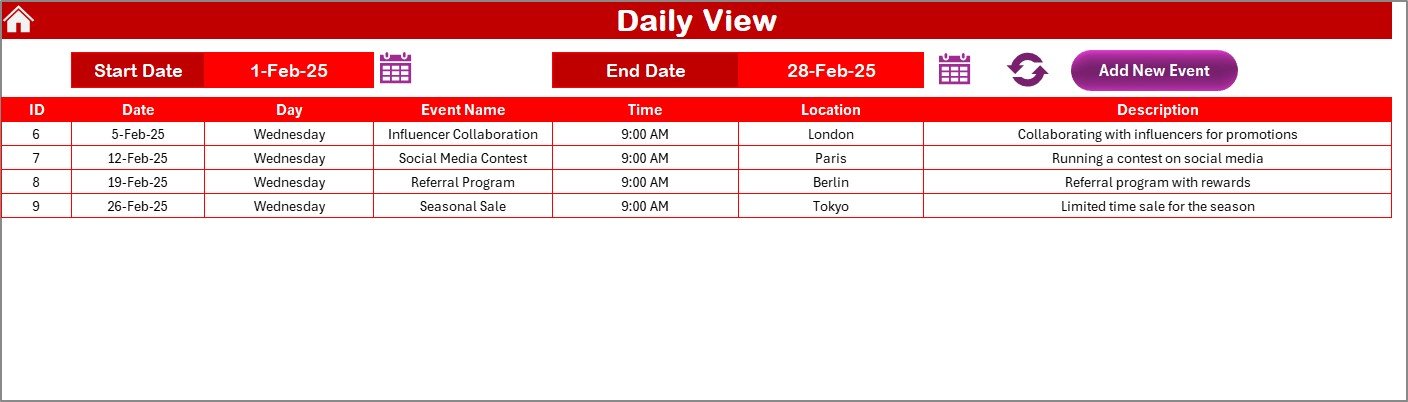
The Daily View Sheet gives you a clear, list-style view of all events within a selected date range. You select the Start Date and End Date, then click Refresh to see all event details.
This view helps Healthcare R&D teams track:
- Experiments
- Research tasks
- Review meetings
- Training sessions
- Facility usage
- Experiment timelines
- Clinical trial activities
Key Features of the Daily View
- Date range input
- Calendar icon for easy date selection
- Refresh button
- Event table view
- Add New Event button
Because the sheet lists every event clearly, you can easily filter or analyze daily workloads.
Click to buy Healthcare R&D Digital Transformation Calendar in Excel
Events Sheet – The Data Engine of the Calendar
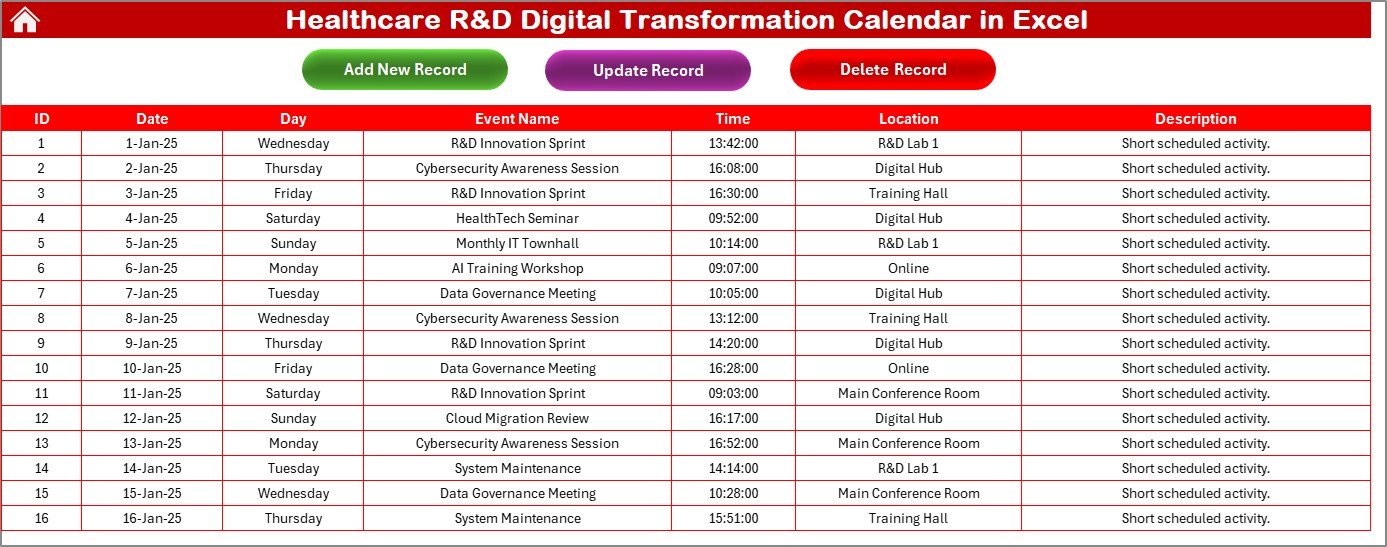
The Events Sheet stores every event in a structured table. It acts as a database for the calendar.
Information Stored in the Events Sheet
- ID – Auto-generated
- Date – Date of the event
- Day – Day name (Monday, Tuesday, etc.)
- Event Name
- Time
- Location
- Description
This structured format helps research teams maintain event history and track activities.
Buttons on the Events Sheet
- Add New Record
- Update Existing Record
- Delete Record
Add New Record
Opens a form → Fill event details → Submit
Update Existing Record
Select the ID → Click Update → Modify data → Submit
Delete Record
Select the ID → Delete the record
Because the template uses forms, the entire event management becomes smooth and error-free.
Click to buy Healthcare R&D Digital Transformation Calendar in Excel
Advantages of Healthcare R&D Digital Transformation Calendar in Excel
Digital transformation changes the way Healthcare R&D teams plan, track, and execute their work. This calendar delivers multiple advantages.
- Better Research Planning
Teams map out yearly and monthly plans clearly. Everyone stays aligned with the schedule.
- Faster Event Management
The form-based event entry saves time. You add, view, update, and delete events within seconds.
- Improved Coordination Between Teams
Clinical teams, lab teams, regulatory teams, and management work with one unified planner. This reduces confusion.
- Higher Productivity
Automated updates, theme settings, and smart navigation reduce manual work.
- Real-Time Visibility
The annual, monthly, and daily views help teams stay updated and make quick decisions.
- Accurate Data Storage
The Events Sheet keeps structured records, which improves compliance and reporting.
- Greater Flexibility and Reusability
You can use the calendar every year by simply changing the year in the input section.
Best Practices for the Healthcare R&D Digital Transformation Calendar in Excel
To get the best performance from this calendar, follow these smart practices.
- Update the Calendar Daily
Enter experiments, meetings, and research tasks every day. This helps you maintain accurate schedules.
Use the Annual Sheet for Long-Term Planning
Plan phases, milestones, regulatory deadlines, and project cycles in the annual view.
Use the Monthly Sheet for Team-Level Planning
Plan team workloads, reviews, and weekly research tasks in the monthly view.
Keep the Events Sheet Clean
Review the database regularly and delete outdated or duplicate entries.
Use Highlighting for Better Visibility
Highlight weekends, non-working days, or critical milestones to improve clarity.
Apply Theme Consistently
Choose a theme that matches your department’s presentation style.
Refresh the Daily View After Every Update
Always click Refresh after changing the date range or adding events.
Train Your Team
Share the template with your team and show them how to use event forms effectively.
Conclusion
A Healthcare R&D Digital Transformation Calendar in Excel helps research teams manage complex schedules with clarity and control. Because it offers annual, monthly, and daily views, teams plan everything from long-term experiments to daily lab work smoothly. Event forms simplify data entry, while the Events Sheet stores every detail. With this calendar, Healthcare R&D departments save time, improve coordination, reduce errors, and stay ready for fast-moving research cycles.
This tool supports every research team that values structured planning and efficient workflows.
Frequently Asked Questions (FAQs)
- How does this calendar help Healthcare R&D teams?
The calendar organizes research timelines, events, and milestones in a single place. Teams view yearly, monthly, and daily plans easily and work with better coordination.
- Can I add multiple events on the same day?
Yes. You can add unlimited events. The monthly sheet shows one event and displays “more than 1…” if additional events exist.
- Can I reuse the calendar every year?
Yes. You can select a new year from the input panel, and the entire calendar updates automatically.
- Can I customize colors and themes?
Yes. The theme group allows you to apply different color themes across the workbook.
- Do I need Excel skills to use this calendar?
No. The Home Sheet buttons, event forms, and auto-updating features make it very simple to use.
- Can I track experiment timelines?
Yes. You can add research events, lab schedules, clinical activities, and any other R&D milestone.
- How do I view all events in a date range?
Use the Daily View Sheet → Enter Start and End Date → Click Refresh. You will see all events in that range.
Visit our YouTube channel to learn step-by-step video tutorials
Watch the step-by-step video tutorial:
Click to buy Healthcare R&D Digital Transformation Calendar in Excel