Building a strong financial safety net remains one of the most important steps toward financial stability. Unexpected expenses such as medical emergencies, job loss, or sudden repairs can create financial stress if individuals do not have savings prepared in advance. Therefore, financial experts strongly recommend maintaining an emergency fund that covers several months of living expenses.
However, many people struggle to track their savings progress, estimate their target emergency fund amount, and stay motivated while building their financial cushion.
This is exactly where the Emergency Fund Tracker in Excel becomes extremely useful.
The Emergency Fund Tracker in Excel is a ready-to-use financial planning template designed to help individuals track monthly expenses, calculate their emergency fund target, monitor savings progress, and achieve their financial goals faster.
Because Excel provides automated calculations, structured tables, and progress tracking features, users can easily manage their savings journey in a simple and organized way.
In this comprehensive guide, we will explore the Emergency Fund Tracker in Excel, including its features, structure, advantages, best practices, and how individuals can use it to build a reliable financial safety net.
What is an Emergency Fund Tracker in Excel?
An Emergency Fund Tracker in Excel is a financial planning tool designed to help individuals monitor their emergency savings and track progress toward their financial safety goals.
Instead of manually calculating savings targets and monthly deposits, the tracker automatically calculates important metrics such as:
- Total monthly expenses
- Target emergency fund amount
- Current savings balance
- Remaining amount to reach the goal
- Percentage of goal completed
- Estimated completion date
Because the tracker visualizes savings progress clearly, individuals remain motivated and disciplined while building their emergency funds.
Why is an Emergency Fund Important?
Click to Buy HR Emergency Fund Tracker in Excel
Unexpected events can happen at any time. Medical emergencies, sudden job loss, or urgent home repairs can disrupt financial stability if people do not have savings prepared.
Therefore, financial planners recommend maintaining 3 to 6 months of living expenses as an emergency fund.
Without an emergency fund, individuals may face several problems:
- Dependence on credit cards
- High-interest loans
- Financial stress during emergencies
- Difficulty covering basic living expenses
However, when individuals build a structured emergency fund, they gain financial confidence and stability.
Key Features of the Emergency Fund Tracker in Excel
The Emergency Fund Tracker includes several powerful features that make financial planning easier.
1. Monthly Expenses Tracker
The tracker allows users to enter their monthly expenses by category.
Example categories include:
- Housing (Rent or Mortgage)
- Utilities
- Groceries & Food
- Transportation
- Insurance Premiums
- Healthcare
- Minimum Debt Payments
- Phone & Internet
- Childcare or Education
- Other Essentials
The tracker automatically calculates the total monthly expenses, which helps determine the emergency fund target.
2. Fund Settings
The Fund Settings section allows users to define their savings strategy.
Users can enter:
- Target months of coverage (3, 6, or 9 months)
- Monthly savings contribution
- Current savings balance
Based on these values, the tracker calculates the required savings target.
3. Automatic Calculations
Click to Buy HR Emergency Fund Tracker in Excel
The template automatically calculates several important financial metrics.
These include:
- Target fund amount
- Remaining amount to reach the goal
- Percentage funded
- Months remaining to achieve the goal
- Estimated completion date
These calculations help users understand how close they are to achieving financial security.
4. Savings Progress Tracker
The tracker includes a visual progress bar that displays how much of the emergency fund goal has been achieved.
For example:
- 25% funded
- 50% funded
- 75% funded
- 100% completed
Because the progress bar updates automatically, users can stay motivated as their savings grow.
5. Milestone Markers
Milestones provide psychological motivation while building savings.
The tracker includes milestone markers such as:
- 25% Goal Achieved
- 50% Goal Achieved
- 75% Goal Achieved
- 100% Emergency Fund Completed
Each milestone encourages users to continue saving consistently.
6. Savings Log
The Savings Log sheet allows users to record every deposit made toward their emergency fund.
The log includes columns such as:
- Date
- Deposit Amount
- Running Total
- Percentage of Goal
- Notes
For example, users can record deposits such as:
- Monthly savings contribution
- Tax refund deposits
- Bonus savings
- Additional contributions
- This log provides a complete history of savings progress.
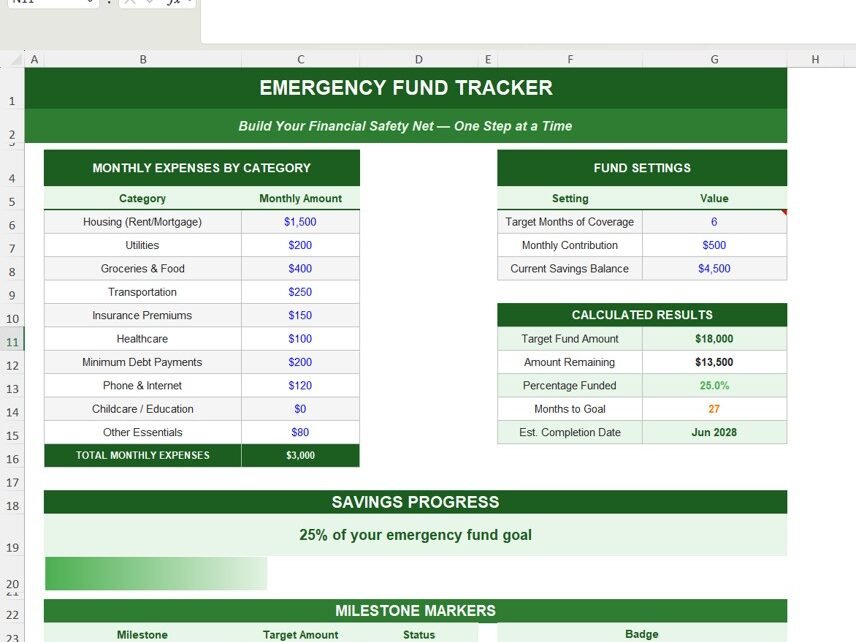
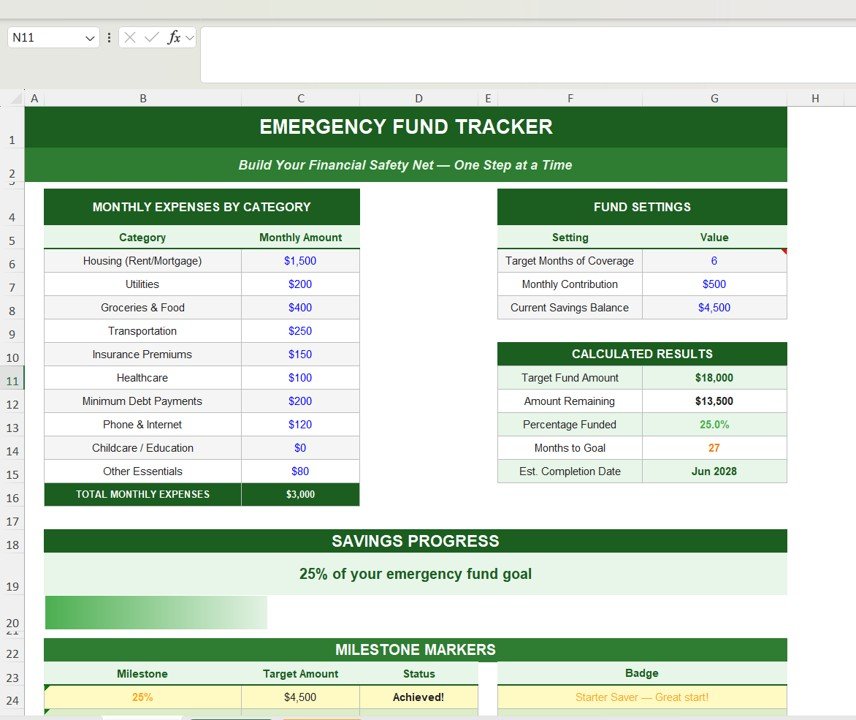
Dashboard Overview of the Emergency Fund Tracker
Click to Buy HR Emergency Fund Tracker in Excel
The main dashboard contains multiple sections that display financial insights.
Monthly Expense Summary
This section displays each expense category and calculates total monthly expenses.
Example:
- Housing: $1,500
- Utilities: $200
- Groceries: $400
- Transportation: $250
Total Monthly Expenses: $3,000
Fund Settings Section
Users define their emergency fund settings here.
Example settings:
- Target Months Coverage: 6 months
- Monthly Contribution: $500
- Current Savings: $4,500
Calculated Results
The tracker calculates important financial indicators.
Example results:
- Target Fund Amount: $18,000
- Amount Remaining: $13,500
- Percentage Funded: 25%
- Months to Goal: 27
- Estimated Completion Date: June 2028
Savings Progress Section
A progress indicator shows the percentage of the emergency fund goal completed.
Example:
25% of your emergency fund goal achieved
This visual progress motivates users to stay consistent with their savings plan.
Click to Buy HR Emergency Fund Tracker in Excel
Advantages of Using an Emergency Fund Tracker in Excel
The Emergency Fund Tracker offers several important benefits.
Clear Financial Visibility
The tracker clearly shows how much money individuals need to save.
Goal-Based Savings Planning
Users can set realistic savings targets based on monthly expenses.
Automatic Calculations
Excel formulas automatically calculate savings progress and financial targets.
Improved Financial Discipline
Tracking savings regularly encourages consistent financial habits.
Motivation Through Progress Tracking
Progress bars and milestones motivate users to stay focused on their savings goals.
Simple and Easy to Use
Even beginners can easily manage their emergency savings using the template.
Best Practices for Building an Emergency Fund
Click to Buy HR Emergency Fund Tracker in Excel
To successfully build an emergency fund, individuals should follow several best practices.
Start with Small Contributions
Start saving small amounts regularly rather than waiting to save large amounts.
Automate Monthly Savings
Set up automatic transfers to ensure consistent savings contributions.
Avoid Using the Fund for Non-Emergencies
Use the emergency fund only for genuine financial emergencies.
Increase Contributions Gradually
Increase monthly savings whenever income increases.
Review Expenses Regularly
Update the expense categories to reflect changes in monthly spending.
Track Savings Progress Consistently
Update the savings log regularly to maintain accurate progress tracking.
Conclusion
Click to Buy HR Emergency Fund Tracker in Excel
Financial emergencies can happen without warning. Therefore, every individual should maintain a well-planned emergency fund.
However, saving money without a clear plan can be difficult.
The Emergency Fund Tracker in Excel provides a structured solution that helps individuals calculate their target savings, track progress, and stay motivated while building financial security.
With features such as expense tracking, automatic calculations, savings logs, progress indicators, and milestone markers, this tracker simplifies the process of building a financial safety net.
As a result, individuals can confidently prepare for unexpected financial challenges and maintain long-term financial stability.
Visit our YouTube channel to learn step-by-step video tutorials
Youtube.com/@NeotechNavigators
Watch the step-by-step video tutorial:
Click to Buy HR Emergency Fund Tracker in Excel