Introduction
In the rapidly evolving world of retail, the ability to seamlessly operate across multiple channels is crucial. That’s why an Omnichannel Retail KPI Scorecard is essential for businesses seeking to monitor, analyze, and optimize their performance effectively. In this article, we introduce a ready-to-use Omnichannel Retail KPI Scorecard template designed to provide comprehensive insights and drive data-backed decisions.
Key Features of Omnichannel Retail KPI Scorecard
- Four Worksheets: A well-structured template comprising Scorecard, KPI Trend, Input Data, and KPI Definition sheets.
- User-Friendly Interface: Dropdown menus for easy selection of months and data ranges like MTD and YTD.
- Visual Performance Indicators: Color-coded visuals and conditional formatting make performance status instantly recognizable.
- Comprehensive KPI Definitions: Clear, contextual definitions including formulae, units, and KPI types to aid understanding.
- Trend Analysis Charts: MTD and YTD charting for Actual, Target, and Previous Year comparisons help in strategic planning.
- Data Entry Flexibility: Easy to update Input Data sheet ensures your KPI metrics stay current and actionable.
Dashboard Pages Explanation
Click to Buy Omnichannel Retail KPI Scorecard in Excel
1. Scorecard Sheet
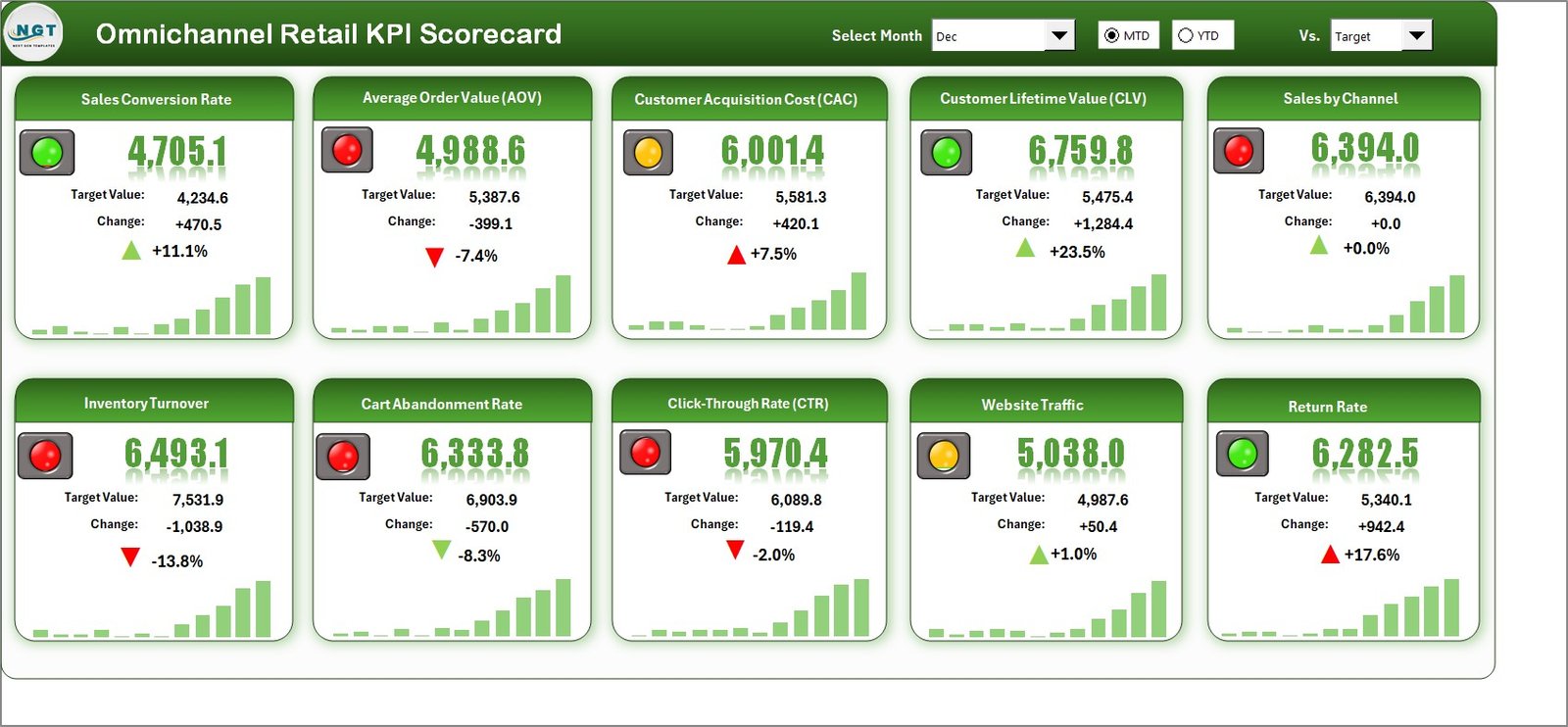
The Scorecard sheet serves as the main interface where KPI performance is displayed clearly and interactively.
- Dropdown Menus: Seamlessly switch between the desired month and select MTD or YTD performance views for deeper analysis.
- Actual vs Target Values: Directly compare how your retail KPIs are performing against preset targets to spot areas needing attention.
- Visual Indicators: Color-coded visuals or conditional formatting instantly highlight performance status allowing for quick decision-making.
- Comprehensive KPI Overview: Displays a holistic set of data points including both Month-to-Date and Year-to-Date statistics for a detailed view.
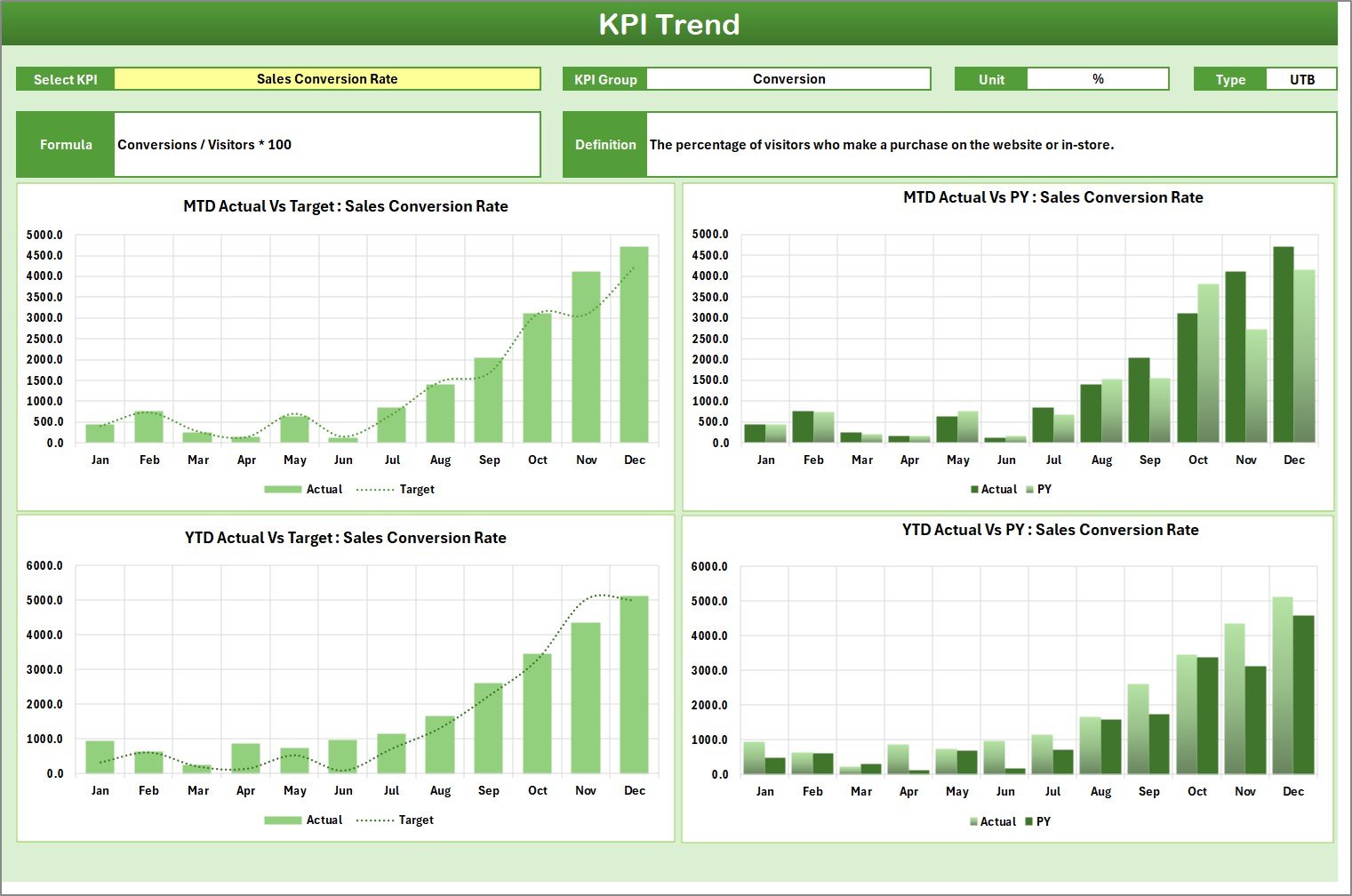
2. KPI Trend Sheet
This worksheet allows you to select a specific KPI from the dropdown (cell C3) and explore detailed insights.
- Displays KPI Group, Unit, KPI Type (is lower or upper better), Formula, and Definition for contextual clarity.
- Integrates MTD and YTD trend charts visualizing Actual, Target, and Previous Year (PY) data for informed trend analysis.
3. Input Data Sheet
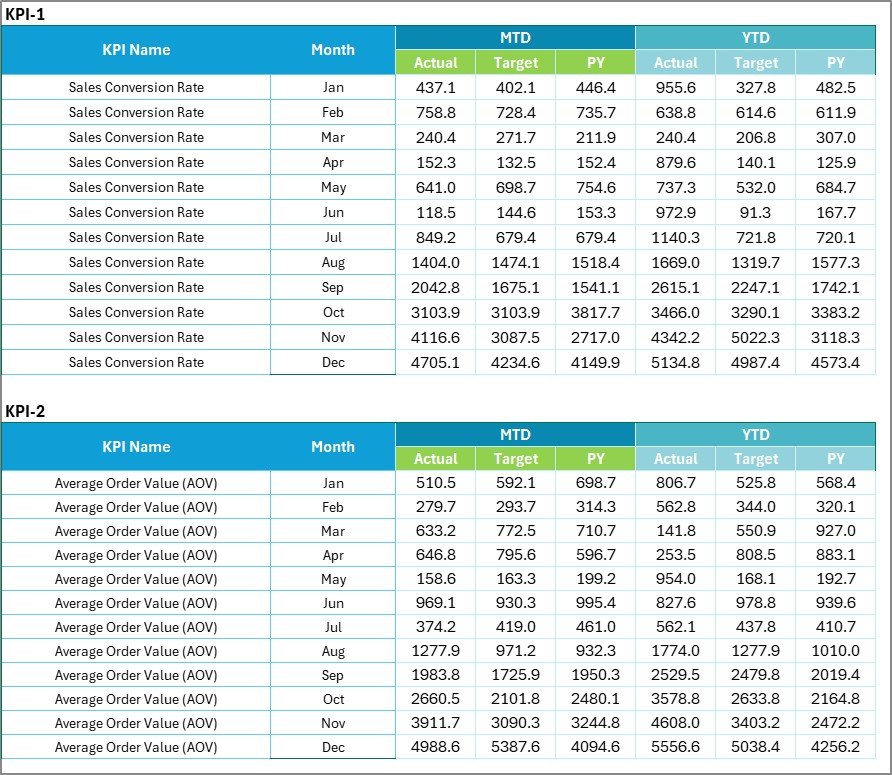
The backbone of the entire scorecard, the Input Data sheet is where KPI data is entered and maintained.
- Data Entry: Record actual values, targets, and other relevant metrics for each KPI on a monthly basis.
- Flexibility: Easy updating capability ensures your scorecard reflects the most recent performance outcomes.
4. KPI Definition Sheet
For clarity and consistency, this sheet contains names, groups, units, formulae, and definitions for all KPIs within the scorecard.

Advantages of Omnichannel Retail KPI Scorecard
- Holistic View: Offering a unified perspective across multiple sales channels.
- Improved Decision Making: Real-time insights and trend analysis enable proactive management.
- Customizable & Scalable: Easy adaptation to your retail business size and evolving KPIs.
- Enhanced Accountability: Transparent tracking of performance against targets helps align teams.
- Time Efficiency: Automated visuals and summaries reduce manual reporting effort.
Opportunities for Improvement
- Integration with ERP Systems: Automate data input through system linkage to reduce manual entry errors.
- Mobile-Friendly Dashboards: Optimize for access on mobile devices for on-the-go decision support.
- Advanced Predictive Analytics: Incorporate machine learning models to forecast retail trends more accurately.
- Multi-user Collaboration: Enable simultaneous editing and comments to boost team coordination.
Best Practices
Click to Buy Omnichannel Retail KPI Scorecard in Excel
- Regularly Update Input Data: Accuracy depends on timely and consistent data entry.
- Set Realistic Targets: Establish achievable KPIs reflective of market conditions and company goals.
- Review Scorecard Monthly: Frequent assessments help identify issues early.
- Train Your Team: Ensure all relevant employees understand KPI meanings and dashboard usage.
- Leverage Data Trends: Use trend insights to refine strategies rather than reacting only to end-point metrics.
FAQs
Click to Buy Omnichannel Retail KPI Scorecard in Excel
What is an Omnichannel Retail KPI Scorecard?
It is a performance management tool that tracks critical Key Performance Indicators across multiple retail channels to ensure business goals are met comprehensively.
How often should I update the data in the scorecard?
Ideally, update the data monthly or as soon as new results become available to keep analyses relevant and timely.
Can this scorecard be customized?
Yes, the template is designed to be flexible. You can add or remove KPIs and adjust formulas to suit your retail environment.
Why is visual representation of KPIs important?
Visual cues like color coding and charts allow quicker comprehension of performance trends and highlight areas that need focus.
Conclusion
Click to Buy Omnichannel Retail KPI Scorecard in Excel
The Omnichannel Retail KPI Scorecard is a powerful asset for retail managers and executives wanting real-time clarity on performance across complex sales environments. With its comprehensive dashboard sheets, interactive features, and clear KPI definitions, it equips businesses to enhance operational efficiency, improve customer engagement, and adapt seamlessly to market demands. Try this ready-to-use scorecard template today and unlock new opportunities for your retail success.
For more on KPI dashboards and Excel templates, visit Microsoft Excel Support or explore analytics best practices from industry leaders.
Visit our YouTube channel to watch the demo: Youtube.com/@NextGenTemplates
Click to Buy Omnichannel Retail KPI Scorecard in Excel