In the modern healthcare industry, maintaining consistent quality control and sustainability practices has become essential for hospitals, clinics, laboratories, and healthcare providers. As regulations grow stricter and patient expectations rise, organizations must ensure that every process — from sanitation and safety to audits and environmental practices — is tracked and monitored properly.
To streamline this effort, the Healthcare Quality Control Sustainability Calendar in Excel provides a ready-to-use, fully automated solution that helps teams schedule, monitor, and review all healthcare quality and sustainability activities in one place.
This article explains everything you need to know about this powerful Excel-based calendar — including its features, advantages, and best practices — and answers common questions to help you get started effectively.
Click to buy Healthcare Quality Control Sustainability Calendar in Excel
What Is a Healthcare Quality Control Sustainability Calendar in Excel?
A Healthcare Quality Control Sustainability Calendar is a specialized Excel tool designed to help healthcare organizations systematically plan, track, and monitor quality and sustainability events.
Whether it’s monthly quality audits, training sessions, medical equipment inspections, waste management checks, or environmental safety initiatives, this calendar ensures that all these activities stay organized and on schedule.Healthcare Quality Control Sustainability Calendar in Excel .
Unlike complex project-management software, this Excel-based calendar offers:
- Simplicity: Easy to use for all staff members, regardless of technical background.
- Flexibility: Fully customizable to match your organization’s schedule and event types.
- Automation: Dynamic updates, interactive buttons, and automatic date-based functions.
- Visibility: A complete view of annual, monthly, and daily quality control events.
Key Features of the Healthcare Quality Control Sustainability Calendar
This template includes five interactive worksheet tabs, each built to simplify event management and quality monitoring.
Home Sheet Tab – Central Navigation Hub
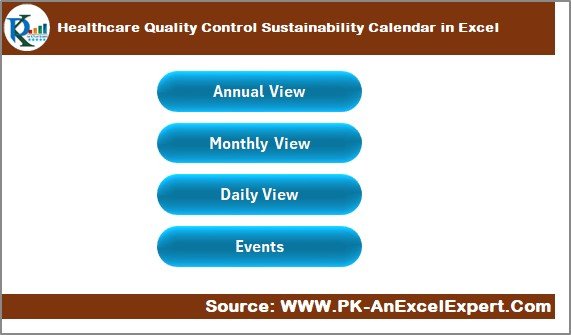
The Home sheet acts as the dashboard for the entire calendar. It contains intuitive buttons that allow users to navigate between different views quickly:
- Annual View Button – Jump directly to the full-year calendar overview.
- Monthly View Button – View or analyze events for a particular month.
- Daily View Button – Focus on a specific date or short date range.
- Events Button – Access the complete list of recorded events.
This simple yet functional layout ensures that anyone — from a nurse to an administrator — can easily find and manage quality or sustainability events with just one click.
Annual View Sheet Tab – A Year-Round Quality Overview
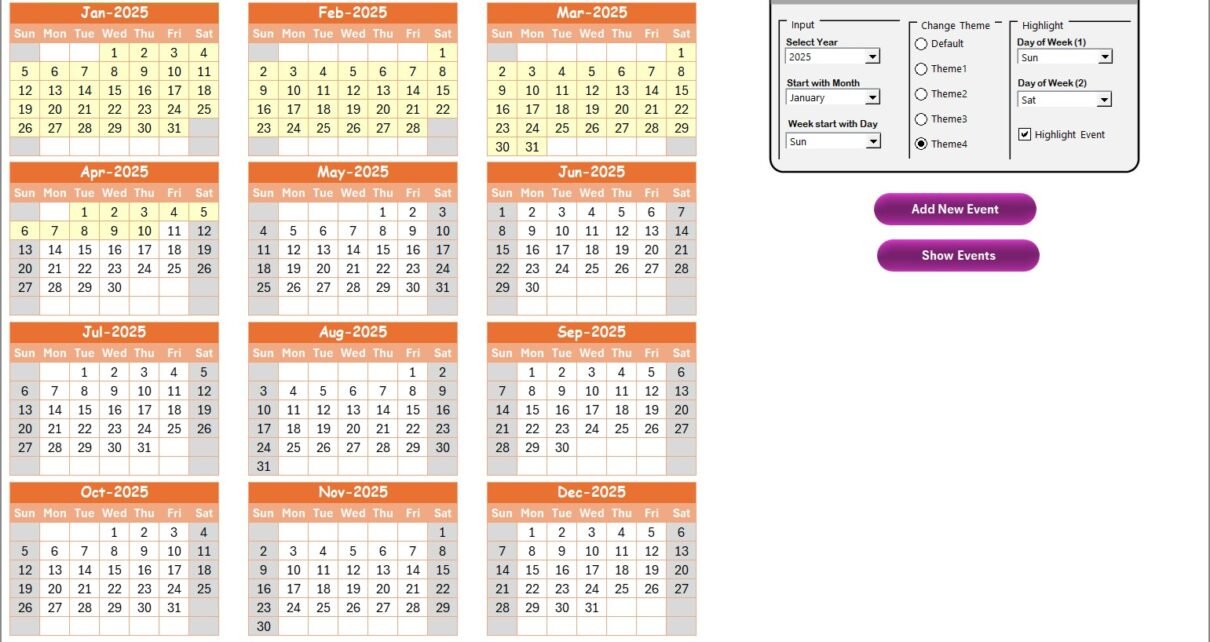
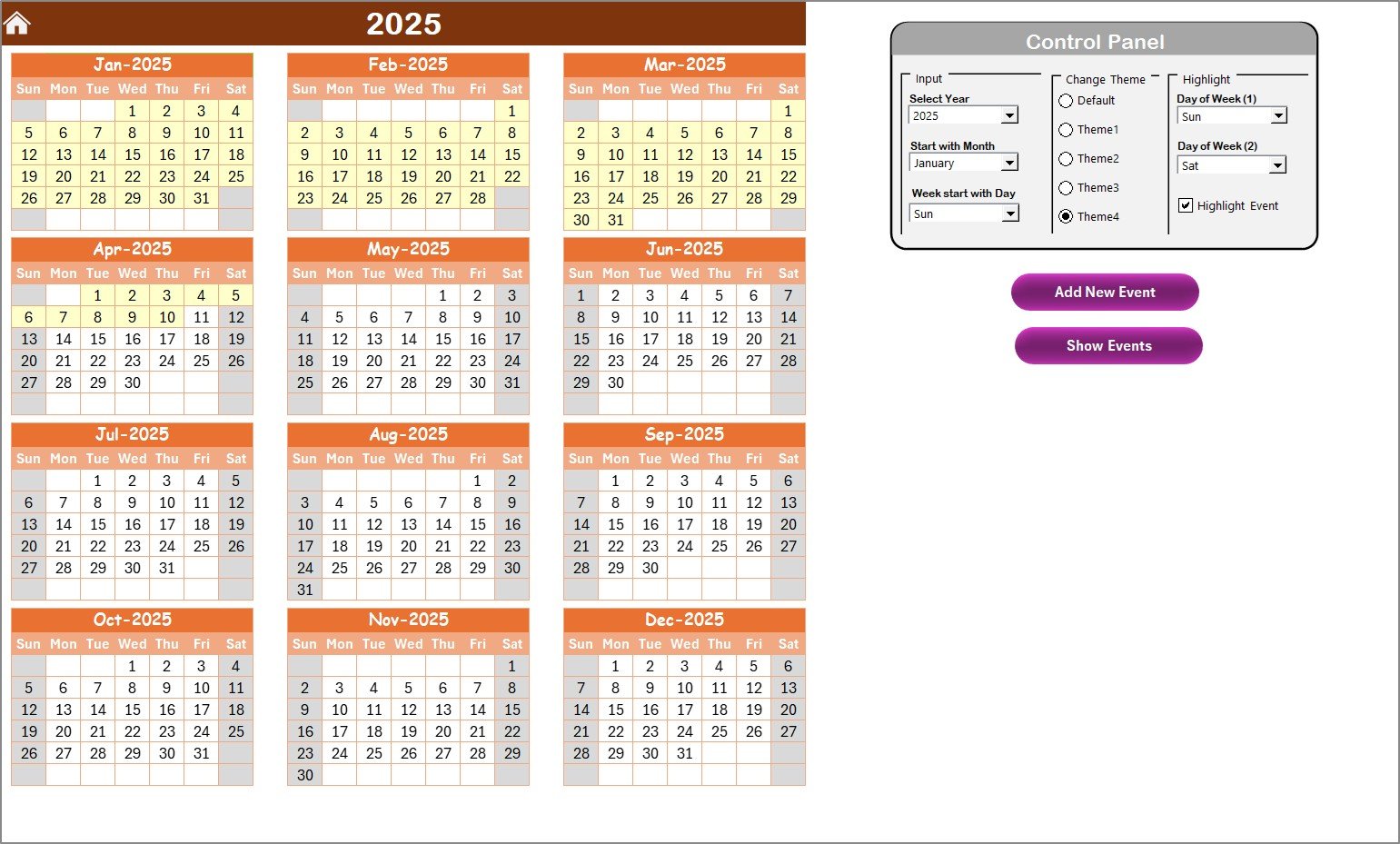
The Annual View Sheet provides a visual display of all 12 months in one place, allowing you to review and plan long-term sustainability and compliance goals.Healthcare Quality Control Sustainability Calendar in Excel .
Control Panel Features:
The sheet includes a Control Panel divided into three main groups:
- Input Group:
- Select the Year to auto-update the entire annual calendar.
- Adjust the Starting Month and Day of the Week to fit your operational calendar.
- Change Theme Group:
- Choose from five professional color themes to personalize your calendar’s appearance and make it visually appealing for team presentations or reports.
- Highlight Group:
- Highlight specific days of the week (e.g., Saturdays and Sundays) in gray for better clarity.
- Enable Highlight Events to automatically mark event days in yellow, making it easy to spot key activities or compliance tasks.
Click to buy Healthcare Quality Control Sustainability Calendar in Excel
Event Management Buttons:
- Add New Event Button:
- Click on any date and use this button to add a new event through a simple pop-up form.
- Enter all event details — including name, date, time, and description — then submit to record it instantly.
- Show Event Button:
- Quickly view the list of scheduled events for any selected date.
With these interactive features, the Annual View Sheet becomes a powerful year-planning tool that eliminates manual tracking errors and ensures that no quality control task is ever missed.
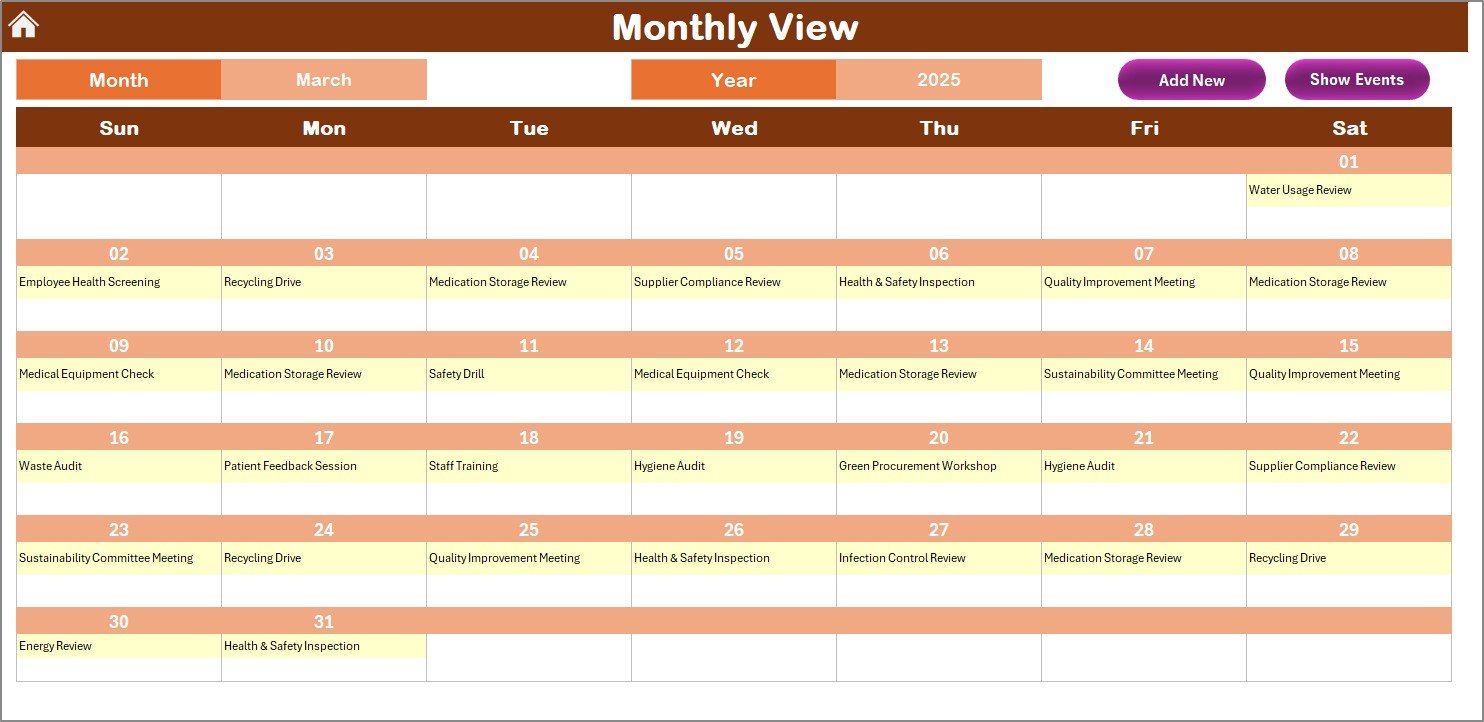
Monthly View Sheet Tab – Focused Monthly Planning
The Monthly View Sheet offers a single-month display with real-time control. You can select both Month and Year from the top panel, and the sheet automatically updates to show the relevant calendar.
Key Highlights:
- Displays one event directly on the calendar grid.
- If multiple events fall on the same date, it smartly displays “more than 1…” for quick recognition.
Action Buttons:
- Add New Event Button:
- Add new events quickly for any selected date using the same intuitive form as the Annual View.
- Show Event Button:
- Instantly display all events linked to a specific date.
This monthly layout is perfect for departmental use — for example, infection control teams can plan monthly audits, sustainability officers can monitor green-waste disposal cycles, and quality teams can track training sessions.
Daily View Sheet Tab – Detailed Event Tracking
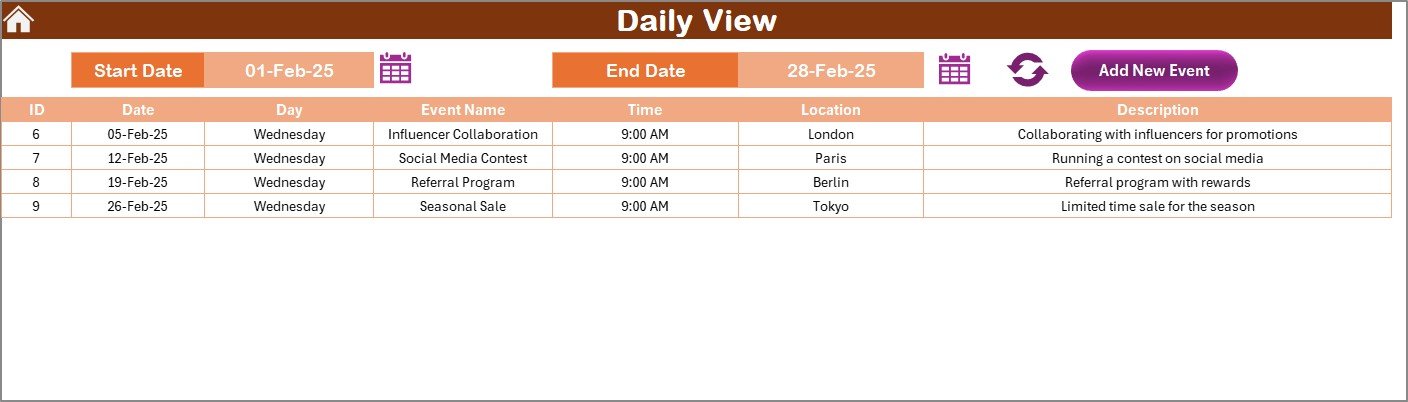
The Daily View Sheet allows users to deep-dive into daily operations and events.
How It Works:
- Simply enter a Start Date and End Date at the top using the built-in calendar icons.
- Click Refresh to display all events within that date range.
Added Functionality:
- Add New Event Button is also available here for quick updates.
- Once clicked, it opens the familiar event entry form where you can record new data efficiently.
This sheet is particularly useful for daily healthcare management teams that need a list view of scheduled quality audits, maintenance checks, and sustainability activities.
Events Sheet Tab – Centralized Event Database
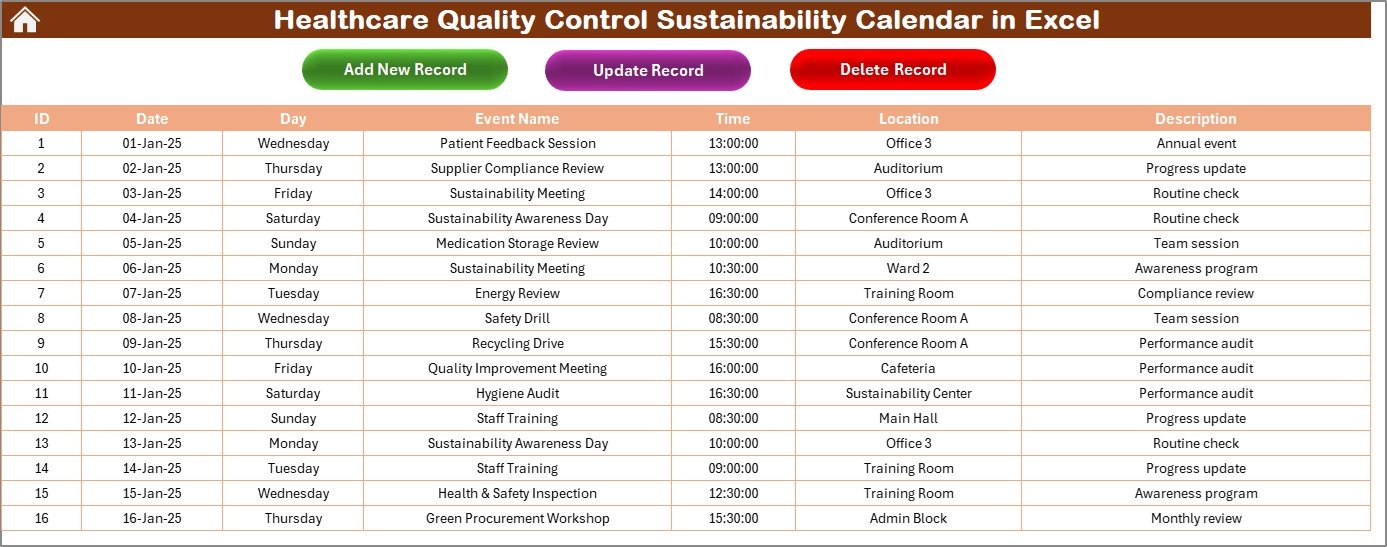
The Events Sheet acts as the main data repository for all scheduled items. Every event created through any view is automatically stored here.
Why Use an Excel-Based Calendar for Healthcare Quality and Sustainability?
Excel remains one of the most versatile tools for organizations worldwide. In the healthcare industry, it serves as an ideal medium for managing quality control schedules because of its flexibility and automation capabilities.
Here’s why this Excel calendar stands out:
- Cost-effective: No need for expensive subscription software.
- Customizable: Add or modify events, departments, or metrics easily.
- Offline Access: Work on your schedules even without internet connectivity.
- Automation Ready: With VBA scripts and formulas, data updates occur seamlessly.
- Visual and Printable: Easy to export, share, or print for meetings and audits.
Click to buy Healthcare Quality Control Sustainability Calendar in Excel
Advantages of the Healthcare Quality Control Sustainability Calendar
This Excel-based calendar offers numerous benefits for healthcare institutions:
- Improved Compliance and Accountability
The calendar ensures that every audit, inspection, and training session is tracked. With automated reminders and color-coded highlights, no critical quality-control event is missed.
- Streamlined Communication
Departments can easily share event plans, making coordination across hospital units smoother.
- Better Resource Management
By visualizing the full schedule, teams can allocate manpower, equipment, and facilities more effectively.
- Real-Time Insights
Daily and monthly views provide instant visibility into upcoming or overdue activities.
- Customization Flexibility
Users can add unique event categories, change color themes, or adjust start days according to organizational needs.
- Enhanced Sustainability Tracking
With this tool, hospitals can track environmental initiatives — like waste management audits, water usage reviews, and green energy checks — alongside clinical quality tasks.
How to Use the Calendar Effectively
To get the most out of your Healthcare Quality Control Sustainability Calendar, follow these simple steps:
- Set Up the Year and Preferences:
- Open the Annual View sheet and select the year, start month, and theme.
- Add Events:
- Use the “Add New Event” button from any view to record audits, meetings, or checks.
- View Activities:
- Switch between Annual, Monthly, and Daily tabs for different timeframes.
- Update Records:
- Go to the Events Sheet to modify or delete past entries when required.
- Monitor Progress:
- Use highlights to track completed vs. pending activities.
By following these steps, you can build a sustainable habit of maintaining healthcare compliance and quality performance.
Best Practices for the Healthcare Quality Control Sustainability Calendar
To make the most of your Excel-based calendar, apply these best practices:
- Maintain Consistency
Update the calendar regularly. Encourage each department to add its events weekly or monthly.
- Use Color Coding Strategically
Apply distinct colors for audit types — for example, green for environmental, blue for safety, and orange for training.
- Protect the Data Sheet
Lock the Events Sheet with a password to prevent accidental edits.
- Create Backups
Save monthly backups of your workbook to avoid data loss.
- Link KPIs with Events
If possible, connect your quality KPIs (e.g., Infection Rate, Audit Completion %) to event data for advanced reporting.
- Integrate with Power BI or Dashboards
Export your Excel data to Power BI or Excel dashboards for visual analytics and trend tracking.
- Regularly Clean Up Old Records
Remove outdated or completed events to keep your file light and responsive.
How the Calendar Supports Healthcare Sustainability Goals
Modern healthcare organizations aim not only to maintain high quality but also to operate sustainably. This Excel calendar helps achieve that balance by:
- Tracking waste segregation audits and recycling initiatives.
- Scheduling energy consumption checks and water efficiency reviews.
- Monitoring staff training on eco-friendly practices.
- Ensuring regulatory compliance with environmental standards.
In short, it acts as a central management system for both quality assurance and sustainability reporting.
Practical Use Cases in Healthcare Settings
Here are a few ways hospitals and healthcare institutions can use this calendar:
Hospitals
Track hygiene audits, equipment calibration, and patient-safety drills.
Laboratories
Monitor sample-handling audits, waste management reviews, and safety certifications.
Pharmaceutical Units
Schedule regular GMP inspections, safety training sessions, and environmental checks.
Clinics & Diagnostic Centers
Plan daily sanitation checks, equipment maintenance, and waste disposal schedules.
How This Calendar Improves Team Collaboration
When multiple departments rely on different spreadsheets, confusion and missed deadlines become common. This calendar eliminates silos by offering:
- Unified data access: One shared file for all departments.
- Real-time coordination: Automatic updates when new events are added.
- Transparent tracking: Visibility into every team’s activities.
These features promote a collaborative work culture that drives healthcare excellence.
Conclusion
The Healthcare Quality Control Sustainability Calendar in Excel is more than just a date-tracking tool — it’s a strategic management solution for hospitals and healthcare institutions aiming for excellence in quality and sustainability.
Its user-friendly interface, automation capabilities, and customizable features make it an essential asset for ensuring compliance, boosting collaboration, and promoting eco-friendly practices.
By integrating this Excel calendar into your daily operations, you’ll not only streamline event tracking but also move closer to achieving sustainable, efficient, and patient-focused healthcare delivery.
Frequently Asked Questions (FAQs)
- What types of events can I track in this calendar?
You can track quality audits, training sessions, safety inspections, sustainability reviews, and compliance checks — any activity related to healthcare quality or environmental initiatives.
- Can I customize the calendar layout?
Yes, you can easily modify themes, colors, and formats using the built-in control panel.
- How do I add a new event?
Simply select the date, click the “Add New Event” button, fill in details such as name, time, and location, and submit. The event automatically appears in all views.
- Can multiple users work on the same file?
If shared on a network drive or cloud system like OneDrive, multiple authorized users can access it (though simultaneous editing should be managed carefully).
- Is this calendar suitable for small clinics?
Absolutely. The template is scalable — perfect for both large hospitals and small healthcare centers.
- How can this calendar help in sustainability tracking?
You can schedule audits for waste segregation, water usage monitoring, and energy efficiency programs, ensuring all sustainability goals stay on track.
- Does it require advanced Excel knowledge?
Not at all. It is designed for simplicity, with interactive buttons and automated forms requiring no coding skills.
- Can I print the calendar?
Yes, each view — annual, monthly, or daily — can be printed directly from Excel for reports or wall displays.
Visit our YouTube channel to learn step-by-step video tutorials
Watch the step-by-step video tutorial:
Click to buy Healthcare Quality Control Sustainability Calendar in Excel