A 2024 Gallup study found that only 14% of employees strongly agree their performance reviews inspire them to improve, yet 81% of HR leaders still manage appraisal cycles across fragmented spreadsheets, emails, and paper forms. The PerTrackerance Appraisal Tracker in Excel replaces that chaos with a single VBA-powered workbook that spans 8 worksheets, a 4-slicer interactive dashboard, 5 built-in charts, and a secure login-protected data entry system — so HR teams can run an entire review cycle without leaving Excel.
Built for HR managers, team leads, and small-business owners who don’t want to pay $8–$15 per user per month for BambooHR or Lattice, this performance appraisal tracker captures ratings, comments, reviewer details, and cycle data in a clean data sheet — with Add, Update, and Delete buttons that open a pre-validated data entry form. Setup takes under 10 minutes: enable macros, log in, and the dashboard starts populating the moment you submit your first record.
🌍 Join 8,400+ teams in 40+ countries using NextGenTemplates to replace paid SaaS HR tools with one-time-purchase Excel, Google Sheets, Power BI, and HTML templates.
Key Features of PerTrackerance Appraisal Tracker in Excel
The Performance Appraisal Tracker is built around a secure, form-driven workflow that eliminates direct cell editing — the #1 cause of data corruption in shared HR workbooks. Every feature below is live in the template:
- 📋 8 structured worksheets — Login, Home, Dashboard, Data, List, Support, Settings, and User Management, each with a defined role in the appraisal cycle.
- 🔐 Login Form with User Management — role-based access controlled through a dedicated User Management sheet, so only authorized HR users can view or edit records.
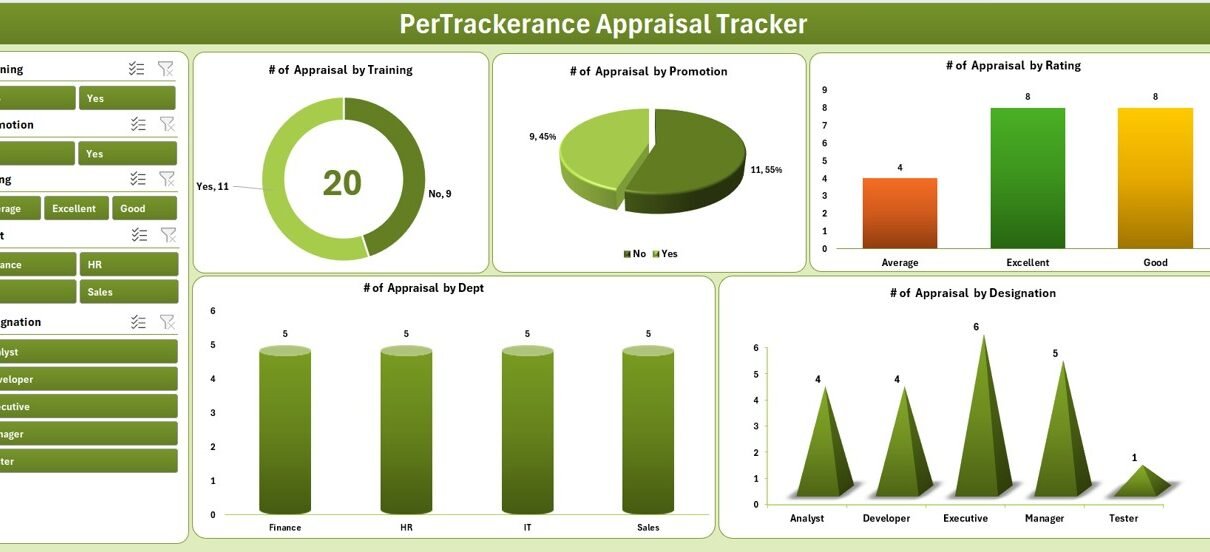
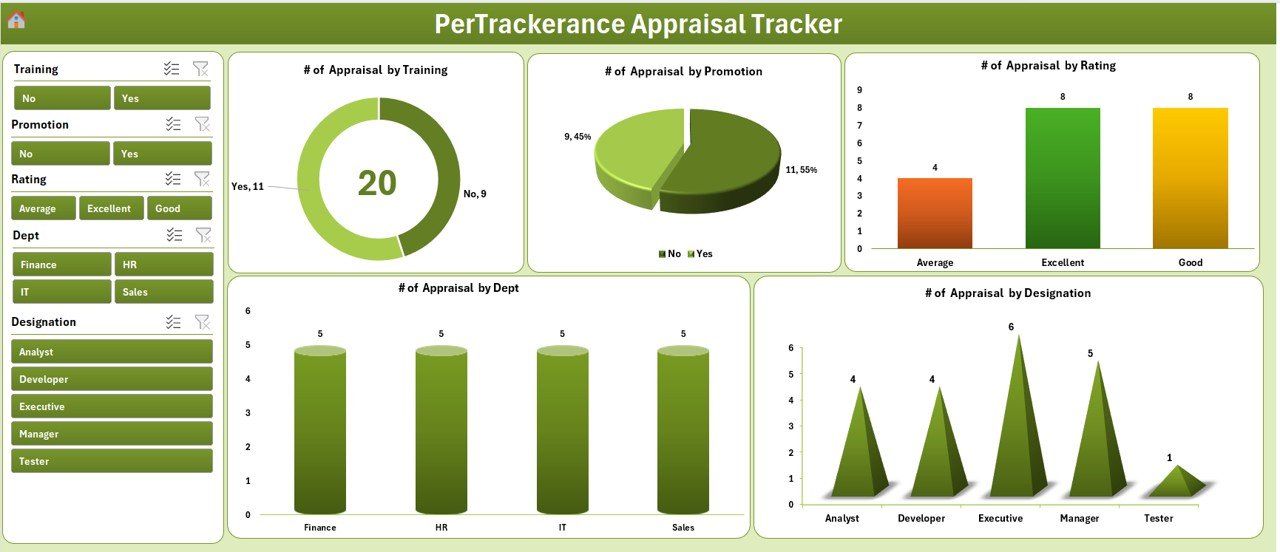
- 📊 Interactive Dashboard with 4 slicers (filter by year, department, rating band, reviewer) and 5 charts that update instantly when you change any filter.
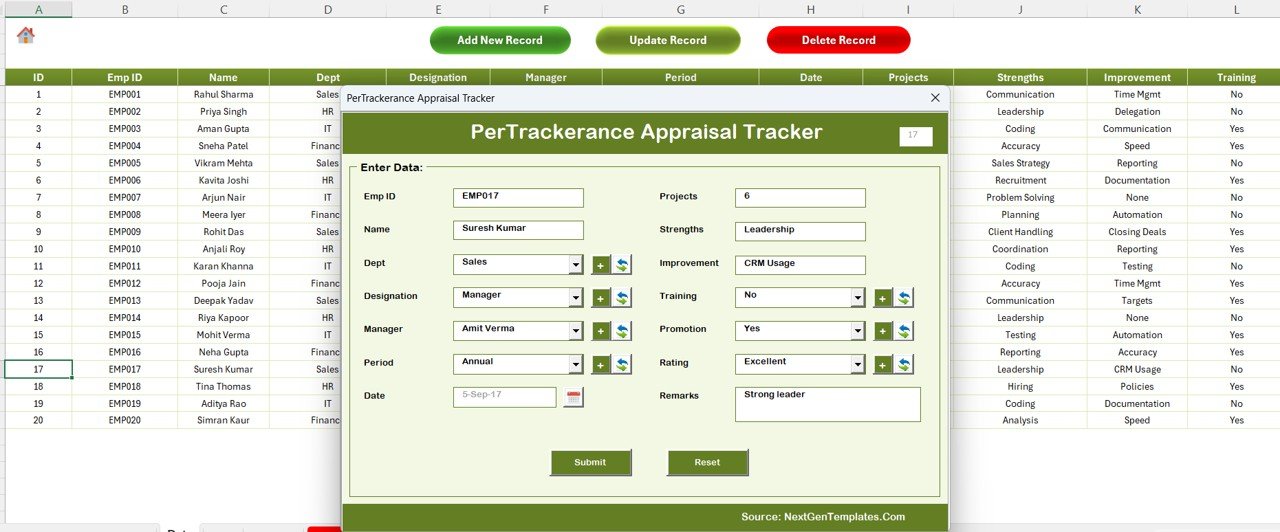
- 📝 Data Entry Form with Add, Update, and Delete buttons — all triggered from the Data sheet, all confirmed before any destructive action.
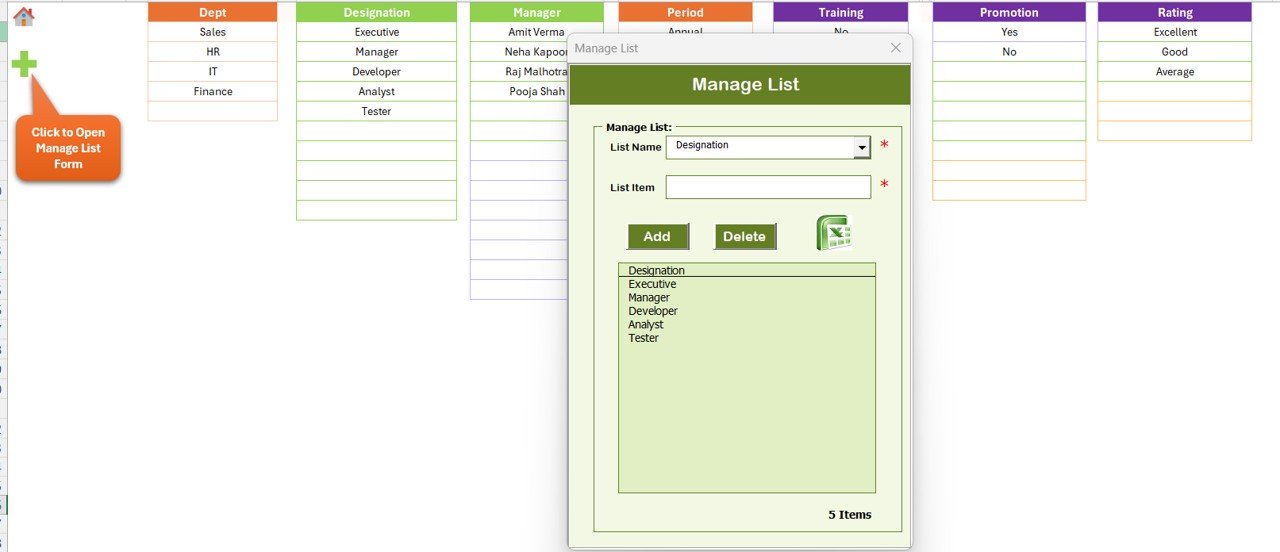
- 🎯 List Sheet that populates every combo box inside the entry form, so dropdowns stay consistent as your organization grows.
- ⚙️ Settings Sheet for theme, company name, review cycle labels, and custom rating scales — no VBA editing required.
- 🗂️ Support Sheet with pre-built pivot tables powering the dashboard; hide it in production, unhide it when you need to audit the data flow.
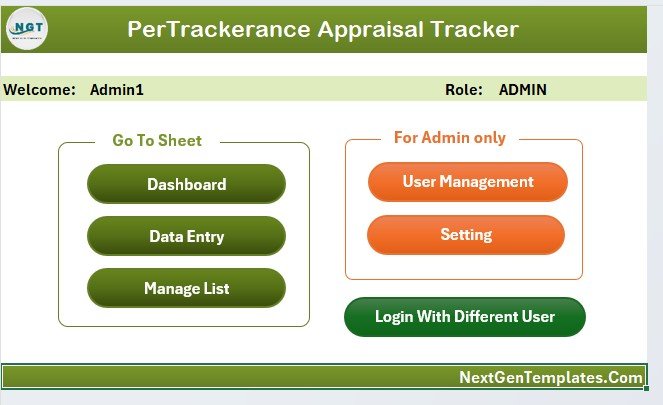
- 🏠 Home Page with clickable navigation buttons so users jump between sheets without using Excel tabs.
Three citable facts about this tracker: (1) it tracks unlimited appraisal records on a single data sheet with no row limit other than Excel’s native 1,048,576; (2) the dashboard refreshes automatically every time the form submits a new record — no manual pivot refresh needed; (3) the User Management sheet supports multiple login credentials, making the workbook genuinely multi-user safe when hosted on OneDrive or SharePoint.
Sheets Explanation
1. Login Form
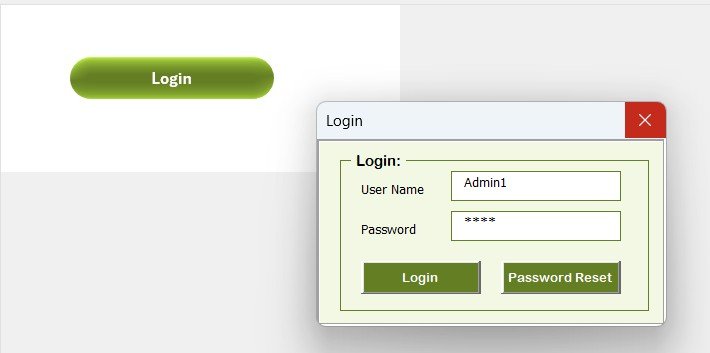
The workbook opens on a login screen. The User Management sheet stores valid usernames and passwords, and the VBA login routine validates credentials before unlocking the rest of the file. Without a valid login, other sheets stay hidden.
2. Home Page
After login, the Home Page acts as the command center. It has navigation buttons for every sheet — Dashboard, Data, List, Settings, and User Management — so reviewers never need to touch Excel’s sheet tabs. This also keeps less-technical users from accidentally landing on the Support sheet.
3. Dashboard
The Dashboard is the analytical heart of the template. It carries 4 slicers and 5 charts driven by pivot tables on the Support sheet. Slicers let you drill into appraisal data by cycle, department, rating, or reviewer, and the charts respond instantly. Everything refreshes automatically when a new record is added through the form.
4. Data Sheet
This is the master repository. The top of the sheet holds three large action buttons:
- ➕ Add New Record — opens a blank data entry form. Fill it, click Submit, and the record is appended and the dashboard refreshes.
- ✏️ Update Record — select the ID of an existing record, click Update, and the form reopens pre-filled. Edit, submit, and the row updates in place.
- 🗑️ Delete Record — select an ID, click Delete, and a confirmation prompt protects against accidental loss.
5. List Sheet
The List sheet feeds every combo box on the data entry form — departments, designations, rating scales, review cycles, locations. Add a new department here and it shows up in the form dropdown immediately. No VBA editing needed.
6. Support Sheet
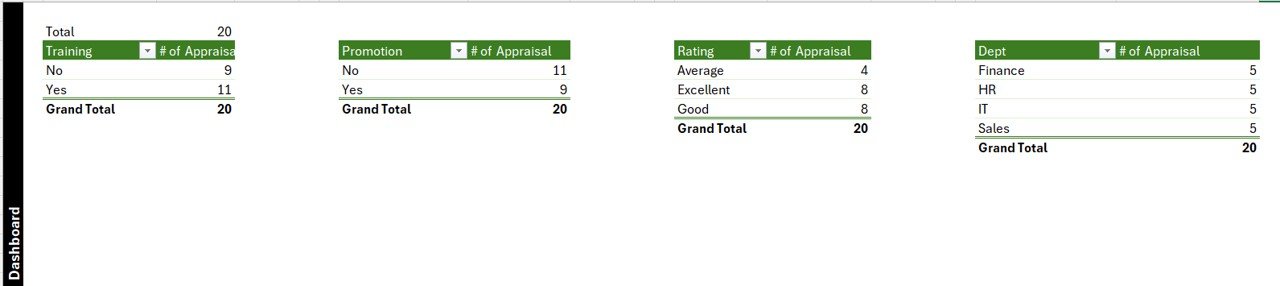
A behind-the-scenes worksheet that hosts the pivot tables powering the dashboard charts. There’s nothing to edit here — you can safely hide this sheet for end users. Unhide it only when auditing how the dashboard aggregates the data.
7. Settings Sheet
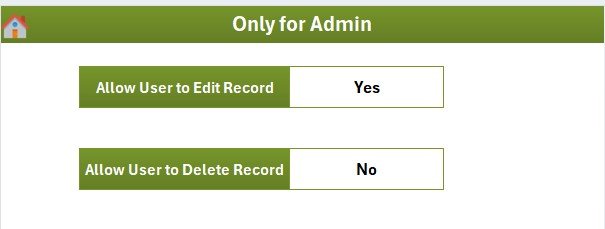
Centralized configuration. Change company name, review cycle names (Q1/Q2/Annual/Mid-year), theme colors, and default rating scales — no code changes needed. The rest of the workbook reads from these cells.
8. User Management Sheet
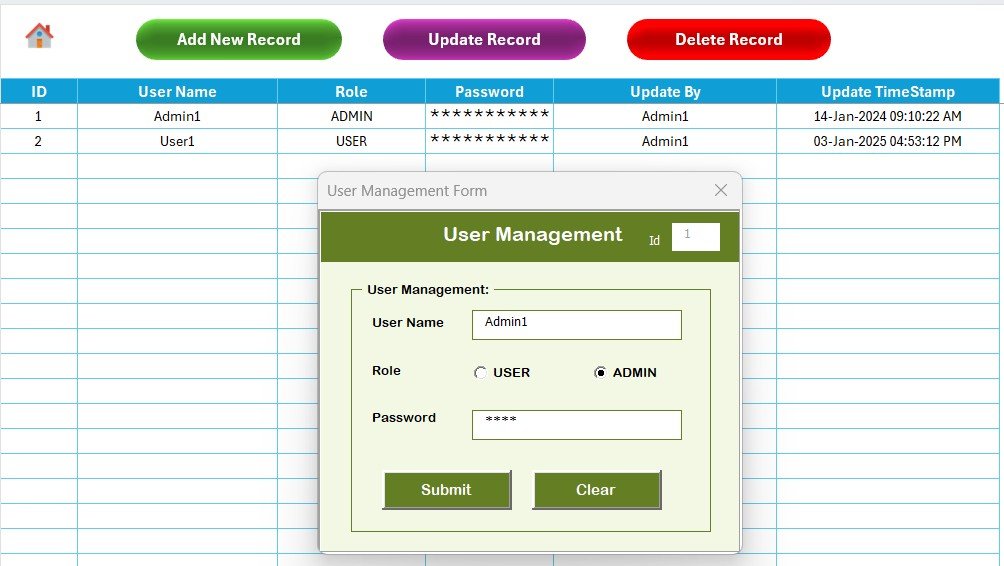
Stores the list of users authorized to log into the workbook. Add a new row with a username and password to grant access, remove the row to revoke it. This is what makes the tracker genuinely multi-user safe when the file lives on a shared drive.
PerTrackerance Appraisal Tracker in Excel vs. Google Sheets Equivalent vs. BambooHR / Lattice — Feature Comparison
| Feature | Performance Appraisal Tracker in Excel | Google Sheets Equivalent | BambooHR / Lattice |
|---|---|---|---|
| Cost | $6.99 one-time | $0 (custom build) | $8–$15 / user / month |
| Platform | Microsoft Excel (desktop) | Google Sheets (web) | SaaS (web only) |
| Setup time | Under 10 minutes | 10–20 hours to build | 2–6 weeks implementation |
| Login-protected access | ✅ Built-in User Management sheet | Manual sharing only | ✅ SSO and role-based |
| Add / Update / Delete via forms | ✅ VBA data entry form | Apps Script required | ✅ Native |
| Customizable fields | ✅ List + Settings sheets | ✅ Manual | Limited without upgrade |
| Dashboard with slicers | ✅ 4 slicers, 5 charts | Filter views only | ✅ Vendor-defined dashboards |
| Data ownership | 100% local file | Stored in Google cloud | Vendor-hosted only |
| Year-1 cost at 5 users | $6.99 total | Dev time: ~$1,500 | $480–$900 |
For HR teams that want full appraisal tracking with login security, slicers, and charts — without paying a recurring per-user SaaS bill — the Performance Appraisal Tracker in Excel sits in the sweet spot.
Who Should Use This Template
✅ Perfect for:
- HR managers at 10–500 person companies running quarterly or annual reviews
- Team leads in small businesses who manage appraisals for 5–50 direct/indirect reports
- HR consultants who need a portable, client-deliverable appraisal system
- Operations managers in manufacturing, retail, and services who track shop-floor performance
- Startup founders who want a professional review process before investing in a full HRIS
❌ Not a fit if:
- Your organization requires SOC 2 compliance, SSO, or enterprise audit trails
- You need mobile-app access for employee self-review submissions
- You prefer a purely cloud-based workflow with no Excel dependency
- Your review process uses 360-degree feedback at scale (100+ reviewers per employee)
Real-World Use Cases
Priya runs HR at a 45-person digital agency in Bengaluru. She uses the Performance Appraisal Tracker to log mid-year and annual reviews for every team member. The login layer means junior HR executives can enter data without seeing the User Management sheet, and the dashboard gives her founder a one-click view of average ratings by department ahead of compensation discussions — at a one-time cost of $6.99 instead of the $540/year Lattice quote she turned down.
Michael is a regional operations manager at a logistics company with 3 warehouses and 120 staff. Each shift supervisor submits reviews into the same workbook hosted on OneDrive. The Add / Update / Delete form keeps the data clean — no one types into cells directly — and the 4-slicer dashboard lets Michael filter by site and rating band during his monthly operations review with leadership.
Leila is an HR consultant who delivers appraisal systems to small business clients. She customizes the Settings and List sheets per client, rebrands the template, and ships it as a deliverable. The one-time purchase model means she can include the tool in a fixed-fee engagement without worrying about per-seat license costs eating into her margin.
Advantages of Performance Appraisal Tracker in Excel
- 💰 One-time $6.99 replaces ~$480–$900/year in BambooHR or Lattice fees for a 5-person HR team.
- 🔒 Login + User Management bring SaaS-style access control to a local Excel file.
- ⚡ VBA forms prevent the three biggest Excel HR risks: accidental deletions, broken formulas, and inconsistent dropdown values.
- 📈 Auto-refreshing dashboard means zero manual pivot maintenance — the moment you submit a record, the charts update.
- 🏷️ Fully customizable without touching VBA — company name, rating scales, review cycles, and dropdown lists all live in the Settings and List sheets.
- 📦 Portable .xlsm file — runs locally, stores locally, and works offline. Ideal for regulated industries that restrict cloud HRIS.
Opportunities for Improvement
Honest limitations worth knowing before you buy:
- Macros must be enabled — if your IT policy blocks VBA, this template won’t run. Check with your admin first.
- The login layer protects the workbook from casual access, but Excel’s file-level encryption is still the stronger security boundary for highly sensitive data.
- Concurrent multi-user editing requires hosting on OneDrive/SharePoint with co-authoring enabled; the native .xlsm format does not lock rows per user.
- No native mobile app — employees on phones should submit review inputs through a separate form that an admin then enters in Excel.
Best Practices
- Back up the workbook after every review cycle closes — copy the file to an archive folder with the cycle name (e.g.,
Appraisal_2026_Q2.xlsm). - Train managers on the Data sheet buttons only. Don’t give them the Support or Settings sheet passwords — it prevents accidental dashboard breakage.
- Use descriptive IDs in the data entry form (e.g.,
EMP-2026-042), not plain numbers, so updates and deletes are unambiguous. - Review the User Management sheet quarterly — revoke access for anyone who’s left the organization.
- Keep the file on OneDrive/SharePoint with version history turned on for an automatic audit trail. See Microsoft’s OneDrive version history guide for setup.
Explore Relevant Templates
Pair the Performance Appraisal Tracker with these related HR templates from NextGenTemplates:
- 📅 Annual Performance Appraisal Calendar in Excel — schedule the entire review cycle visually.
- 📋 Performance Review Schedule Calendar in Excel — plan individual review meetings.
- 📊 Employee Performance Tracking Report in Excel — supplementary monthly reporting.
- 🎯 Employee Goal Setting Tracker in Excel — pair goals with appraisal data.
- 🎓 Training Completion Certification Tracker in Excel — link learning to performance outcomes.
Or browse all HR & Payroll Templates for a full lineup of trackers, dashboards, and calendars.
Frequently Asked Questions
What does the Performance Appraisal Tracker in Excel actually track?
The Performance Appraisal Tracker in Excel records appraisal cycles with fields like employee ID, reviewer, department, rating, review cycle, comments, and review date. All records live on the Data sheet and feed a 4-slicer, 5-chart dashboard that auto-refreshes whenever the form submits a new entry.
How long does setup take for the Performance Appraisal Tracker in Excel?
Setup takes under 10 minutes. Download the .xlsm file, enable macros when Excel prompts, log in with the default credentials, and customize the company name, departments, and rating scales via the Settings and List sheets. You can start entering appraisal records immediately after.
How does the Performance Appraisal Tracker in Excel compare to BambooHR or Lattice?
BambooHR and Lattice charge $8–$15 per user per month with multi-week implementations. The Performance Appraisal Tracker in Excel is a one-time $6.99 purchase with local data ownership. It lacks SaaS features like SSO and mobile apps but suits small-to-mid HR teams that want full control without recurring fees.
Is my appraisal data secure in this template?
The template has a login layer backed by a User Management sheet, so only authorized users can open the workbook’s main sheets. For highly sensitive data, pair it with Excel’s file-level password encryption and host the file on OneDrive or SharePoint with version history enabled for an automatic audit trail.
Can multiple HR users work on this tracker at the same time?
Yes — host the .xlsm file on OneDrive or SharePoint with co-authoring enabled, and multiple users can update records through the form at once. The User Management sheet lets you add or revoke individual accounts without sending the file back and forth.
Do I need to know VBA to customize the Performance Appraisal Tracker in Excel?
No. Every customization end users need — company name, rating scales, review cycles, departments, and dropdown lists — lives in the Settings and List sheets as plain cells. You only need VBA knowledge if you want to change the structure of the data entry form itself.
What happens after I purchase the Performance Appraisal Tracker in Excel?
You get an instant download link for a .zip file containing the .xlsm workbook. Unzip it, open in Microsoft Excel, and enable macros. No subscription, no per-user fees, no activation server — the file is yours permanently, and you can use it across unlimited appraisal cycles and employees.
About the Author
Built by PK — Microsoft Certified Professional with 15+ years of Excel, Google Sheets, and Power BI experience. Founder of NextGenTemplates, reaching 300K+ subscribers across YouTube channels (@PK-AnExcelExpert, @NextGenTemplates, @NeoTechNavigators). Every template is hand-built and tested before release.
Conclusion
The Performance Appraisal Tracker in Excel gives HR teams a login-secured, form-driven, dashboard-ready appraisal system without the per-user SaaS price tag. 8 worksheets, 4 slicers, 5 charts, and a full Add/Update/Delete workflow — all inside a single .xlsm file you own forever.
👉 Click here to Purchase the PerTrackerance Appraisal Tracker in Excel
✅ Instant download · One-time payment · No subscription
🎥 For step-by-step video tutorials visit Youtube.com/@PK-AnExcelExpert
📅 Last updated: April 2026