Buying a home is one of the biggest financial decisions in life. However, many people struggle to understand how much home they can actually afford. Without proper planning, buyers often face financial stress, unexpected expenses, or loan rejections.
So, how can you calculate your home affordability accurately and make confident decisions?
Home Affordability Calculator in Excel.
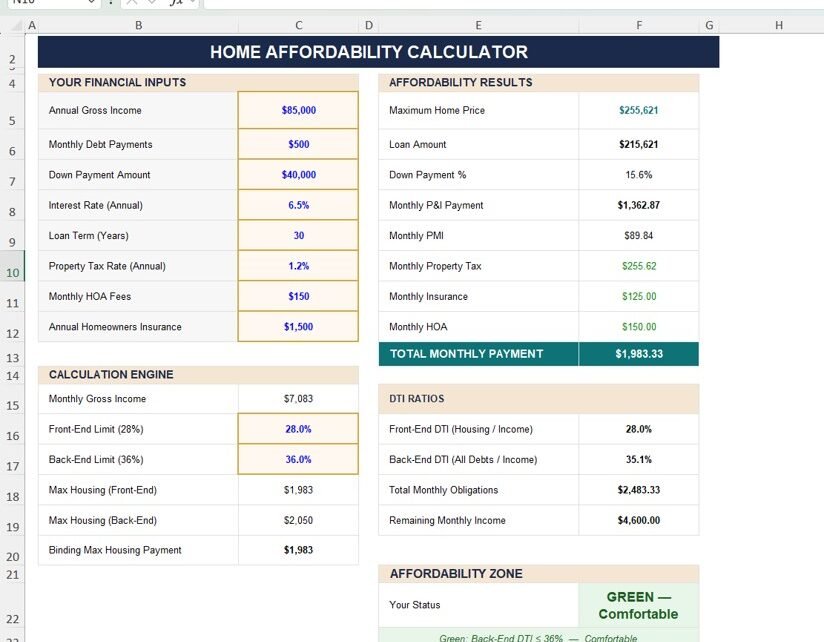
This powerful and easy-to-use Excel tool helps you estimate your home buying capacity, calculate monthly payments, analyze loan scenarios, and plan your finances effectively. Moreover, it provides real-time insights using automated calculations, sensitivity analysis, and amortization schedules.
What is a Home Affordability Calculator in Excel?
A Home Affordability Calculator in Excel is a financial planning tool designed to help individuals determine how much home they can afford based on their income, expenses, and loan details.
Instead of manually calculating complex mortgage formulas, this calculator allows you to:
- Estimate maximum home price
- Calculate loan amount and EMI
- Analyze monthly payments
- Understand debt-to-income (DTI) ratios
- View loan amortization schedules
Therefore, it simplifies the entire home-buying decision process.
Why Do You Need a Home Affordability Calculator?
Click to Buy Home Affordability Calculator in Excel
Many home buyers make decisions based on guesswork. However, this often leads to financial mistakes. With a structured calculator, you gain clarity and confidence.
Key Reasons to Use This Calculator:
- Helps you avoid over-budget purchases
- Provides accurate EMI calculations
- Improves financial planning
- Gives clear affordability insights
- Supports better loan decisions
As a result, you can buy your dream home without financial stress.
Key Features of Home Affordability Calculator in Excel
This calculator includes multiple powerful sections designed to provide complete financial analysis.
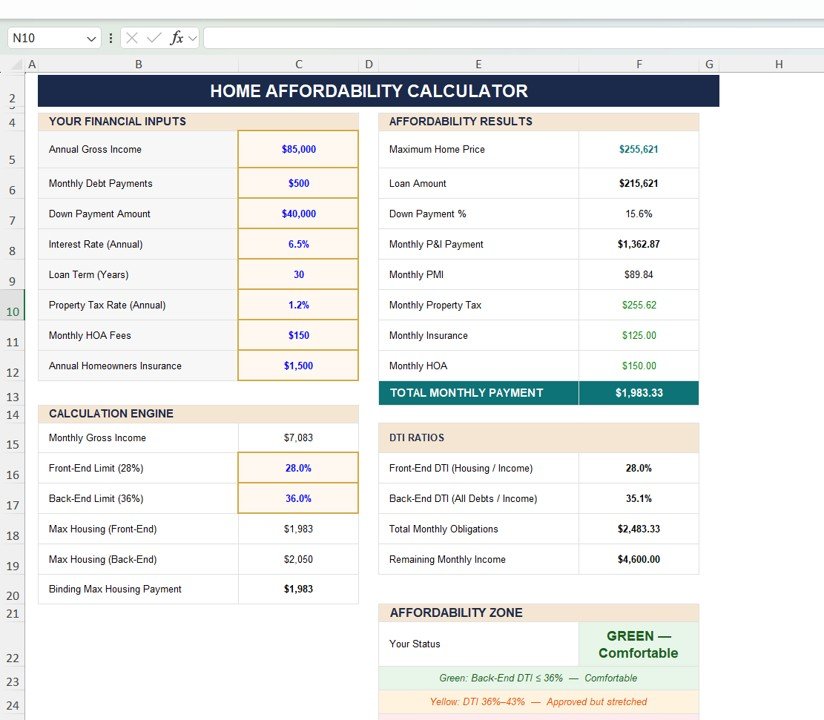
Financial Inputs – Enter Your Key Details
The calculator starts with input fields where you enter your financial data.
🔹 Input Fields:
- Annual Gross Income
- Monthly Debt Payments
- Down Payment Amount
- Interest Rate (Annual)
- Loan Term (Years)
- Property Tax Rate
- Monthly HOA Fees
- Annual Insurance
Click to Buy Home Affordability Calculator in Excel
Affordability Results – Get Instant Insights
Once you enter your data, the calculator provides real-time results.
Key Outputs:
- Maximum Home Price
- Loan Amount
- Down Payment Percentage
- Monthly Principal & Interest
- Monthly PMI
- Monthly Property Tax
- Monthly Insurance
- Total Monthly Payment
DTI Ratios – Measure Financial Health
Debt-to-Income (DTI) ratios play a crucial role in loan approval.
🔹 Metrics Included:
- Front-End DTI (Housing / Income)
- Back-End DTI (All Debts / Income)
- Total Monthly Obligations
- Remaining Income
Affordability Zone – Know Your Risk Level
The calculator categorizes your affordability into zones:
- 🟢 Green – Comfortable
- 🟡 Yellow – Manageable but tight
- 🔴 Red – High risk
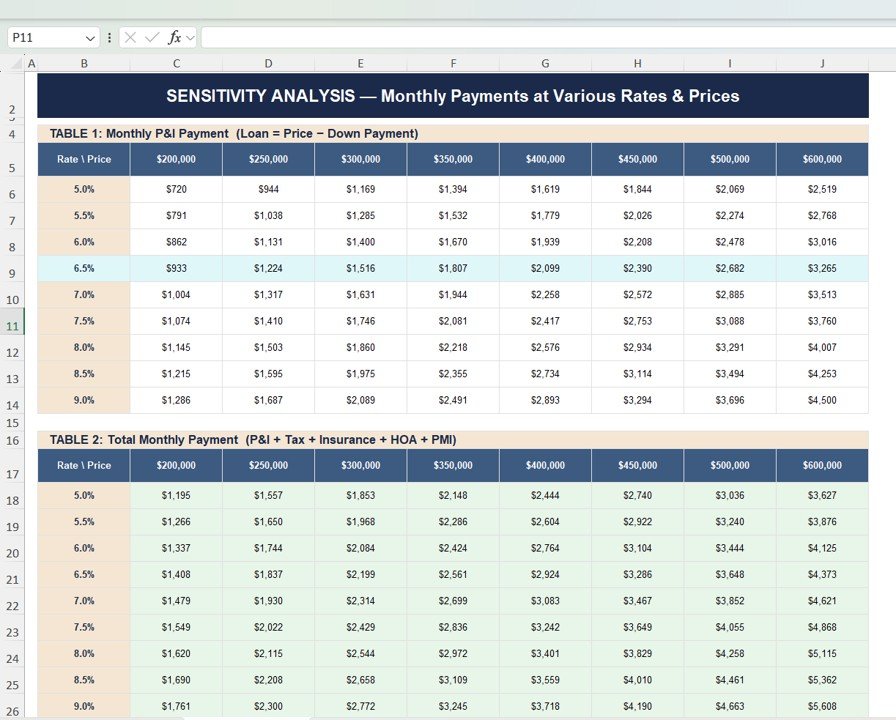
Sensitivity Analysis – Explore Different Scenarios
This feature allows you to analyze how changes in interest rates and home prices impact your monthly payments.
🔹 Includes:
- Monthly EMI across different rates
- Total monthly payment variations
- Comparison tables for multiple scenarios
Click to Buy Home Affordability Calculator in Excel
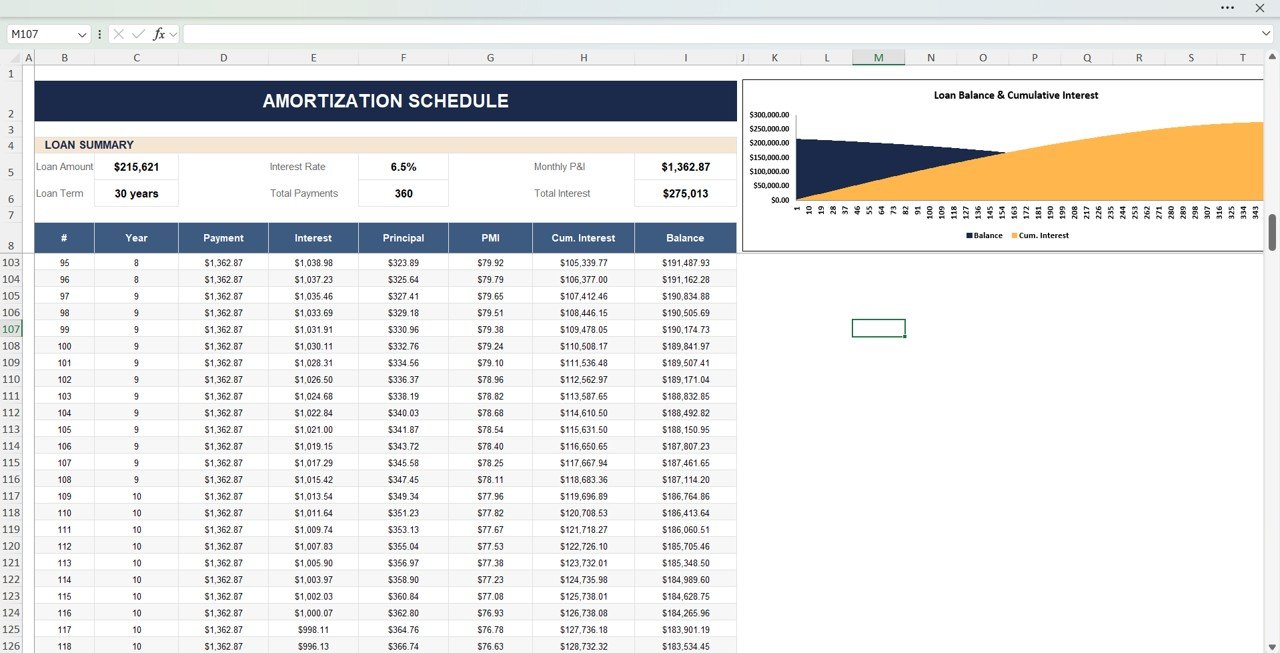
Amortization Schedule – Understand Loan Breakdown
The amortization schedule shows:
- Monthly payments
- Interest vs principal breakdown
- Remaining loan balance
- Cumulative interest paid
Click to Buy Home Affordability Calculator in Excel
Advantages of Home Affordability Calculator in Excel
Using this calculator provides several powerful benefits:
Accurate Financial Planning
- You get precise calculations
- You avoid guesswork
Better Decision-Making
- You understand your affordability clearly
- You choose the right property
Time-Saving Automation
- All calculations update automatically
- You save time and effort
Scenario Analysis
- You test different interest rates
- You compare multiple options
Risk Reduction
- You avoid financial stress
- You stay within budget
How Does This Calculator Improve Home Buying Decisions?
Click to Buy Home Affordability Calculator in Excel
This calculator goes beyond simple calculations. It helps you make smarter decisions.
Here’s how:
- It identifies your maximum budget
- It calculates realistic monthly payments
- It evaluates loan eligibility
- It highlights financial risks
- It supports long-term planning
As a result, you can confidently move forward with your home purchase.
Best Practices for the Home Affordability Calculator in Excel
To get the best results, follow these best practices:
Enter Accurate Data
- Use real income and expense values
- Avoid assumptions
Consider Future Expenses
- Include possible cost increases
- Plan for emergencies
Test Multiple Scenarios
- Change interest rates
- Adjust loan terms
Monitor DTI Ratios
- Keep DTI within safe limits
- Avoid excessive debt
Review Regularly
- Update data before making decisions
- Stay informed about market changes
Opportunities for Improvement
Click to Buy Home Affordability Calculator in Excel
You can enhance this calculator further:
🔹 Add Credit Score Analysis
- Evaluate loan eligibility better
🔹 Include Rent vs Buy Comparison
- Compare financial benefits
🔹 Add Inflation Adjustment
- Improve long-term planning
🔹 Integrate Real-Time Interest Rates
- Increase accuracy
Who Can Benefit from This Calculator?
Click to Buy Home Affordability Calculator in Excel
This calculator is ideal for:
- First-time home buyers
- Working professionals
- Financial planners
- Loan advisors
- Real estate investors
Therefore, anyone planning to buy a home can benefit from this tool.
How to Use the Home Affordability Calculator?
Click to Buy Home Affordability Calculator in Excel
Using this calculator is simple:
- Enter your financial details
- Review affordability results
- Analyze DTI ratios
- Explore sensitivity analysis
- Check amortization schedule
As a result, you gain complete clarity before buying a home.
Conclusion
The Home Affordability Calculator in Excel is a must-have tool for anyone planning to buy a home. It simplifies complex financial calculations, provides clear insights, and helps you make smarter decisions.
Moreover, it allows you to analyze different scenarios and understand long-term financial impact. Therefore, you can confidently plan your home purchase and avoid financial stress.
Visit our YouTube channel to learn step-by-step video tutorials
Youtube.com/@NeotechNavigators
Click to Buy Home Affordability Calculator in Excel