In today’s healthcare environment, nursing homes must deliver high-quality patient care while managing costs and performance efficiently. However, many facilities still depend on manual reports and disconnected data sources. As a result, they struggle to track KPIs, monitor trends, and make timely decisions.
So, how can nursing homes track performance, compare targets, and improve patient outcomes in one place?
Nursing Homes KPI Dashboard in Power BI
This powerful dashboard helps healthcare professionals monitor KPIs, compare actual vs target performance, and gain actionable insights. In this article, you will learn everything about this dashboard, including its features, structure, benefits, and best practices.
What is a Nursing Homes KPI Dashboard in Power BI?
A Nursing Homes KPI Dashboard in Power BI is an interactive data visualization tool that helps track and analyze key healthcare metrics. It consolidates data from Excel and transforms it into meaningful insights.
Instead of using multiple reports, you can view all KPIs in one place. Therefore, decision-makers can quickly identify trends, measure performance, and take corrective actions.
Why Do Nursing Homes Need a KPI Dashboard?
Managing a nursing home involves handling multiple KPIs such as patient care quality, operational efficiency, and financial performance. However, without a proper system, tracking these metrics becomes difficult.
Key Reasons:
- 📊 Centralized KPI monitoring
- ⏱️ Faster decision-making
- 📉 Improved performance tracking
- 🏥 Better patient care outcomes
- 💡 Data-driven insights
As a result, nursing homes can improve both efficiency and service quality.
What Are the Key Features of This Dashboard?
This Power BI dashboard includes 3 powerful pages, each designed for specific analysis.
How Does the Summary Page Help in KPI Monitoring?
Click to Buy Nursing Homes KPI Dashboard in Power BI
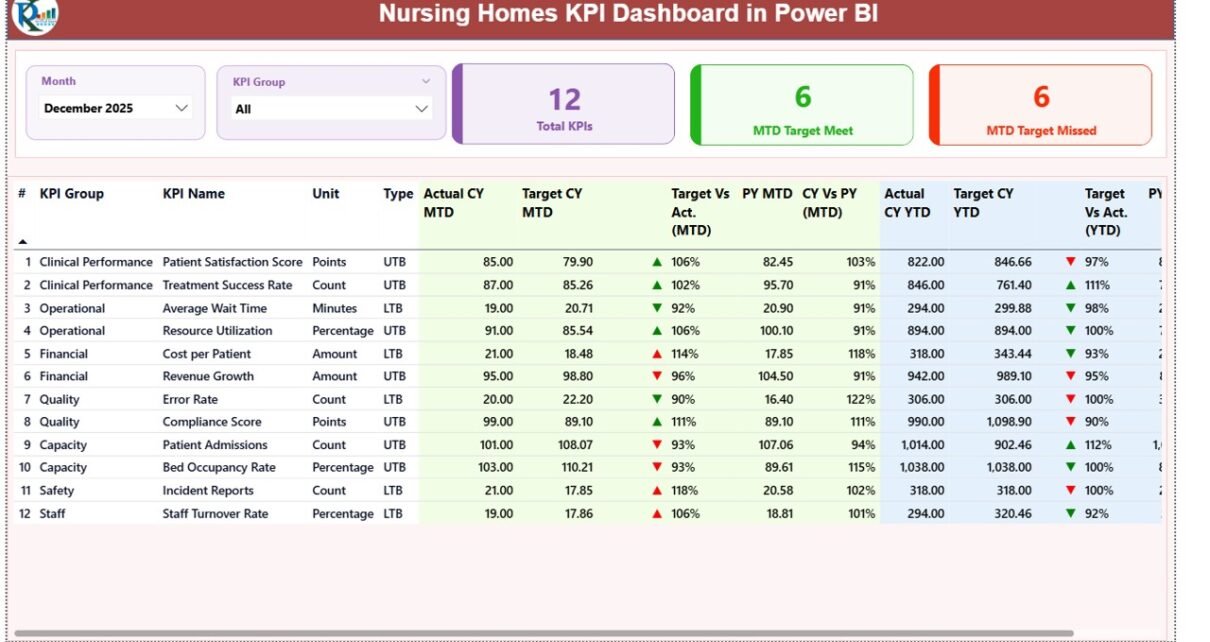
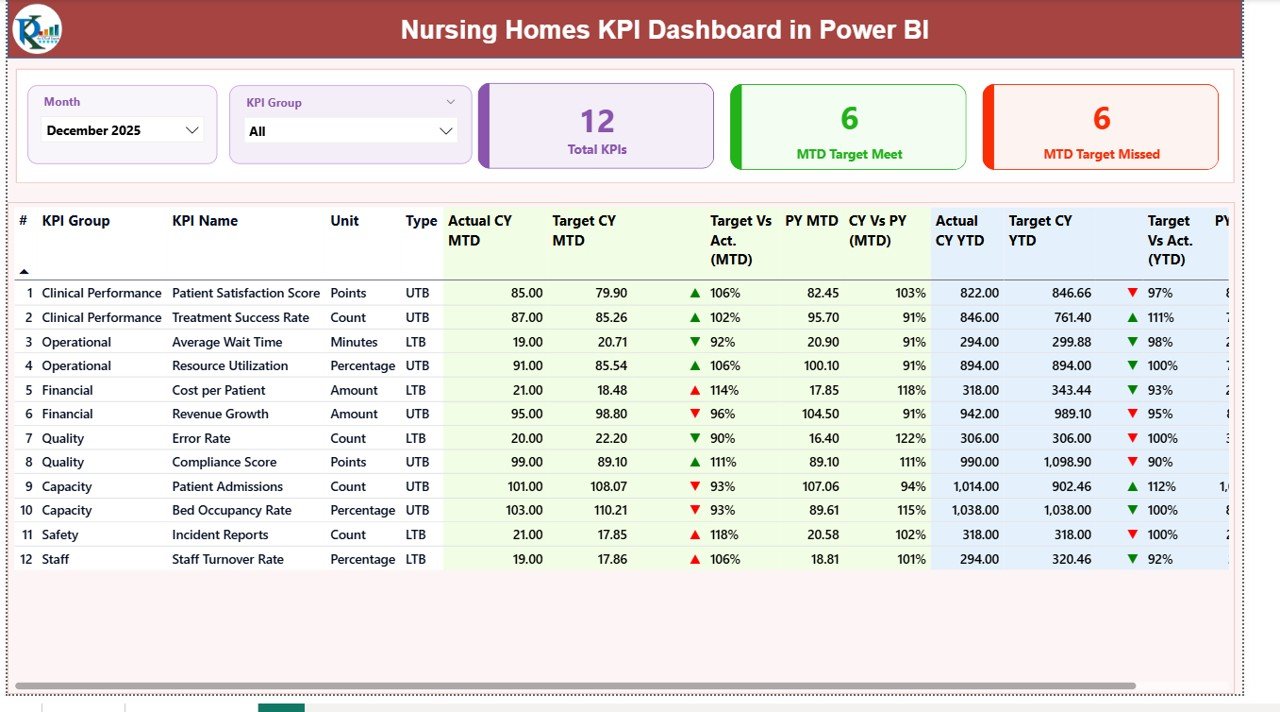
The Summary Page is the main page of the dashboard. It provides a complete overview of all KPIs.
Key Elements:
- 📅 Month Slicer for dynamic filtering
- 📂 KPI Group Slicer for category-wise analysis
KPI Cards:
- Total KPIs Count
- MTD Target Meet Count
- MTD Target Missed Count
Detailed KPI Table Includes:
- KPI Number
- KPI Group
- KPI Name
- Unit of Measurement
- KPI Type (LTB – Lower the Better / UTB – Upper the Better)
Performance Metrics:
- Actual CY MTD vs Target CY MTD
- Target vs Actual (MTD) = Actual / Target
- PY MTD Comparison
- CY vs PY (MTD)
- Actual CY YTD vs Target CY YTD
- Target vs Actual (YTD) = Actual / Target
- PY YTD Comparison
- CY vs PY (YTD)
Visual Indicators:
- ▲ Green Arrow = Good Performance
- ▼ Red Arrow = Needs Improvement
Because of these features, users can instantly understand KPI performance.
Click to Buy Nursing Homes KPI Dashboard in Power BI
How Does the KPI Trend Page Improve Analysis?
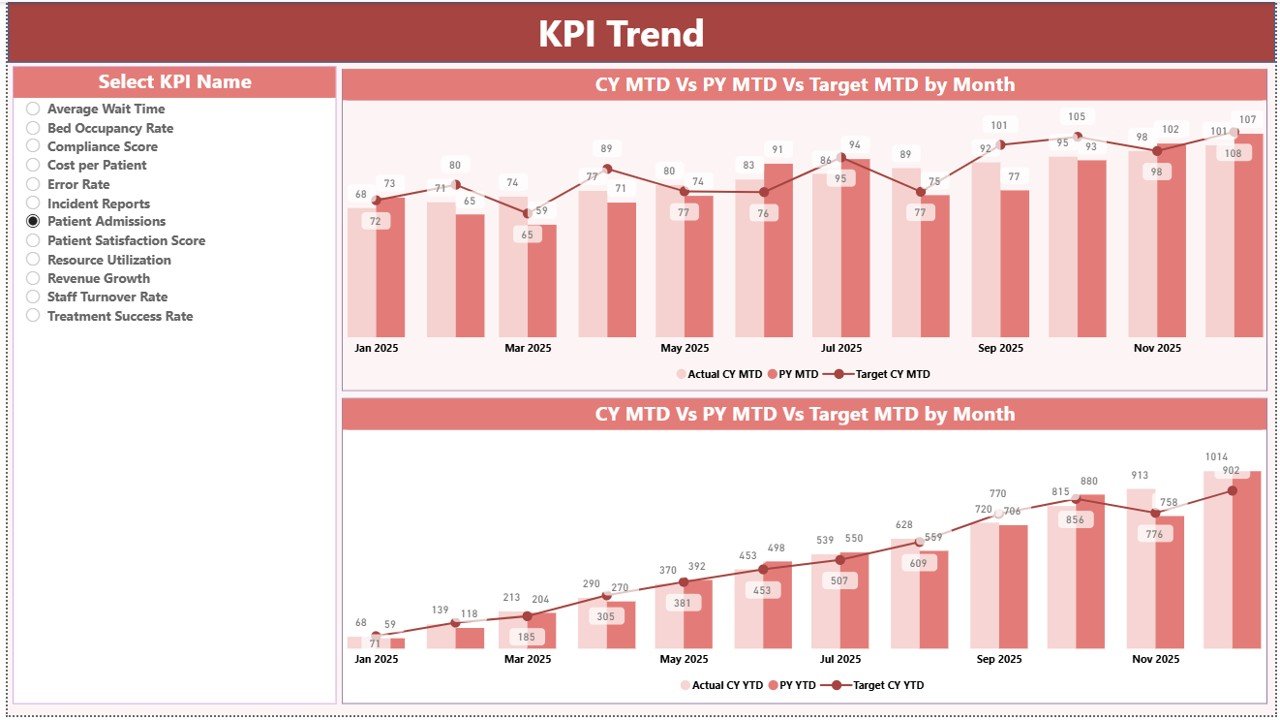
The KPI Trend Page helps track performance over time.
Features:
- 📊 Two combo charts for MTD and YTD
- 📈 Comparison of:
- Current Year Actual
- Previous Year Actual
- Target Values
Interactive Slicer:
- Select KPI Name to analyze specific metrics
Benefits:
- Identifies trends
- Tracks improvements
- Supports forecasting
Click to Buy Nursing Homes KPI Dashboard in Power BI
What is the Purpose of the KPI Definition Page?
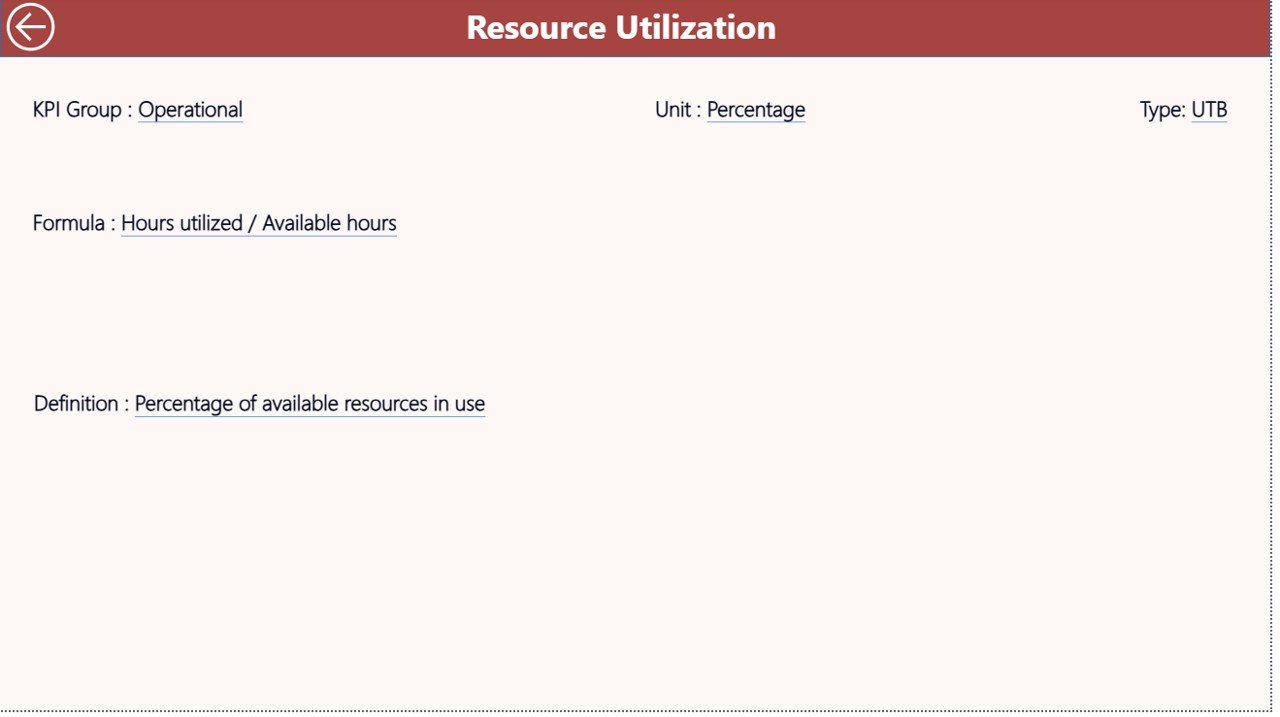
The KPI Definition Page is a drill-through page. It provides detailed information about each KPI.
Includes:
- KPI Formula
- KPI Definition
- KPI Type (LTB or UTB)
Why It’s Useful:
- Improves understanding of KPIs
- Ensures data accuracy
- Supports better decision-making
Additionally, users can easily return to the main page using the back button.
Click to Buy Nursing Homes KPI Dashboard in Power BI
How Does the Excel Data Source Work?
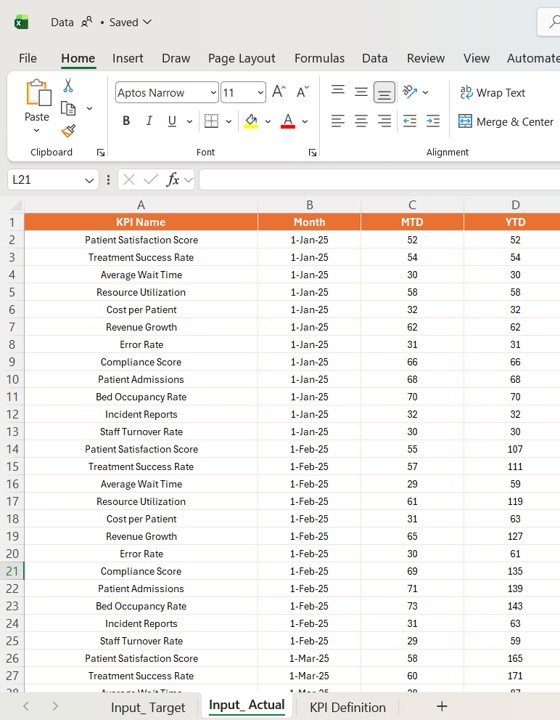
This dashboard uses an Excel file as the data source. Therefore, it becomes easy to manage and update data.
Required Worksheets:
1. Input_Actual Sheet:
- Enter KPI Name
- Month (First date of month)
- MTD Values
- YTD Values
Click to Buy Nursing Homes KPI Dashboard in Power BI
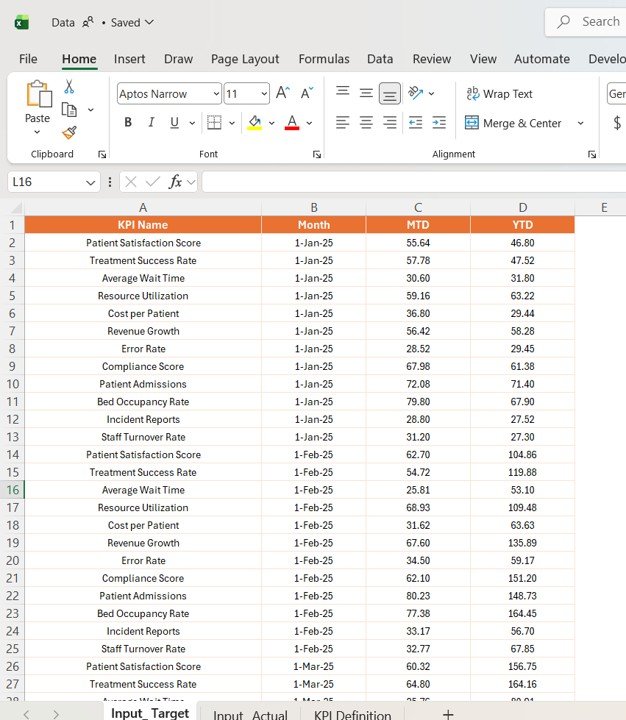
2. Input_Target Sheet:
- Enter Target values for MTD and YTD
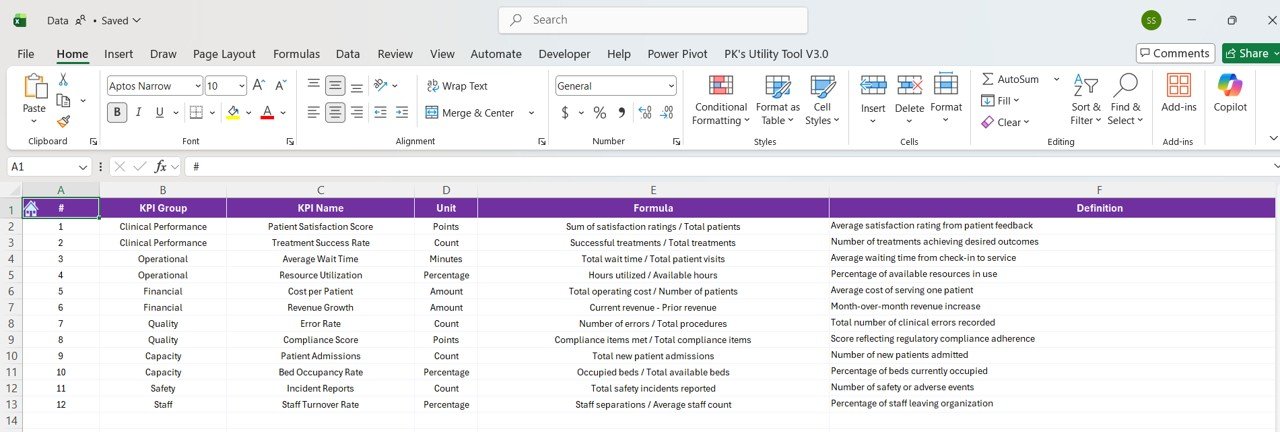
3. KPI Definition Sheet:
- KPI Number
- KPI Group
- KPI Name
- Unit
- Formula
- Definition
- Type (LTB or UTB)
Because of this structured setup, data management becomes simple and efficient.
This dashboard offers multiple benefits. Therefore, it becomes a must-have tool for healthcare professionals.
Click to Buy Nursing Homes KPI Dashboard in Power BI
Key Advantages:
- ✅ Real-time KPI monitoring
- ✅ Easy-to-use interactive interface
- ✅ Improved patient care insights
- ✅ Better target tracking
- ✅ Enhanced decision-making
- ✅ Automated calculations
Moreover, it reduces manual effort significantly.
How Can This Dashboard Improve Patient Care?
This dashboard helps nursing homes focus on quality care.
It Enables:
- Monitoring treatment efficiency
- Tracking patient-related KPIs
- Identifying performance gaps
- Improving service quality
As a result, patient satisfaction increases.
Best Practices for the Nursing Homes KPI Dashboard in Power BI
Click to Buy Nursing Homes KPI Dashboard in Power BI
To get the best results, follow these best practices:
Best Practices:
- 📌 Update data regularly
- 📌 Maintain clean and accurate data
- 📌 Use slicers effectively
- 📌 Monitor KPIs consistently
- 📌 Customize visuals for clarity
- 📌 Validate KPI definitions
Additionally, always review performance trends monthly.
Who Can Benefit from This Dashboard?
This dashboard is useful for various professionals.
Target Users:
- 🏥 Nursing home administrators
- 👩⚕️ Healthcare managers
- 📊 Data analysts
- 💼 Financial teams
- 🧾 Healthcare consultants
Therefore, anyone involved in healthcare analytics can use it.
How to Use the Nursing Homes KPI Dashboard in Power BI?
Click to Buy Nursing Homes KPI Dashboard in Power BI
Using this dashboard is simple.
Steps:
- Input data in Excel sheets
- Load data into Power BI
- Refresh the dashboard
- Use slicers to filter data
- Analyze insights
Because of its intuitive design, even beginners can use it easily.
Conclusion: Why Should You Use This Dashboard?
In conclusion, the Nursing Homes KPI Dashboard in Power BI is a powerful solution for healthcare analytics.
It helps you:
- Track KPI performance
- Compare actual vs target
- Analyze trends
- Improve patient care
Therefore, if you want to make smarter, data-driven decisions, this dashboard is the perfect choice.
Visit our YouTube channel to learn step-by-step video tutorials
Click to Buy Nursing Homes KPI Dashboard in Power BI