Maintaining corporate compliance is critical for organizations to avoid penalties, reduce risks, and ensure operational integrity. The Corporate Compliance Report in Excel provides a ready-to-use solution to track compliance cases, monitor high-risk areas, and evaluate overall performance.
In this article, we will explain the features, advantages, and best practices of using this Excel-based compliance dashboard.
What Is a Corporate Compliance Report?
A Corporate Compliance Report is a structured tool that allows organizations to monitor compliance-related activities, including case status, risk levels, deadlines, and adherence to regulatory standards.
Using Excel, this report helps organizations:
Track compliance cases in real-time
Identify high-risk and overdue cases
Measure completion rates and compliance effectiveness
Generate insights for management reporting and decision-making
Key Features of the Corporate Compliance Report
Click to Buy Corporate Compliance Report in Excel
This report contains three worksheets, each designed for a specific function:
1. Summary Sheet Tab
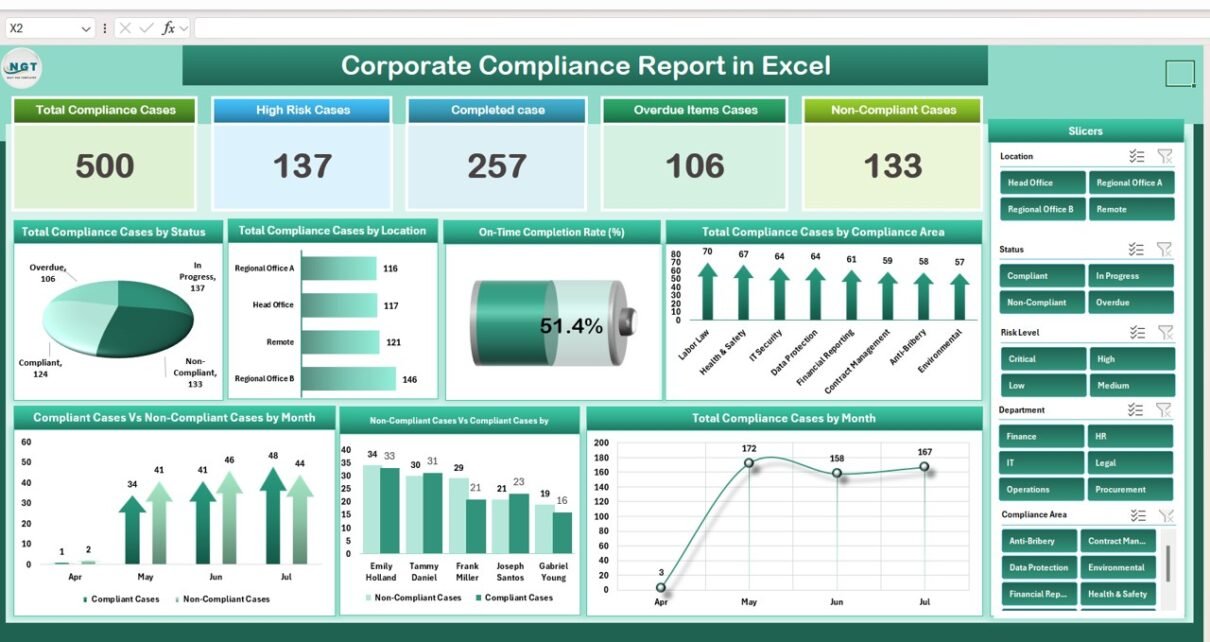
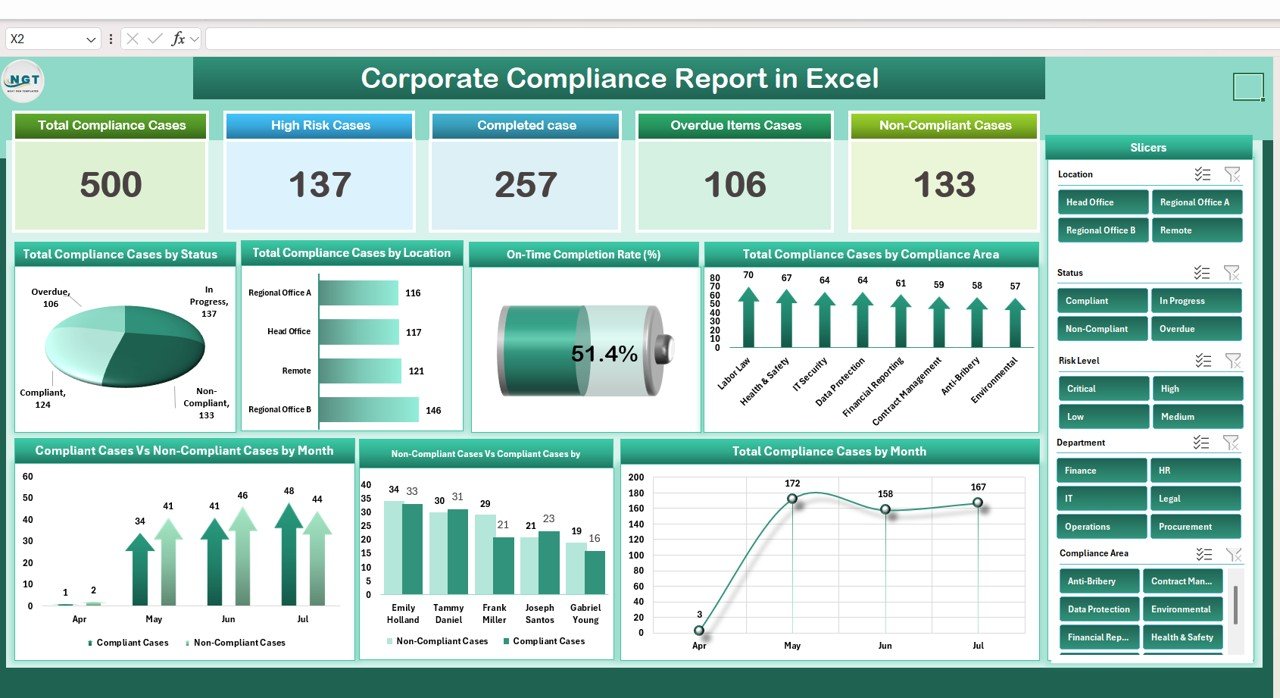
The Summary Sheet provides a high-level overview of compliance performance.
Cards:
Total Compliance Cases: Total number of cases being monitored
High-Risk Cases: Cases flagged as high-risk
Completed Cases: Cases successfully closed
Overdue Items Cases: Cases past their deadlines
Non-Compliant Cases: Cases that are non-compliant or failed audits
Charts:
Total Compliance Cases by Status: Visualizes case distribution (Open, Closed, In Progress)
Total Compliance Cases by Location: Shows compliance performance across different locations
On-Time Completion Rate (%): Measures the percentage of cases completed on time
Total Compliance Cases by Compliance Area: Breakdown by departments or areas
Compliant vs Non-Compliant Cases by Month: Tracks monthly compliance trends
Non-Compliant vs Compliant Cases by Responsible: Identifies accountability and responsible persons
Total Compliance Cases by Month: Tracks case volume trends over time
Click to Buy Corporate Compliance Report in Excel
2. Report Sheet Tab
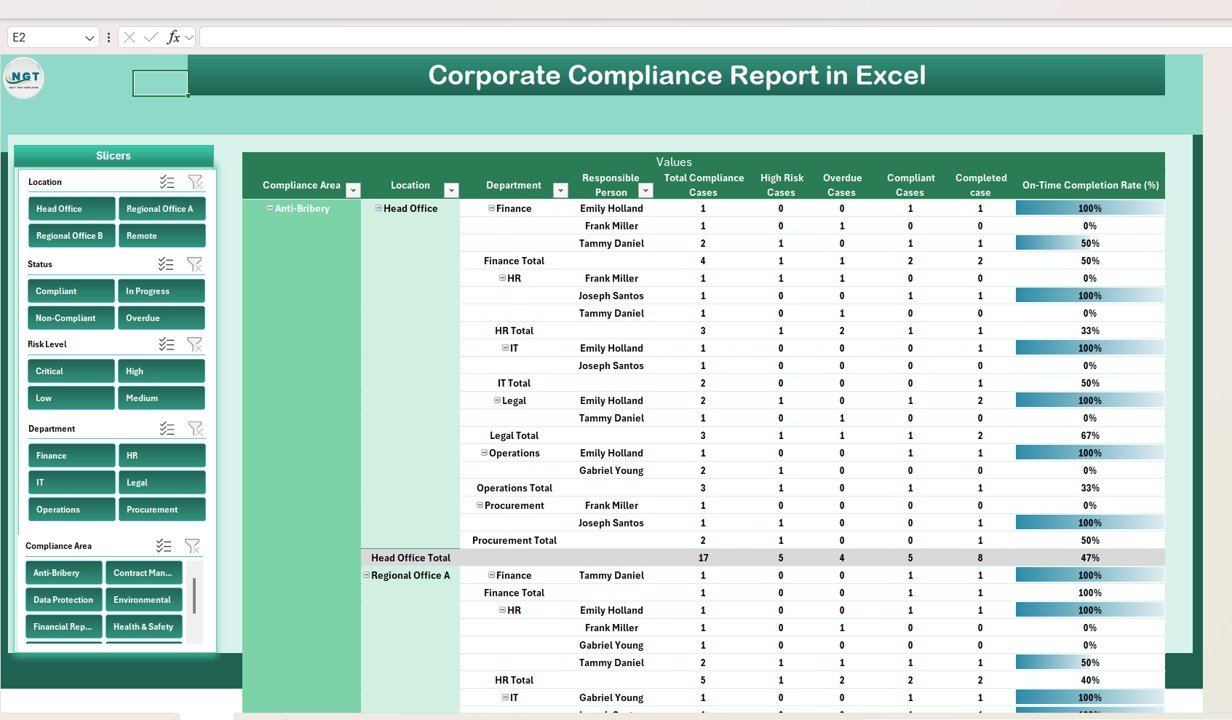
The Report Sheet is a Power Pivot view that provides detailed analysis:
Drill-down capabilities to analyze cases by department, location, or responsible person
Summarized insights for management or regulatory reporting
Supports complex reporting requirements for internal audits
3. Data Sheet Tab
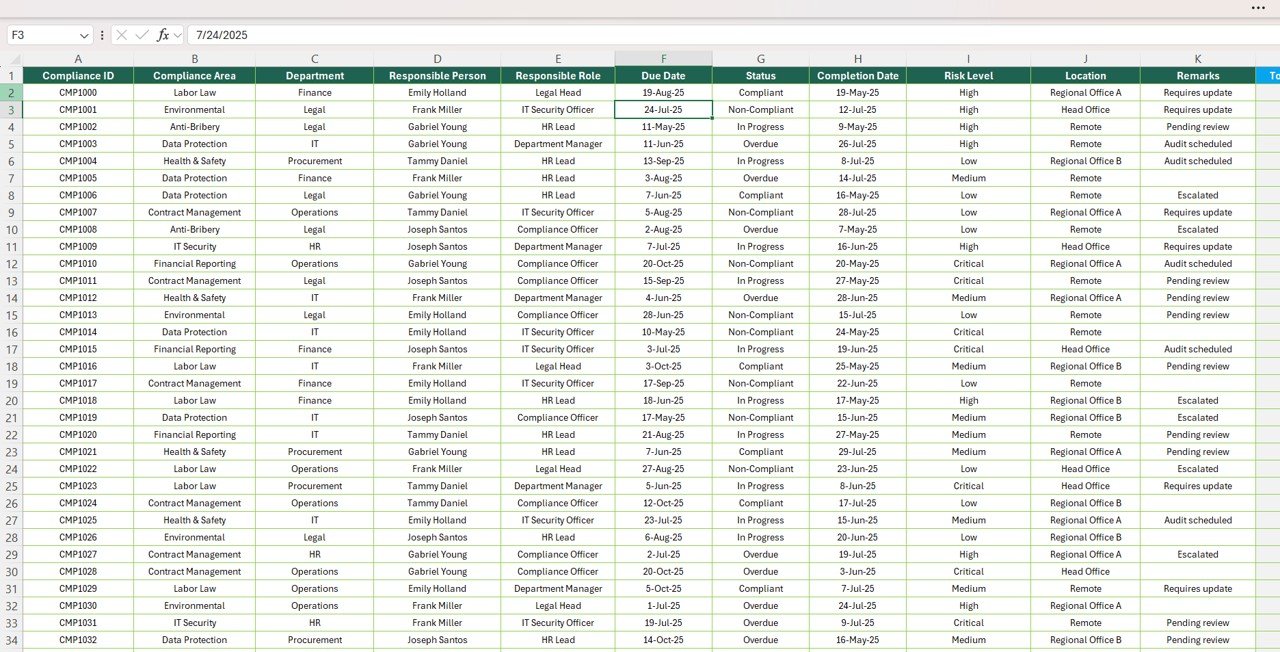
The Data Sheet is the input sheet for all compliance-related information:
Enter case details including status, risk level, responsible person, due dates, and compliance area
Structured data ensures accuracy and consistency
Automatically updates visualizations in the Summary and Report sheets4
Click to Buy Corporate Compliance Report in Excel
Advantages of Using the Corporate Compliance Report
Centralized Tracking: Monitor all compliance cases in one Excel file
Visual Insights: Cards and charts provide quick understanding of performance
Risk Identification: Easily identify high-risk or overdue cases
Accountability: Track non-compliance by responsible person or department
Trend Analysis: Evaluate monthly and area-wise compliance performance
Time-Saving: Automates reporting and reduces manual work
Best Practices for Using the Dashboard
Update Cases Regularly: Ensure data is current for accurate tracking
Segment by Area or Location: Analyze compliance performance by department or office
Track High-Risk Cases Closely: Prioritize addressing overdue and high-risk cases
Monitor On-Time Completion: Identify bottlenecks to improve compliance efficiency
Use Pivot Reports for Analysis: Drill down to understand trends and accountability
How This Report Helps Organizations
Click to Buy Corporate Compliance Report in Excel
Reduce Compliance Risks: Identify non-compliant cases before they escalate
Enhance Accountability: Assign responsible persons for each case
Monitor Trends: Track monthly case volume and completion rates
Support Regulatory Reporting: Use visual dashboards for internal and external reporting
Improve Decision-Making: Prioritize actions based on risk and overdue cases
Frequently Asked Questions (FAQs)
Click to Buy Corporate Compliance Report in Excel
Q1: Can I customize the compliance areas in the report?
Yes, you can add, remove, or rename compliance areas based on your organization’s requirements.
Q2: Does this report show overdue cases clearly?
Yes, overdue cases are tracked separately and visualized in the Summary sheet cards and charts.
Q3: Can I monitor compliance by location?
Absolutely. The Summary sheet provides charts for compliance cases by location.
Q4: Is this report suitable for large organizations?
Yes, using Power Pivot allows the report to handle large datasets efficiently.
Q5: Can I generate monthly compliance trend reports?
Yes, the dashboard includes monthly breakdowns for trend analysis and performance evaluation.
Conclusion
The Corporate Compliance Report in Excel is a comprehensive, ready-to-use tool for monitoring, analyzing, and managing compliance cases. By centralizing all compliance data and providing visual insights, organizations can improve accountability, reduce risk, and ensure regulatory adherence efficiently.
Visit our YouTube channel to learn step-by-step video tutorials
Watch the step-by-step video Demo:
Click to Buy Corporate Compliance Report in Excel