Healthcare organizations now deal with a fast-moving environment where procurement teams must work with strict timelines, compliance requirements, digital tools, and cross-department coordination. Because of this fast pace, every procurement leader needs a simple and effective way to plan, track, and manage daily, monthly, and annual activities.
A Healthcare Procurement Digital Transformation Calendar in Excel gives you exactly that solution. It helps teams organize tasks, track events, streamline communication, and maintain visibility across all digital transformation initiatives. Since it runs in Excel, it becomes easy to set up, use, and customize without any additional software.
This article explains every detail of the Healthcare Procurement Digital Transformation Calendar in Excel. You will learn how it works, how each worksheet supports your workflow, why this tool adds value to your procurement department, and how you can apply best practices to get maximum benefits.
Click to buy Healthcare Procurement Digital Transformation Calendar in Excel
What Is a Healthcare Procurement Digital Transformation Calendar in Excel?
A Healthcare Procurement Digital Transformation Calendar in Excel is a ready-to-use, interactive planning tool designed for hospitals, clinics, medical supply chains, diagnostic centers, and healthcare procurement teams. It helps users track digital transformation tasks such as system upgrades, supplier onboarding automation, procurement workflow changes, compliance checks, training schedules, data migration timelines, and vendor meetings.
Since the entire calendar runs in Excel, users can update it quickly, add new events with a simple form, customize color themes, and view activities in different formats such as:
- Annual View
- Monthly View
- Daily View
- Event Database
This structured design gives procurement teams full control over daily digital transformation progress.
Why Do Healthcare Procurement Teams Need a Digital Transformation Calendar?
Healthcare procurement handles critical responsibilities like:
- Timely purchasing of medical devices
- Tracking supplier performance
- Maintaining compliance
- Managing digital procurement systems
- Ensuring accuracy in electronic purchase orders
- Aligning with finance, IT, and clinical teams
Without a centralized calendar, teams often struggle with:
- Missed deadlines
- Lack of coordination
- Confusion during system upgrades
- Inefficient communication
- Improper event tracking
A dedicated calendar solves these challenges.
Key Features of the Healthcare Procurement Digital Transformation Calendar in Excel
This Excel template includes five powerful worksheets that improve planning, tracking, and reporting.
Let’s explore each sheet in detail.
Home Sheet Tab – Your Navigation Hub
The Home sheet works as the dashboard for the entire workbook. It provides four clearly placed navigation buttons:
- Annual View
- Monthly View
- Daily View
- Events
These buttons help you move across the calendar without scrolling or searching. This improves user experience and makes the calendar friendly even for beginners.
The Home sheet also includes space for snapshots or organization branding.

Click to buy Healthcare Procurement Digital Transformation Calendar in Excel
Annual View Sheet – A Complete Year at a Glance
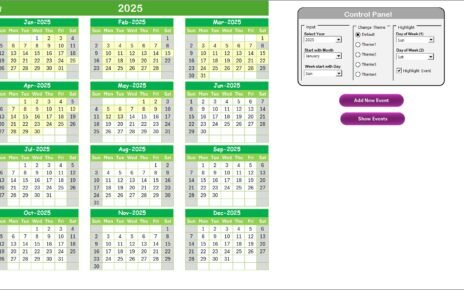
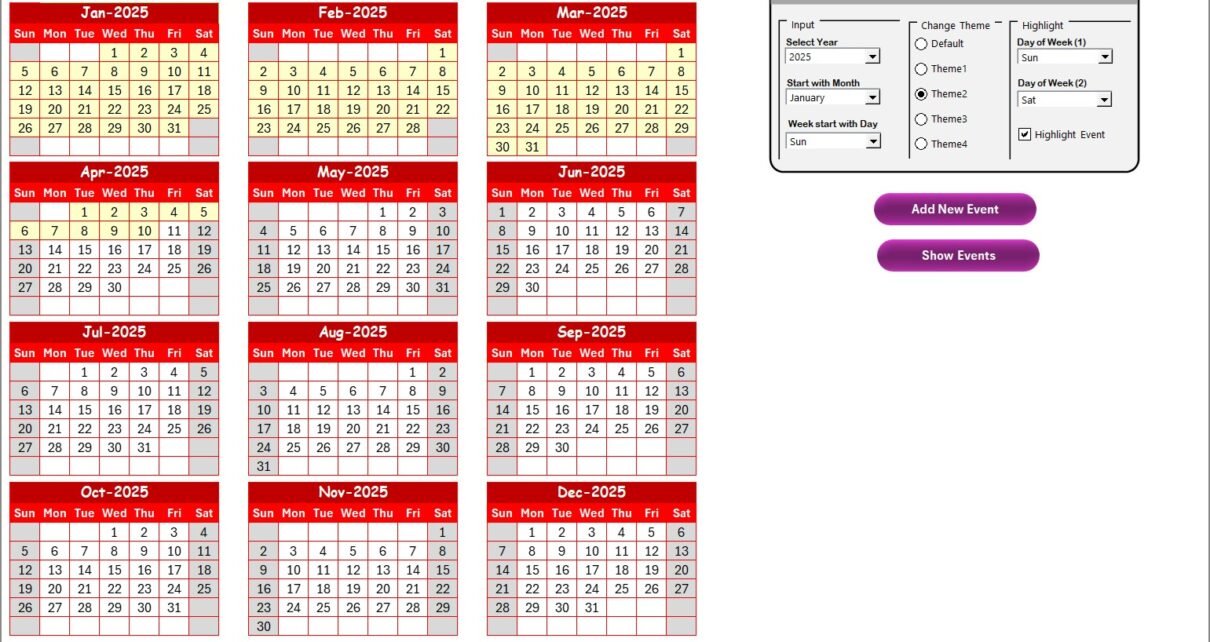
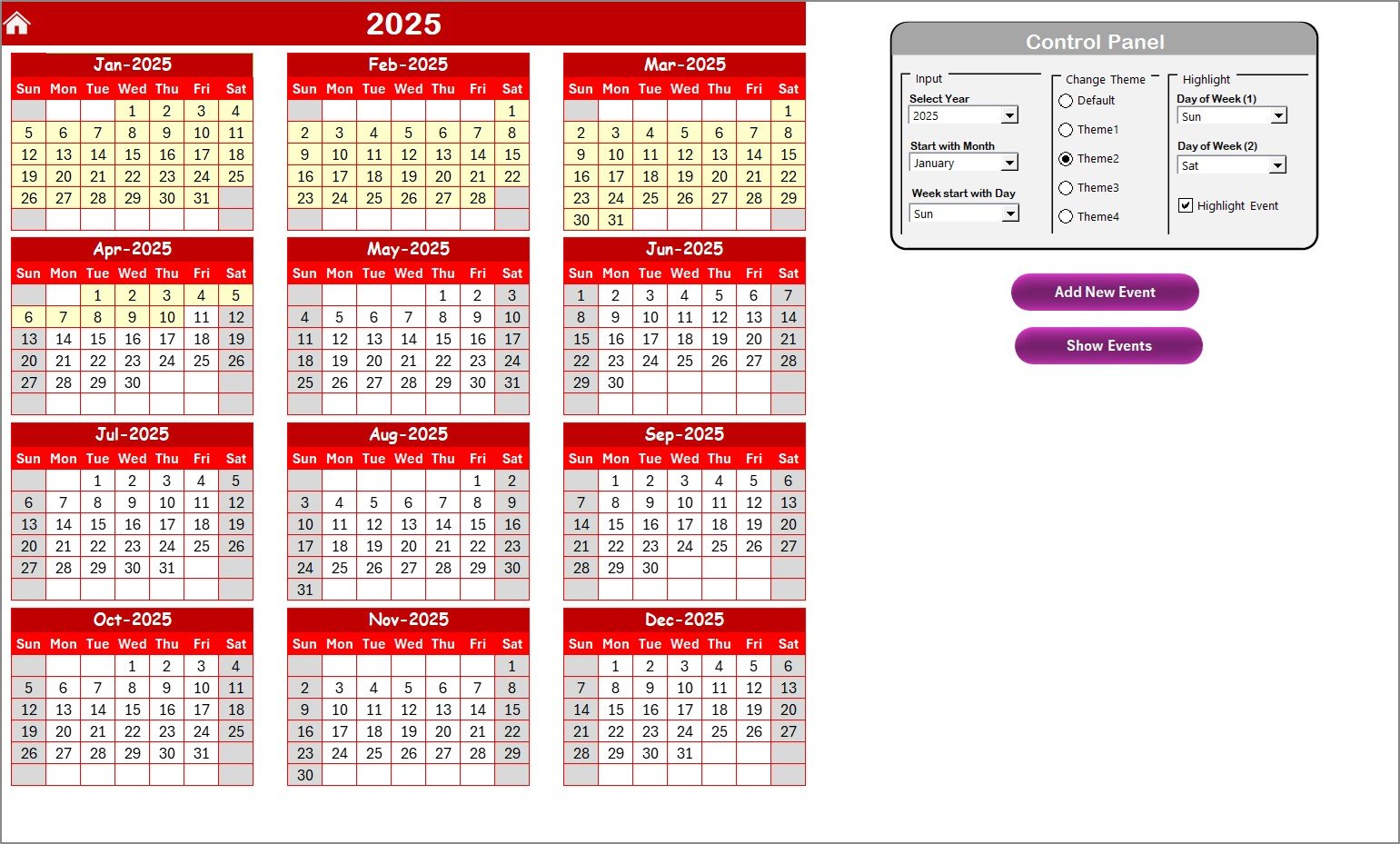
The Annual View sheet displays all 12 months on a single page. This structure supports long-term planning for healthcare procurement teams.
Key Functionalities on the Annual View Sheet
The sheet includes a powerful Control Panel divided into three functional groups:
Input Group
This area allows you to:
- Select the Year
- Select the Starting Month
- Select the Starting Day of the Week
Procurement teams often need flexible calendar alignment due to fiscal calendars or government policies. This input panel adjusts the entire annual calendar instantly.
Click to buy Healthcare Procurement Digital Transformation Calendar in Excel
Change Theme Group
You get 5 beautiful color themes. Users can switch themes to match:
- Hospital branding
- Department preferences
- Presentation requirements
With one click, the entire workbook updates to the chosen color theme.
Highlight Group
This feature improves visibility on the calendar. You can highlight:
- Day of Week (1)
- Day of Week (2)
For example:
- Choose Saturday
- Choose Sunday
Both will appear highlighted across all months, helping teams identify weekends quickly.
You can also enable Highlight Events. When this option is ON, all event dates appear in yellow, making important tasks stand out.
Add New Event Button
Select any date → click Add New Event → an event form opens.
You can enter:
- Event name
- Time
- Location
- Short description
The event saves automatically to that date.
Show Event Button
When you select a date and click Show Event, you will see all events listed for that day.
This helps procurement managers track meetings, deadlines, training sessions, and digital transformation activities easily.
Monthly View Sheet – A Detailed Month-Wise Calendar
This page shows a single calendar based on the month and year you select at the top.
Key Features of Monthly View
- Shows one event directly on the date
- Displays “More than 1…” if a date contains multiple events
- Provides two action buttons on the top
Add New Event Button
Select a date → click the button → fill the form → submit.
This helps teams add events in real time.
Show Event Button
This button reveals all events scheduled on the selected date. It improves visibility and reduces the chance of missed tasks.

Click to buy Healthcare Procurement Digital Transformation Calendar in Excel
Daily View Sheet – Track Events by Date Range
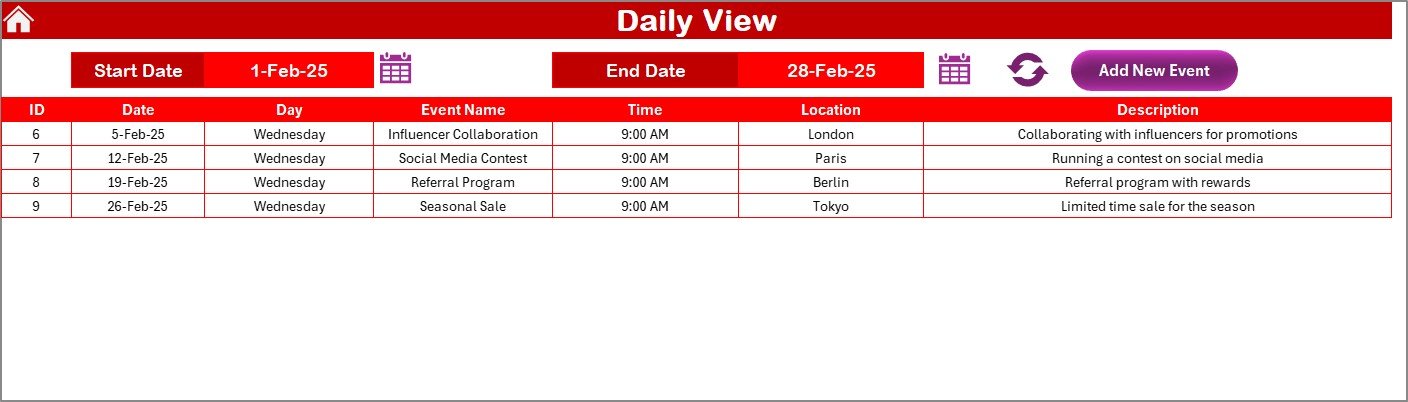
This sheet displays a list of events within a chosen date range.
How It Works
- Choose Start Date
- Choose End Date
- Click Refresh
The sheet then shows all events scheduled within that time.
Procurement teams use this view to plan:
- Weekly progress checks
- Daily digital transformation tasks
- Vendor coordination
- IT integration follow-ups
- Training sessions
- Inspection timelines
This sheet also includes an Add New Event button for quick updates.
Events Sheet – The Master Database
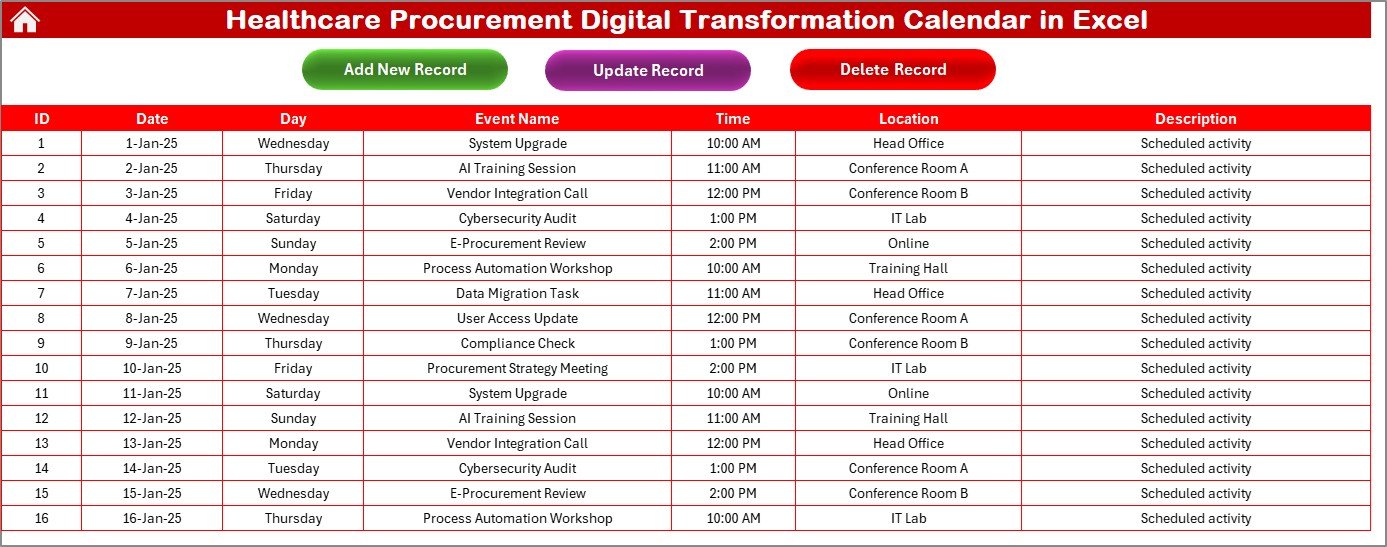
This sheet is the heart of the template. It stores every event in a structured table.
Fields Stored in the Database
- ID: Auto-generated
- Date: Event date
- Day: Weekday
- Event Name: Name of activity
- Time: Event time
- Location: Meeting or work location
- Description: Short details
This structure allows procurement managers to track every digital transformation activity without losing information.
Top Buttons on the Events Sheet
- Add New Record
Opens a form to add a new event.
- Update Existing Record
Select the event ID → click update → edit information → submit.
- Delete Record
Select the ID → click delete → the record gets removed instantly.
This level of control supports full event lifecycle management.
How This Calendar Supports Healthcare Procurement Digital Transformation
This template helps healthcare procurement teams in many ways:
- Better Planning
Digital transformation projects need well-structured timelines. The calendar gives clear visibility.
- Fast Event Tracking
You can find meetings, supplier sessions, training programs, or system updates in seconds.
- Centralized Data
All event data stays in one Excel file.
- No Confusion
Clear navigation and structured sheets reduce errors.
- Improved Collaboration
Teams can share the file and stay aligned.
Advantages of Healthcare Procurement Digital Transformation Calendar in Excel
Using this Excel calendar gives many practical advantages:
- Easy to Use
You do not need advanced technical skills.
- Saves Time
Automation buttons help you add, update, or delete events quickly.
- Supports Long-Term Planning
Annual, monthly, and daily views simplify analysis.
- Enhances Visibility
Highlighted weekends, events, and color themes improve readability.
- Makes Digital Transformation Smooth
Procurement teams track upgrades, vendor digitization, and compliance effortlessly.
- Highly Customizable
You can change themes, dates, layout, or structure.
- Helps Avoid Missed Deadlines
Reminders and event visibility ensure timely execution of tasks.
Best Practices for Using the Healthcare Procurement Digital Transformation Calendar in Excel
To get maximum benefits, follow these best practices:
- Update the Calendar Daily
Record tasks as soon as they are assigned.
- Use Clear Names for Events
Write short names like:
- “Vendor Onboarding Training”
- “E-Procurement System Update”
- “Inventory Automation Review”
- Highlight Important Dates
Use highlight options for:
- Compliance audits
- Budget planning
- System go-live dates
- Review the Annual View Monthly
This helps you prepare for upcoming deadlines.
- Maintain a Clean Database
Avoid duplicate entries in the Events sheet.
- Use the Daily View for Weekly Meetings
This ensures your team stays aware of current tasks.
- Select the Right Theme for Presentations
Themes improve readability during team briefings.
- Keep Descriptions Short
This improves clarity and supports faster scanning.
How Healthcare Teams Use This Calendar in Real Situations
Healthcare procurement teams use this calendar for:
- Vendor Digital Onboarding
Track onboarding, training, and digitization steps.
- E-Procurement System Rollouts
Plan go-live dates, data migration, setup, and testing.
- Inventory Automation
Monitor system updates and hardware installation timelines.
- Contract Renewals and Compliance
Mark expiration dates and audit deadlines.
- Staff Training and Workshops
Schedule training sessions for procurement and clinical staff.
- Supplier Performance Review
Plan bi-annual and monthly performance meetings.
- IT Collaboration Tasks
Track integration of digital procurement tools with hospital systems.
Conclusion
The Healthcare Procurement Digital Transformation Calendar in Excel is a powerful and practical tool for hospitals, clinics, and healthcare procurement teams. It brings structure, clarity, and efficiency to your digital transformation journey. With its annual, monthly, and daily views, along with automation features like event forms and highlight options, this Excel template helps teams stay organized and proactive. It supports planning, tracking, and executing tasks without confusion. As healthcare moves rapidly toward digital systems, tools like this calendar help organizations stay ahead and achieve success with confidence.
Frequently Asked Questions (FAQs)
- What is the Healthcare Procurement Digital Transformation Calendar in Excel?
It is an Excel-based template that helps healthcare procurement teams plan and track digital transformation activities across the year.
- Can I customize the calendar for my hospital or department?
Yes. You can change themes, colors, months, and date settings according to your needs.
- Does the calendar support event automation?
Yes. You can add, update, and delete events using simple buttons and forms.
- Can I track multiple events on the same date?
Yes. The monthly view shows the first event and displays “More than 1…” if additional events exist.
- Is the calendar suitable for long-term planning?
Yes. The annual view helps you monitor activities for the whole year.
- Can beginners use this template?
Absolutely. The interface is simple, clean, and user-friendly.
- How does the daily view help?
It lets you filter events by any date range and prepare weekly or daily workflow reports.
- Is the event database maintained automatically?
Yes. Every event added through the form updates the database instantly.
- Can I share this calendar with my team?
Yes. You can share it like any other Excel file.
- Does this template require macros?
The advanced features generally use VBA buttons, but everything runs smoothly inside Excel without additional software.
Visit our YouTube channel to learn step-by-step video tutorials
Watch the step-by-step video tutorial:
Click to buy Healthcare Procurement Digital Transformation Calendar in Excel