Employee wellness has become one of the most important priorities in modern healthcare institutions. While hospitals, clinics, and procurement teams stay busy with medical supplies, vendor coordination, and emergency-driven activities, they also try to keep employees healthy, focused, and motivated. Because of this, many organizations now use structured tools that support wellness, reduce stress, and improve planning.
One such powerful tool is the Healthcare Procurement Employee Wellness Calendar in Excel. It brings wellness activities, events, reminders, and schedules into one smart and interactive Excel workbook. Since it runs in Excel, teams can use it without any extra software. It also gives full control, customization, and a simple interface that works for everyone.
In this detailed article, you will explore everything about this calendar—its structure, worksheets, uses, advantages, features, best practices, and more. You will also discover how this template helps healthcare procurement teams stay organized and keep their employees engaged.
Click to buy Healthcare Procurement Employee Wellness Calendar in Excel
What Is a Healthcare Procurement Employee Wellness Calendar in Excel?
A Healthcare Procurement Employee Wellness Calendar in Excel is a ready-to-use template designed to help healthcare procurement teams plan, schedule, track, and manage wellness activities. It includes annual, monthly, and daily views that allow users to check all wellness events at a glance. It also includes smart buttons, automation, event forms, and dynamic highlights.
This calendar supports:
- Wellness workshops
- Staff training
- Mental health sessions
- Fitness activities
- Well-being awareness programs
- Procurement-related team engagements
- Culture-building events
Since this system runs fully inside Excel, procurement teams can customize it for any department or wellness program.
Why Healthcare Procurement Teams Need a Wellness Calendar
Healthcare procurement teams deal with high-pressure responsibilities like sourcing medical supplies, managing vendors, ensuring uninterrupted supply chains, and handling emergency requirements. Because of this, stress increases and productivity drops.
A structured wellness calendar helps teams:
- Plan wellness throughout the year
- Improve work-life balance
- Promote awareness and well-being activities
- Reduce burnout
- Encourage teamwork
- Increase focus and motivation
When employees feel supported, their performance improves. A planned calendar ensures consistency and clarity for the entire team.
Key Features of the Healthcare Procurement Employee Wellness Calendar in Excel
This calendar comes with five fully functional worksheets, each designed to manage a different part of wellness planning. These worksheets work together through automation, buttons, and simple data flows.
Let’s explore each sheet in detail.
Home Sheet – The Navigation Center
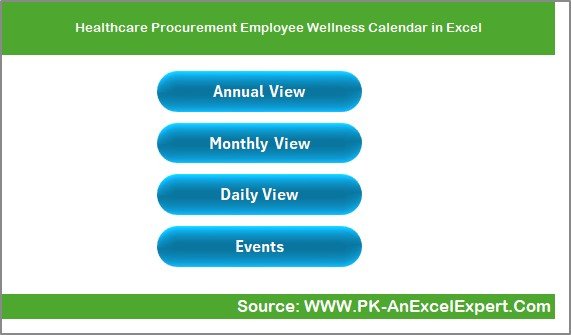
The Home sheet tab works as the index page. From here, users can move to any worksheet instantly. The page includes four smart navigation buttons:
- Annual View
- Monthly View
- Daily View
- Events
These buttons help users move quickly without searching through tabs. This improves usability and makes the workflow smooth.
Click to buy Healthcare Procurement Employee Wellness Calendar in Excel
Annual View Sheet .
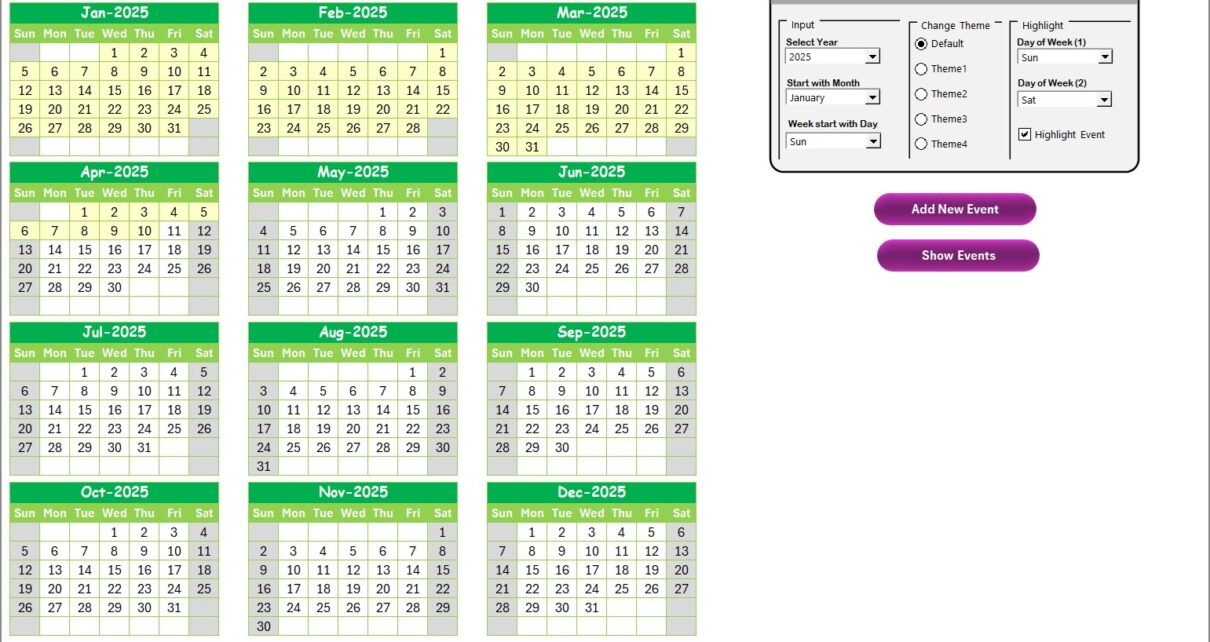
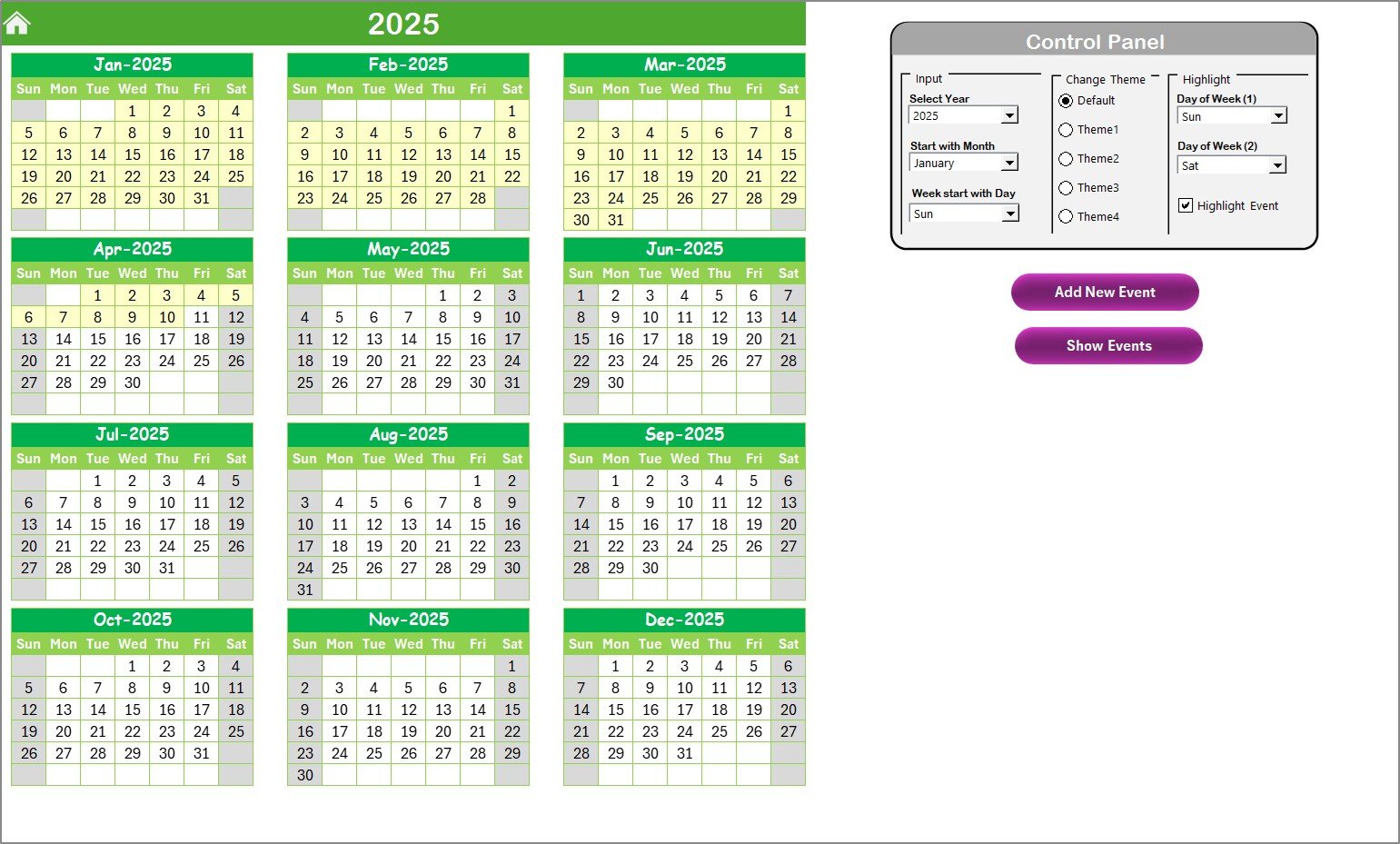
The Annual View shows all twelve months together. Users can see the entire year in one place, which makes yearly planning easy. This view also includes a smart control panel with three groups of options.
Input Group
Users can adjust:
- The year
- The starting month of the calendar
- The starting day of the week
Since healthcare teams work with different schedules, this flexibility helps them match the calendar with organizational needs.
Change Theme Group
Users can select from five color themes. This makes the calendar visually appealing and helps teams personalize their workbook.
Highlight Group
Users can choose:
- Day of week (1)
- Day of week (2)
- Highlight events checkbox
This feature helps highlight weekends or specific days like:
- Saturday
- Sunday
- Weekly off
- Alternate shifts
When users enable highlight events, all event days appear in yellow, making them easy to identify.
Add New Event Button
Users can:
- Select a date
- Click on Add New Event
- Fill the form
- Save the event
The system adds the event to the selected date.
Show Event Button
Users can click this button to see all events on the selected date.
Click to buy Healthcare Procurement Employee Wellness Calendar in Excel
Monthly View Sheet – Focus on One Month
The Monthly View shows a single month calendar. It offers month-wise planning with clarity. Users can select:
- Month
- Year
Then the calendar updates automatically.
If a date has more than one event, the cell shows:
“More than 1…”
This helps users understand the density of activities.
The sheet also includes two buttons:
Add New Event
Users can select a date and add an event using the event form.
Show Event
Users can view the list of events for the selected date.
The monthly view simplifies short-term planning and gives users a clear visual of upcoming wellness programs.

Click to buy Healthcare Procurement Employee Wellness Calendar in Excel
Daily View Sheet – Date-Range Wise Event Listing
The Daily View sheet displays event details within a selected date range. Users can pick:
- Start Date
- End Date
After selecting the date range, they can click Refresh to see the latest data. This is useful for:
- Weekly planning
- fortnightly wellness programs
- Monthly event reviews
- Employee engagement analysis
The sheet also includes an Add New Event button to insert new events quickly from this view.

Click to buy Healthcare Procurement Employee Wellness Calendar in Excel
Events Sheet – The Complete Event Database
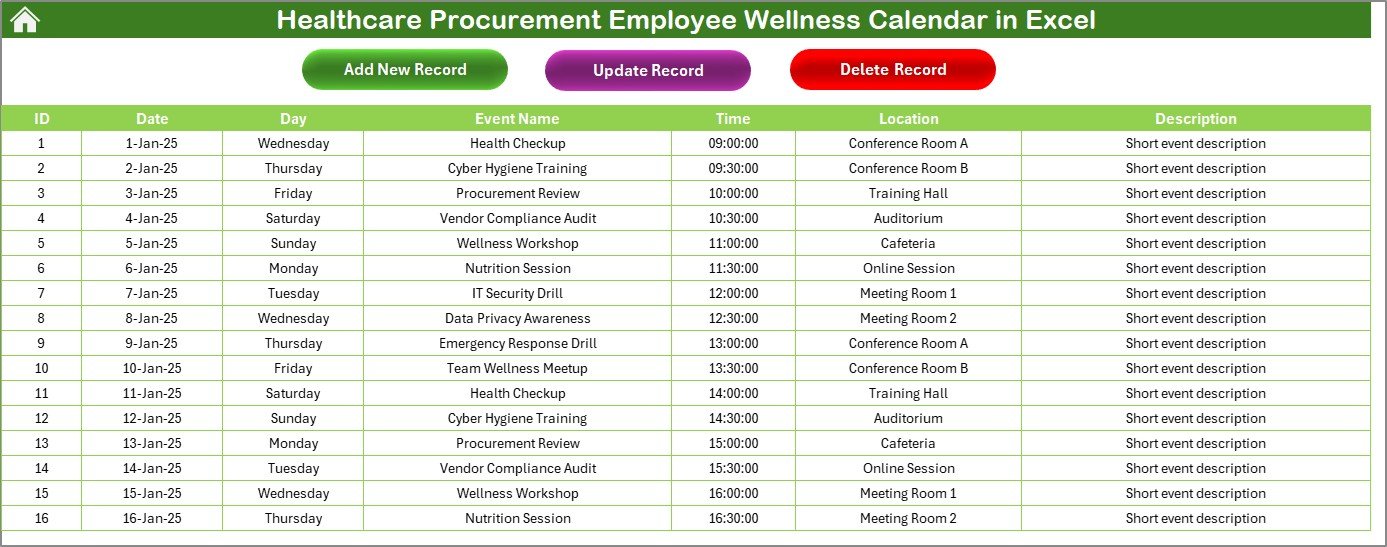
The Events sheet works as the backend database. All events from all forms and inputs appear here. It captures:
- ID (Auto-generated)
- Date
- Day
- Event Name
- Time
- Location
- Description
The top of this sheet includes three smart buttons:
Add New Record
Users can add a new event through a clean and easy form.
Update Existing Record
Users select an ID and click the button. The form opens with prefilled data. They update the information and save changes.
Delete Record
Users select the ID and delete the event instantly.
This database ensures the entire calendar stays clean, organized, and automated.
Click to buy Healthcare Procurement Employee Wellness Calendar in Excel
How This Calendar Supports Employee Wellness
This Excel calendar supports healthcare procurement teams in many ways:
- It improves clarity in planning wellness events.
- It tracks daily, monthly, and annual activities.
- It keeps employees aware of upcoming sessions.
- It supports mental and physical wellness programs.
- It encourages a healthy work environment.
- It helps managers coordinate team activities smoothly.
With its structured layout, the calendar works like a digital wellness hub for the entire department.
Advantages of Healthcare Procurement Employee Wellness Calendar in Excel
This calendar offers several strong benefits:
- Easy to Use
The interface stays simple. Anyone can understand it without training.
- No Extra Software Needed
It runs fully inside Excel, which makes it cost-effective for healthcare teams.
- Improves Employee Engagement
It keeps employees involved in wellness activities and ensures better participation.
- Creates Clarity for Procurement Teams
Everyone sees upcoming events clearly, which reduces confusion.
- Saves Time
The automation, buttons, and forms reduce manual work.
- Supports Better Planning
Annual, monthly, and daily views help teams plan wellness throughout the year.
- Customizable
Teams can change themes, highlights, and fields easily.
- Improves Communication
Employees stay informed about wellness events and schedules.
Opportunities for Improvement
While this calendar offers many features, healthcare teams can improve it further with small enhancements:
- Add priority tags for events
- Add staff participation tracking
- Include reminders through email integration
- Add charts for wellness trends
- Create separate tabs for different departments
These improvements can make the system even more powerful and actionable.
Best Practices for Using the Healthcare Procurement Employee Wellness Calendar
To get the best results from this calendar, healthcare procurement teams can follow these best practices:
- Update the Calendar Regularly
Enter new events as soon as they are planned.
- Highlight Important Days
Use the highlight feature to mark weekly offs or important sessions.
- Keep Descriptions Short and Clear
Use clear descriptions so employees understand each event easily.
- Use Date-Range Filters for Reviews
Check weekly or monthly activities using the Daily View tab.
- Use Monthly View for Team Planning
Hold planning meetings using the monthly calendar.
- Encourage Participation
Share the calendar with employees and encourage them to check updates.
- Review Historical Data
Use the Events sheet to understand past activities and improve future planning.
- Customize Themes for Visual Clarity
Choose a theme that matches your hospital or department’s style.
Conclusion
The Healthcare Procurement Employee Wellness Calendar in Excel helps healthcare procurement teams create a healthy and organized work environment. It brings clarity to wellness activities, improves engagement, and reduces stress across the team. With its dynamic views, smart buttons, easy forms, and flexible design, this calendar becomes a powerful tool for planning wellness throughout the year.
Healthcare teams can use this template to stay consistent, support employee well-being, and build a strong workplace culture. Since it runs entirely in Excel, it remains accessible, affordable, and easy to customize.
Frequently Asked Questions (FAQs)
- What is a Healthcare Procurement Employee Wellness Calendar in Excel?
It is an Excel-based template that helps healthcare procurement teams plan and track wellness events throughout the year.
- Can I customize the calendar?
Yes, you can change color themes, highlight days, modify event details, and adjust the structure as needed.
- How do I add a new event?
You select a date, click on Add New Event, fill the form, and submit it.
- Can I view events for a specific date range?
Yes, the Daily View sheet allows you to select a start and end date to see all events in that period.
- How does the annual view help?
It shows all twelve months on one screen, which helps in long-term planning.
- Is Excel the only requirement?
Yes, the entire calendar works inside Microsoft Excel without any extra tools.
- Can I delete or update events?
Yes, the Events sheet provides buttons for adding, updating, and deleting records.
- Who can use this wellness calendar?
Any healthcare procurement team, hospital, clinic, wellness department, or administrative team can use it.
Visit our YouTube channel to learn step-by-step video tutorials
Watch the step-by-step video tutorial:
Click to buy Healthcare Procurement Employee Wellness Calendar in Excel