Healthcare Research & Development (R&D) depends on productive, motivated, and healthy employees. When people feel energetic, supported, and mentally balanced, they perform better and work with a clear mind. However, many organizations struggle to track employee wellness activities properly. They often use scattered files, manual notes, or outdated calendars. Because of this, teams miss events, skip reminders, and lose the rhythm of wellness planning.
A Healthcare R&D Employee Wellness Calendar in Excel solves all these issues. It brings every event, activity, reminder, and wellness initiative into one well-designed and easy-to-use file. You organize your year, month, and daily schedules without stress. You also track the wellness programs that support physical health, mental stability, team bonding, and workplace happiness.
This article explains everything about this Excel calendar. You will learn its features, structure, benefits, and best practices. You will also see how each sheet works, how teams can use this calendar daily, and how it supports a healthy workplace culture.
Click to buy Healthcare R&D Employee Wellness Calendar in Excel
What Is a Healthcare R&D Employee Wellness Calendar in Excel?
A Healthcare R&D Employee Wellness Calendar in Excel is a ready-to-use template that helps organizations plan and manage wellness activities throughout the year. It supports your internal health programs such as:
- Fitness sessions
- Mindfulness and meditation events
- Ergonomic workshops
- Annual checkup reminders
- Employee engagement activities
- Stress management campaigns
- Mental wellness initiatives
This Excel-based calendar gives you flexibility to add events, update schedules, and view wellness plans from different perspectives — annual, monthly, and daily.
It includes buttons, forms, control panels, themes, and highlight features that make planning simple and interactive. Instead of writing everything manually, you click a button to add events or update details.
Why Do Healthcare R&D Teams Need a Wellness Calendar?
Healthcare R&D teams handle continuous research, testing, documentation, and long hours of analysis. Because of this, stress can build quickly. A dedicated wellness calendar helps teams stay balanced, energetic, and focused.
A structured calendar allows you to:
- Organize wellness activities in advance
- Create a yearly health plan
- Encourage participation
- Bring consistency in wellness culture
- Reduce last-minute confusion
- Improve overall employee well-being
Therefore, this calendar becomes a powerful tool that keeps health programs active throughout the year.
Structure of the Healthcare R&D Wellness Calendar in Excel
This template contains five well-structured worksheets, each designed to support a specific purpose:
- Home Sheet
- Annual View Sheet
- Monthly View Sheet
- Daily View Sheet
- Events Sheet
Each page includes built-in controls, buttons, and interactive tools to make the experience smooth and organized.
Let’s understand each sheet in detail.
Home Sheet — Your Quick Navigation Panel
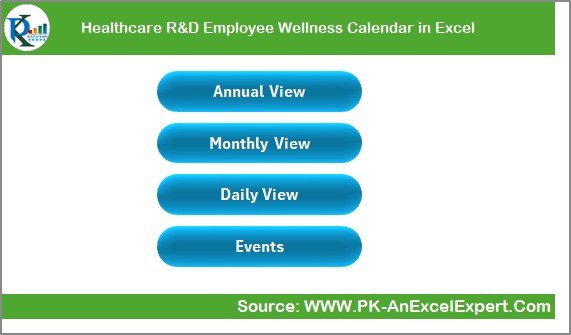
The Home Sheet works as the central index of the workbook. It keeps navigation quick, simple, and user-friendly.
It includes four main buttons:
- Annual View
- Monthly View
- Daily View
- Events
You click any button and move instantly to the respective worksheet. This structure saves time and keeps the file organized. It also allows new users to understand the template within seconds.
The home sheet acts as the dashboard of the wellness calendar, helping teams move smoothly through different views.
Click to buy Healthcare R&D Employee Wellness Calendar in Excel
Annual View Sheet — Full-Year Wellness Planning
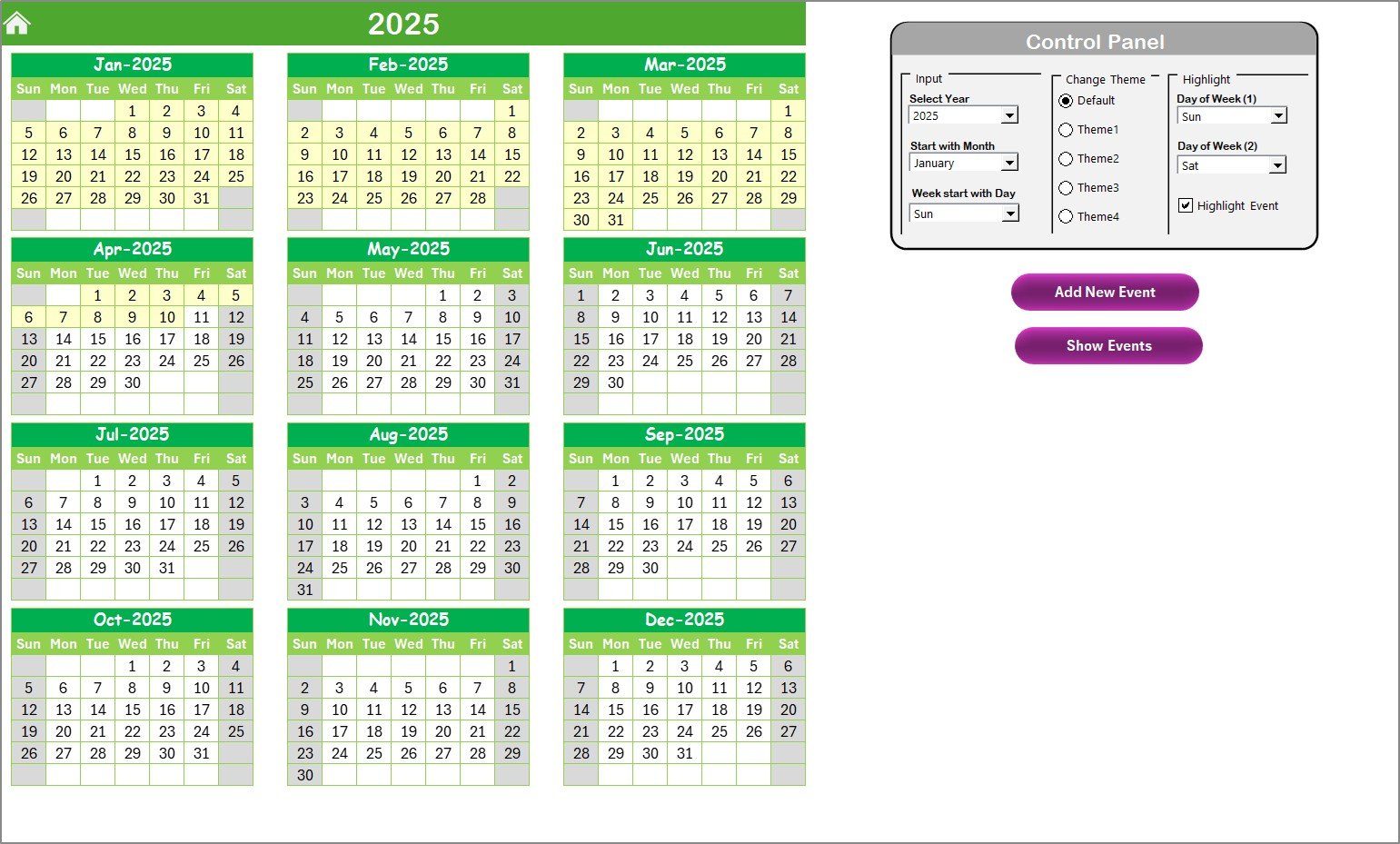
The Annual View Sheet is one of the most powerful features of this Excel wellness calendar. It displays 12 monthly calendars on one page so that you can plan your entire year at once.
This sheet includes a control panel and two helpful buttons.
Control Panel Features
The control panel comes with three important groups:
Input Group
This group allows you to customize the entire calendar. You can:
- Select the year
- Change the starting month
- Choose the starting day of the week
This gives you complete freedom to design your annual layout the way your team needs it.
Change Theme Group
You get five color theme options. Select the theme you prefer and apply it to the entire workbook. This helps you match your corporate branding or team preference.
Highlight Group
This feature helps you highlight specific days such as weekends or wellness-focused days.
You can:
- Select Day of Week (1)
- Select Day of Week (2)
- Highlight both days on the annual calendar
- Use the “Highlight Events” option to mark events in yellow
For example, if you want to highlight Saturday and Sunday, simply choose Sat in Day of Week (1) and Sun in Day of Week (2).
Buttons on the Annual View Page
- Add New Event
Select a date → click the button → fill the event form → submit.
The event is recorded instantly.
- Show Event
Select a date → click the button → view event details.
This lets you check the event list quickly without scanning the entire sheet manually.
Click to buy Healthcare R&D Employee Wellness Calendar in Excel
Monthly View Sheet — Focused Event Planning
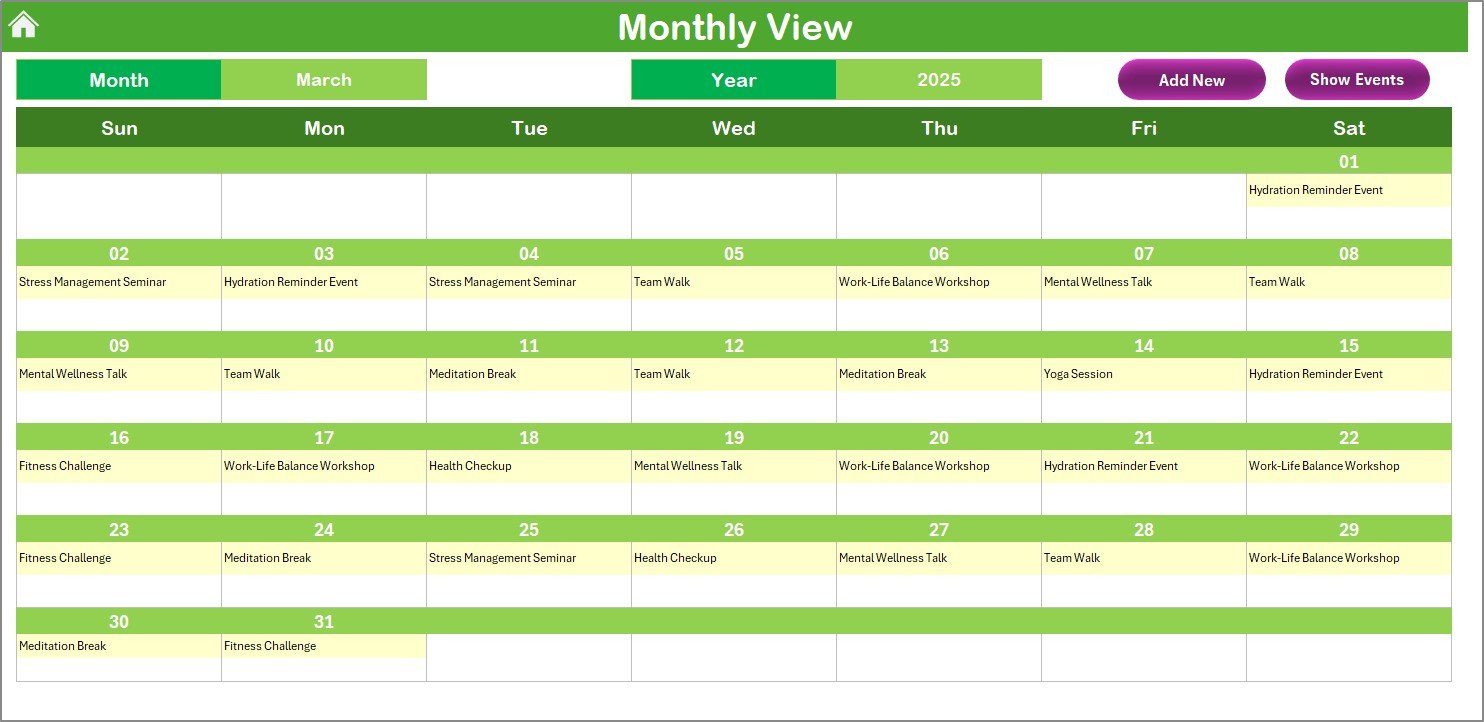
The Monthly View Sheet displays a clean and detailed calendar for the selected month.
You select the Month and Year at the top. The sheet updates automatically and shows all dates along with the events.
If a date has one event, it shows the event name directly.
If a date has more than one event, it displays “more than 1…” to inform you that multiple activities are available.
Click to buy Healthcare R&D Employee Wellness Calendar in Excel
Buttons on the Monthly View Page
- Add New Event
You select a specific date on the calendar and click this button. A form appears where you fill the event details. After submitting, the event is added to the selected date.
- Show Event
Click this to view the list of events scheduled for the selected date. It helps you track busy days easily.
The Monthly View helps teams plan wellness activities with more detail and clarity.
Daily View Sheet — Detailed Event Insights
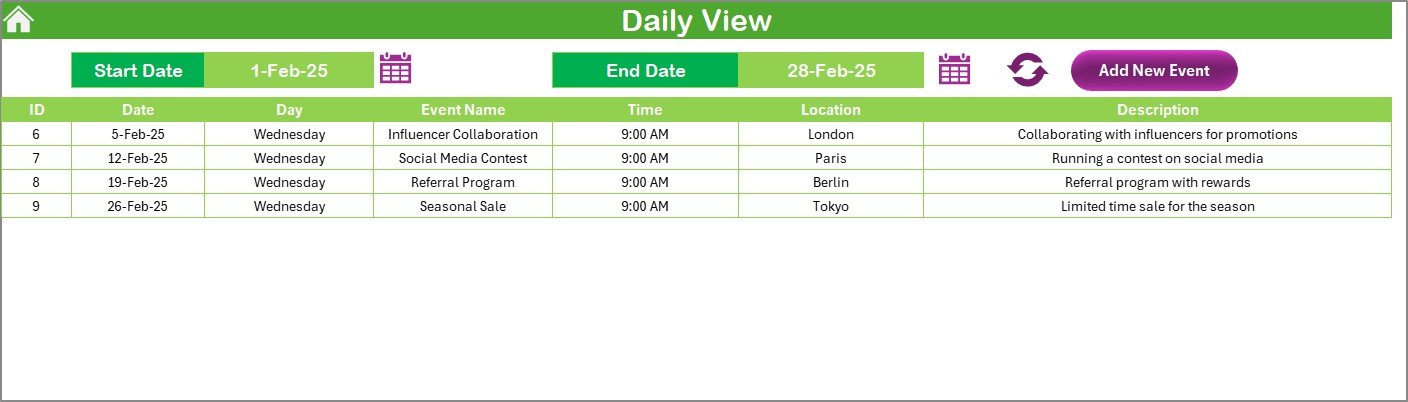
The Daily View Sheet gives you a list of events within a selected date range.
You use the Start Date and End Date fields to filter the period. Then click Refresh to display all events in that range.
This view helps you monitor:
- Daily activities
- Wellness workshops
- Meetings
- Fitness programs
- Awareness sessions
- Team events
- Scheduled reminders
The Daily View Sheet also includes an Add New Event button to enter new items quickly through the event form.
This sheet is especially useful for managers who want to review daily wellness progress.
Click to buy Healthcare R&D Employee Wellness Calendar in Excel
Events Sheet — Master Database of All Wellness Activities
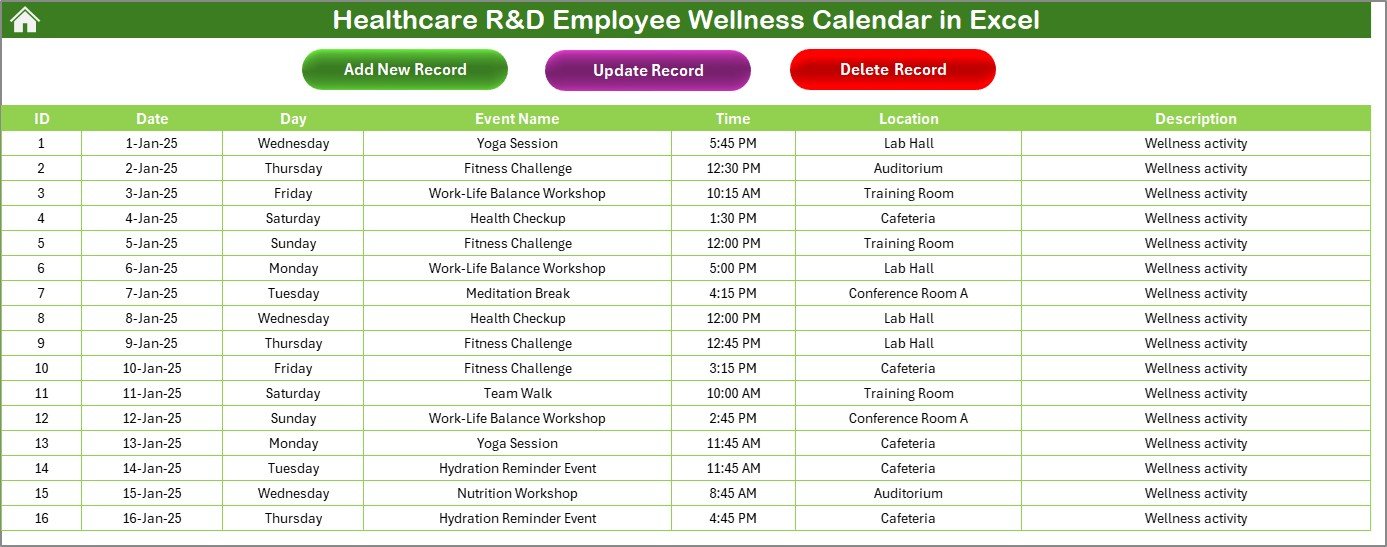
The Events Sheet acts as the backend of the entire template. It stores all events in a structured format.
The sheet contains the following columns:
- ID (Auto-generated unique number)
- Date
- Day
- Event Name
- Time
- Location
- Description
This sheet works as the data source for all other views.
Top Buttons on the Events Sheet
- Add New Record
Click to open the event form → fill the details → submit.
- Update Existing Record
Select the event ID → click the update button → modify the details → save.
- Delete Record
Select the event ID → click delete → the event is removed.
This page keeps your entire wellness calendar updated and well-managed.
Key Features of the Healthcare R&D Employee Wellness Calendar in Excel
This template stands out because of its powerful features:
- Annual, monthly, and daily views
- Theme customization
- Highlight weekend and special days
- Simple event entry forms
- Auto-generated event IDs
- Quick navigation buttons
- Interactive control panel
- Automatic calendar updates
- Event management (add, update, delete)
- Clean and professional design
- User-friendly layout
These features make this calendar perfect for Healthcare R&D teams who need structure and clarity in their wellness planning.
Advantages of a Healthcare R&D Employee Wellness Calendar in Excel
A wellness calendar brings structure and positivity to the workplace. Here are the major advantages:
- Improves Employee Engagement
Employees feel more involved when the organization promotes wellness activities consistently.
- Encourages Healthy Habits
Regular reminders create a habit of participating in fitness and mental health programs.
- Reduces Workplace Stress
Wellness events such as meditation sessions or yoga workshops help reduce stress.
- Boosts Productivity
Healthy and happy employees work with higher focus and better performance.
- Supports Mental Well-being
The daily and monthly views help employees stay aware of upcoming mental wellness activities.
- Enhances Workplace Culture
Consistent wellness planning builds a positive, supportive, and balanced work environment.
Best Practices for Using the Healthcare R&D Wellness Calendar in Excel
To get the best results, follow these practices:
- Update Events Regularly
Keep your calendar updated. Add new events as soon as you plan them.
- Use Color Themes for Clarity
Pick a theme that matches your organization’s branding or wellness category.
- Highlight Weekends and Rest Days
Highlighting weekends helps teams balance wellness and work schedules.
- Review the Daily View Every Morning
Make it a habit to check the daily view to track reminders and events on time.
- Maintain a Clean Event Description
Clear event titles and descriptions help employees understand the purpose quickly.
- Use the Annual View for Long-Term Planning
Plan yearly health campaigns such as blood donation drives, medical checkups, or training sessions.
- Encourage Team Participation
Share the calendar with teams and motivate them to join various wellness activities.
How This Wellness Calendar Helps Healthcare R&D Teams
This Excel template fits perfectly into fast-paced R&D environments. It:
- Supports event management
- Provides structure to wellness programs
- Reduces missed events
- Improves planning efficiency
- Encourages healthier work habits
- Makes wellness events easy to track
The calendar supports strategic planning and makes wellness a consistent priority.
Conclusion
A Healthcare R&D Employee Wellness Calendar in Excel helps organizations manage wellness activities with clarity, structure, and consistency. It brings all health-related events into one clean, interactive workbook. Teams can track annual plans, monthly schedules, and daily reminders effortlessly.
From theme customization to event forms and from highlighting weekends to viewing events by date range — every feature in this template supports a healthier and more organized workplace. Healthcare R&D teams can reduce stress, increase productivity, and encourage a culture of wellness by using this calendar effectively.
Frequently Asked Questions (FAQs)
- What is a Healthcare R&D Employee Wellness Calendar in Excel?
It is a ready-to-use template that helps teams plan and track wellness events through annual, monthly, and daily views.
- Can I customize the year and month in the calendar?
Yes. You can change the year, month, starting day of the week, and theme using the control panel.
- How do I add a new event?
Click the Add New Event button on any sheet, fill the form, and submit it. The event will be added automatically.
- Can I highlight weekends or special days?
Yes. You can highlight two specific days of the week and also highlight events in the annual view.
- What does the Events Sheet store?
It stores all event details, including ID, date, name, time, location, and description.
- How does the Daily View help?
It shows a detailed list of events for any selected date range. It helps users plan their day more effectively.
- Is this file suitable for any department?
Yes. Although designed for Healthcare R&D, any department can adapt it to plan wellness and engagement events.
Visit our YouTube channel to learn step-by-step video tutorials
Watch the step-by-step video tutorial:
Click to buy Healthcare R&D Employee Wellness Calendar in Excel