Managing holidays and compensatory off (Comp-Off) manually often creates confusion, errors, and delays. HR teams usually rely on emails, registers, or scattered Excel sheets. As a result, tracking Comp-Off balances, approvals, and employee records becomes time-consuming and error-prone.Holiday & Comp-Off Management System V1.0 in Excel VBA
That is exactly where Holiday & Comp-Off Management System V1.0 makes a real difference.
Holiday & Comp-Off Management System V1.0 is a ready-to-use Excel and VBA-based tool designed to manage employee holidays, Comp-Off requests, balances, and reports from one centralized system. Moreover, it provides role-based access, secure login, structured data entry, and automated record management.
In this detailed article, you will learn what Holiday & Comp-Off Management System V1.0 is, how it works, its key features, advantages, best practices, system requirements, and frequently asked questions.
What Is Holiday & Comp-Off Management System V1.0?
Holiday & Comp-Off Management System V1.0 is a desktop-based management tool built using Microsoft Excel and VBA. It helps organizations track employee holidays, Comp-Off requests, balances, approvals, and historical records efficiently.
Instead of managing multiple files or manual logs, this system centralizes all data in one secure Excel file. Because it uses VBA forms, it delivers a software-like experience while remaining flexible and easy to use.
Most importantly, the tool works instantly without any additional installation.
Why Do HR and Admin Teams Need a Holiday & Comp-Off Management System?
Click to Buy Holiday & Comp-Off Management System V1.0 in Excel VBA
Holiday and Comp-Off management directly affects payroll accuracy, employee satisfaction, and compliance. Therefore, mistakes can create disputes and operational delays.
Without a structured system:
- Comp-Off balances become inaccurate
- Approval history gets lost
- Data entry errors increase
- Reporting takes too much time
However, with Holiday & Comp-Off Management System V1.0:
- Records stay centralized and secure
- User access remains controlled
- History remains traceable
- Reporting becomes fast and reliable
As a result, HR teams work efficiently and confidently.
How Does Holiday & Comp-Off Management System V1.0 Work?
The system works through a secure login, a central main form, and multiple supporting management forms.
Here is how it works step by step:
- Users log in using role-based credentials
- The main form displays all relevant records
- Users add, update, or delete records using forms
- Filters and sorting simplify data analysis
- Reports export instantly to Excel
Because everything runs inside Excel, users do not need technical knowledge.
What Is the Login Form and How Does It Secure the System?
Click to Buy Holiday & Comp-Off Management System V1.0 in Excel VBA
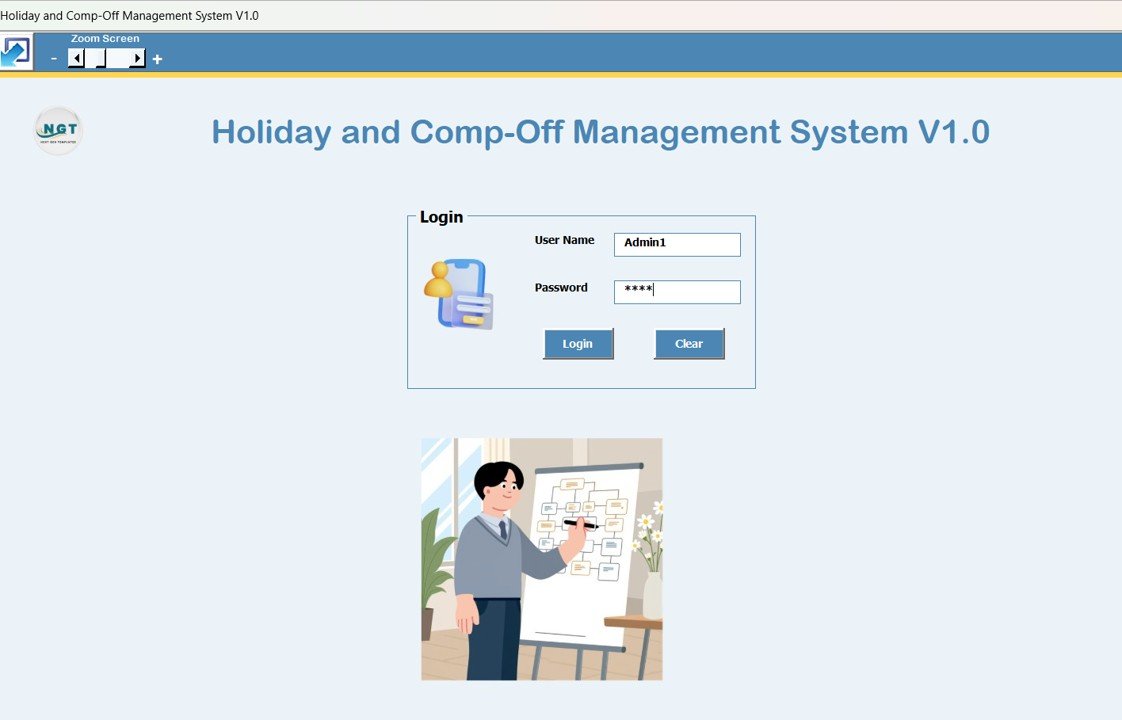
The Login Form ensures controlled access to the system.
Default Login Credentials:
Admin Role
-
Username:
Admin1 -
Password:
abcd
User Role
-
Username:
User1 -
Password:
abcd
After entering the credentials and clicking Login (or pressing Enter), the system opens the main form.
This role-based login ensures data security and controlled access.
Click to Buy Holiday & Comp-Off Management System V1.0 in Excel VBA
What Is the Main Form and How Does It Control the System?
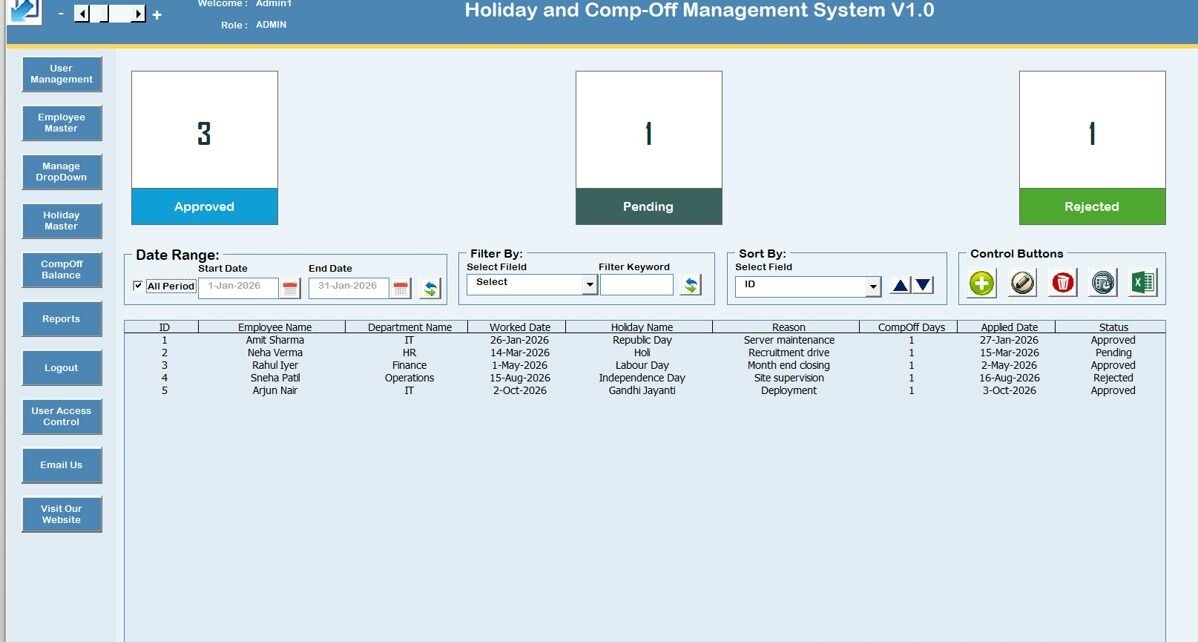
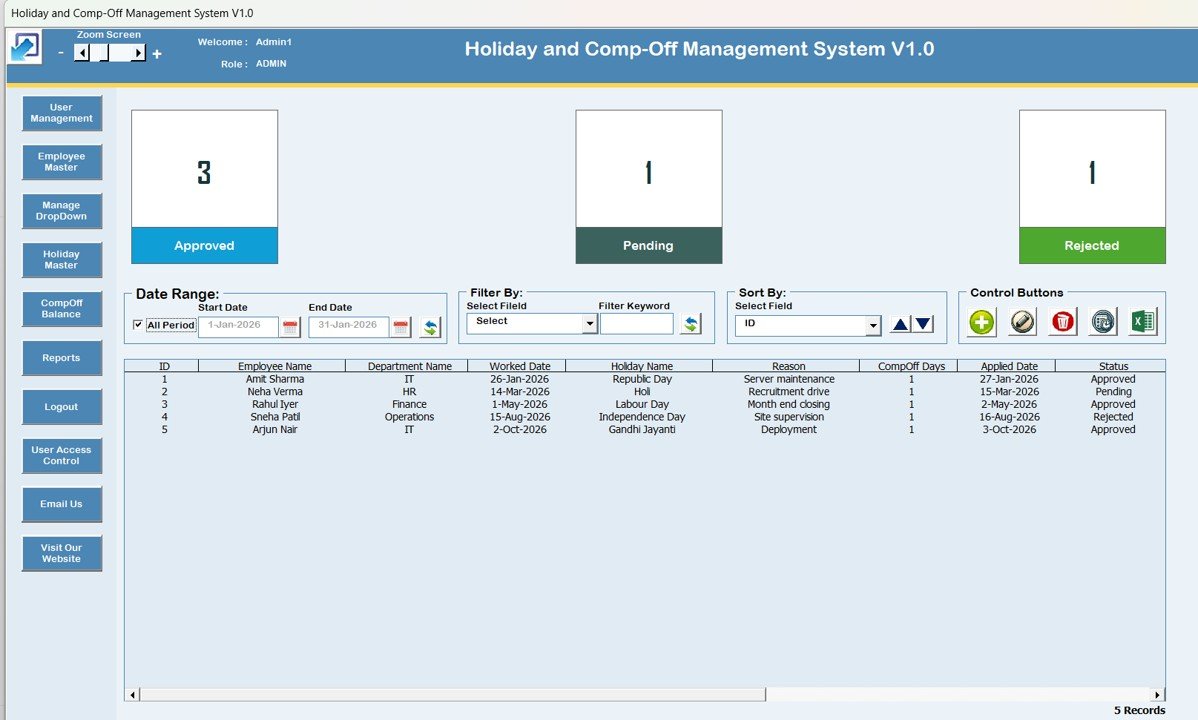
The Main Form appears immediately after login. From this screen, users can manage all activities.
It acts as the central control panel for the entire system.
How Does the List Box on the Main Form Help Data Management?
The List Box sits at the center of the main form and displays all relevant Comp-Off and holiday records.
Key Benefits of the List Box:
-
Shows structured data clearly
-
Allows record selection for updates
-
Supports double-click editing
Because of this design, users can manage large datasets easily.
How Do Filters Improve Record Search and Analysis?
Click to Buy Holiday & Comp-Off Management System V1.0 in Excel VBA
Above the list box, the system provides filter options.
Filtering Options Include:
-
Filter by date range
-
Filter by selected column
This feature helps users quickly locate specific records without scrolling.
How Does the Sort Feature Organize Records?
The Sort By option allows users to arrange records based on selected fields.
As a result, users can view records in a logical order for better analysis and reporting.
What Control Buttons Are Available on the Main Form?
Click to Buy Holiday & Comp-Off Management System V1.0 in Excel VBA
The system includes several powerful control buttons.
Available Control Buttons:
-
Add New Record
Add a new Comp-Off or holiday record instantly. -
Update Existing Record
Select a record from the list box and update details.
You can also double-click a record to edit it. -
Delete Record
Remove selected records safely from the system. -
Show Record History
View complete modification history of a record. -
Export to Excel
Export list box data into a new Excel file.
These controls make record management fast and user-friendly.
Click to Buy Holiday & Comp-Off Management System V1.0 in Excel VBA
What Is the Comp-Off Request Form and Why Is It Important?
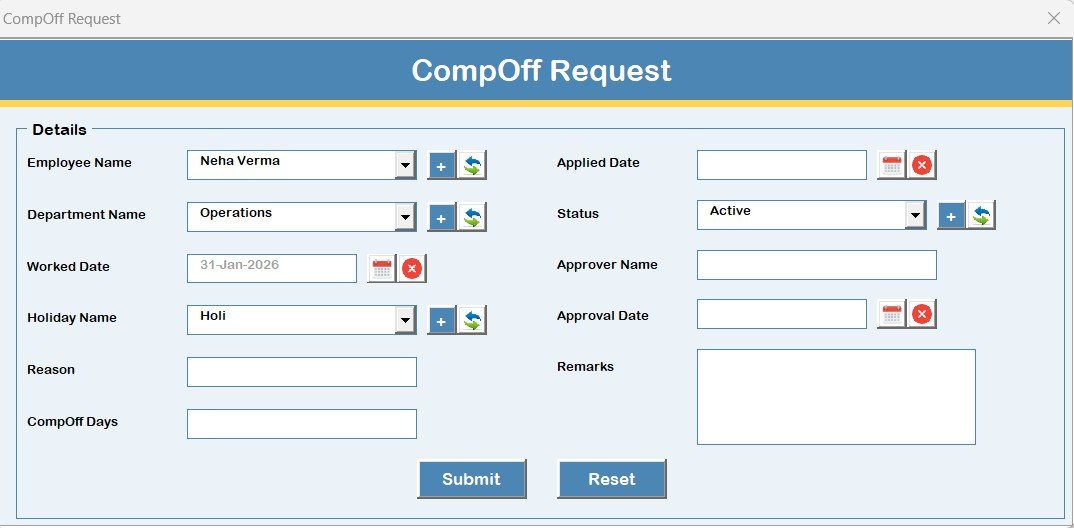
The Comp-Off Request Form acts as the main data entry form.
Key Functions:
- Add new Comp-Off records
- Update existing records
- Maintain clean and structured data
This form opens automatically when users click Add New or Update Existing.
What Options Are Available in the Left-Side Navigation Menu?
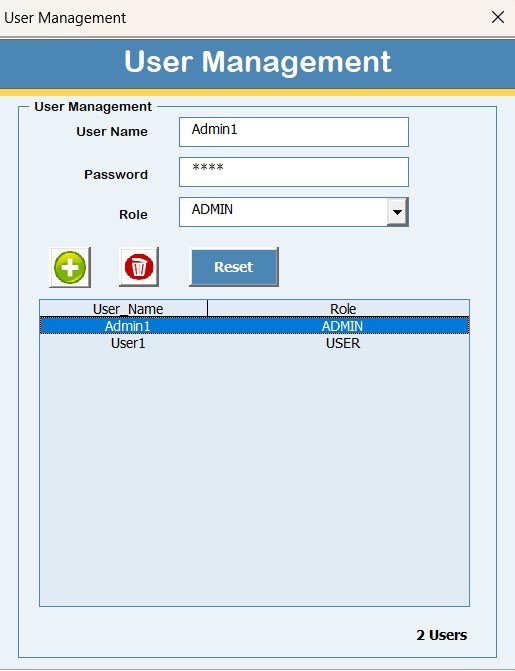
The left-side navigation menu provides access to advanced system features.
User Management
The User Management form allows admins to:
-
Add new users
-
Update user details
-
Delete users
-
Reset passwords
-
Change user passwords
This ensures controlled access and secure system usage.
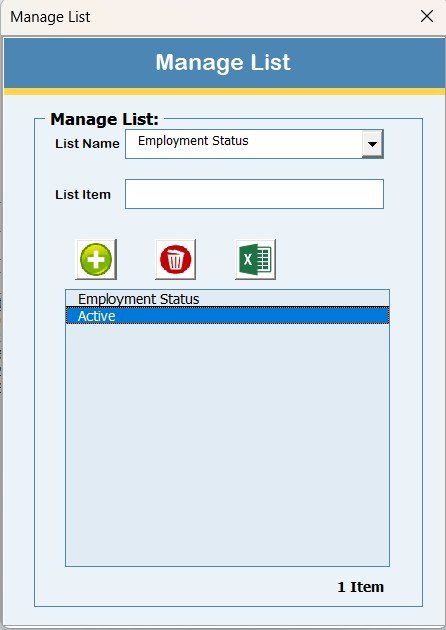
Manage List Feature
The Manage List form helps maintain dropdown lists used in the system.
Users can:
-
Add list values
-
Delete list values
This feature keeps data standardized.
Click to Buy Holiday & Comp-Off Management System V1.0 in Excel VBA
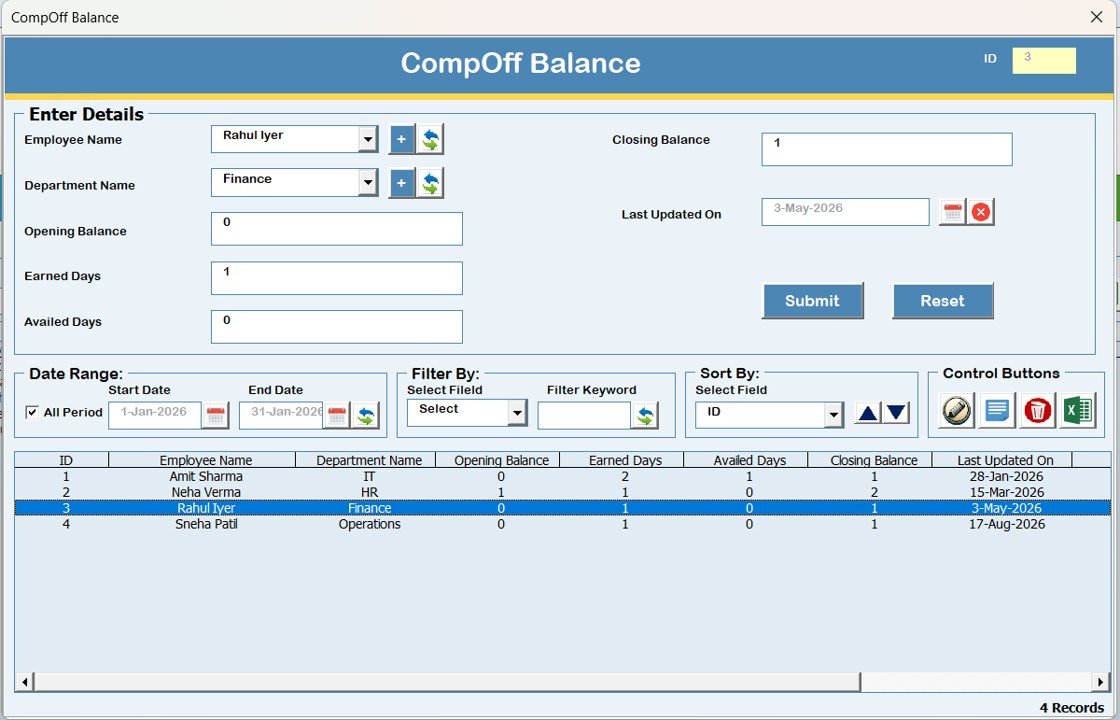
Comp-Off Balance Form Work?
The Comp-Off Balance form allows users to:
-
Enter Comp-Off balance information
-
Maintain accurate leave balances
This ensures balance tracking remains consistent.
Click to Buy Holiday & Comp-Off Management System V1.0 in Excel VBA
Employee Master Form
The Employee Master form stores core employee information.
This form acts as the foundation for accurate record mapping across the system.
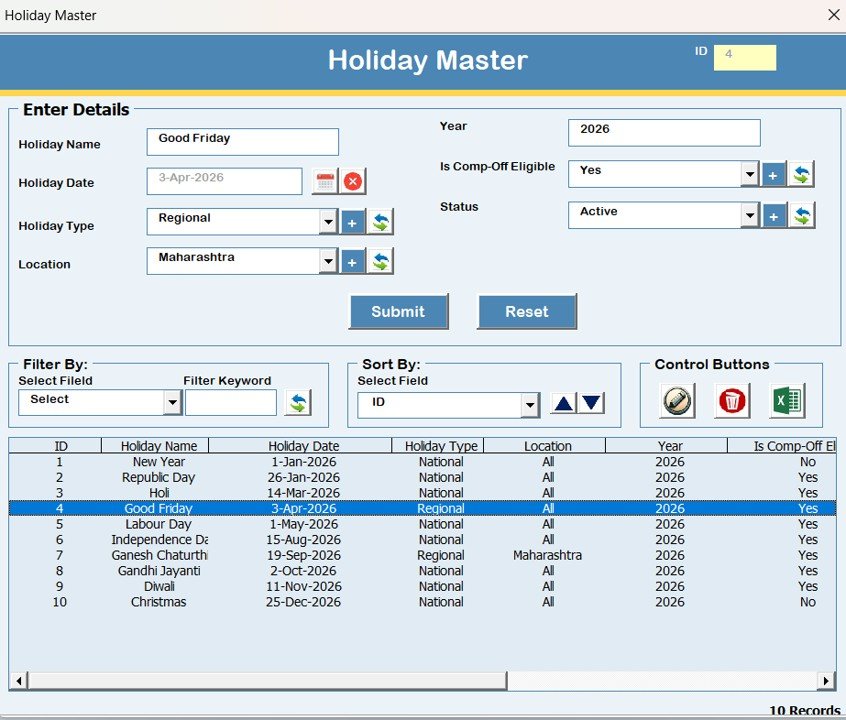
Holiday Master
The Holiday Master form maintains official holiday data.
Because of this, holiday tracking stays consistent and reliable.
Click to Buy Holiday & Comp-Off Management System V1.0 in Excel VBA
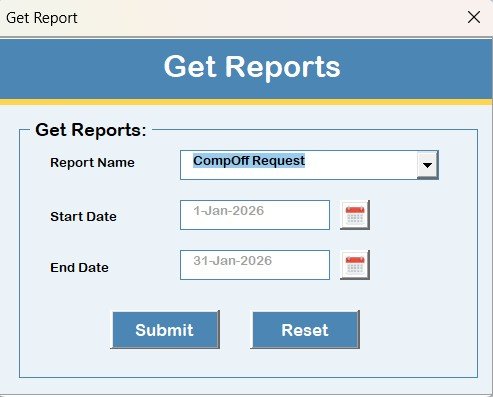
Reports Module
The Reports form allows users to:
-
Select a date range
-
Export reports in Excel format
This feature simplifies audits, payroll checks, and management reviews.
Click to Buy Holiday & Comp-Off Management System V1.0 in Excel VBA
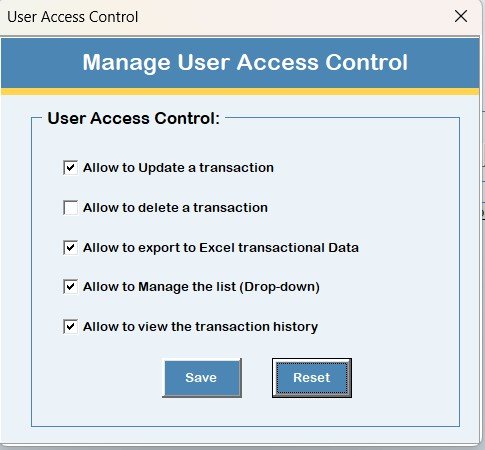
What Is User Access Control and Why Is It Important?
The Manage User Access Control form allows admins to define permissions.
Admins can:
-
Enable or disable features per role
-
Control what users can access
Only admin users can view and manage this form.
Click to Buy Holiday & Comp-Off Management System V1.0 in Excel VBA
What Happens When Users Click Logout?
The Logout button:
-
Saves all data automatically
-
Closes forms and the Excel file safely
This prevents data loss and corruption.
What Do the Email Us and Visit Website Buttons Do?
-
Email Us displays the support email ID for help or customization
-
Visit Our Website opens the official website to explore more tools
These buttons improve user support and engagement.
Advantages of Holiday & Comp-Off Management System V1.0
Click to Buy Holiday & Comp-Off Management System V1.0 in Excel VBA
This tool offers several strong advantages.
Key Advantages:
- Centralized holiday and Comp-Off management
- Secure role-based login
- Complete record history tracking
- Fast data entry and updates
- Easy Excel export
- Fully customizable VBA solution
- No additional software required
Most importantly, it reduces manual effort and errors.
Best Practices for Holiday & Comp-Off Management System V1.0
To maximize benefits, follow these best practices:
- Maintain updated employee master data
- Assign correct user roles
- Review Comp-Off balances regularly
- Export reports periodically
- Restrict admin access carefully
- Train users on data entry standards
These practices ensure long-term system reliability.
System Compatibility and Important Notes
Click to Buy Holiday & Comp-Off Management System V1.0 in Excel VBA
Please note the following compatibility details carefully:
-
Compatible with Windows 10 and above
-
Requires Microsoft Excel 2010 or above
-
Works only on Microsoft Excel Desktop application
-
Does not work on Mobile or Tablet devices
-
Not compatible with Mac operating system
Conclusion: Why Choose Holiday & Comp-Off Management System V1.0?
Holiday & Comp-Off Management System V1.0 provides a powerful yet simple way to manage employee holidays and Comp-Off records. It replaces manual tracking with a structured, secure, and user-friendly Excel-VBA solution.
By using this tool, organizations improve accuracy, transparency, and efficiency without investing in complex software.
In short, it is the ideal solution for HR teams seeking control and clarity.
Frequently Asked Questions (FAQs)
Click to Buy Holiday & Comp-Off Management System V1.0 in Excel VBA
What is Holiday & Comp-Off Management System V1.0?
It is an Excel and VBA-based tool used to manage employee holidays and Comp-Off records securely.
Does this tool require internet access?
No, it works completely offline using Microsoft Excel Desktop.
Can I add multiple users to the system?
Yes, admins can add, update, and manage multiple users.
Is record history available in the system?
Yes, the system stores complete modification history.
Can I export reports to Excel?
Yes, users can export reports for selected date ranges.
Visit our YouTube channel to learn step-by-step video tutorials
Watch the step-by-step video tutorial:
Click to Buy Holiday & Comp-Off Management System V1.0 in Excel VBA