Managing personal finances becomes difficult when expenses are scattered across bank statements, apps, and notes. Many people know how much they earn, but they often struggle to track where the money goes. As a result, savings decrease and overspending increases.
However, a Monthly Budget Planner Template in Excel solves this problem effectively. It helps individuals track income, plan expenses, and compare budgeted vs actual spending. Therefore, users can control spending habits, improve savings, and build better financial discipline.
This ready-to-use template is built inside Microsoft Excel and provides a simple system to monitor monthly finances
What Is a Monthly Budget Planner Template in Excel?
Click to Buy Monthly Budget Planner Template in Excel
A Monthly Budget Planner Template in Excel is a financial management spreadsheet that helps users organize income and expenses in a structured format.
Instead of guessing monthly spending, the template allows users to:
- Enter monthly income sources
- Plan fixed and variable expenses
- Record actual spending
- Compare budget vs actual values
- Identify overspending areas
Because Excel performs automatic calculations, users immediately see financial results.
Why Do People Need a Budget Planner?
Many people experience financial stress because they lack visibility into their spending habits. Without structured tracking, it becomes difficult to understand financial behavior.
A monthly budget planner helps because it:
- Shows where money is spent
- Prevents unnecessary expenses
- Encourages saving habits
- Helps plan financial goals
- Improves financial awareness
Therefore, individuals gain control over their personal finances.
Key Features of the Monthly Budget Planner Template in Excel
Click to Buy Monthly Budget Planner Template in Excel
This template includes four structured worksheets that guide users through the budgeting process.
Assumptions Sheet – Define Your Income and Base Budget
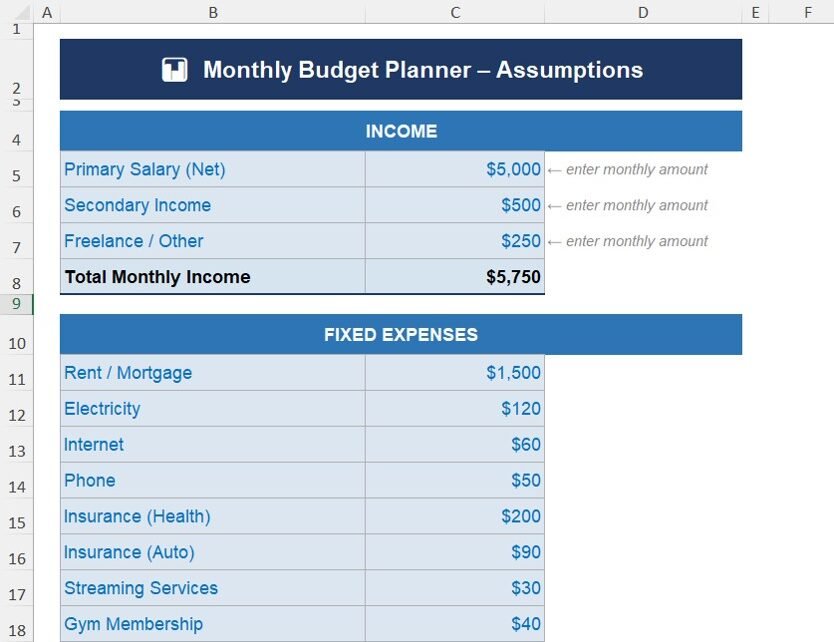
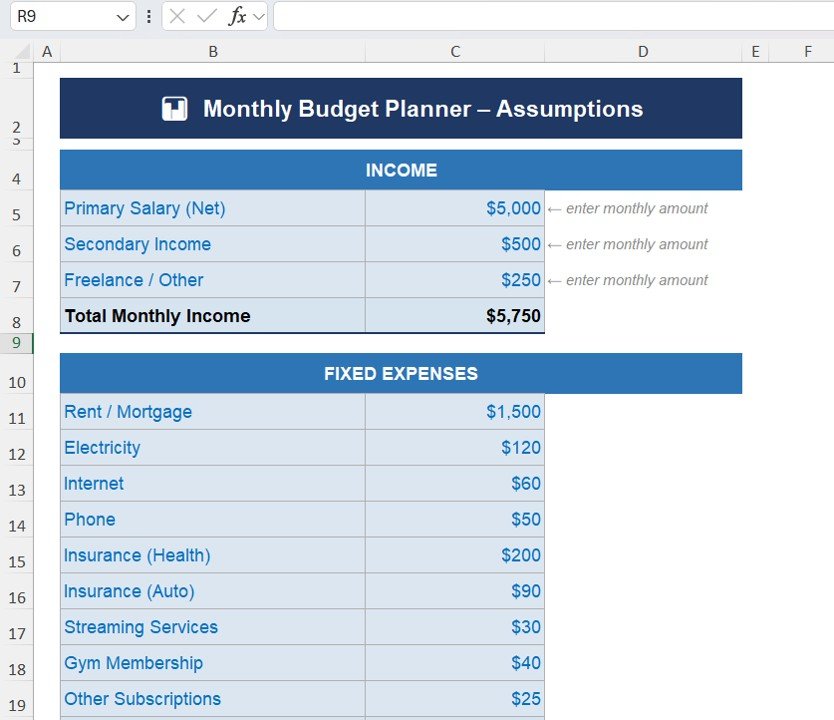
The Assumptions Sheet serves as the starting point of the template. Here, users define their expected income and baseline expenses.
Income Section
Users enter monthly income sources such as:
- Primary Salary (Net)
- Secondary Income
- Freelance / Other Income
The template then calculates:
Total Monthly Income
This value becomes the foundation for the budgeting plan.
Fixed Expenses Section
Fixed expenses represent recurring costs that remain relatively constant each month.
Examples include:
- Rent / Mortgage
- Electricity
- Internet
- Phone
- Health Insurance
- Auto Insurance
- Streaming Services
- Gym Membership
- Other Subscriptions
Because these expenses repeat monthly, planning them first helps control finances.
Click to Buy Monthly Budget Planner Template in Excel
Monthly Budget Tracker – Compare Budget vs Actual Spending
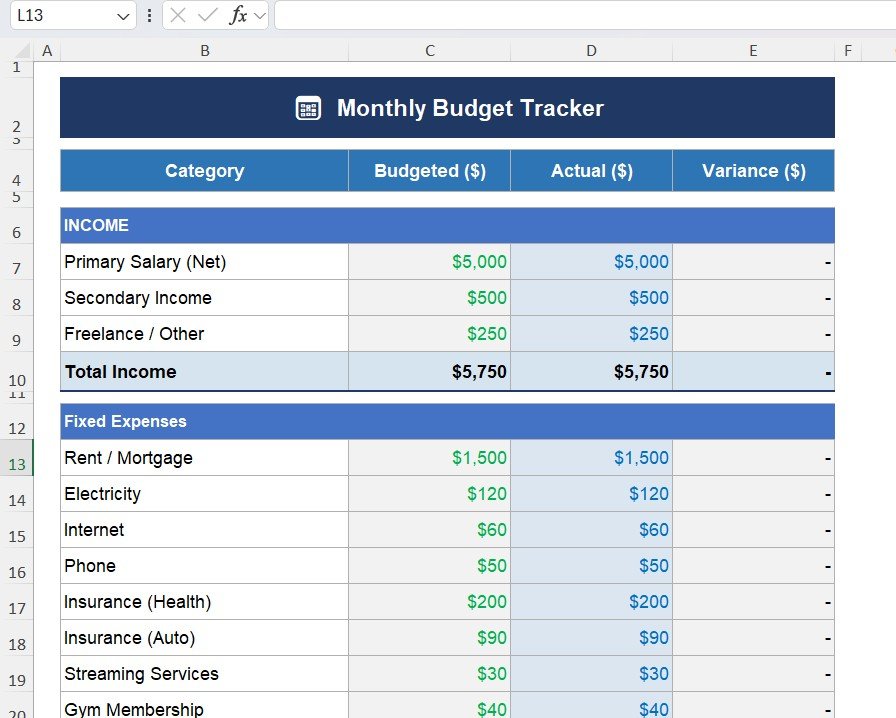
The Monthly Budget Tracker sheet tracks planned expenses and real spending.
Budgeted Column
This column shows planned spending based on the Assumptions sheet.
Actual Column
Users enter real spending values here.
Variance Column
The template automatically calculates:
Variance = Budget – Actual
This metric helps identify overspending.
If actual expenses exceed the budget, users immediately notice the difference.
Expense Categories Included in the Template
Click to Buy Monthly Budget Planner Template in Excel
The tracker includes several categories such as:
Fixed Expenses
- Rent / Mortgage
- Electricity
- Internet
- Phone
- Insurance
Variable Expenses
- Groceries
- Dining Out
- Coffee / Snacks
- Transportation / Fuel
- Public Transit
Lifestyle Expenses
- Entertainment
- Shopping / Clothing
- Personal Care
- Health / Pharmacy
Miscellaneous
- Unexpected expenses
- Additional personal spending
This structure ensures that every type of spending gets tracked properly.
Click to Buy Monthly Budget Planner Template in Excel
Budget vs Actual Chart – Visual Expense Analysis
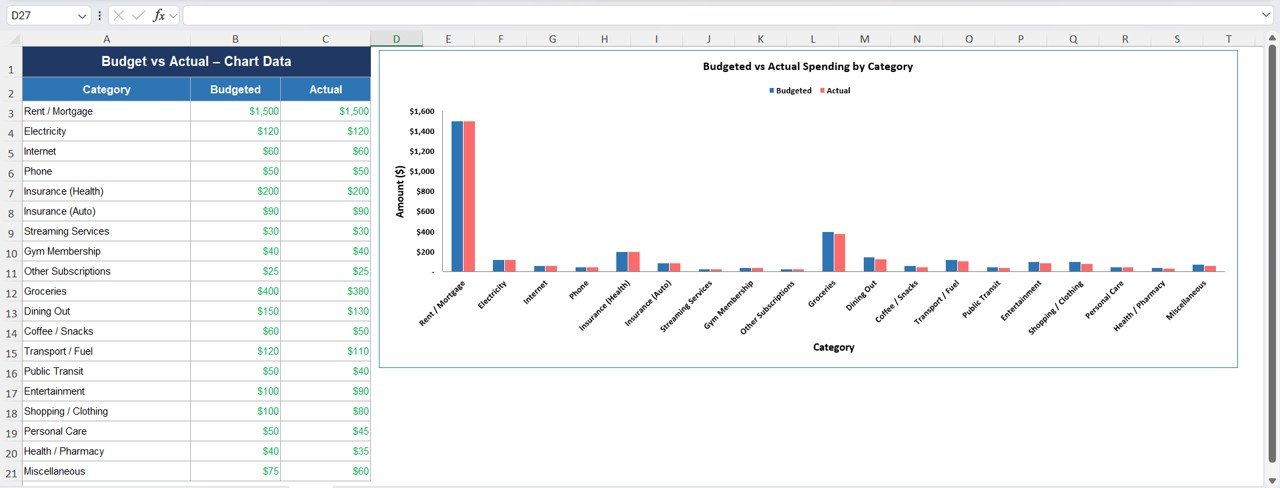
The Chart Sheet provides a visual comparison of spending.
The chart displays:
- Budgeted Spending
- Actual Spending
For each expense category.
This visual representation helps users:
- Identify overspending quickly
- Compare spending patterns
- Adjust budgets accordingly
Therefore, the chart turns raw financial data into actionable insights.
Click to Buy Monthly Budget Planner Template in Excel
What Financial Insights Does This Template Provide?
The template helps answer critical personal finance questions:
- How much money do I earn monthly?
- How much do I spend each month?
- Which category consumes the most money?
- Am I overspending on certain categories?
- How much can I save?
Because the template tracks both planned and actual spending, users quickly improve financial discipline.
Advantages of Monthly Budget Planner Template in Excel
Using this template provides several advantages.
1. Clear Financial Visibility
Users understand income and expenses easily.
2. Better Spending Control
Overspending becomes visible immediately.
3. Improved Savings
Users identify opportunities to reduce expenses.
4. Easy Financial Planning
Monthly budgeting becomes simple and structured.
5. Customizable Expense Categories
Users can add or modify categories based on their needs.
6. No Additional Software Needed
Anyone with Excel can use the template.
Best Practices for Monthly Budget Planning
Click to Buy Monthly Budget Planner Template in Excel
To get the best results, follow these budgeting practices.
1. Track Expenses Daily
Update spending regularly to maintain accurate records.
2. Review Budget Weekly
Weekly review prevents small expenses from becoming large problems.
3. Separate Needs and Wants
Focus spending on essential expenses first.
4. Maintain Emergency Savings
Always allocate a portion of income to emergency funds.
5. Adjust Budget Based on Real Spending
Use past data to improve future budget planning.
Conclusion
Click to Buy Monthly Budget Planner Template in Excel
Managing personal finances does not require complicated software. A Monthly Budget Planner Template in Excel provides a simple yet powerful solution.
It organizes income, tracks expenses, compares budget vs actual spending, and highlights overspending areas. As a result, users gain better control over their money and improve financial stability.
If you want to build stronger financial habits, this Excel budget planner will help you manage money smarter.
Frequently Asked Questions (FAQs)
1. What is a monthly budget planner?
A monthly budget planner helps track income and expenses to manage personal finances effectively.
2. Can beginners use this Excel template?
Yes. The template uses simple formulas and clear instructions.
3. Does the template calculate totals automatically?
Yes. Excel formulas calculate totals and variances automatically.
4. Can I customize expense categories?
Yes. Users can add or remove categories based on personal needs
Visit our YouTube channel to learn step-by-step video tutorials
Watch the step-by-step video tutorial:
Click to Buy Monthly Budget Planner Template in Excel