Managing payroll manually can quickly become complex, time-consuming, and error-prone. From calculating salaries and deductions to generating payslips, businesses often struggle with accuracy and efficiency. As a result, payroll delays and compliance issues may arise.Payroll Calculator and Payslip Generator in Excel
So, how can you simplify payroll processing and generate professional payslips effortlessly?
This powerful Excel-based solution automates payroll calculations, manages employee data, and generates payslips in just a few clicks. Moreover, it ensures accuracy, saves time, and improves productivity.Payroll Calculator and Payslip Generator in Excel
Click here to purchase the Payroll Calculator and Payslip Generator in Excel
Overview of Payroll Calculator and Payslip Generator in Excel
-
Calculate salaries automatically
-
Apply deductions like PF, ESI, and TDS
-
Manage employee records
-
Generate payslips in PDF format
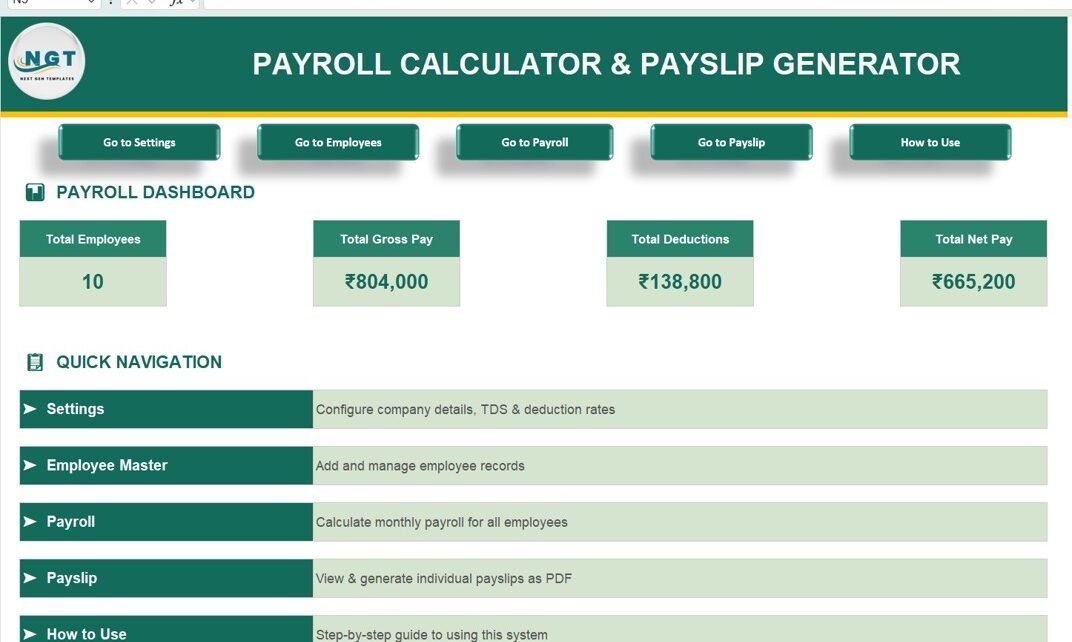
Moreover, the dashboard provides a quick summary of payroll data, including total employees, gross pay, deductions, and net pay.
Key Features of Payroll Calculator and Payslip Generator in Excel
This solution includes multiple interactive sheets designed for end-to-end payroll management.
Payroll Dashboard – Quick Insights 📌
The dashboard provides a high-level overview of payroll performance.
🔹 KPI Cards:
-
Total Employees
-
Total Gross Pay
-
Total Deductions
-
Total Net Pay
🔹 Navigation Buttons:
-
Go to Settings
-
Go to Employees
-
Go to Payroll
-
Go to Payslip
-
How to Use

Click here to purchase the Payroll Calculator and Payslip Generator in Excel
Settings & Configuration – Customize Payroll ⚙️
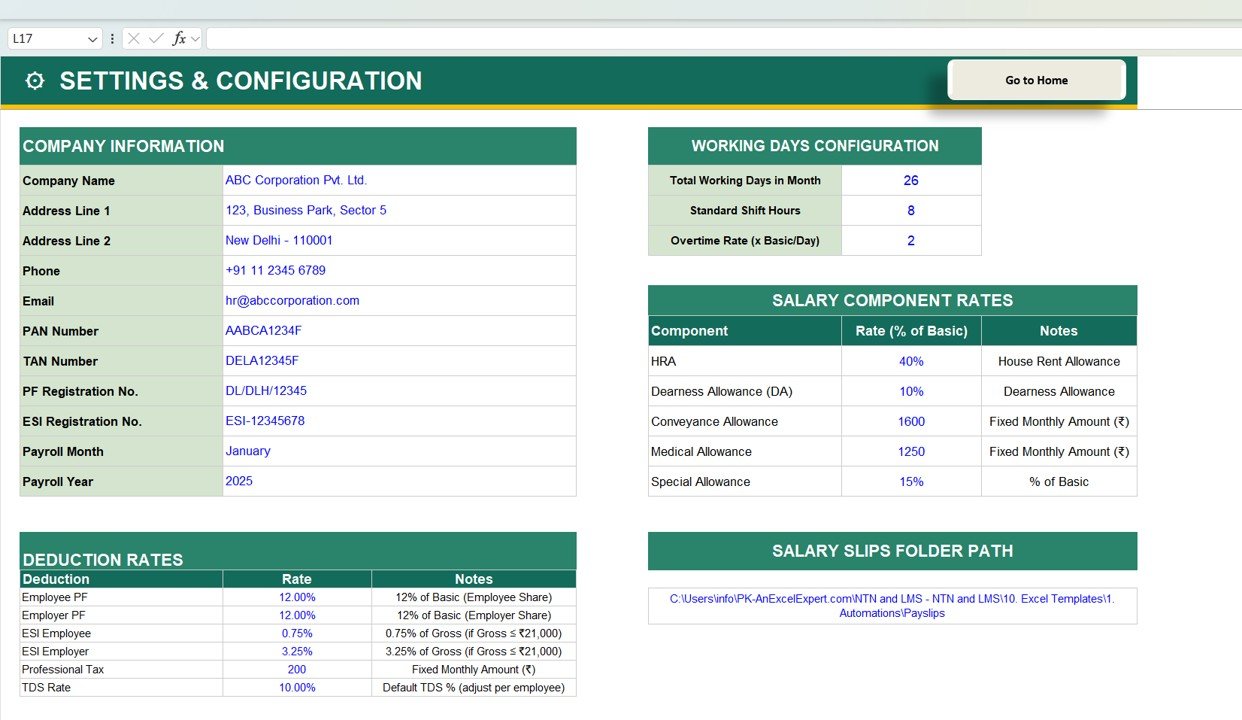
This sheet allows you to configure all payroll settings.
🔹 Includes:
-
Company Information (Name, Address, PAN, TAN)
-
Working Days Configuration
-
Salary Components (HRA, DA, Allowances)
-
Deduction Rates (PF, ESI, TDS, Professional Tax)
-
Payslip Folder Path
Employee Master Database – Manage Employee Data 👨💼This sheet stores employee details.
🔹 Fields Included:
-
Employee ID
-
Employee Name
-
Department
-
Designation
-
Date of Joining
-
PAN & Aadhaar
-
Bank Details

Click here to purchase the Payroll Calculator and Payslip Generator in Excel
Monthly Payroll Calculator – Automated Salary Calculation 💰
This sheet calculates salaries automatically.
🔹 Earnings:
-
Basic Salary
-
HRA
-
DA
-
Conveyance
-
Medical
-
Special Allowance
🔹 Deductions:
-
PF
-
ESI
-
Professional Tax
-
TDS

Payslip Generator – Instant Payslip Creation 📄
🔹 Features:
-
Select Employee ID
-
Auto-fill employee details
-
Earnings & deductions breakdown
-
Generate PDF payslip
-
Generate all payslips at once

How to Use – Step-by-Step Guide 📘
🔹 Steps Included:
-
Configure settings
-
Add employee details
-
Process payroll
-
Generate payslips

Advantages of Payroll Calculator & Payslip Generator
✅ Saves Time
-
Automates calculations
-
Reduces manual effort
✅ Improves Accuracy
-
Eliminates calculation errors
-
Ensures correct deductions
✅ Easy to Use
-
Simple interface
-
Step-by-step process
✅ Professional Output
-
Generates PDF payslips
-
Clean and structured format
✅ Cost-Effective
-
No expensive software required
📈 How Does This Tool Improve Payroll Efficiency?
When businesses use this tool:
-
Payroll processing becomes faster
-
Errors reduce significantly
-
Compliance improves
-
Employee satisfaction increases
Therefore, organizations can focus on growth instead of manual tasks.Payroll Calculator and Payslip Generator in Excel
Best Practices for Payroll Management
- 🔹 Keep Employee Data Updated
- 🔹 Verify Salary Components
- 🔹 Review Deduction Rates Regularly
- 🔹 Automate Payslip Generation
- 🔹 Maintain Backup of Payroll DataPayroll Calculator and Payslip Generator in Excel
Who Should Use This Tool?
-
HR Managers
-
Small Business Owners
-
Accountants
-
Payroll Executives
-
Startups
Conclusion
The Payroll Calculator & Payslip Generator in Excel is a complete payroll solution that simplifies salary processing and payslip generation.Payroll Calculator and Payslip Generator in Excel
By using this tool, you can:
-
Automate payroll calculations
-
Reduce errors
-
Save time
-
Improve efficiencyPayroll Calculator and Payslip Generator in Excel
Frequently Asked Questions (FAQs)
1. What is a Payroll Calculator in Excel?
It is a tool used to calculate employee salaries automatically.Payroll Calculator and Payslip Generator in Excel
2. Can I generate payslips in PDF?
Yes, you can generate individual or bulk payslips in PDF format.
3. Is this tool customizable?
Yes, you can modify salary components and deductions.
4. Does it support multiple employees?
Yes, it supports multiple employees easily.
5. Is it suitable for small businesses?
Yes, it is perfect for small and medium businesses.
Click here to purchase the Payroll Calculator and Payslip Generator in Excel
Visit our YouTube channel to learn step-by-step video tutorials