Procurement plays a major role in every business. When companies buy goods or services, they want the process to be easy, clear, and error-free. Because of this, teams must follow a structured approach. A Procurement Preparation Guide Checklist in Excel helps people stay organized, avoid mistakes, and complete every step at the right time.
In this in-depth article, you will discover everything about this Excel-based checklist. You will learn how it works, why it matters, how to use it, and the best practices for better results. You will also see the key features of the template and understand how it supports procurement teams. At the end, you will find helpful answers to common questions.Procurement Preparation Guide Checklist in Excel
Let us begin the journey toward smarter and smoother procurement.Procurement Preparation Guide Checklist in Excel.
Click to buy Procurement Preparation Guide Checklist in Excel
Procurement plays a major role in every business. When companies buy goods or services, they want the process to be easy, clear, and error-free. Because of this, teams must follow a structured approach. A Procurement Preparation Guide Checklist in Excel helps people stay organized, avoid mistakes, and complete every step at the right time.
In this in-depth article, you will discover everything about this Excel-based checklist. You will learn how it works, why it matters, how to use it, and the best practices for better results. You will also see the key features of the template and understand how it supports procurement teams. At the end, you will find helpful answers to common questions.Procurement Preparation Guide Checklist in Excel
Let us begin the journey toward smarter and smoother procurement.Procurement Preparation Guide Checklist in Excel
What Is a Procurement Preparation Guide Checklist in Excel?
A Procurement Preparation Guide Checklist in Excel is a ready-to-use template that helps you track every task in the procurement cycle. It gives you a clean structure that keeps all activities in one place. As a result, you complete your preparation on time and avoid delays.
This checklist template includes simple drop-downs, status markers, responsible persons, deadlines, and remarks. When you update each item, the sheet updates the total progress automatically. As the percentage increases, you can see how close you are to completing your procurement preparation.
Because the template runs inside Excel, you can use it in any industry such as:
- Manufacturing
- Retail
- Logistics
- Education
- Finance
- Healthcare
- Government
- IT services
Whether your task is to buy raw material, get a vendor quote, finalize contracts, or prepare for a large tender, this checklist helps you stay in control.
Why Do You Need a Procurement Preparation Guide Checklist?
Every procurement project has many steps. Teams must collect data, verify documents, contact vendors, compare quotes, follow rules, and complete approvals. When you try to manage everything manually, the process becomes slow and confusing.
However, a simple Excel checklist changes everything.
You need this checklist because it:
- Organizes the entire process
- Reduces the chance of mistakes
- Helps you follow timelines
- Tracks responsibilities clearly
- Improves communication in teams
- Gives instant visibility of progress
When you prepare well, you save time, reduce cost, and improve the quality of your final purchase decision. This is why companies prefer using this structured checklist before starting any procurement activity.
Key Features of the Procurement Preparation Guide Checklist in Excel
This Excel template offers powerful features while staying easy to use. Let us explore each one in detail.
Main Checklist Sheet
This is the primary sheet where you capture all procurement tasks. You can fill each row with clear details, update statuses, and track progress.
Top Section: Visual Summary Cards
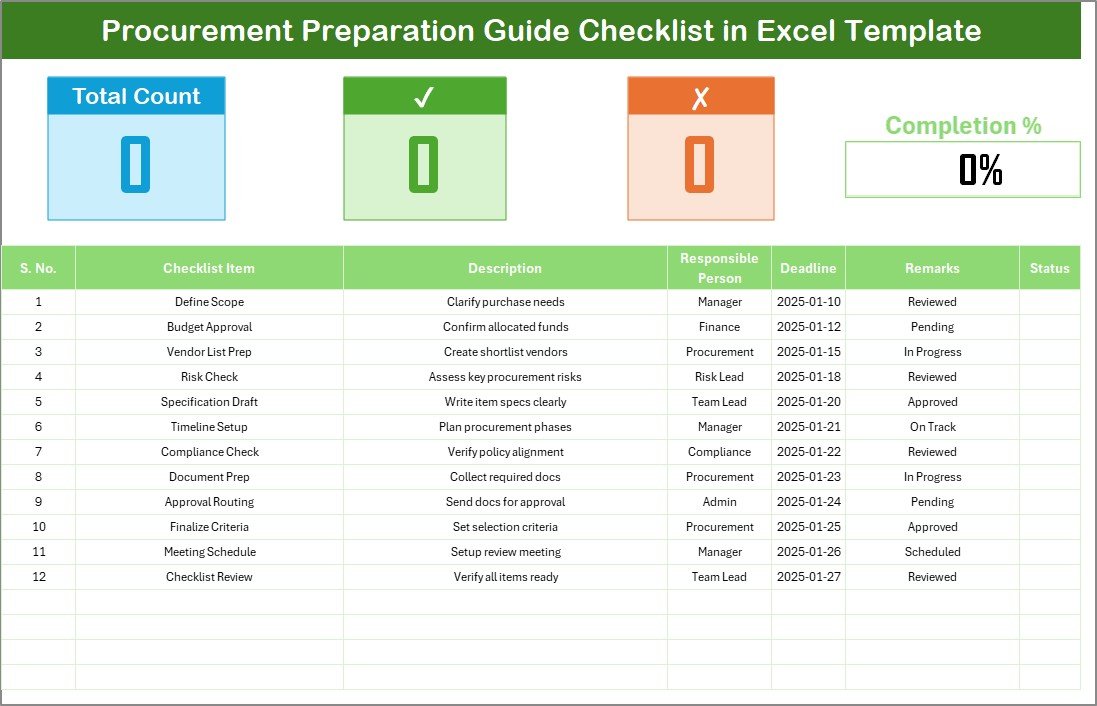
The top area of the sheet shows three important cards:
- Total Count – Number of checklist items
- Completed Count – Number of tasks finished
- Pending Count – Number of tasks still incomplete
You also see a Progress Bar that shows the percentage of completed items. As you update items, this bar moves automatically. Because of this, you can view your progress instantly without doing any manual calculation.
Checklist Table with Smart Columns
- Serial No.: Helps you track each task in order.
- Checklist Item: The name of the task, such as “Collect vendor quotes.”
- Description: A short note to explain the task.
- Responsible Person: Dropdown list showing who will handle the task.
- Deadline: The last date to finish the task.
- Remarks: Any extra comments or updates.
- Status: You can update it using ✔ for completed or ✘ for pending.
When you update the status column, the progress bar changes automatically. Because of this feature, the checklist becomes a live dashboard.
Click to buy Procurement Preparation Guide Checklist in Excel
List Sheet Tab
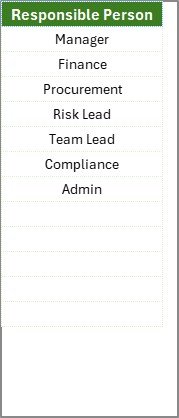
The second sheet stores the unique list of responsible persons. This sheet helps you create a dropdown list in the main checklist table. You can add names here, and the dropdown updates instantly.
This simple structure makes the template fast, smooth, and easy to maintain.
Click to buy Procurement Preparation Guide Checklist in Excel
How Does the Procurement Preparation Checklist Improve the Procurement Process?
Although procurement looks easy, it includes many hidden steps. When teams miss even one step, the entire project suffers. However, this Excel checklist ensures that every activity stays recorded and monitored.
Here is how it improves your overall process:
- Ensures Step-by-Step Completion
You complete each task in a sequence. Because of this, you do not miss any critical step like vendor background checks or budget approvals.
- Reduces Delays
Since you follow deadlines, the team completes tasks faster and more confidently.
- Creates Clear Ownership
Every task has a responsible person. So, there is no confusion about who handles what.
- Makes Procurement Transparent
The progress bar and summary cards help managers track the project status easily.
- Supports Audits and Compliance
A structured checklist proves that you followed every step. This helps during internal or external audits.
How to Use the Procurement Preparation Checklist Template
Even though the template is simple, the results become powerful when you use it correctly. Follow these steps to make the most of the checklist.
Step 1: Add Your Team Members in the List Sheet
Go to the List tab and enter the names of all team members. These names appear in the dropdown list under the Responsible Person column.
Step 2: Fill the Checklist Items
Add the tasks required for procurement preparation. For example:
- Identify requirement
- Create purchase request
- Check budget availability
- Collect vendor details
- Prepare RFQ document
- Send RFQ to vendors
- Receive vendor quotes
- Compare quotes
- Check vendor compliance
- Finalize vendor selection
- Prepare purchase order draft
- Send final PO for approval
You can add any other task depending on your business needs.
Step 3: Set Deadlines and Add Descriptions
You must set a clear deadline for each task. When deadlines stay clear, the team completes tasks on time.
You can also write a short description to explain the purpose of each task.
Step 4: Assign Responsibilities
Use the dropdown list to assign a team member to each task. This step removes confusion and divides the workload properly.
Step 5: Update the Status Regularly
Use to mark a completed task and for pending tasks. As you update the status, the summary cards and progress bar update automatically.
Step 6: Track Overall Progress
The top section shows:
- Total items
- Completed items
- Pending items
- Progress percentage
You can view the current status at any moment without any extra calculation.
Advantages of a Procurement Preparation Guide Checklist in Excel
A checklist looks simple, yet it offers strong advantages. Let us explore them one by one.
- Better Team Coordination
Every task has a clear owner. Because of this, team members coordinate better and complete their tasks on time.
- Improved Procurement Accuracy
The checklist captures every important detail. So, you do not skip key steps like compliance checks or budget approval.
- Faster Procurement Cycle
With clear deadlines and responsibilities, people work faster. This reduces the total procurement time.
- Increased Transparency
The progress bar and summary cards show the real-time status of the project. Managers can see what is done and what is pending.
- Easy to Customize
You can add new tasks, delete old ones, or update names. The template stays flexible and supports both small and large teams.
- Supports Reporting and Audits
A structured checklist becomes strong documentation. Auditors can review the list and confirm that you followed proper steps.
What Are the Best Practices for Using a Procurement Preparation Checklist?
If you want the best results, follow these practical best practices.
- Keep the Checklist Updated
You must update the status daily. When the sheet stays current, your progress becomes accurate.
- Use Short and Clear Descriptions
Short descriptions help team members understand tasks quickly.
- Set Realistic Deadlines
Choose deadlines that suit the project timeline. Unrealistic dates create pressure and mistakes.
- Review the Checklist Weekly
Reviewing the checklist helps you track delays and take action.
- Add Remarks for Better Clarity
If you face issues, note them in the remarks column. This helps during audits and future planning.
- Involve the Entire Team
Procurement works well when everyone participates. So, ask the team to review and update the checklist regularly.
Common Mistakes to Avoid While Using This Checklist
Even though the template is simple, some teams make common mistakes. Avoid these to get better results.
- Not updating the status daily
- Missing deadlines
- Using unclear task names
- Not assigning a responsible person
- Ignoring the remarks column
- Forgetting to review the list weekly
When you avoid these mistakes, your procurement process becomes smooth and predictable.
Conclusion
A Procurement Preparation Guide Checklist in Excel makes the procurement cycle easy, organized, and efficient. It helps you capture every step, assign responsibilities, set deadlines, and monitor progress. The template stays flexible and fits any business, whether large or small. When you follow the best practices and keep the checklist updated, you achieve better results and complete procurement activities without delay.
With this guide, you now understand how to use the checklist and why it matters. Start using the template today and bring more clarity to your procurement process.
Frequently Asked Questions (FAQs)
- What is the main purpose of a procurement preparation checklist?
- The main purpose is to organize all tasks, assign responsibility, and monitor progress. It helps teams complete procurement steps on time.
- Can I customize the checklist?
- Yes, you can add new tasks, update existing ones, or remove steps. The template stays flexible and supports all workflows.
- How often should I update the status?
- You should update it daily. Regular updates keep the summary cards and progress bar accurate.
- Can I use this template for large projects?
- Yes. You can add hundreds of checklist items. Excel handles large projects easily.
- What symbols do I use for status?
- Use ✔ for completed tasks and ✘ for pending tasks. These symbols make the sheet easy to understand.
- Who should maintain the checklist?
The procurement lead or project manager usually handles it. However, team members should also update their tasks.
- Does the checklist support audits?
Yes. It stores clear records of every task, timeline, and responsibility. This supports compliance and audit reviews.
Visit our YouTube channel to learn step-by-step video tutorials
Click to buy Procurement Preparation Guide Checklist in Excel
Watch the step-by-step video tutorial: