Introduction
The Telemedicine Platforms KPI Dashboard is a comprehensive, ready-to-use template designed to help healthcare providers and administrators monitor and analyze the key performance indicators (KPIs) of their telemedicine services effectively. With this dashboard, decision-makers can easily track performance trends, assess monthly and yearly goals, and optimize telemedicine delivery for better patient outcomes.
Key Features of Telemedicine Platforms KPI Dashboard
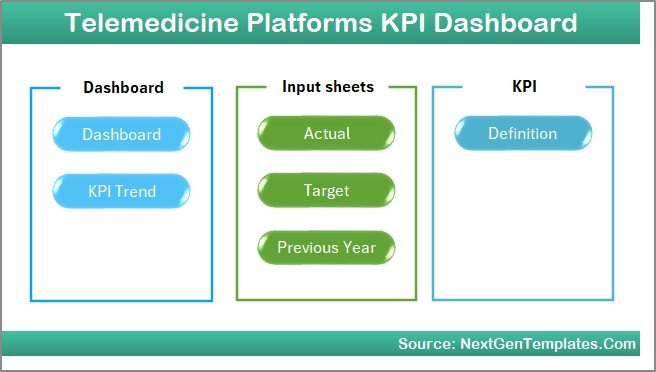
- Seven fully integrated worksheets to provide detailed insights and data entry points.
- Interactive drop-down selections for dynamic data viewing by month or KPI.
- Conditional formatting with up/down arrows to visualize KPI performance vs targets.
- MTD (Month-To-Date), YTD (Year-To-Date), and Previous Year comparisons for deep trend analysis.
- Clean UI with navigation buttons for easy switching among key dashboard pages.
- Data input sheets for actual, target, and previous year numbers ensuring seamless updates.
- KPI definitions with formula references and performance type classification.
Dashboard Pages Explanation
1. Home Sheet
This is the index or landing page of the dashboard, equipped with six navigation buttons that allow quick access to other sheets.
2. Dashboard Sheet
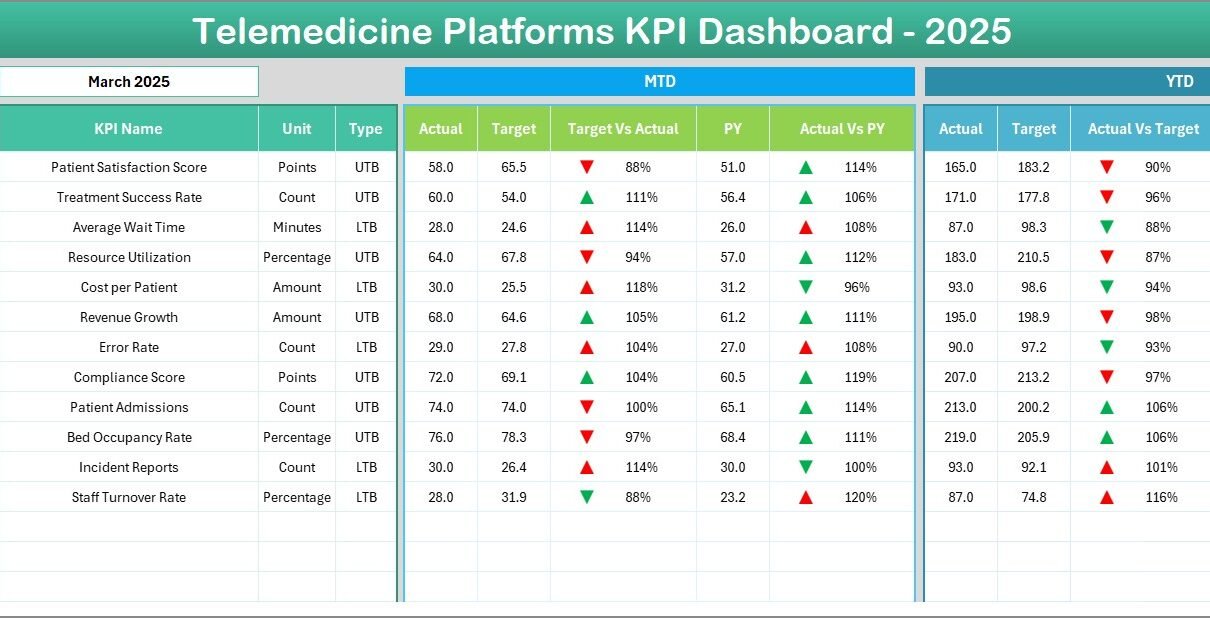
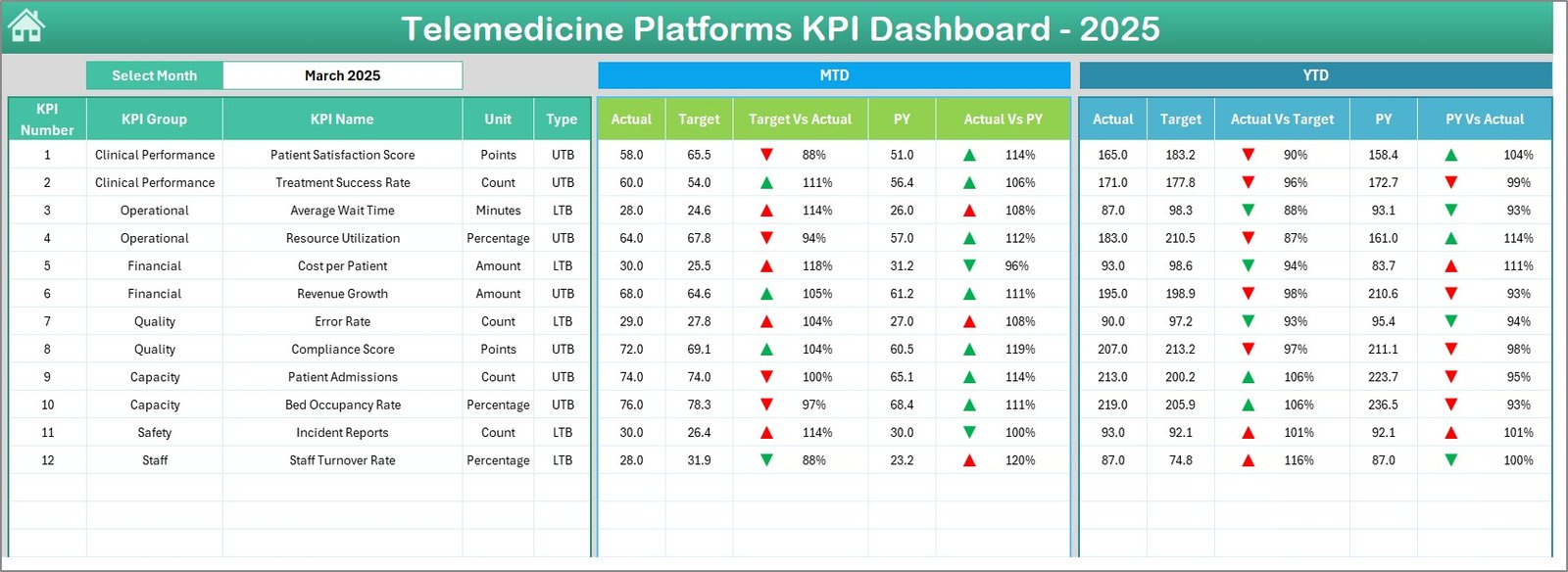
This is the main analytics sheet, showing important KPIs with the ability to select the month via a drop-down in cell D3. The dashboard dynamically updates to display:
- MTD Actual, Target, and Previous Year data.
- Comparisons between Target vs Actual and Previous Year (PY) vs Actual using conditional formatting with arrows indicating upward or downward trends.
- YTD Actual, Target, and Previous Year data alongside the respective comparisons.
3. KPI Trend Sheet
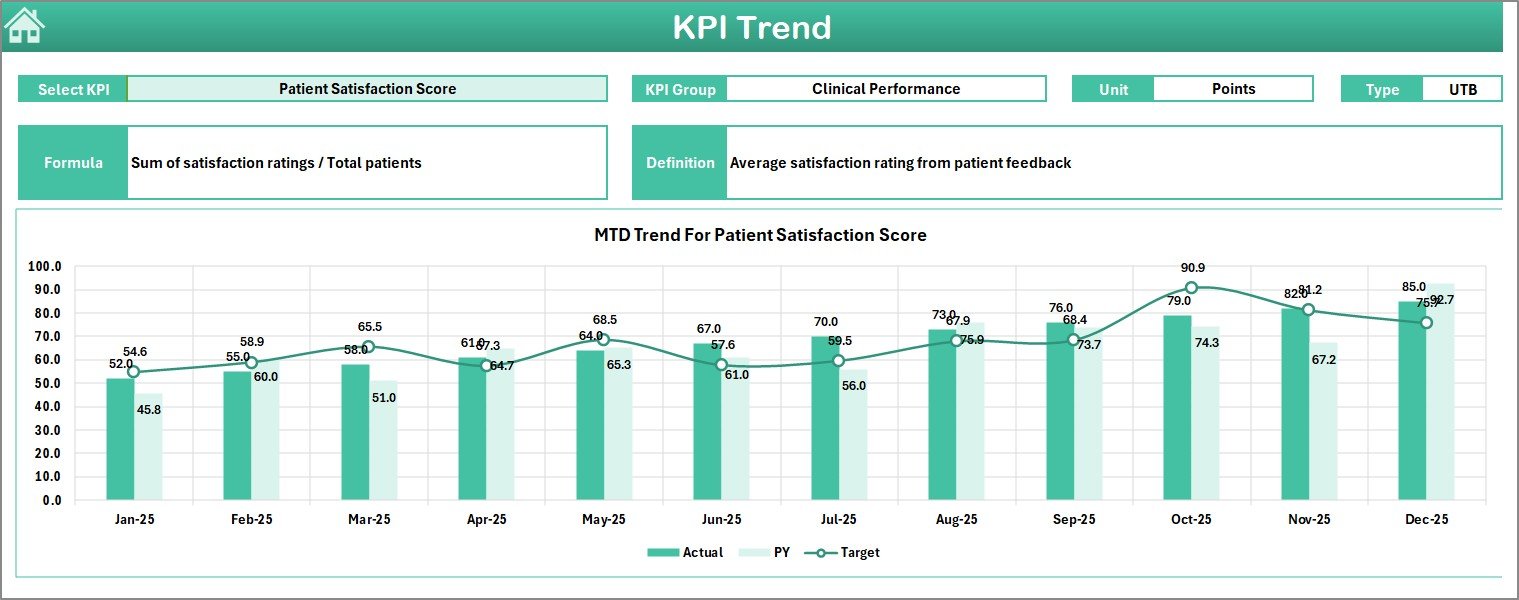
On this sheet, users can select any KPI from a drop-down menu (located in cell C3) and view detailed information about it. This includes:
- KPI Group and Unit of measurement.
- Type of KPI (whether lower is better – LTB, or upper is better – UTB).
- Formula and a precise definition to understand KPI calculation.
- MTD and YTD trend charts representing Actual, Target, and Previous Year data for visual performance analysis.
4. Actual Numbers Input Sheet
This sheet is dedicated to inputting actual performance numbers for the telemedicine platform. You can set the starting month of the year in cell E1 to align with your fiscal calendar. Enter MTD and YTD actual values corresponding to each KPI and selected month.
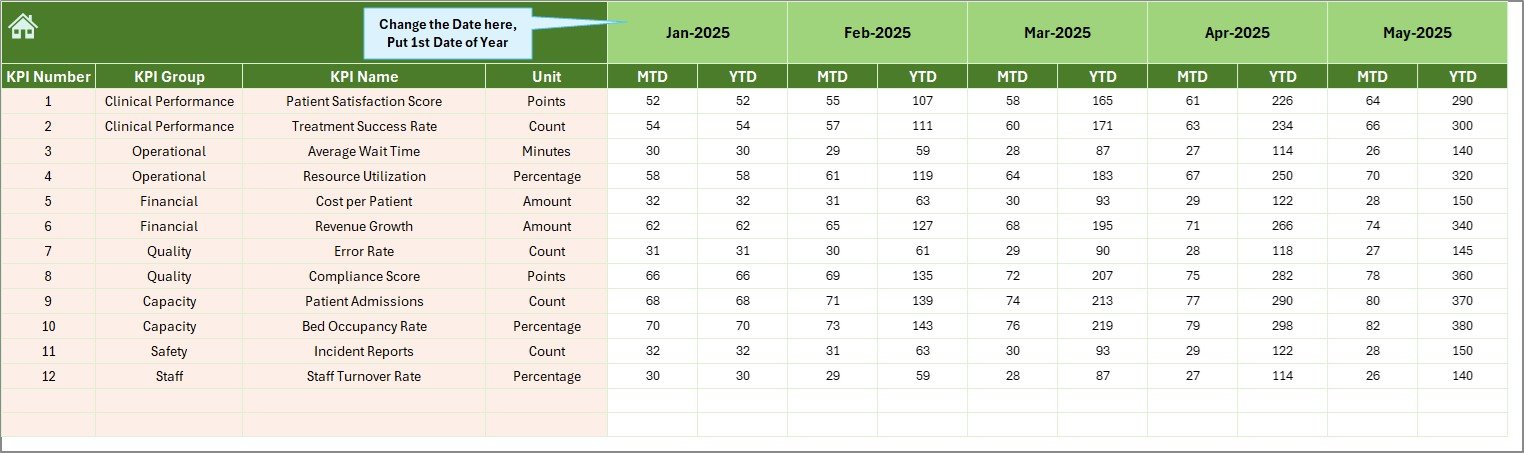
Actual Numbers Input sheet
5. Target Number Input Sheet
Users input target goals for each KPI here, for both MTD and YTD periods. This helps the dashboard benchmark actual performance against planned targets.
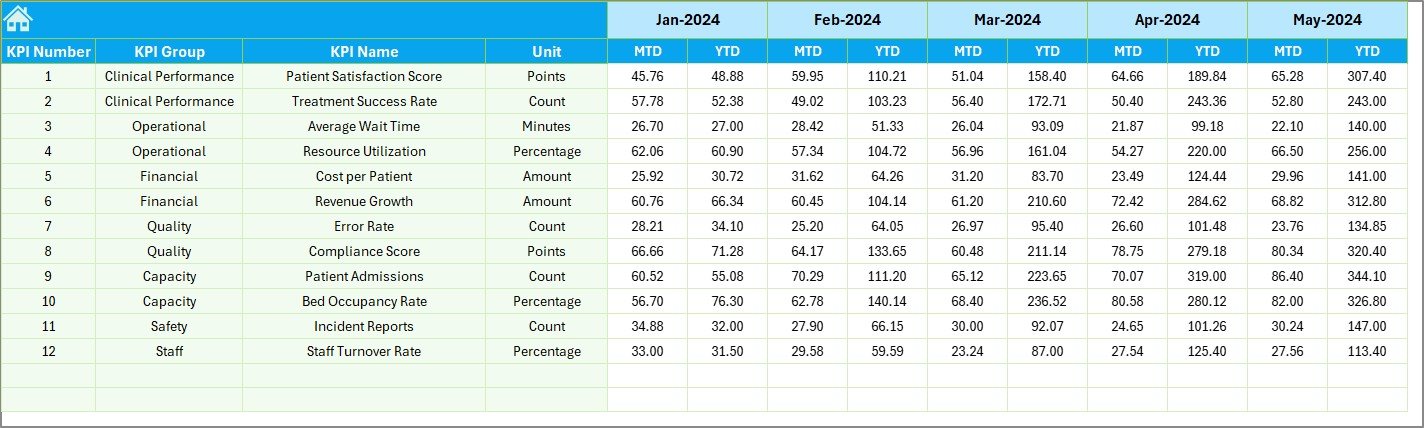
6. Previous Year Number Input Sheet
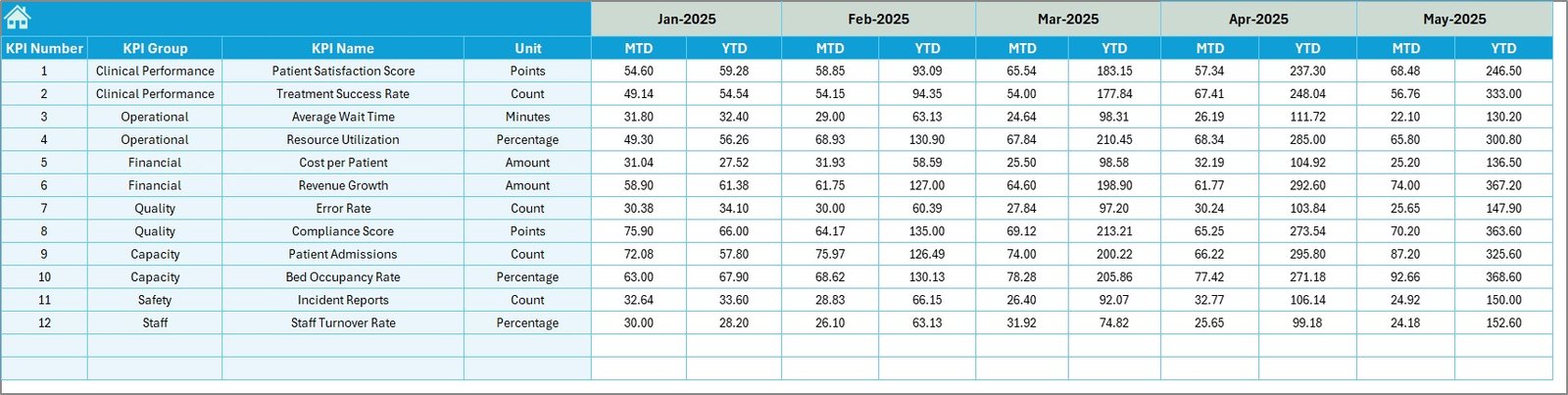
Enter the previous year’s KPI data in this sheet to enable year-over-year comparisons as shown on the dashboard and trend sheets.
Previous Year Number Input sheet
7. KPI Definition Sheet
This foundational sheet holds metadata for each KPI including:
- KPI Name, Group, and Unit.
- Calculation Formula.
- Detailed KPI Definition.
- KPI Type to specify if it is LTB (Lower the Better) or UTB (Upper the Better).

Advantages of Telemedicine Platforms KPI Dashboard
- Real-time Insights: Makes it easy to spot trends and issues quickly without complex analysis.
- Improved Decision-Making: Provides actionable data by monitoring key indicators against targets and previous performance.
- Data Consistency: Centralizes data entry and KPI definitions to ensure everyone uses the same reference standards.
- Enhanced Accountability: Clear visibility of performance promotes responsibility among telemedicine team members.
- Scalable and Customizable: Suitable for various telemedicine business models and can be adapted to specific KPI requirements.
Opportunities for Improvement
- Include automatic data import from Electronic Health Records (EHR) systems to reduce manual input errors.
- Add benchmarking features comparing KPIs with industry standards or competitors.
- Integrate alert mechanisms for KPIs that fall below thresholds.
- Expand visualization options, such as heat maps or geographical performance metrics.
- Develop mobile-friendly versions for on-the-go access by healthcare executives.
Best Practices
Click to Buy Telemedicine Platforms KPI Dashboard in Excel
- Regularly update actual, target, and previous year data to maintain dashboard accuracy.
- Validate KPI formulas and definitions to ensure measurement relevance.
- Customize KPIs based on your telemedicine service objectives and patient demographics.
- Train staff on how to interpret dashboard metrics for operational improvements.
- Use the dashboard reports in strategy meetings for transparent and data-driven discussions.
FAQs
What is the main purpose of the Telemedicine Platforms KPI Dashboard?
The dashboard is designed to track, visualize, and analyze key telemedicine performance metrics to help providers improve service quality and operational efficiency.
Can the dashboard be customized for different telemedicine platforms?
Yes, the dashboard structure is flexible and can be tailored by adding or modifying KPIs based on specific platform needs.
How frequently should data be updated on this dashboard?
It is recommended to update the data monthly for timely and actionable reporting, but more frequent updates are possible to suit operational requirements.
Is technical expertise required to use this dashboard?
Basic Excel skills are sufficient to enter data and navigate the dashboard. More advanced users can customize KPI formulas or charts as required.
Conclusion
Click to Buy Telemedicine Platforms KPI Dashboard in Excel
The Telemedicine Platforms KPI Dashboard is a powerful tool tailored specifically for the telemedicine sector, enabling healthcare providers to track performance and make informed decisions that improve patient care delivery. Its intuitive design, combined with deep KPI analysis, ensures you stay ahead in a fast-evolving healthcare environment.
For further learning, visit Microsoft Excel Help & Training for tips on optimizing dashboards.
Visit our YouTube channel to watch the demo.
Click to Buy Telemedicine Platforms KPI Dashboard in Excel