Introduction
Theater managers face unique challenges in optimizing operational efficiency and measuring performance effectively. To address this need, we present the Theater Management KPI Scorecard, a ready-to-use, comprehensive Excel template designed to track, analyze, and improve key performance indicators (KPIs) in theater management. This tool empowers managers with clear insights into their operations, enabling data-driven decisions and enhanced performance monitoring.
Key Features of Theater Management KPI Scorecard
- Four Dedicated Worksheets: The template includes Scorecard Sheet, KPI Trend Sheet, Input Data Sheet, and KPI Definition Sheet for holistic management.
- Dynamic Dropdown Menus: Customize views by month, Month-to-Date (MTD), or Year-to-Date (YTD) to analyze performance trends over time.
- Actual vs Target Comparisons: Visualize how well theater operations meet established targets with clarity and precision.
- Visual Performance Indicators: Color-coded alerts and conditional formatting provide rapid status updates at a glance.
- Detailed KPI Information: Get comprehensive insights including units, types, formulas, and definitions, ensuring accurate measurement and interpretation.
- Trend Analysis: View performance trends across periods with clear charts comparing Actual, Target, and Previous Year (PY) data.
- Flexible Data Entry: Easily update KPI metrics to keep the scorecard current and relevant.
Dashboard Pages Explanation
1. Scorecard Sheet
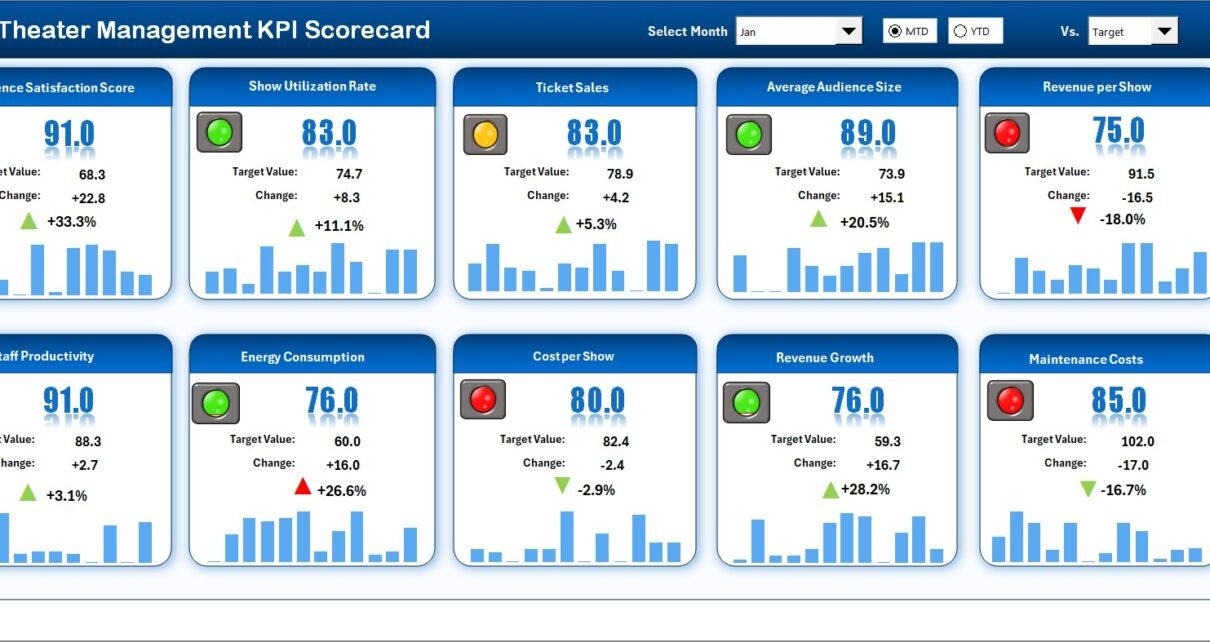
 Theater Management KPI Scorecard
Click to Buy Theater Management KPI Scorecard in Excel
The Scorecard Sheet is the main interface where you view KPI performance metrics. Key features include:
- Dropdown Menus: Select the specific month, MTD, or YTD data for tailored performance analysis.
- Actual vs Target Values: Directly compare current figures against goals.
- Visual Indicators: Use color-coded cells and conditional formatting to quickly assess performance status.
- Comprehensive KPI Overview: Review all relevant KPI data, including MTD and YTD comparisons for a broad perspective.
2. KPI Trend Sheet
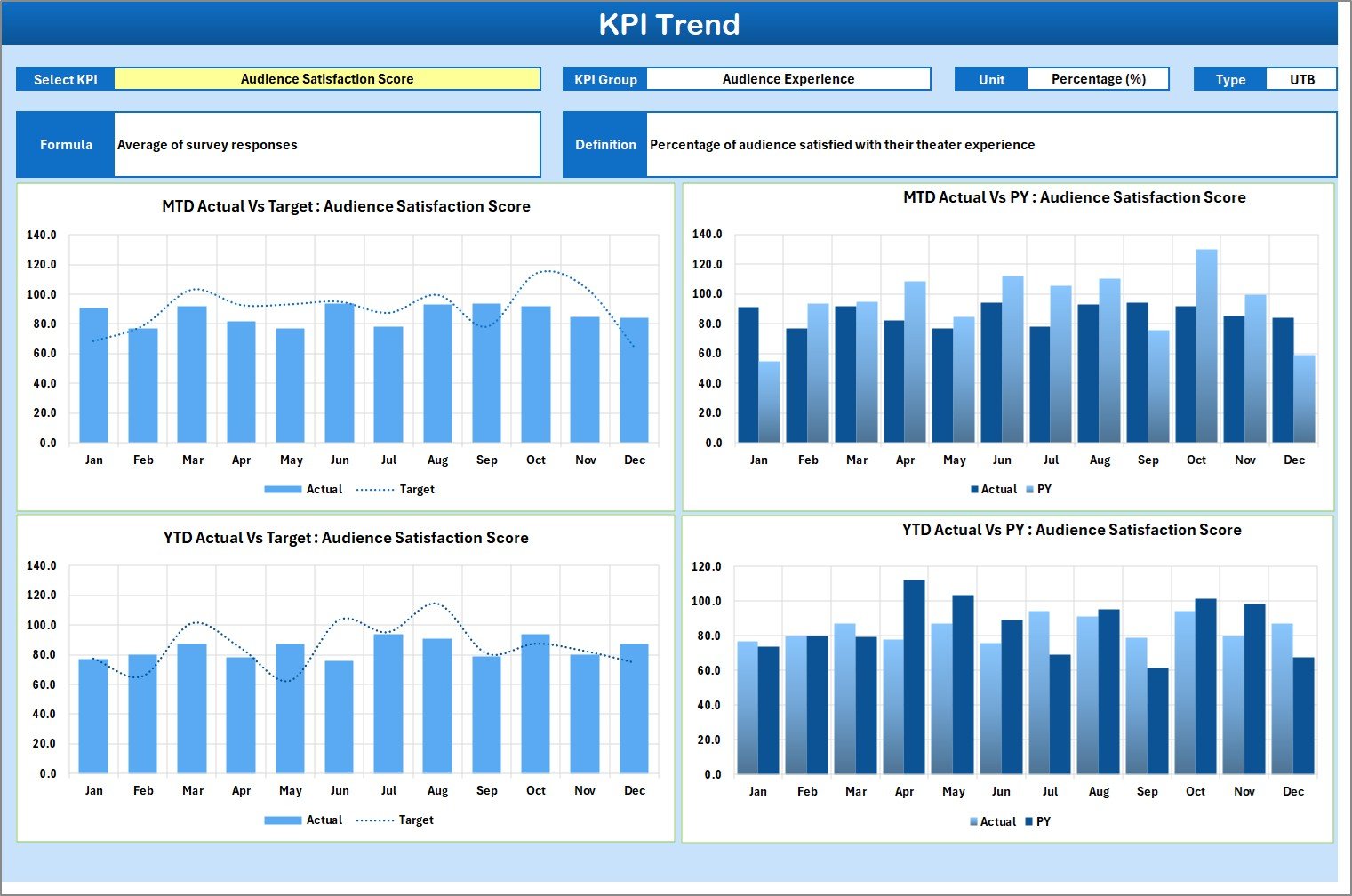 KPI Trend Sheet
In the KPI Trend Sheet, you can:
- Select the KPI name from the dropdown in cell C3.
- View essential KPI metadata, including group, unit, type (whether a lower or upper value is preferred), formula, and definition.
- Analyze MTD and YTD trend charts displaying Actual, Target, and Previous Year (PY) values, helping you identify performance patterns over time.
3. Input Data Sheet
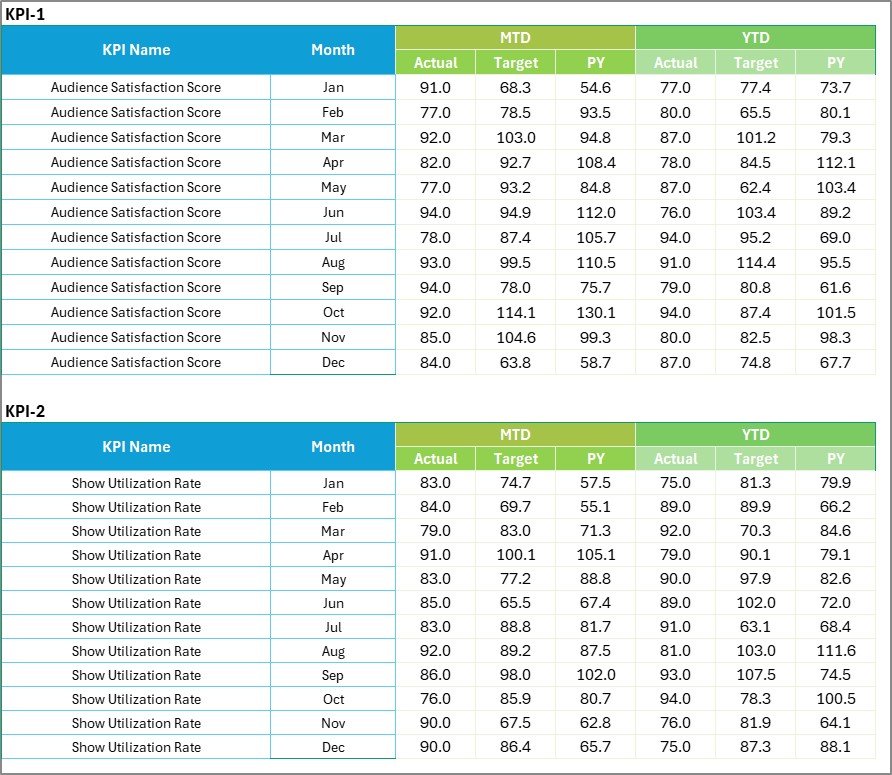 Input Data Sheet
Click to Buy Theater Management KPI Scorecard in Excel
The Input Data Sheet is the backbone of the scorecard where all KPI data is entered. This sheet allows you to:
- Record actual KPI values, set targets, and input relevant metrics.
- Update data continuously as new results become available.
- Maintain flexibility ensuring that the scorecard reflects the most current and accurate information.
4. KPI Definition Sheet Tab
 KPI Definition sheet tab
Click to Buy Theater Management KPI Scorecard in Excel
Use this sheet to define each KPI in detail by specifying:
- KPI Name
- KPI Group
- Units of measurement
- Calculation formula
- Detailed KPI definitions
This ensures consistent understanding and measurement of each KPI across your theater management team.
Advantages of Theater Management KPI Scorecard
- Improved Visibility: Centralizes all key metrics in one dynamic place for straightforward monitoring.
- Data-Driven Decisions: Facilitates objective analysis by comparing actual performance with targets.
- Customization: Settings allow viewing by month, MTD, or YTD for flexible reporting.
- Engaging Visuals: Charts and conditional formatting enhance user experience and speed comprehension.
- Time-Saving: Pre-built formulas and dashboards reduce manual reporting workload.
- Scalability: Easily adaptable to changing needs and more KPIs.
Opportunities for Improvement
Click to Buy Theater Management KPI Scorecard in Excel
- Integrate real-time data connections to automate KPI updates directly from theater management systems.
- Add predictive analytics capabilities to forecast trends and allow preemptive action.
- Embed employee performance and customer feedback KPIs for a holistic view.
- Develop mobile-friendly dashboards for on-the-go access.
Best Practices
- Regular Data Updates: Enter data promptly to maintain accuracy and relevance.
- Team Collaboration: Share insights with your management team to foster transparency and collective responsibility.
- Review and Revise KPIs: Periodically assess KPIs for continued alignment with strategic goals.
- Leverage Visual Indicators: Act immediately on color-coded alerts to improve underperforming areas.
- Use Trend Analysis: Identify long-term patterns to guide resource allocation and operational changes.
FAQs
Click to Buy Theater Management KPI Scorecard in Excel
What is the main purpose of the Theater Management KPI Scorecard?
It tracks and analyzes key performance indicators to optimize theater operations and support data-driven decisions.
Can I customize the KPIs in this scorecard?
Yes, the KPI Definition Sheet allows you to add or modify KPIs according to your theater’s unique operational needs.
Does this template support multi-period analysis?
Absolutely. It offers monthly, MTD, and YTD views to help you understand short-term and long-term performance.
Is it user-friendly for managers with limited Excel experience?
Yes, the template has dropdowns, clear visuals, and straightforward input fields designed for ease of use.
Conclusion
Click to Buy Theater Management KPI Scorecard in Excel
The Theater Management KPI Scorecard offers a powerful yet easy-to-use solution for measuring, tracking, and improving theater operations. With its comprehensive dashboards, flexible inputs, and insightful trend analyses, theater managers can stay ahead of performance challenges and strategically drive success. Implement this scorecard today to elevate your theater’s operational visibility and performance management.
For additional resources, visit the official Microsoft Excel Support page to enhance your Excel skills and maximize the potential of this template.
Visit our YouTube channel to watch the demo.
Click to Buy Theater Management KPI Scorecard in Excel