Glass manufacturing operates in a highly competitive and quality-sensitive environment. Manufacturers must control production efficiency, energy consumption, waste levels, quality defects, delivery timelines, and financial performance at the same time. However, many glass plants still rely on scattered Excel sheets, manual reports, and delayed reviews. Because of this, decision-makers often miss early warning signs.
That is exactly why a Glass Manufacturing KPI Dashboard in Power BI becomes a powerful performance management solution.
This article explains what a Glass Manufacturing KPI Dashboard in Power BI is, why it matters, how it works, its page-wise structure, advantages, best practices, and frequently asked questions. Moreover, the content uses clear language, smooth transitions, and practical explanations to ensure easy understanding and strong SEO performance.
Click to buy Glass Manufacturing KPI Dashboard in Power BI
What is a Glass Manufacturing KPI Dashboard in Power BI?
A Glass Manufacturing KPI Dashboard in Power BI is a ready-to-use, interactive analytics solution that helps glass manufacturers monitor, analyze, and improve operational and business performance using key performance indicators (KPIs).
Instead of managing multiple disconnected spreadsheets, this dashboard consolidates KPI data into a single Power BI file. As a result, production managers, plant heads, quality teams, and leadership gain real-time visibility into both Month-to-Date (MTD) and Year-to-Date (YTD) performance.
Because the dashboard uses Power BI as the visualization layer and Excel as the data source, it remains flexible, scalable, and easy to maintain. Furthermore, teams can update data quickly without advanced technical skills.
Why do glass manufacturing companies need a KPI dashboard?
Glass manufacturing involves complex processes such as melting, forming, annealing, cutting, coating, and inspection. Therefore, even small inefficiencies can increase costs and reduce profitability.
Without a structured KPI dashboard, glass manufacturers often face these challenges:
- Limited visibility into production efficiency
- Difficulty tracking quality defects and scrap rates
- Delayed identification of missed targets
- Manual and time-consuming performance reporting
- Weak comparison between current and previous years
However, when manufacturers use a Glass Manufacturing KPI Dashboard in Power BI, they gain clarity, control, and confidence. As a result, leadership teams make faster and more informed decisions.
How does the Glass Manufacturing KPI Dashboard in Power BI work?
The dashboard follows a simple and effective data flow:
- Data Entry in Excel
Teams enter actual values, target values, and KPI definitions in structured Excel sheets. - Data Modeling in Power BI
Power BI connects to the Excel file and processes the data using predefined measures and logic. - Interactive Visualization
Users analyze performance using slicers, cards, tables, icons, and trend charts.
Because of this approach, organizations can maintain data accuracy while enjoying powerful analytics.
What are the key features of the Glass Manufacturing KPI Dashboard in Power BI?
The dashboard includes three well-structured pages inside the Power BI Desktop application. Each page serves a specific purpose and supports data-driven decision-making.
What does the Summary Page show in the Glass Manufacturing KPI Dashboard?
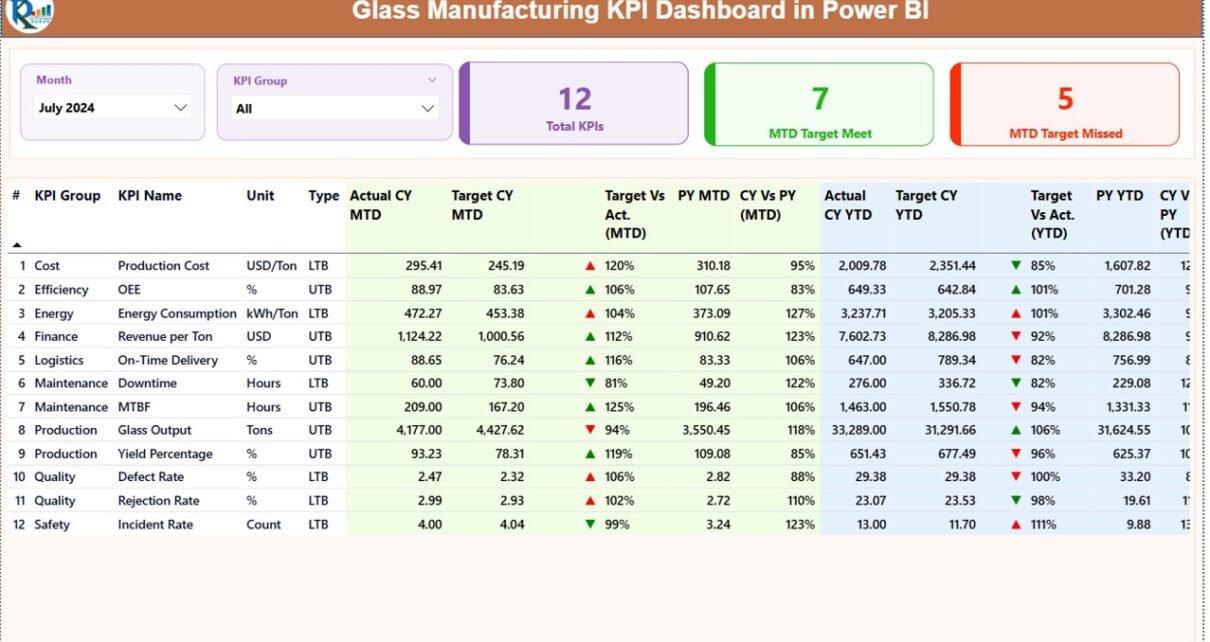
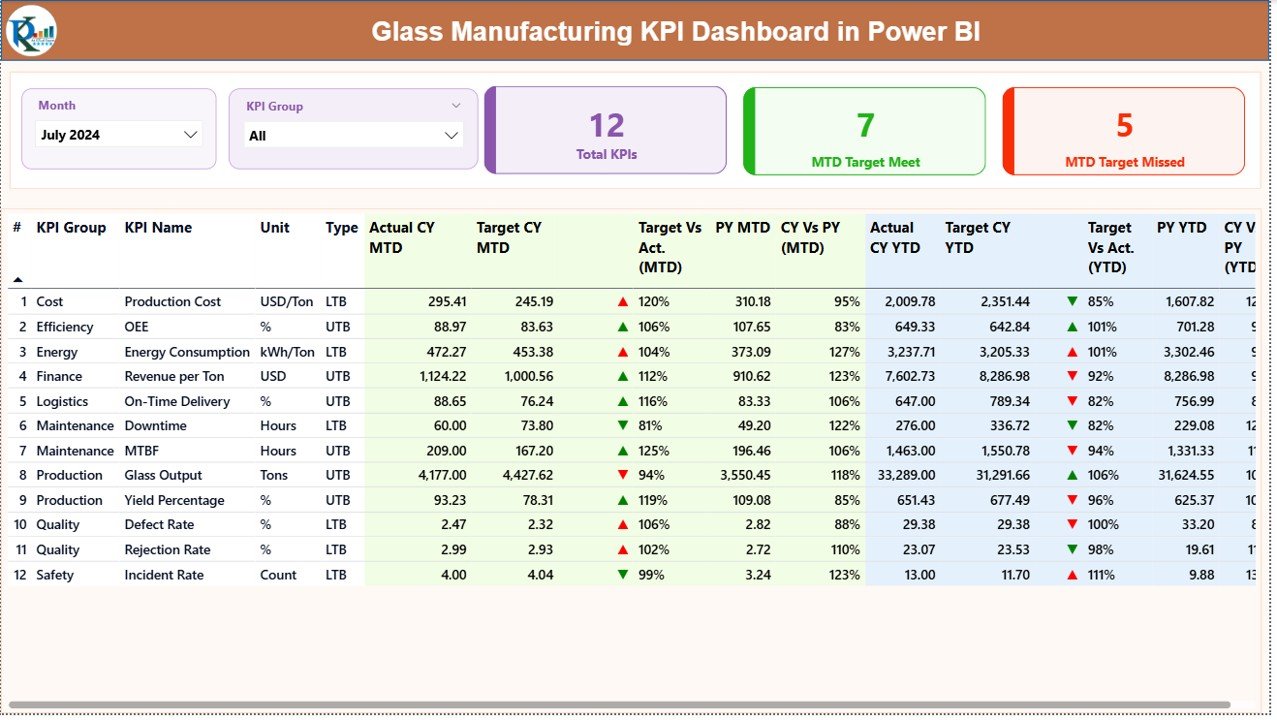
The Summary Page acts as the main control center of the dashboard. It provides a consolidated view of all KPIs at a glance.
Key elements of the Summary Page
Interactive slicers
- Month slicer allows users to select a specific month
- KPI Group slicer filters KPIs by category
Because of these slicers, users can analyze performance quickly without manual filtering.
KPI performance cards
At the top of the page, the dashboard displays three cards:
- Total KPIs Count
- MTD Target Met Count
- MTD Target Missed Count
These cards instantly highlight overall performance health.
What information does the detailed KPI table contain?
Below the cards, a detailed table displays comprehensive KPI information:
- KPI Number – Sequential identifier of the KPI
- KPI Group – Category or functional group
- KPI Name – Name of the KPI
- Unit – Unit of measurement
- Type – UTB (Upper the Better) or LTB (Lower the Better)
MTD Performance Metrics
- Actual CY MTD – Current year actual MTD value
- Target CY MTD – Current year target MTD value
- MTD Icon – ▲ or ▼ with green/red indicators
- Target vs Actual (MTD) – Actual ÷ Target percentage
- PY MTD – Previous year MTD value
- CY vs PY (MTD) – Current ÷ Previous year percentage
YTD Performance Metrics
- Actual CY YTD
- Target CY YTD
- YTD Icon
- Target vs Actual (YTD)
- PY YTD
- CY vs PY (YTD)
Click to buy Glass Manufacturing KPI Dashboard in Power BI
Because of this structured layout, users can quickly identify trends, risks, and improvement areas.
KPI Trend Page
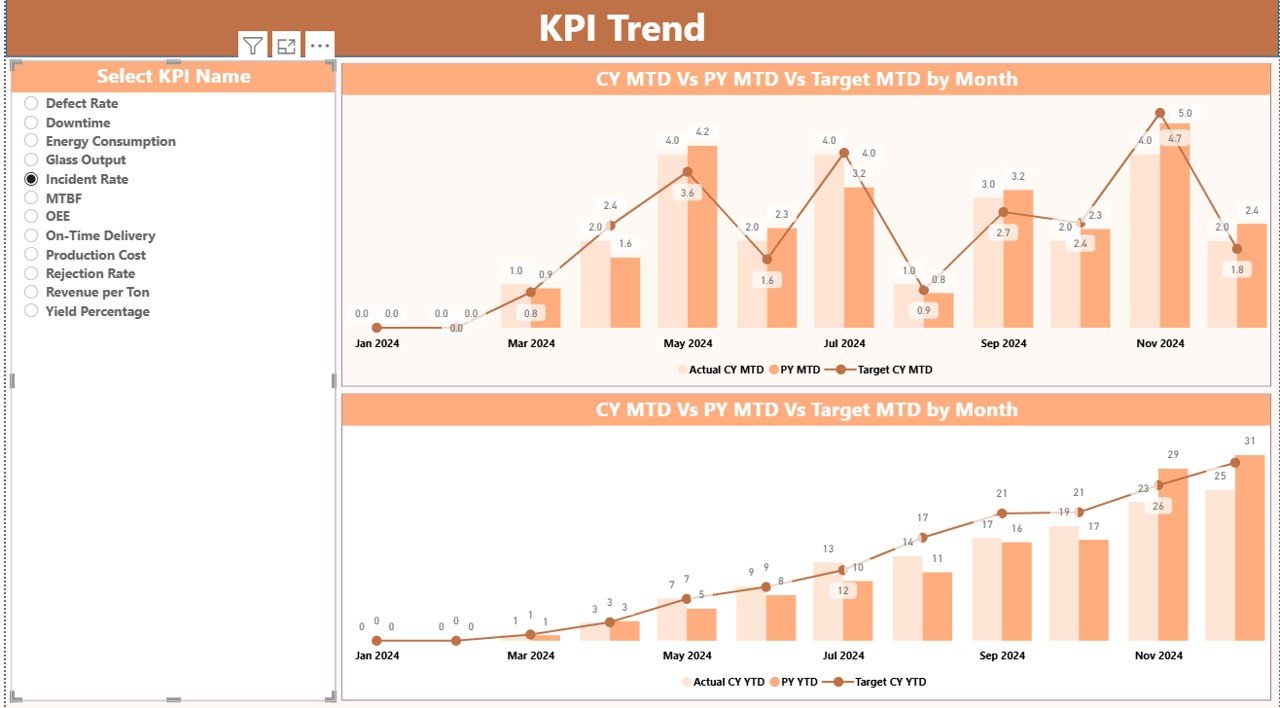
The KPI Trend Page focuses on trend-based analysis. Instead of viewing static numbers, users can visualize performance over time.
Key highlights of the KPI Trend Page
- KPI Name slicer on the left for easy selection
Two combo charts:
MTD Actual vs Target vs Previous Year
YTD Actual vs Target vs Previous Year
These charts help users:
- Identify seasonal trends
- Compare current performance with historical data
- Detect early performance deviations
As a result, teams can act before issues escalate.
Click to buy Glass Manufacturing KPI Dashboard in Power BI
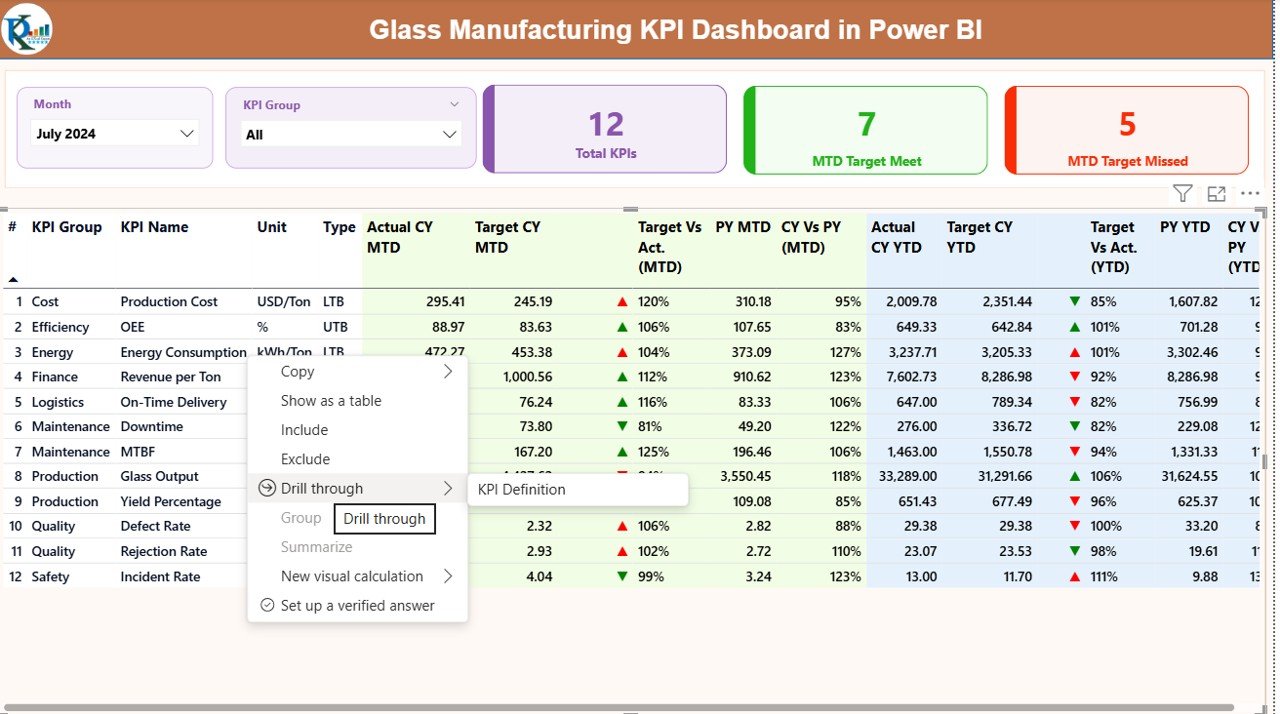
the KPI Definition
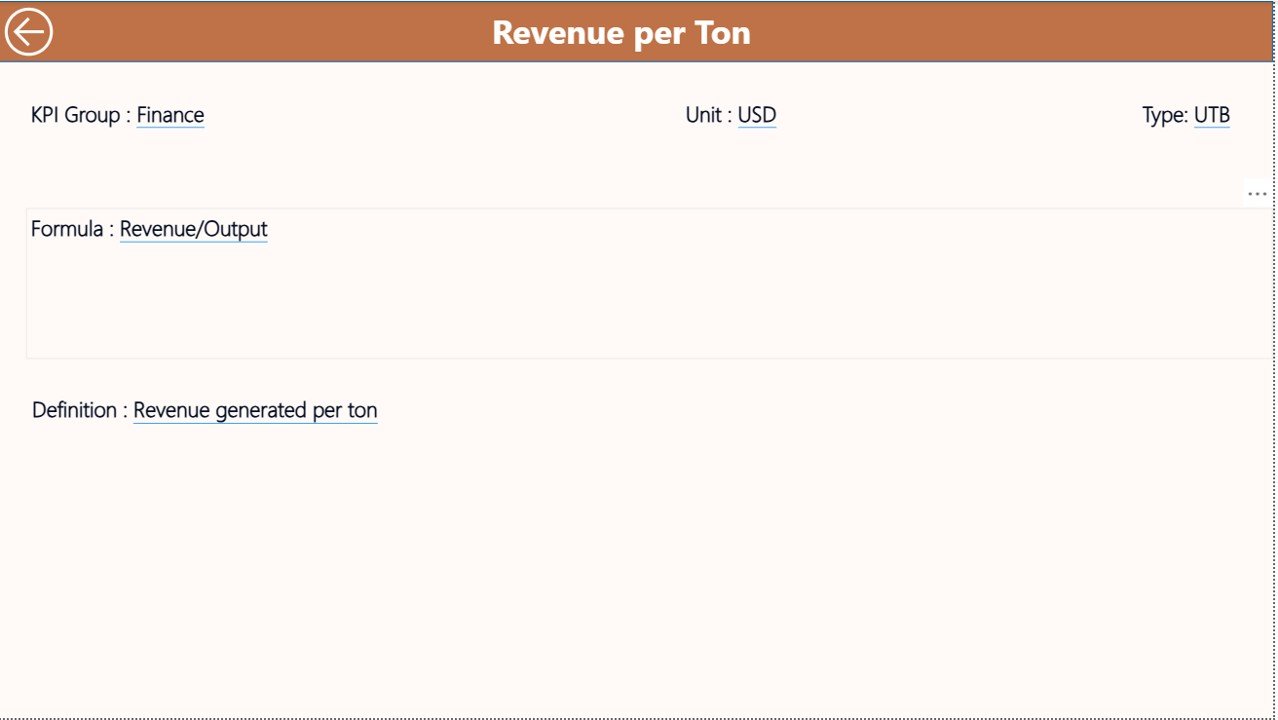
The KPI Definition Page acts as a drill-through reference page. Although it remains hidden by default, users can access it directly from the Summary Page.
What information does the KPI Definition Page show?
- KPI Number
- KPI Group
- KPI Name
- Unit of measurement
- Formula
- KPI definition
- KPI type (UTB or LTB)
This page ensures KPI clarity and consistency across teams. Additionally, it supports training and audit requirements.
A Back button on the top-left corner allows users to return to the main Summary Page easily.
Click to buy Glass Manufacturing KPI Dashboard in Power BI
What Excel sheets are required for the Glass Manufacturing KPI Dashboard?
The dashboard uses Excel as its data source, which makes data entry simple and familiar.
Input_Actual sheet
Users enter:
- KPI Name
- Month (first date of the month)
- MTD actual values
- YTD actual values
Input_Target sheet
Users enter:
- KPI Name
- Month (first date of the month)
- MTD target values
- YTD target values
Click to buy Glass Manufacturing KPI Dashboard in Power BI
KPI Definition sheet
Users enter:
- KPI Number
- KPI Group
- KPI Name
- Unit
- Formula
- Definition
- KPI Type (UTB or LTB)
Because of this structured setup, data remains clean, consistent, and analysis-ready.
Advantages of Glass Manufacturing KPI Dashboard in Power BI
Centralized performance monitoring
The dashboard brings all KPIs into one place. Therefore, teams no longer chase multiple reports.
Faster decision-making
Real-time insights enable managers to respond quickly to production and quality issues.
Improved target tracking
Clear MTD and YTD comparisons help teams stay aligned with goals.
Visual performance indicators
Icons and trend charts simplify complex data interpretation.
Scalability and flexibility
Power BI allows easy expansion as KPI requirements grow.
Strong historical comparison
CY vs PY analysis supports strategic planning and forecasting.
Opportunities for improvement using KPI dashboards in glass manufacturing
Although the dashboard already delivers strong value, organizations can enhance impact by:
- Adding automated data refresh from ERP systems
- Including predictive analytics for demand forecasting
- Linking KPIs with maintenance and energy dashboards
- Creating role-based views for executives and operators
Because Power BI supports advanced analytics, future enhancements remain easy to implement.
Best Practices for the Glass Manufacturing KPI Dashboard in Power BI
Define KPIs clearly
Always document KPI definitions and formulas in the KPI Definition sheet.
Update data consistently
Maintain a fixed data update schedule to avoid inconsistencies.
Use UTB and LTB correctly
Classify KPIs properly to ensure accurate visual indicators.
Review trends regularly
Analyze MTD and YTD trends instead of focusing only on single months.
Train users
Ensure teams understand how to interpret charts and icons.
Keep dashboards simple
Avoid overcrowding visuals. Clarity always improves decision-making.
How does this dashboard support executive decision-making?
Executives require fast, reliable insights. This dashboard delivers:
- High-level KPI summaries
- Immediate visibility into missed targets
- Clear performance trends
- Drill-through access to KPI definitions
As a result, leadership teams can focus on strategy instead of manual reporting.
Conclusion: Why should glass manufacturers invest in a KPI dashboard?
A Glass Manufacturing KPI Dashboard in Power BI transforms raw operational data into meaningful insights. It improves transparency, enhances accountability, and supports continuous improvement.
Moreover, because it combines Excel-based data entry with Power BI analytics, it remains practical, scalable, and cost-effective. For glass manufacturers aiming to improve efficiency, quality, and profitability, this dashboard becomes an essential performance management tool.
Frequently Asked Questions (FAQs)
What KPIs can be tracked in a Glass Manufacturing KPI Dashboard?
Manufacturers can track production efficiency, defect rates, energy consumption, yield, downtime, delivery performance, and financial KPIs.
Do users need advanced Power BI skills to use this dashboard?
No. Users only need basic Excel skills for data entry and simple Power BI navigation for analysis.
Can this dashboard support multiple plants?
Yes. Organizations can extend the data model to include plant-level filters.
How often should data be updated?
Most teams update data monthly, although weekly updates also work for high-volume plants.
Can this dashboard integrate with ERP systems?
Yes. Power BI supports direct connections to ERP databases for automated refresh.
Is this dashboard customizable?
Absolutely. Teams can add KPIs, visuals, and filters based on business needs.
Visit our YouTube channel to learn step-by-step video tutorials
Watch the step-by-step video tutorial:
Click to buy Glass Manufacturing KPI Dashboard in Power BI