Managing insurance enrollments manually often creates confusion, delays, and data errors. Many HR departments and insurance administrators still rely on multiple spreadsheets to track employee enrollments, plan selections, and dependent details. As a result, they struggle to maintain accurate records and generate timely reports.
Therefore, organizations need a structured and automated enrollment management system. More importantly, they need a ready-to-use solution that works inside Microsoft Excel without complex installation.
That is exactly where the Insurance Enrollment Management System V1.0 in Excel VBA becomes the ideal solution.
This is a ready-to-use Excel and VBA-based tool designed to manage insurance enrollments, employee details, plan information, and reporting in one secure system.
In this article, we will explain every feature and functionality of this powerful tool.
What Is Insurance Enrollment Management System V1.0?
The Insurance Enrollment Management System V1.0 is an automated Excel application developed using VBA (Visual Basic for Applications).
Instead of tracking enrollments manually, organizations can:
-
Manage employee insurance enrollments
-
Record plan selections
-
Maintain provider information
-
Track dependent details
-
Control user access securely
-
Generate professional reports instantly
Because the system operates inside Excel, implementation becomes simple and cost-effective.
Login Form – Secure System Access
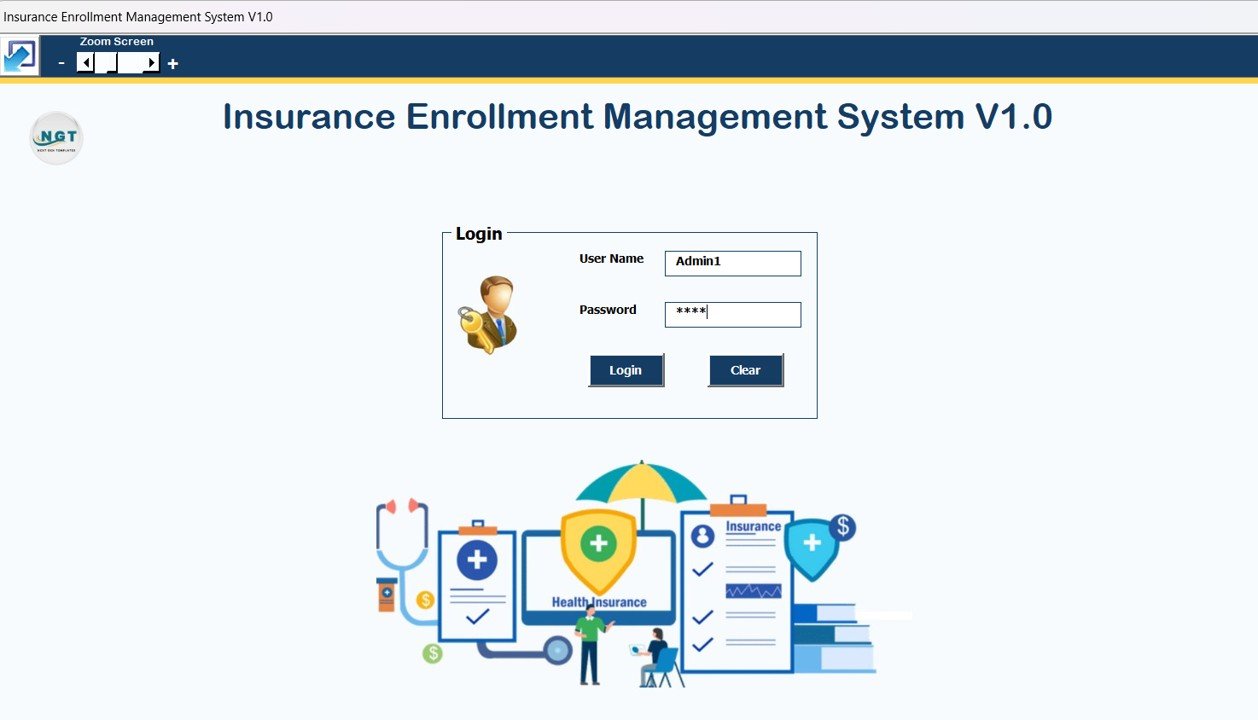
The tool begins with a secure Login Form.
Users enter credentials and click Login or press Enter to access the system.
Default Login Credentials
👨💼 Admin Role
-
Username: Admin1
-
Password: abcd
👤 User Role
-
Username: User1
-
Password: abcd
After successful login, the system automatically opens the Main Form.
Click to Buy Insurance Enrollment Management System V1.0 in Excel VBA
Main Form – Central Enrollment Dashboard
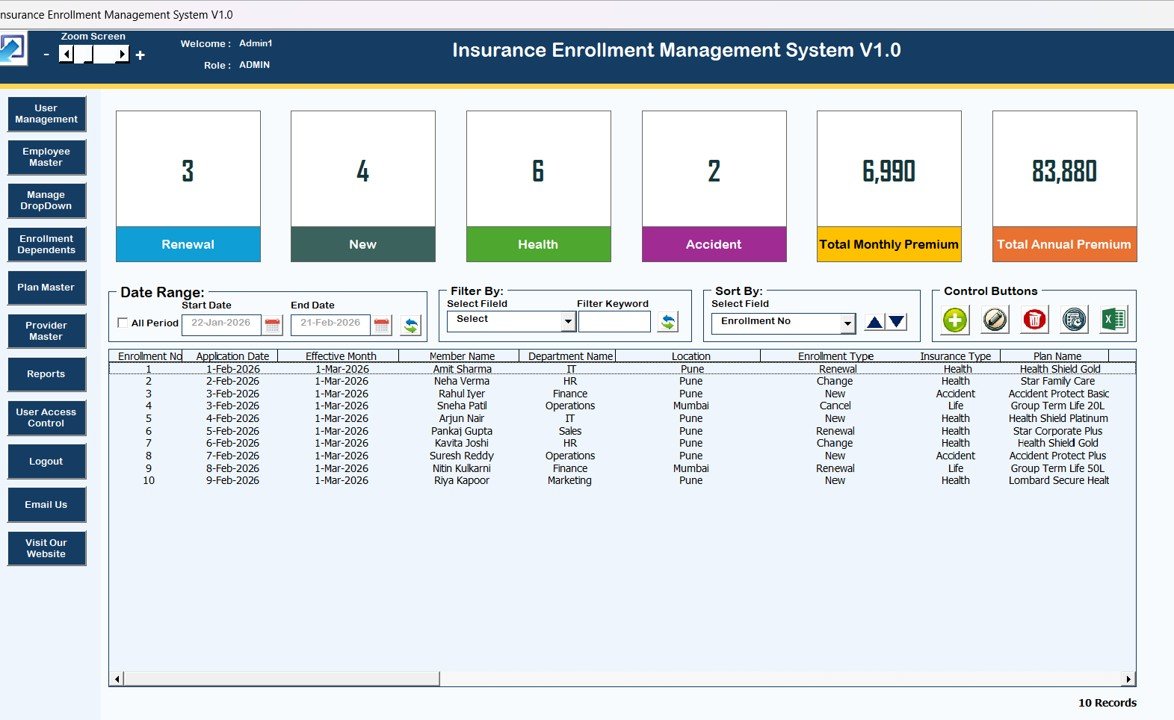
The Main Form acts as the command center for managing enrollments.
From this screen, users can control all system operations.
List Box (Center Display Area)
At the center of the main page, a List Box displays all enrollment records.
Users can view relevant enrollment data instantly.
Filters
Above the list box, filtering options allow users to:
-
Filter by Date Range
-
Filter by Selected Column
Therefore, searching enrollment records becomes quick and efficient.
Sort By Feature
Users can sort list box data easily to organize enrollment records based on selected fields.
Control Buttons on Main Form
The system includes several powerful action buttons:
➕ Add New Record
Add a new insurance enrollment record instantly.
✏️ Update Existing Record
-
Select a record and click Update
OR -
Double-click a record in the list box
The enrollment form opens automatically for editing.
🗑️ Delete Record
Delete selected enrollment records securely.
🕘 Show Record History
View full modification history of any enrollment.
📤 Export to Excel
Export filtered enrollment data into a new Excel file instantly.
Click to Buy Insurance Enrollment Management System V1.0 in Excel VBA
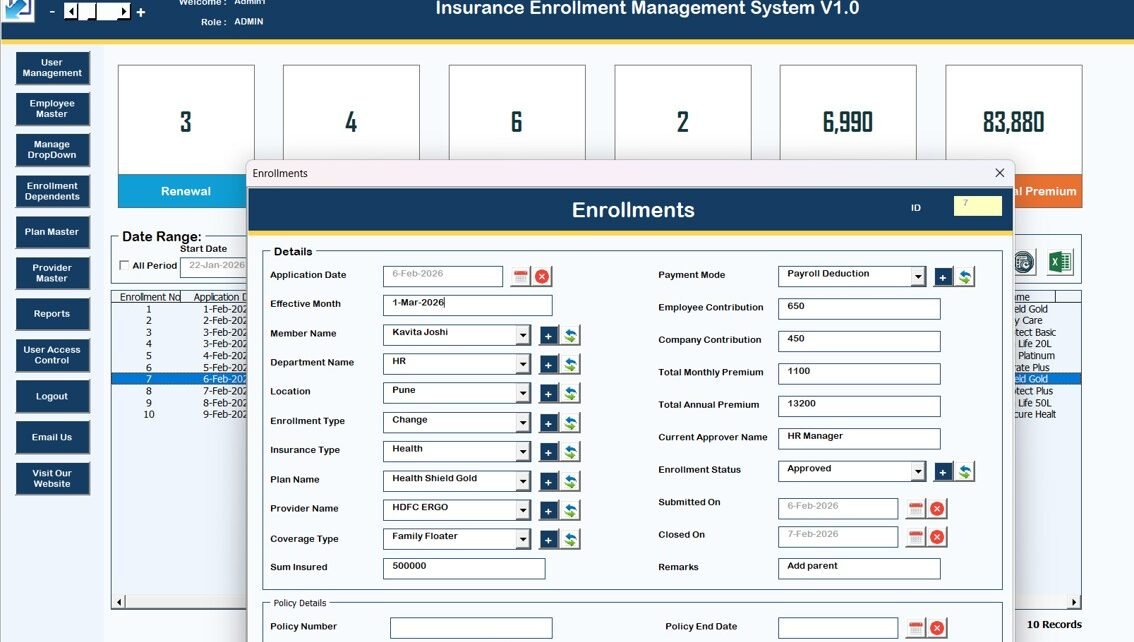
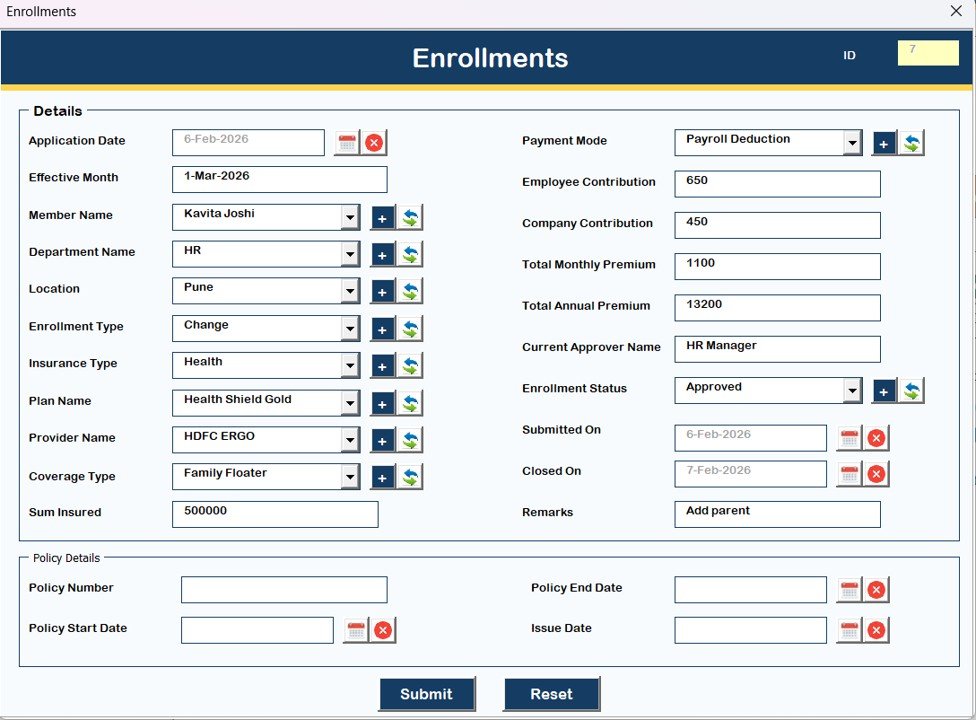
Enrollments (Main Data Entry Form)
This is the primary form used for enrollment data entry.
The form opens when clicking Add New or Update Existing.
Using this form, users can:
-
Add new employee enrollments
-
Modify existing enrollment details
-
Update plan information
-
Save accurate records securely
Because the form standardizes entries, data accuracy improves significantly.
Click to Buy Insurance Enrollment Management System V1.0 in Excel VBA
Navigation Menu (Left Side Panel)
The navigation panel provides access to all modules of the system.
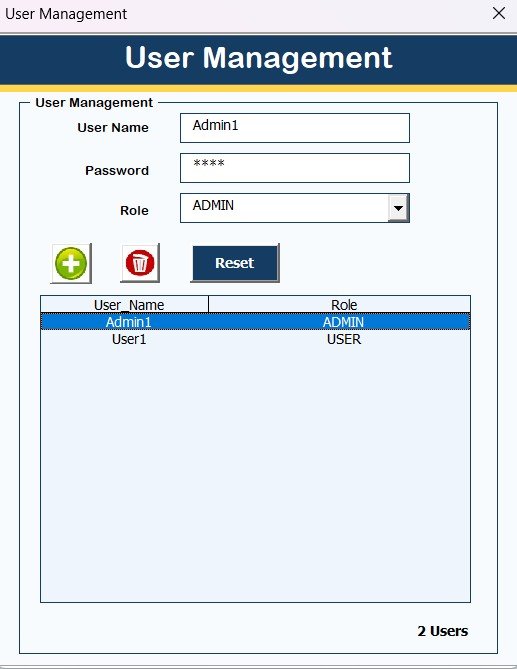
User Management
This module allows administrators to:
-
Add users
-
Update users
-
Delete users
-
Reset passwords
-
Change login credentials
Therefore, organizations maintain secure system access.
Click to Buy Insurance Enrollment Management System V1.0 in Excel VBA
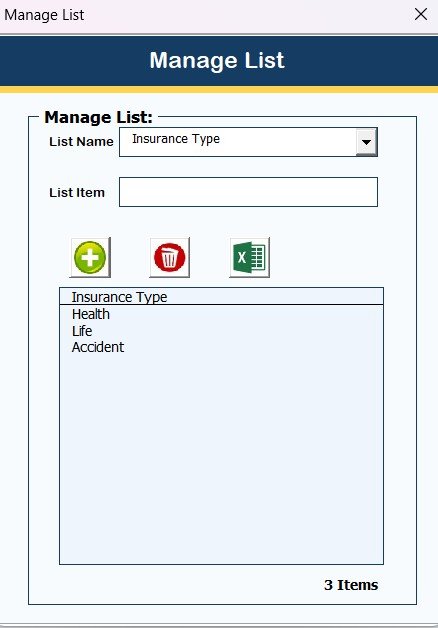
Manage List
Users can manage dropdown lists by:
-
Adding list items
-
Deleting list items
This ensures flexibility in plan categories and status fields.
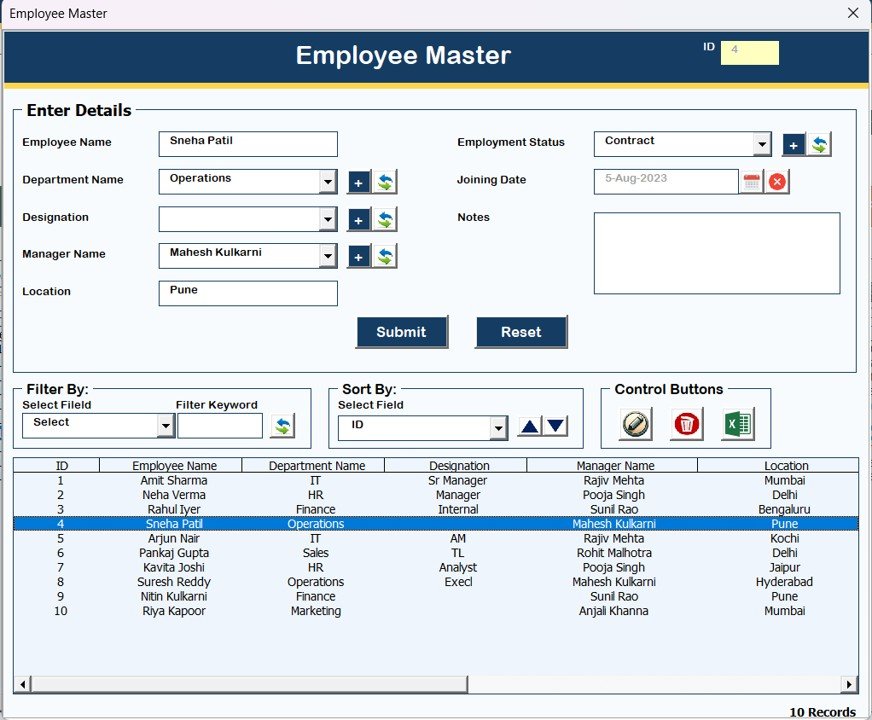
Employee Master
This section stores employee details such as:
-
Employee ID
-
Employee Name
-
Department
-
Contact Information
Because employee master data remains centralized, reporting becomes accurate.
Click to Buy Insurance Enrollment Management System V1.0 in Excel VBA
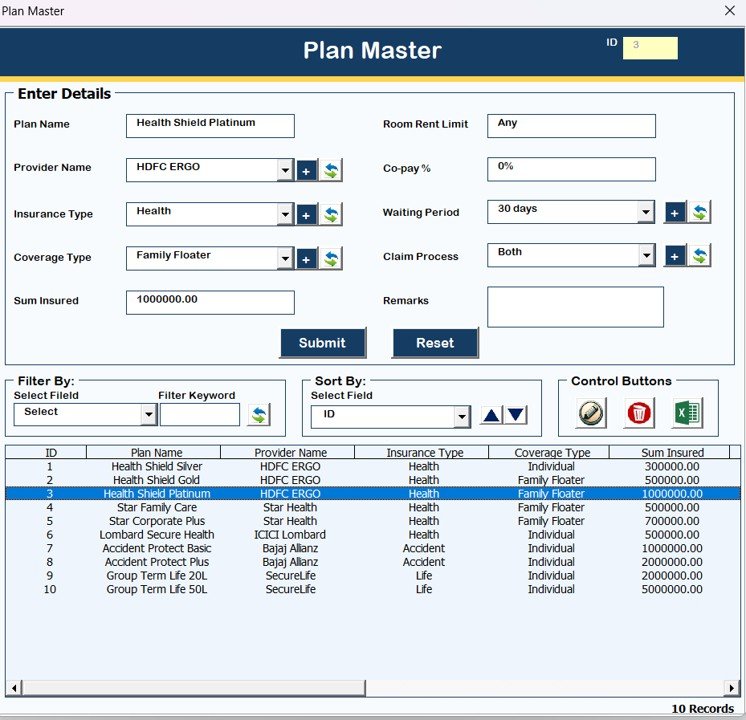
Plan Master
This form allows users to:
-
Add insurance plan details
-
Define plan coverage
-
Maintain plan codes
Therefore, organizations manage insurance plans efficiently.
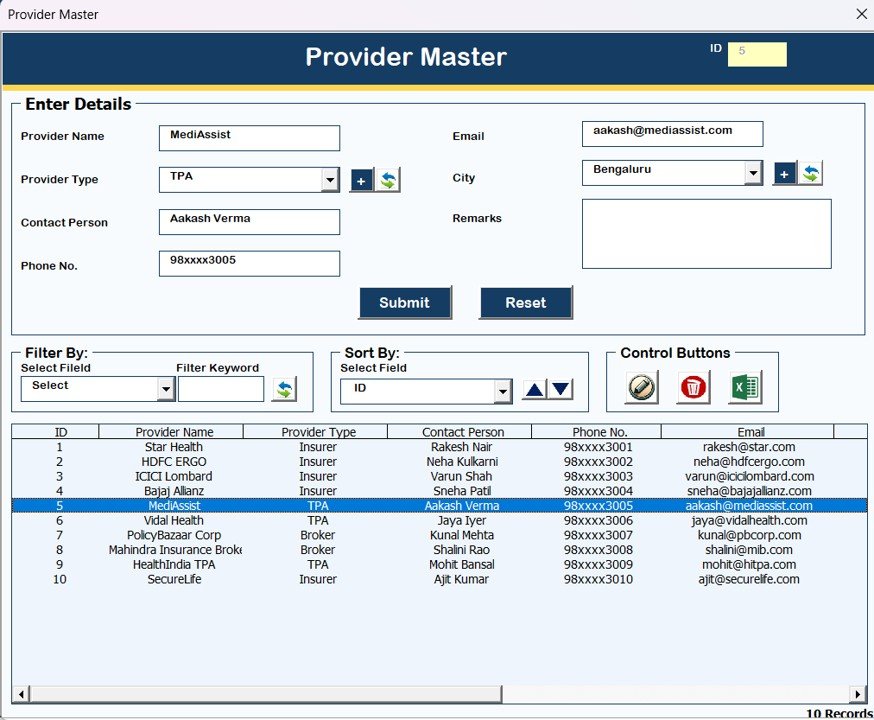
Provider Master
In this form, users can:
-
Add insurance providers
-
Update provider details
-
Maintain provider records
As a result, the system keeps insurance provider data organized.
Click to Buy Insurance Enrollment Management System V1.0 in Excel VBA
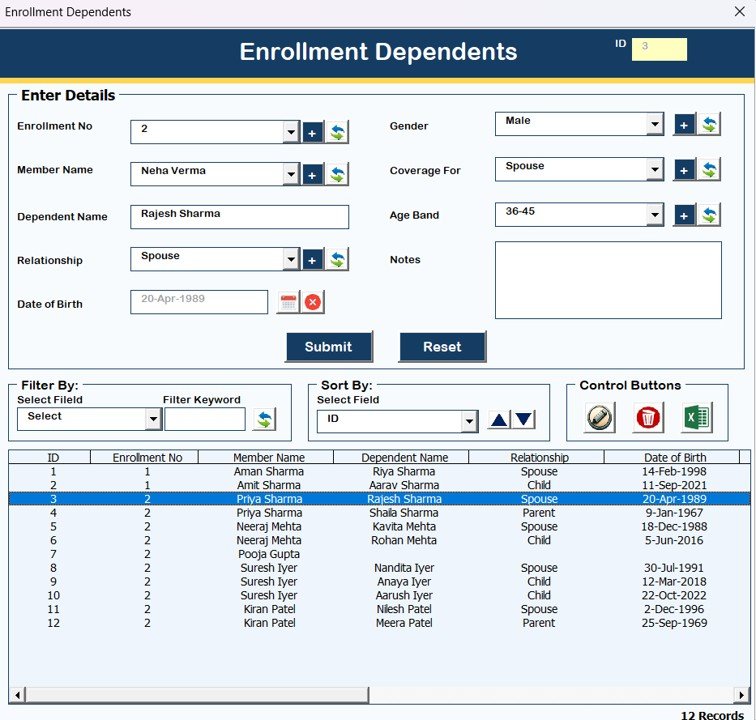
Enrollment Dependents
This module manages dependent information such as:
-
Dependent Name
-
Relationship
-
Age
-
Coverage details
Because dependent data integrates with enrollment records, insurance tracking becomes complete.
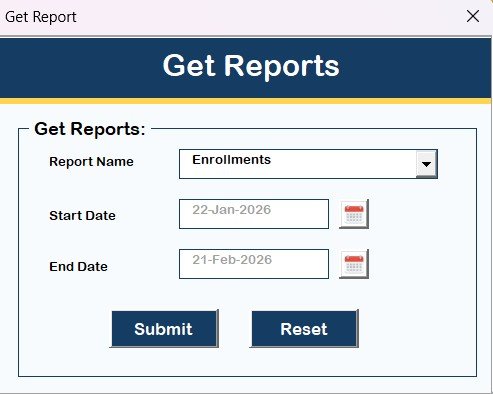
Reports Module
The Reports section allows users to:
-
Select date range
-
Generate enrollment reports
-
Export reports in Excel format
Therefore, HR and insurance administrators can create professional reports instantly.
Click to Buy Insurance Enrollment Management System V1.0 in Excel VBA
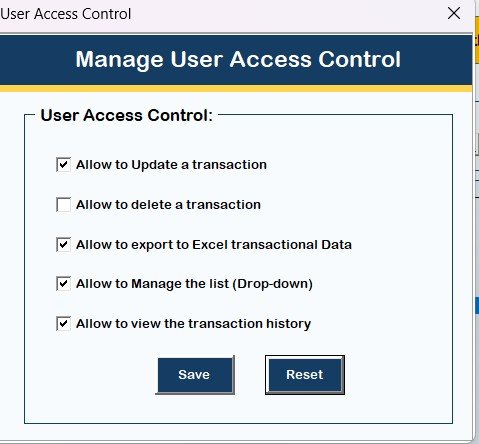
Manage User Access Control
Only Admin users can access this feature.
Admins can:
-
Assign permissions by role
-
Control feature visibility
-
Restrict access to sensitive data
As a result, data security improves significantly.
Logout
Clicking Logout will:
-
Save all data automatically
-
Close the forms safely
-
Exit the application
Email Us Button
Displays support contact details for:
-
Technical assistance
-
Customization requests
-
Feature upgrades
Visit Our Website Button
Opens the official website where users can explore and purchase additional tools and templates.
Advantages of Insurance Enrollment Management System
Click to Buy Insurance Enrollment Management System V1.0 in Excel VBA
Centralized Enrollment Management
All insurance records stay in one structured system.
Secure Role-Based Access
Admin and User roles protect sensitive information.
Easy Record Management
Add, update, delete, and search enrollment data quickly.
Organized Master Data
Employee, Plan, and Provider data remain structured.
Instant Report Generation
Generate enrollment reports in Excel format easily.
Ready-to-Use Solution
No complex installation required.
Best Practices for Using This Tool
To maximize efficiency, follow these recommendations:
Keep Employee and Plan Masters Updated
Accurate master data ensures proper enrollment tracking.
Review Enrollment Records Regularly
Frequent review prevents data inconsistencies.
Assign Proper User Roles
Limit access based on job responsibility.
Backup Data Periodically
Maintain regular Excel backups for safety.
Validate Enrollment Information Before Saving
Ensure accuracy to prevent claim issues later.
System Compatibility (Important Highlights)
✅ Compatible With:
-
Windows 10 and above
-
Microsoft Excel 2010 and above versions
⚠️ Important Notes:
-
Works only with Microsoft Excel Desktop Application
-
Supported on Laptop or Desktop devices only
-
❌ Not supported on Mobile or Tablet devices
-
❌ Not compatible with Mac Operating System
Conclusion
Click to Buy Insurance Enrollment Management System V1.0 in Excel VBA
The Insurance Enrollment Management System V1.0 in Excel VBA provides a powerful, structured, and easy-to-use solution for managing insurance enrollments efficiently.
Instead of maintaining multiple spreadsheets, organizations gain:
- Automated enrollment management
- Secure access control
- Organized employee and plan data
- Instant reporting capabilities
- Improved administrative efficiency
Because the system combines Excel familiarity with VBA automation, it becomes an ideal solution for HR departments, insurance administrators, and corporate offices.
If you want a reliable and cost-effective enrollment management system, this ready-to-use Excel VBA tool delivers exactly what you need.
Frequently Asked Questions (FAQs)
🔹 Is this tool ready to use?
Yes, you can start using it immediately after opening the Excel file.
🔹 Can the system be customized?
Yes, customization support is available through email.
🔹 Does it require internet access?
No. The tool works completely offline.
🔹 Can multiple users use this system?
Yes, role-based login allows multiple users.
🔹 Is it suitable for small organizations?
Yes, it works perfectly for small and medium-sized businesses.
Visit our YouTube channel to learn step-by-step video tutorials
Watch the step-by-step video tutorial:
Click to Buy Insurance Enrollment Management System V1.0 in Excel VBA