In today’s fast-moving healthcare environment, digital transformation is no longer a luxury — it’s a necessity. Every sales representative, manager, and regional head in the healthcare sector needs efficient ways to plan, track, and manage their activities. That’s where the Healthcare Sales Digital Transformation Calendar in Excel comes in.
This ready-to-use Excel calendar helps healthcare teams organize sales activities, product launches, medical conferences, and client follow-ups in one interactive, visually structured workbook. Whether you are managing pharmaceutical sales, healthcare equipment distribution, or hospital partnerships, this tool helps you transform your workflow digitally — without any coding or expensive software.
Click to buy Healthcare Sales Digital Transformation Calendar in Excel
What Is the Healthcare Sales Digital Transformation Calendar in Excel?
The Healthcare Sales Digital Transformation Calendar is a fully interactive Excel-based planning tool. It acts as a centralized calendar where all healthcare sales activities can be logged, viewed, filtered, and analyzed.
Instead of maintaining multiple scattered spreadsheets, this single workbook consolidates every event — from monthly reviews to regional meetings — with smart automation.
The calendar template includes five key worksheet tabs:
- Home Sheet
- Annual View
- Monthly View
- Daily View
- Events Database
Each sheet has a specific purpose, designed to ensure smooth navigation, quick updates, and accurate insights.
. Home Sheet Tab — The Central Control Panel
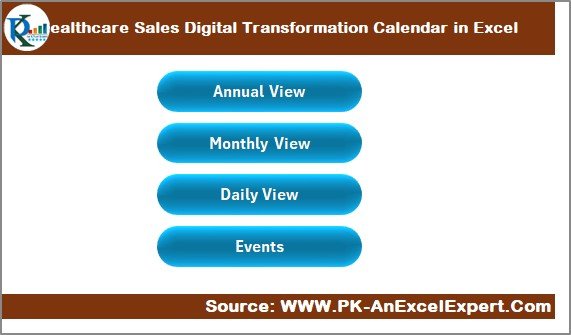
The Home sheet acts as the navigation hub of the workbook. It includes four main buttons:
- Annual View
- Monthly View
- Daily View
- Events
With just one click, users can move between these sections. This eliminates the hassle of scrolling or searching through sheets manually.
The design is simple and professional, making it ideal for healthcare teams who prefer clarity and efficiency. Each button is linked with a macro-enabled action (if VBA is enabled) or direct hyperlinks, ensuring seamless transitions.
💡 Tip: Customize the home page with your organization’s logo or color theme to align with your corporate branding.
2. Annual View Sheet — Your 12-Month Outlook
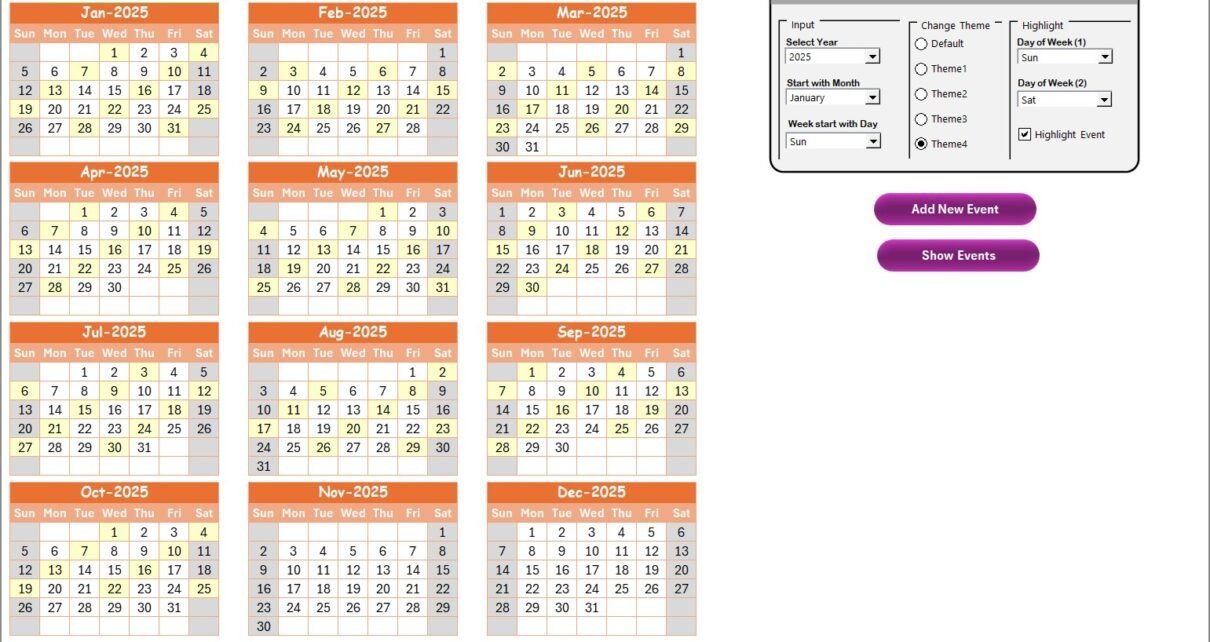
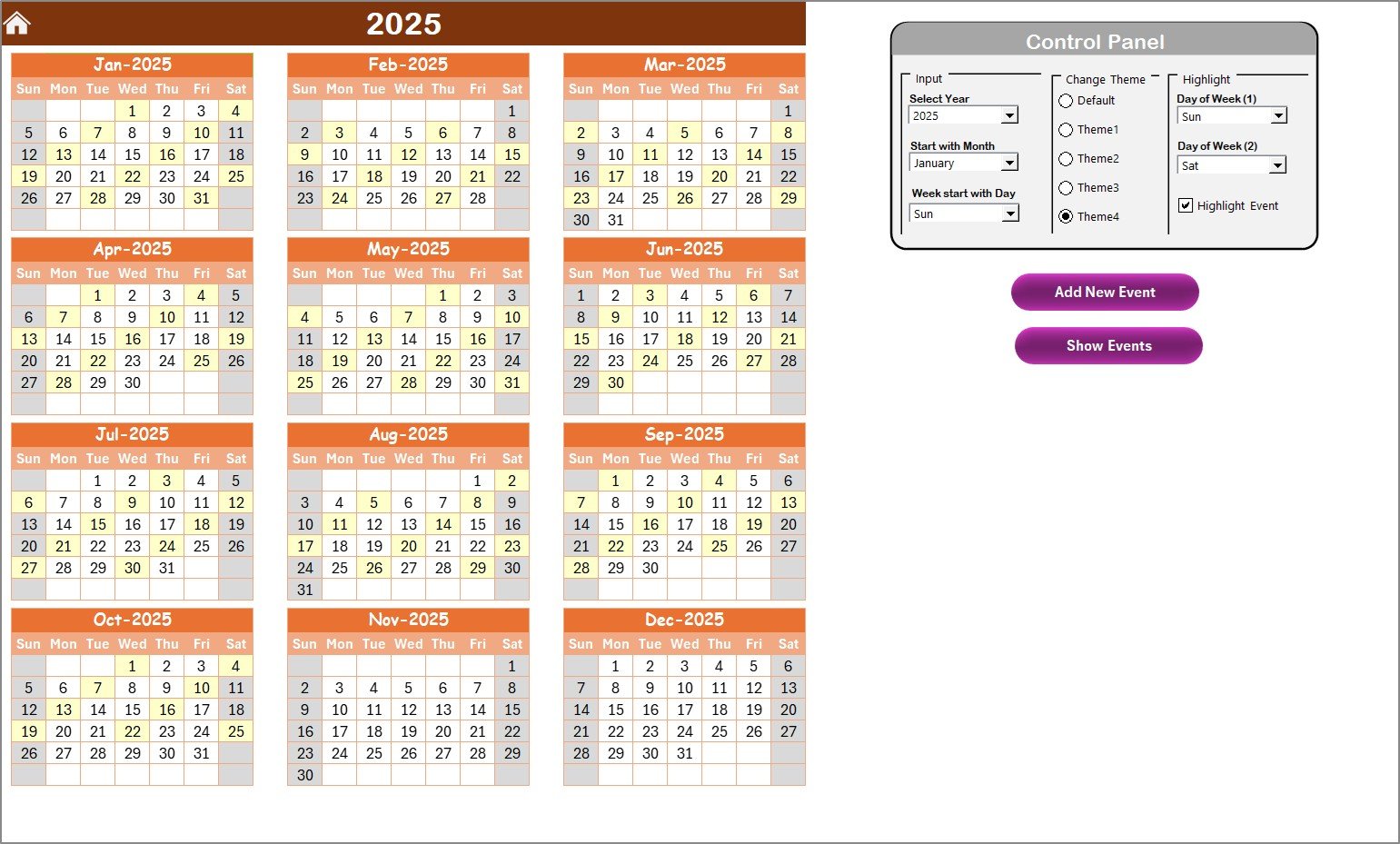
The Annual View Sheet provides a complete 12-month calendar on one page. This view is perfect for healthcare sales directors who want a yearly overview of campaigns, conferences, and client activities.
✨ Key Highlights
- Control Panel:
Located at the top, the control panel includes three major groups:
Input Group – Select the year, starting month, and starting day of the week. The calendar updates automatically.
Change Theme Group – Choose from five predefined color themes. Whether you prefer blue for medical themes or green for sustainability, you can instantly apply your choice across the workbook.
Highlight Group – Highlight specific days of the week, like Saturday and Sunday, in grey. You can even enable an “Highlight Event” checkbox to mark event dates in yellow for instant visibility.
- Add New Event Button:
Simply click on any date and press this button to open the “Add New Event” form. Enter the event details — such as event name, time, and description — and hit submit. - Show Event Button:
Want to review all events on a specific date? Click this button to see a list of activities for that day instantly.
This annual view transforms your Excel sheet into a smart, color-coded planning dashboard for the entire healthcare year.
Click to buy Healthcare Sales Digital Transformation Calendar in Excel
3. Monthly View Sheet — A Deeper Dive
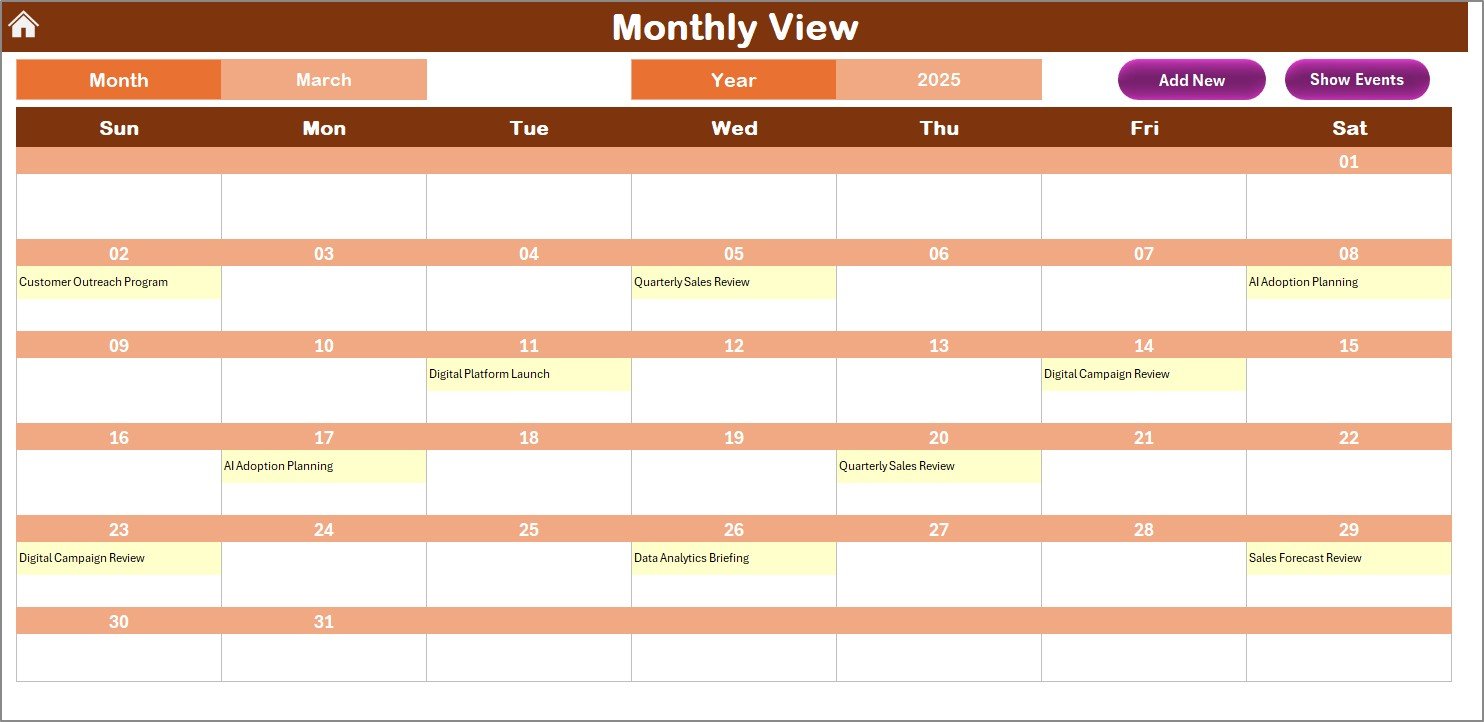
The Monthly View Sheet gives users a detailed look at one specific month.
You can choose any month and year from the top, and the calendar dynamically refreshes to display the corresponding events.
Features
- Dynamic Calendar: Displays events for each day. If multiple events fall on the same date, the sheet displays “More than 1…” to indicate additional entries.
- Add New Event Button: Quickly record a new event by selecting the desired date.
- Show Event Button: Instantly view all events associated with the chosen date.
This view is particularly useful for sales representatives and managers who need to track daily visits, client meetings, and conference schedules for the month.
Click to buy Healthcare Sales Digital Transformation Calendar in Excel
4. Daily View Sheet — Track Events by Date Range
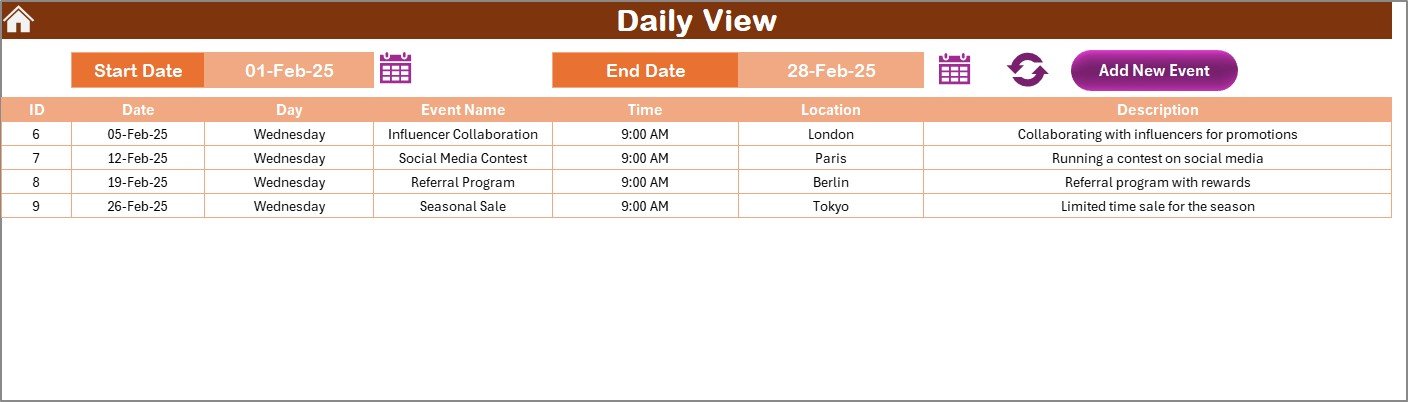
The Daily View Sheet allows users to filter and display events within a custom date range.
You simply select the Start Date and End Date using the calendar picker, and the system automatically shows all events falling within that period.
Smart Functionalities
- Refresh Button: Instantly updates the displayed list with the most recent entries.
- Add New Event Button: Opens a form to record a new event, ensuring data consistency across the workbook.
- Detailed View: Displays each event’s ID, date, day, name, time, location, and description — making it easy to plan follow-ups or post-event actions.
This sheet is especially valuable for daily planning and tracking of healthcare field operations, such as medical representative visits, hospital demos, or regional campaign days.
5. Events Sheet — The Master Database
The Events Sheet acts as the database backbone of the entire calendar system.
Every event you create in the Annual, Monthly, or Daily views is stored here automatically.
Data Structure
Each record includes:
- ID – Auto-generated unique number
- Date – Date of event
- Day – Day name (Monday, Tuesday, etc.)
- Event Name – Title of the event
- Time – Event time slot
- Location – Event venue or area
- Description – Short summary
Functional Buttons
- Add New Record: Opens a clean input form to enter event details.
- Update Existing Record: Select the record ID to edit. The form opens pre-filled, allowing quick updates.
- Delete Record: Choose the ID to remove the record permanently.
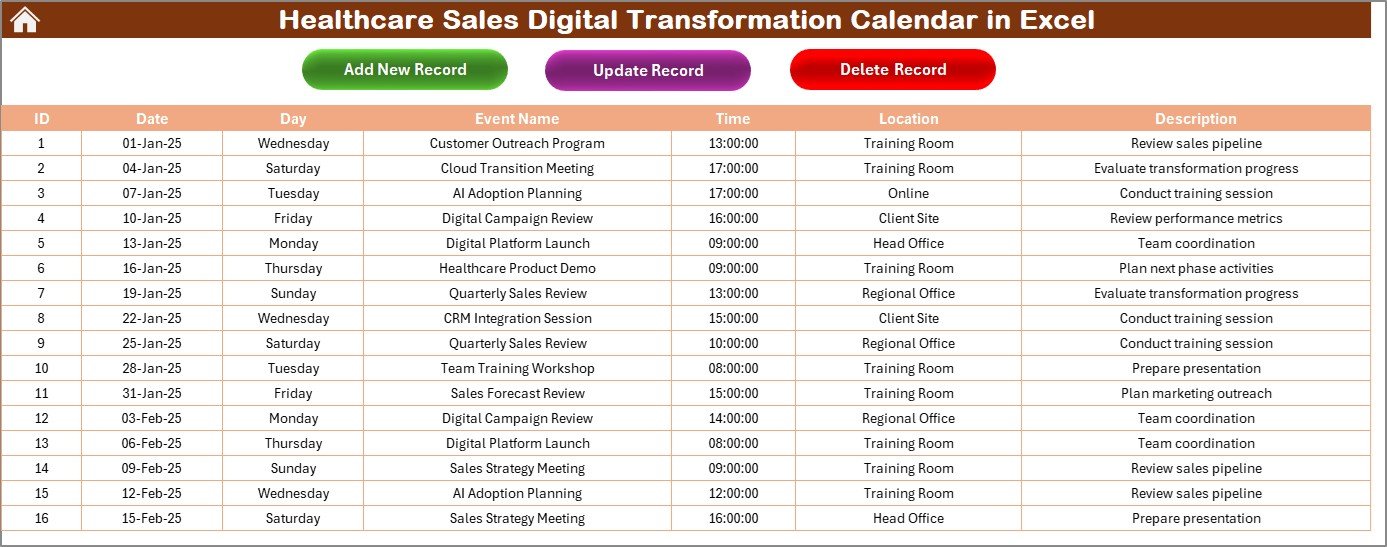
This structure ensures all data remains organized, traceable, and easy to modify.
Why Do You Need a Digital Transformation Calendar for Healthcare Sales?
In healthcare sales, timing and coordination are everything. Sales teams often juggle multiple product promotions, training sessions, hospital visits, and partnership events.
Traditional paper calendars or static spreadsheets can’t handle this complexity effectively. The Healthcare Sales Digital Transformation Calendar offers:
- Centralized event tracking
- Color-coded visual indicators
- Instant access to data
- Improved planning efficiency
- Real-time insights into workload and commitments
By switching to this Excel-based calendar, you turn disorganized notes into an actionable digital sales management system.
How This Calendar Supports Healthcare Digital Transformation
Healthcare organizations worldwide are adopting digital tools to optimize performance. This Excel calendar aligns perfectly with digital transformation goals because it:
- Eliminates Manual Tracking: Reduces errors caused by manual data entry or forgotten updates.
- Automates Visualization: Provides dynamic views of your sales and marketing activities.
- Enables Quick Insights: Gives managers instant visibility into upcoming events and resource allocation.
- Encourages Team Collaboration: Multiple users can view and update event schedules on a shared drive.
- Integrates Easily: You can connect it with Power BI or Google Sheets for advanced analytics.
In short, it bridges the gap between traditional Excel familiarity and modern digital management.
Advantages of Healthcare Sales Digital Transformation Calendar in Excel
Using this calendar brings several powerful advantages for healthcare professionals:
1. Centralized Information Management
All activities, events, and meetings are in one file — accessible anytime.
2. Simplified Event Tracking
You can easily navigate between annual, monthly, and daily views.
3. Visual Planning Efficiency
Highlighted weekends, event colors, and themed calendars make it simple to identify busy periods.
4. Easy to Customize
You can modify the colors, add new themes, or insert your organization’s logo without technical knowledge.
5. Smart Automation
Buttons like Add New Event and Update Record minimize errors and make data entry quick and user-friendly.
6. Time-Saving
Eliminates repetitive manual scheduling and improves decision-making.
Opportunities for Improvement
Even though the template is powerful, a few enhancements can take it to the next level:
- Integration with Outlook or Google Calendar: For automated reminders.
- User Access Control: Limit editing rights based on user roles.
- Event Category Filters: Add filters for event type (Sales, Training, Product Launch, etc.).
- Automated Summary Dashboard: Display monthly statistics like “Total Events,” “Completed Events,” and “Pending Reviews.”
- Mobile Compatibility: Optimize layouts for viewing on tablets and mobile devices.
These improvements can make the template a truly comprehensive planning system for healthcare organizations.
Best Practices for Using the Healthcare Sales Digital Transformation Calendar
To make the most of this Excel calendar, follow these best practices:
1. Keep Data Consistent
Always enter complete and accurate event details. Avoid using different date formats or inconsistent names.
2. Regularly Refresh and Backup
Click the “Refresh” button after any major update. Also, keep backup copies of the workbook to avoid accidental data loss.
3. Use Themes for Visual Clarity
Choose different color themes for different regions or departments. It makes the calendar easier to interpret.
4. Combine with Dashboards
If you are an advanced user, connect the Events data with a Power BI or Excel dashboard to analyze trends.
5. Share with Teams via Cloud
Save the file in a shared folder (like OneDrive or Google Drive) to allow real-time collaboration.
6. Periodically Clean the Database
Delete outdated or irrelevant events every quarter to keep the calendar lightweight and efficient.
Conclusion
The Healthcare Sales Digital Transformation Calendar in Excel is not just a scheduling tool — it’s a productivity powerhouse.
It helps healthcare professionals digitize their planning, visualize their progress, and improve coordination across departments. With its automated buttons, dynamic calendars, and intuitive layout, this Excel workbook transforms routine scheduling into a smart, data-driven process.
Whether you’re a sales rep planning hospital visits or a manager monitoring regional performance, this calendar ensures nothing falls through the cracks.
Digital transformation in healthcare starts with simple, efficient tools — and this Excel template is the perfect example of how powerful Excel can be when designed with purpose.
Frequently Asked Questions (FAQs)
- Who can use the Healthcare Sales Digital Transformation Calendar?
This calendar is ideal for healthcare sales representatives, managers, pharmaceutical companies, and hospital business teams who need structured planning and tracking.
- Do I need advanced Excel knowledge to use it?
No. The interface is user-friendly with ready-made buttons and dropdowns. Even beginners can navigate easily.
- Can I customize the theme or color scheme?
Yes. You can choose from five built-in color themes or create your own using Excel’s format tools.
- Does it support event filtering by category or location?
Currently, it focuses on date-based filtering. However, you can add columns like “Category” or “Department” for extended functionality.
- How can I share this calendar with my team?
Save it on cloud platforms like OneDrive or Google Drive. Team members can open and update it simultaneously (if shared as an Excel Online file).
- Can I track completed versus upcoming events?
Yes. You can use Excel filters or conditional formatting to highlight completed events in different colors.
- Is it compatible with Power BI?
Absolutely. You can link the Events sheet with Power BI to build dashboards showing trends, event counts, or location-wise activity summaries.
- Can this calendar help improve sales performance?
Definitely. It helps teams stay organized, plan ahead, and track outcomes — all of which directly enhance productivity and sales efficiency.
Visit our YouTube channel to learn step-by-step video tutorials
Watch the step-by-step video tutorial:
Click to buy Healthcare Sales Digital Transformation Calendar in Excel