In today’s fast-paced entertainment world, the music industry thrives on creativity, talent, and audience engagement. However, behind every chart-topping song and sold-out concert lies a deep network of operations, marketing, production, and financial performance metrics. To track and manage these elements effectively, professionals need a Music Industry KPI Scorecard in Excel — a ready-to-use analytical tool that transforms raw data into actionable insights.
This article explores everything you need to know about this Excel-based scorecard — from its structure and features to its benefits, best practices, and common questions. Whether you’re a music producer, record label executive, or independent artist, this scorecard helps you measure success, improve performance, and grow your brand.
Click to buy Music Industry KPI Scorecard in Excel
What Is a Music Industry KPI Scorecard in Excel?
A Music Industry KPI Scorecard is a structured Excel tool that helps record labels, production houses, and artists track key performance indicators (KPIs) that define success in the music business. It consolidates metrics like:
- Album sales
- Streaming performance
- Audience engagement
- Revenue generation
- Social media reach
- Concert attendance
- Licensing deals
- Marketing ROI
This template eliminates the need for complex business-intelligence software. It offers a simple, dynamic, and affordable way to monitor your music business performance with full flexibility inside Excel.
By using interactive dashboards, charts, and KPI cards, this scorecard allows you to analyze trends, spot opportunities, and identify underperforming areas instantly.
Structure of the Music Industry KPI Scorecard
The Music Industry KPI Scorecard in Excel includes four major worksheet tabs, each serving a unique function to streamline analysis and reporting.
Scorecard Sheet – The Performance Dashboard
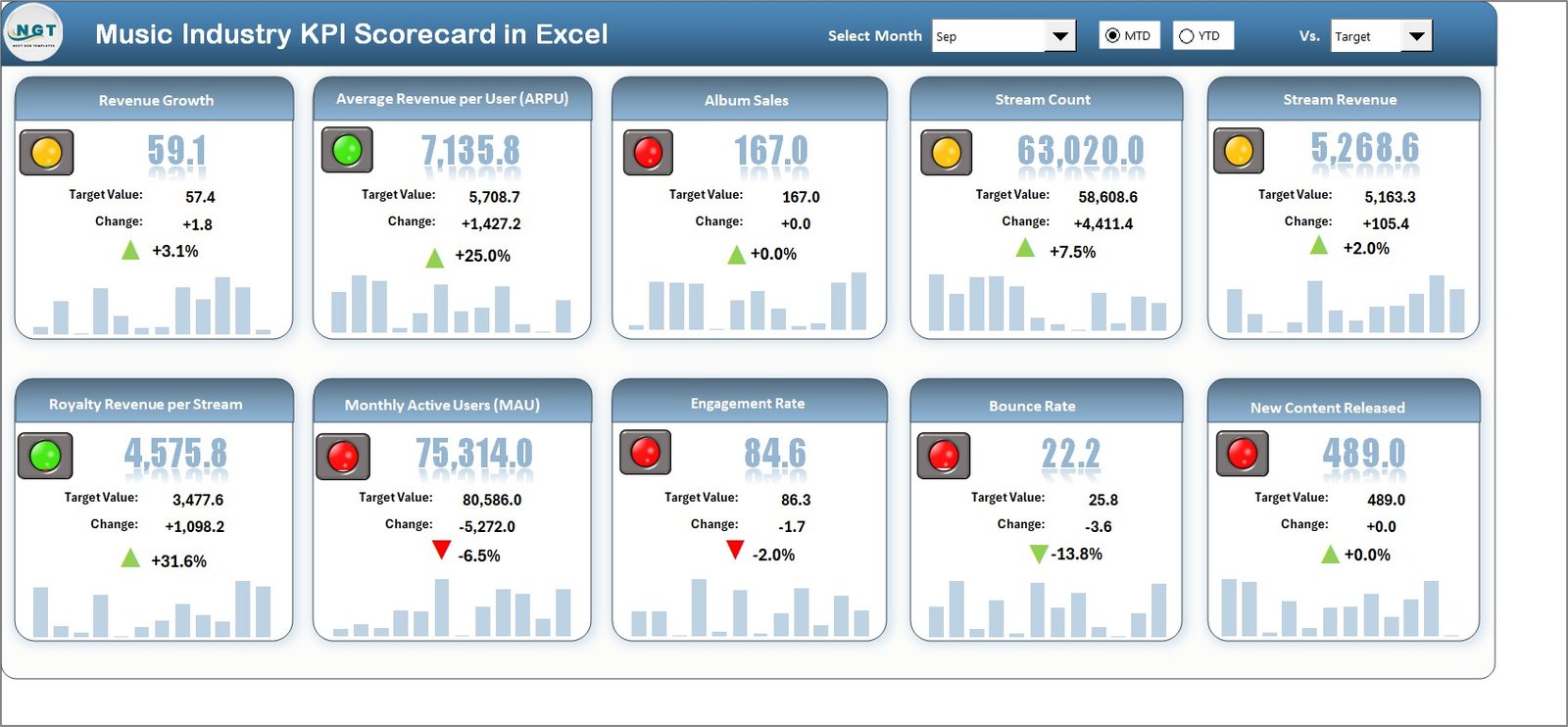
The Scorecard Sheet is the main interface of the template and provides a comprehensive visual overview of all KPIs.
Key Features:
- Dropdown Menus: Quickly select the Month, MTD (Month-to-Date), or YTD (Year-to-Date) to analyze performance for a specific period.
- Actual vs Target Comparison: Compare real performance metrics against set targets to understand success levels.
- Visual Indicators: Conditional formatting uses colors and symbols to indicate performance — green for success, yellow for caution, and red for below-target results.
- KPI Overview: Displays up to 10 KPIs at once, giving a snapshot of critical business metrics.
- User-Friendly Layout: Simple buttons and slicers for easy navigation.
This sheet acts as the control center, allowing you to track everything from streaming numbers to concert ticket sales in one place.
Click to buy Music Industry KPI Scorecard in Excel
KPI Trend Sheet – Visualize Performance Over Time
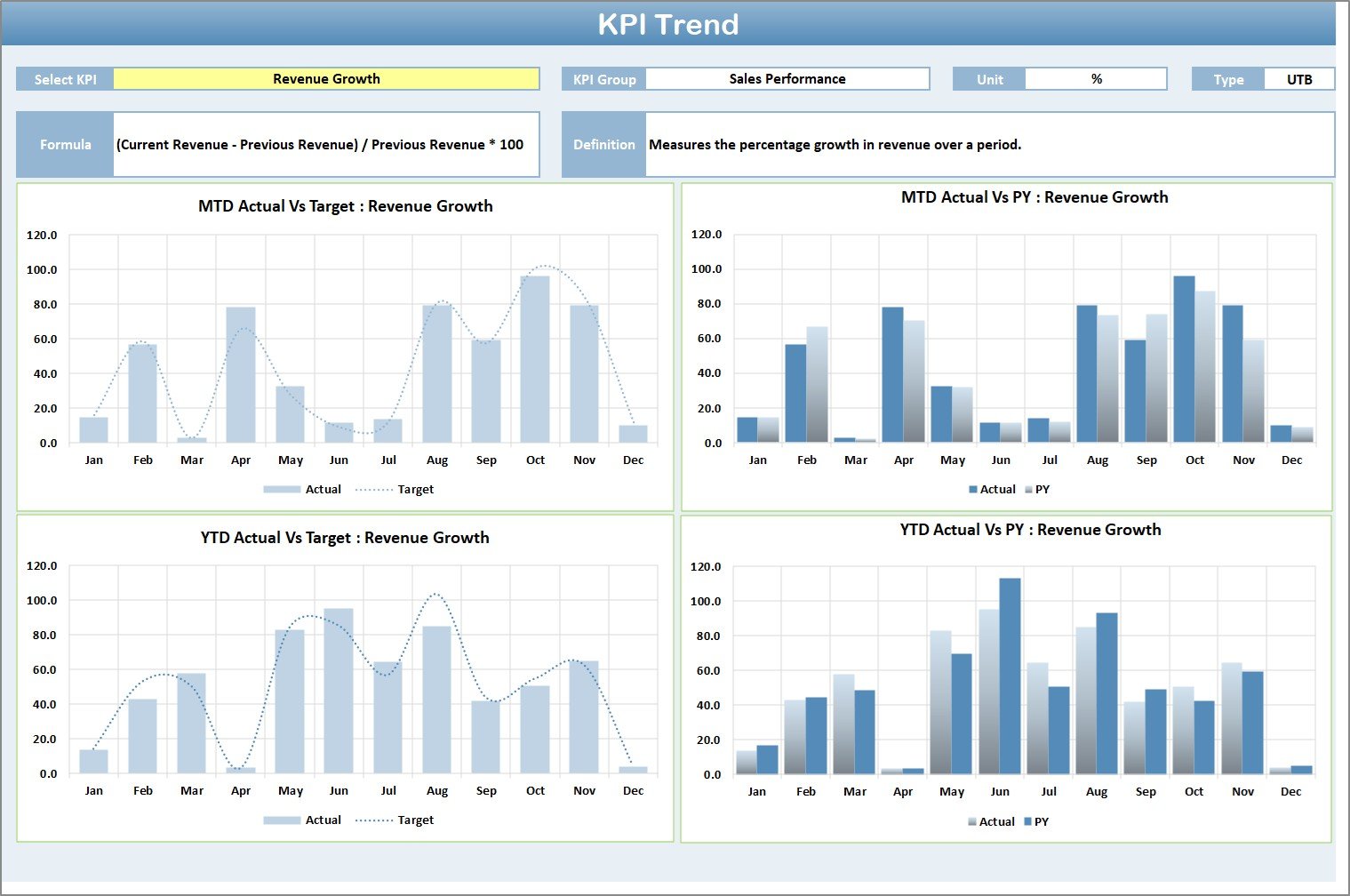
The KPI Trend Sheet focuses on trend analysis and detailed performance tracking.
Highlights:
- Dynamic KPI Selection: Choose any KPI from a dropdown (cell C3) to view related data.
- KPI Details: Instantly display the KPI Group, Unit, Type (LTB/UTB), Formula, and Definition.
- Trend Charts: Interactive charts show MTD and YTD performance for Actual, Target, and Previous Year values.
- Comparative Insights: Quickly assess whether your strategies are improving over time.
For instance, if you select Streaming Revenue, the sheet shows its growth trend over months — helping you evaluate marketing campaigns or release schedules.
Click to buy Music Industry KPI Scorecard in Excel
Input Data Sheet – Manage Raw Data Easily
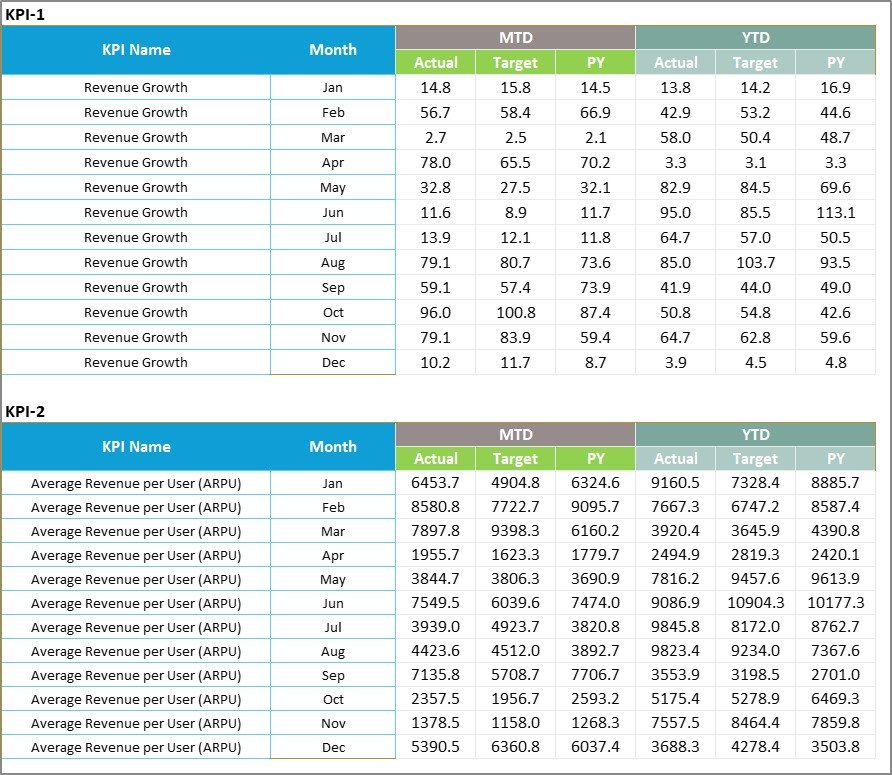
This sheet is where all the core data entry happens.
Features:
- Data Recording: Enter actual values, targets, and historical data for each KPI.
- Auto-Update Capability: Any changes here automatically update in other sheets.
- Ease of Use: Structured format ensures consistency and avoids data errors.
- Scalability: Supports continuous data input as your business grows.
By maintaining this sheet regularly, your scorecard remains current and ensures that management decisions are based on accurate, up-to-date information.
Click to buy Music Industry KPI Scorecard in Excel
KPI Definition Sheet – Your Performance Dictionary
This sheet defines what each KPI means and how it is calculated.
Columns include:
- KPI Name
- KPI Group
- Unit of Measurement
- Formula
- Definition
This documentation ensures that all stakeholders share a common understanding of how performance is measured — from marketing executives to finance teams.

Why Use a KPI Scorecard for the Music Industry?
The music industry generates vast amounts of data daily — from streaming platforms, ticketing systems, royalties, and promotions. Without proper organization, this data becomes meaningless. A KPI scorecard helps bring clarity and control.
Key Benefits:
- Centralized Tracking: All key metrics in one Excel file.
- Quick Analysis: Identify high-performing areas instantly.
- Goal Monitoring: Compare actual vs target values.
- Trend Evaluation: Understand how performance changes over time.
- Improved Decision-Making: Back your business choices with real data.
- Customizable Format: Add or modify KPIs as your business evolves.
- Visual Simplicity: Excel charts and conditional formatting make results intuitive.
How to Use the Music Industry KPI Scorecard in Excel
To make the most of this template, follow these simple steps:
- Download and Open the Excel file.
- Enter Data in the Input Sheet for each month and KPI.
- Set Targets for each KPI to benchmark progress.
- Use the Dropdowns in the Scorecard sheet to switch between MTD or YTD views.
- Review the Charts in the Trend sheet to evaluate growth patterns.
- Refer to the Definition Sheet for formula and meaning clarity.
- Regularly Update Data for accuracy.
- Share Insights with team members or management.
By updating your data consistently, you’ll gain real-time visibility into performance and easily identify what needs attention.
Advantages of Music Industry KPI Scorecard in Excel
A well-structured KPI Scorecard offers numerous advantages to both independent professionals and large organizations.
- Improved Transparency
All performance metrics are visible in one place, allowing stakeholders to see exactly where success or challenges lie.
- Strategic Decision-Making
With precise data insights, you can make informed strategic decisions — such as optimizing marketing campaigns or revising production schedules.
- Cost Efficiency
Unlike specialized software, Excel templates are budget-friendly and easy to customize, making them accessible to every level of the industry.
- Time Savings
Automated calculations, dropdowns, and visual indicators reduce manual effort, giving you more time to focus on creative strategies.
- Flexibility and Scalability
As your label grows, you can easily add new KPIs, departments, or years without rebuilding the entire scorecard.
- Enhanced Collaboration
Different teams (finance, marketing, operations) can work from a single unified template, ensuring everyone aligns with the same goals.
Best Practices for Using the Music Industry KPI Scorecard
To ensure your KPI scorecard delivers maximum value, follow these best practices:
- Define Clear Objectives
Start with a clear understanding of what you want to measure — sales, marketing, production efficiency, or audience growth. Align KPIs with your overall goals.
- Keep Data Consistent
Maintain consistent formats for dates, currency, and percentages. Consistency ensures accurate calculations and easy trend tracking.
- Update Data Regularly
Enter data periodically — daily, weekly, or monthly — depending on your reporting needs.
- Visualize Effectively
Use Excel’s conditional formatting and charts to present results visually. It helps non-technical users interpret results quickly.
- Benchmark Performance
Set realistic targets and compare actual performance against them to identify areas for improvement.
- Use Historical Data
Analyze past years’ performance to understand patterns, seasonality, and growth trends.
- Customize KPIs
Not all KPIs fit every music business. Adjust or add metrics to reflect your organization’s unique operations — whether you manage live tours, streaming content, or merchandise.
- Secure Your Data
Protect sheets or use password locks for sensitive business data to maintain confidentiality.
- Combine with Other Tools
Export visuals to Power BI or Google Sheets for advanced dashboards, if needed.
How This Scorecard Supports Decision-Making
The scorecard isn’t just a data tracker — it’s a strategic management tool.
It helps you:
- Identify top-performing artists or albums.
- Detect declining trends early.
- Forecast future sales or revenue potential.
- Optimize marketing budgets and ad spending.
- Improve artist collaboration and project allocation.
- Measure audience loyalty and engagement across channels.
When data tells the story, decisions become faster, smarter, and more reliable.
Conclusion
The Music Industry KPI Scorecard in Excel is more than just a reporting template — it’s a complete performance management system for music professionals. It empowers you to track, analyze, and optimize all aspects of your operations, from revenue to reputation.
With its structured layout, interactive visuals, and real-time data handling, this Excel scorecard provides a clear view of your music business health. By adopting this tool, you can turn numbers into narratives — guiding your next hit song, marketing campaign, or world tour with confidence.
So whether you’re a solo artist tracking your progress or a large record label managing dozens of releases, this scorecard is your data-driven companion to sustained success.
Frequently Asked Questions (FAQs)
- What is a Music Industry KPI Scorecard?
It’s an Excel-based tool that tracks key performance indicators like sales, streams, audience growth, and profitability, helping music professionals measure progress efficiently.
- Who can use this template?
Record labels, producers, marketing teams, event managers, and independent artists can all use it to analyze business performance.
- Can I customize the KPIs in the scorecard?
Yes. You can add, edit, or remove KPIs according to your business model and objectives.
- How often should I update the data?
Ideally, update it monthly or quarterly to ensure accurate YTD and MTD analysis.
- Does the scorecard support charts and visuals?
Absolutely. The template includes interactive charts and conditional formatting for easy visualization.
- What makes this different from BI tools like Power BI?
While BI tools require technical setup, the Excel scorecard is simple, lightweight, and ready to use immediately.
- Can I track multiple artists or albums together?
Yes. You can segment your data by artist, album, or region to perform comparative analysis.
- Is this scorecard suitable for independent musicians?
Definitely. Independent artists can use it to monitor revenue, streaming growth, and fan engagement without extra cost.
Visit our YouTube channel to learn step-by-step video tutorials
Watch the step-by-step video tutorial:
Click to buy Music Industry KPI Scorecard in Excel