Healthcare logistics has a huge responsibility. Every hospital, medical supplier, and emergency response team depends on secure digital systems to move medicines, protect patient data, and keep life-saving operations running smoothly. However, cyberattacks grow every year, and they disrupt supply chains, delay deliveries, and expose sensitive information. Because of this, cybersecurity planning must stay organized, consistent, and proactive.
A Healthcare Logistics Cybersecurity Calendar in Excel solves this challenge. It offers a simple and powerful way to plan cybersecurity tasks, track incidents, schedule audits, and manage compliance activities. You use it without any technical skills because it works inside Microsoft Excel. The calendar layout helps every team member see upcoming work, important events, and daily tasks in one place.
In this complete guide, you will learn everything about this Excel calendar, including how each sheet works, how it helps healthcare organizations, and how you can use it more effectively. You will also see the key benefits, best practices, and answers to common questions at the end.
Click to buy Healthcare Logistics Employee Wellness Calendar in Excel
What Is a Healthcare Logistics Cybersecurity Calendar in Excel?
A Healthcare Logistics Cybersecurity Calendar in Excel is a ready-to-use yearly planning tool designed for cybersecurity, IT, and healthcare logistics teams. It organizes all cybersecurity activities into Annual View, Monthly View, Daily View, and Event Tracking sheets. Because of this structure, teams stay aligned and informed about every cybersecurity event, including:
- Patch updates
- Network scans
- Vulnerability assessments
- System audits
- Access review cycles
- Incident investigations
- Training and awareness activities
- Vendor security checks
You use dropdowns, buttons, and forms to add events. The template fills all information automatically and highlights important dates. It offers color themes, weekday highlighting, and clickable navigation to improve usability.
Why Do Healthcare Logistics Teams Need a Cybersecurity Calendar?
Healthcare logistics involves storing patient-impacting supplies, handling temperature-sensitive materials, managing transport networks, and maintaining digital systems. Cyber threats affect all these activities. A single attack can stop deliveries, compromise medical records, or block access to equipment.
Teams need a structured calendar because:
- Cyber events happen daily
- Compliance rules require regular tracking
- Manual spreadsheets cause errors
- Missed tasks create risks
- Teams work across different time zones and locations
A clear cybersecurity calendar in Excel keeps everyone on track, reduces mistakes, and strengthens operational control.
Key Features of the Healthcare Logistics Cybersecurity Calendar in Excel
This template has five powerful worksheets, each designed to manage cybersecurity tasks with speed and clarity.
Home Sheet – Your Main Control Center
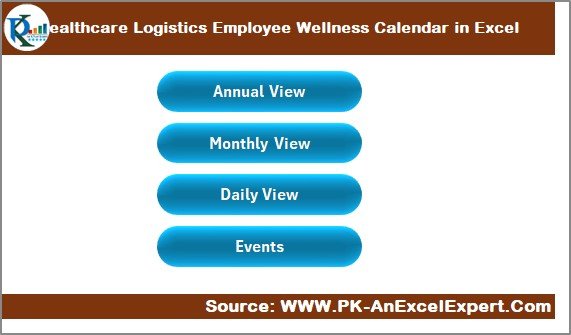
The Home sheet acts as the navigation panel. It contains four action buttons:
- Annual View
- Monthly View
- Daily View
- Events
You click any button to jump directly to that sheet. This layout saves time and helps users who want a simple interface.
Because the Home sheet works like an index, new users learn the dashboard quickly.
Click to buy Healthcare Logistics Employee Wellness Calendar in Excel
Annual View Sheet – Full-Year Cybersecurity Overview
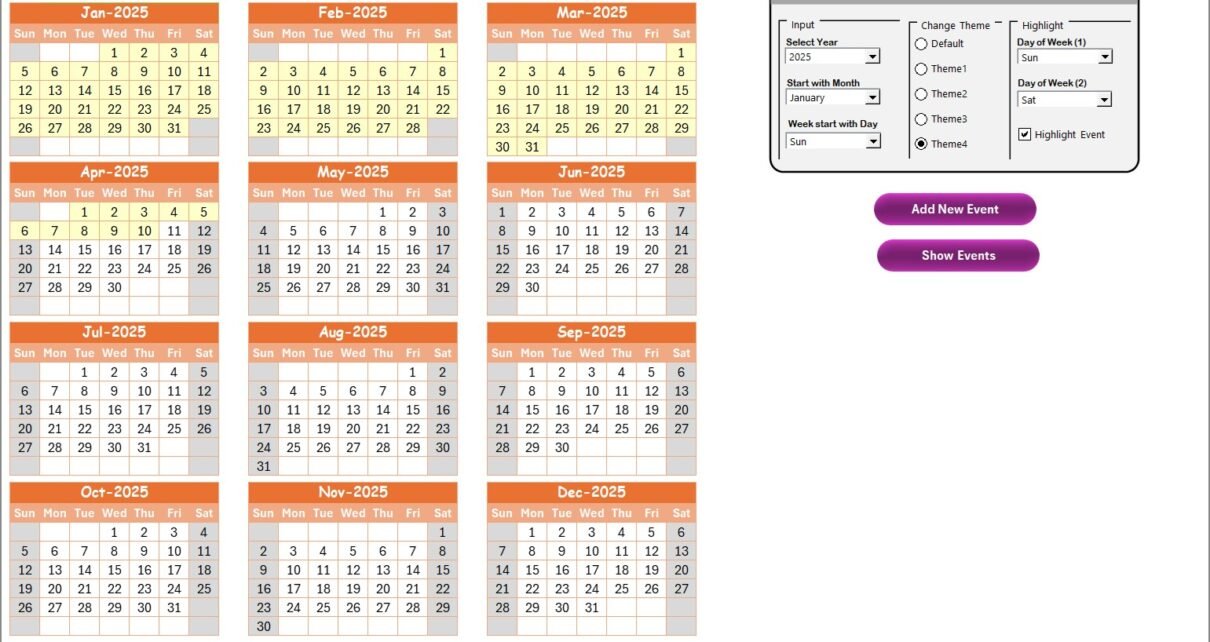
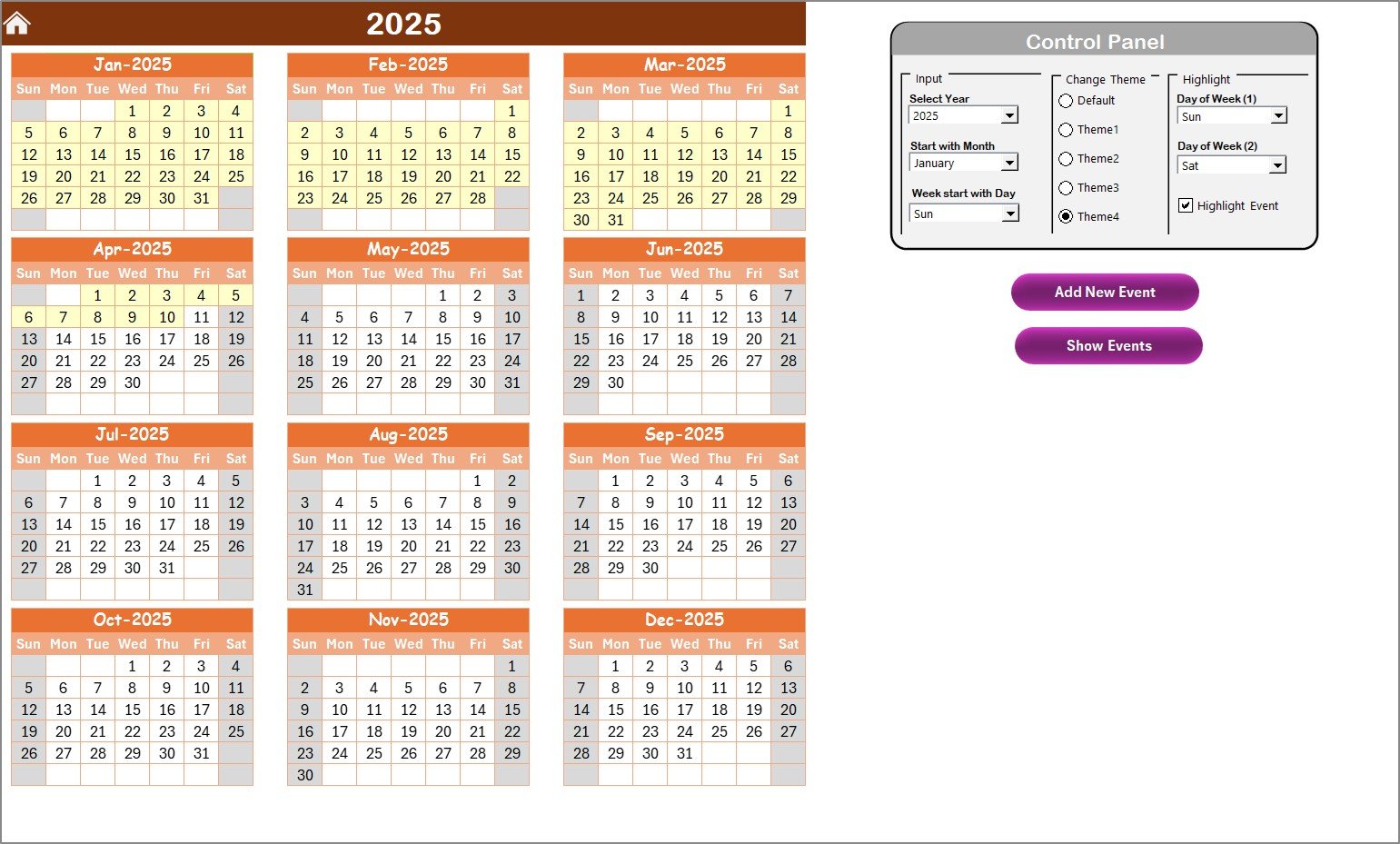
The Annual View sheet displays all 12 monthly calendars in one view. This full-year visualization helps cybersecurity teams plan annual activities such as:
- Policy updates
- Yearly access reviews
- Scheduled audits
- Large security projects
- Awareness campaigns
- New compliance requirements
Control Panel in the Annual View
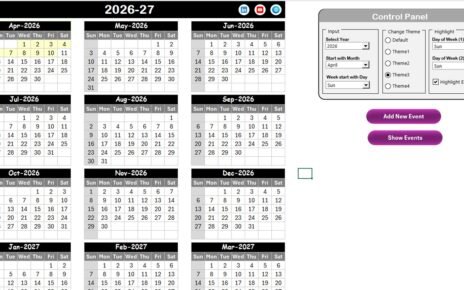
The Annual View contains a powerful Control Panel with three groups:
- Input Group
You use this group to control how the calendar displays:
- Select the Year
- Change the starting month
- Choose the starting day of the week
This flexibility supports different regional formats and organizational policies.
- Change Theme Group
The template includes 5 beautiful color themes.
You select any theme and the entire workbook updates instantly.
This feature improves readability and helps teams personalize the design.
- Highlight Group
This group allows you to highlight:
- Day of Week (1)
- Day of Week (2)
For example, if you select Saturday and Sunday, the calendar highlights weekends in grey.
You can also turn on the Highlight Event checkbox to mark event dates in yellow on the annual calendar. This makes important cybersecurity days impossible to miss.
Annual View Buttons
You also get two buttons:
- Add New Event
- Show Event
When you select a date and click Add New Event, a form opens. You enter the event name, time, location, and description, and the system inserts it into the calendar.
When you click Show Event, you see all events scheduled for that date.
Click to buy Healthcare Logistics Employee Wellness Calendar in Excel
Monthly View Sheet – Detailed Month-Wise Planning
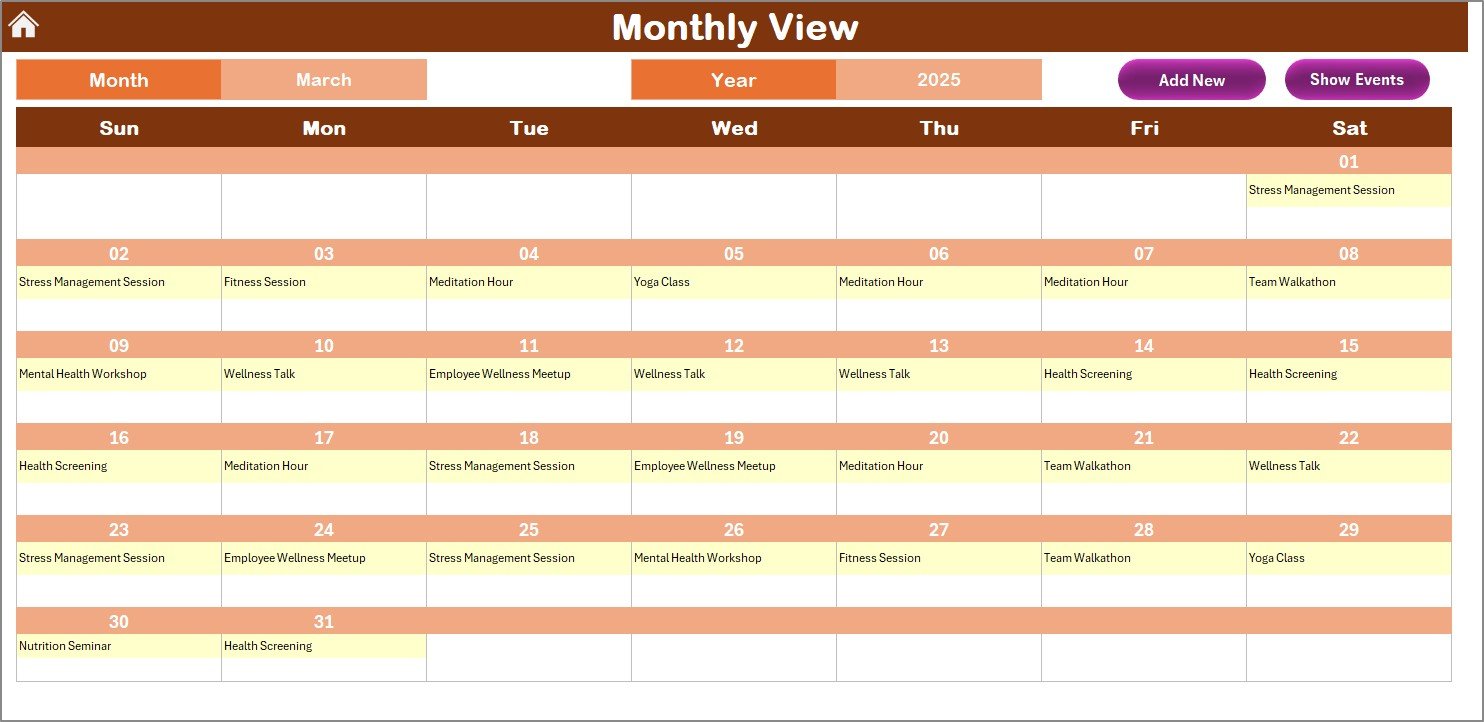
The Monthly View sheet shows a single month. You select the Month and Year from the top panel. The calendar updates instantly.
The Monthly View is useful when teams want clarity for:
- Weekly patch schedules
- Monthly audits
- SOC (Security Operations Center) reviews
- Monthly risk assessments
- Follow-ups after incidents
- Backups and maintenance tasks
If more than one event appears on a date, the calendar shows “More than 1…” to indicate additional activity.
Buttons in Monthly View
- Add New Event
- Show Event
These buttons work the same way as in the Annual View. You select a date and add or view events through a form.
Because of this simple structure, the template stays user-friendly for all technical levels.
Click to buy Healthcare Logistics Employee Wellness Calendar in Excel
Daily View Sheet – Day-to-Day Cybersecurity Tracking
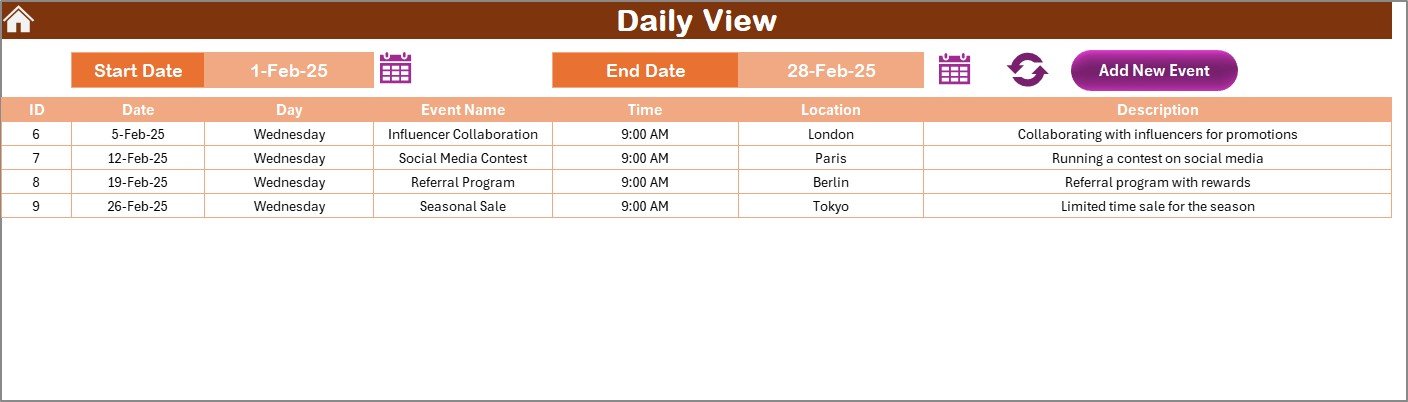
The Daily View is ideal for high-precision tracking. You enter the Start Date and End Date, then click Refresh. The sheet shows all events within that period.
Teams use this page for:
- Daily security tasks
- SOC monitoring
- Incident response
- Vendor access approvals
- Server checks
- Firewall reviews
- Log analysis tasks
You also get an Add New Event button that opens the form to enter new tasks for any day.
Because the Daily View focuses on a smaller time window, it helps teams maintain operational discipline.
Click to buy Healthcare Logistics Employee Wellness Calendar in Excel
Events Sheet – The Master Database
The Events sheet stores every event with full details. It works like the backend database of the entire calendar.
Fields in the Events Sheet:
- ID (Auto-generated)
- Date
- Day
- Event Name
- Time
- Location
- Description
This structured format helps organizations maintain a clean event log for audits and reporting.
Three Buttons for Data Management
- Add New Record
- Update Existing Record
- Delete Record
You select the ID before Update or Delete. The form loads all existing details when editing.
This system simplifies record management and prevents errors.

Click to buy Healthcare Logistics Employee Wellness Calendar in Excel
How Does This Excel Calendar Improve Cybersecurity in Healthcare Logistics?
This Excel calendar improves the operational efficiency of cybersecurity teams in many ways:
- Clear Yearly, Monthly, and Daily Planning
Teams see everything at a glance and avoid missing deadlines.
- Better Decision-Making
Structured views help managers allocate time and responsibilities.
- Reduced Human Errors
Automated calendar updates prevent mistakes that usually occur in manual spreadsheets.
- Faster Incident Response
Daily tracking shows urgent issues instantly.
- Stronger Compliance
Regulations like HIPAA, GDPR, and ISO 27001 require timeline tracking and documentation.
- Increased Accountability
Events stored in the database show who completed what and when.
- Improved Collaboration
Multiple departments—IT, cybersecurity, supply chain, and operations—work from a central source.
Advantages of a Healthcare Logistics Cybersecurity Calendar in Excel
Using this calendar delivers several practical advantages:
Easy to Use for Everyone
Because the tool works in Excel, every team member understands it without training.
No Software Installation Required
There is no need for expensive cybersecurity management software.
Flexible Design
Users customize themes, days, months, and views based on their preference.
Centralized Planning
All cybersecurity events stay connected in one file.
Strong Data Accuracy
The automated form ensures accurate event entry.
Fast Operational Updates
Teams adjust plans quickly without complex systems.
Visibility for Management
Leaders review annual cybersecurity status in minutes.
Supports All Healthcare Logistics Functions
Hospitals, distributors, cold chain suppliers, and emergency teams can use it.
Best Practices for Using the Healthcare Logistics Cybersecurity Calendar in Excel
To get the most value from this template, follow these best practices:
- Update the Calendar Daily
Cyber threats change quickly. Enter events as soon as they occur.
- Keep Descriptions Clear
Short and clear descriptions help teams understand tasks immediately.
- Use Standard Naming Conventions
Examples:
- “Firewall Patch – Q1”
- “Vendor Access Review – Monthly”
- “HIPAA Compliance – Training Week”
Consistency improves reporting accuracy.
- Use Theme Colors for Visual Clarity
Select themes that match your team’s workflow style.
- Highlight Weekends and Critical Days
Use the Highlight Group to mark high-risk or high-activity days.
- Review the Annual View Weekly
This practice helps teams stay prepared for upcoming audits or compliance deadlines.
- Maintain the Event Database Carefully
ID-based editing ensures the accuracy of historical records.
- Encourage Team Adoption
Make the calendar the single source of truth for all cybersecurity tasks.
How to Use the Calendar (Step-by-Step Guide)
Step 1: Open the Home Sheet
Click any button to navigate to Annual, Monthly, Daily, or Events.
Step 2: Plan Yearly Activities
Use the Annual View to set major tasks and compliance projects.
Step 3: Add Events Using the Form
Select a date → Click Add → Fill the details → Submit.
Step 4: Track Monthly Tasks
Switch to the Monthly View to review upcoming deadlines.
Step 5: Monitor Daily Operations
Enter date range → Click Refresh → View events.
Step 6: Update or Delete Records
Use the Events sheet to modify or remove tasks.
Conclusion
Healthcare logistics depends on strong cybersecurity. Every day, sensitive data flows across systems, delivery routes, and digital platforms. Because of this, teams must track cybersecurity activities without errors. The Healthcare Logistics Cybersecurity Calendar in Excel offers a simple, powerful, and user-friendly solution.
It organizes tasks in annual, monthly, and daily views, supports event forms, allows color themes, and maintains a clean event database. With this calendar, teams strengthen security, improve compliance, reduce operational risks, and respond faster to threats. Ultimately, it helps healthcare organizations protect patient safety and keep supply chains running without disruption.
Frequently Asked Questions (FAQ)
- Who should use a Healthcare Logistics Cybersecurity Calendar?
Cybersecurity teams, IT staff, logistics managers, compliance officers, and healthcare administrators can use it.
- Can I add unlimited events?
Yes. The Events sheet captures as many records as you need.
- Does this calendar work on Mac and Windows?
Yes, it works on both, as long as you have Microsoft Excel.
- Can I change the color theme?
Yes. The Change Theme Group offers five color themes.
- How do I track multiple events on the same date?
The Monthly View shows “More than 1…” when multiple tasks exist.
- Can beginners use this template?
Yes. The buttons, forms, and navigation make it very easy.
- Is this template suitable for hospitals only?
No. It suits all healthcare logistics systems, including distributors, suppliers, and emergency networks.
- Can I update or delete events?
Yes. Use the Update and Delete buttons on the Events sheet.
Visit our YouTube channel to learn step-by-step video tutorials
Watch the step-by-step video tutorial:
Click to buy Healthcare Logistics Employee Wellness Calendar in Excel