Tool and die manufacturing plays a critical role in modern manufacturing ecosystems. Because precision, quality, cost control, and delivery timelines matter every single day, organizations must track performance consistently. However, many tool rooms and die manufacturing units still depend on manual reports, disconnected Excel sheets, and delayed reviews. As a result, leaders struggle to identify issues early and improve efficiency.Tool & Die Manufacturing KPI Dashboard in Power BI
That is exactly where a Tool & Die Manufacturing KPI Dashboard in Power BI delivers real value.
In this detailed, SEO-friendly, and easy-to-understand article, you will learn what a Tool & Die Manufacturing KPI Dashboard in Power BI is, why it matters, how it works, its page-wise structure, data requirements, advantages, best practices, and frequently asked questions. Moreover, this guide uses simple language, strong transitions, and practical explanations so that you can implement it confidently.
Click to buy Tool & Die Manufacturing KPI Dashboard in Power BI
What Is a Tool & Die Manufacturing KPI Dashboard in Power BI?
A Tool & Die Manufacturing KPI Dashboard in Power BI is a ready-to-use performance monitoring system designed specifically for tool rooms, die shops, and precision manufacturing units.Tool & Die Manufacturing KPI Dashboard in Power BI
Instead of tracking production efficiency, tool life, rejection rates, downtime, and cost using multiple spreadsheets, this dashboard consolidates all key performance indicators into one interactive Power BI report. Consequently, managers, engineers, and executives gain instant visibility into manufacturing performance.Tool & Die Manufacturing KPI Dashboard in Power BI
Because the dashboard uses Excel as a data source, teams can enter data easily without complex systems. Meanwhile, Power BI handles calculations, visuals, comparisons, and trends automatically.
Why Is KPI Tracking Important in Tool & Die Manufacturing?
Tool and die manufacturing involves high capital investment, skilled labor, and tight tolerances. Therefore, even small inefficiencies can lead to large cost overruns.
KPI tracking becomes essential because it helps you:
- Monitor tool production performance in real time
- Compare actual results against defined targets
- Identify delays, quality issues, and productivity gaps
- Improve decision-making using accurate data
- Maintain consistency across teams and shiftsTool & Die Manufacturing KPI Dashboard in Power BI
Moreover, KPI dashboards create transparency. As a result, everyone works toward the same goals.
How Does a Tool & Die Manufacturing KPI Dashboard in Power BI Work?
The dashboard works on a simple yet powerful workflow:
- Users enter actual and target KPI data in Excel
- Power BI connects directly to the Excel file
- Measures calculate MTD, YTD, and comparisons automatically
- Visuals update instantly when data changes
- Users analyze performance using slicers and drill-through
Because of this design, teams save time while improving accuracy.
Page-Wise Structure of the Tool & Die Manufacturing KPI Dashboard in Power BI
This dashboard includes three structured pages, each serving a specific purpose. Together, they deliver complete performance visibility.
the Summary Page
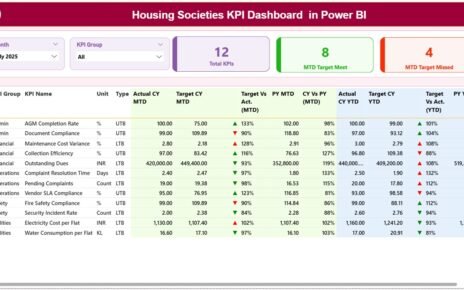
The Summary Page acts as the main control center of the dashboard. It provides a complete snapshot of all KPIs in one view.
Top-Level Filters and Cards
At the top of the page, you will see:
- Month Slicer – Select the month for analysis
- KPI Group Slicer – Filter KPIs by category
- Total KPIs Card – Shows total KPIs tracked
- MTD Target Met Card – Counts KPIs meeting targets
- MTD Target Missed Card – Counts KPIs missing targets
Because of these elements, users can quickly understand overall performance.
Detailed KPI Performance Table
Below the cards, the dashboard displays a detailed KPI table with the following columns:
- KPI Number – Sequence number of the KPI
- KPI Group – Category or functional group
- KPI Name – Name of the KPI
- Unit – Unit of measurement
- Type – LTB (Lower the Better) or UTB (Upper the Better)
Monthly Performance Metrics (MTD)
- Actual CY MTD – Current year actual month-to-date value
- Target CY MTD – Current year target for the month
- MTD Icon – ▲ or ▼ with green or red color
- Target vs Actual (MTD) – Actual ÷ Target
- PY MTD – Previous year month-to-date value
- CY vs PY (MTD) – CY MTD ÷ PY MTD
These fields help users assess short-term performance quickly.
Year-to-Date Performance Metrics (YTD)
- Actual CY YTD – Current year actual YTD value
- Target CY YTD – Current year target YTD value
- YTD Icon – ▲ or ▼ indicator
- Target vs Actual (YTD) – Actual ÷ Target
- PY YTD – Previous year YTD value
- CY vs PY (YTD) – CY YTD ÷ PY YTD
Therefore, users can track both short-term and long-term performance in one table.

Click to buy Tool & Die Manufacturing KPI Dashboard in Power BI
the KPI Trend Page
The KPI Trend Page focuses on deep analysis of individual KPIs.
Key Features of the KPI Trend Page
- KPI Name Slicer on the left side
- Two Combo Charts showing:
Actual CY
Previous Year
Target
One chart displays MTD trends, while the other displays YTD trends.
Because of these visuals, users can identify patterns, seasonality, and improvement trends easily.

Click to buy Tool & Die Manufacturing KPI Dashboard in Power BI
KPI Definition Page
The KPI Definition Page acts as a drill-through reference page. Although hidden by default, users can access it from the Summary Page.
What Information Does It Show?
- KPI Formula
- KPI Definition
- Measurement Logic
- KPI Type (LTB or UTB)
This page ensures that everyone interprets KPIs consistently. Moreover, it supports governance and standardization.
A Back Button on the top-left corner helps users return to the Summary Page quickly.

Click to buy Tool & Die Manufacturing KPI Dashboard in Power BI
What Excel Data Is Required for This Dashboard?
The dashboard uses a simple Excel-based data model. Therefore, users do not need advanced systems to get started.
Input_Actual Sheet
In this sheet, users enter:
- KPI Name
- Month (use the first date of the month)
- Actual MTD value
- Actual YTD value
This sheet captures real performance numbers.
Input_Target Sheet
In this sheet, users enter:
- KPI Name
- Month (use the first date of the month)
- Target MTD value
- Target YTD value
As a result, the dashboard compares performance against goals.
KPI Definition Sheet
In this sheet, users enter:
- KPI Number
- KPI Group
- KPI Name
- Unit
- Formula
- Definition
- Type (LTB or UTB)
This structure ensures clarity and consistency across KPIs.
Advantages of Tool & Die Manufacturing KPI Dashboard in Power BI
Using this dashboard delivers several practical advantages.
- Centralized Performance Monitoring
The dashboard brings all KPIs into one place. Consequently, users avoid scattered reports.
- Faster Decision-Making
Because Power BI updates visuals instantly, leaders act faster on issues.
- Clear Target Tracking
MTD and YTD comparisons show whether performance meets expectations.
- Visual Performance Indicators
Green and red icons highlight success and risk immediately.
- Easy Excel Data Entry
Teams can maintain data without complex IT systems.
- Consistent KPI Definitions
The KPI Definition page ensures everyone follows the same logic.
Best Practices for the Tool & Die Manufacturing KPI Dashboard in Power BI
To maximize value, follow these best practices.
- Define KPIs Clearly Before Implementation
Always finalize KPI definitions, formulas, and targets first.
- Update Data Regularly
Update Excel data monthly to keep insights accurate.
- Use Correct KPI Types
Set UTB or LTB correctly to avoid misleading icons.
- Review Trends, Not Just Numbers
Always analyze trend charts to identify root causes.
- Train Users on KPI Interpretation
Ensure teams understand what each KPI represents.
- Maintain Historical Data
Keep previous year data for meaningful comparisons.
Common Challenges and How to Overcome Them
Challenge 1: Inconsistent Data Entry
Solution: Use standardized Excel templates.
Challenge 2: Misinterpreted KPIs
Solution: Refer to the KPI Definition page.
Challenge 3: Overloading Too Many KPIs
Solution: Focus on critical manufacturing KPIs only.
Who Should Use a Tool & Die Manufacturing KPI Dashboard?
This dashboard suits:
- Tool room managers
- Manufacturing engineers
- Operations heads
- Quality managers
- Plant leadership teams
Because it remains flexible, both small tool rooms and large manufacturing plants can use it.
Conclusion
A Tool & Die Manufacturing KPI Dashboard in Power BI transforms raw manufacturing data into clear, actionable insights. Instead of relying on manual tracking, teams gain structured visibility across MTD and YTD performance, targets, and historical comparisons.
Moreover, the Excel-based data model keeps implementation simple, while Power BI delivers powerful visuals and analytics. When organizations follow best practices and maintain consistent data, this dashboard becomes a reliable foundation for continuous improvement.
Frequently Asked Questions About Tool & Die Manufacturing KPI Dashboard in Power BI
What KPIs can I track using this dashboard?
You can track productivity, quality, cost, delivery, downtime, tool life, and efficiency KPIs.
Do I need advanced Power BI knowledge to use this dashboard?
No. You only need basic Power BI navigation and Excel data entry skills.
Can I customize KPI groups and names?
Yes. You can fully customize KPI groups, names, units, and formulas.
How often should I update the Excel data?
You should update data monthly for accurate MTD and YTD analysis.
Can this dashboard work for other manufacturing industries?
Yes. You can adapt the structure for other manufacturing domains by changing KPI definitions.
Visit our YouTube channel to learn step-by-step video tutorials
Watch the step-by-step video tutorial:
Click to buy Tool & Die Manufacturing KPI Dashboard in Power BI