Running a fitness studio involves much more than training members and maintaining equipment. Every successful gym owner, fitness manager, or studio operator continuously tracks performance, monitors growth, and improves efficiency. However, many fitness studios still depend on scattered spreadsheets, manual reports, or guesswork. As a result, decision-making becomes slow and inaccurate.
That is exactly where a Fitness Studios KPI Dashboard in Excel becomes a powerful solution.
In this detailed article, you will learn what a Fitness Studios KPI Dashboard in Excel is, why fitness studios need it, how it works, its worksheet-wise structure, key features, advantages, best practices, and frequently asked questions. Moreover, the article uses simple language, active voice, strong transitions, and practical explanations to ensure clarity and SEO effectiveness.
Click to buy Fitness Studios KPI Dashboard in Excel
What Is a Fitness Studios KPI Dashboard in Excel?
A Fitness Studios KPI Dashboard in Excel is a centralized performance tracking tool designed to monitor, analyze, and visualize key performance indicators (KPIs) for fitness studios, gyms, yoga centers, and wellness clubs.
Instead of reviewing multiple sheets and manual reports, this dashboard consolidates all critical fitness KPIs into a single interactive view. As a result, managers can instantly track:
- Membership growth
- Revenue performance
- Attendance trends
- Trainer productivity
- Retention and churn rates
- Target vs Actual performance
Since the dashboard uses Microsoft Excel, it remains cost-effective, flexible, and easy to customize for studios of any size.
Why Do Fitness Studios Need a KPI Dashboard in Excel?
Fitness studios operate in a highly competitive market. Therefore, relying on intuition alone no longer works. Data-driven decisions help studios grow faster and reduce risks.
Here’s why a KPI dashboard becomes essential:
- It gives real-time visibility into studio performance
- It highlights underperforming KPIs instantly
- It supports monthly and yearly planning
- It improves accountability across teams
- It reduces manual reporting time
Moreover, Excel dashboards work perfectly for small to mid-sized fitness studios that want professional analytics without investing in expensive BI tools.
What KPIs Are Commonly Tracked in a Fitness Studio Dashboard?
A Fitness Studios KPI Dashboard in Excel typically tracks KPIs across multiple categories. These KPIs provide a holistic view of business performance.
Financial KPIs
- Monthly Revenue
- Membership Revenue
- Average Revenue per Member
- Target vs Actual Revenue
- Year-over-Year Revenue Growth
Operational KPIs
- Active Members
- New Memberships
- Membership Cancellations
- Class Attendance Rate
- Capacity Utilization
Customer KPIs
- Retention Rate
- Churn Rate
- Customer Satisfaction Score
- Repeat Membership Rate
Performance KPIs
- Trainer Utilization
- Sessions per Trainer
- KPI Achievement Percentage
When studios track these KPIs consistently, they can identify growth opportunities and fix issues early.
How Does a Fitness Studios KPI Dashboard in Excel Work?
A Fitness Studios KPI Dashboard in Excel works on a simple yet powerful logic.
First, users enter actual values, target values, and previous year values in dedicated input sheets. Then, Excel formulas calculate MTD (Month-to-Date) and YTD (Year-to-Date) metrics. Finally, pivot tables, formulas, and conditional formatting display insights visually on the dashboard.
Because of this structure, users can:
- Change the month selection dynamically
- Instantly compare Actual vs Target
- Analyze Current Year vs Previous Year
- Identify trends using charts
Worksheet-Wise Structure of the Fitness Studios KPI Dashboard in Excel
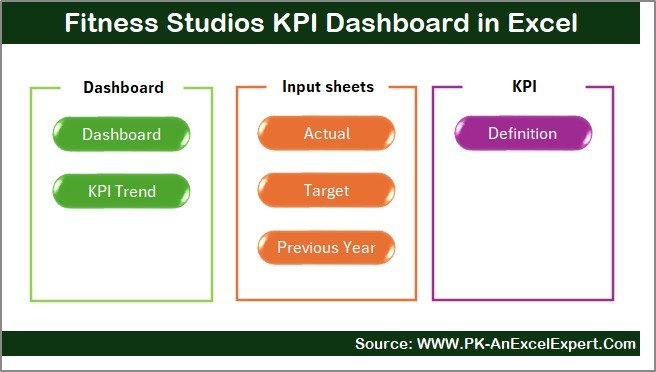
This Fitness Studios KPI Dashboard contains 7 well-structured worksheets, each serving a specific purpose. Let’s explore them one by one.
Summary Page
The Summary Page acts as an index or navigation hub for the entire dashboard.
Key Features of the Summary Page
- It contains 6 clickable buttons
- Each button redirects users to a specific worksheet
- It improves navigation and usability
- It makes the dashboard user-friendly even for beginners
Because of this design, users can move between sheets quickly without scrolling or searching.
Click to buy Fitness Studios KPI Dashboard in Excel
Dashboard Sheet
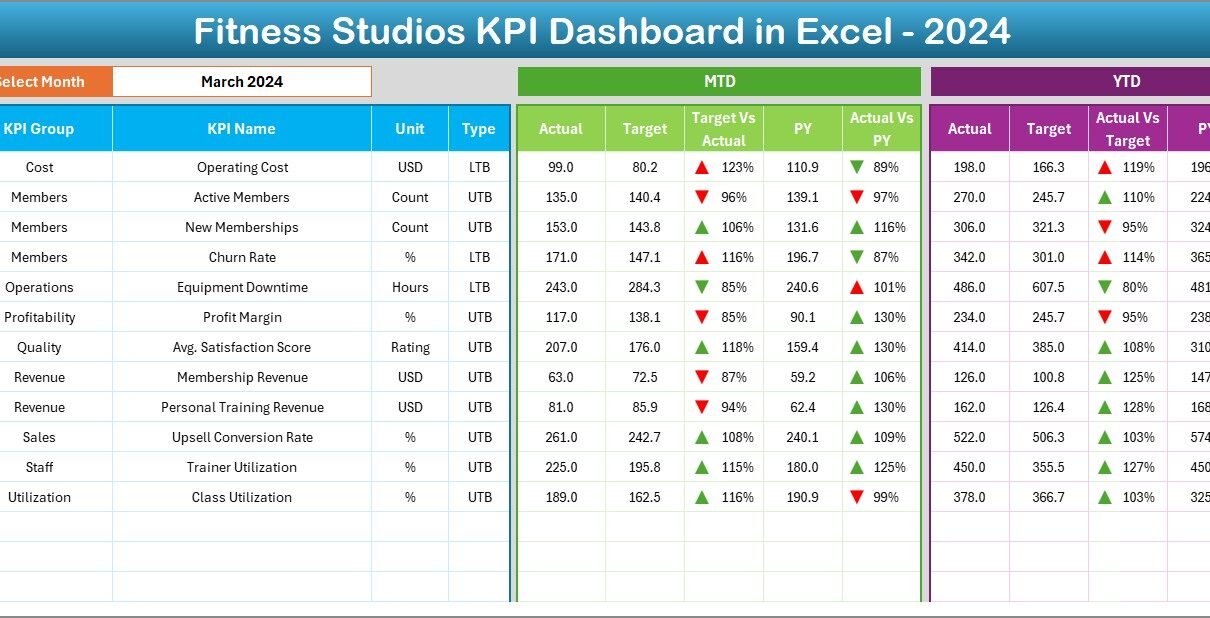
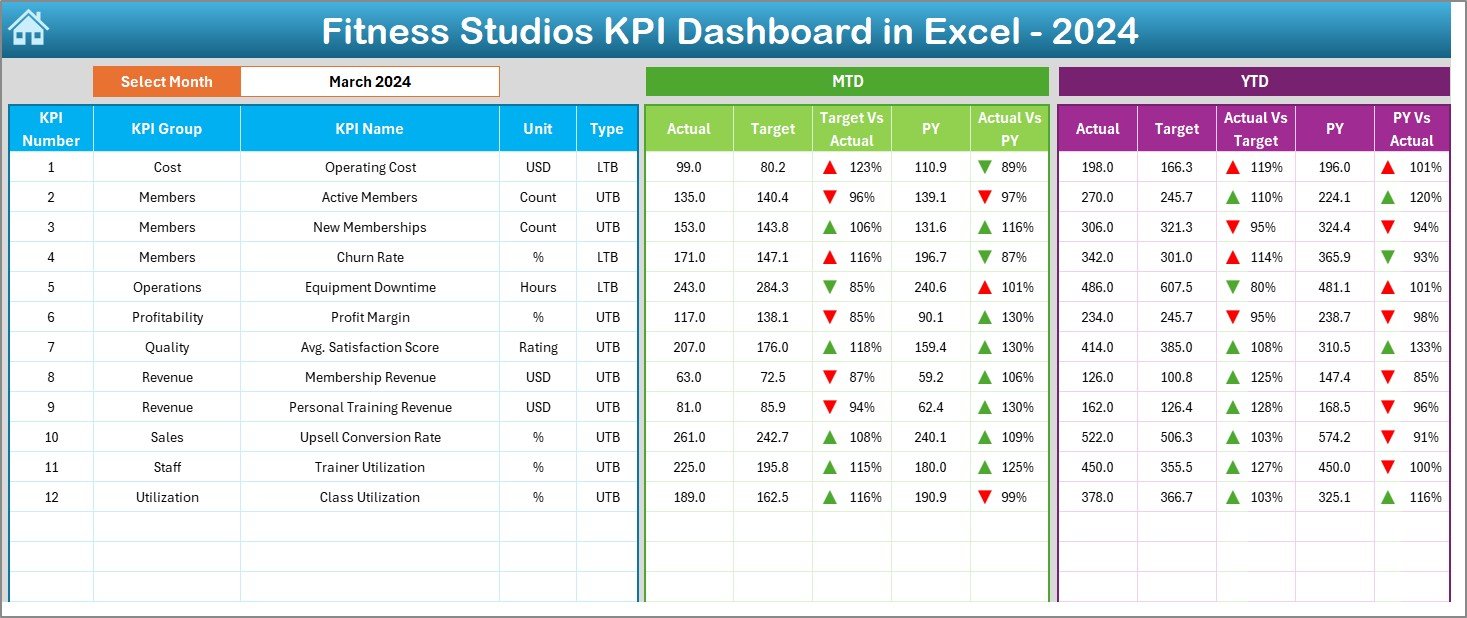
The Dashboard sheet serves as the core of the Fitness Studios KPI Dashboard in Excel.
Key Functionalities of the Dashboard Sheet
- It displays all KPIs in one view
- It includes a Month selection dropdown at cell D3
- It dynamically updates KPIs based on the selected month
KPIs Displayed on the Dashboard
For each KPI, the dashboard shows:
MTD Metrics
- MTD Actual
- MTD Target
- MTD Previous Year
- Target vs Actual (%)
- Previous Year vs Actual (%)
YTD Metrics
- YTD Actual
- YTD Target
- YTD Previous Year
- Target vs Actual (%)
- Previous Year vs Actual (%)
Conditional Formatting
- Up arrows indicate positive performance
- Down arrows indicate negative performance
As a result, users can instantly identify which KPIs perform well and which ones need attention.
Click to buy Fitness Studios KPI Dashboard in Excel
Trend Sheet
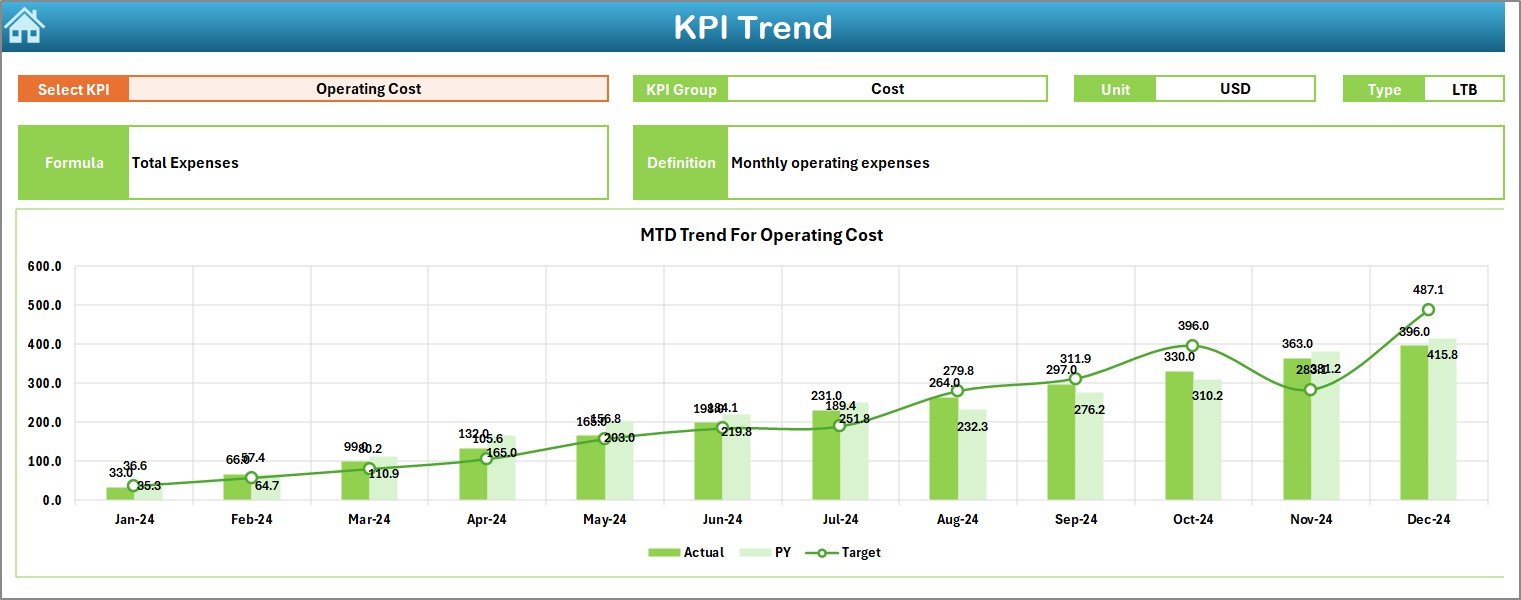
The Trend Sheet focuses on deep KPI-level analysis.
Key Features of the Trend Sheet
- KPI selection dropdown at cell C3
Displays:
KPI Group
KPI Unit
KPI Type (Upper the Better or Lower the Better)
KPI Formula
KPI Definition
Trend Charts
- MTD trend chart for Actual, Target, and Previous Year
- YTD trend chart for Actual, Target, and Previous Year
Because of these charts, fitness managers can easily analyze historical performance and forecast future trends.
Click to buy Fitness Studios KPI Dashboard in Excel
Actual Numbers
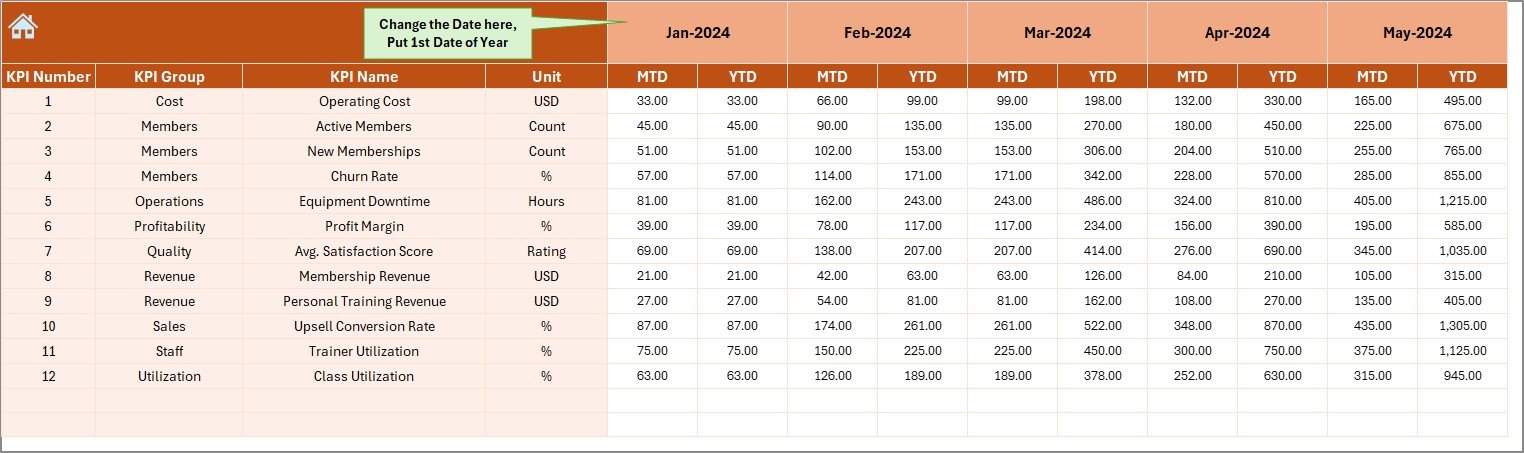
The Actual Numbers Input Sheet serves as the primary data entry sheet.
How This Sheet Works
- Users enter MTD and YTD actual values for each KPI
- Cell E1 allows users to select the starting month of the year
- Changing the month automatically updates calculations
This setup ensures accuracy while reducing repetitive data entry.
Click to buy Fitness Studios KPI Dashboard in Excel
Target Sheet
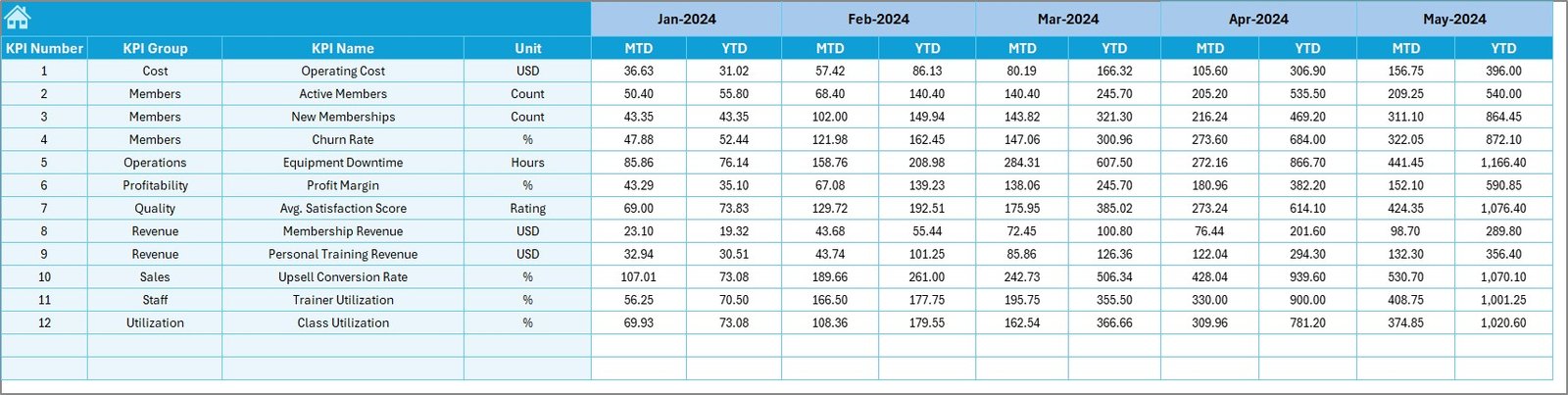
The Target Sheet stores performance targets for each KPI.
Key Features
- Enter monthly MTD Target values
- Enter cumulative YTD Target values
- Supports goal tracking and planning
Because targets drive performance, this sheet plays a critical role in evaluating success.
Previous Year Number Sheet
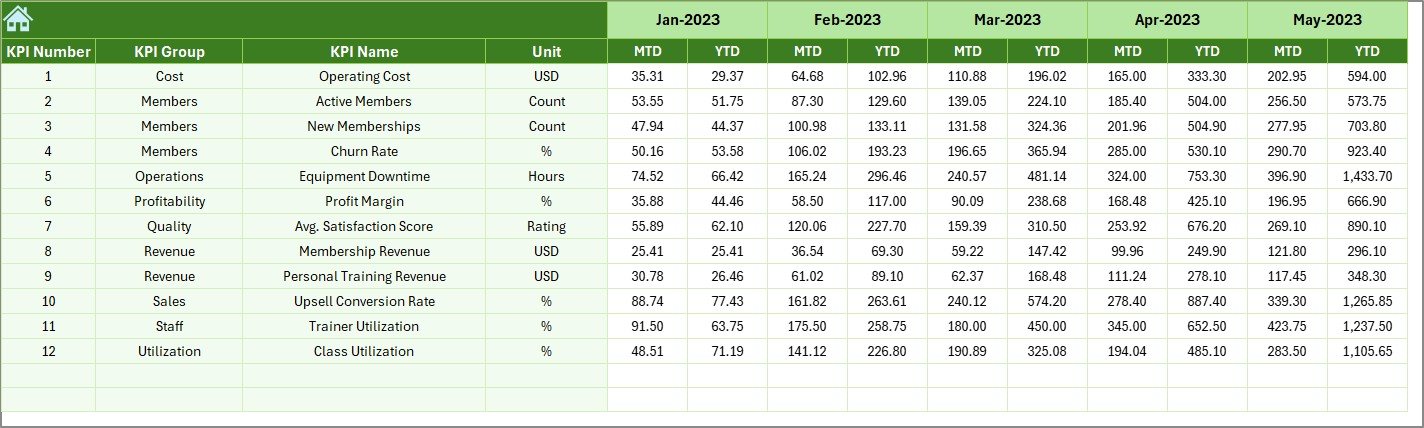
The Previous Year Number Sheet captures historical data for comparison.
Why This Sheet Matters
- Enables year-over-year analysis
- Helps identify seasonal patterns
- Supports growth and decline analysis
Comparing current performance with previous years allows fitness studios to measure real progress.
Click to buy Fitness Studios KPI Dashboard in Excel
KPI Definition Sheet
The KPI Definition Sheet acts as the foundation of the entire dashboard.
Information Captured in This Sheet
- KPI Name
- KPI Group
- KPI Unit
- KPI Formula
- KPI Definition
This sheet ensures consistency and clarity across all KPIs. Moreover, it helps new users understand each KPI easily.

Click to buy Fitness Studios KPI Dashboard in Excel
Advantages of Fitness Studios KPI Dashboard in Excel
Using a Fitness Studios KPI Dashboard in Excel offers several benefits.
Key Advantages
- Centralized KPI Tracking
- Saves Reporting Time
- Improves Decision-Making
- Tracks Targets Effectively
- Compares Performance Across Periods
- Cost-Effective Analytics Solution
- Easy Customization in Excel
Because of these advantages, many fitness studios prefer Excel dashboards over complex BI tools.
How Does This Dashboard Improve Decision-Making for Fitness Studios?
This dashboard supports smarter decisions in multiple ways.
- It highlights weak KPIs instantly
- It helps prioritize improvement areas
- It supports monthly performance reviews
- It enables proactive planning instead of reactive fixes
As a result, studio owners can act faster and more confidently.
Best Practices for the Fitness Studios KPI Dashboard in Excel
To get the most value from this dashboard, fitness studios should follow proven best practices.
- Define KPIs Clearly
Always define KPIs with proper units, formulas, and definitions. This practice avoids confusion and errors.
- Update Data Regularly
Update actual, target, and previous year data on a monthly basis. Consistent updates keep insights accurate.
- Set Realistic Targets
Always set achievable yet challenging targets. Unrealistic goals distort performance analysis.
- Review Trends Monthly
Use the Trend Sheet regularly to identify early warning signs and growth opportunities.
- Train Users Properly
Ensure that staff understand how to input data and interpret results correctly.
- Avoid Overloading KPIs
Track only meaningful KPIs. Too many KPIs reduce focus and clarity.
How Can Fitness Studios Customize This KPI Dashboard?
Excel dashboards offer high flexibility.
Fitness studios can:
- Add new KPIs easily
- Modify formulas as needed
- Customize colors and branding
- Add slicers or filters
- Expand to multi-location analysis
This flexibility makes the dashboard suitable for growing studios.
Who Can Benefit from a Fitness Studios KPI Dashboard in Excel?
This dashboard benefits a wide range of users.
- Gym Owners
- Fitness Studio Managers
- Operations Teams
- Finance Teams
- Franchise Operators
- Business Consultants
Anyone involved in performance tracking can use this dashboard effectively.
Conclusion: Why Should Fitness Studios Use a KPI Dashboard in Excel?
A Fitness Studios KPI Dashboard in Excel transforms raw data into actionable insights. It simplifies performance tracking, improves accountability, and supports smarter decisions.
Because it combines ease of use, affordability, and powerful analytics, this dashboard becomes an ideal solution for fitness studios that want structured growth without complexity.
By implementing this dashboard, fitness studios can track KPIs confidently, optimize operations, and achieve sustainable success.
Frequently Asked Questions (FAQs)
- What is the main purpose of a Fitness Studios KPI Dashboard in Excel?
The main purpose is to track, analyze, and visualize fitness studio KPIs in a centralized and interactive way.
- Can beginners use this KPI dashboard easily?
Yes, the dashboard uses simple navigation, clear inputs, and structured sheets, making it beginner-friendly.
- Can I add more KPIs to this dashboard?
Yes, Excel allows easy customization. You can add or modify KPIs as needed.
- Does this dashboard support month-wise analysis?
Yes, users can select months dynamically, and all KPIs update automatically.
- Why does the dashboard include previous year data?
Previous year data helps compare growth, identify trends, and measure real progress.
- Is Excel suitable for KPI dashboards?
Yes, Excel offers flexibility, affordability, and powerful calculation capabilities, especially for small and mid-sized businesses.
Visit our YouTube channel to learn step-by-step video tutorials
Click to buy Fitness Studios KPI Dashboard in Excel