Healthcare organizations handle critical operations daily—procurement cycles, vendor onboarding, contract evaluations, risk assessments, compliance audits, cybersecurity checks, and many more essential tasks. When teams try to manage all these activities without a structured system, mistakes happen, follow-ups get delayed, and cybersecurity threats increase.
A Healthcare Procurement Cybersecurity Calendar in Excel solves this problem because it helps teams stay organized, track tasks clearly, and plan ahead with confidence. This ready-to-use Excel calendar gives you a complete workflow to manage procurement and cybersecurity events in one place.
In this detailed guide, you will learn everything about this powerful Excel template—its features, structure, benefits, best practices, and why every healthcare organization should use it. You will also explore how this calendar improves visibility, reduces risks, and helps teams move from reactive to proactive operations.
Click to buy Healthcare Procurement Cybersecurity Calendar in Excel
What Is a Healthcare Procurement Cybersecurity Calendar in Excel?
A Healthcare Procurement Cybersecurity Calendar in Excel is a structured planning tool designed to track cybersecurity tasks, procurement events, audits, reviews, and compliance activities for the entire year. It works like a digital organizer where you can add events, schedule follow-ups, manage timelines, and view your workflow in annual, monthly, or daily formats.
Because the entire system is created in Excel, you can use it easily without needing any advanced tools or technical knowledge. You only enter your event details, and the calendar updates automatically.
The template includes smart features like:
- Automated calendars
- Annual, monthly, and daily views
- Event forms for adding, updating, or deleting records
- Color themes
- Highlight options for weekends and events
- Dynamic filters
- A clean and professional layout
This calendar helps healthcare organizations plan cybersecurity audits, procurement cycles, contract renewals, vendor checks, and risk assessments on time.
Why Do Healthcare Teams Need a Procurement Cybersecurity Calendar?
Healthcare procurement teams handle sensitive information, medical device details, vendor data, financial information, and compliance documents. Because of this, cybersecurity plays a major role in daily operations.
A dedicated cybersecurity calendar helps teams:
- Plan audits ahead
- Maintain vendor compliance
- Track cybersecurity events
- Ensure data protection
- Follow procurement timelines
- Record every activity in one place
With a well-organized calendar, you never miss renewal dates, cybersecurity checks, system updates, or procurement milestones.
Key Features of the Healthcare Procurement Cybersecurity Calendar in Excel
To help simplify your planning and cybersecurity processes, this template includes five powerful worksheets:
Home Sheet (Index Page)
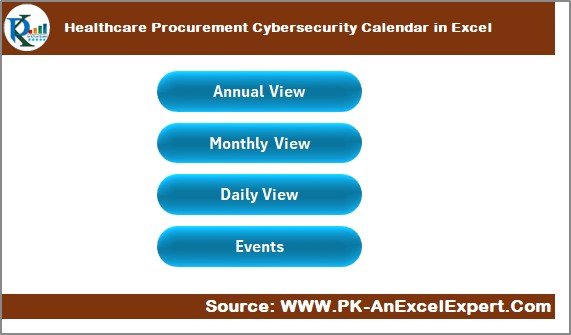
The Home sheet acts as the main landing page where you can jump to any part of the calendar instantly.
It includes four navigation buttons:
- Annual View
- Monthly View
- Daily View
- Events Database
These buttons make the template user-friendly and save time when switching between different calendar views.
The clean layout helps every team member understand where to go and what to use, even if they are new to Excel.
Click to buy Healthcare Procurement Cybersecurity Calendar in Excel
Annual View Sheet
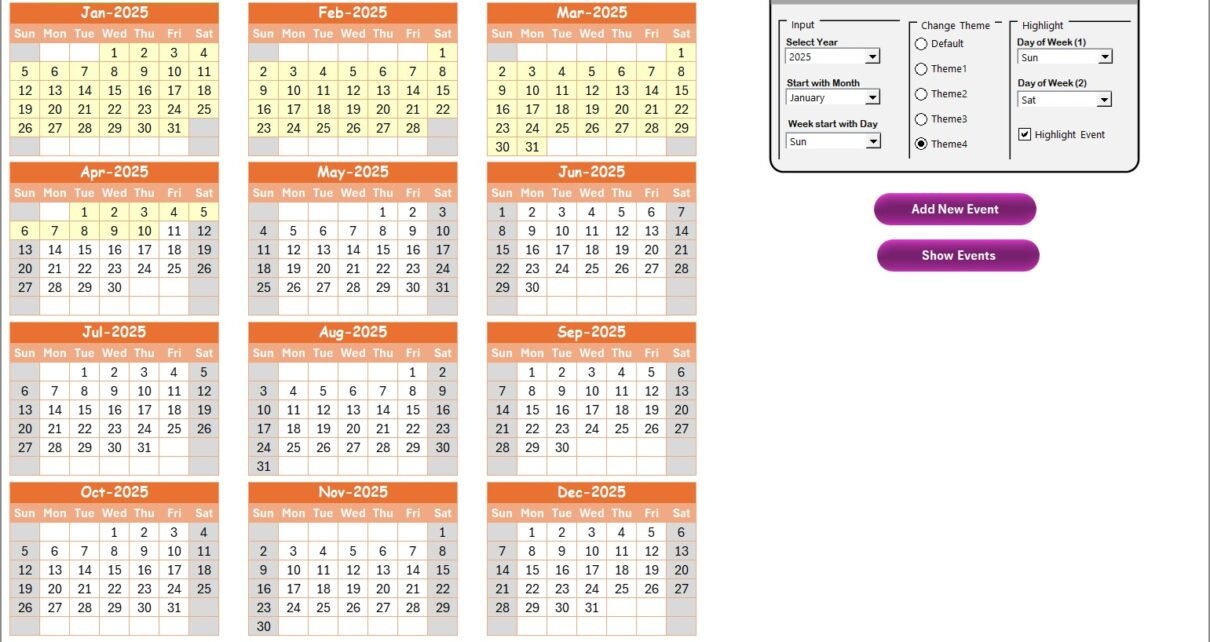
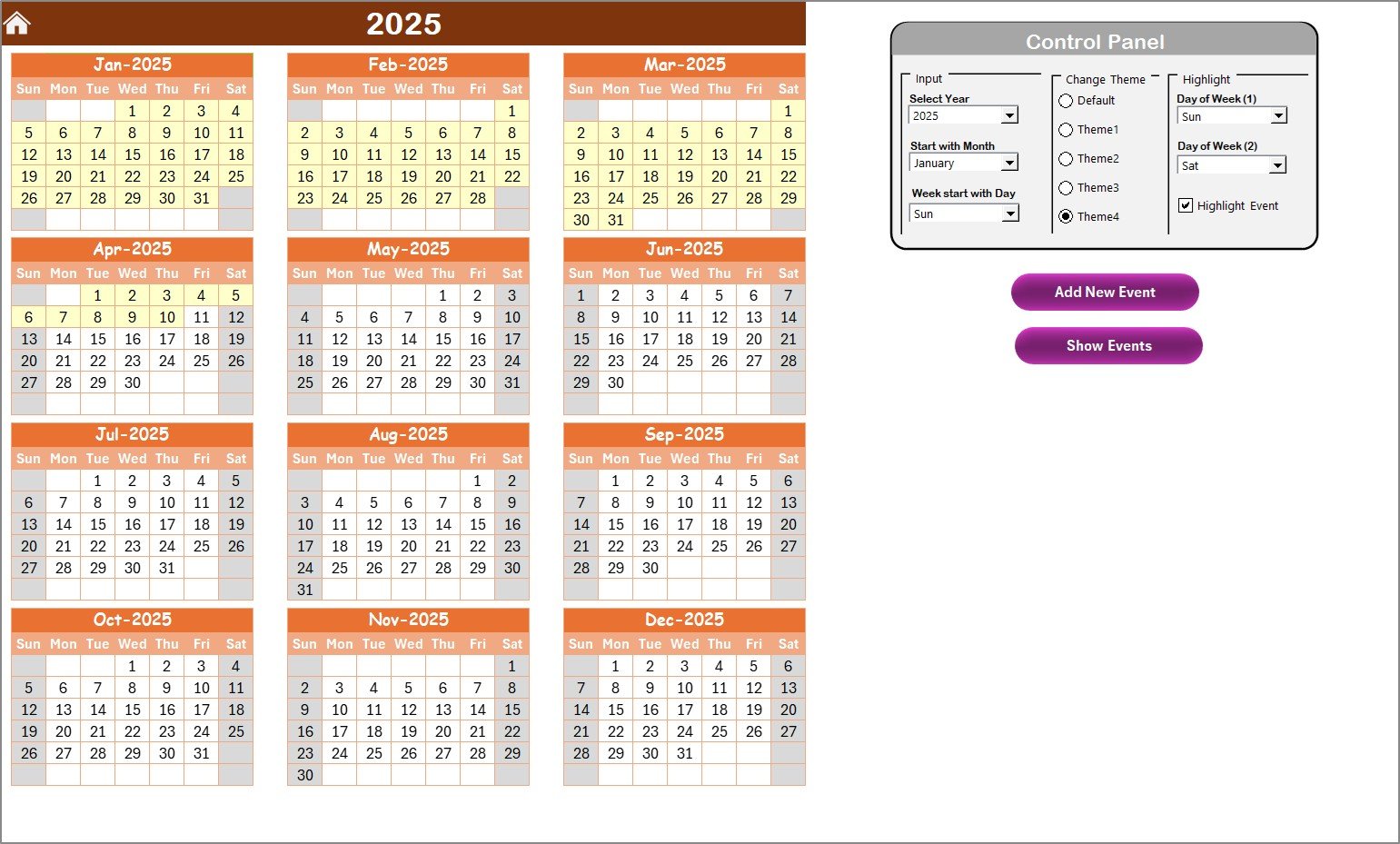
The Annual View Sheet displays a complete 12-month calendar on a single page. It allows you to see all months together, so you get a full-year picture of procurement and cybersecurity tasks.
What You Can Do in the Annual View:
View all 12 months at once
Track important cybersecurity milestones
Identify busy periods
Check event highlights
Switch between years or starting months
This section includes one of the most powerful features of the template: the Control Panel.
Annual View Control Panel – Complete Overview
The Control Panel includes three functional groups:
Input Group
This group helps you customize the calendar according to your organization’s timeline.
You can:
- Select the Year to update the full calendar
- Change the starting month of the year
- Choose the starting day of the week (Monday, Sunday, etc.)
These options help international healthcare teams adapt the calendar to their country’s format.
Change Theme Group
The calendar includes five beautifully designed color themes.
You can select any theme, and the entire workbook updates instantly. This adds professional styling and visual clarity.
Highlight Group
You can highlight specific days such as weekends or special days.
- Choose Day of Week (1) and Day of Week (2) to highlight—for example, Saturday and Sunday.
- Turn on Highlight Events to display events in yellow on the annual calendar.
These visual cues help you identify busy days and plan tasks easily.
Click to buy Healthcare Procurement Cybersecurity Calendar in Excel
Event Buttons in the Annual View
You get two important buttons:
- Add New Event
Select any date and click the button to open an event form. Enter details like event name, time, description, and submit it.
- Show Event
This button displays all events scheduled for the selected date.
- Monthly View Sheet
The Monthly View Sheet shows a clean and simple calendar for one selected month. You can select both Month and Year from the dropdowns.
This view is especially useful for:
- Scheduling procurement meetings
- Planning audits
- Weekly task reviews
- Cybersecurity patch updates
- Vendor compliance checks
If a date contains more than one event, it will show “more than 1…” so you can click and view all events.
Buttons Included:
- Add New Event – To add tasks quickly
- Show Event – To view all events for the selected day
This sheet makes monthly planning simple and clear.
Daily View Sheet
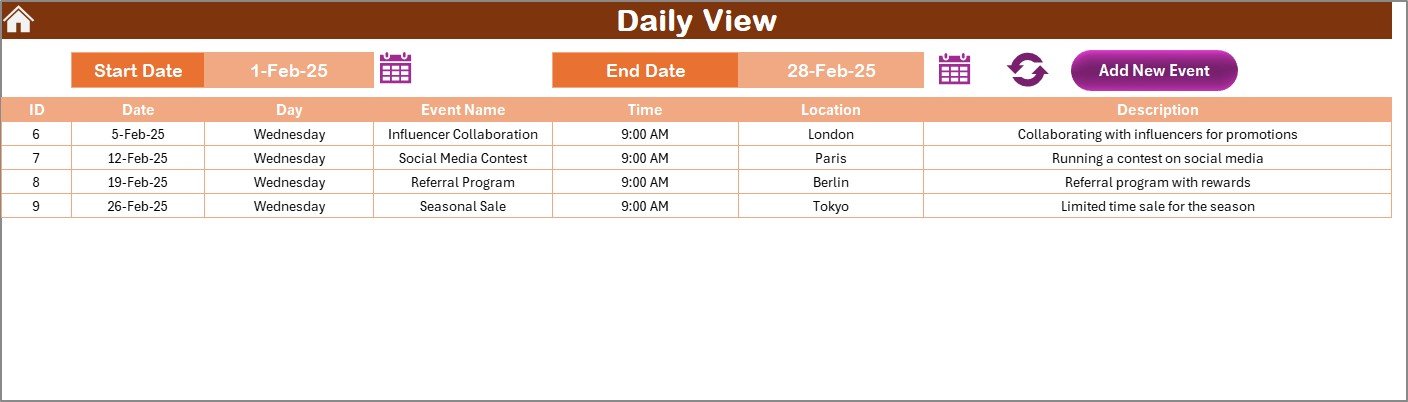
The Daily View Sheet shows all events between a selected Start Date and End Date.
This view is helpful for:
- Daily monitoring
- Short-term project planning
- IT or cybersecurity review cycles
- Procurement approvals
- Vendor follow-ups
How It Works:
- Select a start date
- Select an end date
- Click Refresh
- View all events in a detailed list
You also get an Add New Event button to input new tasks instantly.
Click to buy Healthcare Procurement Cybersecurity Calendar in Excel
Events Sheet (Database Sheet)
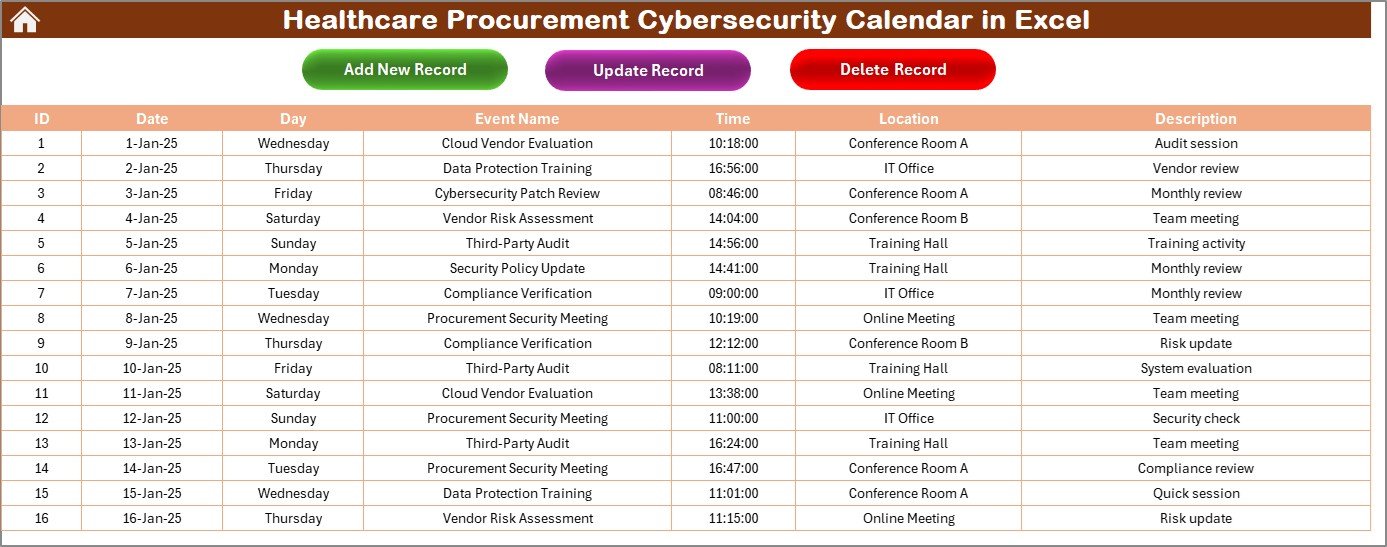
The Events Sheet stores all the event records safely. Think of it as the master database for the entire calendar.
Stored Details Include:
- ID – Automatically generated unique number
- Date – Actual date of the event
- Day – Day name (Mon, Tue, etc.)
- Event Name
- Time
- Location
- Description
This sheet keeps a complete history of all events, which helps teams track past activities easily.
Buttons on the Events Sheet:
Add New Record – Add events using a form
Update Existing Record – Modify any record
Delete Record – Remove any event using its ID
This database-driven structure makes the system flexible, organized, and scalable.
Advantages of Healthcare Procurement Cybersecurity Calendar in Excel
- Centralized Planning
All procurement and cybersecurity events stay in one place. You do not need multiple spreadsheets or manual notes.
- Improved Cybersecurity Awareness
When teams follow a structured schedule, cybersecurity tasks happen on time. This reduces risks and strengthens internal controls.
- Better Compliance Management
Healthcare regulations require timely documentation, checks, reviews, and audits. This calendar helps you plan everything correctly.
- Enhanced Transparency
Team members get total clarity on what is due, what is pending, and what is completed.
- Automated and Easy-to-Use
The entire calendar runs on simple Excel logic. You do not need advanced skills or software.
- Smooth Vendor Coordination
Procurement teams can plan vendor reviews, contract renewals, and compliance checks without missing deadlines.
- Clear Visual Layouts
The annual, monthly, and daily views make planning easy for everyone—procurement teams, IT, and cybersecurity staff.
- Accurate Record Keeping
The events database stores all historical data securely. You can track past decisions, follow-ups, and actions.
Best Practices for Using the Healthcare Procurement Cybersecurity Calendar
- Update the Calendar Daily
Make it a routine to update new tasks, cybersecurity checks, or procurement events.
- Assign Owners to Each Event
Clearly define the responsible person so tasks never get ignored.
- Use Themes for Visual Clarity
Switch themes to create color-coded plans for easy reading.
- Enable Weekend and Event Highlighting
Use the highlight features to track busy days and important events.
- Add Detailed Descriptions
Write clear and short descriptions when adding events. This helps avoid confusion later.
- Use the Daily View for Short-Term Planning
Always check the daily view when handling weekly IT or procurement tasks.
- Keep the Events Database Clean
Regularly delete duplicate entries and update old information.
- Review Monthly and Annual Plans
Check monthly and annual views at the end of each cycle to prepare for upcoming tasks.
How This Calendar Helps Healthcare Organizations Stay Secure
Healthcare data breaches have increased over the years. Most attacks happen due to:
- Missed updates
- Poor vendor management
- Delayed cybersecurity checks
- Untracked network changes
Using this calendar ensures:
- Timely system updates
- Regular cybersecurity assessments
- Better vendor risk monitoring
- Compliance with healthcare regulations
- Smooth procurement workflows
The result is a strong, secure, and streamlined environment.
Conclusion
A Healthcare Procurement Cybersecurity Calendar in Excel offers a complete planning and tracking solution for healthcare teams. It simplifies daily tasks, supports cybersecurity best practices, enhances compliance, and ensures timely procurement operations. The ready-to-use structure, multiple views, event automation, and user-friendly layout make it a perfect tool for hospitals, clinics, healthcare vendors, IT security teams, and procurement departments.
When teams follow a structured calendar, they stay organized, avoid risks, and build a secure and efficient workflow. This Excel template gives you everything you need to manage procurement and cybersecurity tasks with clarity and confidence.
Frequently Asked Questions (FAQs)
- What is a Healthcare Procurement Cybersecurity Calendar in Excel?
It is a ready-to-use Excel template that helps you track cybersecurity tasks, procurement events, audits, and reviews using annual, monthly, and daily calendar views.
- Who should use this calendar?
Procurement teams, IT security teams, compliance departments, healthcare administrators, vendor managers, and risk management teams can use this tool.
- Can I add unlimited events?
Yes, the Events sheet stores all events. You can add unlimited records.
- Can I customize the calendar theme?
Yes, the template includes five color themes that update the full workbook.
- How do I add a new event?
Select a date and click the Add New Event button. Fill the event form and submit it. The event will be added automatically.
- What happens if there are multiple events on one date?
The Monthly View will show “more than 1…” so you can click to view all events.
- Does this template require advanced Excel knowledge?
No. The system uses simple dropdowns, buttons, and forms that anyone can navigate easily.
- Can I track tasks for an entire year?
Yes. The Annual View lets you view all 12 months at once.
- Is this template useful for audits?
Yes. You can schedule cybersecurity audits, procurement reviews, vendor assessments, and compliance checks.
- Can this calendar improve cybersecurity?
Yes. When teams follow a structured schedule, they reduce risks and strengthen cybersecurity controls.
Visit our YouTube channel to learn step-by-step video tutorials
Watch the step-by-step video tutorial:
Click to buy Healthcare Procurement Cybersecurity Calendar in Excel