Introduction
The Subscription Box industry is thriving, making it more important than ever to track key performance indicators (KPIs) efficiently. To help subscription box businesses monitor their progress, optimize operations, and make data-driven decisions, we’ve developed a ready-to-use Subscription Box KPI Scorecard. This comprehensive scorecard template simplifies KPI tracking, giving business owners and managers a clear view of performance trends and insights.
Key Features of Subscription Box KPI Scorecard
- Four Interactive Worksheets: The template includes Scorecard, KPI Trend, Input Data, and KPI Definition sheets for a holistic KPI management experience.
- Flexible Data Filtering: Easily select monthly, Month-to-Date (MTD), or Year-to-Date (YTD) performance views.
- Visual Performance Indicators: Color-coded displays and conditional formatting enable quick status checks.
- KPI Trend Analysis: Monitor trends with dynamic charts comparing actual, target, and prior year (PY) data.
- User-Friendly Data Entry: Input and update KPI values smoothly without hassle.
- KPI Documentation: Clearly defined KPIs with associated groups, formulas, units, and descriptions for shared understanding.
Dashboard Pages Explanation
1. Scorecard Sheet
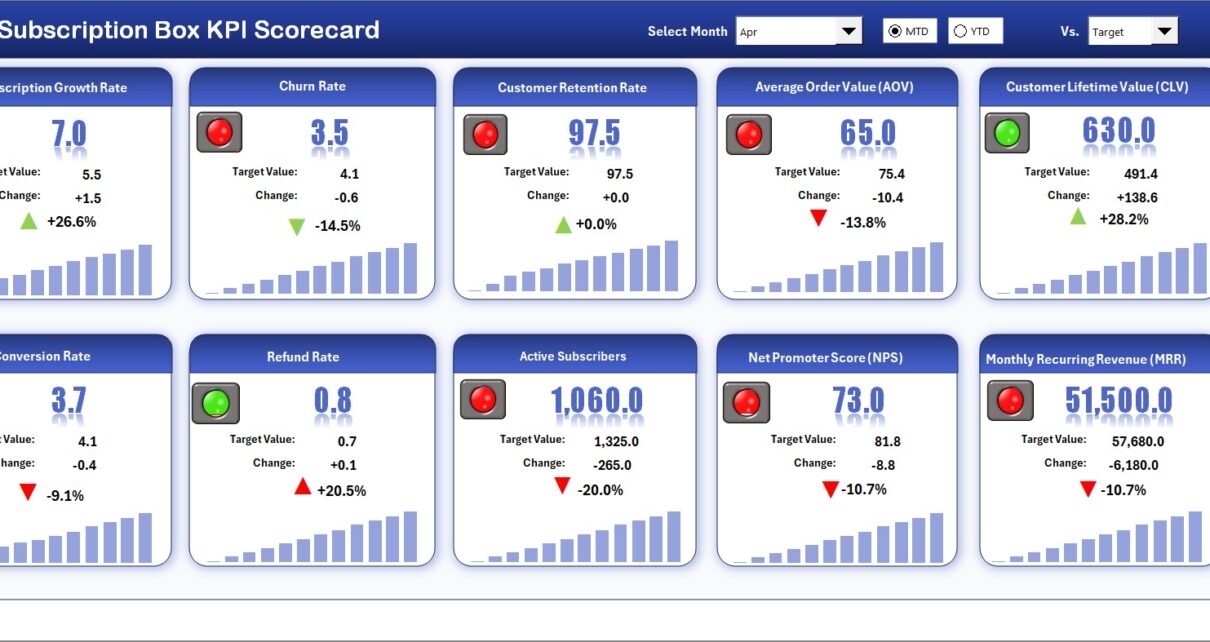
The Scorecard Sheet serves as the main dashboard, providing a comprehensive overview of your subscription box KPIs in a single interface.
- Dropdown Menus: Choose the month, MTD, or YTD metrics to analyze your performance within specific time frames.
- Actual vs Target Values: Easily compare actual results with set targets to evaluate success or identify gaps.
- Visual Indicators: Color-coded alerts and conditional formatting highlight whether each KPI is on track, underperforming, or exceeding expectations.
- Comprehensive KPI Overview: View all critical KPI information including monthly and yearly progress at a glance.
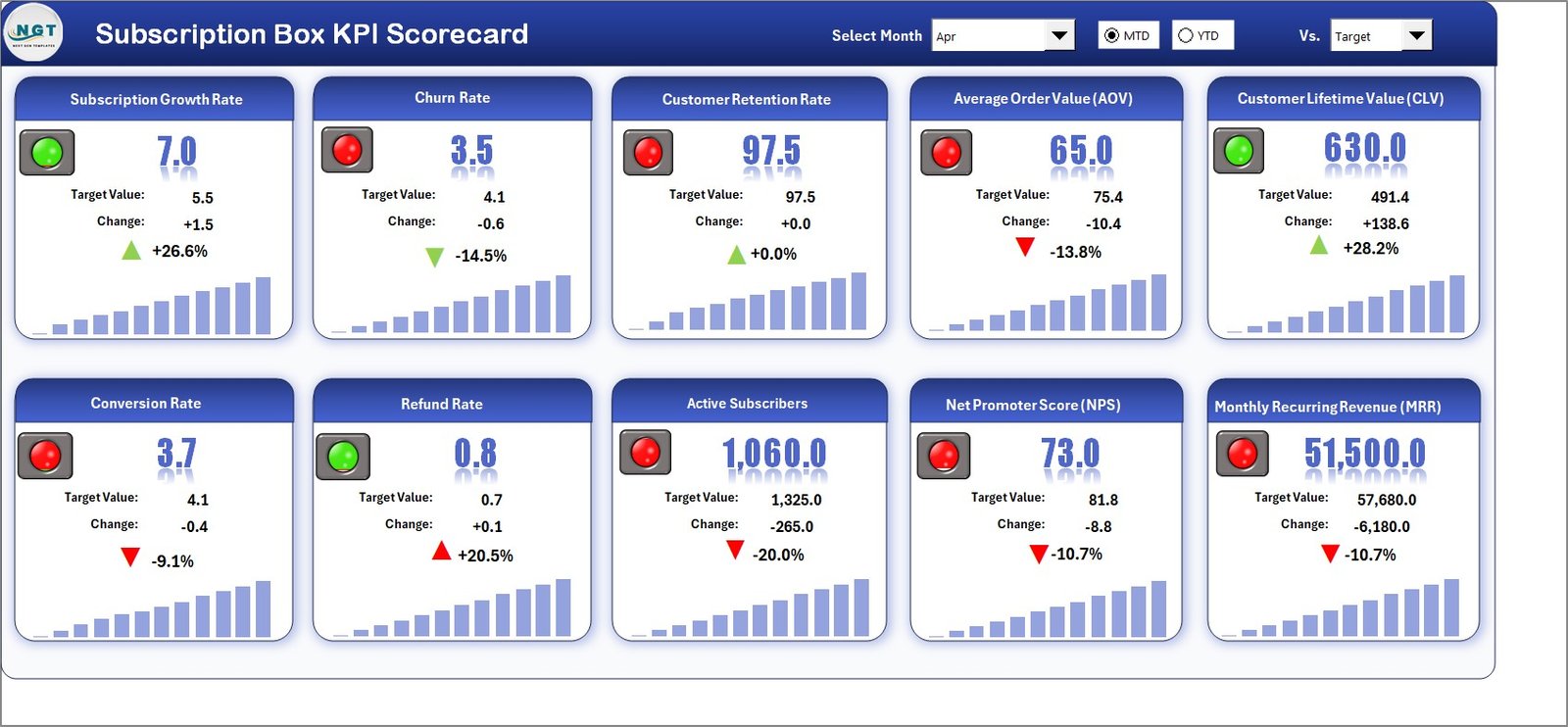 Subscription Box KPI Scorecard
Click to Buy Subscription Box KPI Scorecard in Excel
2. KPI Trend Sheet
This tab is designed for in-depth trend analysis of individual KPIs over time.
- KPI Selection: Use the dropdown in cell C3 to select a KPI seamlessly.
- Detailed KPI Info: View KPI Group, Unit of Measure, KPI Type (whether lower or upper values are desirable), formula, and a clear definition for context.
- Performance Charts: Dynamic charts display MTD and YTD trends for actual, target, and previous year’s values, providing valuable insights into KPI fluctuations.
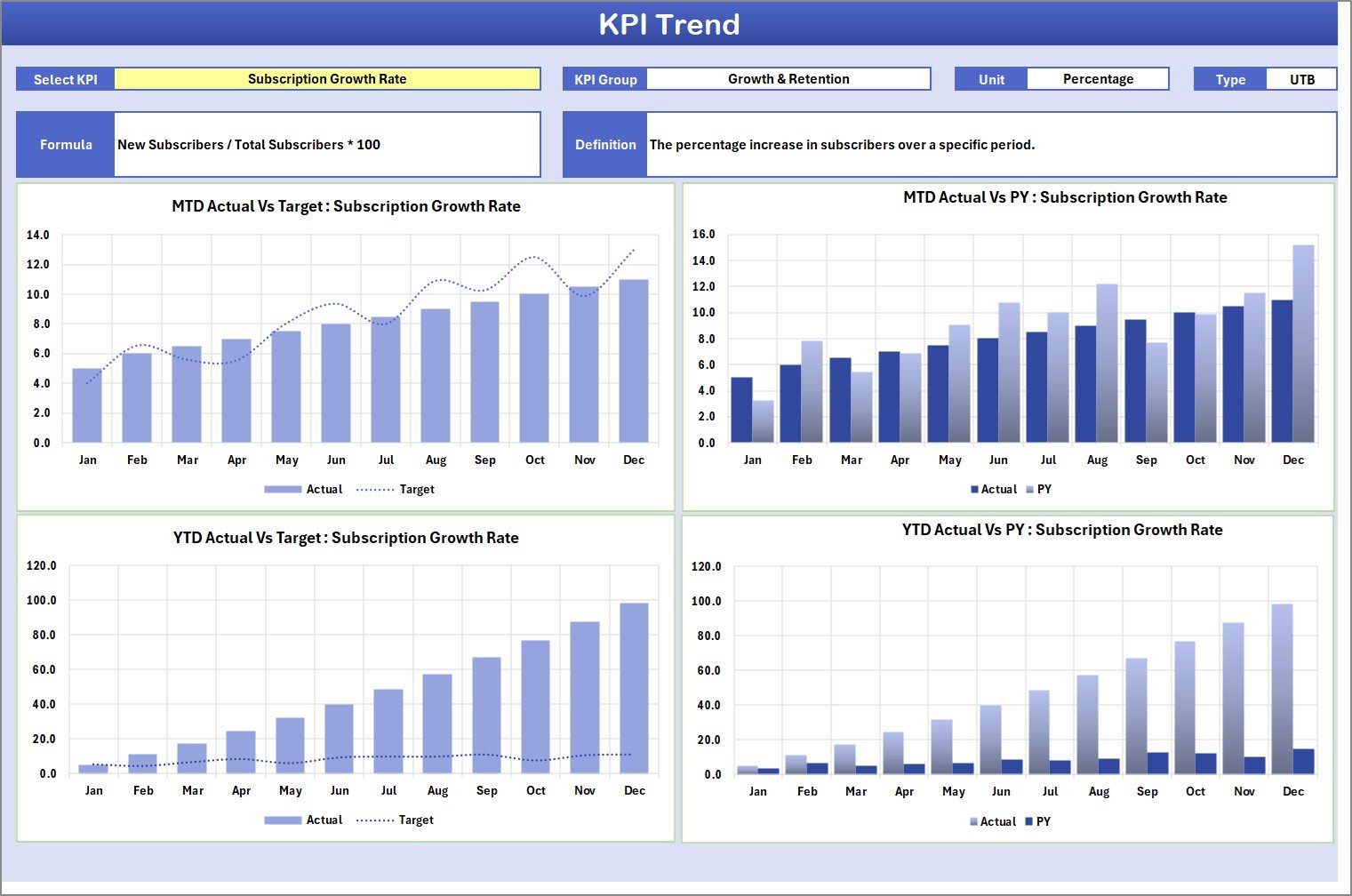 KPI Trend Sheet
Click to Buy Subscription Box KPI Scorecard in Excel
3. Input Data Sheet
The Input Data Sheet is where all KPI values are recorded and updated.
- Data Entry: Record actual achieved values, targets, and other relevant metrics for each KPI on a daily or periodic basis.
- Flexibility: Easily update or add new data points to keep the scorecard current.
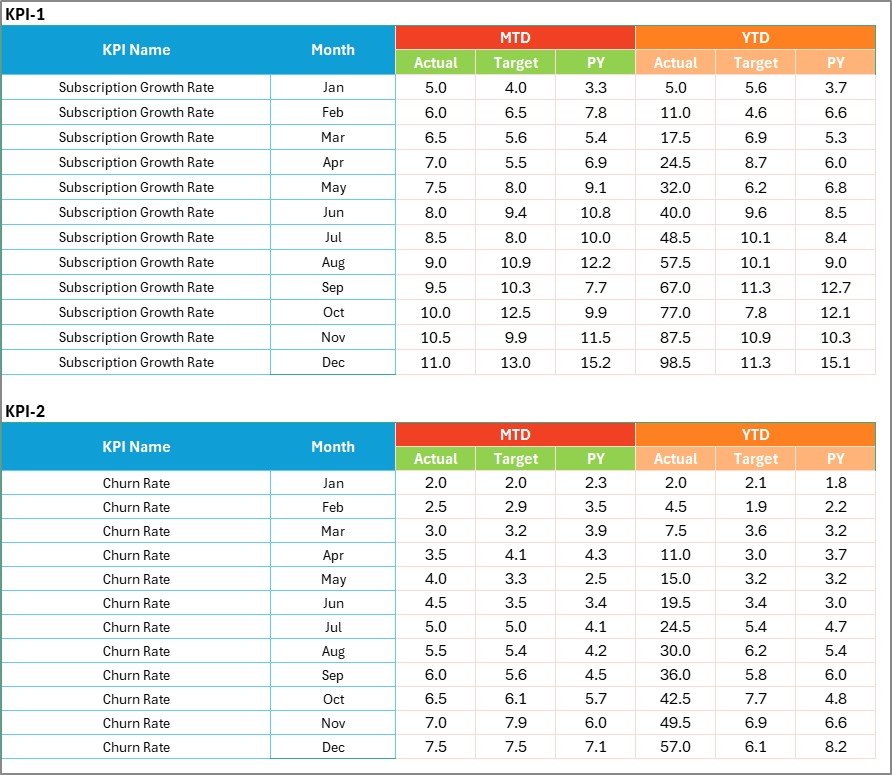 Input Data Sheet
Click to Buy Subscription Box KPI Scorecard in Excel
4. KPI Definition Sheet
Documenting the KPIs is crucial for clarity and consistent interpretation.
- Enter KPI Name, KPI Group, Unit of Measurement, Formula used, and comprehensive KPI Definitions here.
- This sheet acts as a reference point for team members to understand the purpose and calculation of each KPI.
 KPI Definition sheet tab
Click to Buy Subscription Box KPI Scorecard in Excel
Advantages of Subscription Box KPI Scorecard
- Centralized Performance Monitoring: View all essential KPIs in one place, saving time and minimizing confusion.
- Data Driven Decisions: Equipped with clear visuals and trend analyses, businesses can pivot strategies with confidence and agility.
- Customizable & Scalable: Add new KPIs or adapt the template as your subscription box business grows.
- Improved Collaboration: Define KPI meanings to keep teams aligned and informed.
- Time Efficiency: Streamlined data entry and visualization reduce effort and errors.
Opportunities for Improvement
Click to Buy Subscription Box KPI Scorecard in Excel
- Automation: Incorporating real-time data integration could enhance accuracy and update frequency.
- Mobile Compatibility: A mobile-friendly version would empower managers on the go.
- Predictive Analytics: Future versions could embed forecasting models for proactive business planning.
Best Practices
- Regular Updates: Ensure KPI data is entered timely to keep the scorecard insights relevant.
- Customize KPIs: Focus on KPIs that truly reflect your subscription box’s business goals and customer experience.
- Engage Teams: Use the KPI Definition sheet to onboard new members and keep everyone aligned.
- Review & Adjust: Periodically reassess KPIs and targets to adapt to changing business environments.
FAQs
Click to Buy Subscription Box KPI Scorecard in Excel
What is the main purpose of the Subscription Box KPI Scorecard?
It consolidates vital KPIs related to subscription box operations into an interactive dashboard for performance monitoring and strategic decision making.
Can I customize the KPIs in this template?
Yes, you can add, remove, or modify KPIs and their definitions to fit your business needs.
Is the template suitable for beginners?
Absolutely. The scorecard is designed for usability with helpful dropdown menus, clear instructions, and visual cues.
How often should I update the data?
Regular updates are recommended-monthly or MTD updates ensure that performance tracking is accurate and timely.
Conclusion
Click to Buy Subscription Box KPI Scorecard in Excel
The Subscription Box KPI Scorecard is a powerful tool to streamline KPI management, providing both macro and micro level insights into your subscription box business. With its intuitive design and real-time data visualization capabilities, it supports informed decisions that can accelerate growth and operational excellence. Whether you are a startup or an established player, leveraging this scorecard helps you stay ahead in a competitive market.
For further resources on KPI tracking and Excel dashboards, visit the Microsoft Excel Support page.
Visit our YouTube channel to watch the demo. Youtube.com/@NextGenTemplates
Click to Buy Subscription Box KPI Scorecard in Excel