Customer feedback plays a critical role in shaping products, services, and overall customer experience. However, collecting feedback alone does not create value. Organizations must review, audit, and act on feedback systematically. Without a structured audit process, valuable insights remain unused, issues repeat, and customer satisfaction declines.
That is exactly where a Customer Feedback Audit Checklist in Excel becomes a powerful solution.
This ready-to-use checklist helps organizations review customer feedback processes, track audit actions, assign ownership, and monitor progress visually. Moreover, Excel keeps the entire audit simple, transparent, and easy to manage without expensive tools.
In this detailed guide, you will learn what a Customer Feedback Audit Checklist in Excel is, why organizations need it, how it works, its advantages, best practices, and common use cases. In addition, you will find frequently asked questions at the end to help you use this checklist confidently.
Click to Purchases Customer Feedback Audit Checklist in Excel
What Is a Customer Feedback Audit Checklist in Excel?
A Customer Feedback Audit Checklist in Excel is a structured template designed to audit how an organization collects, analyzes, responds to, and improves customer feedback. It helps teams review feedback processes step by step while ensuring accountability and consistency.
Instead of reviewing feedback informally or through scattered documents, this checklist centralizes audit activities in one Excel file. As a result, teams gain clarity, control, and visibility over customer feedback management.
Because Excel supports formulas, drop-down lists, and visual indicators, this checklist works as a lightweight audit management tool that anyone can use.
Why Do Organizations Need a Customer Feedback Audit Checklist?
Customer feedback audits involve multiple departments, data sources, and follow-up actions. Without a checklist, teams miss gaps, delay corrective actions, and struggle to track improvement.
Organizations need a Customer Feedback Audit Checklist in Excel because it:
-
Standardizes customer feedback audits
-
Improves accountability and ownership
-
Tracks audit findings and actions
-
Ensures timely follow-ups
-
Improves customer experience consistently
-
Supports quality and compliance reviews
As customer expectations rise, structured feedback audits become essential.
Click to Purchases Customer Feedback Audit Checklist in Excel
How Does a Customer Feedback Audit Checklist in Excel Work?
The checklist works through a simple and structured layout. It separates summary insights from detailed audit items so teams can focus on execution rather than formatting.
This template includes two worksheets, each with a specific purpose.
What Worksheets Are Included in the Customer Feedback Audit Checklist Template?
1. Customer Feedback Audit Checklist Sheet Tab

This is the main working sheet where audit checklist items and actions are captured.
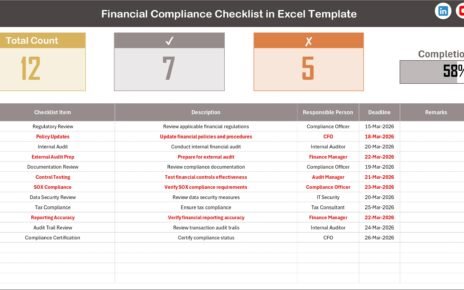
Top Section: Customer Feedback Audit Overview
At the top of the sheet, you will find a summary section that provides a quick audit snapshot.
This section includes:
-
Total Count – Total number of audit checklist items
-
Checked Count – Completed audit items
-
Crossed Count – Pending or non-compliant items
-
Progress Bar for Checked % – Visual indicator showing audit completion
Because of this overview, managers can instantly understand audit progress without reviewing each row.
Checklist Table: Audit Execution Area
Below the summary section, the checklist table captures detailed audit information.
The table includes the following columns:
-
Serial No. – Unique number for each audit item
-
Checklist Item – Customer feedback audit requirement
-
Description – Short explanation of the audit point
-
Responsible Person – Owner of the audit item
-
Deadline – Target completion date
-
Remarks – Observations or improvement notes
-
Status – Completion status using ✔ or ✘
Users simply update the Status column. Excel automatically updates counts and progress visuals.
2. List Sheet Tab
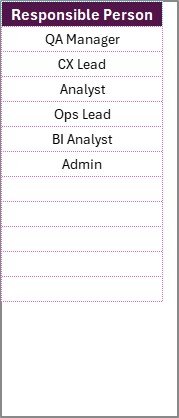
The List sheet tab supports data consistency and accuracy.
In this sheet, teams maintain a unique list of Responsible Persons. Excel then uses this list to create a drop-down menu in the main checklist.
As a result:
-
Data entry stays consistent
-
Errors reduce significantly
-
Accountability improves
-
Audit reporting becomes easier
This separation keeps the checklist professional and clean.
Click to Purchases Customer Feedback Audit Checklist in Excel
How Does the Progress Bar Help During Customer Feedback Audits?
The progress bar plays a key role in audit tracking.
Instead of scanning rows manually, users see audit progress visually. As checklist items change from ✘ to ✔, the progress bar updates automatically.
Because of this visual clarity:
-
Managers identify audit gaps early
-
Teams stay focused on completion
-
Review meetings become data-driven
-
Audit cycles close faster
Visual progress tracking always improves audit effectiveness.
Who Can Use a Customer Feedback Audit Checklist in Excel?
This checklist fits organizations of all sizes and industries.
Common users include:
-
Customer experience teams
-
Quality assurance teams
-
Internal audit teams
-
Operations managers
-
Customer support leaders
-
Small and medium businesses
-
Large enterprises
Because Excel remains widely used, teams can adopt this checklist immediately.
How Does This Checklist Improve Customer Experience?
A Customer Feedback Audit Checklist in Excel improves customer experience by creating discipline around feedback management.
First, it ensures feedback collection processes remain consistent.
Second, it tracks whether teams analyze feedback properly.
Third, it ensures follow-up actions receive ownership and deadlines.
Finally, it creates continuous improvement through regular audits.
Together, these steps turn feedback into measurable improvement.
Click to Purchases Customer Feedback Audit Checklist in Excel
Advantages of Customer Feedback Audit Checklist in Excel
Using a Customer Feedback Audit Checklist in Excel offers many advantages.
1. Structured Audit Process
The checklist ensures every feedback audit follows the same steps, improving consistency.
2. Clear Accountability
Each audit item has a responsible person, which improves follow-through.
3. Real-Time Audit Visibility
The summary section and progress bar provide instant audit status.
4. Easy Customization
Teams can easily modify checklist items based on feedback channels and policies.
5. Cost-Effective Solution
Excel removes the need for expensive audit or CX tools.
6. Improved Compliance
The checklist ensures feedback handling aligns with internal standards.
7. Better Decision-Making
Clear audit insights support data-driven improvements.
How to Use the Customer Feedback Audit Checklist in Excel Step by Step?
Follow these steps to use the checklist effectively.
Step 1: Open the Excel Template
Download and open the Customer Feedback Audit Checklist template.
Step 2: Update the List Sheet
Enter unique names of responsible persons in the List sheet tab.
Step 3: Define Audit Checklist Items
Add customer feedback audit items and short descriptions.
Step 4: Assign Owners and Deadlines
Select responsible persons from the drop-down list and define deadlines.
Step 5: Update Status Regularly
Mark audit items as ✔ or ✘ based on completion.
Step 6: Review Progress and Findings
Use the summary section to monitor audit completion and gaps.
What Areas Can This Checklist Audit?
This checklist supports audits across multiple customer feedback areas, including:
-
Feedback collection channels
-
Response time tracking
-
Complaint resolution processes
-
Customer satisfaction surveys
-
Feedback escalation procedures
-
Root cause analysis
-
Improvement action tracking
Because of its flexibility, teams can adapt it easily.
Click to Purchases Customer Feedback Audit Checklist in Excel
Best Practices for the Customer Feedback Audit Checklist in Excel
Follow these best practices to maximize value.
1. Keep Audit Items Clear and Specific
Clear audit points reduce confusion and speed up reviews.
2. Update Status Frequently
Regular updates ensure accurate audit tracking.
3. Assign One Owner per Audit Item
Single ownership improves accountability.
4. Set Realistic Deadlines
Achievable deadlines encourage timely completion.
5. Protect Formula Cells
Protect summary sections to avoid accidental edits.
6. Review Audit Results Periodically
Regular reviews help identify recurring issues.
7. Train Team Members Briefly
A short walkthrough improves checklist adoption.
Click to Purchases Customer Feedback Audit Checklist in Excel
Common Mistakes to Avoid During Customer Feedback Audits
Avoid these mistakes to ensure audit success.
-
Ignoring pending audit items
-
Using free text instead of drop-downs
-
Skipping remarks and observations
-
Delaying corrective actions
-
Treating audits as one-time activities
Avoiding these mistakes ensures continuous improvement.
How Does This Checklist Support Quality and Compliance Audits?
Quality teams and auditors require evidence, traceability, and ownership. This checklist provides all three.
Auditors can easily see:
-
What feedback processes were audited
-
Who owned each audit item
-
Completion timelines
-
Observations and improvement actions
Therefore, audit preparation becomes faster and more reliable.
Click to Purchases Customer Feedback Audit Checklist in Excel
Conclusion: Why You Need a Customer Feedback Audit Checklist in Excel
A Customer Feedback Audit Checklist in Excel transforms customer feedback reviews from informal checks into a structured, transparent, and actionable process.
With clear audit items, defined ownership, deadlines, and real-time progress tracking, organizations improve customer experience consistently. Moreover, Excel keeps the solution affordable, flexible, and easy to maintain.
If your organization wants to turn customer feedback into real improvement, this checklist is a must-have tool.
Frequently Asked Questions (FAQs)
What is a Customer Feedback Audit Checklist in Excel?
It is an Excel-based template used to audit customer feedback processes, track findings, and monitor corrective actions.
Is this checklist easy to use?
Yes, anyone with basic Excel knowledge can use it easily.
Can I customize the checklist?
Yes, you can add, remove, or modify audit items as needed.
How does the progress bar update?
The progress bar updates automatically based on ✔ and ✘ entries.
Can teams collaborate on this checklist?
Yes, teams can share the Excel file using shared drives or cloud platforms.
Does this checklist help improve customer satisfaction?
Yes, structured audits ensure feedback leads to consistent improvement.
Is this checklist suitable for small businesses?
Absolutely. Small businesses benefit greatly from organized feedback audits.
Click to Purchases Customer Feedback Audit Checklist in Excel
Visit our YouTube channel to learn step-by-step video tutorials