Managing multiple debts can quickly become overwhelming. Credit cards, personal loans, student loans, and medical bills often carry different interest rates and payment schedules. As a result, many people struggle to decide which debt to pay first and how to reduce total interest costs.
Therefore, having a structured debt repayment plan becomes essential.
The Debt Payoff Calculator Template in Excel is a powerful financial planning tool designed to help individuals organize their debts, calculate payoff schedules, and compare repayment strategies.
This Excel template automatically calculates repayment timelines using two popular methods:
-
Debt Snowball Method – Pay the smallest balance first
-
Debt Avalanche Method – Pay the highest interest rate first
Moreover, the template provides amortization schedules, payoff comparisons, and visual charts to help users understand their progress clearly.
Because Excel automates calculations and updates instantly, users can experiment with different payment strategies and find the fastest way to eliminate debt.
In this guide, we will explore the Debt Payoff Calculator Template in Excel, its structure, features, benefits, and best practices.
What is a Debt Payoff Calculator Template in Excel?
Click to Buy Debt Payoff Calculator Template in Excel
A Debt Payoff Calculator in Excel is a financial planning spreadsheet that helps individuals calculate how long it will take to pay off debts and how much interest they will pay over time.
Instead of manually calculating repayment schedules, the template automatically performs calculations when users enter debt details.
Using this tool, users can:
- List all debts in one place
- Enter balances, interest rates, and minimum payments
- Add extra monthly payments
- Compare Snowball vs Avalanche strategies
- View payoff timelines and total interest
- Track balance reduction visually
As a result, users gain complete visibility into their debt repayment plan.
Why Should You Use a Debt Payoff Calculator?
Managing debts without a clear plan can lead to:
- Paying unnecessary interest
- Missing payments
- Slow debt repayment progress
- Financial stress
However, a debt payoff calculator helps you create a structured strategy.
Key benefits include:
- Clear overview of all debts
- Faster payoff planning
- Interest savings calculations
- Visual debt reduction tracking
- Motivation through progress charts
Therefore, this Excel template becomes an excellent financial planning tool for individuals and families.
Key Features of the Debt Payoff Calculator Template in Excel
Click to Buy Debt Payoff Calculator Template in Excel
The template includes several powerful features designed to simplify debt management.
Organized Debt Input Section
Users can enter up to 8 debts with balances, interest rates, and minimum payments.
Extra Payment Allocation
Users can add extra monthly payments to accelerate debt payoff.
Snowball Method Calculation
Automatically calculates payoff schedule using the lowest balance first strategy.
Avalanche Method Calculation
Calculates repayment using the highest interest rate first strategy.
Automatic Amortization Table
Displays month-by-month balance reductions and interest calculations.
Debt Comparison Dashboard
Compares total interest and payoff timelines for both strategies.
Visual Charts
Displays debt reduction progress using graphs.
Automated Recommendation
The template recommends the best repayment strategy based on interest savings.
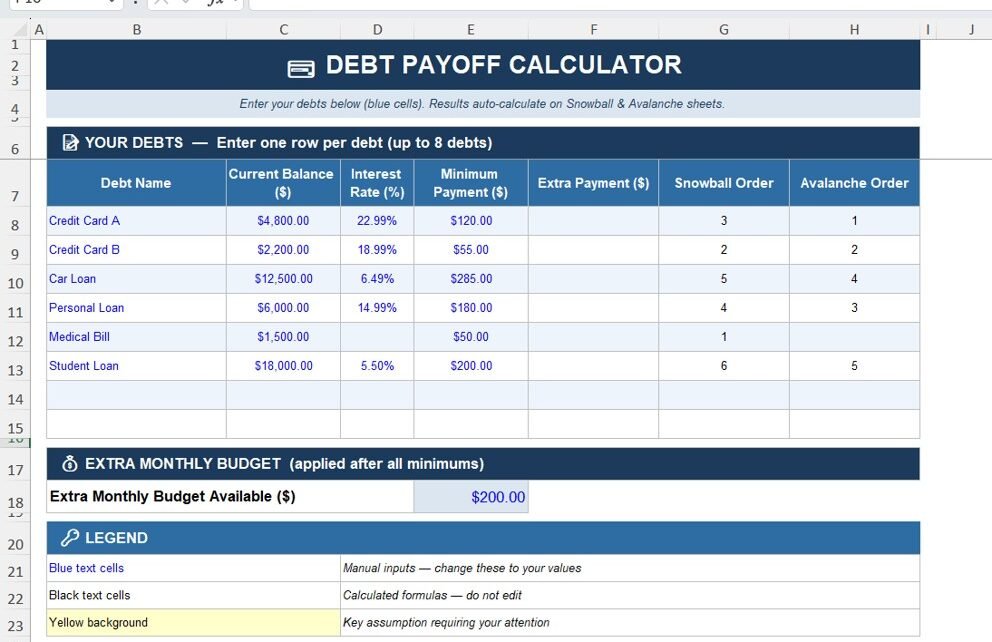
Sheet 1 – Debt Input Calculator
The first sheet serves as the main input section where users enter their debt information.
Debt Information Fields
Users can enter the following details:
- Debt Name – Name of the debt (Credit Card, Loan, etc.)
- Current Balance – Outstanding amount
- Interest Rate (%) – Annual interest rate
- Minimum Payment ($) – Minimum required payment
- Extra Payment ($) – Additional payment applied monthly
The sheet also calculates debt payoff priority for both Snowball and Avalanche methods.
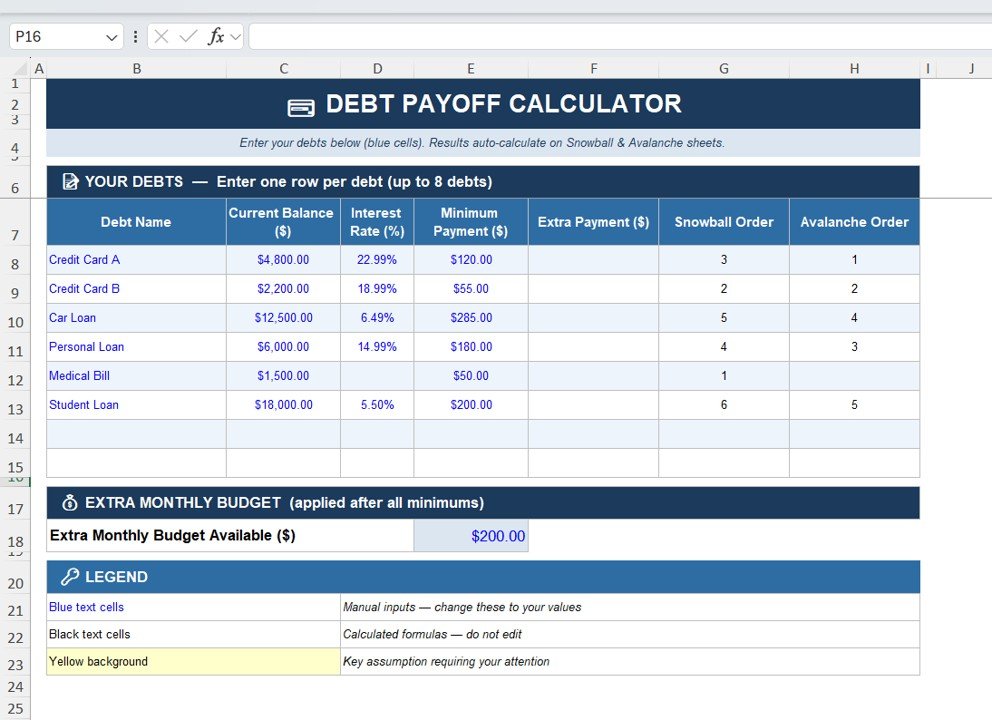
Extra Monthly Budget
Below the debt table, users can enter:
Extra Monthly Budget Available
This amount gets applied automatically to the priority debt based on the selected strategy.
For example:
- If extra budget = $200
- The calculator adds $200 to the highest priority debt payment.
As soon as a debt gets paid off, the extra payment automatically shifts to the next debt.
Click to Buy Debt Payoff Calculator Template in Excel
Sheet 2 – Debt Snowball Strategy
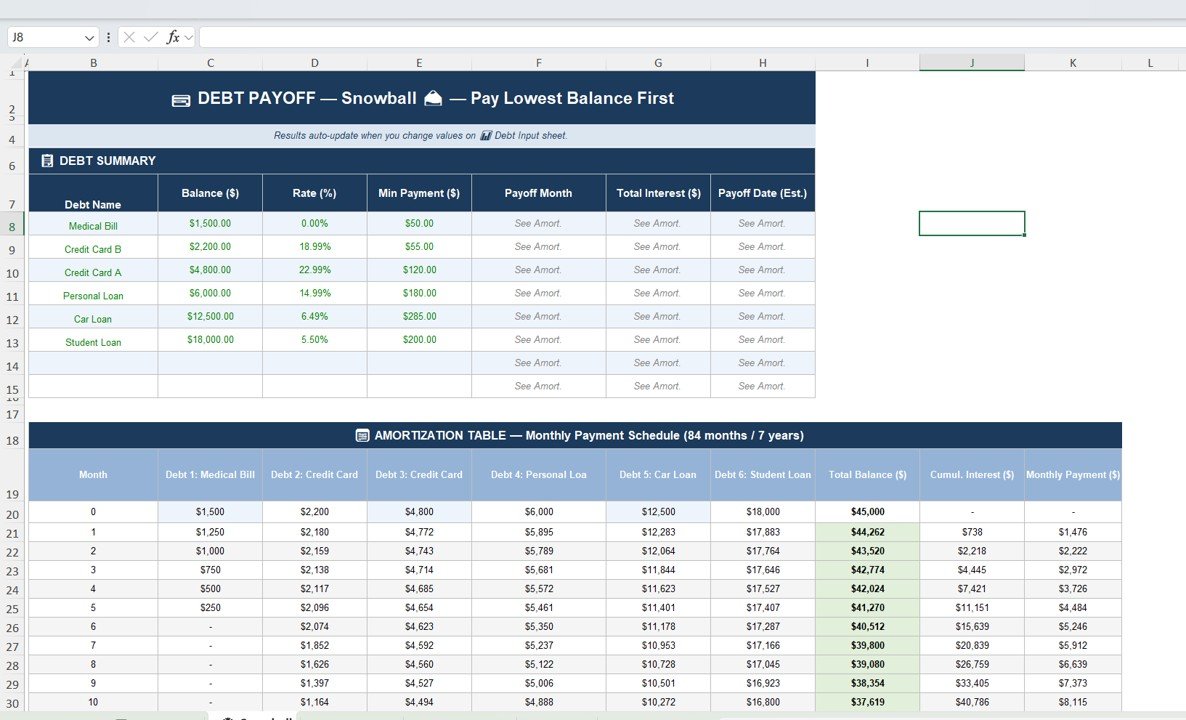
The Snowball Sheet calculates repayment using the Debt Snowball Method.
What is the Snowball Method?
The snowball method pays off debts in ascending order of balance.
Small debts get cleared first.
This creates psychological motivation and momentum.
Snowball Debt Summary
The sheet includes:
- Debt name
- Balance
- Interest rate
- Minimum payment
- Payoff month
- Total interest
- Estimated payoff date
Snowball Amortization Table
The amortization table shows:
- Monthly balances
- Interest accumulation
- Remaining balance
- Total payment progress
This allows users to track their debt payoff progress month by month.
Click to Buy Debt Payoff Calculator Template in Excel
Sheet 3 – Debt Avalanche Strategy
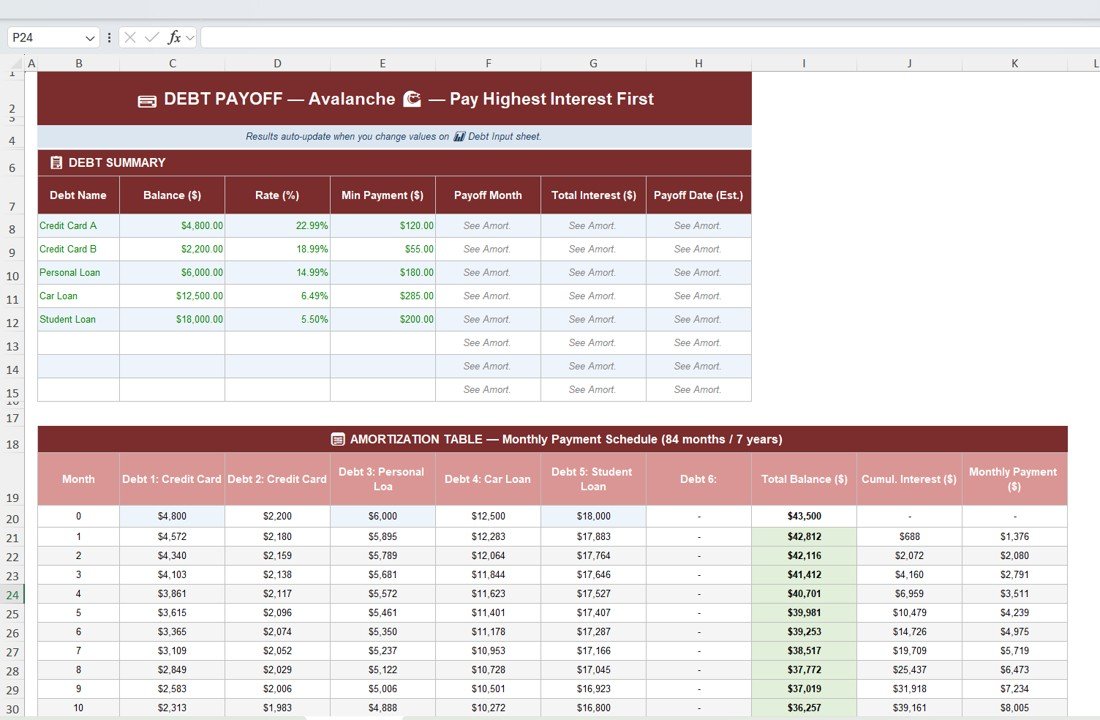
The Avalanche Sheet calculates repayment using the Debt Avalanche Method.
What is the Avalanche Method?
The avalanche method prioritizes debts with highest interest rates first.
This strategy minimizes total interest payments.
Although payoff motivation may feel slower initially, the long-term savings are higher.
Avalanche Debt Summary
The sheet calculates:
- Debt payoff month
- Total interest paid
- Estimated payoff date
Click to Buy Debt Payoff Calculator Template in Excel
Sheet 4 – Snowball vs Avalanche Comparison
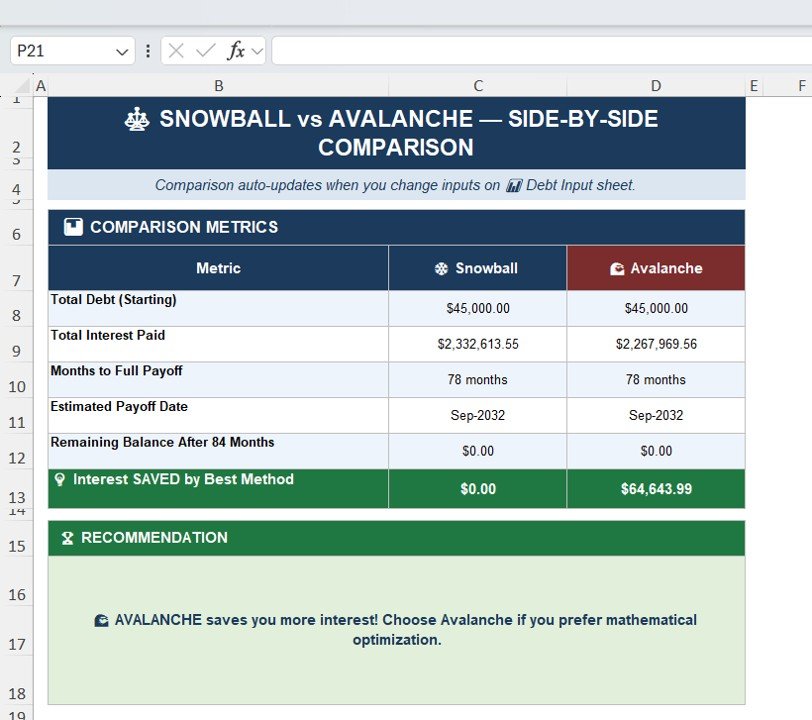
This sheet compares both repayment strategies side-by-side.
Comparison Metrics
- Total starting debt
- Total interest paid
- Months required for payoff
- Estimated payoff date
- Remaining balance
The sheet also calculates interest savings.
Additionally, the template automatically recommends the best strategy.
Click to Buy Debt Payoff Calculator Template in Excel
Sheet 5 – Debt Payoff Progress Chart
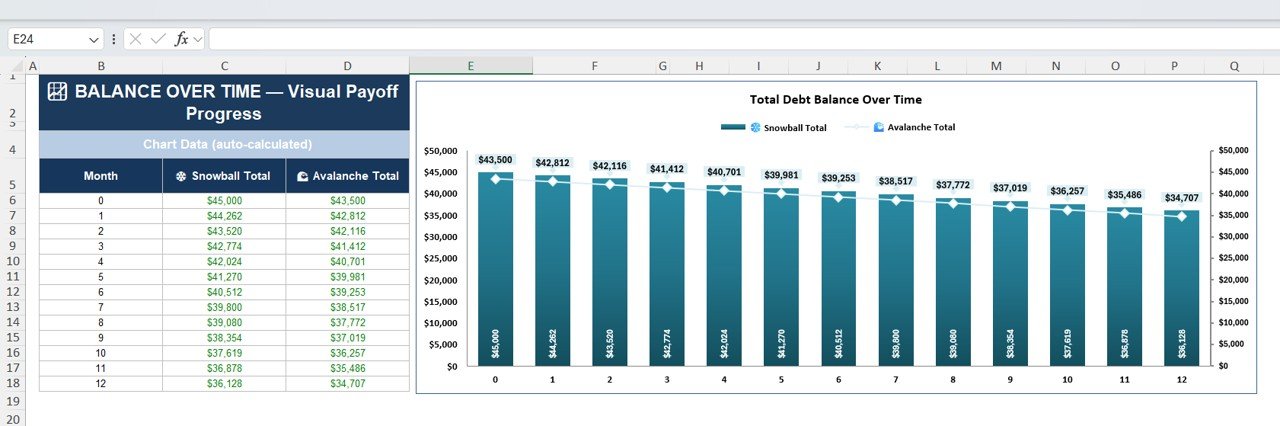
The final sheet displays a visual chart showing balance reduction over time.
The chart compares:
- Snowball total balance
- Avalanche total balance
Users can clearly see how quickly their debt decreases over time.
This visual representation helps maintain motivation during the repayment journey.
Click to Buy Debt Payoff Calculator Template in Excel
Advantages of the Debt Payoff Calculator Template
Using this template provides several financial benefits.
Organized Debt Tracking
All debts appear in a single structured worksheet.
Faster Debt Payoff Planning
Users can create clear repayment strategies.
Interest Savings Analysis
The calculator identifies the strategy that saves the most interest.
Financial Awareness
Users gain complete visibility into their debt situation.
Motivation Through Visual Progress
Charts help users track progress over time.
Flexible Customization
Users can add or remove debts easily.
Opportunities for Improvement
Click to Buy Debt Payoff Calculator Template in Excel
Although the template provides powerful functionality, users can enhance it further.
Possible improvements include:
- Add payment reminders
- Track credit score impact
- Add loan payoff milestones
- Include debt-to-income ratio tracking
- Add financial goal planning dashboard
These enhancements can turn the template into a complete personal finance management tool.
Best Practices for Using the Debt Payoff Calculator
Always Pay Minimum Payments
Ensure minimum payments are always paid to avoid penalties.
Allocate Extra Payments Wisely
Use extra funds to accelerate priority debts.
Update Balances Monthly
Update balances regularly to track accurate progress.
Avoid Taking New Debt
Focus on eliminating existing debt first.
Choose Strategy That Fits Your Psychology
Some people prefer motivation (Snowball), others prefer efficiency (Avalanche).
Conclusion
Click to Buy Debt Payoff Calculator Template in Excel
The Debt Payoff Calculator Template in Excel is an excellent tool for individuals who want to take control of their finances.
By organizing debts, calculating payoff schedules, and comparing repayment strategies, this template helps users create a clear path toward financial freedom.
With features like Snowball and Avalanche strategies, amortization schedules, comparison dashboards, and visual charts, the template simplifies debt management significantly.
Therefore, anyone serious about eliminating debt faster should consider using a structured debt payoff calculator like this Excel template.
Frequently Asked Questions (FAQs)
What is the Debt Snowball method?
The Snowball method pays off the smallest debt first to create quick wins and motivation.
What is the Debt Avalanche method?
The Avalanche method prioritizes debts with the highest interest rate first to minimize total interest.
Which method is better?
Avalanche saves more interest, but Snowball provides stronger psychological motivation.
Can I customize this Excel template?
Yes. You can add debts, change payments, and modify interest rates.
Is Excel good for financial planning?
Yes. Excel provides powerful calculations, charts, and automation for personal finance planning.
Visit our YouTube channel to learn step-by-step video tutorials
Youtube.com/@NeotechNavigators
3>Watch the step-by-step video tutorial:
Click to Buy Debt Payoff Calculator Template in Excel