Airbnb Host Dashboard in Excel is a ready-to-use interactive analytical tool that helps Airbnb hosts and property managers monitor their hosting business performance using dynamic charts, KPI indicators, and interactive slicers. Managing multiple Airbnb properties requires constant tracking of revenue, host payouts, guest satisfaction, booking patterns, and location-level performance. When this data is scattered across spreadsheets, emails, and platform reports, making informed decisions becomes nearly impossible.
This is exactly where the Airbnb Host Dashboard in Excel provides a game-changing solution. The dashboard consolidates all your hosting data into one centralized reporting system with 5 interactive analytical pages, 5 KPI cards, and multiple chart-based visualizations that update automatically when you refresh the underlying data. Whether you host a cozy studio apartment or manage a portfolio of vacation properties across multiple cities, this template adapts to your needs.
Instead of manually calculating revenue trends or guest rating averages, the dashboard does all the heavy lifting through pivot tables and pivot charts. Simply enter your booking records in the Data Sheet, click Refresh All, and watch every chart, KPI card, and analysis page update instantly. This makes performance monitoring structured, visual, and incredibly efficient.
Key Features of Airbnb Host Dashboard in Excel
The Airbnb Host Dashboard in Excel is packed with features designed to give Airbnb hosts complete visibility into their business performance. Here are the standout capabilities:
- 5 Interactive Dashboard Pages — Overview, Property Analysis, Booking Trends, Location Insights, and Revenue Analysis provide comprehensive multi-angle analytics.
- 5 KPI Cards on Overview — Total Revenue, Total Host Payout, Total Records, Avg. Guest Rating, and Total Nights displayed as prominent visual indicators.
- Dynamic Slicers — Filter the entire dashboard by property type, location, booking source, month, year, and superhost status with one click.
- Auto-Refreshing Pivot Charts — All visualizations are powered by pivot tables in the Support Sheet and refresh automatically with new data.
- Location-Based Insights — Compare guest ratings, nightly rates, and cancellation trends across all your Airbnb locations.
- Revenue Breakdown — Analyze revenue by superhost status, service fees by booking source, and instant book impact on bookings.
- Structured Data Sheet — Clean, organized data entry format that feeds all dashboard calculations.
- Hidden Support Sheet — Contains all pivot tables that drive the dashboard dynamically. Keep it hidden for a cleaner user experience.
Dashboard Pages Explained
1. Overview Page — Main Airbnb Analytics Dashboard
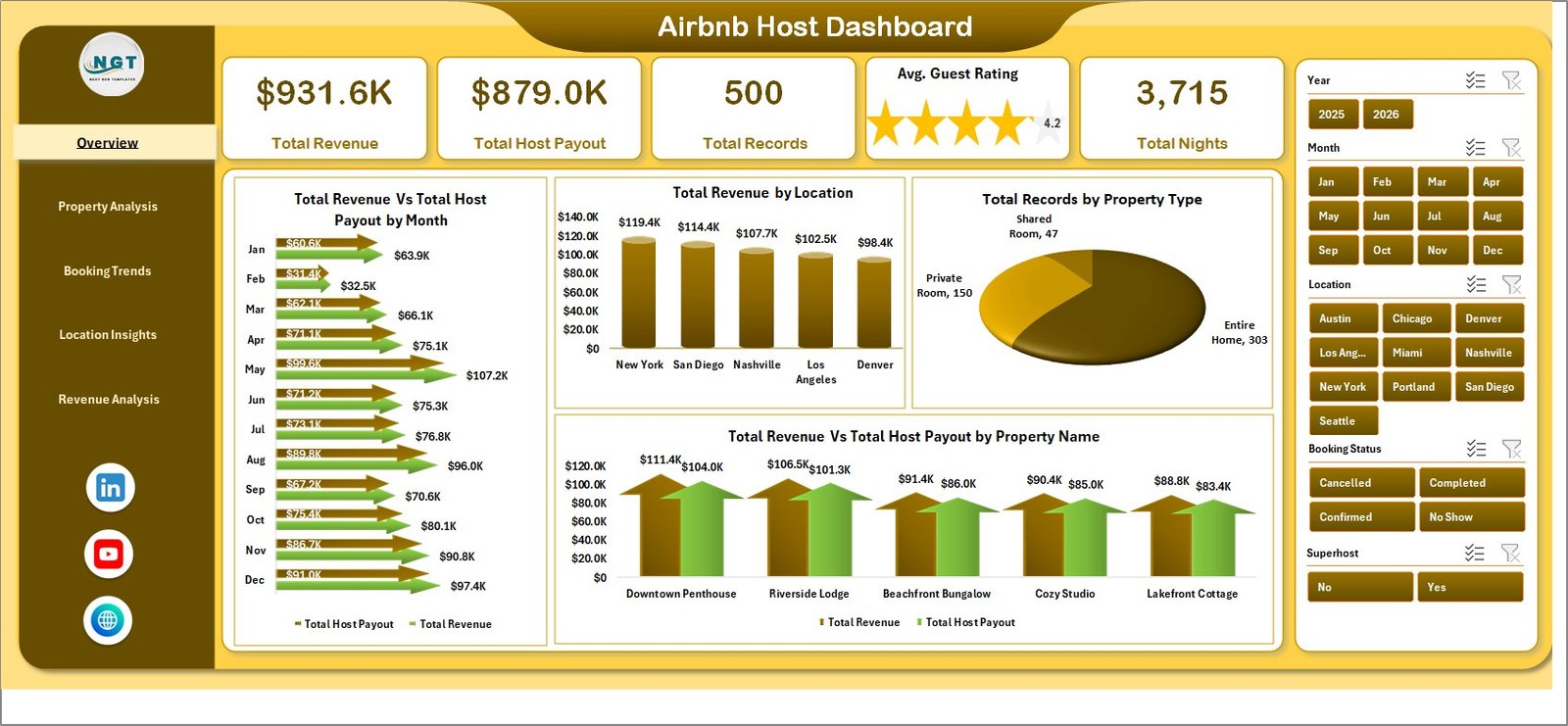
Airbnb Host DashboardThe Overview Page serves as the command center for your Airbnb hosting analytics. At the top, 5 KPI cards display your most critical metrics: Total Revenue, Total Host Payout, Total Records, Avg. Guest Rating, and Total Nights. Below these cards, interactive charts provide deeper insights.
The charts on this page include Total Revenue Vs Total Host Payout by Month which helps you track monthly financial performance, Total Revenue by Location showing which cities generate the most income, Total Records by Property Type revealing which property categories attract the most bookings, and Total Revenue Vs Total Host Payout by Property Name for individual property-level comparison. Multiple slicers on the right side allow you to filter all these visualizations simultaneously.
2. Property Analysis Page
 Property Analysis
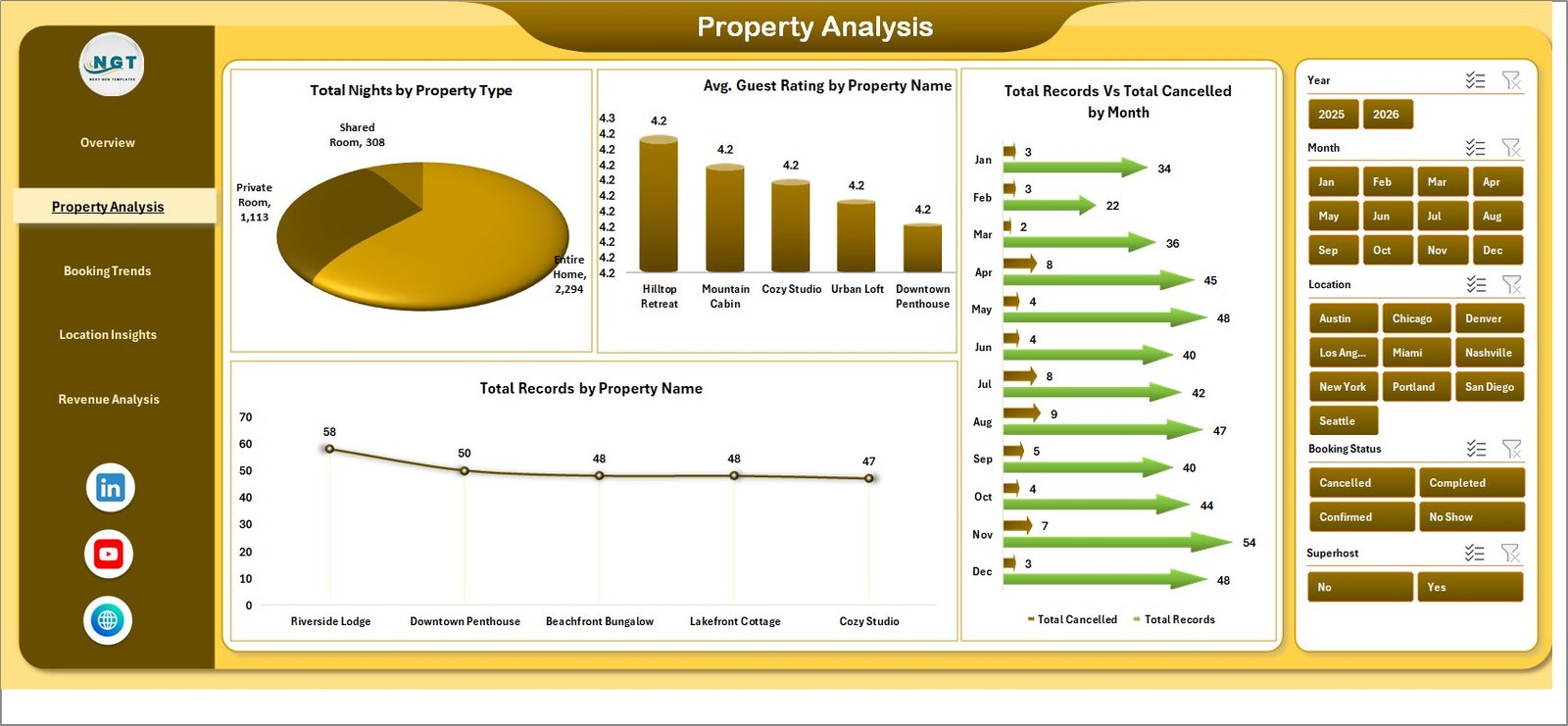
The Property Analysis page dives deeper into property-level performance metrics. Charts on this page analyze Total Nights by Property Type showing which property categories have the highest occupancy, Avg. Guest Rating by Property Name helping you identify your best-rated listings, Total Records Vs Total Cancelled by Month revealing cancellation trends over time, and Total Records by Property Name showing booking volume distribution across your portfolio. These insights are essential for hosts who want to understand which properties deliver the best guest satisfaction and revenue performance.
3. Booking Trends Page
 Booking Trends
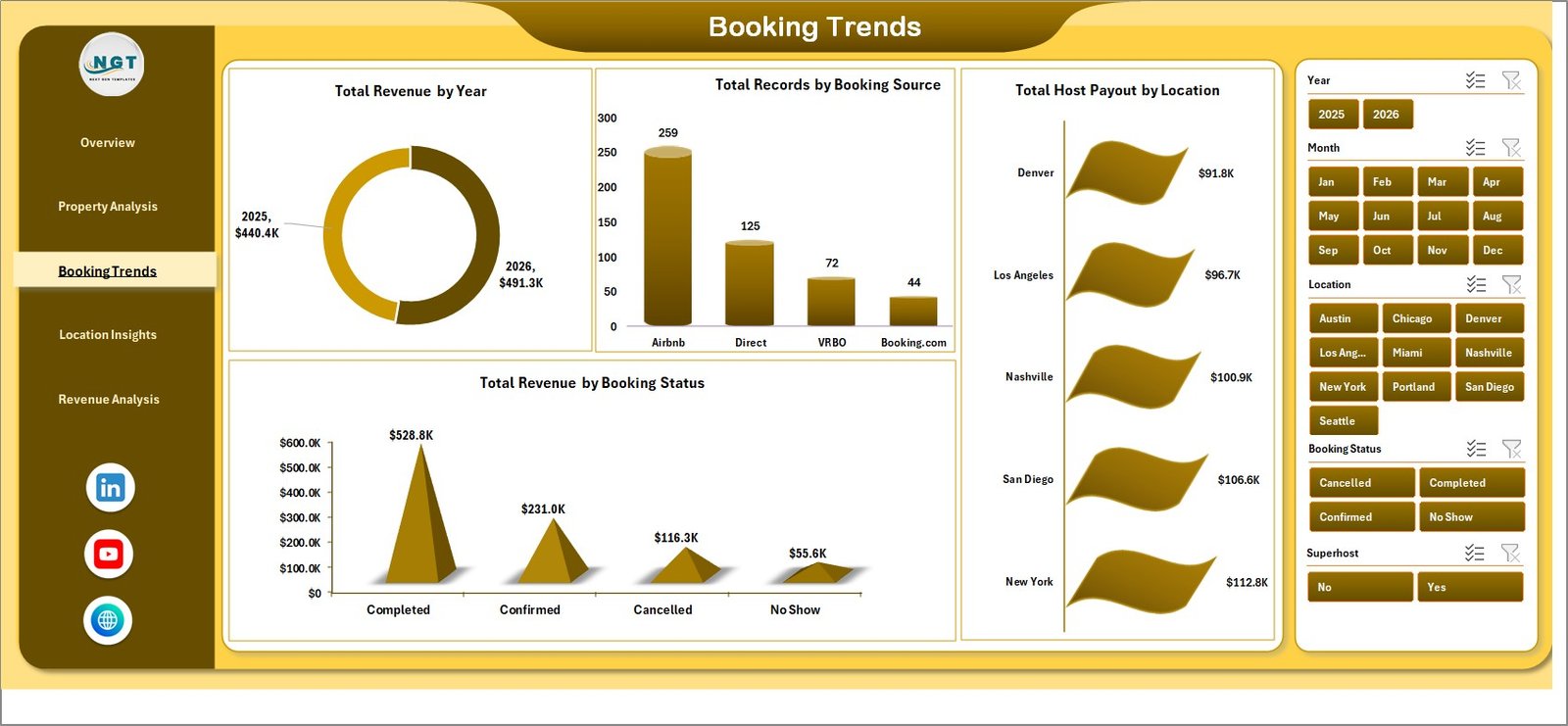
Understanding booking patterns is critical for Airbnb hosts who want to optimize their marketing and pricing strategies. This page presents Total Revenue by Year for long-term growth tracking, Total Records by Booking Source showing which channels drive the most bookings, Total Host Payout by Location comparing host earnings across cities, and Total Revenue by Booking Status helping you understand the financial impact of confirmed, cancelled, and pending bookings. These trend insights enable data-driven decisions about where to invest marketing efforts and how to adjust pricing strategies.
4. Location Insights Page
 Location Insights
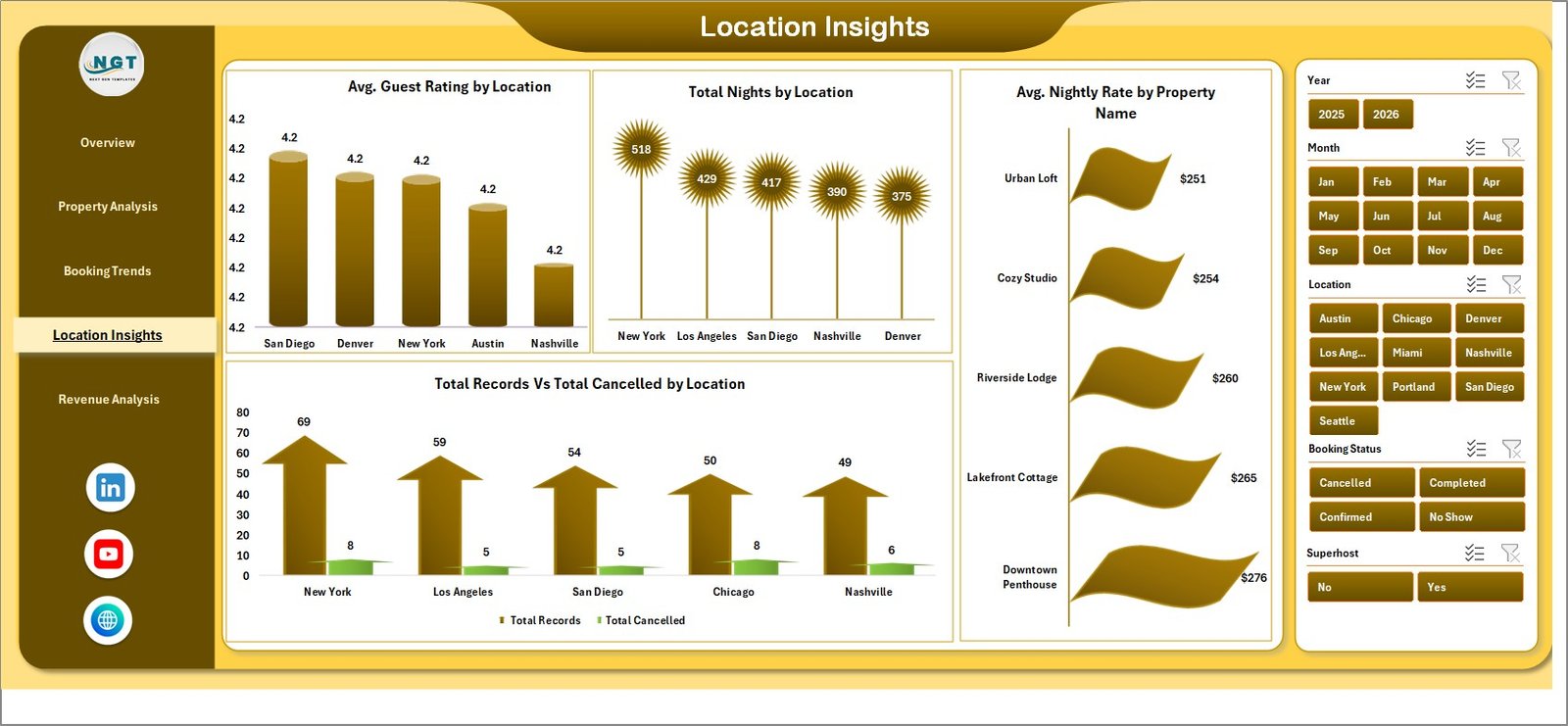
For hosts managing properties across multiple locations, this page delivers essential geographic performance data. The charts include Avg. Guest Rating by Location to identify which areas have the happiest guests, Total Nights by Location showing demand concentration, Avg. Nightly Rate by Property Name for pricing comparison, and Total Records Vs Total Cancelled by Location revealing which areas experience higher cancellation rates. Location-based analytics help hosts decide where to expand their portfolio and where to improve service quality.
5. Revenue Analysis Page
 Revenue Analysis
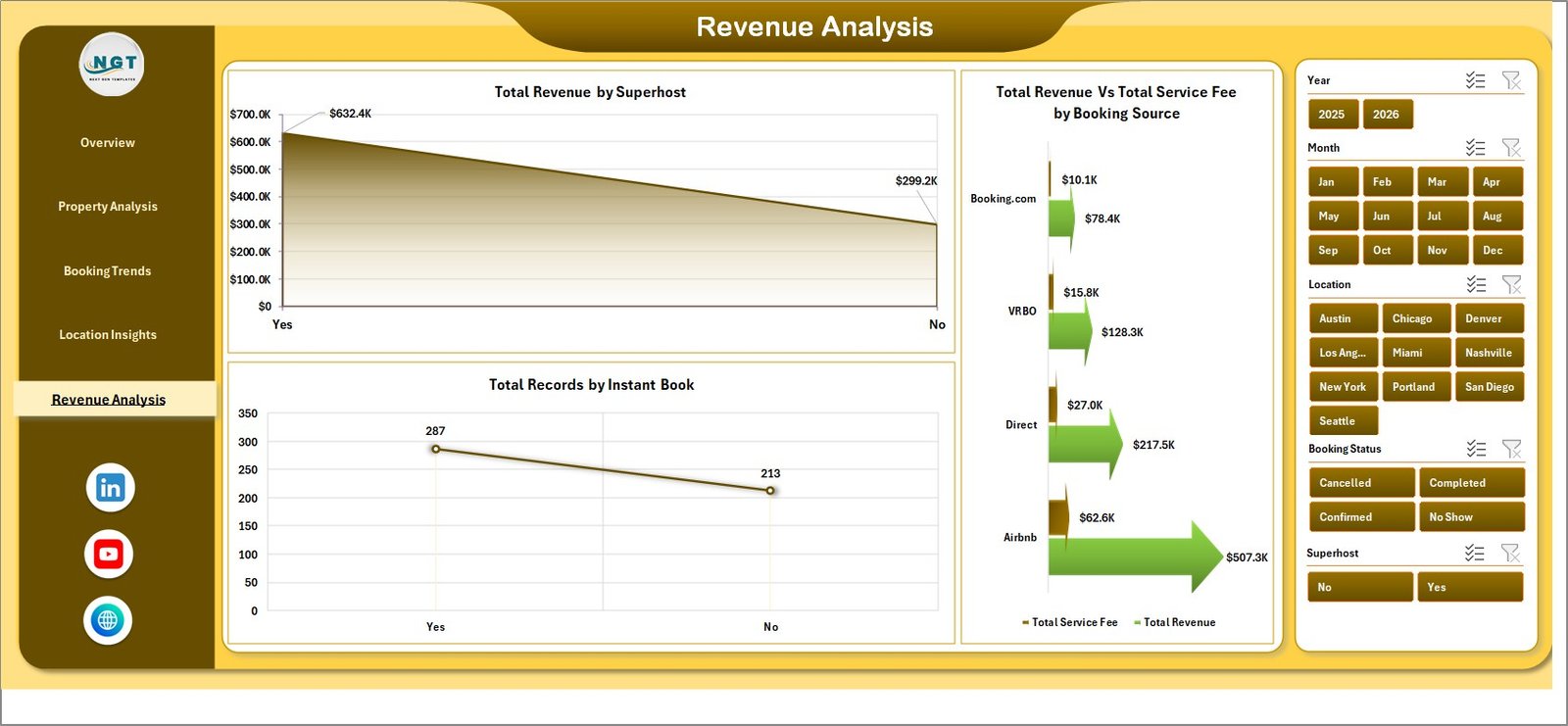
The Revenue Analysis page provides a focused breakdown of your Airbnb financial performance. Charts on this page include Total Revenue by Superhost showing how superhost status impacts earnings, Total Revenue Vs Total Service Fee by Booking Source comparing net income across different booking channels, and Total Records by Instant Book analyzing whether instant booking availability affects booking volume. These financial insights are crucial for hosts who want to maximize their revenue per property and optimize their hosting strategy.
6. Data Sheet Tab
 Data Sheet Tab
The Data Sheet is where all your Airbnb booking records are stored. It follows a structured format with columns for property details, booking information, revenue figures, guest ratings, and location data. Simply replace the sample data with your own records following the same column structure. All dashboard pages read from this sheet and update dynamically after a data refresh.
7. Support Sheet Tab
 Support Sheet Tab
The Support Sheet contains multiple pivot tables that serve as the calculation engine for the entire dashboard. When you go to the Data tab in the Excel Ribbon and click Refresh All, these pivot tables recalculate based on your updated data, and all connected charts across every dashboard page update automatically. You can keep this sheet hidden for a cleaner dashboard experience.
Advantages of Airbnb Host Dashboard in Excel
The Airbnb Host Dashboard in Excel offers several compelling advantages for hosts and property managers. First, it provides complete visibility into your hosting business by consolidating revenue, occupancy, ratings, and booking data into one location. Second, the interactive slicers enable instant filtering without modifying any formulas, making it easy to analyze specific time periods, locations, or property types. Third, the pivot table architecture ensures that adding new data is as simple as pasting records and clicking refresh. Fourth, the dashboard supports multi-property analysis, making it suitable for both individual hosts and large portfolio managers. Finally, the template requires no VBA or macros, so it works seamlessly in standard Excel without security prompts.
Opportunities for Improvement
While the dashboard provides excellent analytical coverage, there are areas where hosts can extend its capabilities. Adding a guest review sentiment analysis column could help track qualitative feedback alongside quantitative ratings. Incorporating cleaning cost and maintenance expense tracking would provide a more complete profitability picture. Hosts managing properties across countries could benefit from adding currency conversion logic. Additionally, integrating seasonal pricing multipliers into the revenue analysis could help predict future earnings more accurately.
Best Practices for Using the Airbnb Host Dashboard
To get the most value from this dashboard, follow these best practices. Update your booking data weekly or bi-weekly to maintain current analytics. Use the slicers to compare month-over-month performance and identify trends early. Pay special attention to the cancellation trends on the Property Analysis page to proactively address booking policy issues. Review the Location Insights page quarterly to evaluate whether certain locations need pricing adjustments or service improvements. Finally, use the Revenue Analysis page to assess whether pursuing superhost status is financially worthwhile for your specific portfolio.
Explore Relevant Templates
If you are looking for additional Airbnb and rental analytics tools, explore these related templates from NextGenTemplates:
- Airbnb-style Rentals Dashboard in Excel — Comprehensive booking and occupancy analytics for rental portfolio managers.
- Airbnb-style Rentals Dashboard in Power BI — Advanced Power BI version with interactive visuals and DAX-powered measures.
- Vacation Rentals KPI Dashboard in Power BI — KPI scorecard tracking MTD, YTD, Target vs Actual for vacation rental businesses.
Browse the full collection of Excel Dashboard Templates at NextGenTemplates.com.
Frequently Asked Questions
What is the best Excel dashboard for Airbnb hosts?
The Airbnb Host Dashboard in Excel is one of the best Excel dashboard templates for Airbnb hosts. It tracks 5 key performance indicators across 5 interactive analytical pages, covering revenue, property performance, booking trends, location insights, and financial analysis. The dashboard updates automatically when you refresh pivot tables after entering new data.
How do I track Airbnb hosting performance in Excel?
You can track Airbnb hosting performance in Excel by using the Airbnb Host Dashboard template. Enter your booking records in the structured Data Sheet, then click Refresh All in the Data tab. The dashboard automatically calculates and displays revenue trends, guest ratings, property comparisons, and location-based analytics across 5 interactive pages.
Can I analyze multiple Airbnb properties in one dashboard?
Yes. The Airbnb Host Dashboard in Excel is designed to handle multiple properties across different locations. Use the built-in slicers to filter by property name, property type, or location. Each dashboard page provides property-level breakdowns so you can compare performance across your entire hosting portfolio.
Do I need VBA or macros to use this Airbnb dashboard?
No. The Airbnb Host Dashboard in Excel uses only standard pivot tables and pivot charts. There are no VBA macros involved, so the file works in any version of Microsoft Excel without requiring you to enable macros or adjust security settings.
What metrics does this Airbnb Host Dashboard track?
The dashboard tracks Total Revenue, Total Host Payout, Total Records, Average Guest Rating, Total Nights, revenue by location, revenue by property name, booking source distribution, cancellation trends, superhost revenue impact, nightly rate comparisons, and service fee analysis across 5 dedicated analytical pages.
Is this dashboard suitable for Vrbo and Booking.com hosts?
Absolutely. While the dashboard uses Airbnb-centric terminology, the underlying data structure supports any short-term rental platform. Hosts using Vrbo, Booking.com, or any other rental platform can enter their data in the same format and get identical analytical functionality.
Conclusion
The Airbnb Host Dashboard in Excel is an essential tool for any serious Airbnb host or property manager who wants to make data-driven decisions. With 5 interactive analytical pages, dynamic KPI cards, and auto-refreshing pivot charts, this dashboard transforms raw booking data into actionable insights that drive revenue growth and operational efficiency. Whether you manage one listing or a multi-city portfolio, this template gives you the visibility and control you need to succeed in the competitive short-term rental market.
Click here to Purchase Airbnb Host Dashboard in Excel
For more Excel tutorials and dashboard walkthroughs, visit our YouTube channel: