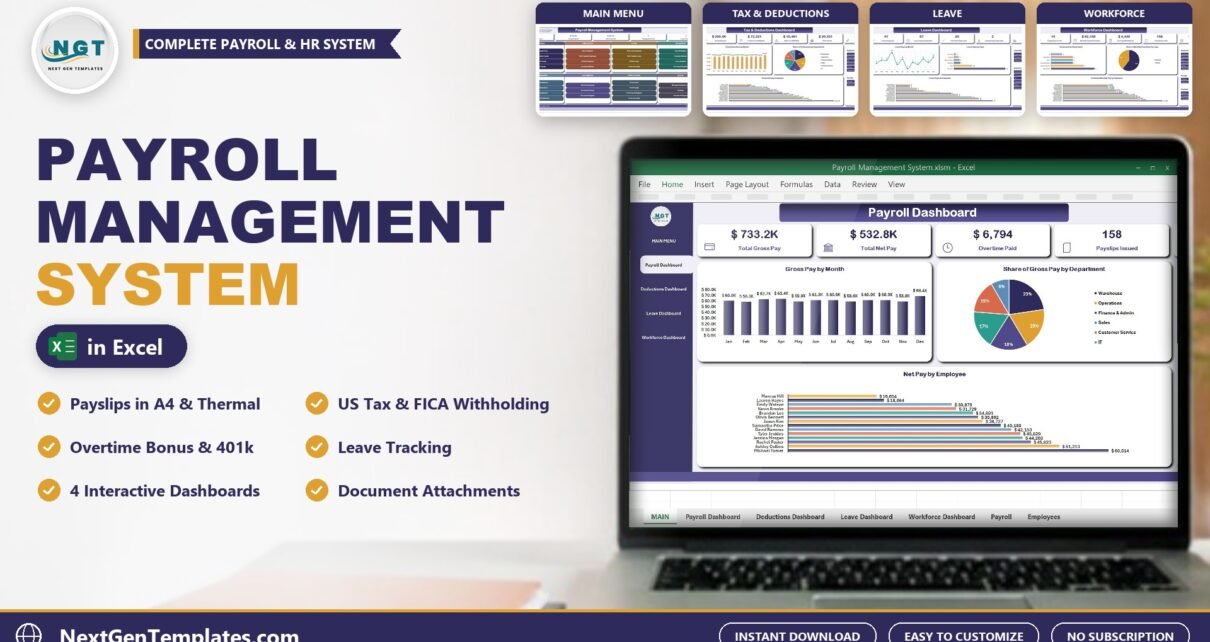
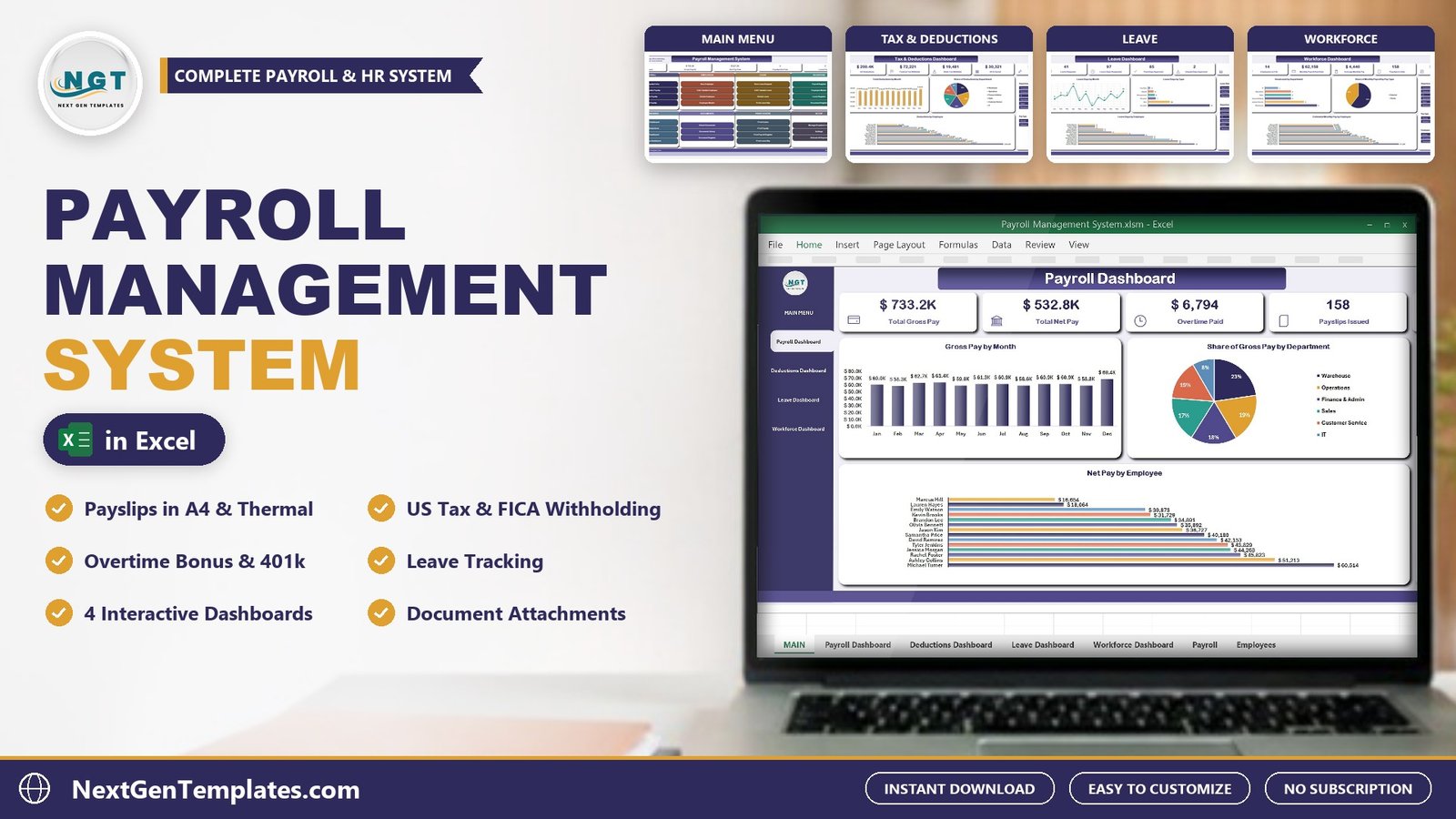
The Payroll Management System in Excel is a macro-enabled workbook that runs monthly payroll for a small business from one file: payslips with overtime, bonus and US tax withholding, a payroll register, an employee master, a leave register and document attachments. It has 4 pivot dashboards, 8 VBA forms and 3 printable documents that come out at A4, 4 inch and 3 inch. It ships with 158 sample payslips across 12 pay runs, 14 employees and 41 leave requests, so every chart is populated the first time you open it.
Watch the Payroll Management System in Excel VBA walkthrough
A blank grid from a search for an excel payroll template gives you columns and nothing else. You still have to build the entry form, the overtime rule, the deductions, the printable payslip and the reports. This workbook has all of that built, so it works as a ready payroll system in Excel and as a payroll template excel users can run on day one, and it keeps every record on your own PC. If you have been comparing payroll management software, this is what the same jobs look like inside Excel, without a monthly fee.
What the Payroll Management System in Excel Does
Everything goes in through a checked form, so nobody types straight into a data sheet. The main jobs are:
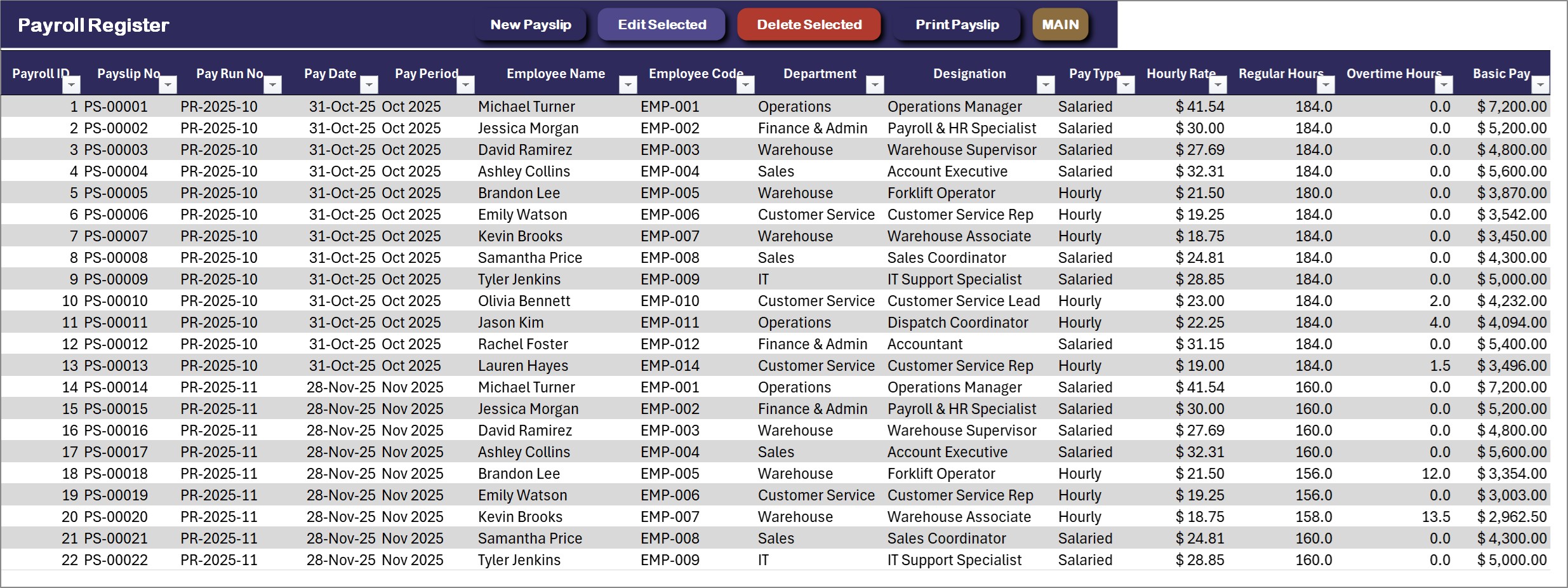
- Payslips: the New Payslip Entry form has three tabs. Pick the employee, enter regular and overtime hours, add a bonus or allowances, choose the payment mode and save. Each payslip gets a PS- number inside a PR- pay run.
- Pay and deductions: overtime is paid at 1.5 times the hourly rate. Federal and state income tax come from the percentages kept on each employee, with Social Security at 6.2%, Medicare at 1.45%, a 401k contribution and health insurance. Net pay and employer cost are worked out for you.
- Printing: print the payslip for the employee, the Payroll Register for a pay run and the Leave Approval Slip, at A4, 4 inch or 3 inch.
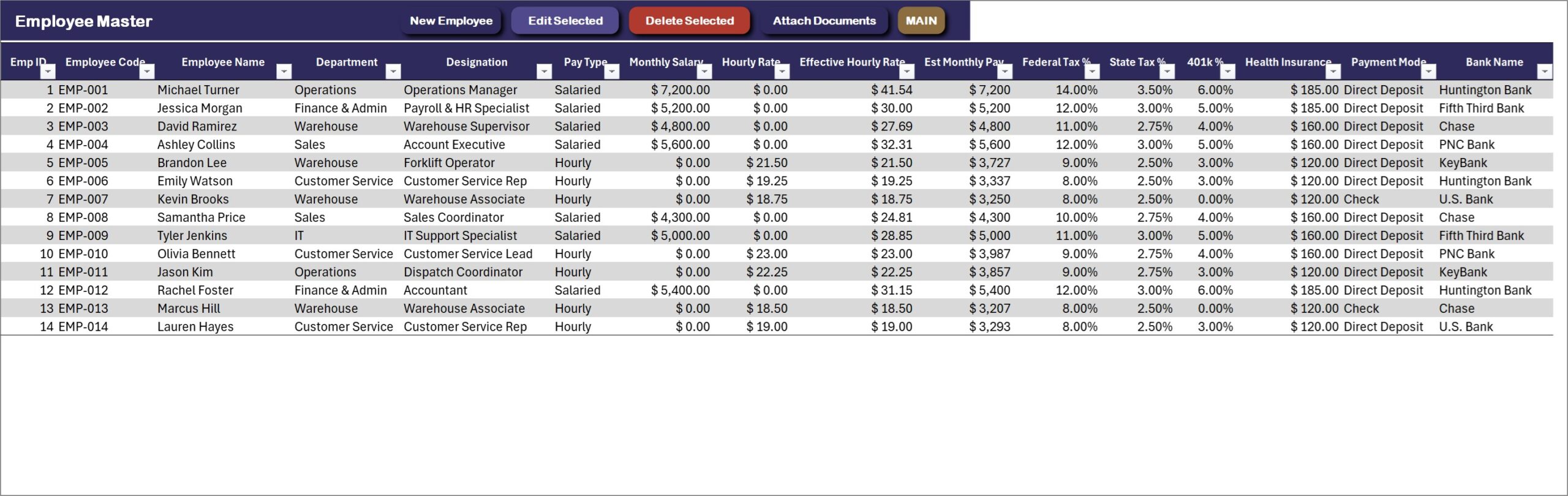
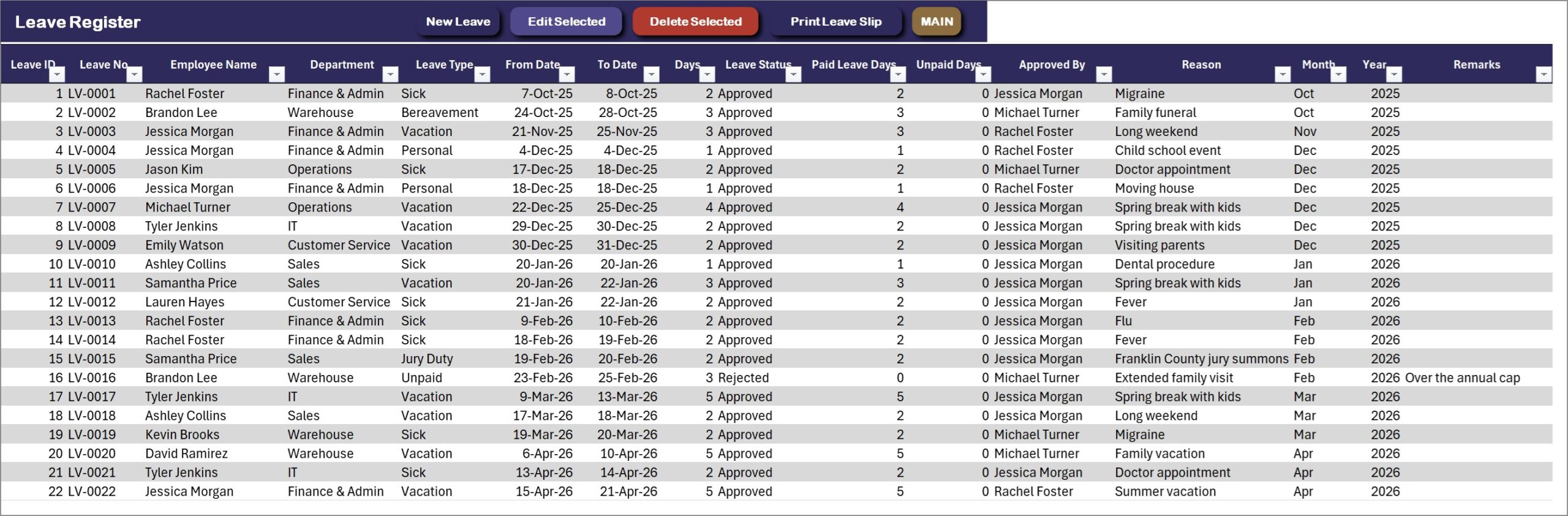
- Employees and leave: an Employee Master with pay settings and bank details, and a Leave Register that counts working days without weekends and splits paid and unpaid days.
- Documents: attach a W-4, I-9, offer letter or timesheet to a person, a payslip or a leave request and open it again in one click.
You can see every screen in the full product listing.
Dashboard Pages and Sheets Explained
MAIN menu
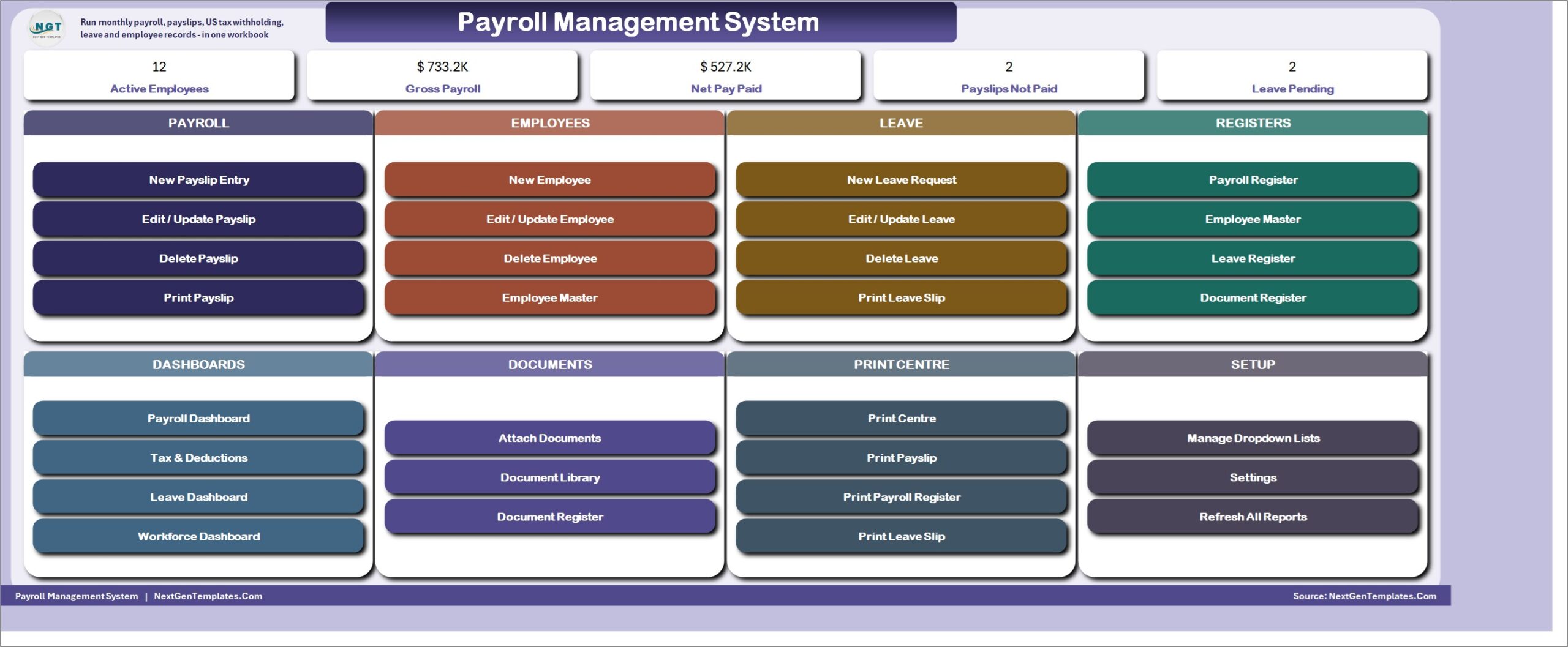
The file opens on a menu with five live KPI cards (Active Employees, Gross Payroll, Net Pay Paid, Payslips Not Paid and Leave Pending) and eight cards of buttons: Payroll, Employees, Leave, Registers, Dashboards, Documents, Print Centre and Setup.
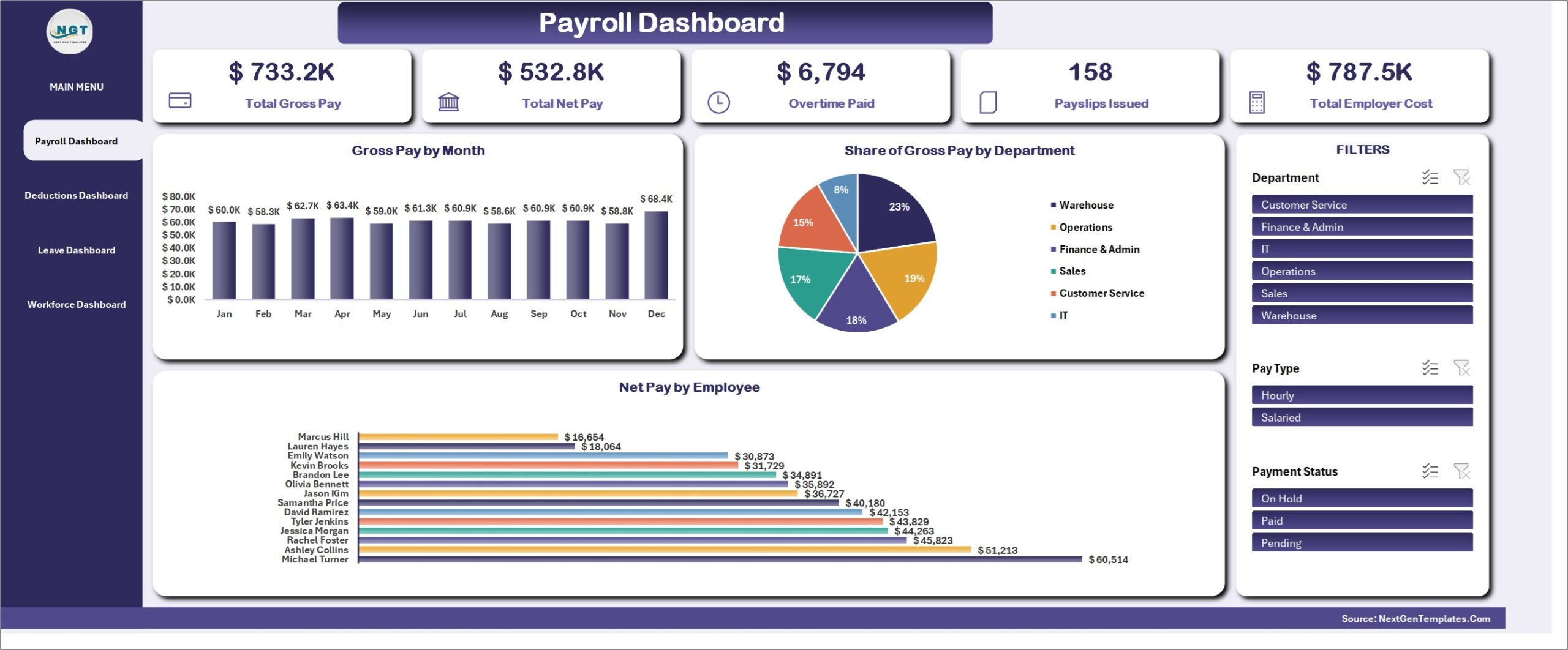
Payroll Dashboard
Total gross pay, total net pay, overtime paid, payslips issued and total employer cost, with gross pay by month, the share of each department and net pay by employee. Slicers for department, pay type and payment status.
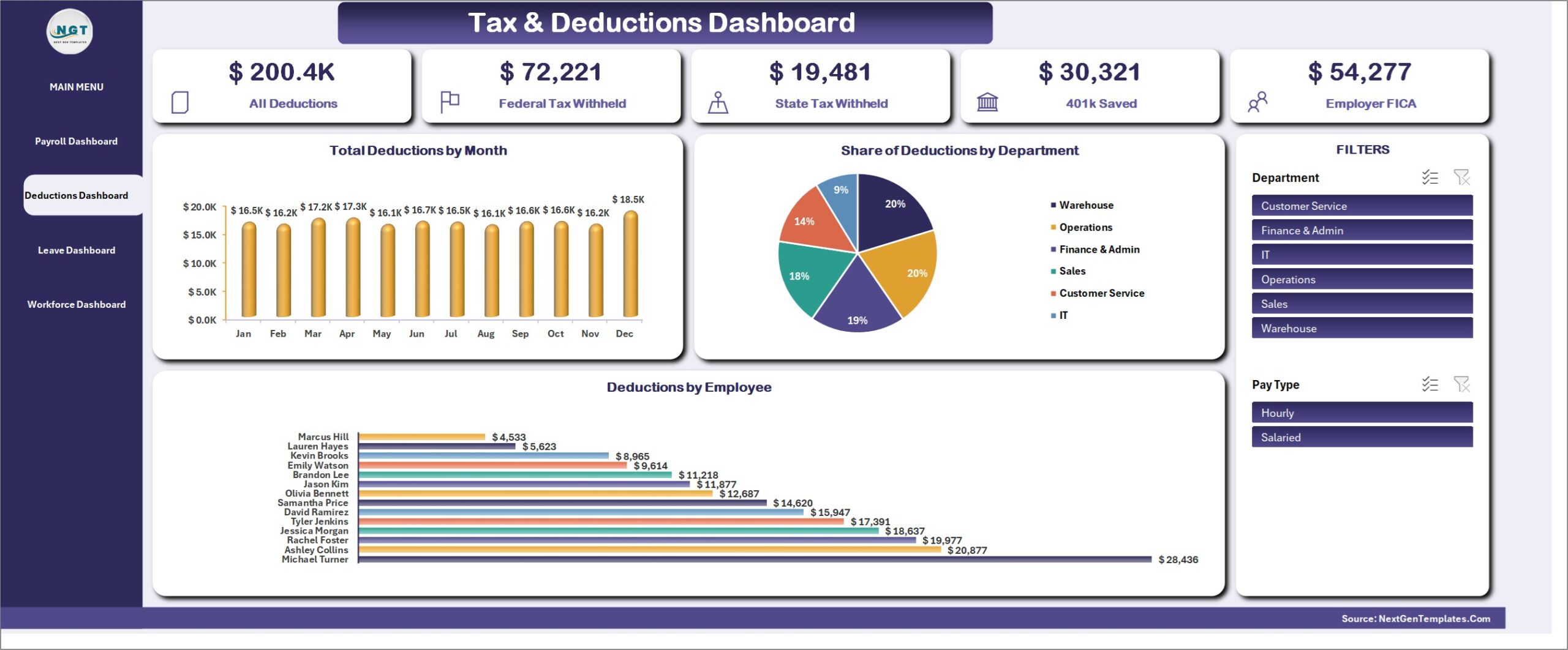
Tax and Deductions Dashboard
All deductions, federal and state tax withheld, 401k saved and the employer share of Social Security and Medicare, shown by month, by department and by employee.
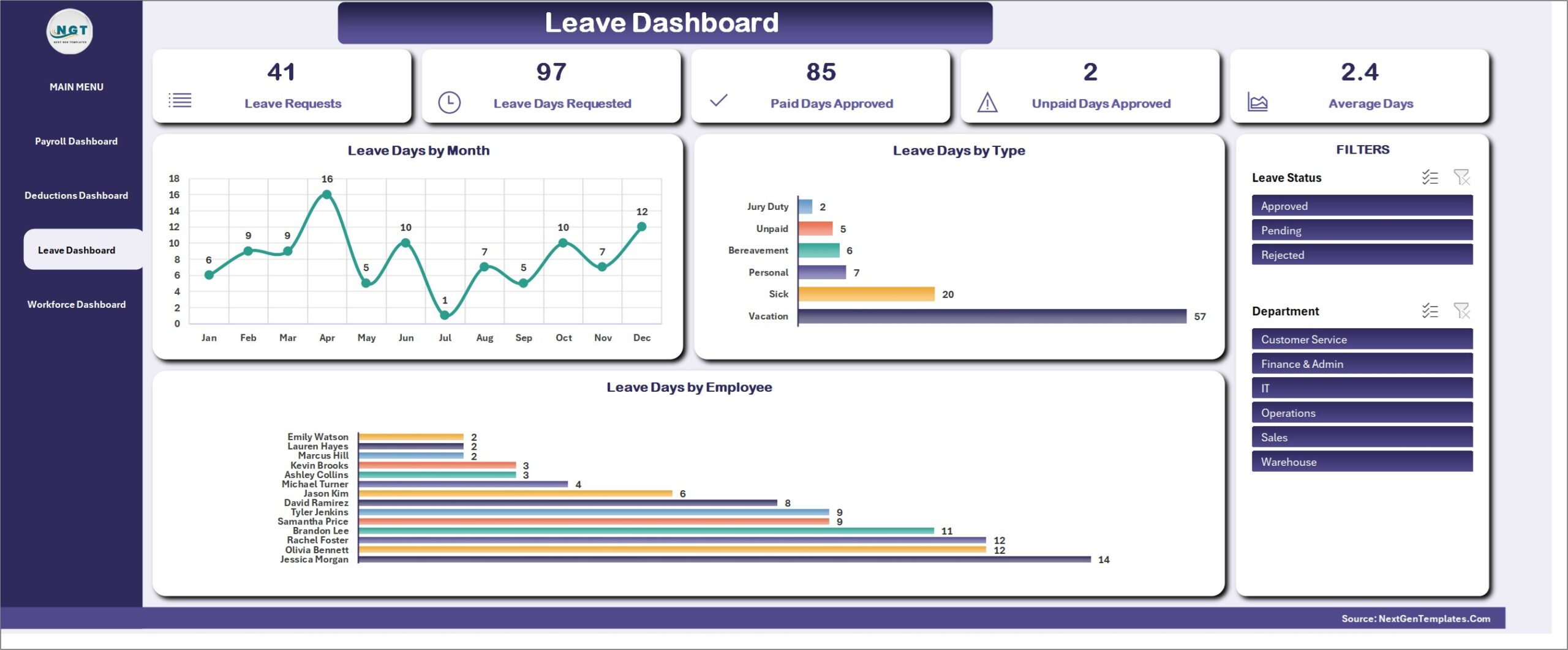
Leave Dashboard
Leave requests, days requested, paid and unpaid days approved and the average length, with leave days by month, by type and by employee. In the sample data, Vacation is the most common leave type.
Workforce Dashboard
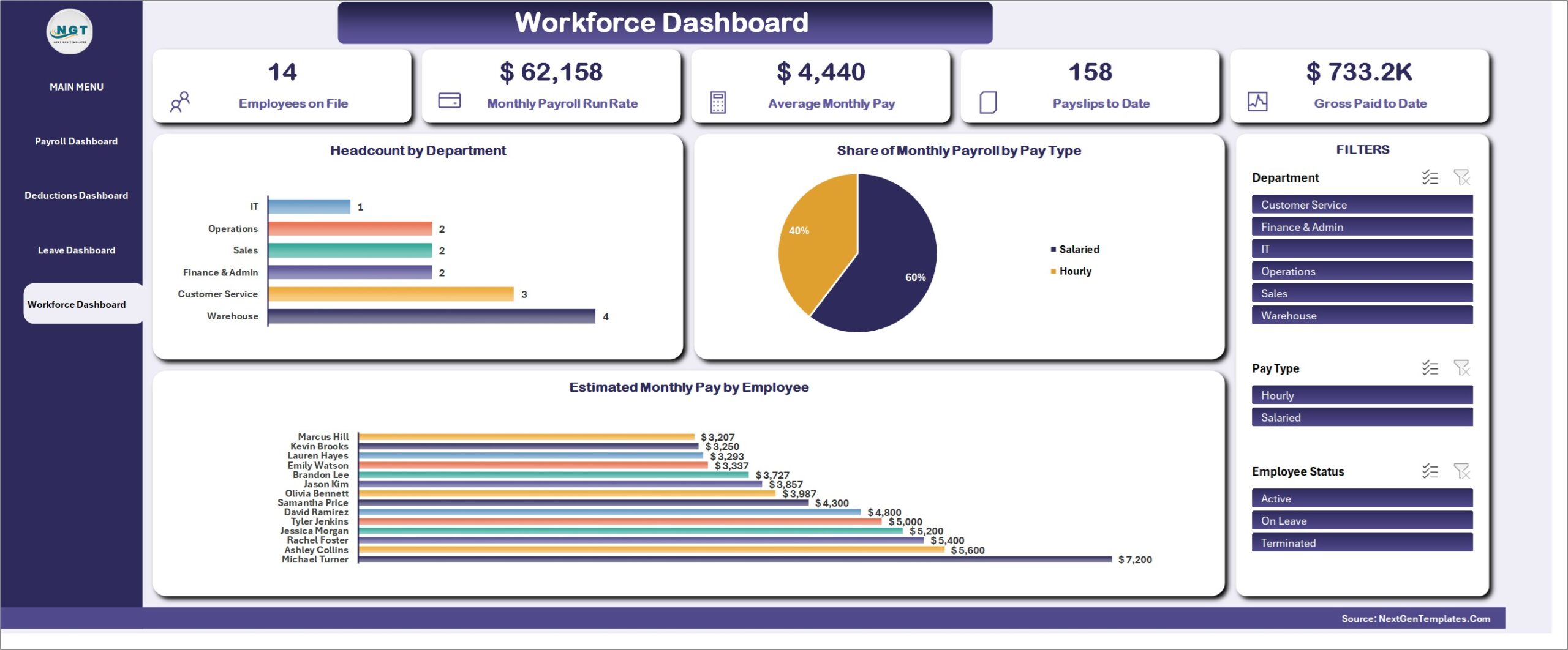
Employees on file, the monthly payroll run rate, average monthly pay, payslips to date and gross paid to date, with headcount by department and the share of payroll by pay type.
Registers and settings
Behind the dashboards sit the Payroll Register (one row per payslip), the Employee Master, the Leave Register and the Document Register, plus a Category Master for the dropdown lists and a Settings sheet for company details, currency, numbering prefixes, permissions and printing defaults.
Payroll Management System vs. a Payroll Spreadsheet vs. Cloud Payroll Software
| Feature | This Excel VBA system | Plain payroll spreadsheet | Cloud payroll software |
|---|---|---|---|
| Cost | One-time purchase | Free to a few dollars | Monthly fee, often per employee |
| Payslip entry form | Yes, three tabs | One cell at a time | Yes |
| Printed payslip and register | Yes, A4, 4 inch and 3 inch | Manual | Yes |
| Leave register and attachments | Yes | Separate files | Depends on plan |
| Automatic tax tables and filing | No | No | Yes |
| Works offline | Yes | Yes | No |
Who Should Use This Template
It suits small businesses, offices and HR teams that pay salaried and hourly staff every month, want a printed payslip for each person, and want leave and employee documents in the same file. It is a single-user desktop workbook for Microsoft Excel on Windows with macros enabled. It is not for several people entering data at the same time, for Mac or Excel on the web, or for businesses that need automatic IRS tax tables, direct deposit files or tax filing.
Real-World Use Cases
- A warehouse paid by the hour. Enter 172 regular hours, 8.5 overtime hours and a $150 bonus for a forklift operator, save, and print the payslip.
- Checking labor cost. The Payroll Dashboard shows gross pay by month and department, and a slicer isolates one team.
- Handling time off. A leave request goes in with its dates, weekends are skipped, an approver is named and the approval slip prints for the file.
Advantages and Limits
Advantages: one-time cost, no subscription, data stays on your PC, payslips print at three paper sizes, and every list is editable from the Manage Dropdown Lists form. Limits: single user, Windows desktop Excel only, tax is taken at the percentages you enter for each employee rather than from IRS tables, and there is no direct deposit file or tax filing. If you need several users at once, look at the browser-based Employee Attendance Payroll Management System.
How to Set It Up in Under 20 Minutes
- Download the ZIP, extract it, open the .xlsm file and click Enable Content.
- Open Setup, then Settings, and enter your company details, currency and paper size.
- Replace the sample departments, leave types and approvers in Manage Dropdown Lists.
- Add your employees with their pay type, rate, tax percentages, 401k and health insurance, then start with New Payslip Entry.
- Delete the sample rows when you are ready; the dashboards refresh themselves.
Try It Free for 7 Days
The 7-day free trial on the product page is the complete system, so you can enter your own payslips and test every form, dashboard and printout before you buy. After 7 days it locks, and the full version, with unlocked VBA code, is a one-time purchase.
Frequently Asked Questions
Is this a real payroll system or just a sheet?
It is a working system inside one workbook. The payslip form works out overtime, gross pay, deductions, net pay and employer cost, and the payslip, register and leave slip print at A4, 4 inch or 3 inch.
Does this payroll template calculate US tax?
It takes federal and state income tax at the percentages you set for each employee, plus Social Security at 6.2% and Medicare at 1.45%. It does not use IRS withholding tables or file returns, so confirm the percentages with your accountant.
Can I print a payslip template for my employees?
Yes. The payslip prints with your company name and address from the Settings sheet, the employee details, hours, every earning and deduction line and the net pay.
Does it work on Mac or Excel for the web?
No. The forms and printing engine are VBA, so it needs Microsoft Excel for Windows with macros enabled.
Can you customise it for my business?
Yes. Write to NextGenTemplates with what you need.
Get the Payroll Management System
👉 See the Payroll Management System V1.0 in Excel VBA on NextGenTemplates.com, with instant download, one-time payment, a 7-day free trial and an illustrated PDF user manual.
Related Posts
- Cafe Management System in Excel VBA, the same engine for a cafe.
- Payroll Management Dashboard in Excel, a reporting-only payroll dashboard.
- Microsoft: enable or disable macros in Office files