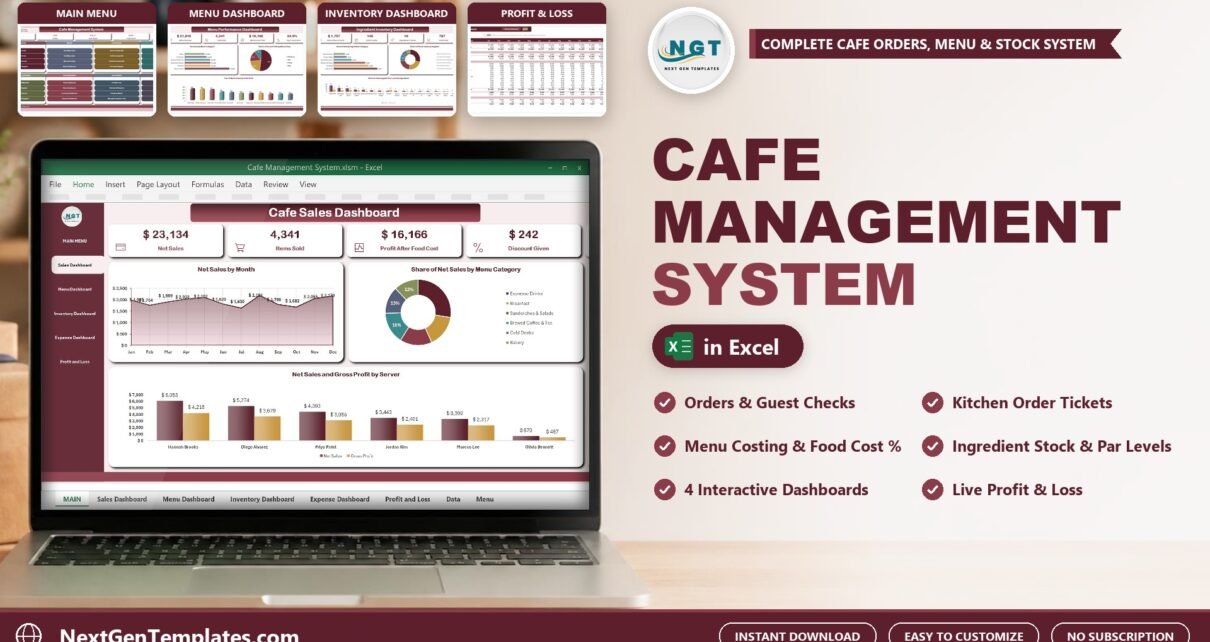
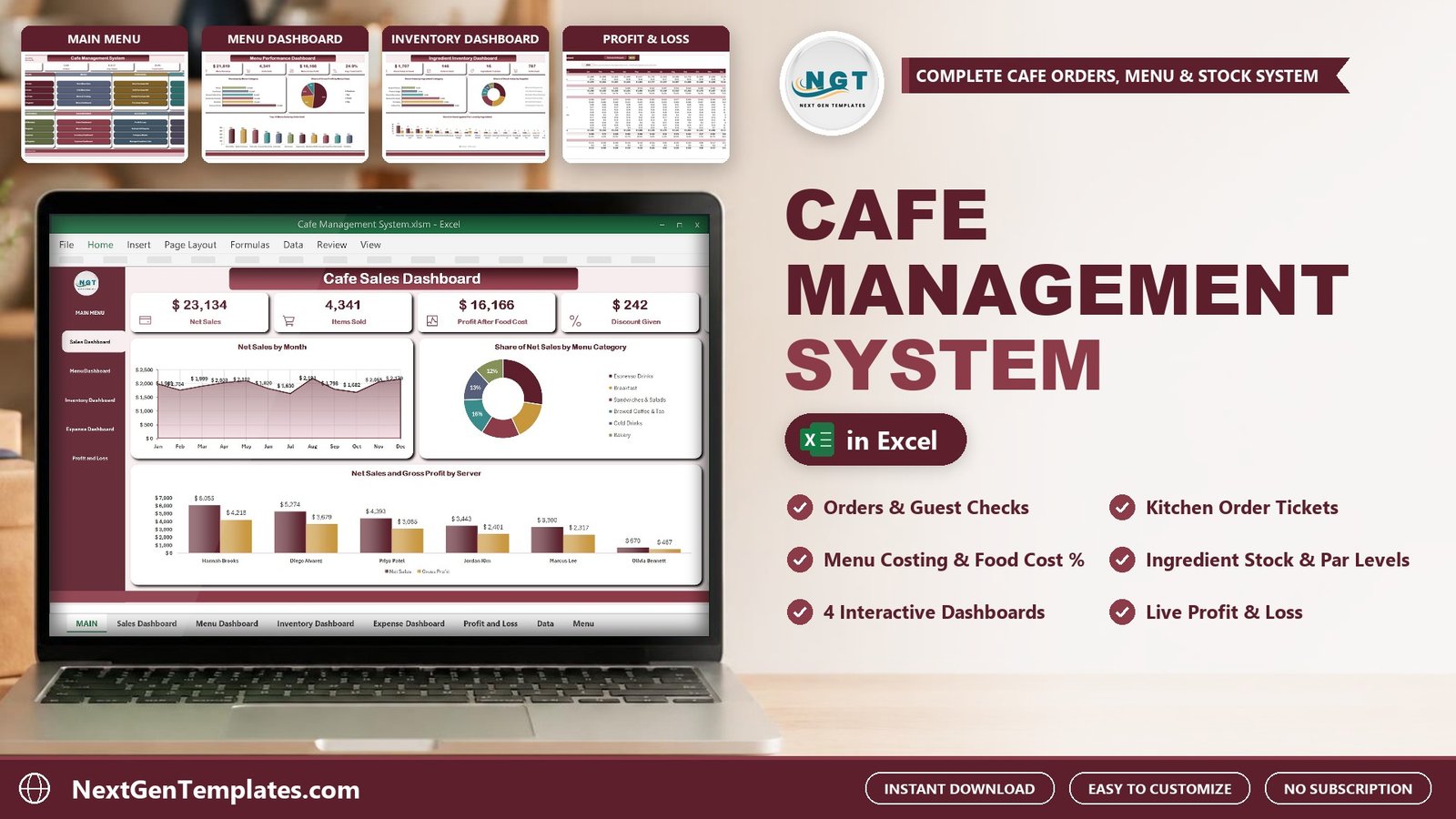
The Cafe Management System in Excel is a macro-enabled workbook that runs a small cafe or coffee shop from one file: orders with guest checks and kitchen tickets, menu costing, ingredient stock, supplier purchases, staff, expenses and profit. It has 15 worksheets, 10 VBA forms, 4 pivot dashboards, a live Profit & Loss statement and 3 printable documents that come out at A4, 4 inch and 3 inch. It ships with 1,525 sample orders (3,200 order lines), 140 purchase lines and 176 expense vouchers, so every chart is populated the first time you open it.
Watch the Cafe Management System in Excel VBA walkthrough
Most small cafes do not need a monthly POS subscription to know how the week went. They need an order that prints for the guest and the kitchen, a food cost for every menu item, a warning before the oat milk runs out, and a monthly profit figure. A plain spreadsheet gives you a sales list and then stops. This workbook closes that gap and keeps every record on your own PC. If you have been comparing cafe management software, this is what the same jobs look like inside Excel.
What the Cafe Management System in Excel Does
Everything goes in through a checked form, so nobody types straight into a data sheet. The main jobs are:
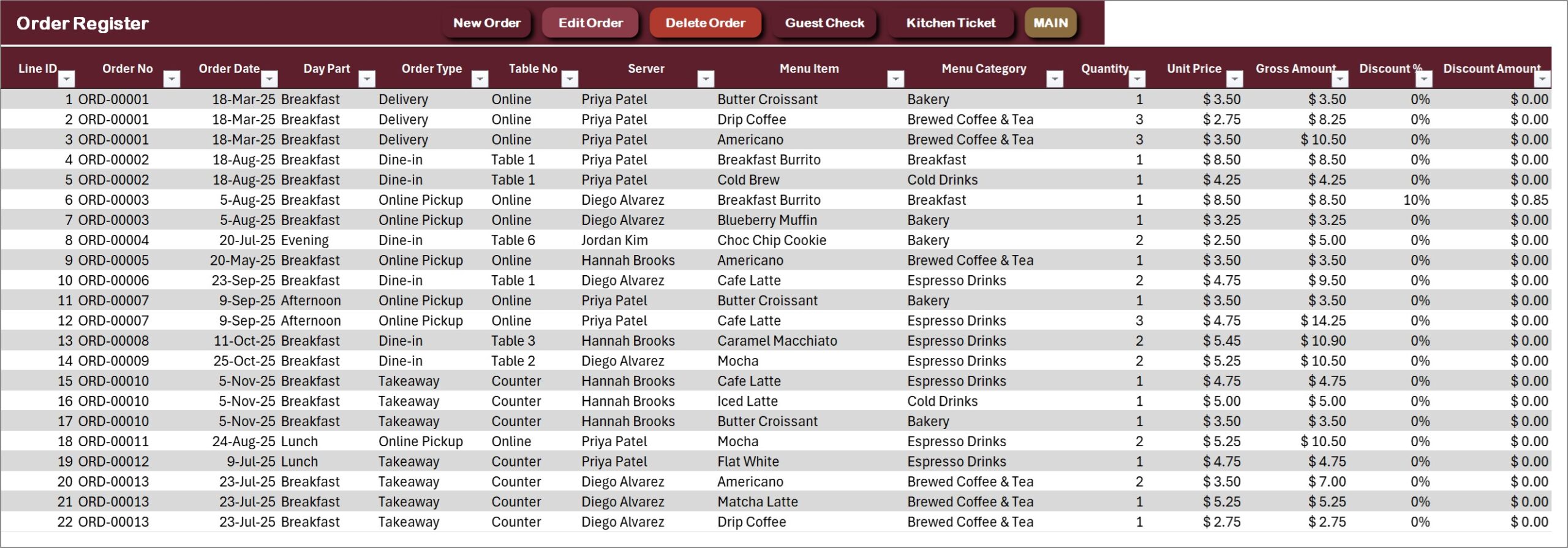
- Orders: the New Order form is a basket. Choose the server, order type, table and day part, search a menu item, enter the quantity and add as many lines as the order needs. It saves under one ORD- number.
- Guest check and kitchen ticket: print the guest check for the customer and the kitchen order ticket for the bar, at A4, 4 inch or 3 inch.
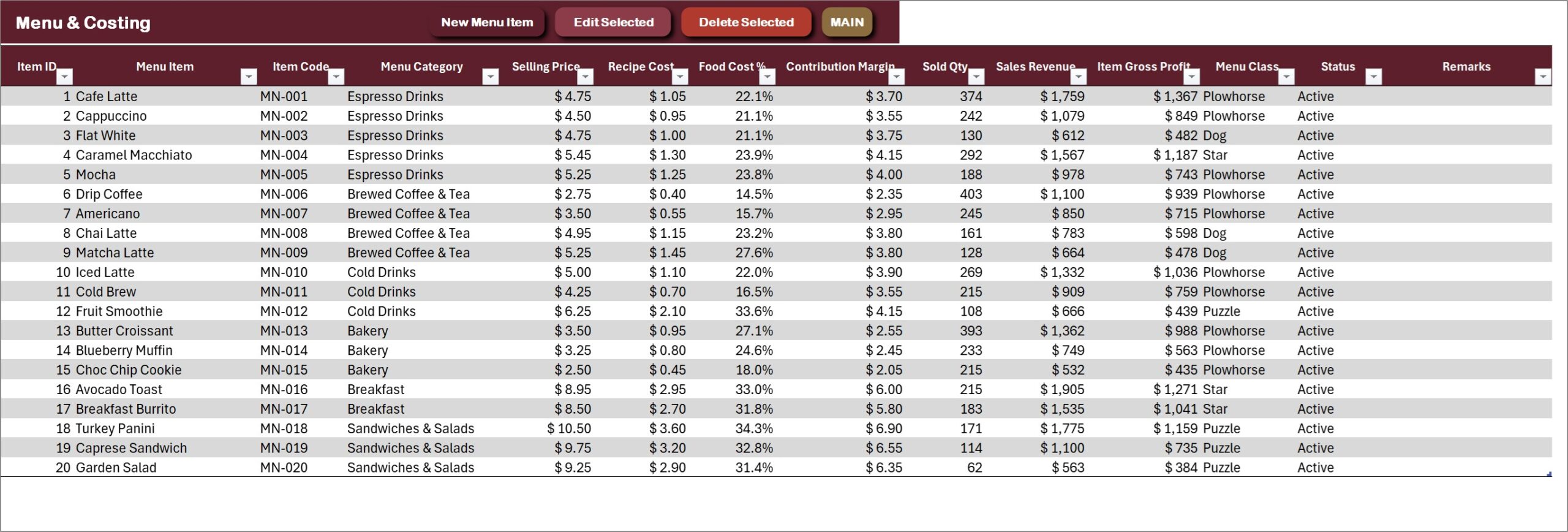
- Menu costing: every menu item carries a selling price and a recipe cost, so food cost %, contribution margin and a Star, Plowhorse, Puzzle or Dog class are worked out for you. It is a menu costing template that updates from real orders.
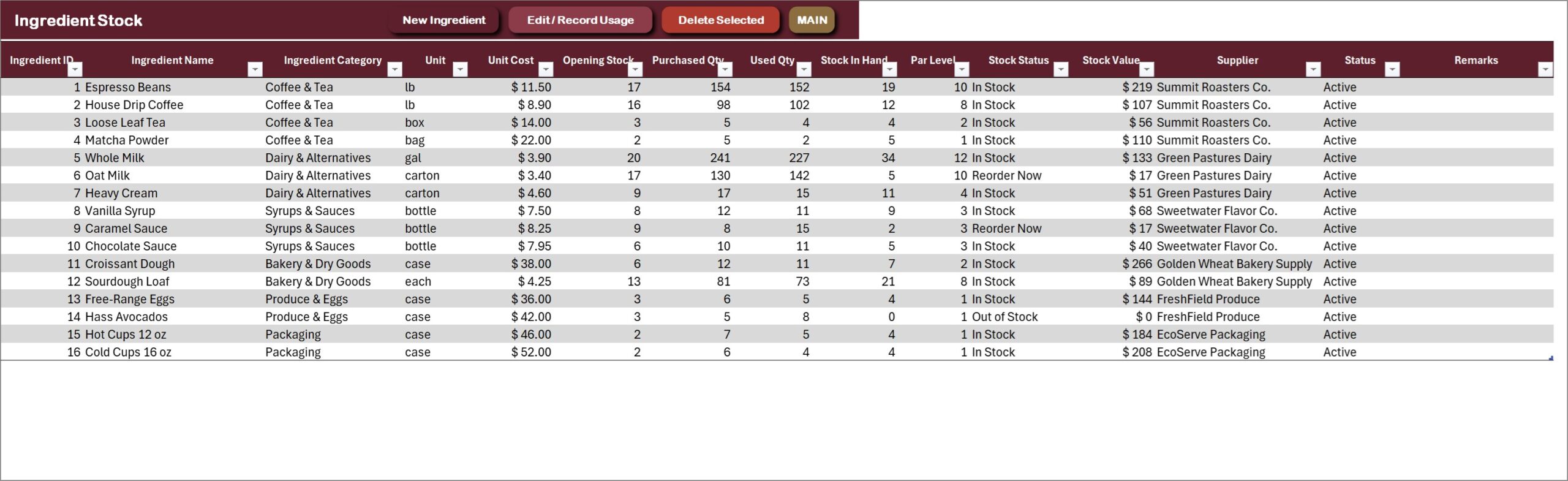
- Ingredient stock: opening stock plus purchases minus usage gives stock in hand, and each ingredient shows In Stock, Reorder Now or Out of Stock against its par level. Think of it as a coffee shop inventory spreadsheet that does the arithmetic.
- Purchases, staff and expenses: a purchase basket for supplier bills, a staff register with sales handled per person, and an expense register that feeds the Profit & Loss.
You can see every screen in the full product listing.
Dashboard Pages and Sheets Explained
MAIN menu
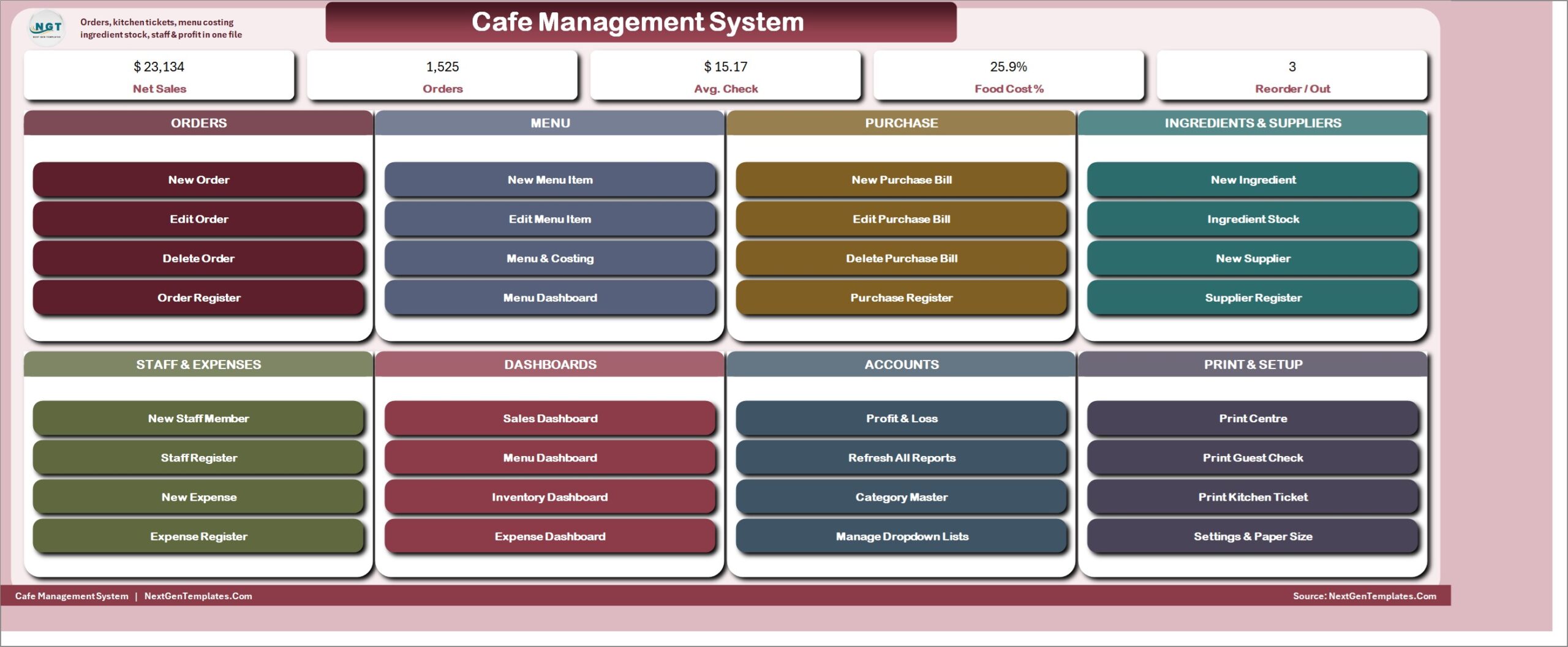
The file opens on a menu with five live KPI cards (Net Sales, Orders, Avg. Check, Food Cost % and Reorder / Out) and eight cards of buttons: Orders, Menu, Purchase, Ingredients & Suppliers, Staff & Expenses, Dashboards, Accounts and Print & Setup.
Cafe Sales Dashboard
Net Sales, Items Sold, Profit After Food Cost, Discount Given and Sales Tax Collected, with net sales by month, the share of each menu category, and net sales and gross profit by server. Slicers for order type, day part and payment mode.

Menu Performance Dashboard
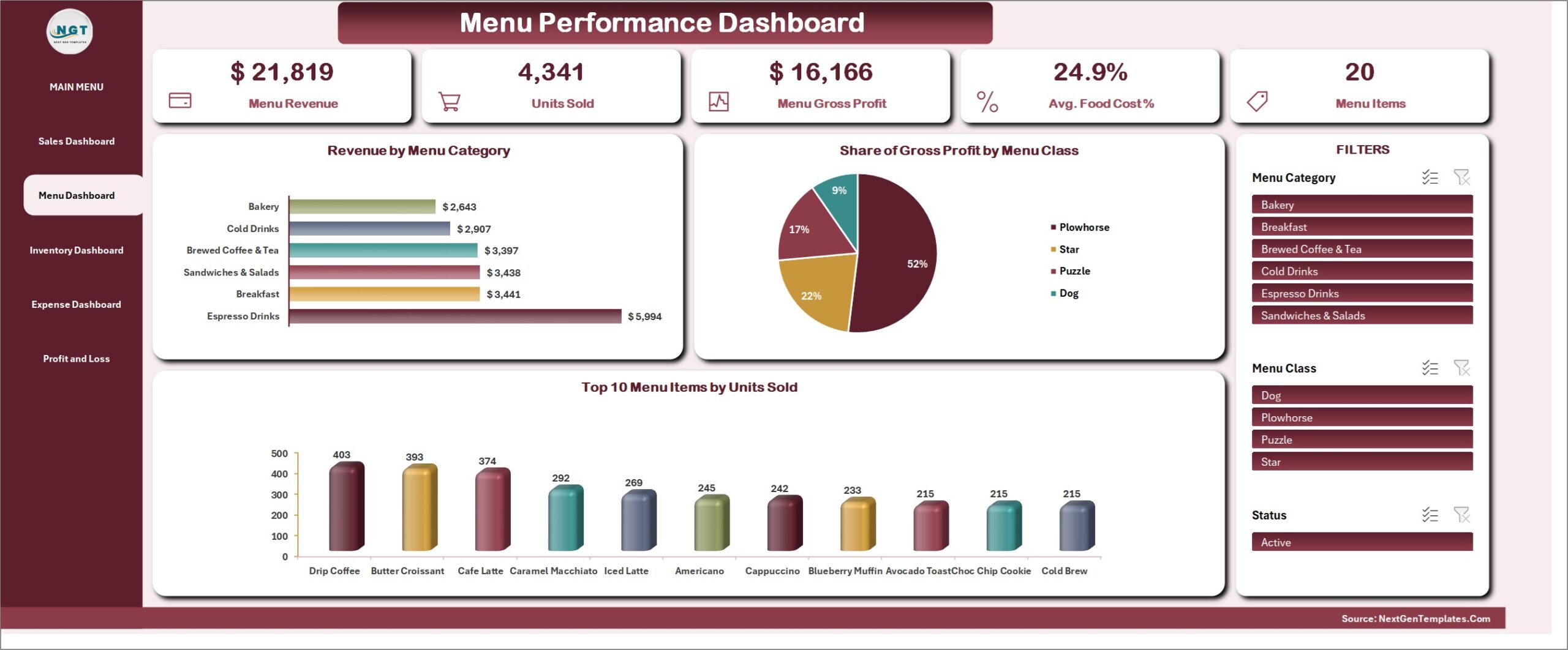
Menu revenue, units sold, menu gross profit, average food cost % and the item count, with revenue by menu category, gross profit by menu class and the top ten items by units sold. This is the page to open before you change a price.
Ingredient Inventory Dashboard
Stock value on hand, units in hand, ingredients tracked, units used and units purchased, with stock value by ingredient category and by supplier, and stock in hand against the par level for every ingredient.

Expense Dashboard
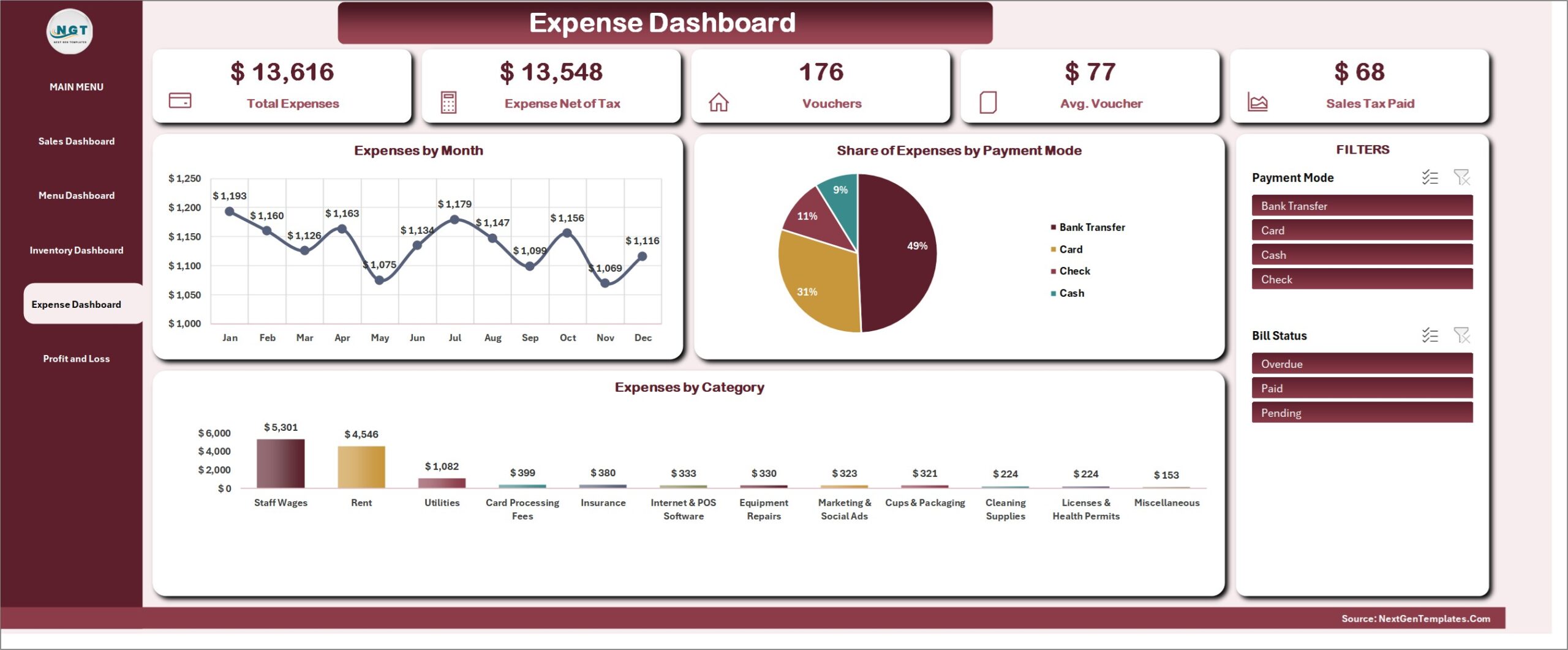
Total expenses, expenses net of tax, vouchers, average voucher and sales tax paid, with spend by month, by payment mode and by category.
Profit and Loss statement
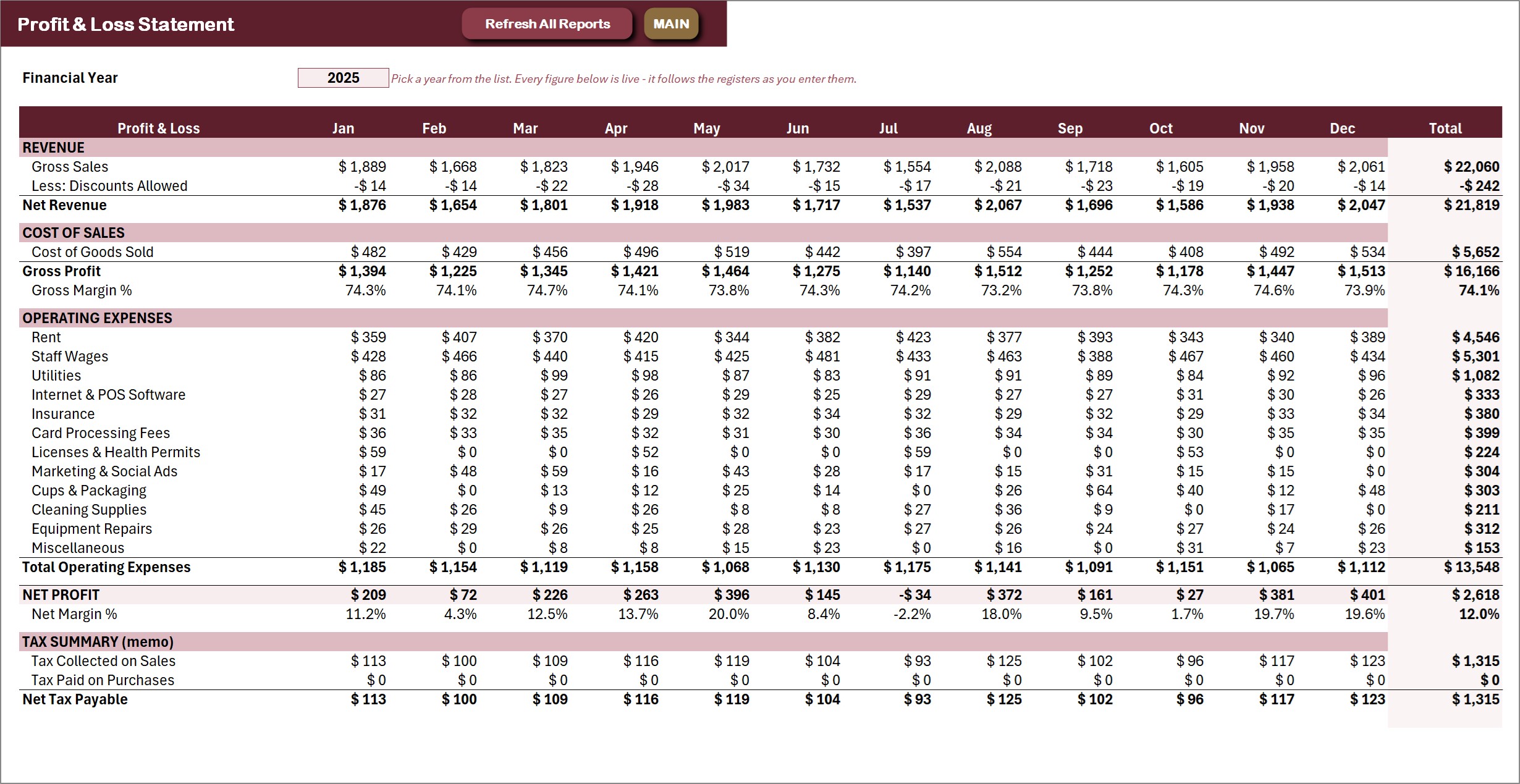
Twelve months and a year total, from gross sales and discounts through cost of goods sold to net profit and net margin, with a sales tax memo. The Financial Year dropdown picks the year. In the sample cafe the year closes at a 12.0% net margin.
Registers and settings
Behind the dashboards sit the Order Register (one row per order line), Menu & Costing, the Purchase Register, Ingredient Stock, the Supplier Register, the Staff Register and the Expense Register, plus a Category Master for the dropdown lists and a Settings sheet for cafe details, currency, sales tax rate, numbering prefixes, permissions and printing defaults.
Cafe Management System vs. a Cafe Spreadsheet vs. Cloud Cafe POS
| Feature | This Excel VBA system | Plain cafe spreadsheet | Cloud cafe POS |
|---|---|---|---|
| Cost | One-time purchase | Free to a few dollars | Monthly subscription, often per register |
| Multi-item orders with discount and tax | Yes, basket form | One row at a time | Yes |
| Guest check and kitchen ticket | Yes, A4, 4 inch and 3 inch | No | Yes |
| Food cost % and menu classes | Yes, automatic | Manual | Depends on plan |
| Ingredient stock against par level | Yes | Manual | Often an add-on |
| Card terminal and online ordering | No | No | Yes |
| Works offline | Yes | Yes | Usually no |
Who Should Use This Template
It suits small cafes, coffee shops, bakery cafes and kiosks that take orders at one counter, want to know the food cost of every item, and want stock, purchases, staff sales and monthly profit in the same file. It is a single-user desktop workbook for Microsoft Excel on Windows with macros enabled. It is not for several people taking orders at the same time, for Mac or Excel on the web, or for cafes that need card-terminal payments, online ordering or payroll.
Real-World Use Cases
- One till, a busy breakfast. The barista adds two lattes and a croissant to the basket, saves, prints a 3 inch guest check and sends the kitchen ticket to the bar; the owner reads net sales and profit after food cost on the Sales Dashboard at close.
- Fixing the menu. The Menu Dashboard shows which items are Stars and which are Dogs, and a new price on Menu & Costing updates the margin straight away.
- Weekly restocking. Ingredient Stock flags anything at or below its par level, New Purchase Bill records what arrived, and the Purchase Order prints for the supplier.
Advantages and Limits
Advantages: one-time cost, no subscription, data stays on your PC, guest checks and kitchen tickets print at three paper sizes, and every list is editable from the Manage Dropdown Lists form. Limits: single user, Windows desktop Excel only, ingredient usage is recorded by hand rather than deducted by recipe, the tax rate is a whole-number percentage in this version, and there is no card-terminal or online-ordering link. If you need several devices at once, look at the browser-based Coffee Cafe POS Web App.
How to Set It Up in Under 20 Minutes
- Download the ZIP, extract it, open the .xlsm file and click Enable Content.
- Open Print & Setup, then Settings & Paper Size, and enter your cafe details, currency symbol, sales tax rate and paper size.
- Replace the sample tables, menu categories, staff roles and expense categories in Manage Dropdown Lists.
- Add your menu items with their recipe cost, your ingredients with par levels, suppliers and staff, then start with New Order.
- Delete the sample rows when you are ready; the dashboards and the Profit & Loss refresh themselves.
Try It Free for 7 Days
You do not have to take our word for it. The 7-day free trial on the product page is the complete system, so you can enter your own orders and test every form, dashboard and printout before you buy. After 7 days it locks, and the full version, with unlocked VBA code, is a one-time purchase.
Frequently Asked Questions
Is this a real cafe management system or just a sheet?
It is a working system inside one workbook. The New Order form is a multi-item basket, menu costing and stock update from the registers, and guest checks, kitchen tickets and purchase orders print at A4, 4 inch or 3 inch.
Can I print a guest check template for my cafe?
Yes. The guest check prints with your cafe name, address and tax number from the Settings sheet, the table, server and every item, with subtotal, discount, sales tax and total.
Does it work on Mac or Excel for the web?
No. The forms and printing engine are VBA, so it needs Microsoft Excel for Windows with macros enabled.
Can I change the currency and tax rate?
Yes. The sample cafe uses US dollars and 6% sales tax; set your own on the Settings sheet. Use a whole-number tax rate in this version.
Can you customise it for my cafe?
Yes. Write to NextGenTemplates with what you need.
Get the Cafe Management System
👉 See the Cafe Management System V1.0 in Excel VBA on NextGenTemplates.com – instant download, one-time payment, with a 7-day free trial and an illustrated PDF user manual.
Related Posts
- Restaurant Management System V2.0 in Excel VBA – the full-service restaurant version.
- General Store Billing Management System in Excel VBA – the same engine for a shop counter.
- Menu Item Master Data Entry System in Excel – a lighter menu list workbook.
- Microsoft: enable or disable macros in Office files