Small pathology labs lose bookings to paper registers every day — a mistyped test name, a payment never totaled, a report that nobody remembered to deliver. The Lab Test Booking Data Entry System in Excel replaces the register with a VBA-powered entry form that captures 6 fields per booking, ships with 12 pre-loaded test names, and summarizes everything in 3 live KPI cards: Tests Booked, Revenue, and Pending Reports. Setup takes under 10 minutes and the template costs $5.99 one time — no subscription.
If your front desk logs 10–100 test bookings a day and you have been searching for a lab test booking data entry system in Excel that a receptionist can run without training, this template was built for exactly that workflow. Every record saves with an automatic serial number and entry timestamp, and every KPI recalculates the moment a booking is added, updated, or deleted.
Click here to Purchase the Lab Test Booking Data Entry System in Excel
Key Features of the Lab Test Booking Data Entry System in Excel
The template is a single-workbook system built around one principle: reception staff should never type what a dropdown can select. Here is what ships inside.
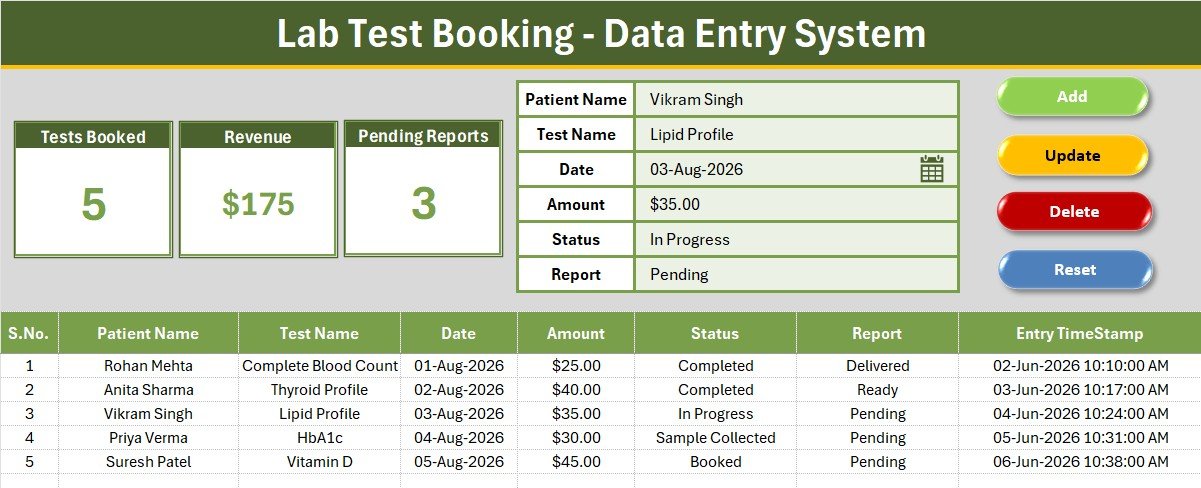
- 6-field guided entry form — Patient Name, Test Name, Date, Amount, Status, and Report sit in a clean panel at the top of the sheet with bold labels and tinted input lines.
- Four VBA action buttons — Add saves a new booking, Update rewrites a selected record, Delete removes it, and Reset clears the form. The system also supports double-click-to-edit: double-click any record row and it loads straight back into the form.
- 3 live KPI cards — Tests Booked counts every record, Revenue sums all booking amounts, and Pending Reports counts bookings whose report has not been delivered. All three update automatically.
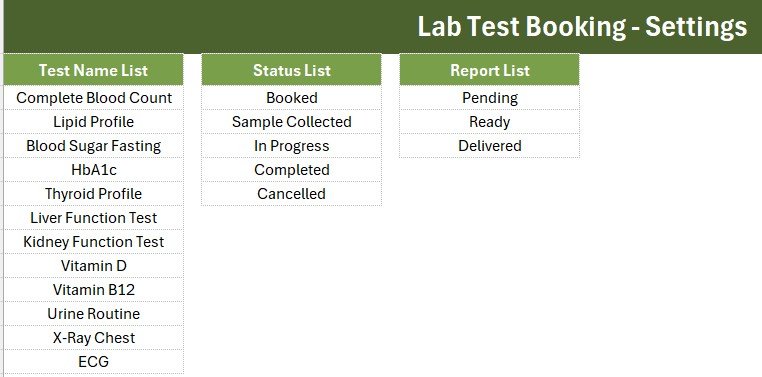
- 12 pre-loaded test names — Complete Blood Count, Lipid Profile, Blood Sugar Fasting, HbA1c, Thyroid Profile, Liver Function Test, Kidney Function Test, Vitamin D, Vitamin B12, Urine Routine, X-Ray Chest, and ECG.
- Two-track status control — the booking moves through Booked, Sample Collected, In Progress, Completed, or Cancelled, while the report moves through Pending, Ready, and Delivered.
- Auto serial number and Entry TimeStamp — every saved record is numbered and time-stamped, creating a clean audit trail with zero manual effort.
The Lab Test Booking Data Entry System in Excel tracks 6 data fields per booking, monitors 3 key performance indicators, and stores unlimited records — the table simply grows as your lab does. The whole system runs offline in Microsoft Excel, which matters for labs with unreliable internet.
Sheets Explanation
Data Entry Sheet
The main working screen. The gray dashboard panel at the top holds the 3 KPI cards and the 6-field form with its Add, Update, Delete, and Reset buttons; below it, the records table lists every booking with auto serial numbers, currency-formatted amounts, and entry timestamps.
Setting Sheet
This sheet stores the three editable dropdown lists — Test Name, Status, and Report — plus a duplicated set of KPI stat cards you can paste elsewhere as linked pictures. Add a new test panel here and it appears in the entry form dropdown instantly, with no code changes.
Instructions Sheet
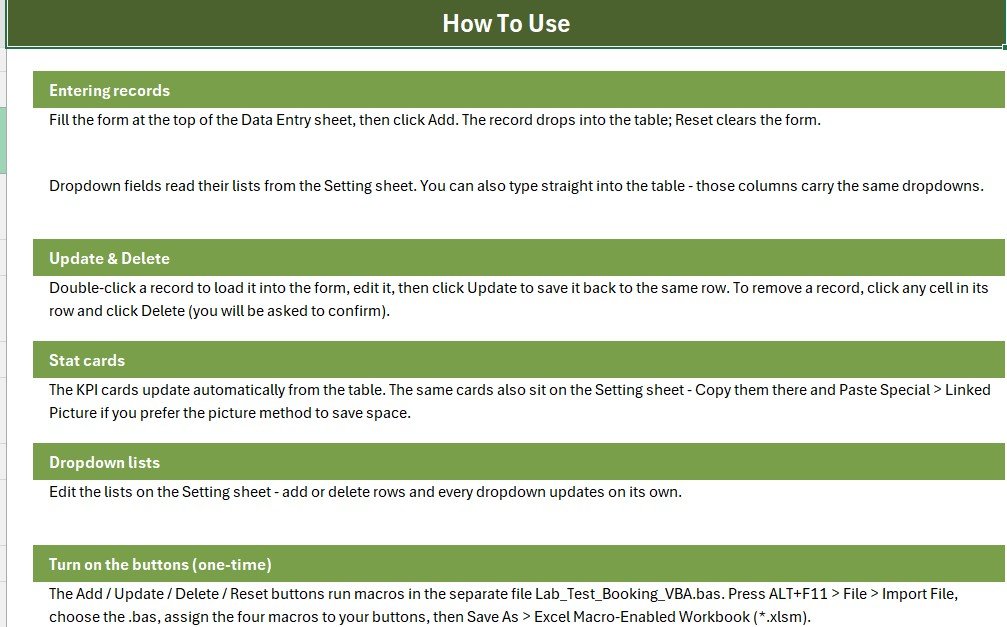
A step-by-step activation guide written for non-technical users: import the VBA module, assign the four macros to the buttons, and save as a macro-enabled workbook. The same steps are covered in Microsoft’s own Getting Started with VBA in Office documentation if you want the deeper background.
Lab Test Booking System vs. Google Sheets vs. Lab Management SaaS — Feature Comparison
| Feature | Lab Test Booking System (Excel) | Google Sheets DIY | Lab SaaS (CrelioHealth / Labsmart) |
|---|---|---|---|
| Cost | ✅ $5.99 one-time | Free, but built from scratch | $30–100 / month |
| Platform | Microsoft Excel (offline) | Browser only | Cloud only |
| Setup time | ✅ Under 10 minutes | Hours of manual building | Days of onboarding |
| Entry form with action buttons | ✅ VBA form included | ❌ Not available natively | ✅ Built-in forms |
| Works without internet | ✅ Yes | ❌ No | ❌ No |
| Live KPI cards | ✅ 3 pre-built | Manual formulas | ✅ Dashboards |
| Editable dropdown lists | ✅ Setting sheet, no code | Manual data validation | Limited by plan |
| Report delivery tracking | ✅ Pending / Ready / Delivered | Manual column | ✅ Included |
| Year-1 cost | ✅ $5.99 | $0 + your build time | $360–1,200+ |
For single-desk labs that want structured booking entry, payment totals, and report tracking without monthly LIMS fees, the Lab Test Booking Data Entry System in Excel sits in the sweet spot.
Who Should Use This Template
Perfect for:
- Small pathology labs and diagnostic centers with one reception desk and 10–100 bookings a day
- Clinic receptionists replacing a paper register or a messy free-form spreadsheet
- Home sample-collection services tracking bookings, payments, and report delivery from one laptop
- Lab owners who want a daily revenue figure without a calculator
Not a fit if:
- You run a multi-branch lab chain needing multi-user cloud access and patient portals — consider our Pathology Lab Management System Web App, which adds login roles and browser access
- You need barcode scanning or automated analyzer interfacing — that is full LIMS territory
Real-World Use Cases
Meena runs the front desk at a two-technician pathology lab. She logs each walk-in in the form, marks samples as Collected during the day, and glances at the Pending Reports card before closing. Since switching from the paper register, no patient has called about a forgotten report, and her end-of-day cash tally matches the Revenue card every time.
Dr. Arora operates a home sample-collection service. His phlebotomist enters the day’s bookings each evening, and the Revenue card gives Dr. Arora the collections total instantly. When a diagnostic partner asks about a sample, the Status dropdown tells him whether it is Collected, In Progress, or Completed.
Sunil manages a small diagnostic center inside a clinic. He added 8 extra test panels on the Setting sheet in five minutes, and now uses the Report dropdown to track delivery for every referring doctor — the same pattern our Blood Bank Management System Tracker uses for unit status.
Advantages of the Lab Test Booking Data Entry System
The biggest gain is error prevention: dropdown-driven Test Name, Status, and Report fields mean bookings are always consistent, so your counts and totals are always right. The second gain is time — the form-plus-buttons workflow is faster than formatting rows by hand, and the automatic timestamp removes an entire manual step. Third is cost: at $5.99 one time versus $360–1,200 per year for lab SaaS, the template pays for itself on day one. And because everything runs locally in Excel, patient booking data never leaves your machine — a real consideration for labs handling sensitive health information.
Opportunities for Improvement
Honest limits: this is a single-user desktop tool, so two receptionists cannot enter bookings simultaneously the way they can in our multi-user web apps like the Dental Clinic Management System. There is no built-in invoice printing — the Amount field records payment but does not generate a bill. And VBA means Windows Excel is the reliable home; Mac Excel handles most of it, but Windows is the tested platform. If any of these matter to your lab today, the web-app versions are the upgrade path.
Best Practices
- Customize the Setting sheet on day one — remove tests you do not offer and add your own panels so dropdowns stay short and scannable.
- Update the Report dropdown to Delivered the moment a report is handed over; the Pending Reports card is only as truthful as your entries.
- Save a dated backup copy weekly — it is one file, so a copy to a USB drive or cloud folder takes seconds.
- Use the double-click-to-edit loader for corrections instead of typing over table cells, so the timestamp trail stays intact.
Explore Relevant Templates
- Vaccination Record Data Entry System in Excel — the same form-and-KPI workflow for immunization records
- Prescription Record Data Entry System in Excel — dropdown-driven prescription logging
- Pathology Lab Management System Web App — the multi-user, browser-based big brother of this template
- Healthcare Management Dashboard in Google Sheets — analytics once your booking data grows
- Telehealth Dashboard in Google Sheets — for clinics tracking remote consultations
💎 Save more with the Healthcare Administrator Toolkit — 9 premium healthcare templates in one bundle.
Frequently Asked Questions
What does the Lab Test Booking Data Entry System in Excel track?
The Lab Test Booking Data Entry System in Excel tracks 6 fields per booking — Patient Name, Test Name, Date, Amount, Status, and Report — plus an automatic serial number and entry timestamp. Three KPI cards summarize Tests Booked, Revenue, and Pending Reports in real time.
How long does setup take?
Under 10 minutes. The Lab Test Booking Data Entry System ships with a one-time activation: import the VBA module, assign four macros to the Add, Update, Delete, and Reset buttons, and save as a macro-enabled workbook. The Instructions sheet covers every step.
Can I add my own lab tests to the dropdown?
Yes. All dropdown values for the Lab Test Booking Data Entry System live on the Setting sheet. Type new test names, statuses, or report stages into the lists and the entry form dropdowns update automatically — no VBA editing required.
How does this compare to lab management SaaS like CrelioHealth?
LIMS platforms such as CrelioHealth and Labsmart cost $30–100 per month and suit multi-branch labs with barcode workflows. The Lab Test Booking Data Entry System in Excel is a $5.99 one-time purchase for single-desk labs that need booking entry, revenue totals, and report tracking without recurring fees.
Does the system work offline?
Yes. The Lab Test Booking Data Entry System runs entirely inside Microsoft Excel on your computer, so bookings can be entered, edited, and totaled with no internet connection — useful for labs in areas with unreliable connectivity.
Do I need to know VBA to use it?
No. The VBA code ships ready-made with the Lab Test Booking Data Entry System; you import it once following the Instructions sheet and never touch it again. Daily use is just the form, the dropdowns, and the four buttons.
About the Author
Built by PK — Microsoft Certified Professional with 15+ years of Excel, Google Sheets, and Power BI experience. Founder of NextGenTemplates, reaching 300K+ subscribers across YouTube channels. Every template is hand-built and tested before release.
Conclusion
A paper register cannot total your revenue, remind you of pending reports, or timestamp a booking — and building the same system from scratch takes hours you do not have. The Lab Test Booking Data Entry System in Excel gives a small lab structured entry, live KPIs, and a clean audit trail for less than the cost of a single test.
Click here to Purchase the Lab Test Booking Data Entry System in Excel
Instant download · One-time payment · No subscription
🎥 For step-by-step video tutorials, visit Youtube.com/@NeoTechNavigators
Last updated: August 2026