Luxury travel businesses operate in a world where expectations remain extremely high. Customers demand flawless experiences, personalized services, and consistent quality across every touchpoint. Therefore, luxury travel companies cannot rely on guesswork or scattered reports to measure performance. Instead, they need a structured, data-driven approach.
That is exactly where a Luxury Travel KPI Scorecard in Excel plays a critical role.
In this in-depth article, you will learn what a Luxury Travel KPI Scorecard in Excel is, why it matters, how it works, and how each worksheet supports performance tracking. Moreover, you will explore the advantages, best practices, and frequently asked questions related to this ready-to-use Excel scorecard.
Because Excel remains flexible, familiar, and powerful, this KPI scorecard becomes an ideal solution for luxury travel agencies, tour operators, and premium hospitality businesses.
Click to Purchases Luxury Travel KPI Scorecard in Excel
What Is a Luxury Travel KPI Scorecard in Excel?
A Luxury Travel KPI Scorecard in Excel is a structured and interactive performance measurement tool designed to track, analyze, and monitor key performance indicators (KPIs) for luxury travel businesses.
Instead of reviewing multiple spreadsheets or static reports, this scorecard consolidates actual values, targets, previous year comparisons, and trends into a single, easy-to-use Excel workbook.
As a result, management teams gain instant clarity on business performance and make faster, smarter decisions.
Why Do Luxury Travel Businesses Need a KPI Scorecard?
Luxury travel businesses deal with high-value clients, premium services, and complex operations. Therefore, even small performance gaps can impact brand reputation and profitability.
A Luxury Travel KPI Scorecard in Excel helps because it:
Provides a clear view of performance at all times
Tracks MTD (Month-to-Date) and YTD (Year-to-Date) results
Highlights gaps between actual and target values
Supports proactive decision-making
Improves accountability across teams
Consequently, leaders move from reactive reporting to proactive performance management.
How Does a Luxury Travel KPI Scorecard in Excel Work?
This ready-to-use KPI scorecard works through four well-designed worksheets, each serving a specific purpose. Together, they create a complete performance tracking system.
Let us explore each worksheet in detail.
Click to Purchases Luxury Travel KPI Scorecard in Excel
What Is the Scorecard Sheet in the Luxury Travel KPI Scorecard?
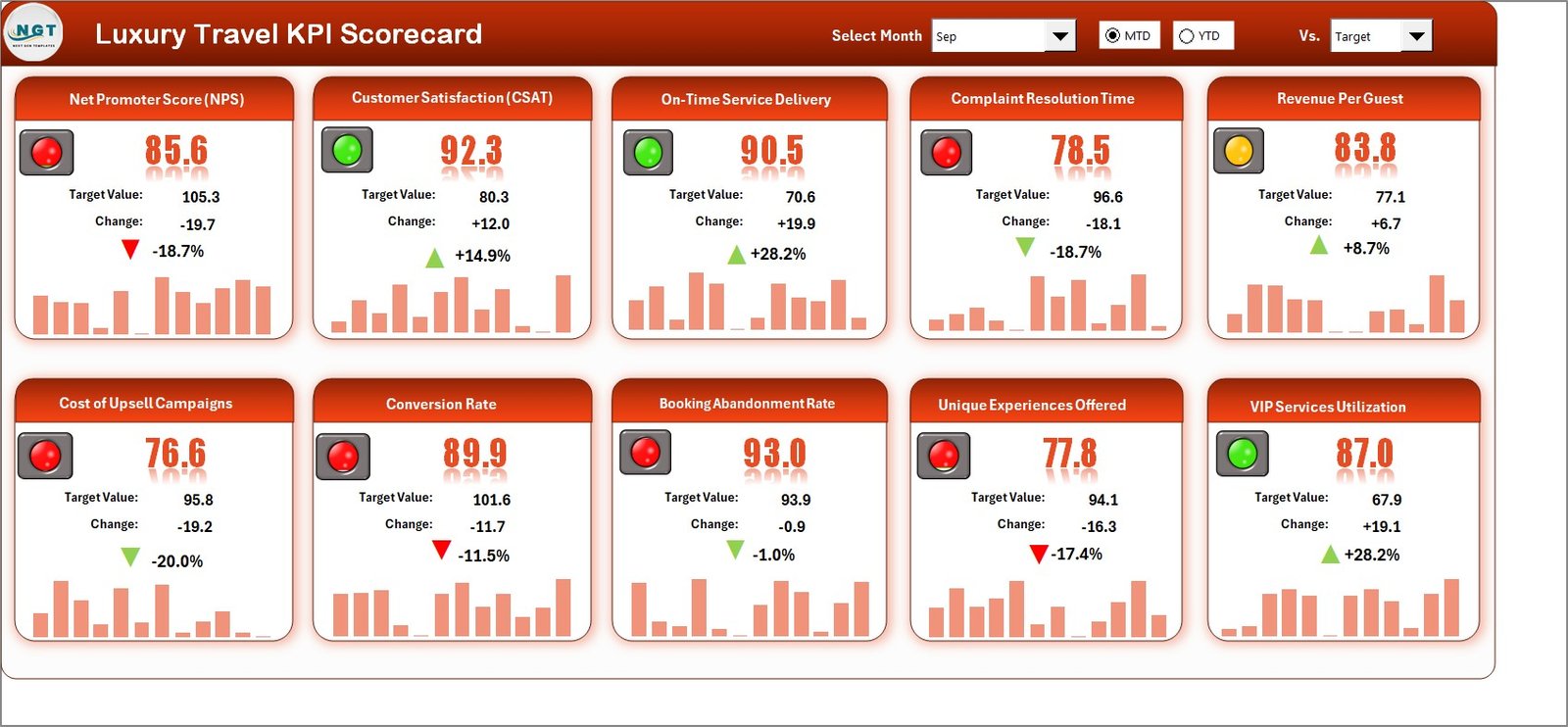
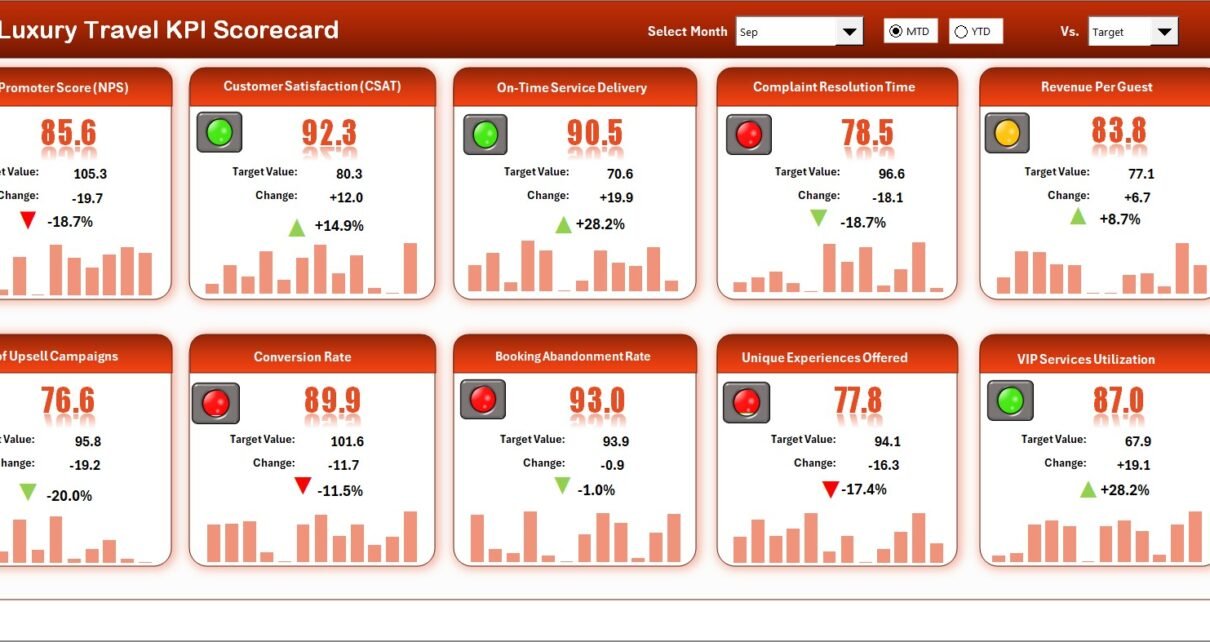
The Scorecard Sheet acts as the main interface of the entire workbook. This sheet displays overall KPI performance in a clear and structured format.
Key Features of the Scorecard Sheet
The Scorecard sheet includes several powerful features that simplify analysis.
How Do Dropdown Menus Improve KPI Analysis?
At the top of the scorecard, dropdown menus allow you to:
Select a specific month
Switch between MTD and YTD views
Because of these dropdowns, all KPI values update automatically. As a result, users analyze performance quickly without manual calculations.
How Does Actual vs Target Comparison Help?
The scorecard clearly displays:
Actual values
Target values
This side-by-side comparison helps users immediately understand whether performance meets expectations or requires attention.
How Do Visual Indicators Improve Decision-Making?
The scorecard uses visual indicators and conditional formatting, such as:
Color-coded performance status
Clear highlights for underperforming KPIs
Because of these visuals, users can identify issues at a glance instead of reading long tables.
What Information Does the Scorecard Display?
The Scorecard Sheet shows:
KPI Name
KPI Group
Unit of measurement
MTD Actual and Target
YTD Actual and Target
Performance status
Therefore, decision-makers get a complete overview on a single screen.
Click to Purchases Luxury Travel KPI Scorecard in Excel
What Is the KPI Trend Sheet and Why Is It Important?
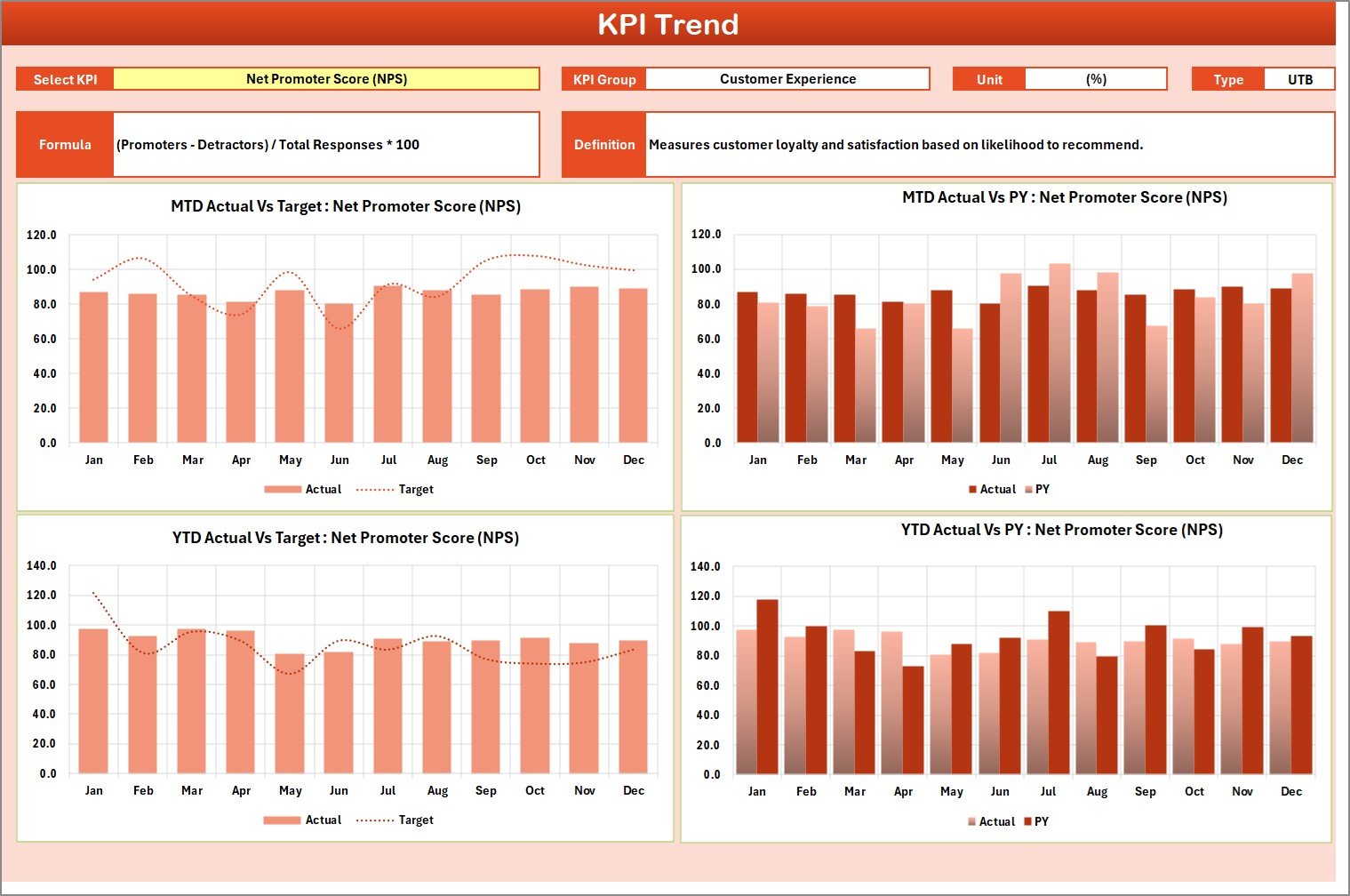
The KPI Trend Sheet focuses on detailed analysis of individual KPIs over time.
How Do You Select a KPI in the Trend Sheet?
You can select the KPI name from a dropdown available in range C3. Once selected, the sheet updates automatically.
What KPI Details Are Displayed in the Trend Sheet?
The Trend Sheet displays:
KPI Group
Unit of KPI
KPI Type (Lower the Better or Upper the Better)
KPI Formula
KPI Definition
Because of this structure, users understand both the numbers and the logic behind each KPI.
How Do Trend Charts Support Better Insights?
The Trend Sheet shows MTD and YTD trend charts for:
Actual values
Target values
Previous Year (PY) values
These charts help users:
Identify performance patterns
Spot improvement or decline trends
Compare current performance with historical data
As a result, forecasting and planning become easier.
Click to Purchases Luxury Travel KPI Scorecard in Excel
What Is the Input Data Sheet in the KPI Scorecard?
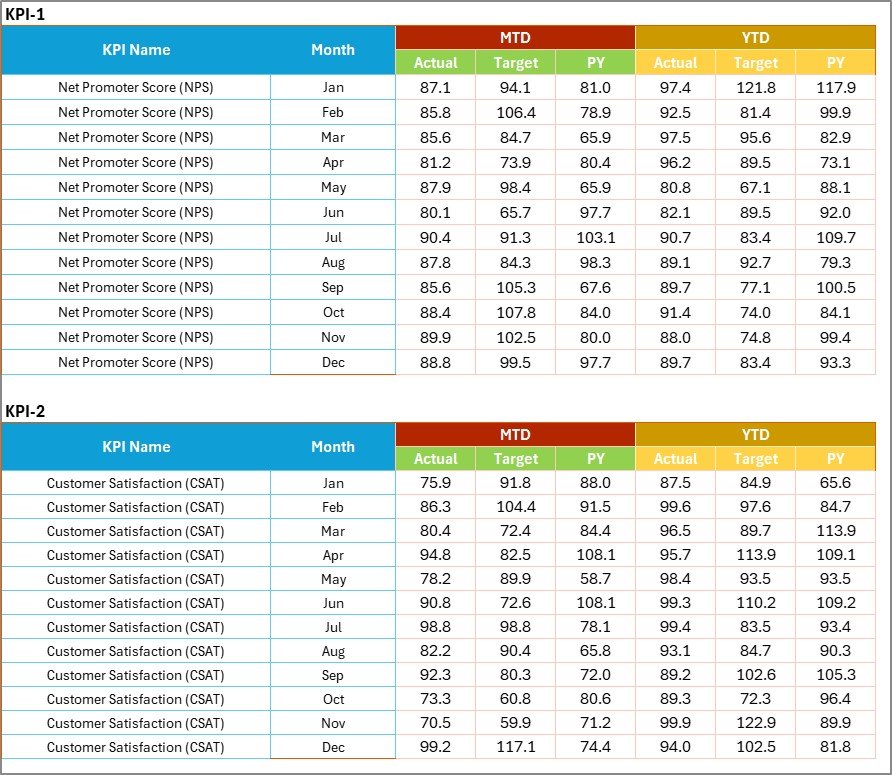
The Input Data Sheet serves as the data entry foundation of the entire scorecard.
What Data Do You Enter in the Input Data Sheet?
You enter:
Actual KPI values
Target values
Period-wise data for each KPI
Because this sheet controls all calculations, accuracy here ensures reliable insights across the scorecard.
Why Is the Input Data Sheet Flexible?
The Input Data Sheet allows users to:
Update values easily
Add new data as results become available
Maintain up-to-date performance tracking
Therefore, the scorecard always reflects the latest business performance.
Click to Purchases Luxury Travel KPI Scorecard in Excel
What Is the KPI Definition Sheet and Why Is It Essential?

The KPI Definition Sheet acts as a reference guide for all KPIs used in the scorecard.
What Information Does the KPI Definition Sheet Store?
This sheet captures:
KPI Name
KPI Group
Unit of measurement
KPI Formula
KPI Definition
Because of this documentation, everyone interprets KPIs consistently.
How Does the KPI Definition Sheet Improve Governance?
The KPI Definition Sheet:
Prevents confusion around KPI meaning
Ensures standardized reporting
Supports onboarding of new team members
As a result, data governance and reporting accuracy improve.
How Does the Luxury Travel KPI Scorecard Improve Business Performance?
This KPI scorecard improves performance in several ways.
Performance Improvement Areas
Enhances visibility across all KPIs
Improves target tracking
Identifies weak areas early
Encourages data-driven decisions
Aligns teams with business goals
Consequently, leadership gains confidence in strategic planning.
Click to Purchases Luxury Travel KPI Scorecard in Excel
Advantages of Luxury Travel KPI Scorecard in Excel
Using a Luxury Travel KPI Scorecard in Excel offers multiple practical benefits.
Key Advantages
Centralized KPI tracking
Clear MTD and YTD analysis
Visual performance indicators
Easy trend analysis
No additional software required
Fully customizable in Excel
Suitable for small and large teams
Because of these advantages, luxury travel businesses maintain control over performance metrics.
Why Excel Is Ideal for Luxury Travel KPI Tracking
Excel remains a preferred tool because it:
Is widely available
Requires minimal training
Supports advanced formulas and visuals
Allows customization without coding
Integrates easily with existing data
Therefore, Excel-based KPI scorecards deliver both flexibility and power.
Click to Purchases Luxury Travel KPI Scorecard in Excel
Best Practices for Using a Luxury Travel KPI Scorecard in Excel
To maximize value, teams should follow best practices consistently.
Best Practices
Update input data regularly
Review MTD performance weekly
Analyze YTD trends monthly
Set realistic and measurable targets
Maintain clear KPI definitions
Avoid overcrowding the scorecard
Validate data before sharing reports
By following these practices, teams ensure accurate insights and reliable decision-making.
Who Should Use a Luxury Travel KPI Scorecard in Excel?
This KPI scorecard suits many roles and organizations.
Ideal Users
Luxury travel agencies
Premium tour operators
Travel operations managers
Revenue and performance analysts
Business owners and leadership teams
Because of its structured design, both technical and non-technical users can adopt it easily.
Click to Purchases Luxury Travel KPI Scorecard in Excel
Conclusion: Why Choose a Luxury Travel KPI Scorecard in Excel?
A Luxury Travel KPI Scorecard in Excel transforms raw performance data into meaningful insights. Instead of relying on manual reports, luxury travel businesses gain a structured, visual, and interactive performance management tool.
Because the scorecard includes MTD, YTD, trend analysis, and KPI definitions, it supports both daily monitoring and long-term strategy. Moreover, its Excel-based design ensures flexibility, ease of use, and scalability.
Ultimately, this KPI scorecard helps luxury travel businesses deliver consistent excellence while maintaining full control over performance.
Frequently Asked Questions About Luxury Travel KPI Scorecard in Excel
What is a Luxury Travel KPI Scorecard in Excel?
It is an Excel-based tool that tracks and analyzes key performance indicators for luxury travel businesses.
Can beginners use this KPI scorecard?
Yes. The dropdowns, visuals, and structured layout make it beginner-friendly.
Does the scorecard support MTD and YTD analysis?
Yes. You can switch between MTD and YTD using dropdown menus.
Can I customize KPIs in this scorecard?
Yes. You can edit KPIs, targets, formulas, and definitions easily.
Is this scorecard suitable for large luxury travel companies?
Yes. The scorecard scales well for both small teams and large organizations.
Does the scorecard include trend analysis?
Yes. The KPI Trend Sheet displays MTD and YTD trends for Actual, Target, and Previous Year values.
Click to Purchases Luxury Travel KPI Scorecard in Excel
Visit our YouTube channel to learn step-by-step video tutorials