Managing personal finances requires a clear understanding of your assets, liabilities, and overall financial progress. However, many individuals struggle to monitor their wealth because financial information often exists across multiple bank accounts, investment portfolios, loans, and digital assets.
As a result, it becomes difficult to evaluate financial growth or identify areas that require improvement. Therefore, using a Net Worth Tracker in Excel helps individuals organize their financial data and monitor wealth effectively.
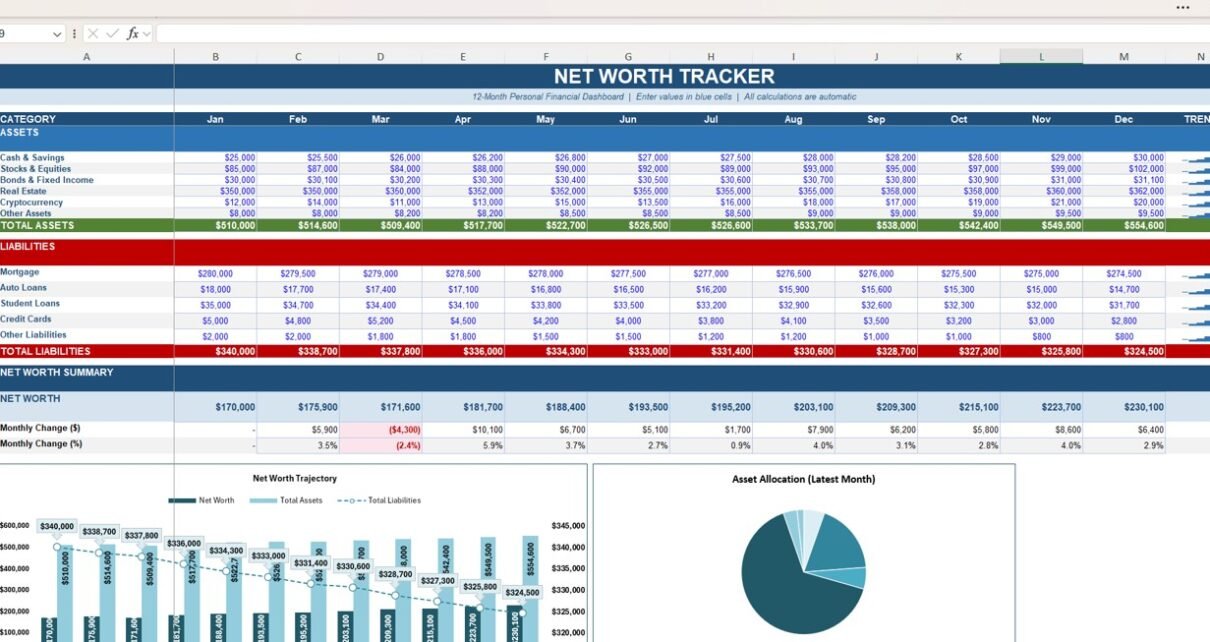
The Net Worth Tracker in Excel is a structured financial dashboard that calculates your net worth by tracking assets and liabilities on a monthly basis. Because the template automatically updates totals and charts when new data is entered, users can easily analyze financial progress over time.
This article explains everything about the Net Worth Tracker in Excel, including its structure, features, advantages, best practices, and frequently asked questions.
What Is a Net Worth Tracker in Excel?
A Net Worth Tracker in Excel is a financial tracking template designed to calculate the difference between what you own and what you owe.
The tracker uses the formula:
Net Worth = Total Assets – Total Liabilities
Because Excel automatically calculates totals and updates charts, users can instantly see how their financial position changes every month.
Data Included in a Net Worth Tracker
The template typically records the following financial information:
- Cash and savings balances
- Investment accounts
- Bonds and fixed-income investments
- Real estate value
- Cryptocurrency holdings
- Other personal assets
- Mortgage balances
- Auto loans
- Student loans
- Credit card balances
- Other financial liabilities
Consequently, the tracker provides a complete overview of personal financial health.
Why Should You Track Your Net Worth?
Click to Buy Net Worth Tracker in Excel
Many people focus mainly on income and monthly expenses. However, income alone does not reflect financial strength.
Instead, net worth represents the true measure of financial stability.
Key Reasons to Track Net Worth
• Understand your financial position clearly
• Measure long-term financial growth
• Identify opportunities to reduce debt
• Monitor investment performance
• Stay motivated toward financial goals
Therefore, tracking net worth allows individuals to make smarter financial decisions.
Key Features of the Net Worth Tracker in Excel
The Net Worth Tracker template includes several powerful features that make financial tracking simple and effective.
1. 12-Month Financial Tracking
The template tracks financial balances from January to December.
Because users update values monthly, they can clearly monitor how assets and liabilities change throughout the year.
Benefits of Monthly Tracking
-
Track financial growth across the year
-
Identify seasonal financial patterns
-
Monitor debt reduction progress
2. Asset Tracking Section
The Assets section lists all wealth-generating items.
Asset Categories Included
- Cash & Savings
- Stocks & Equities
- Bonds & Fixed Income
- Real Estate
- Cryptocurrency
- Other Assets
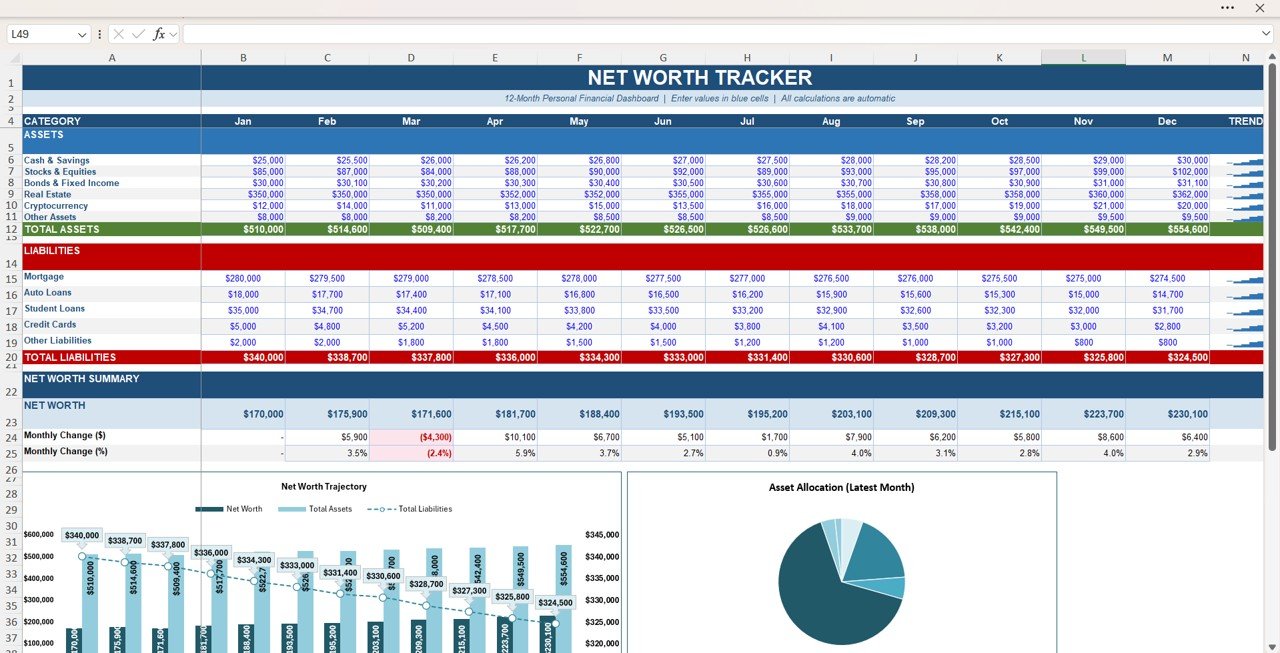
Each asset category records monthly values and automatically updates the Total Assets row.
3. Liability Tracking Section
Click to Buy Net Worth Tracker in Excel
The Liabilities section records financial obligations.
Liability Categories Included
- Mortgage
- Auto Loans
- Student Loans
- Credit Cards
- Other Liabilities
Because the template tracks balances monthly, users can easily monitor debt reduction progress.
4. Net Worth Summary Dashboard
The template includes a Net Worth Summary section that automatically calculates financial performance.
Key Metrics
- Net Worth
- Monthly Change ($)
- Monthly Change (%)
Because Excel calculates these values automatically, users can immediately evaluate financial progress.
5. Visual Financial Charts
The dashboard includes visual charts that make financial analysis easier.
Charts Included
Net Worth Trajectory Chart
This chart shows:
- Net Worth trend
- Total Assets trend
- Total Liabilities trend
As a result, users can easily see financial growth over time.
Asset Allocation Chart
The pie chart displays the distribution of assets in the latest month.
Therefore, users can understand where their wealth is invested.
Click to Buy Net Worth Tracker in Excel
Advantages of the Net Worth Tracker in Excel
The Net Worth Tracker provides several benefits for individuals and households.
1. Complete Financial Visibility
The tracker combines assets and liabilities into one dashboard.
As a result, users can see their entire financial picture.
2. Easy to Use
Excel provides a familiar interface that most users already understand.
Therefore, beginners can easily manage their finances.
3. Automated Calculations
Formulas automatically calculate totals, percentages, and net worth.
Consequently, users avoid manual calculation errors.
4. Visual Financial Insights
Charts make financial trends easier to understand.
As a result, users quickly identify financial improvements or setbacks.
5. Financial Goal Tracking
Tracking net worth helps individuals stay motivated to improve financial health.
Therefore, users remain focused on long-term wealth growth.
Best Practices for Using a Net Worth Tracker
Click to Buy Net Worth Tracker in Excel
To get the most value from this tracker, users should follow several best practices.
1. Update the Tracker Monthly
Consistent monthly updates ensure accurate financial analysis.
2. Use Realistic Market Values
Enter asset values based on current market value rather than purchase price.
3. Track All Financial Accounts
Include all bank accounts, investments, and liabilities for accurate net worth calculations.
4. Monitor Debt Regularly
Focus on reducing high-interest debt such as credit cards.
5. Review Financial Trends
Regularly analyze charts to understand financial progress.
Who Should Use a Net Worth Tracker?
Click to Buy Net Worth Tracker in Excel
This financial tool is useful for many individuals.
Ideal Users
- Individuals managing personal finances
- Families tracking household wealth
- Investors monitoring portfolio performance
- Financial planners analyzing client finances
- Entrepreneurs tracking business equity
Therefore, the template supports both personal finance management and financial planning.
Conclusion
Understanding your financial position is essential for long-term financial success. However, many people fail to track their assets and liabilities properly.
The Net Worth Tracker in Excel solves this challenge by providing a structured and automated financial dashboard.
Because it records assets, liabilities, monthly changes, and overall wealth growth, users can clearly monitor financial progress.
Moreover, Excel automatically calculates totals and visualizes trends using charts, which makes financial analysis simple.
Therefore, if you want to build wealth, monitor financial health, and make smarter financial decisions, the Net Worth Tracker in Excel is an excellent tool.
Visit our YouTube channel to learn step-by-step video tutorials
Watch the step-by-step video tutorial:
Click to Buy Net Worth Tracker in Excel