Educational NGOs operate in a data-driven environment where tracking student outcomes, teacher effectiveness, and funding utilization directly impacts program renewals and donor confidence. The Educational NGOs KPI Dashboard in Excel tracks 15+ key performance indicators across 7 worksheets, with MTD and YTD trend charts, conditional formatting variance arrows, and month-level filtering. Setup takes under 10 minutes — just replace the sample data and every metric updates automatically.
Whether you manage a single literacy program or coordinate education initiatives across multiple regions, this Excel template gives you a structured KPI tracking system without the $25–150/user/month cost of donor management platforms like Salesforce Nonprofit Cloud or Bloomerang. Over 8,400 teams in 40+ countries use NextGenTemplates to replace paid SaaS tools with one-time-purchase templates.
Key Features of Educational NGOs KPI Dashboard in Excel
Click here to Purchase the Educational NGOs KPI Dashboard in Excel
This dashboard tracks 15+ education-focused KPIs including student enrollment rate, teacher retention, program completion rate, donor acquisition cost, and grant utilization percentage. Every KPI updates automatically when you input your monthly actual, target, and previous year numbers into three dedicated input sheets.
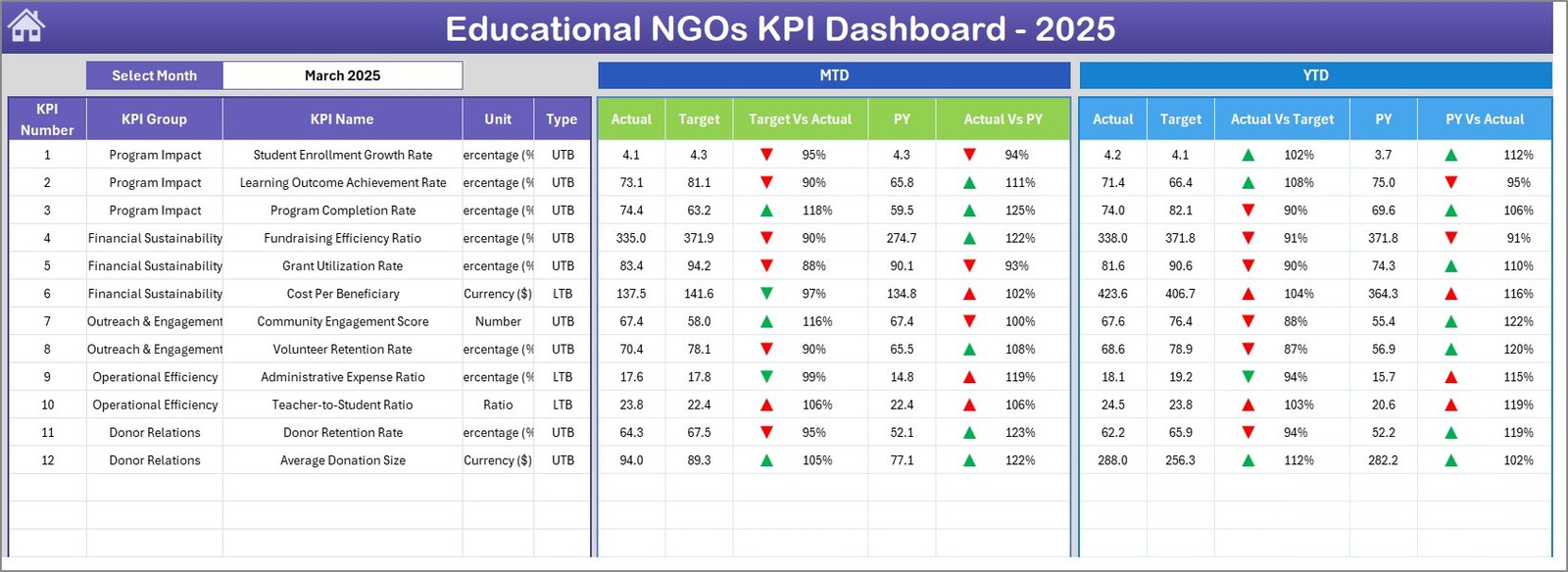
- Month-level filtering — Select any month from the drop-down on cell D3, and the entire dashboard recalculates MTD Actual, Target, and Previous Year data with variance arrows showing performance direction.
- YTD tracking built in — Beyond monthly snapshots, the dashboard displays Year-to-Date Actual vs. Target vs. Previous Year comparisons with conditional formatting indicators (green up arrows for positive trends, red down arrows for negative).
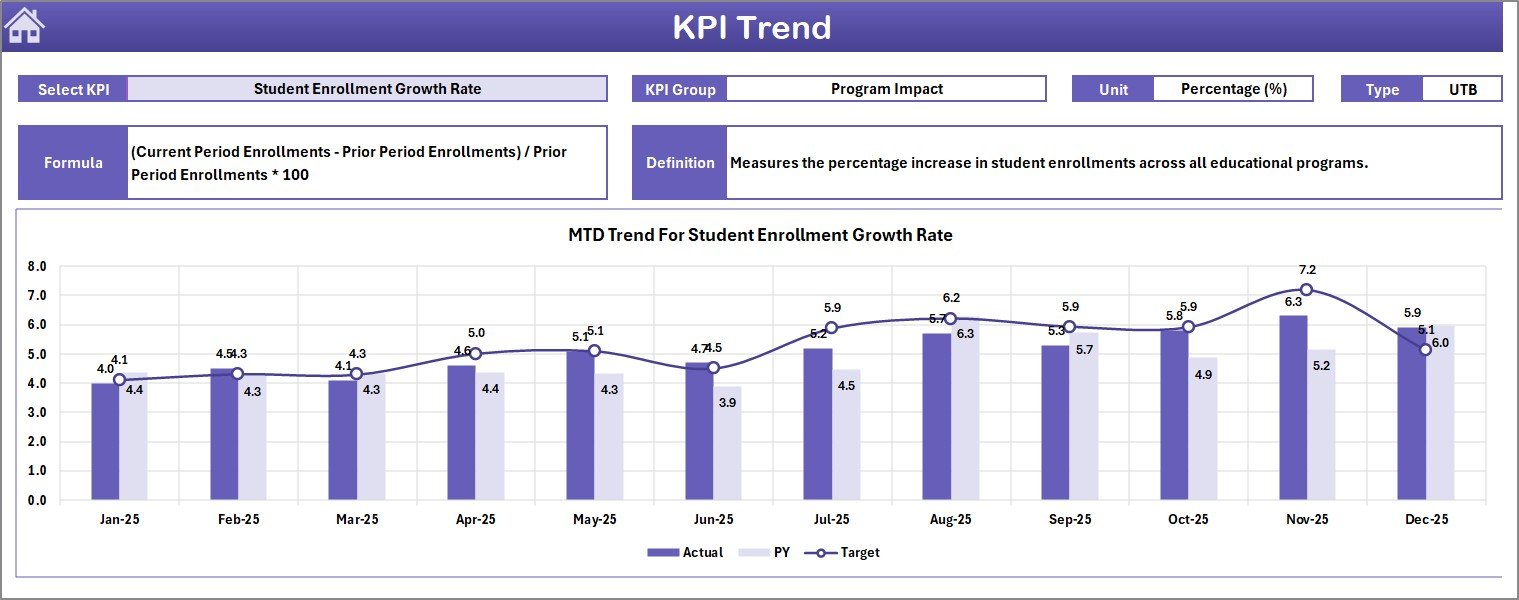
- KPI Trend analysis — A dedicated trend sheet lets you pick any single KPI from a drop-down and view its 12-month MTD and YTD trend charts for Actual, Target, and PY side by side.
- KPI Definition sheet — Define each KPI’s name, group, unit, formula, full definition, and type (Lower the Better or Upper the Better) in one central sheet that feeds every other page.
- No macros, no VBA — Works on Windows, Mac, and Microsoft 365 without enabling any special settings.
If you are managing education programs for NGOs, this template pairs well with the Teacher Training Institutes KPI Dashboard and Curriculum Development Services KPI Dashboard for a full education analytics stack.
Dashboard Pages Explanation
Click here to Purchase the Educational NGOs KPI Dashboard in Excel
The Educational NGOs KPI Dashboard in Excel includes 7 professionally designed worksheets. Here is a detailed explanation of each sheet:
1. Home Sheet
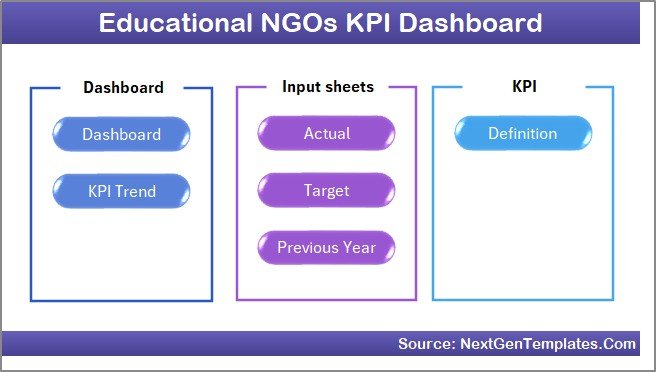
This is an index sheet where we have given 6 buttons to jump to the respective sheet. It serves as the central navigation hub for the entire workbook.
Home Page
2. Dashboard Sheet
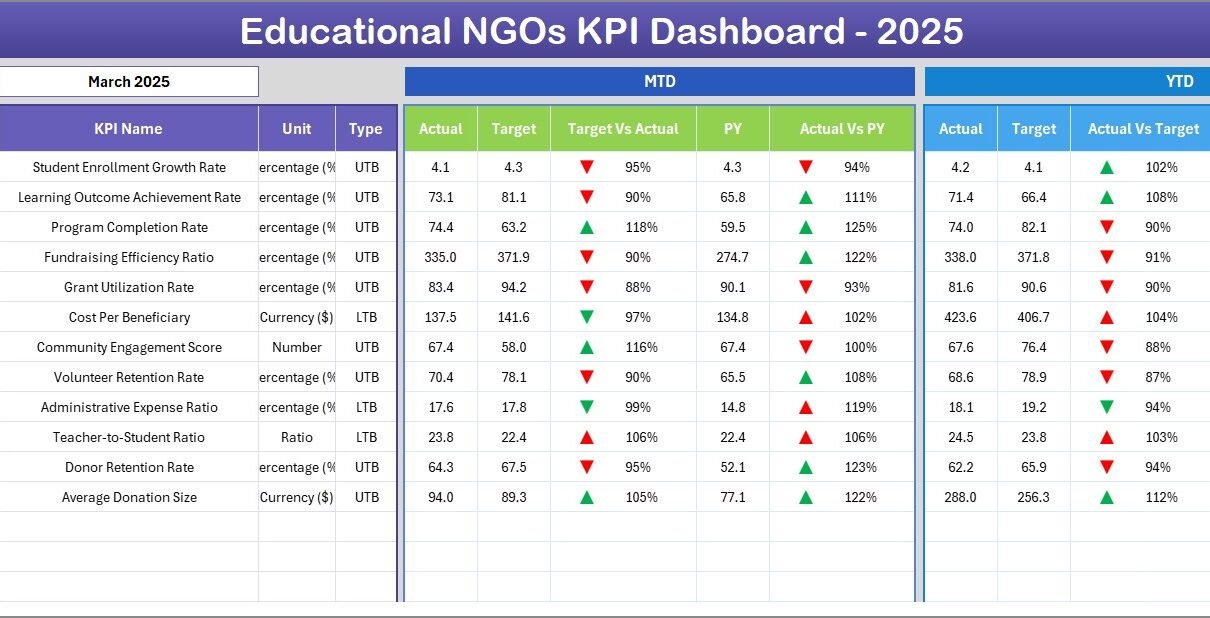
This is the main sheet tab. Here, we are showing all information about all of the KPIs. On range D3, you can select the Month from the drop-down. The whole dashboard numbers will change for that month. The sheet displays MTD Actual, Target, Previous Year data along with Target vs Actual and PY vs Actual variances with conditional formatting up/down arrows. It also shows YTD Actual, Target, Previous Year data with the same variance indicators.
Educational NGOs KPI Dashboard
3. KPI Trend Sheet
Here you can select the KPI name from the drop-down available on range C3. The sheet displays the KPI Group, Unit of KPI, Type of KPI (Lower the Better or Upper the Better), Formula of the KPI, and Definition of the KPI. It also shows MTD and YTD trend charts for Actual, Target, and PY numbers over 12 months.
KPI Trend Sheet
4. Actual Numbers Input Sheet
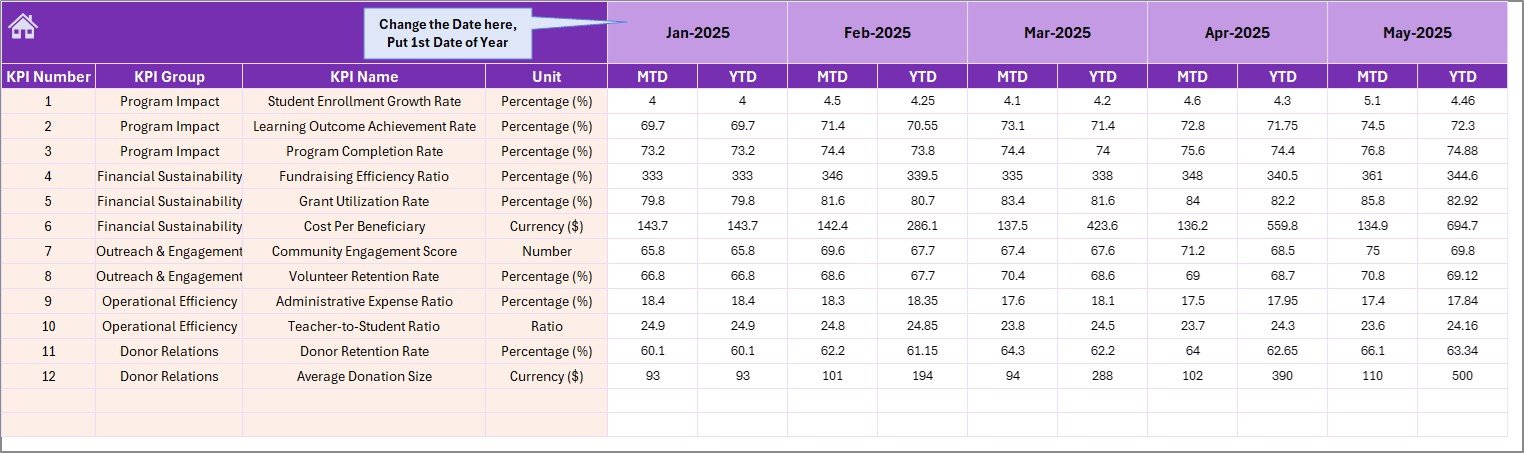
Here you enter the actual numbers for YTD and MTD for a particular month. You can change the months from range E1. Just input the first month of the Year on range E1 to set your fiscal year starting point.
Actual Numbers Input Sheet
5. Target Number Input Sheet
In this sheet tab, you enter the Target numbers for each KPI for the particular month as MTD as well as YTD. The dashboard uses these targets to calculate variance indicators automatically.
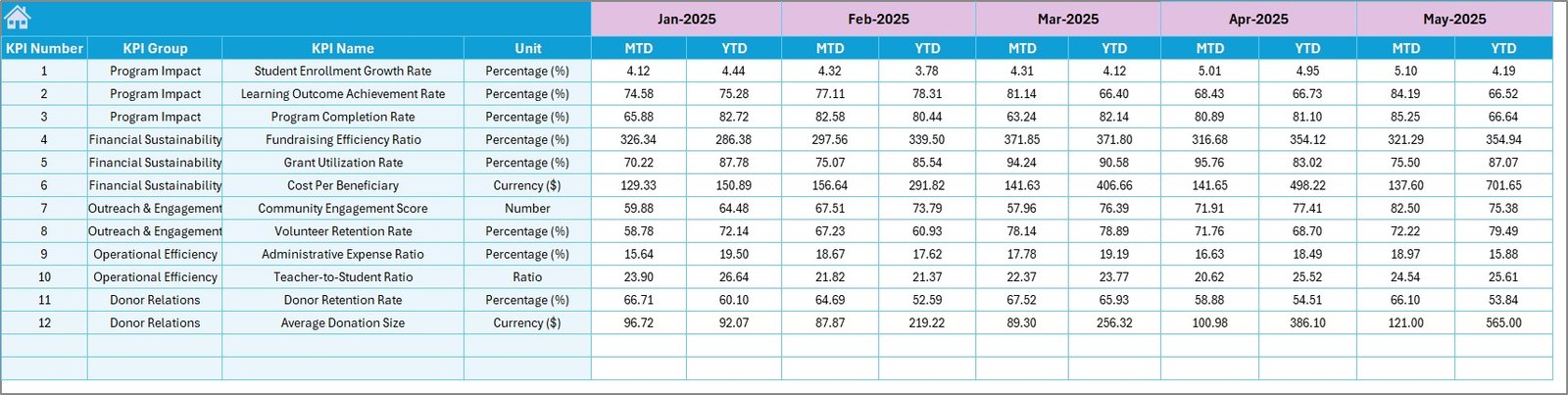
Target Number Input Sheet
6. Previous Year Number Input Sheet
Enter the numbers for the previous year in the same format as you have entered for the current year. This enables year-over-year comparison on the Dashboard sheet.
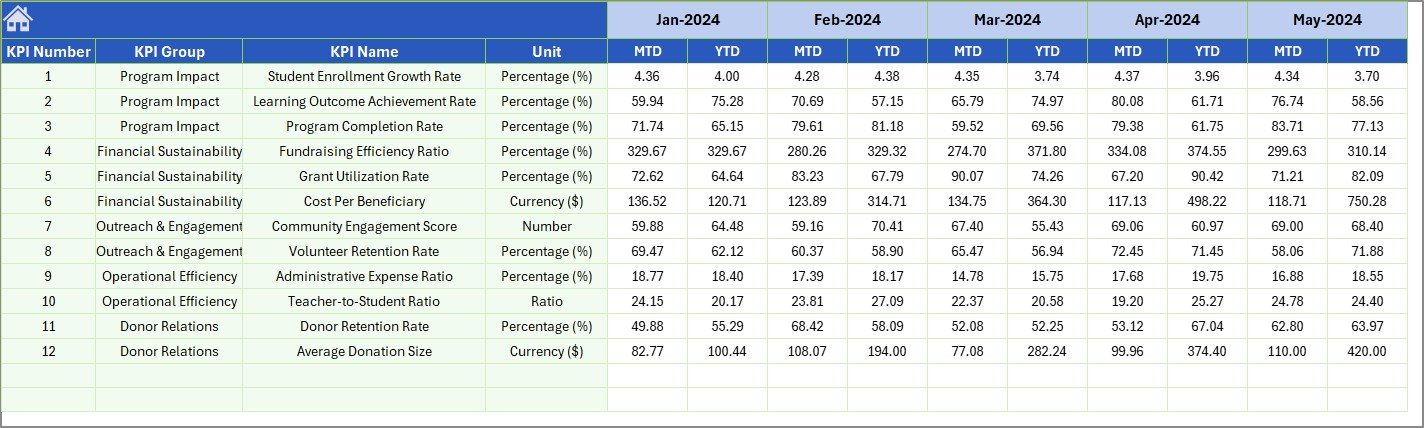
Previous Year Number Input Sheet
7. KPI Definition Sheet
In this sheet tab, you enter the KPI Name, KPI Group, Unit, Formula, and KPI definition. In the last column, enter the KPI type as LTB (Lower the Better) or UTB (Upper the Better). This central definition feeds all other sheets in the workbook.

KPI Definition Sheet
Educational NGOs KPI Dashboard vs. Google Sheets Alternative vs. Salesforce Nonprofit — Feature Comparison
| Feature | Educational NGOs KPI Dashboard (Excel) | Google Sheets KPI Tracker | Salesforce Nonprofit / Bloomerang |
|---|---|---|---|
| Cost | $14.99 one-time | Free (manual build) | $25–150 / user / month |
| Platform | Microsoft Excel (desktop + 365) | Google Sheets (browser) | Cloud SaaS |
| Setup Time | Under 10 minutes | 4–8 hours (build from scratch) | 2–6 weeks onboarding |
| Real-Time Collaboration | Via OneDrive / SharePoint | Yes (native) | Yes |
| Mobile Access | Excel mobile app | Sheets mobile app | Yes |
| Customizable KPIs | Yes — edit KPI Definition sheet | Yes (manual) | Limited without developer |
| MTD + YTD Trend Charts | Yes — built-in | Manual chart setup | Requires report builder |
| Year-1 Cost (5 users) | $14.99 total | $0 (but 20+ hours labor) | $1,500–$9,000 |
| LTB / UTB KPI Classification | Yes — automatic | Not built-in | Custom configuration needed |
For education NGOs that need structured KPI tracking without paying per-user SaaS fees, the Educational NGOs KPI Dashboard in Excel sits in the sweet spot.
Who Should Use This Template
Click here to Purchase the Educational NGOs KPI Dashboard in Excel
Perfect for:
- Program managers at education-focused NGOs tracking student outcomes, teacher performance, and funding metrics
- Nonprofit directors reporting KPIs to board members and grant-making organizations
- M&E (Monitoring and Evaluation) officers who need a structured MTD/YTD tracking system
- Education consultants managing multiple school improvement projects
Not a fit if:
- You need multi-currency, multi-country consolidated reporting across 50+ offices (consider enterprise BI tools)
- You require real-time API integrations with donor databases like Raiser’s Edge
- Your organization doesn’t use Microsoft Excel at all
Real-World Use Cases
Maria runs education programs at a rural development NGO in East Africa. She uses the Educational NGOs KPI Dashboard to track student enrollment, teacher attendance, and classroom supply utilization across 12 community schools. Every quarter, she exports the dashboard to PDF for her donor report — replacing the 3 hours she used to spend building charts manually in PowerPoint.
James manages grants at a U.S.-based education nonprofit. He enters target KPIs from each grant agreement into the Target sheet, then tracks actual performance monthly. The YTD variance arrows instantly show which programs are falling behind, letting him redirect resources before the annual review. He also uses the Nonprofit Fundraising Dashboard in Excel to track his fundraising pipeline alongside program outcomes.
Priya coordinates teacher training at an Indian education foundation. She tracks 18 KPIs including training completion rates, teacher certification pass rates, and student test score improvements. The LTB/UTB classification helps her team understand which metrics need to decrease (like dropout rates) versus increase (like graduation rates).
Advantages of Educational NGOs KPI Dashboard
Click here to Purchase the Educational NGOs KPI Dashboard in Excel
- Cost savings — A one-time $14.99 purchase replaces $300–$9,000/year in SaaS subscriptions for a 5-person team.
- Donor-ready reporting — The dashboard layout is clean enough to export directly as PDF attachments for grant reports and board presentations.
- Fiscal year flexibility — Set your fiscal year start month on cell E1 in the Actual Input sheet. The dashboard adapts to April–March, July–June, or any custom fiscal calendar.
- KPI classification logic — The LTB/UTB system ensures conditional formatting arrows always point in the correct direction for each metric type.
- Year-over-year comparison — Previous Year data sits alongside current year performance, making trend analysis immediate without any pivot table setup.
Opportunities for Improvement
- The template does not include automated data import from external databases — you need to enter numbers manually each month.
- There is no built-in multi-language support for KPI labels. If your team operates in multiple languages, you will need to translate the KPI Definition sheet manually.
- The dashboard does not support multi-site consolidation out of the box. For NGOs with 10+ regional offices, a Power BI version would allow more scalable data aggregation. Check out the Nonprofit Fundraising Dashboard in Power BI for a connected data approach.
Best Practices
- Update monthly — Enter actual numbers by the 5th of each month to maintain consistent reporting cadence for donors and board members.
- Define KPIs first — Complete the KPI Definition sheet before entering any data. This ensures the Dashboard and Trend sheets display correct labels and classifications.
- Use consistent units — If you track enrollment as a percentage in one month, keep it as a percentage throughout. Mixing units (count vs. percentage) will break trend comparisons.
- Archive previous years — At the start of each fiscal year, save a copy of the current file as an archive, then move current year data to the Previous Year sheet and clear the Actual sheet for fresh entries.
- Share via OneDrive — For team collaboration, save the file to OneDrive or SharePoint so multiple team members can view and update data simultaneously using Microsoft 365 co-authoring.
Explore Relevant Templates
If you are looking for more education and nonprofit templates, explore these related dashboards on NextGenTemplates:
- Teacher Training Institutes KPI Dashboard in Excel — Track instructor certification, training hours, and assessment pass rates.
- Curriculum Development Services KPI Dashboard — Monitor curriculum rollout, content quality scores, and stakeholder feedback.
- Nonprofit Fundraising Dashboard in Excel — Visualize donor pipeline, campaign ROI, and fundraising targets.
- Adult Literacy Programs KPI Dashboard — Track literacy improvement rates, enrollment, and program reach.
- Vocational Schools KPI Dashboard in Excel — Monitor vocational training outcomes and job placement rates.
Browse the full Excel Dashboard Templates collection for 200+ industry-specific dashboards.
Frequently Asked Questions
Click here to Purchase the Educational NGOs KPI Dashboard in Excel
What KPIs does the Educational NGOs KPI Dashboard track?
The Educational NGOs KPI Dashboard tracks 15+ education-focused KPIs including student enrollment rate, teacher retention, program completion rate, donor acquisition cost, grant utilization, and classroom attendance. All metrics auto-update when you enter your data.
Does this template work on Mac?
Yes. The Educational NGOs KPI Dashboard uses standard Excel formulas and conditional formatting — no macros or VBA. It works on Windows, Mac, and Microsoft 365 without any special setup.
How long does setup take?
Setup takes under 10 minutes. Open the file, enter your KPI definitions, input your actual and target numbers, and the dashboard populates automatically. No coding or formula editing required.
Can I add my own custom KPIs?
Yes. The KPI Definition sheet lets you add, rename, or remove KPIs freely. Enter the KPI name, group, unit, formula, definition, and type (LTB or UTB) — the dashboard and trend charts update automatically.
How does this compare to Salesforce Nonprofit Cloud?
The Educational NGOs KPI Dashboard costs $14.99 one-time versus Salesforce Nonprofit Cloud at $60+ per user per month. For small-to-mid education NGOs that need structured KPI tracking without CRM complexity, this Excel template delivers the same MTD/YTD analytics at a fraction of the cost.
Can I share this with my team?
Yes. Save the file to OneDrive or SharePoint for real-time collaboration. Multiple team members can view and update the dashboard simultaneously through Microsoft 365 co-authoring.
What is LTB and UTB in the KPI Definition sheet?
LTB means Lower the Better (e.g., dropout rate, cost per student). UTB means Upper the Better (e.g., enrollment rate, graduation rate). This classification determines how conditional formatting arrows display — green for favorable performance direction, red for unfavorable.
About the Author
Built by PK — Microsoft Certified Professional with 15+ years of Excel, Google Sheets, and Power BI experience. Founder of NextGenTemplates, reaching 300K+ subscribers across YouTube channels. Every template is hand-built and tested before release.
Conclusion
The Educational NGOs KPI Dashboard in Excel gives education-focused nonprofits a structured, ready-to-use system for tracking program performance, donor metrics, and teacher effectiveness — all in a single Excel workbook with 7 interconnected sheets.
Click here to Purchase the Educational NGOs KPI Dashboard in Excel
✅ Instant download · One-time payment · No subscription · Lifetime access
Visit our YouTube channel for step-by-step video tutorials: Youtube.com/@PK-AnExcelExpert